



Holitide Public holidays for your schedules: 200+ countries and their states, added with no duplicates.
From $29 a month per Zendesk account. 14-day free trial (Zendesk asks for a card at install). Billed monthly by Zendesk. No free plan.
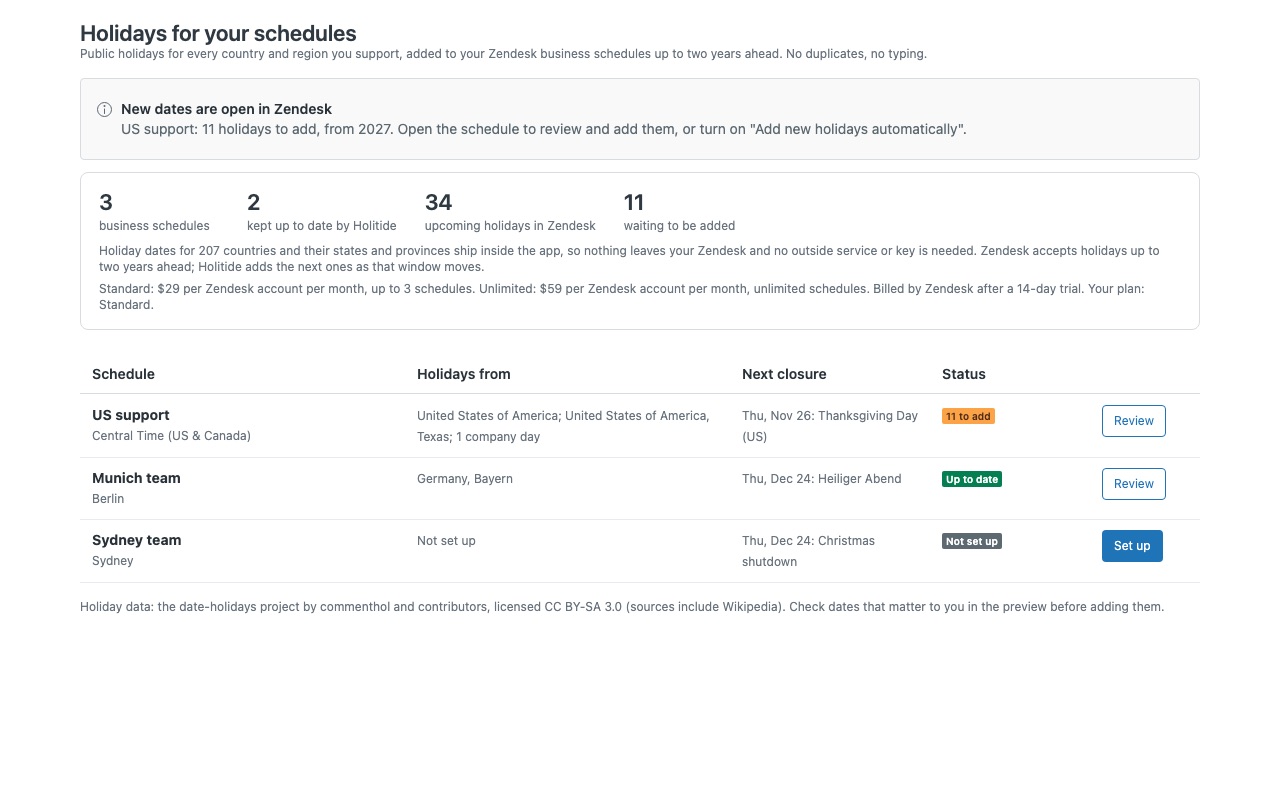
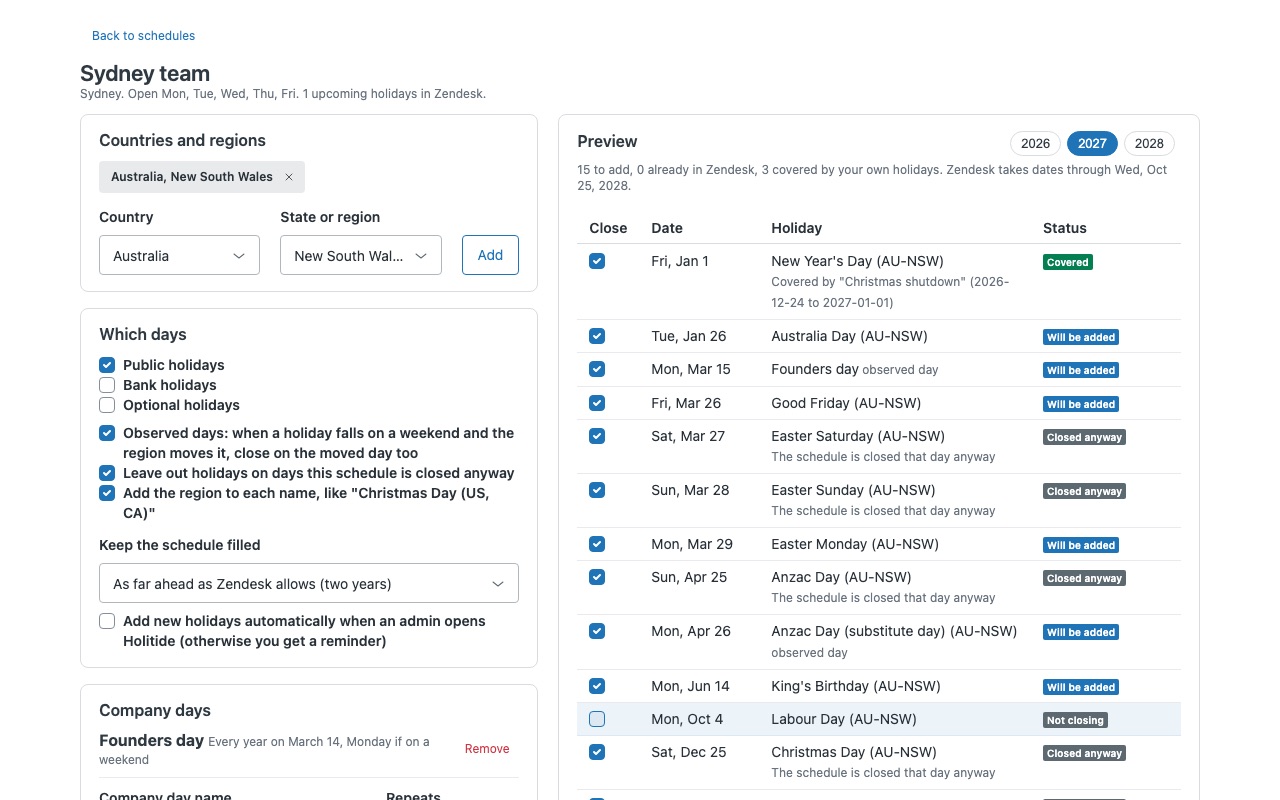
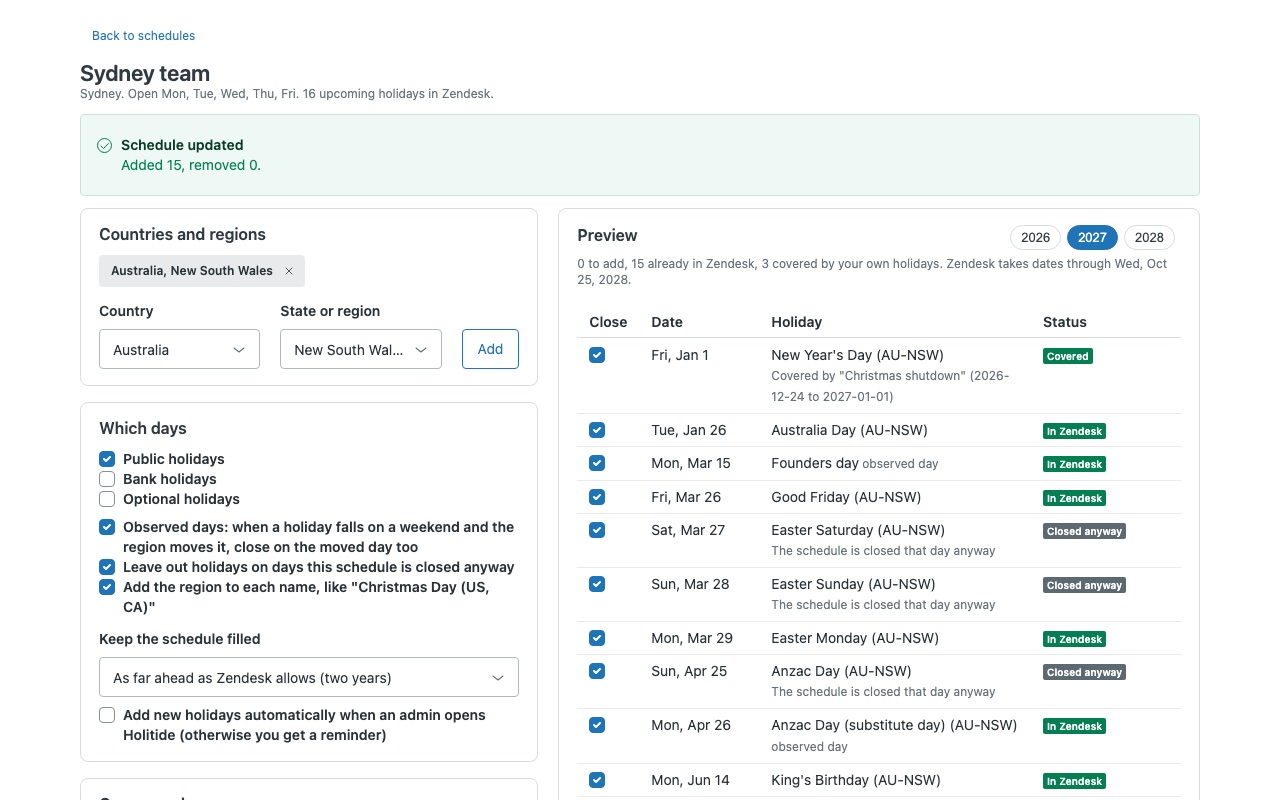
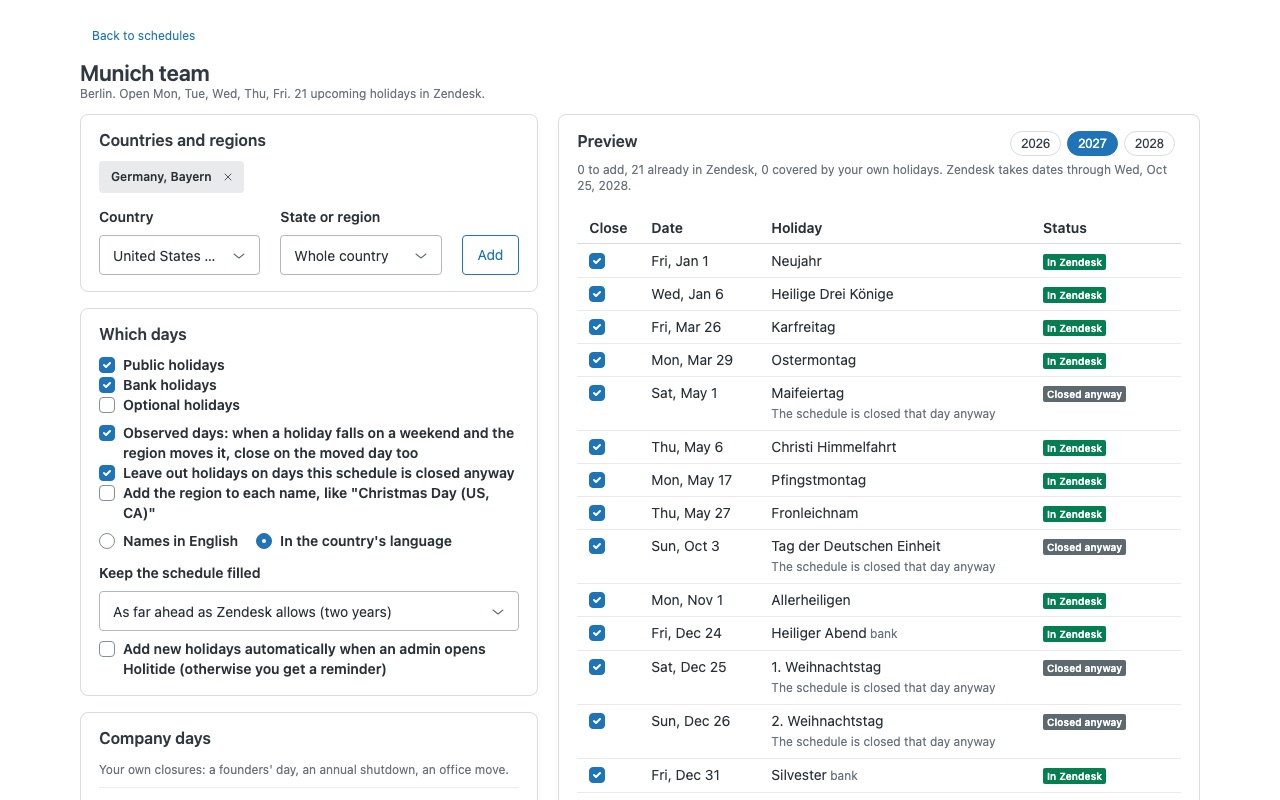
Every public holiday your teams close for, in your Zendesk schedules, years ahead, in one click. Pick the countries, states, provinces or nations each business schedule covers. Holitide shows the year's holidays, adds the missing ones to the schedule, never adds one twice, and keeps the schedule filled as Zendesk's two-year window moves forward. Your SLAs, business-hours views and automations stop counting closed days.
What you get
Built for teams in more than one place
Holiday dates for 200+ countries and their states and regions ship inside the app: US states, German Länder, Canadian provinces, Australian states, the four UK nations, Swiss cantons, Spanish communities, Indian and Brazilian states and more. Several regions on one schedule: a holiday that two regions share becomes one closure, named "Christmas Day (US, CA)".
How Holitide works
- Install Holitide from the Zendesk Marketplace. It installs no ticket fields, triggers or objects. Open it from the left navigation bar (the calendar with a star).
- Choose Set up next to a schedule. Each business schedule in Admin Center gets its own setup.
- Add the countries and regions it closes for. Pick a country and, if your team follows one, a state, province, nation or canton. "United States" plus "Canada, Quebec" works for a team serving both, and a holiday they share becomes one closure.
- Pick which days count. Public holidays are on by default. Add bank or optional holidays, observed days, and your own company days, such as the last Friday of June.
- Check the preview. Each year's holidays show a status: Will be added, In Zendesk, Covered, Same day, Closed anyway, Not closing, Later, Not yet open or Past. Untick any holiday you stay open on, and it stays unticked every year.
- Choose Save and update Zendesk. A progress line shows each holiday as it's added. Business-hours SLAs, views, triggers, automations and reports then treat those days as closed.
- Let next year fill in. Zendesk accepts holidays up to two years ahead. When an admin opens Holitide, newly open dates are added automatically, or a reminder shows the count, your choice per schedule.
Who it's for
Teams with one schedule per country or time zone
Every schedule gets its own regions, so the Berlin team closes for German holidays plus its Land, and the Austin team for US federal holidays. Each is set up once.
Admins on Enterprise with many schedules
Standard covers up to 3 schedules; Unlimited covers every schedule in the account. The main page lists each schedule with what's set up and what's waiting.
Support teams with their own closure days
Company days repeat on a date (with a weekend rule: keep it, move to Monday, or move to the nearest weekday), on a weekday such as the last Friday of June, or once, and can last up to 14 days.
What you need
- Business schedules in Zendesk: Suite Growth or higher, or Support Professional or Enterprise. Enterprise plans can have several schedules; the others have one.
- A Zendesk admin. Zendesk lets only admins change schedules, so only admins add or remove holidays with Holitide. Agents can open it to see upcoming closures.
- At least one schedule under Admin Center > Objects and rules > Business rules > Schedules.
Holitide guides
Questions about Holitide
What does Holitide do?
Public holidays for your schedules: 200+ countries and their states, added with no duplicates.
What does Holitide work with?
Holitide works in Zendesk Support.
How much does Holitide cost?
Standard: $29 a month per Zendesk account. Unlimited: $59 a month per Zendesk account.
Is there a free trial?
14-day free trial (Zendesk asks for a card at install). Billed monthly by Zendesk. No free plan.
Where do I install Holitide?
From the Zendesk Marketplace. Use the Install button on this page, or search for "Holitide" there.
Who makes Holitide?
Great Work LLC, an independent software company. Email hello@greatwork.company with any question about Holitide and someone will answer.
Where do the holiday dates come from?
They ship inside the app, from the open date-holidays project (CC BY-SA 3.0), and cover through 2036. Holitide calls no outside service and needs no key. Check the preview for the dates that matter to you, since governments sometimes move holidays at short notice.
Will it duplicate holidays I already typed in?
No. Before every change Holitide reads the schedule again and adds a holiday only if nothing on the schedule already has the same dates and name or overlaps them. Yours show as In Zendesk or Covered.
Can I change regions later?
Yes. Remove a region or untick a holiday and apply again. Holitide removes the upcoming holidays it added that no longer fit and adds what's missing. Past holidays stay, so past reports don't change.
Does it touch holidays I added by hand?
Never. It only removes holidays it created, and it keeps their ids to tell them apart.
What happens when I uninstall it?
The holidays it added stay on your schedules. To take them off first, open each schedule in Holitide and choose Remove holidays Holitide added.
Does it read tickets?
No. It reads and writes schedules and their holidays only, keeps its setup in a hidden setting on the app installation, and sends nothing to Great Work.
More Zendesk apps
 Hourwell
 Hitchwell
 Huddlewell
 Heralder