



Milewell Roadmaps and Gantt charts on Confluence pages that save every change as a version, with dependencies, milestones and Jira links.
Listed on the Atlassian Marketplace as “Milewell: Roadmaps and Gantt for Confluence”
From $15 a month for up to 10 users. Billed by Atlassian, with a 30-day free trial.
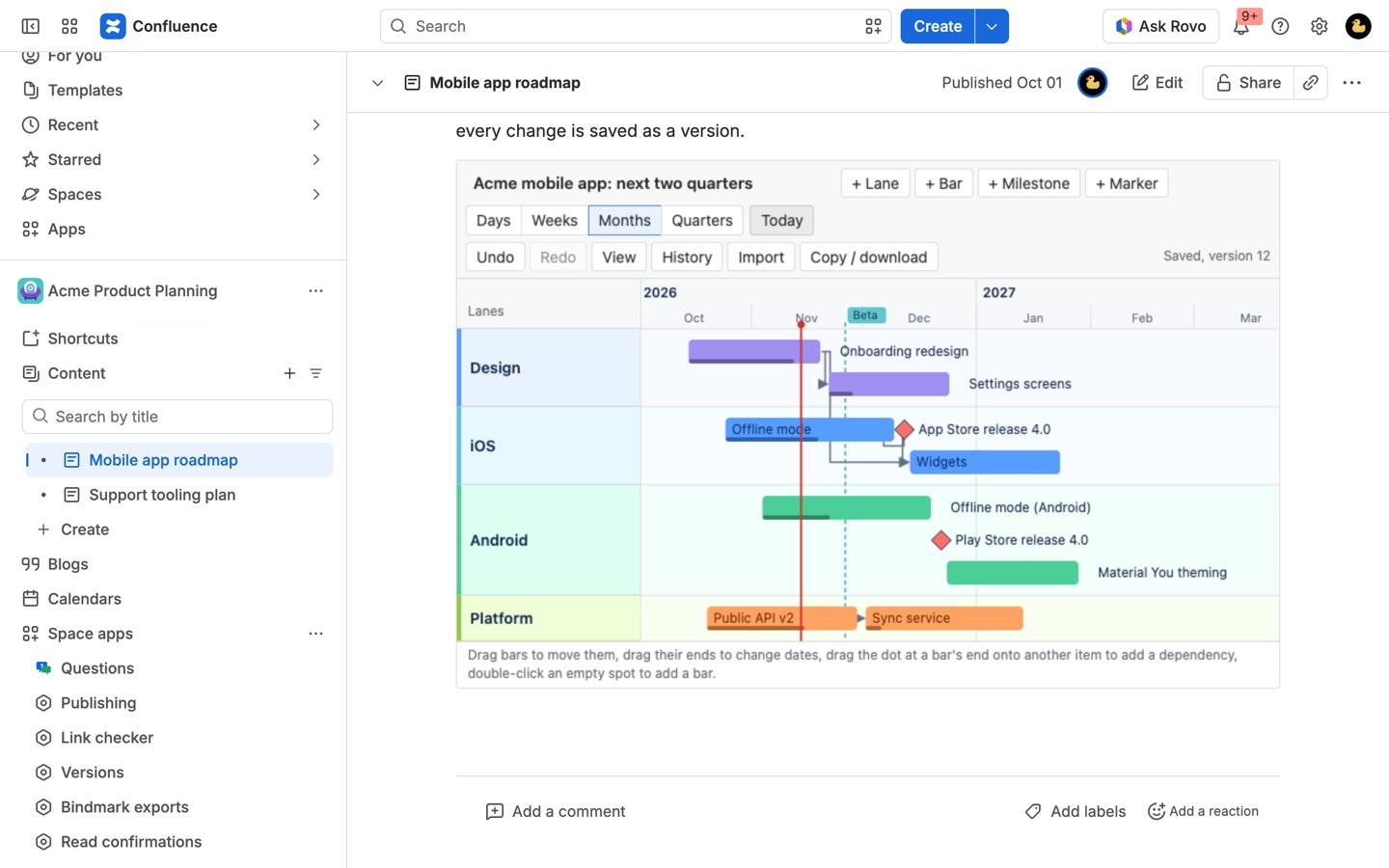
Plan on the page: lanes, bars, milestones, dependencies, a today line and day to quarter zoom. Every change is saved as a version you can restore, and two people editing at once never overwrite each other. Runs on Atlassian.
What you get
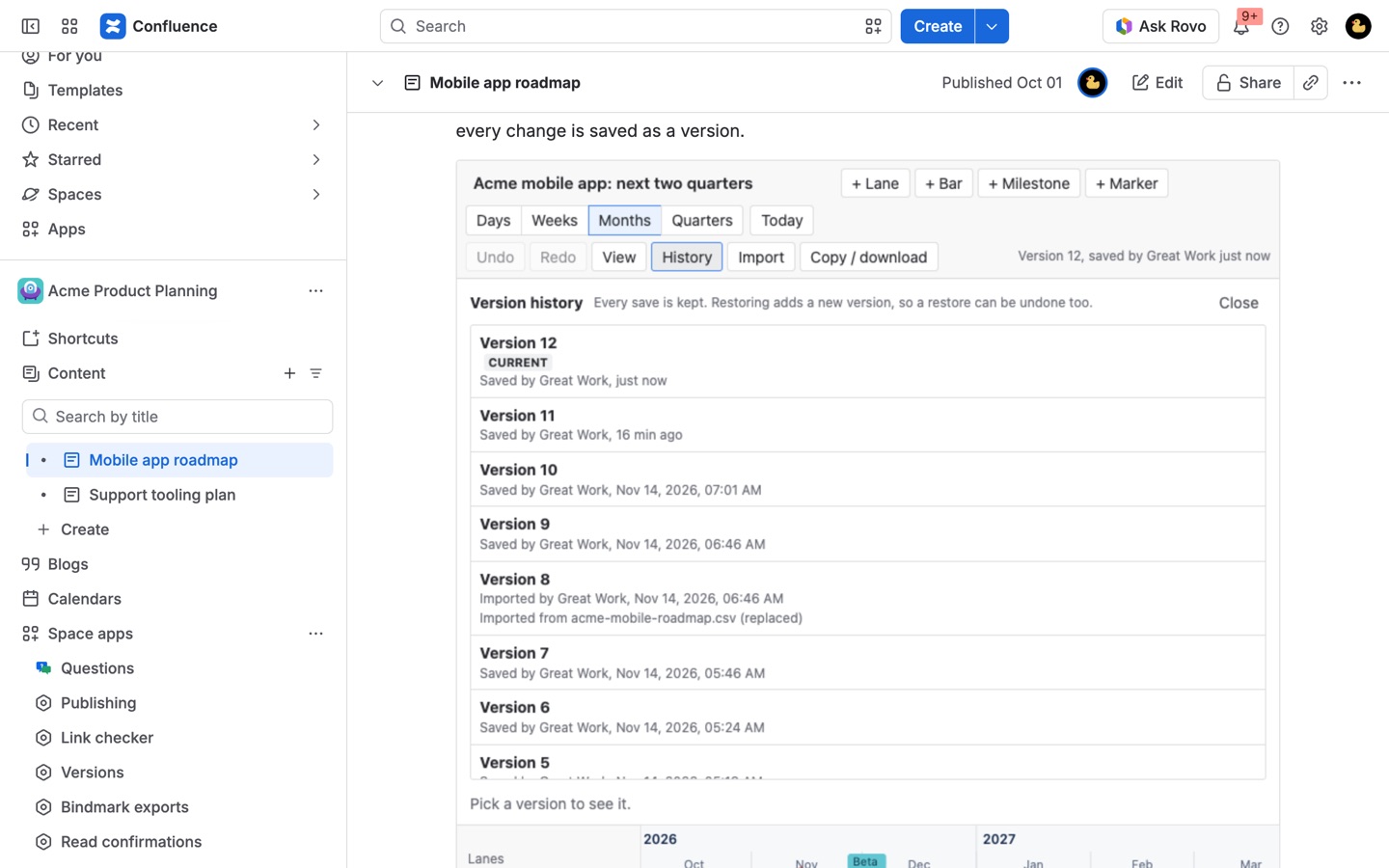
Every change is a version you can restore
Autosave a second after you stop, with a full history: preview any version, restore it in one click, name the ones that matter. Restores are versions too, so nothing is ever lost.
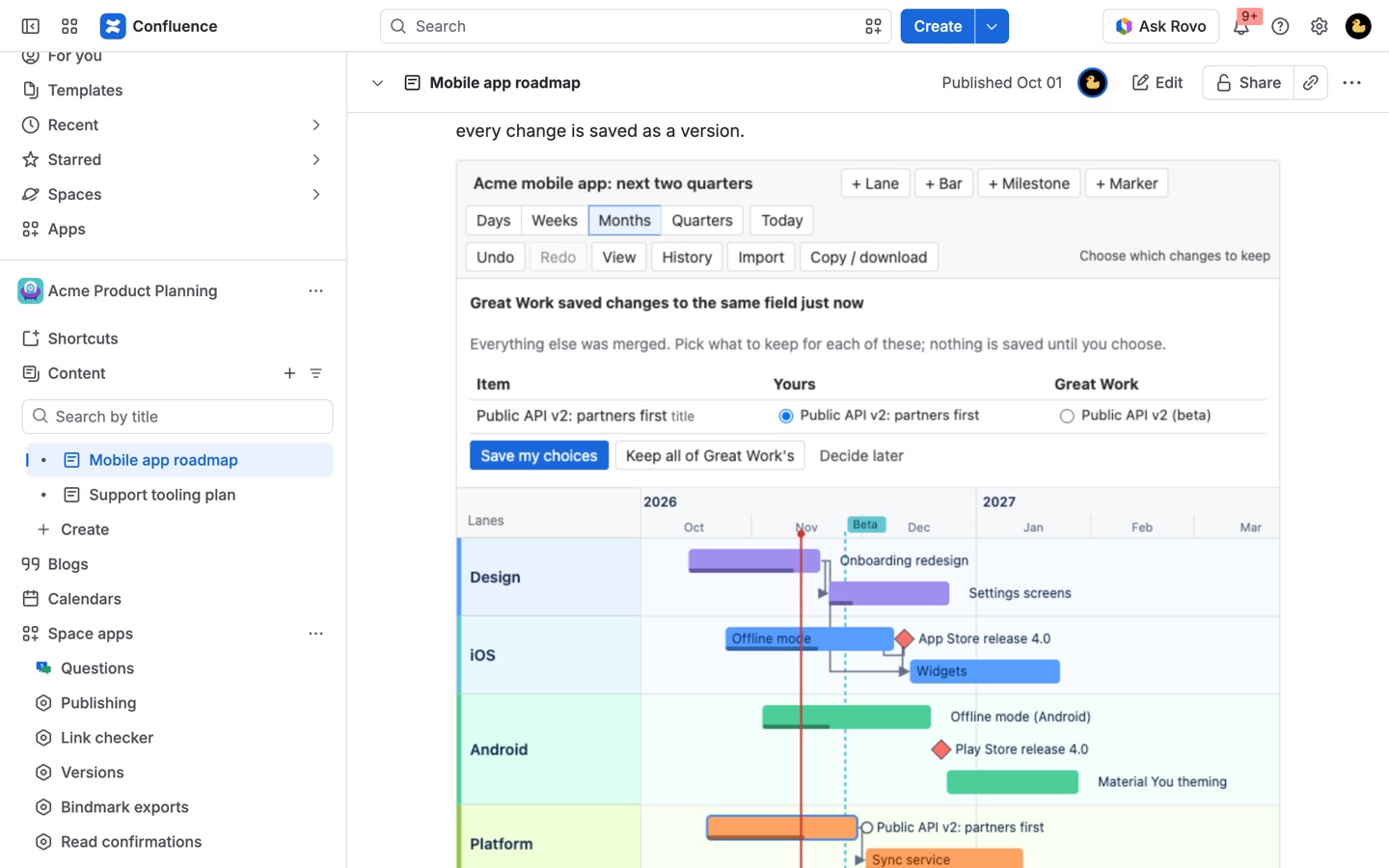
Plan together without overwriting anyone
Saves made at the same time are merged item by item. If two people changed the same bar, Milewell shows both and asks which to keep before anything is saved.
Dependencies, milestones and Jira links
Drag a dependency from one bar to the next, mark milestones and dates, and link bars to Jira work items with live status. Zoom from days to quarters with a today line.
How Milewell works
- Install Milewell from the Atlassian Marketplace. It runs in Confluence Cloud; connecting it to Jira on the same site is optional and only needed for Jira links.
- Edit a page, type /Milewell and pick Milewell roadmap. Publish the page. From then on the roadmap is edited right on the published page, without opening the page editor again.
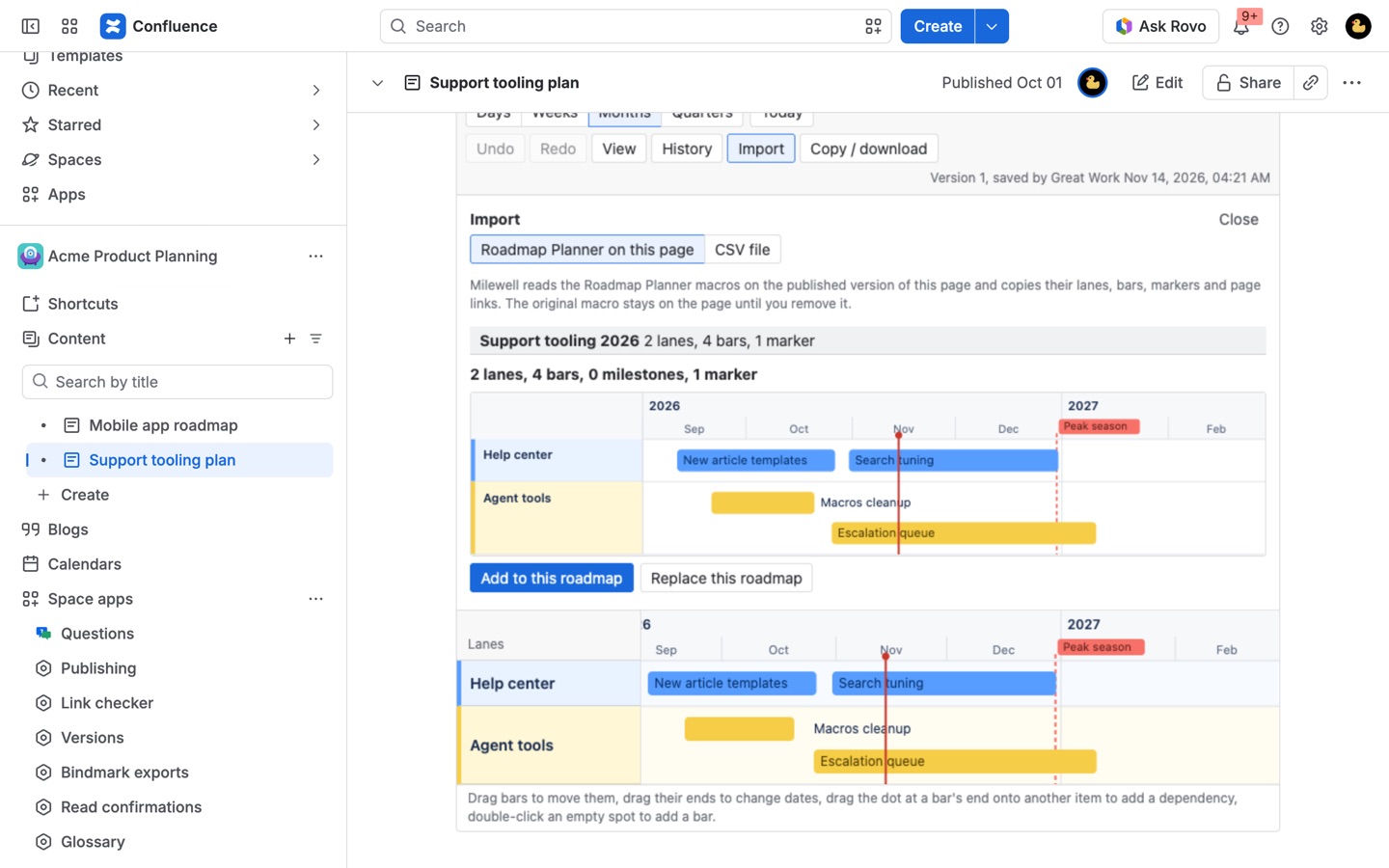
- Pick a start: Start with an example, Start blank, or Import Roadmap Planner or CSV.
- Lay out the plan. + Lane adds a row for a team or workstream. + Bar adds a bar starting today, or double-click an empty spot in a lane to start one on that day. Drag a bar to move it, drag either end to change its dates, or drag it up or down into another lane.
- Mark the dates that matter. + Milestone adds a diamond for a single date. + Marker draws a dashed line across the whole roadmap for a release, a code freeze or a launch.
- Connect the work. Hover a bar and drag the small dot at its end onto the bar or milestone that waits for it. The arrow turns red if the later item starts before the earlier one ends.
- Pick the scale. Days, Weeks, Months and Quarters change the zoom, and Today scrolls back to the today line.
- Leave it. Milewell saves a second after you stop. History shows every saved version with who saved it, and any one can be previewed and restored.
Who it's for
Project managers who keep the plan in Confluence
The project page already holds the scope, the decisions and the meeting notes. A Gantt chart on that page, with dependencies between tasks and a progress line along each bar, keeps the schedule next to the reasons behind it instead of in a separate tool that half the readers can't open.
Product teams sharing a quarterly roadmap
Lanes per team, Quarters zoom, and markers for each release give a one-screen view for a planning review. Name the version that was approved ("Q3 plan, agreed") and it is kept for good, so the next time dates move you can open what was promised and compare.
Teams that plan in Jira but report in Confluence
Link a bar to a Jira epic or any work item and it shows a dot in the status category color, gray, blue or green. Use these dates copies the work item's start and due dates onto the bar. Readers see Jira details only for work items they can browse themselves.
Anyone burned by a lost roadmap
Several people editing at once is where page macros lose work. Milewell merges saves made at the same time item by item, and when two people changed the same bar it shows both values and waits for a choice. A closed tab keeps unsaved changes in the browser, offered back with Restore them.
Milewell or the built-in Roadmap Planner
Confluence Cloud comes with the Roadmap Planner macro, and for a simple picture of a few bars it does the job at no extra cost. Atlassian's help page for the Roadmap Planner describes a roadmap shown by weeks or months, with bars that link to Confluence pages, and says the macro is not available in live docs yet.
Milewell is for the plans that outgrow that: day and quarter zoom, a today line, dependency arrows, milestones, progress, links to Jira work items, and a version history you can restore from. It also brings an existing Roadmap Planner across. Add a Milewell macro to the page that has the planner, publish, then Import > Roadmap Planner on this page; lanes, bars with their descriptions and page links, markers and the date range come over, and the original macro stays until you remove it.
Milewell is not a replacement for Jira's own planning tools. It doesn't calculate capacity or a critical path, and it never writes to Jira: it reads status and dates from the work items you link.
Limits and requirements
- Confluence Cloud. Jira links need the app connected to Jira on the same site (Administration > Apps).
- Anyone who can edit the page can edit its roadmap; anyone who can view the page can view the roadmap and its history.
- Up to 100 lanes, 3,000 bars, 1,000 milestones, 3,000 dependencies and 200 markers per roadmap.
- Versions from the last 30 days are all kept. Older ones are thinned to one per hour, and after a year to one per day. Named versions, imports, copies and restores are always kept.
- If the subscription lapses, roadmaps stay readable and downloadable with their history, but editing, restoring and importing stop until it is active again.
Milewell guides
Questions about Milewell
What does Milewell do?
Roadmaps and Gantt charts on Confluence pages that save every change as a version, with dependencies, milestones and Jira links. Plan on the page: lanes, bars, milestones, dependencies, a today line and day to quarter zoom. Every change is saved as a version you can restore, and two people editing at once never overwrite each other. Runs on Atlassian.
What does Milewell work with?
Milewell works in Confluence Cloud.
How much does Milewell cost?
$15 a month for up to 10 users, or $150 a year. From 11 users: $1.50 per user a month, with lower rates for larger sites.
Is there a free trial?
Billed by Atlassian, with a 30-day free trial.
Where do I install Milewell?
From the Atlassian Marketplace. Use the Install button on this page, or search for "Milewell: Roadmaps and Gantt for Confluence" there.
Who makes Milewell?
Great Work LLC, an independent software company. Email hello@greatwork.company with any question about Milewell and someone will answer.
How do I add a Gantt chart to a Confluence page?
Install Milewell, edit the page, type /Milewell and pick Milewell roadmap, then publish. Choose Start blank, add lanes and bars, and drag the dot at the end of a bar onto another bar to draw a dependency.
Can the roadmap show days instead of weeks?
Yes. Switch between Days, Weeks, Months and Quarters at any time. Under View you can also shade non-working days in day and week zoom and pick Monday or Sunday as the first day of the week.
Does Milewell change my Jira work items?
No. It only reads the status, summary, start date and due date of the work items you link, and only shows them to people who can browse those work items.
Can I put the roadmap in a slide deck or email?
Yes. Copy / download copies the roadmap as a PNG to paste into slides, chat or email, or downloads it as PNG or SVG in a light or dark version, or as CSV. A PDF or Word export of the page includes the roadmap as a picture and a table of every bar and milestone.
What happens if the page with the roadmap is deleted?
Space admins can still find it under Space settings > Milewell roadmaps, which lists every roadmap in the space with its history and downloads, including roadmaps whose page was deleted or restricted.
What happens when I copy a page that has a roadmap?
The copy starts with its own copy of the roadmap, as long as you can see the original. Editing one never changes the other.
Where are the roadmaps stored?
In your site's Forge SQL database on Atlassian. Pictures and CSV files are made in your browser, and nothing is sent to Great Work or anyone else.
Does it work in dark mode?
Yes. Milewell follows Confluence's light and dark themes, and colors are chosen per theme so a roadmap made in one reads well in the other.
More Confluence apps
 Sheetkeep
 Lanemark
 Sprigwell
 Dibs