



Sheetkeep Spreadsheets on Confluence pages that keep every version: formulas, sheets, Excel import and export, and one-click restore.
Listed on the Atlassian Marketplace as “Sheetkeep: Spreadsheets for Confluence”
From $13.80 a month for up to 10 users. Billed by Atlassian, with a 30-day free trial.
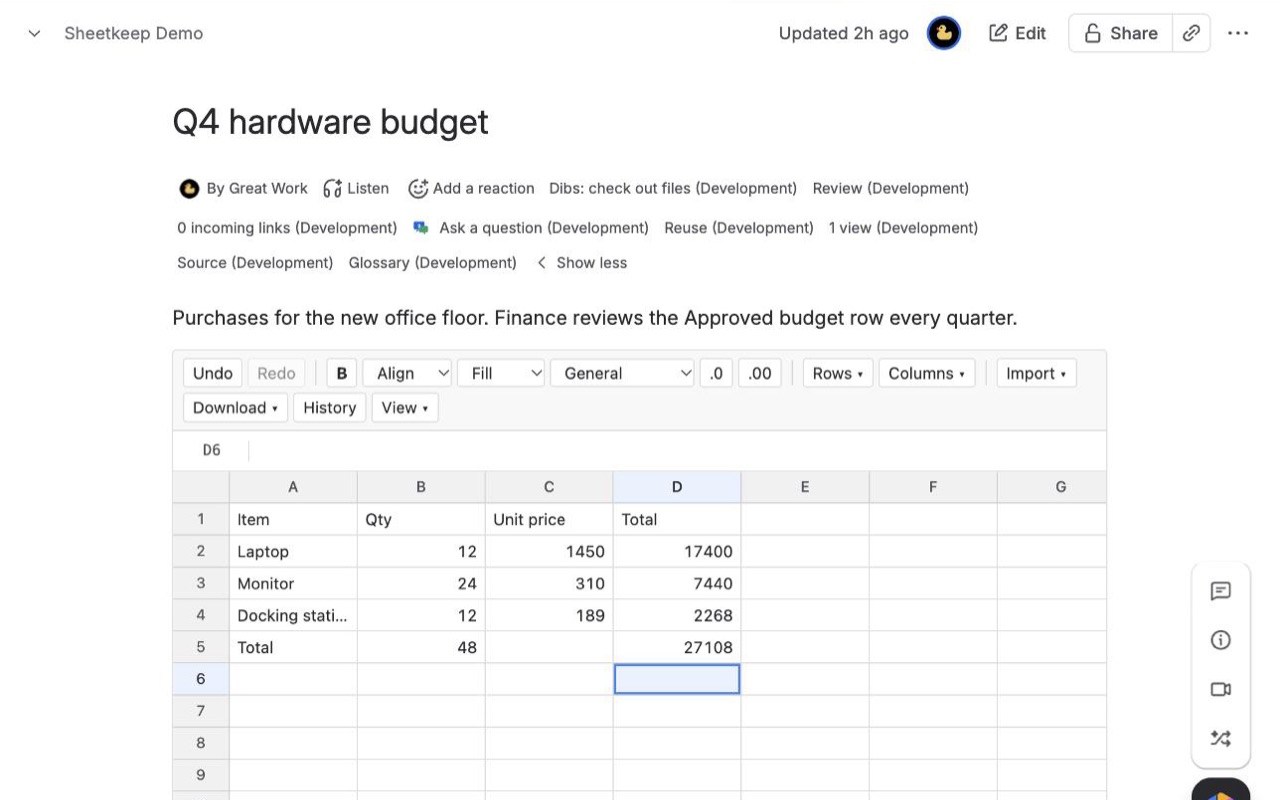
A spreadsheet macro for Confluence pages. Formulas, several sheets, frozen rows, CSV and XLSX import and export. Every save is a version you can restore, and two people editing at once never overwrite each other. Runs on Atlassian.
What you get
Every save is a version you can restore
Preview any earlier version, download it as XLSX or restore it in one click. Restores are versions too, and named versions are kept forever. Nothing is ever overwritten.
Edit together without losing anything
Saves made at the same time are merged cell by cell. If two people changed the same cell, Sheetkeep shows both values and asks which one to keep before saving.
Formulas, sheets and Excel in and out
SUMIF, VLOOKUP, XLOOKUP, dates and cross-sheet references, frozen rows, number formats in your locale. Import and export XLSX and CSV right in the browser.
How Sheetkeep works
- Install Sheetkeep on your Confluence Cloud site from the Atlassian Marketplace.
- Edit a page or blog post, type /Sheetkeep and pick Sheetkeep spreadsheet. Publish the page.
- Type straight into the published page. You don't open the page editor to change a cell. Sheetkeep saves about a second after you stop typing, and the corner of the spreadsheet says "Saved, version N".
- Bring in what you already have. Import > CSV or XLSX file (up to 10 MB) reads every sheet of a workbook, with its formulas, number formats, bold text, frozen panes and column widths. In a new, empty spreadsheet, Import > Copy or recover from this space starts from another Sheetkeep spreadsheet in the same space.
- Build it out. Formulas start with
=and can point at other sheets (='Q3 budget'!B7). The Rows and Columns menus insert, delete, freeze and sort; sheet tabs at the bottom add, rename and remove sheets. - Open History to go back. Each save is listed with who made it and when. Click one to preview it, Download as XLSX, name it, or Restore this version.
- Take it out again. Download > Workbook as XLSX or This sheet as CSV. Exporting the page to PDF or Word prints the first sheet as a table of calculated values.
Who it's for
Teams that keep a budget or cost tracker on a page
A project page with planned and actual spend can total each line with =SUMIF, look up vendor rates on a second sheet with =VLOOKUP, and name the version that was approved ("Signed off") so it is kept no matter how many edits follow.
Anyone who has lost a table to a bad edit
When a pasted column lands in the wrong place, the version from five minutes earlier is one click away in History, and restoring it touches only the spreadsheet, not the text around it on the page.
Pages several people update in the same week
Rotas, inventories, test matrices and release checklists where two people may save close together. Changes to different cells are combined. If both changed the same cell, Sheetkeep shows both values side by side and saves nothing until someone picks.
Teams working outside US number formats
View > Numbers and dates switches the whole spreadsheet to one of 13 formats, such as Deutsch (1.234,50 and 31.12.2026 with ; between formula arguments), Français, Svenska or English (India), so typed amounts and dates are read the way your team writes them.
Sheetkeep or Confluence's own tables and Excel files
Confluence's own tables hold text and numbers but don't calculate: there is no =SUM in a native table cell, and Atlassian's request to add spreadsheet functions to tables (CONFCLOUD-4632) is still open. A table also lives inside the page, so going back means restoring the whole page to an older version.
Attaching an .xlsx file shows a preview of the file, which is fine when the workbook's home is Excel or SharePoint and the page only needs to show it. Nobody edits it on the page, and each change means uploading the file again.
Sheetkeep fits when the numbers should live on the page itself, be edited there by anyone who can edit the page, and keep a history of their own. If you only need a static table that never changes, a native Confluence table is enough.
Limits and requirements
- Confluence Cloud only. Data Center and Server are not supported.
- Per spreadsheet: 20,000 rows, 500 columns, 250,000 filled cells and 50 sheets. Up to 32,000 characters per cell.
- Imports up to 10 MB. Formulas that use a function Sheetkeep doesn't calculate keep their last value, and the import message says how many.
- Not available yet: charts, conditional formatting, merged cells, cell comments and array formulas.
- PDF and Word exports show the first sheet only, up to 500 rows and 30 columns.
- People who can only view the page can read the spreadsheet, open History and download any version, but can't edit or restore.
Sheetkeep guides
Questions about Sheetkeep
What does Sheetkeep do?
Spreadsheets on Confluence pages that keep every version: formulas, sheets, Excel import and export, and one-click restore. A spreadsheet macro for Confluence pages. Formulas, several sheets, frozen rows, CSV and XLSX import and export. Every save is a version you can restore, and two people editing at once never overwrite each other. Runs on Atlassian.
What does Sheetkeep work with?
Sheetkeep works in Confluence Cloud.
How much does Sheetkeep cost?
$13.80 a month for up to 10 users, or $138 a year. From 11 users: $1.38 per user a month, with lower rates for larger sites.
Is there a free trial?
Billed by Atlassian, with a 30-day free trial.
Where do I install Sheetkeep?
From the Atlassian Marketplace. Use the Install button on this page, or search for "Sheetkeep: Spreadsheets for Confluence" there.
Who makes Sheetkeep?
Great Work LLC, an independent software company. Email hello@greatwork.company with any question about Sheetkeep and someone will answer.
Which formulas does Sheetkeep support?
56 functions, including SUM, AVERAGE, ROUND, IF, IFS, IFERROR, SUMIF, SUMIFS, COUNTIF, COUNTIFS, AVERAGEIF, VLOOKUP, HLOOKUP, XLOOKUP, INDEX, MATCH, CONCAT, LEFT, MID, TRIM, TODAY, DATE, EDATE, DAYS and WEEKDAY. References can be absolute ($B$2), whole columns (D:D) or on another sheet.
Do formulas still work after I sort or insert rows?
Yes. Rows move as whole records when you sort, and formulas keep pointing at the same cells. Deleting a row or column a formula used shows #REF! in that formula.
How long are old versions kept?
Every version from the last 30 days. After that, the last version of each hour is kept for a year, then the last version of each day. Named versions, the first version, and every version written by a restore or an import are always kept, along with the version each restore replaced.
What happens if I close the tab before it saves?
Unsaved edits stay in your browser. Open the page again in the same browser and click Restore them on the yellow bar; they are merged with the latest saved version.
What happens to the spreadsheet if someone deletes the page?
The data stays. A space admin can find it under Space settings > Sheetkeep spreadsheets, marked recoverable, and download it or copy it into a new Sheetkeep spreadsheet.
What happens when the subscription ends?
Spreadsheets turn read-only. Viewing, History and downloads keep working, and nothing is deleted.
If I copy a page, does the copy share the spreadsheet?
No. The copy gets its own copy of the spreadsheet the first time it opens, as long as you can see the original page. Editing one never changes the other.
Where is the data stored?
In your site's Forge SQL database on Atlassian. Sheetkeep has no outside servers, and CSV and XLSX files are read and written in your browser.
More Confluence apps
 Sprigwell
 Milewell
 Chartmere
 Lanemark