



Sprigwell Keyboard-first mind maps on Confluence pages: every change a version, XMind import, Jira links, and branches to work items.
Listed on the Atlassian Marketplace as “Sprigwell: Mind Maps for Confluence”
From $6 a month for up to 10 users. Billed by Atlassian, with a 30-day free trial.
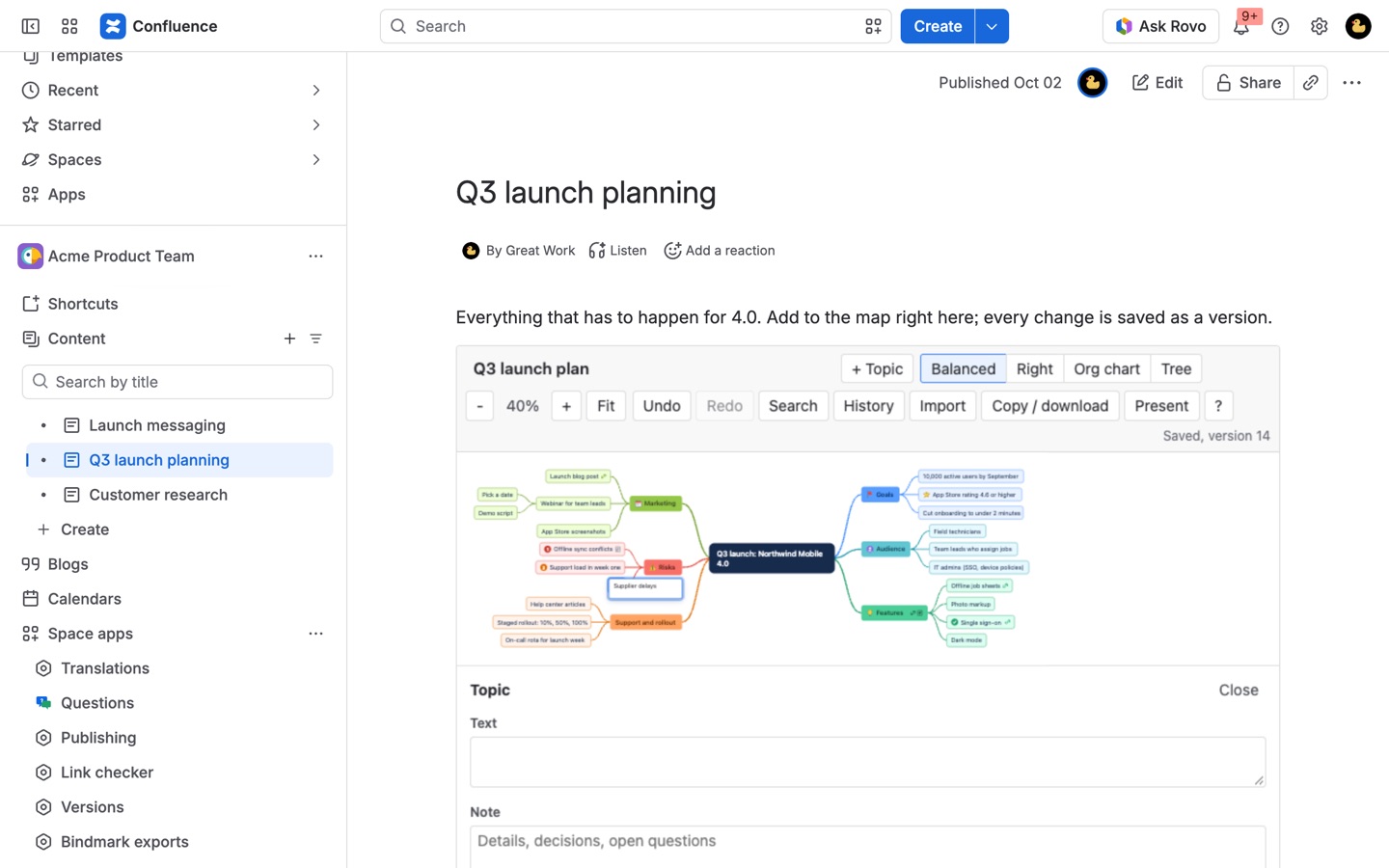
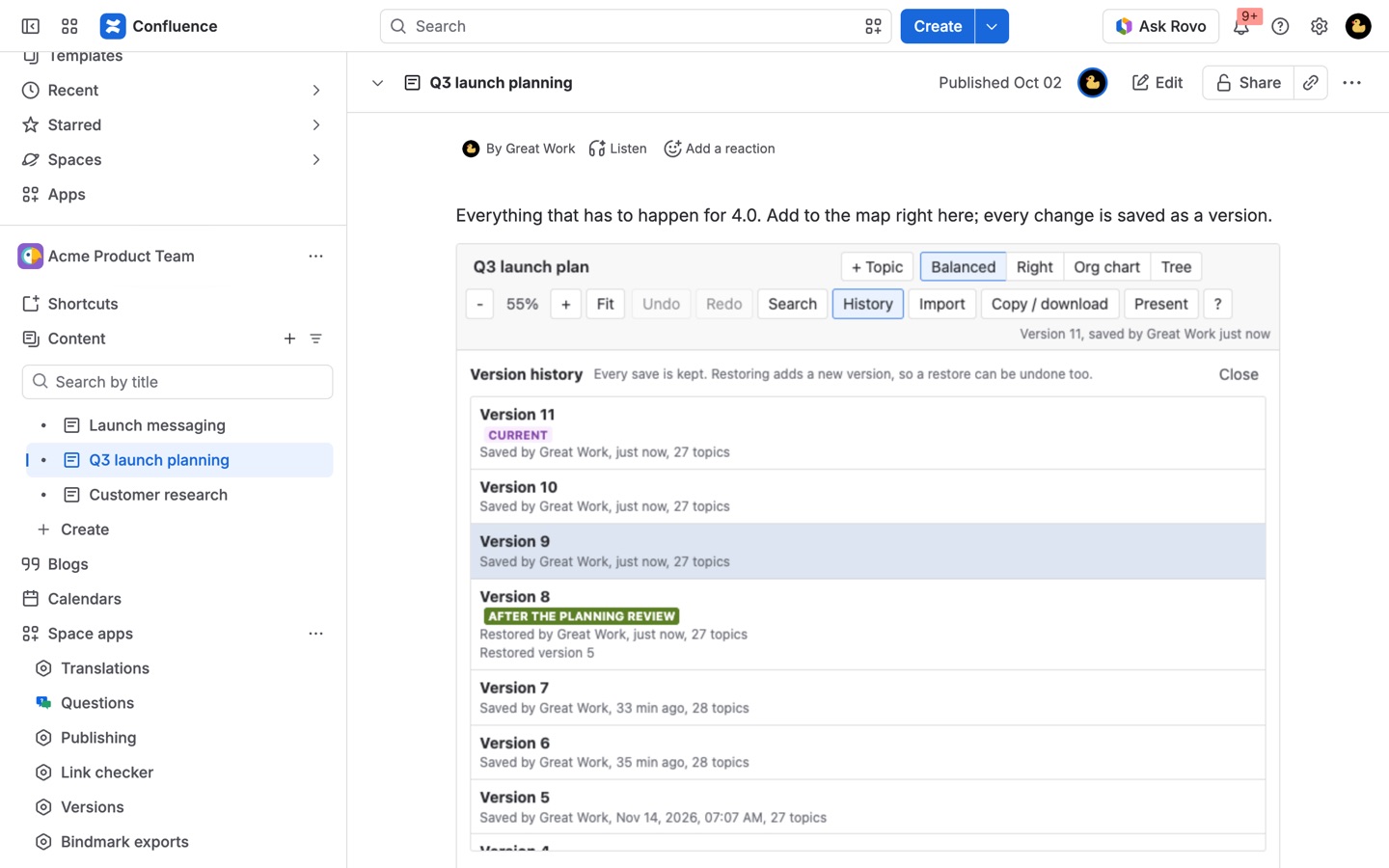
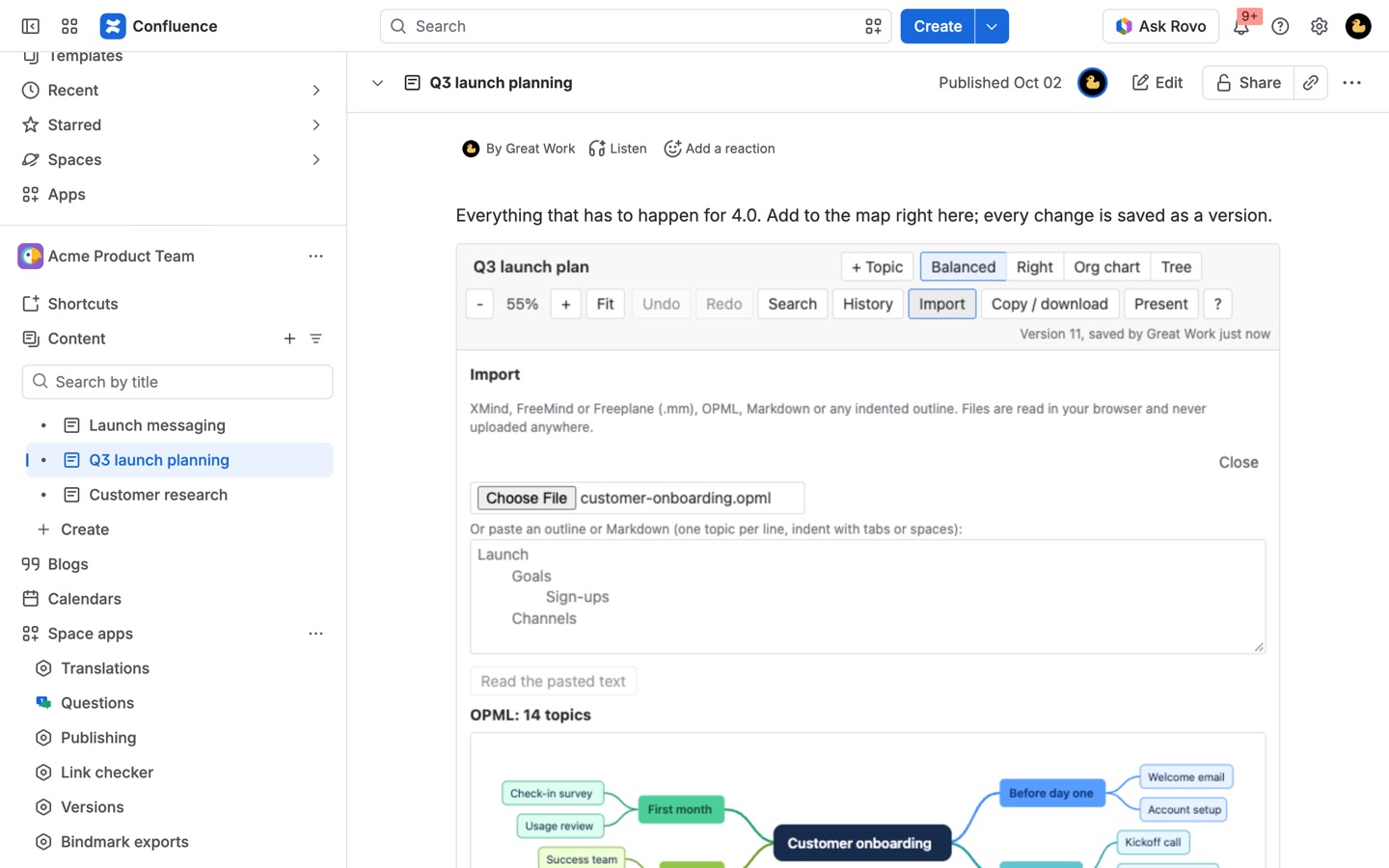
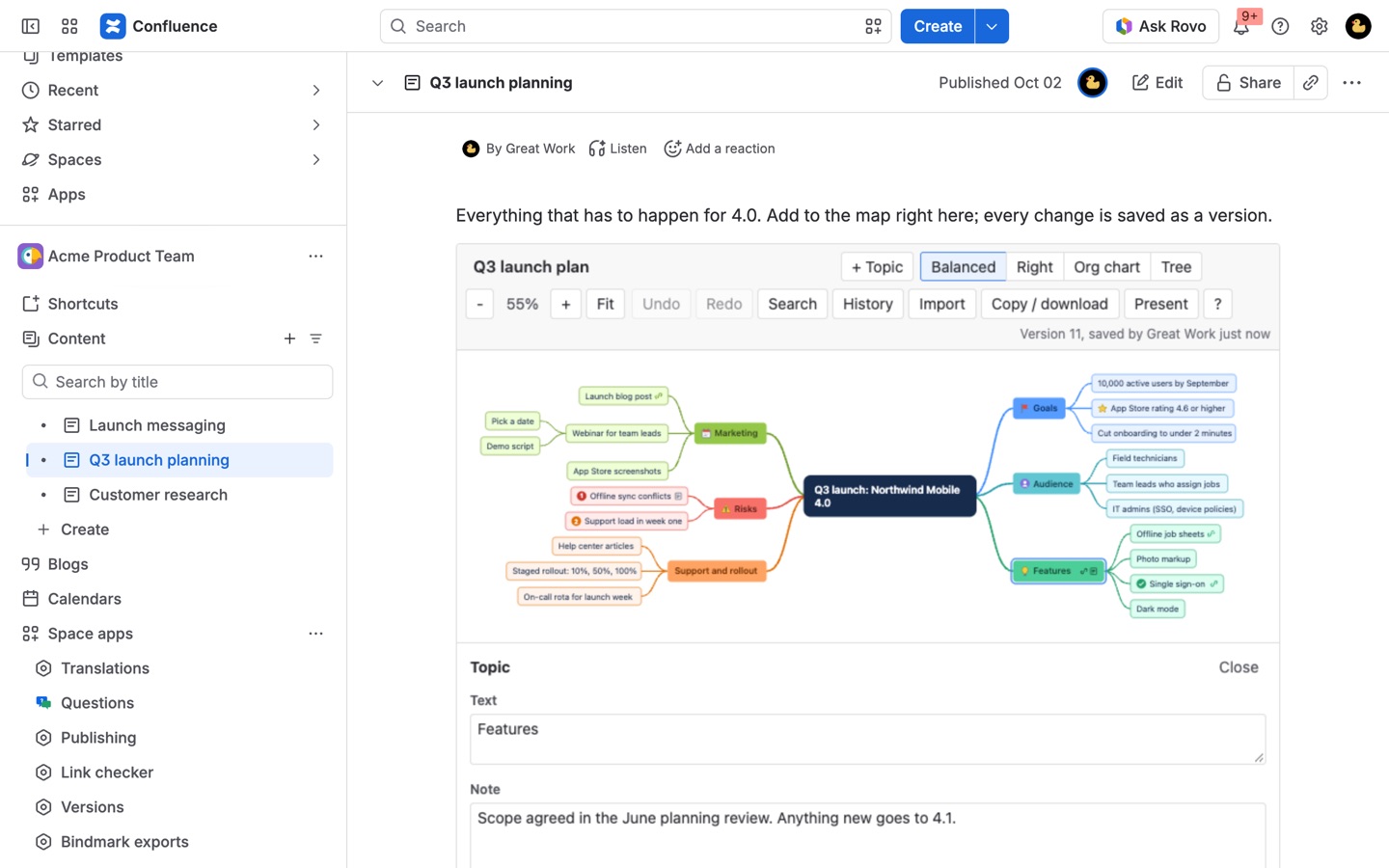
Map ideas on the page with the keyboard: Tab, Enter, type. Four layouts, links to pages and Jira, notes and icons. Every change is a version you can restore, two people editing never overwrite each other, and it imports XMind. Runs on Atlassian.
What you get
Tab, Enter, type: map as fast as you think
Keyboard-first editing with four automatic layouts, drag to move, colors, icons, notes and links to pages, Jira work items and web addresses. Search, collapse and present it.
Every change is a version, nothing is lost
Autosave with full history: preview, name and restore any version. Saves made at the same time are merged topic by topic, and you choose when two people changed the same topic.
Import XMind, turn branches into work items
Bring maps in from XMind, FreeMind, OPML or Markdown. Then turn a branch into Jira work items after a preview: an Epic with its stories and subtasks, created by you and linked back.
How Sprigwell works
- Install Sprigwell from the Atlassian Marketplace. A Confluence admin does this once for the site.
- Edit a page or blog post, type
/Sprigwelland pick Sprigwell mind map. Publish the page. - Pick a start on the published page: Start a mind map and type the central idea, Start with an example, or Import a file or a pasted outline. You don't open the page editor again to change the map.
- Build it from the keyboard. Tab adds a topic under the selected one, Enter adds the next one beside it, and typing replaces the text. Alt with the arrow keys moves a topic up, down, out a level or in a level. Press ? in the toolbar for every shortcut.
- Add detail in the topic panel: a note, a color, an icon (priority 1 to 3, done, question, warning and more), and a link to a Confluence page, a Jira work item or a web address. A linked work item shows its current status on the topic.
- Pick a layout: Balanced, Right, Org chart or Tree. The layout is saved with the map.
- Let it save. Sprigwell saves about a second after you stop typing, and each save becomes a version in History, with who saved it and when.
Several Sprigwell macros can sit on one page; each holds its own map.
Who it's for
A team planning in a meeting
One person types while the others talk. The map grows on the same page as the agenda and the notes, so the decisions and the picture of them stay together, and a later reader finds both in one place.
Product managers breaking down a feature
Map the feature into areas, then the areas into tasks. When the shape is settled, select the feature and turn its branch into an Epic with Tasks and Subtasks in a Jira project, after a preview. See how to turn a mind map into Jira work items.
Teams moving maps out of XMind or FreeMind
Maps that live on someone's laptop come onto a Confluence page with their notes, links, icons and colors. See how to import an XMind file into Confluence.
Documentation that has to print
When someone exports the page to PDF or Word, the map comes out as a picture followed by the full outline, with every note and link written out, so nothing hides inside a collapsed branch.
Sprigwell or a Confluence whiteboard
Confluence whiteboards have a mind map template, and for a free-form session with sticky notes, shapes and drawing they are the better fit. Sprigwell is for a structured map that lives on a page:
- Where it lives. A whiteboard is its own item in the space. A Sprigwell map is part of the page, next to the text around it, and goes out with the page in PDF and Word exports.
- Keyboard. Atlassian lists keyboard navigation and screen readers among the things whiteboards don't support. Sprigwell is built around the keyboard, including moving whole branches.
- History. Atlassian keeps whiteboard history for 30 days, and restoring an old version makes a new whiteboard. Sprigwell keeps every version from the last 30 days, then one per hour, then one per day after a year, and a restore puts the old version back on the same page. Versions you name are kept forever.
- Bringing maps in. Sprigwell reads XMind, FreeMind, Freeplane, OPML, Markdown and indented outlines.
What Sprigwell doesn't do: live cursors of other editors, free drawing, or lines between topics on different branches. When two people edit at once, their saves are merged topic by topic, and if both changed the same topic, Sprigwell shows both versions and asks which to keep.
Limits and requirements
- Confluence Cloud. Connecting Jira is optional and only needed for work item links and Create work items; a site admin connects it once.
- A map holds up to 5,000 topics, 500 characters per topic and 5,000 per note. Imported files can be up to 20 MB.
- People who can edit the page can edit its map. People who can only view the page can still collapse branches, switch layouts for themselves, search, present and download.
- Maps and their versions are stored in your site's Forge SQL database, on Atlassian. Files you import are read in your browser.
- If the subscription lapses, every map stays on its page, read-only, and downloads keep working.
Sprigwell guides
Questions about Sprigwell
What does Sprigwell do?
Keyboard-first mind maps on Confluence pages: every change a version, XMind import, Jira links, and branches to work items. Map ideas on the page with the keyboard: Tab, Enter, type. Four layouts, links to pages and Jira, notes and icons. Every change is a version you can restore, two people editing never overwrite each other, and it imports XMind. Runs on Atlassian.
What does Sprigwell work with?
Sprigwell works in Confluence Cloud.
How much does Sprigwell cost?
$6 a month for up to 10 users, or $60 a year. From 11 users: $0.60 per user a month, with lower rates for larger sites.
Is there a free trial?
Billed by Atlassian, with a 30-day free trial.
Where do I install Sprigwell?
From the Atlassian Marketplace. Use the Install button on this page, or search for "Sprigwell: Mind Maps for Confluence" there.
Who makes Sprigwell?
Great Work LLC, an independent software company. Email hello@greatwork.company with any question about Sprigwell and someone will answer.
How do I add a mind map to a Confluence page?
Install Sprigwell, edit the page, type /Sprigwell and choose Sprigwell mind map, then publish. Start the map on the published page by typing the central idea, starting from the example, or importing a file.
Can I edit the mind map without opening the page editor?
Yes. Anyone who can edit the page edits the map right on the published page, and each change saves on its own.
Can I get an old version of a map back?
Open History, preview any version and click Restore. The restore is saved as a new version, so it can be undone too.
What happens when I close the tab before a change is saved?
Unsaved edits are kept in your browser. Reopen the page in the same browser and click Restore them.
Does a copied page or a template get its own map?
Yes. A page copied from another, or created from a template with a Sprigwell macro, gets its own copy of the map the first time it opens, as long as you can see the original.
Can I export a Confluence mind map as an image?
Yes. Copy / download in the toolbar copies the map as a PNG or downloads PNG or SVG, in light or dark. It also gives a Markdown outline, plain outline, OPML or FreeMind (.mm) file.
What happens to maps on a deleted page?
Space admins find them in Space settings, under Sprigwell mind maps, with their history and downloads.
Can I present a mind map in a meeting?
Yes. Present reveals the map branch by branch or topic by topic. Move with the arrow keys or Space, go full screen where the browser allows it, and press Esc to leave.
More Confluence apps
 Chartmere
 Sheetkeep
 Clean Copy
 Milewell