



Remindwell Remind yourself, the assignee or any teammate about a Jira issue, once or on repeat, at the exact time you pick.
Listed on the Atlassian Marketplace as “Remindwell: Issue Reminders and Follow-ups for Jira”
From $2 a month for up to 10 users. Billed by Atlassian, with a 30-day free trial.
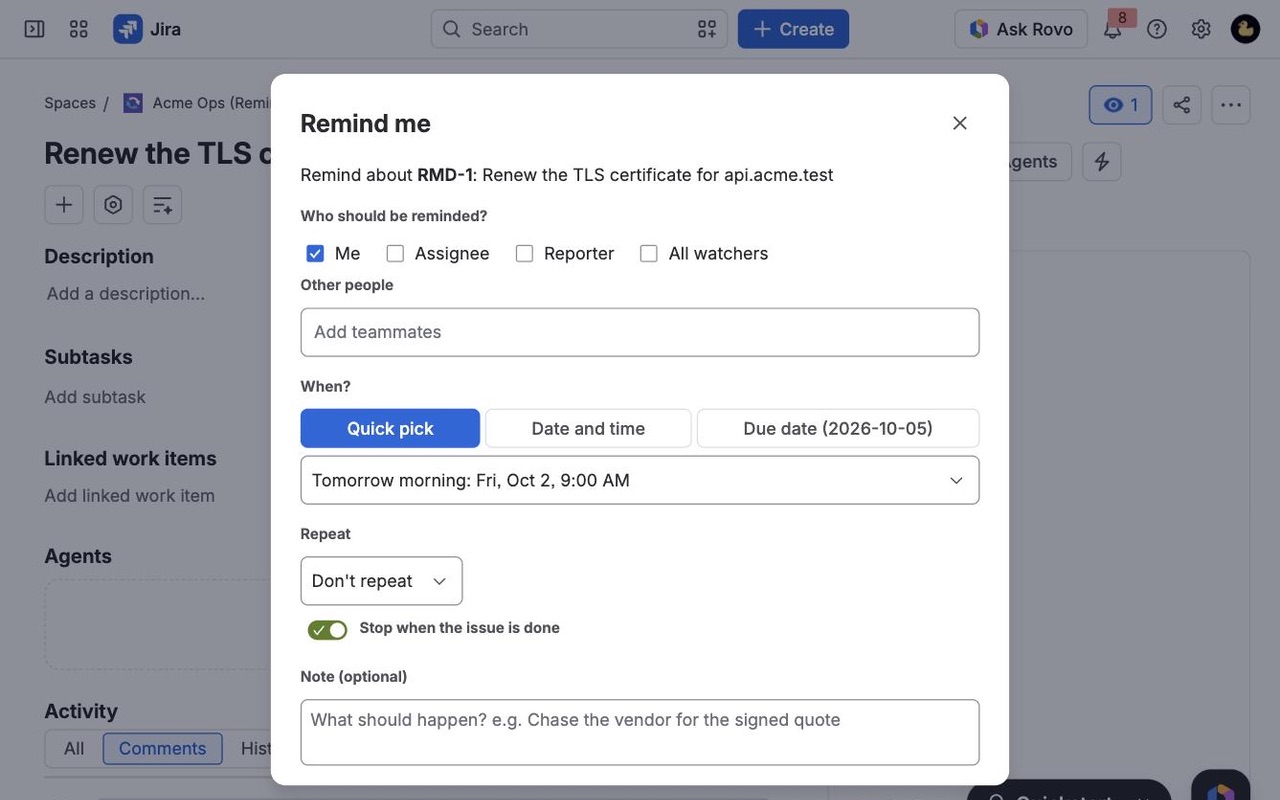
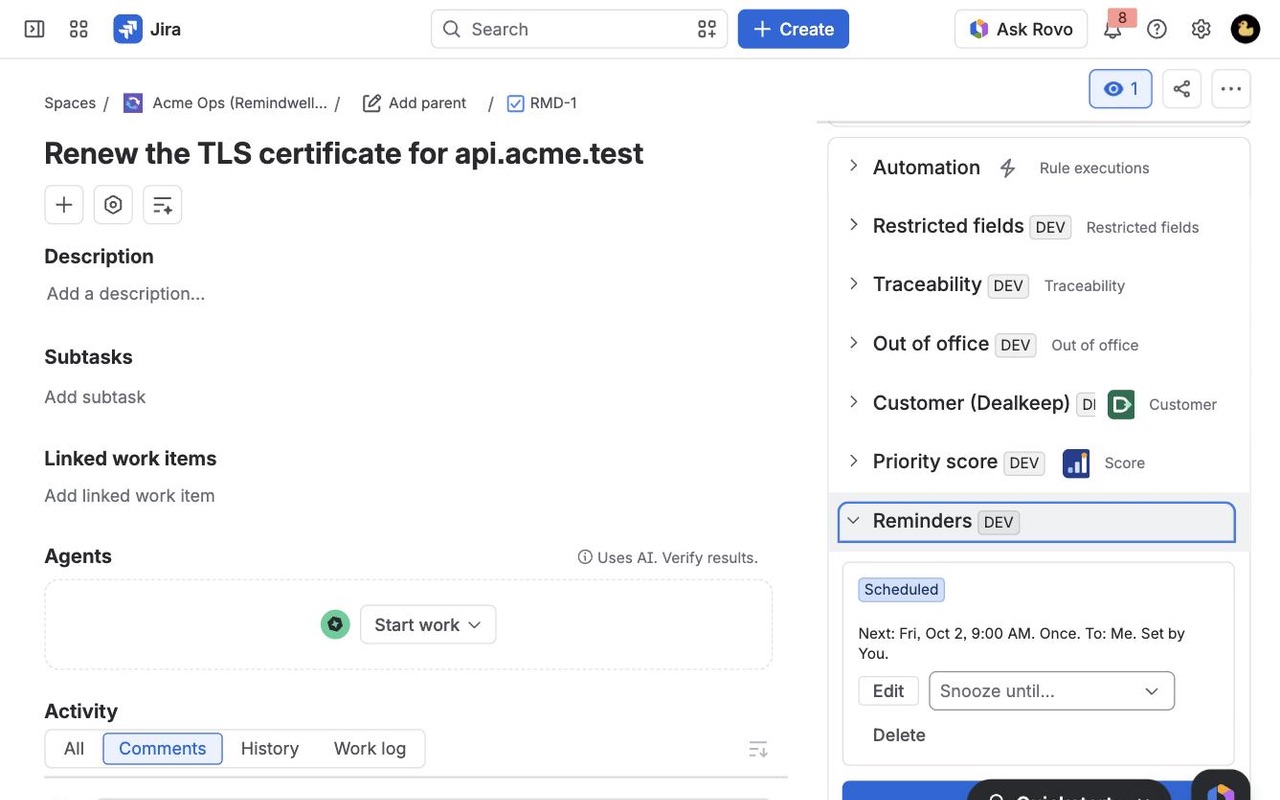
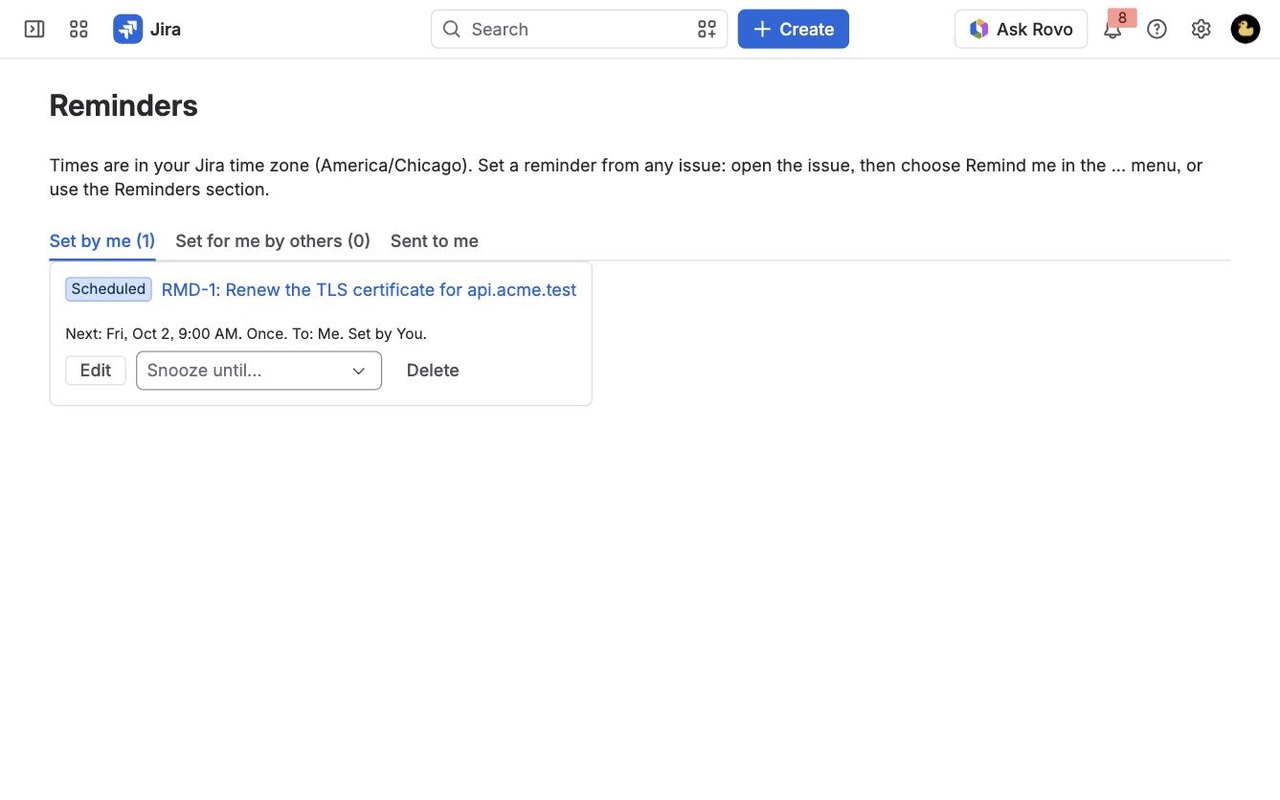
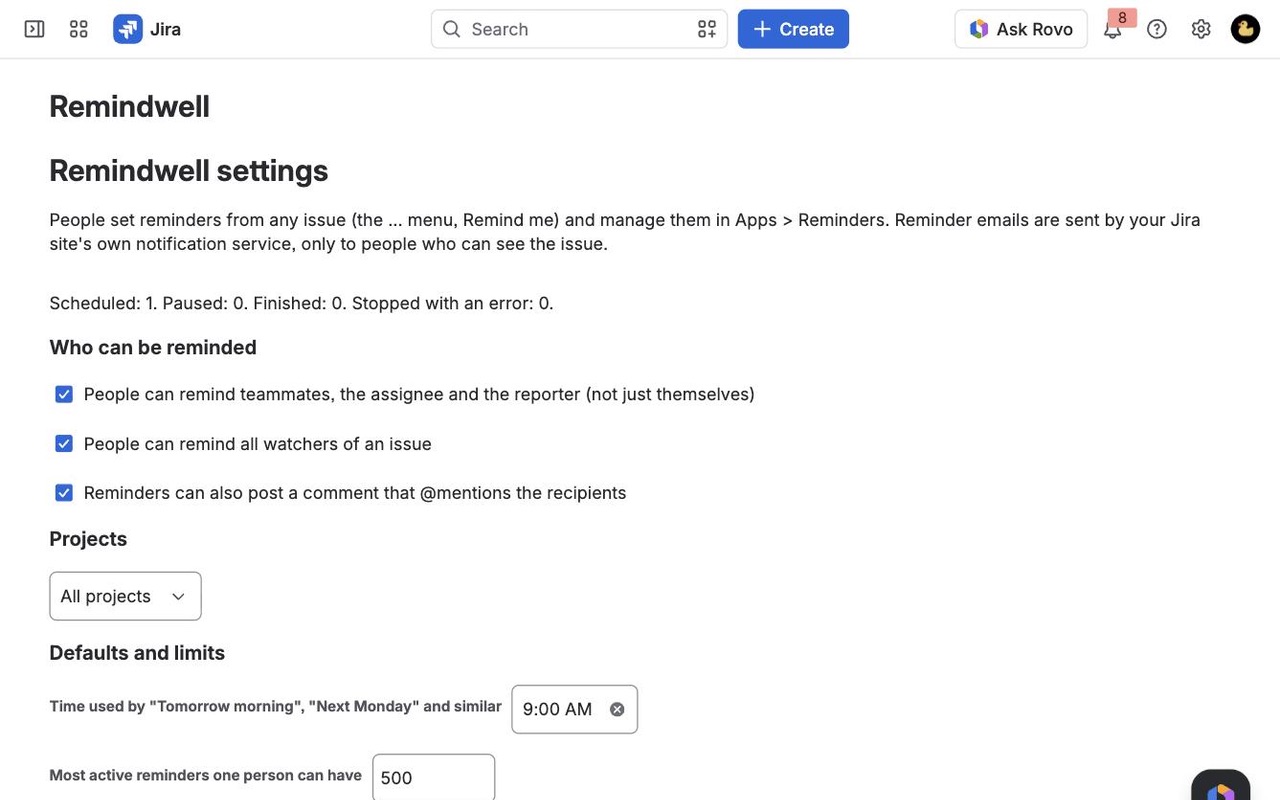
Set a reminder on any Jira issue for yourself, the assignee, the reporter, watchers or teammates. Repeat it, tie it to the due date, stop it when the issue is done. Emails come from your own Jira, every 5 minutes.
What you get
Remind yourself or anyone on the issue
Pick yourself, the assignee, reporter, watchers or any teammates, then a quick time or exact date. Assignee and reporter are resolved when it fires, so it reaches the current owner.
Repeat it, or tie it to the due date
Every weekday, weekly on chosen days or monthly, starting days before the due date. Stops when the issue is done, on a date or after N reminders. Moves when the due date moves.
Every reminder in one place
Apps > Reminders shows everything you set, everything set for you and what was sent. Snooze, edit, delete, or opt out of a teammate's reminder in one click.
How Remindwell works
- A Jira admin installs Remindwell from the Atlassian Marketplace. Every site starts with a 30-day free trial.
- Open an issue and choose Remind me in its ••• (more actions) menu. The same form opens from Add reminder in the issue's Reminders panel.
- Tick who should be reminded: Me, Assignee, Reporter, All watchers, or add up to 20 named people under Other people.
- Pick when. Quick pick lists In 1 hour, In 3 hours, Tomorrow morning, In 2 days, Next Monday and In 1 week, each with the exact time next to it. Date and time takes any minute up to 5 years ahead. Due date sets the reminder a number of days before, on or after the issue's due date.
- Choose a repeat if you want one: every day, every weekday, every week on the days you tick, or every month, with an optional last date or a set number of reminders. Stop when the issue is done is on unless you turn it off.
- Add a note, such as "Chase the vendor for the signed quote", and tick Also add a comment that @mentions them if the people reminded should get Jira's bell and mobile push too.
- Check the box at the bottom. It lists the next reminder times in your time zone. Click Set reminder.
- The email arrives from your Jira site's usual address within 5 minutes of that time, with the subject
[KEY-123] Reminder: your note (issue summary).
Who it's for
Anyone waiting on a reply
You've asked a vendor, a customer or another team for something and the issue can't move until they answer. A reminder in 2 days on yourself, with the note "No reply yet? Call them", brings it back before it gets forgotten in the backlog.
Leads chasing an owner
A blocker sits with someone in another team. Remind the assignee every weekday at 10:00 until the issue reaches Done. If the issue changes hands, the reminder goes to the new assignee, because the assignee is looked up when each reminder is sent.
Deadlines that can't slip
Contract renewals, release cutoffs and audit dates live on issues with a due date. Send the assignee and the watchers a reminder a week before and on the day. When someone moves the due date, the reminders move with it.
Recurring checks
Some issues stand for a job that comes back, like reviewing access rights or renewing a certificate. A monthly reminder on that issue keeps the job in front of whoever holds it, without a calendar invite that lives outside Jira.
Remindwell or Jira's own notifications
Jira Cloud already emails people when an issue changes: a comment, a new assignee, a status move. It can also send a daily email about due and overdue work, which you can switch on or off but not reschedule. None of those let you say "tell this person about this issue on Thursday at 14:00", and nothing native repeats on a schedule you choose or stops when the issue is done.
Filter subscriptions email the results of a saved search on a schedule. They work for a standing list, such as "everything due this week", but each one is a whole filter, not a note on one issue, and people get the list whether or not anything in it needs them.
Remindwell fits when the reminder belongs to one issue, one moment and particular people. If your team only needs a weekly list of overdue work, a filter subscription is enough and you don't need an app.
Limits and requirements
- Jira Cloud only. Remindwell runs on Atlassian's Forge platform and has no network access outside Atlassian.
- Email through Jira's own issue notifications. There's no Slack, Teams or SMS delivery, and no digest that combines several issues in one email.
- Everyone reminded must be an active Jira user who can see the issue. Saving tells you if someone can't.
- Up to 20 named people per reminder and 20 of your reminders per issue. Your admin sets the most active reminders one person can have (500 unless changed).
- Your Jira admin can limit reminders to the person setting them, turn off watcher reminders or comments, and switch the app on for only some projects in Jira settings > Apps > Remindwell.
- Nothing is sent while the trial or subscription isn't active. Reminders are kept, and a reminder that came due in that time is sent once when the subscription is active again.
Remindwell guides
Questions about Remindwell
What does Remindwell do?
Remind yourself, the assignee or any teammate about a Jira issue, once or on repeat, at the exact time you pick. Set a reminder on any Jira issue for yourself, the assignee, the reporter, watchers or teammates. Repeat it, tie it to the due date, stop it when the issue is done. Emails come from your own Jira, every 5 minutes.
What does Remindwell work with?
Remindwell works in Jira Cloud.
How much does Remindwell cost?
$2 a month for up to 10 users, or $20 a year. From 11 users: $0.40 per user a month, with lower rates for larger sites.
Is there a free trial?
Billed by Atlassian, with a 30-day free trial.
Where do I install Remindwell?
From the Atlassian Marketplace. Use the Install button on this page, or search for "Remindwell: Issue Reminders and Follow-ups for Jira" there.
Can I remind someone other than myself?
Yes: the assignee, reporter, all watchers, or up to 20 teammates. Your admin can turn this off.
Can I pick an exact time, not a 30-minute slot?
Yes. Pick any time to the minute; reminders go out within 5 minutes of it.
Do the quick picks really mean what they say?
Each quick pick shows the exact date and time it stands for, in your time zone, before you save.
Can I use a 24-hour clock?
Times follow your Jira language. Set your Jira profile language to one that uses 24-hour time, such as English (UK).
Can I see all my reminders and their notes in one place?
Yes, Apps > Reminders.
Is the issue key in the email subject?
Yes: [KEY-123] Reminder: ....
Who makes Remindwell?
Great Work LLC, an independent software company. Email hello@greatwork.company with any question about Remindwell and someone will answer.
What happens if the assignee changes before the reminder goes out?
The reminder goes to whoever is the assignee at that moment. If nobody is assigned then, it goes to the person who set it, with a line saying so.
Does a reminder stop when the issue is closed?
Yes, by default. Stop when the issue is done is on for every new reminder, and when the issue reaches a done status the reminder ends with "Stopped: KEY-1 is Done". Turn it off if you want the reminder anyway.
What if someone moves or clears the due date?
A due-date reminder follows the new date (Remindwell checks about once an hour). If the due date is cleared, the reminder shows Paused and picks up again when a due date is set.
Can my teammates read the notes on my reminders?
No. On an issue, others see only how many other reminders exist, not what they say or who they're for. The people you remind see your note in their email.
Can I stop a reminder a teammate set for me?
Yes. In Apps > Reminders, open Set for me by others and click Stop reminding me on it. If you were the only person on that reminder, it's deleted.
Who can edit or delete a reminder?
The person who set it, and Jira admins. Admins also get a list of paused and stopped reminders across the site in the app's settings page.
What happens if Jira can't send a reminder?
Remindwell tries again with longer waits, from 15 minutes up to 6 hours, and marks the reminder Stopped after 5 failed tries, with the reason in its note. Edit it to try again.
Does uninstalling remove the reminders?
Yes. Reminders stop, and Atlassian deletes the app's stored data for your site. Comments Remindwell posted stay on their issues.
More Jira apps
 Spillproof
 Mergewell
 Stillframe
 Cutline