



Cutline Every Jira release from every space on one calendar, gates and approvals checked before you ship, and freeze windows that hold.
Listed on the Atlassian Marketplace as “Cutline: Release Calendar, Gates and Freeze Windows”
From $5 a month for up to 10 users. Billed by Atlassian, with a 30-day free trial.
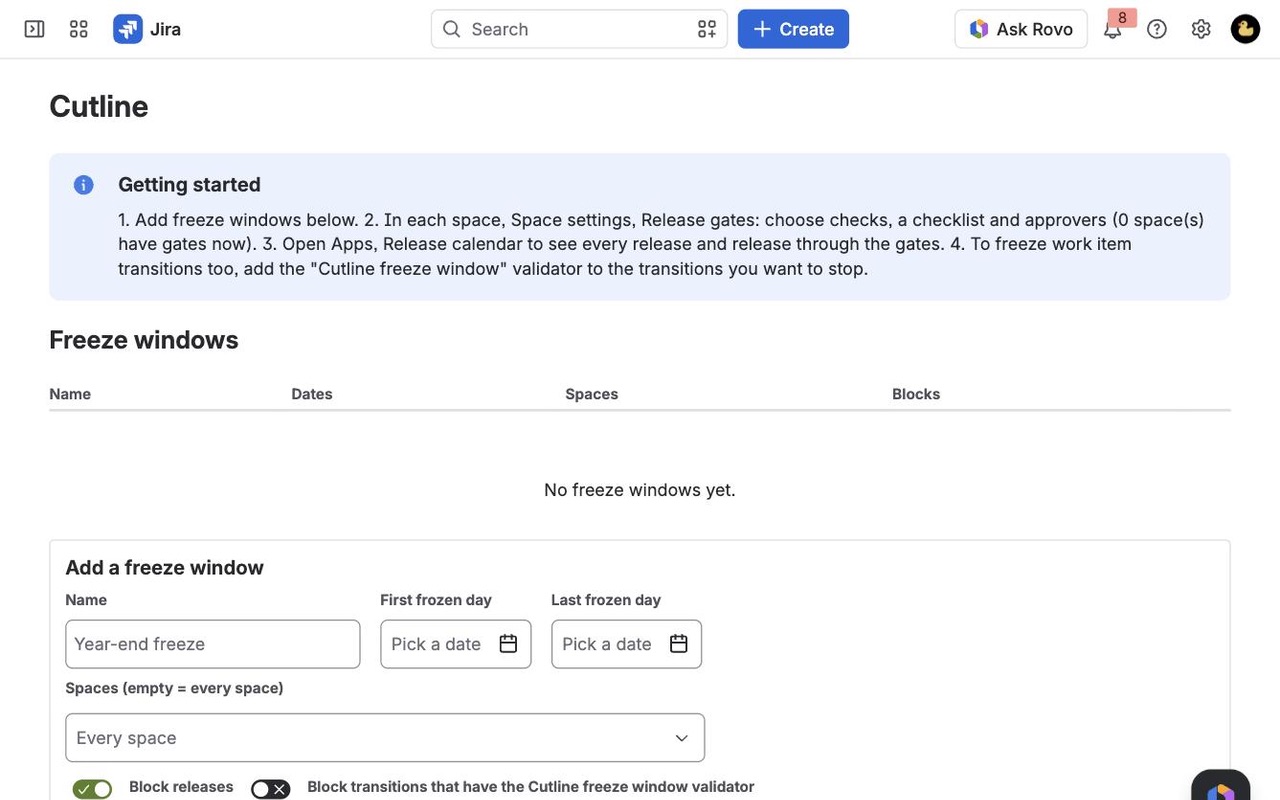
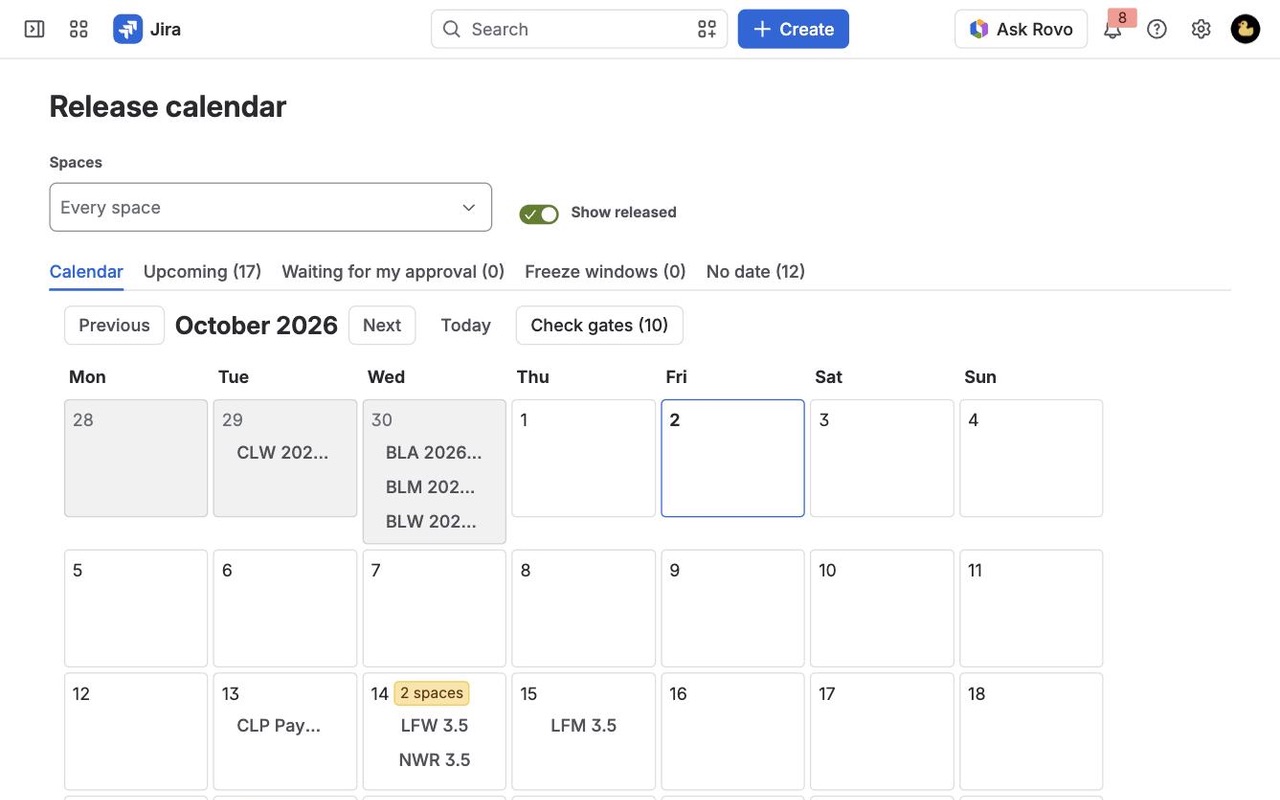
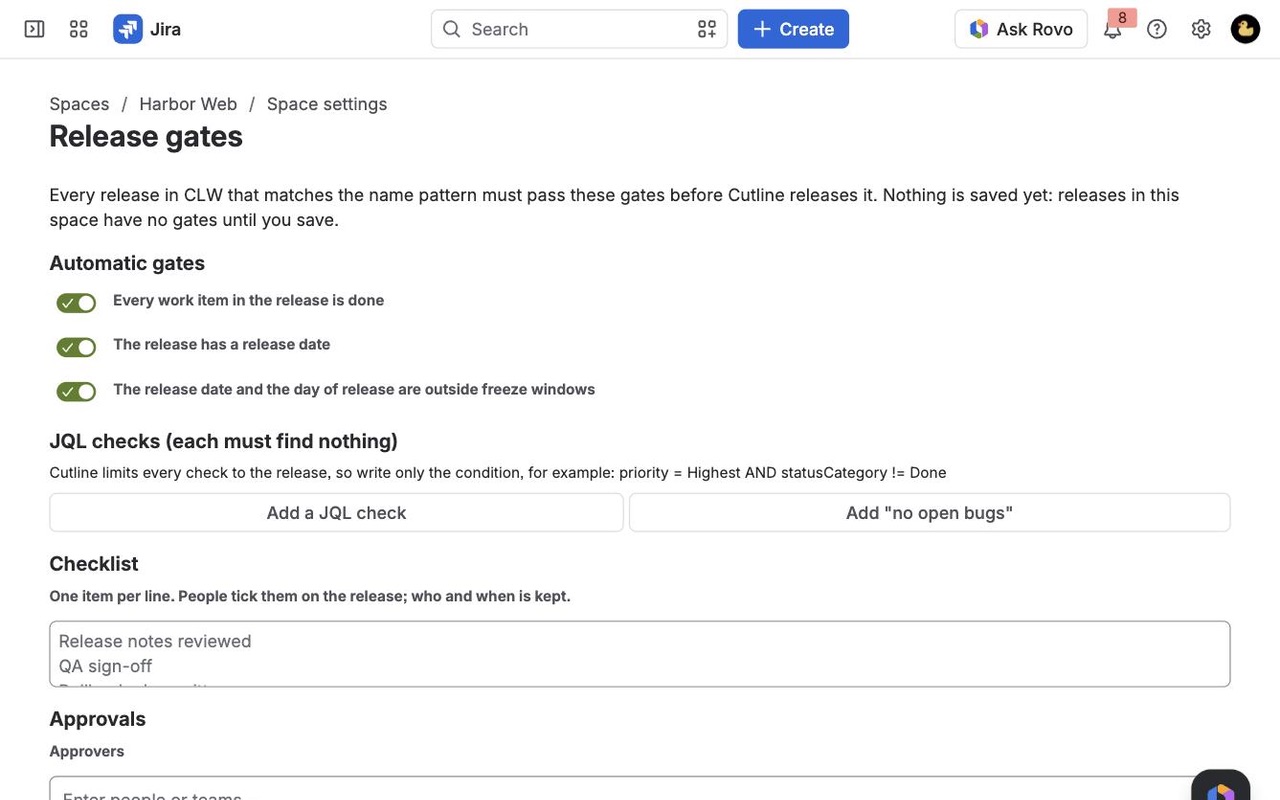
A release calendar for Jira Cloud with the space key on every release, release gates (all work done, JQL checks, checklists, approvals) checked before you release, and freeze windows that stop releases and transitions.
What you get
Every release on one calendar
A month view of every version across your spaces, each labelled with its space key, with freeze windows shaded and busy release days flagged. Open any release to see its gates.
Gates and approvals before you ship
All work done, JQL checks that must find nothing, a checklist with owners and named approvers. The Release button checks them again and logs any override with its reason.
Freeze windows that hold
Block releases, and any transition you add the validator to, during year-end or launch freezes. Releases made around Cutline on Jira's Releases page are recorded or put back.
How Cutline works
- Install Cutline from the Atlassian Marketplace. A Jira admin opens Jira settings > Apps > Cutline to add freeze windows, choose who may release past failing gates (Jira admins, space admins or nobody), and pick what happens when someone releases on Jira's own Releases page: record it, or put it back to unreleased.
- Space admins set Space settings > Release gates. Nothing is gated until they save. Automatic gates check that every work item is done, the release has a date and it isn't inside a freeze. On top of that come JQL checks that must find nothing, a checklist and named approvers.
- Everyone opens Apps > Release calendar. A month of releases from every space you can see, each labelled with its space key. Freeze days are shaded yellow, and a "2 spaces" badge marks days when several spaces release.
- Click a release to see each gate, pass or not yet, and why. Tick checklist items there; approvers approve, or reject with a comment.
- Click Release. Cutline checks the gates again and releases as you, so Jira still checks your right to release. Unfinished work can move to another release in the same space. If a gate fails and you're allowed to override, you give a reason, and it is kept on the release.
- Read the history. Each release keeps its first planned date and every date change, and after release says how many days late or early it shipped.
Who it's for
Release managers with several teams on one site
Jira's own release calendar is one space at a time. With five spaces shipping on their own schedules, the Release calendar shows every release in one month view, so two big launches don't land on the same Tuesday by accident.
Teams that need a sign-off before shipping
QA, security or product sign-off becomes an approval: pick the approvers and how many must agree. With "an approval stops counting when work items are added" switched on, work added after someone approved makes their approval out of date.
Companies with year-end or launch freezes
A freeze window covers chosen days and spaces and can block releases, transitions or both, with your own message. Add the Cutline freeze window validator to a workflow transition, such as moving to Done, and it is refused while a freeze is on.
Admins who need releases to follow the process
Releases made around Cutline, on Jira's Releases page, by Automation or by another app, are checked against the gates as they were. Depending on your setting, Cutline notes which gates failed or puts the version back to unreleased and logs why.
Cutline or Jira's own release tools
Jira Cloud shows releases per space, with progress and warnings from connected development tools. A view of releases across spaces is part of Plans, on Premium and Enterprise. Jira Service Management's change calendar has freeze windows for change requests, but not for versions. If one space releases on its own schedule, Jira's Releases page may be enough.
Cutline adds the cross-space calendar, gates and approvals on versions, and freezes that apply to releases and transitions. It uses Jira's versions as they are: it never creates, renames or syncs them.
Limits
- The calendar shows the first 150 spaces you can see, or the spaces a Jira admin picked.
- Check gates fills in readiness badges for up to 15 releases at a time, and gate counts stop at 100 ("100 work items found" means 100 or more).
- Upcoming covers the next 60 days plus overdue releases.
- Cutline runs on Atlassian's Forge platform and sends nothing outside Atlassian.
Cutline guides
Questions about Cutline
What does Cutline do?
Every Jira release from every space on one calendar, gates and approvals checked before you ship, and freeze windows that hold. A release calendar for Jira Cloud with the space key on every release, release gates (all work done, JQL checks, checklists, approvals) checked before you release, and freeze windows that stop releases and transitions.
What does Cutline work with?
Cutline works in Jira Cloud.
How much does Cutline cost?
$5 a month for up to 10 users, or $50 a year. From 11 users: $2.15 per user a month, with lower rates for larger sites.
Is there a free trial?
Billed by Atlassian, with a 30-day free trial.
Where do I install Cutline?
From the Atlassian Marketplace. Use the Install button on this page, or search for "Cutline: Release Calendar, Gates and Freeze Windows" there.
Who makes Cutline?
Great Work LLC, an independent software company. Email hello@greatwork.company with any question about Cutline and someone will answer.
Can I see Jira releases from multiple projects on one calendar?
Yes. Apps > Release calendar shows releases from every space you can see, each labelled with its space key, and you can filter by space and hide released versions.
Can people still release from Jira's Releases page?
They can, and Cutline checks the gates as they were just before. If they passed, it notes the release. If not, it records the failing gates or, when your site enforces gates, puts the version back to unreleased.
What does a JQL gate look like?
Write only the condition, such as priority = Highest AND statusCategory != Done, and Cutline adds the release itself. The gate passes when the query finds nothing. Saving refuses a query Jira can't run.
Can gates apply to only some releases?
Yes. A name pattern such as 2026.*, Release * limits a space's gates to matching releases. Empty means every release in the space.
Is there a dashboard view?
Yes. Add the Upcoming releases (Cutline) widget to any Jira dashboard.
Which time zone do freeze windows use?
The one a Jira admin sets in Cutline's settings, which also decides what "today" means and the first day of the week.
Does it work with release notes?
A checklist item such as "Release notes published" pairs well with Changeleaf, which publishes notes from the same versions to Confluence.
More Jira apps
 Mergewell
 Changeleaf
 Remindwell
 Berth