



Mergewell Merge duplicate Jira issues and service requests into one. Preview every change, keep every customer informed, undo for 24 hours.
Listed on the Atlassian Marketplace as “Mergewell: Merge Duplicate Issues and Requests”
From $5 a month for up to 10 users. Billed by Atlassian, with a 30-day free trial.
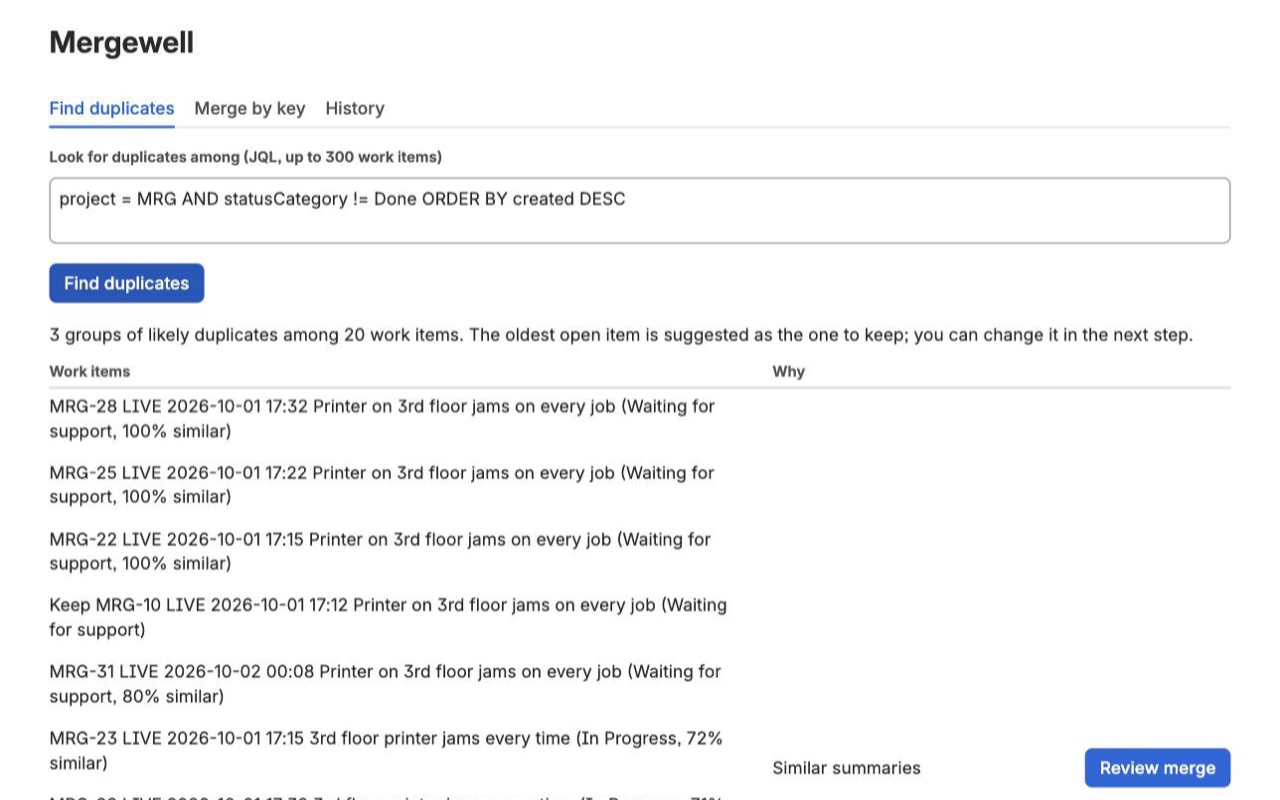
Merge duplicates in Jira Cloud, including Jira Service Management. Comments, files, links and watchers move over; the reporter becomes a request participant on service requests, a watcher on other issues. Preview first, undo later.
What you get
Find duplicates in a queue, then merge
Mergewell groups requests that look like the same problem, from any JSM queue or JQL search, and suggests which one to keep. Review the group, adjust, and merge in a few clicks.
See every change before it happens
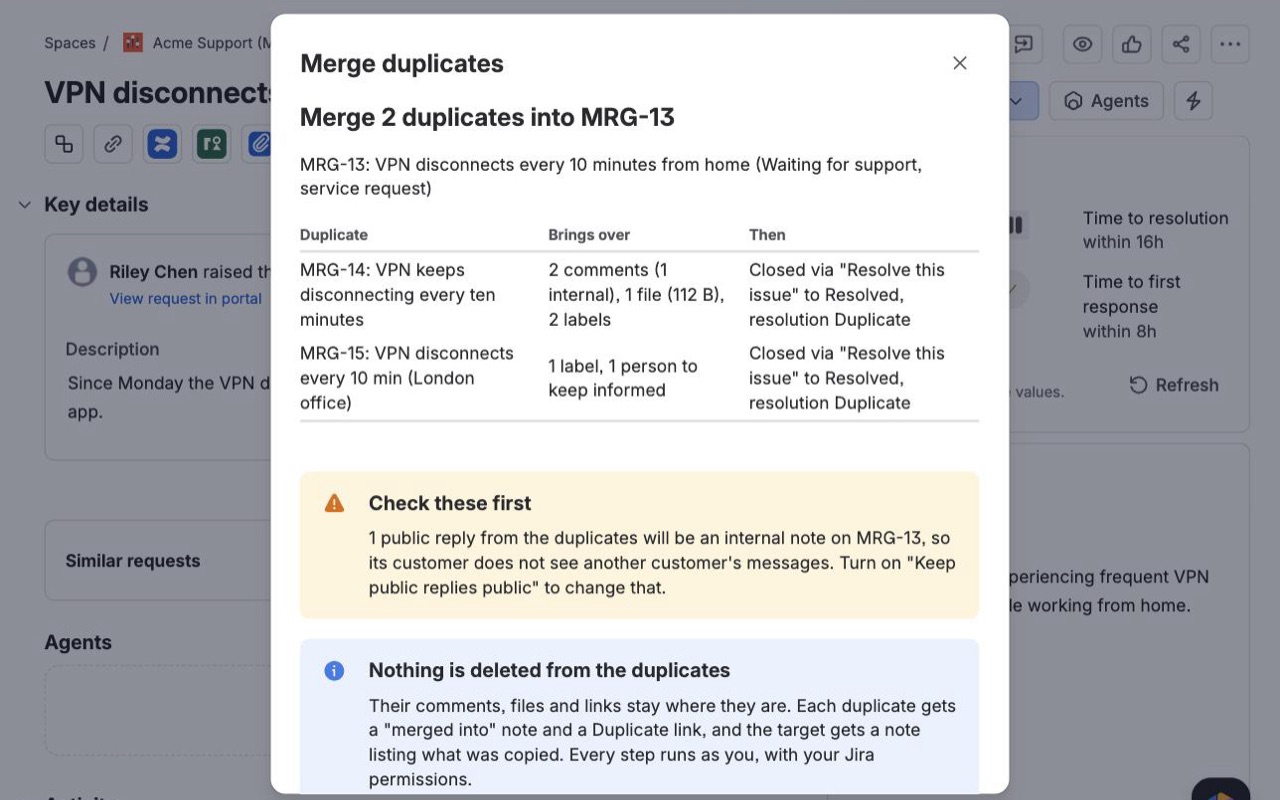
The preview shows what each duplicate brings over, how it will be closed, who gets added, what stays internal, and what Undo cannot reverse. Nothing changes until you press Merge.
Customers keep getting updates
The duplicate's reporter and participants join the request you keep, a public reply tells them where things continue, and both sides get a note and a Duplicate link. Undo for 24 hours.
How Mergewell works
- Install Mergewell from the Atlassian Marketplace on your Jira Cloud site. It adds a Merge duplicates item to every work item's "..." menu, a Merge duplicates page in each service project's sidebar, and an Apps > Mergewell page.
- Pick the work item to keep. From the "..." menu, choose Merge duplicates into HELP-12 (keep HELP-12) to pull others in, or Merge HELP-12 into another work item to fold this one into an older one. Mergewell lists up to 10 similar work items from the same project created in the last 180 days, each with a "% similar" score, and you can type more keys by hand.
- Click Next: choose what to copy. Comments come over as one combined comment per duplicate, one by one with an "Originally by" line, or not at all. Tick or untick the description, attachments, links to other work items, labels, watchers, the reporter and request participants, closing the duplicates, and the public reply to JSM customers.
- Click Preview. A table shows what each duplicate brings over (for example "4 comments (1 internal), 2 files (3.1 MB), 1 link") and how it will be closed, such as
Closed via "Done" to Done, resolution Duplicate. A yellow Check these first box lists problems found with your permissions, and a separate box lists what Undo cannot reverse. - Click Merge and keep the window open. Each step shows as "Step 3 of 14". A merge interrupted halfway resumes from History with Continue.
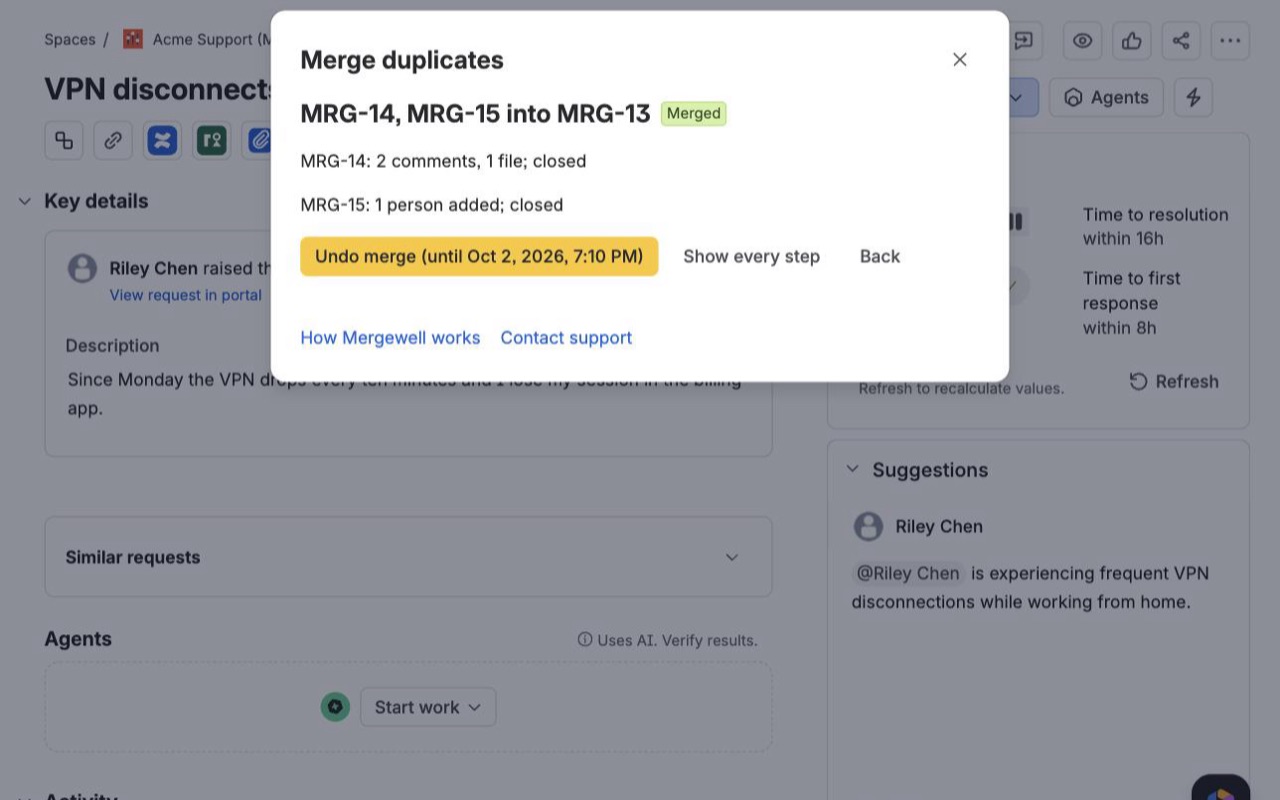
- Undo if you need to. The finished merge shows Undo merge (until ...). It removes what the merge added and reopens each duplicate.
Who it's for
Service desks where customers report the same problem twice
A customer emails the help desk, then submits the portal form an hour later. Open the service project's Merge duplicates page, pick the queue, click Find duplicate requests, and Mergewell groups requests with similar summaries, scoring two from the same customer within a week higher. The second customer becomes a request participant on the kept request, so they get its updates instead of silence.
Outages that arrive as twenty tickets
When the VPN goes down, the queue fills with "VPN not connecting" in a dozen spellings. Merge up to 20 duplicates into one request at once (admins can raise it to 50). Choose the combined comment option so watchers of the kept request get one email per duplicate, not one per copied comment.
Software teams cleaning up a backlog
Two people filed the same bug in different sprints. Use Apps > Mergewell > Find duplicates with a JQL search such as project = APP AND type = Bug AND statusCategory != Done, review the suggested groups and merge them, keeping the older work item with its history.
Admins who need a record
Every merge and undo lands in an audit log on Jira settings > Apps > Mergewell, with a Show as CSV button. Each merged duplicate also carries a property you can search with JQL: mergedInto = HELP-12.
Mergewell or Jira's own duplicate link
Jira Cloud has no merge command. What it has is the "duplicates" link type and a resolution named Duplicate: you link the two work items and close one. That is enough when nobody else is waiting on the duplicate. It leaves the comments, files and watchers behind, though, and on a service desk the duplicate's customer stops hearing anything, because they aren't on the request you kept.
Mergewell does the linking and closing too, and also copies the comments, description, attachments, links and labels, adds the watchers and customers to the kept work item, posts a public reply telling the customer where updates continue, and keeps a 24 hour Undo. If your team only needs the link, Jira's built-in link does that.
Limits and requirements
- Jira Cloud, including Jira Service Management. Mergewell runs on Atlassian's Forge platform and sends nothing to an outside server.
- Every step runs as the person merging, with that person's Jira permissions. If you can't add attachments to the target, the preview tells you files won't be copied.
- Sub-tasks and child work items stay on the duplicate. Field values such as priority, due date and custom fields are not merged.
- Copied comments are posted under your name, with the original author and time written in the comment, because Jira doesn't let an app post as someone else.
- Files larger than the admin's limit (20 MB by default, up to 50 MB) stay on the duplicate and are listed in the preview.
- Closing needs a workflow transition to a Done status that asks for no extra fields. If your site has no Duplicate resolution, the workflow's default resolution is used, and the preview says so.
Mergewell guides
Questions about Mergewell
What does Mergewell do?
Merge duplicate Jira issues and service requests into one. Preview every change, keep every customer informed, undo for 24 hours. Merge duplicates in Jira Cloud, including Jira Service Management. Comments, files, links and watchers move over; the reporter becomes a request participant on service requests, a watcher on other issues. Preview first, undo later.
What does Mergewell work with?
Mergewell works in Jira Cloud.
How much does Mergewell cost?
$5 a month for up to 10 users, or $50 a year. From 11 users: $1.04 per user a month, with lower rates for larger sites.
Is there a free trial?
Billed by Atlassian, with a 30-day free trial.
Where do I install Mergewell?
From the Atlassian Marketplace. Use the Install button on this page, or search for "Mergewell: Merge Duplicate Issues and Requests" there.
Who makes Mergewell?
Great Work LLC, an independent software company. Email hello@greatwork.company with any question about Mergewell and someone will answer.
Can I merge work items from different projects?
Yes. Type any keys in Merge into it, and the preview checks your permissions in the target's project. Comments restricted to a role that the target's project doesn't have are not copied, and the step says so.
Does merging delete the duplicate?
No. The duplicate keeps its comments, files and links, gets a "merged into" note and a Duplicate link, and is closed. Nothing is deleted.
Will everyone mentioned in the copied comments get notified again?
No. Mentions in copied comments become plain text, so copying a long thread doesn't ping everyone in it a second time.
Can a customer see another customer's replies after a merge?
Not by default. On a service request, copied public replies become internal notes on the kept request. Tick Keep public replies public (JSM) when every duplicate came from the same customer.
What can't Undo reverse?
Emails Jira already sent, the entries in each work item's History tab, comments someone edited after the merge, and duplicates someone moved after the merge. If the workflow has no transition straight back to the old status, Mergewell uses the reopen transition and tells you where the item landed.
Who can undo a merge, and for how long?
The person who merged and Jira admins, for 24 hours by default. Admins can set the window anywhere up to 168 hours.
Can I limit who is allowed to merge?
Yes. On Jira settings > Apps > Mergewell, pick one or more groups under Who may merge. Leave it empty to let anyone merge. Jira admins can always merge.
What happens if one step fails halfway?
A duplicate whose copy step failed is left open and its customer isn't told. The merge shows Some steps did not complete; fix the cause, usually a permission, and click Retry failed steps.
More Jira apps
 Remindwell
 Cutline
 Spillproof
 Changeleaf