



Spillproof Find passwords, API keys, card numbers and ID numbers in Confluence and Jira. Checksum-verified, masked, nothing leaves Atlassian.
Listed on the Atlassian Marketplace as “Spillproof: PII and Secret Scanner for Confluence and Jira”
From $5 a month for up to 10 users. Billed by Atlassian, with a 30-day free trial.
Scans pages, blog posts, comments and issues as they are saved, plus a full backfill. Luhn, mod 97 and token checksums cut false alarms. Redact or restrict in one click. Runs on Atlassian: your content is never sent anywhere.
What you get
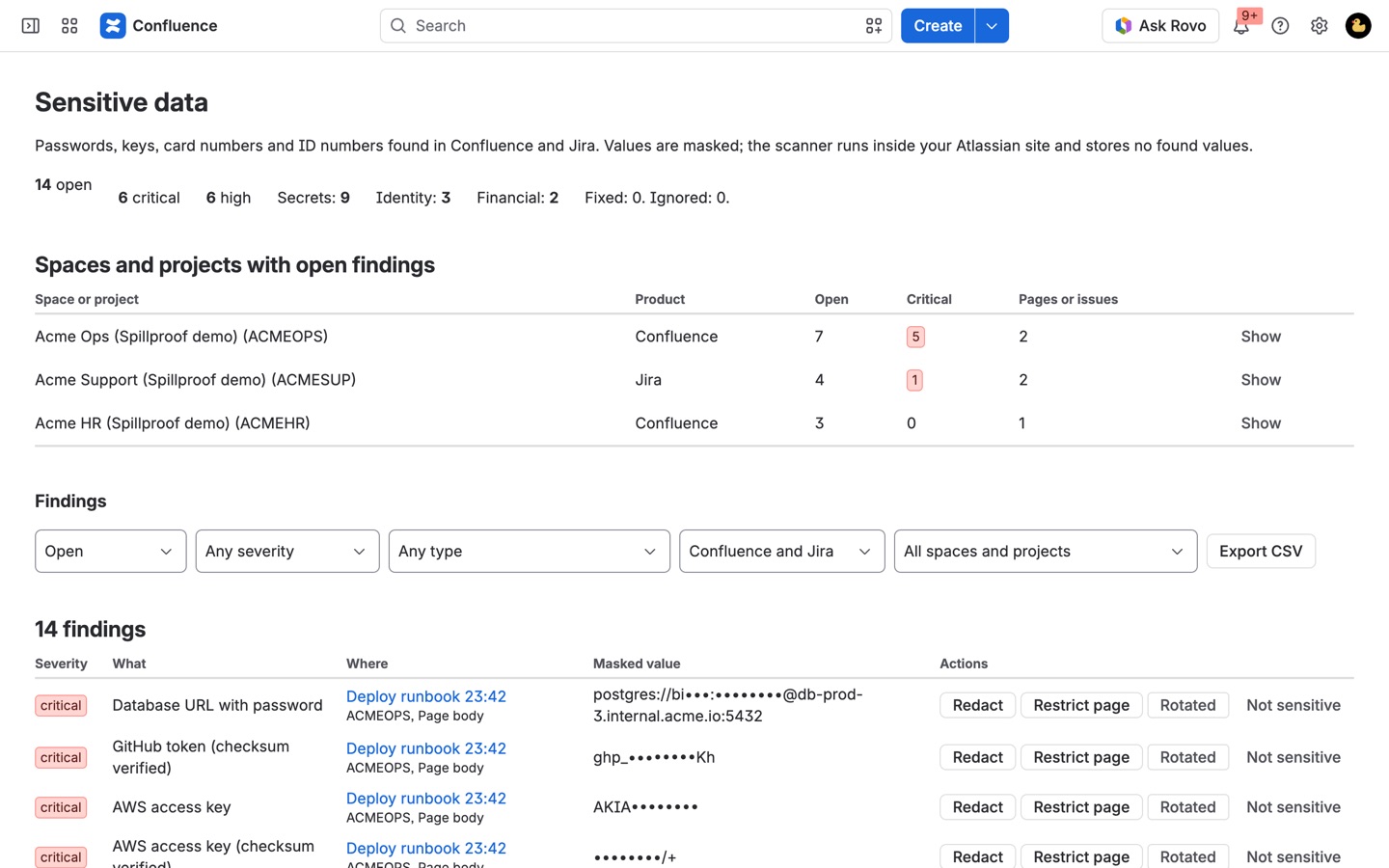
Only the spaces and projects with findings
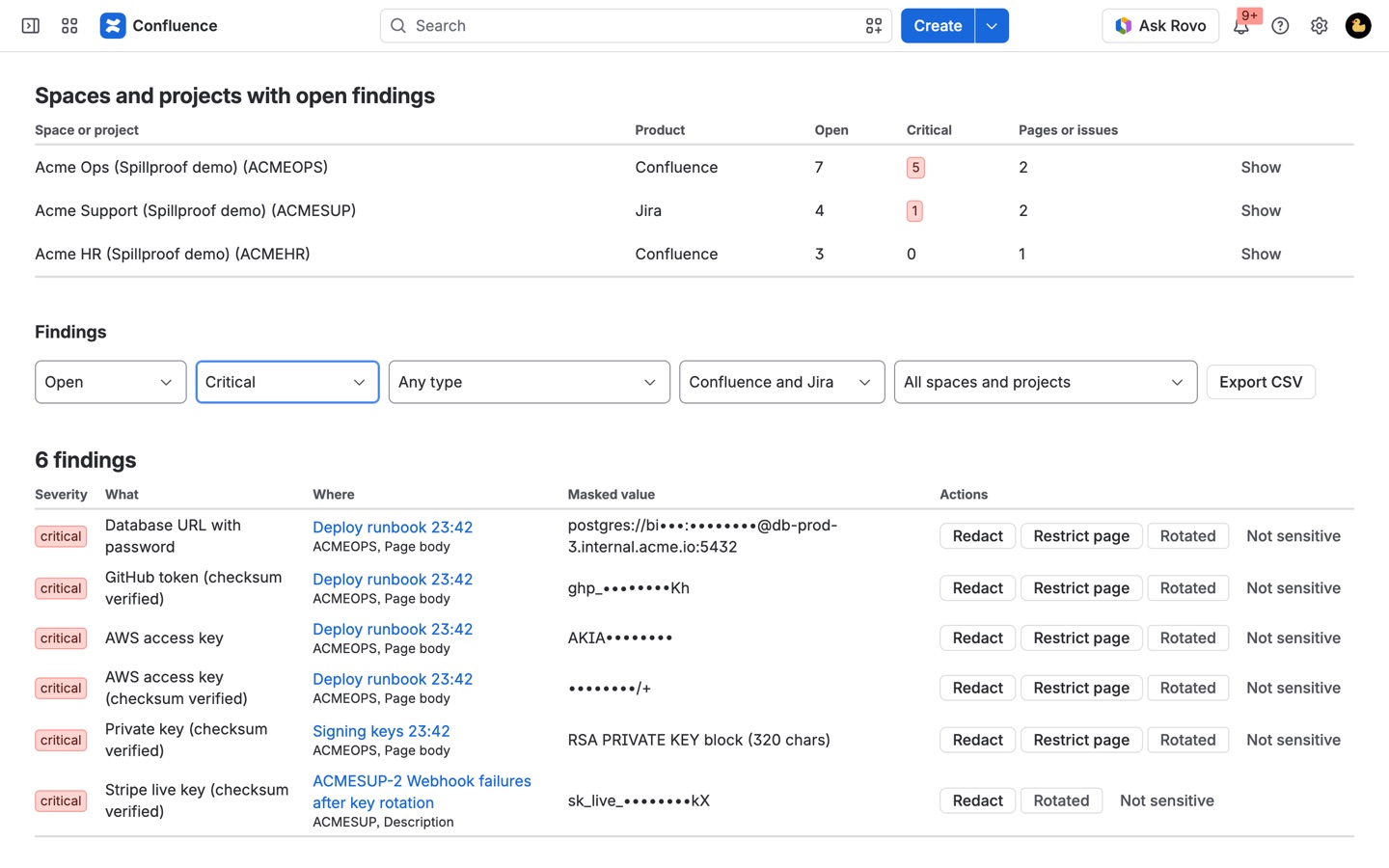
One dashboard for Confluence and Jira, sorted by critical findings first. Filter by severity, type, product, space or project, and export a masked CSV for your audit.
Checksums, not guesses
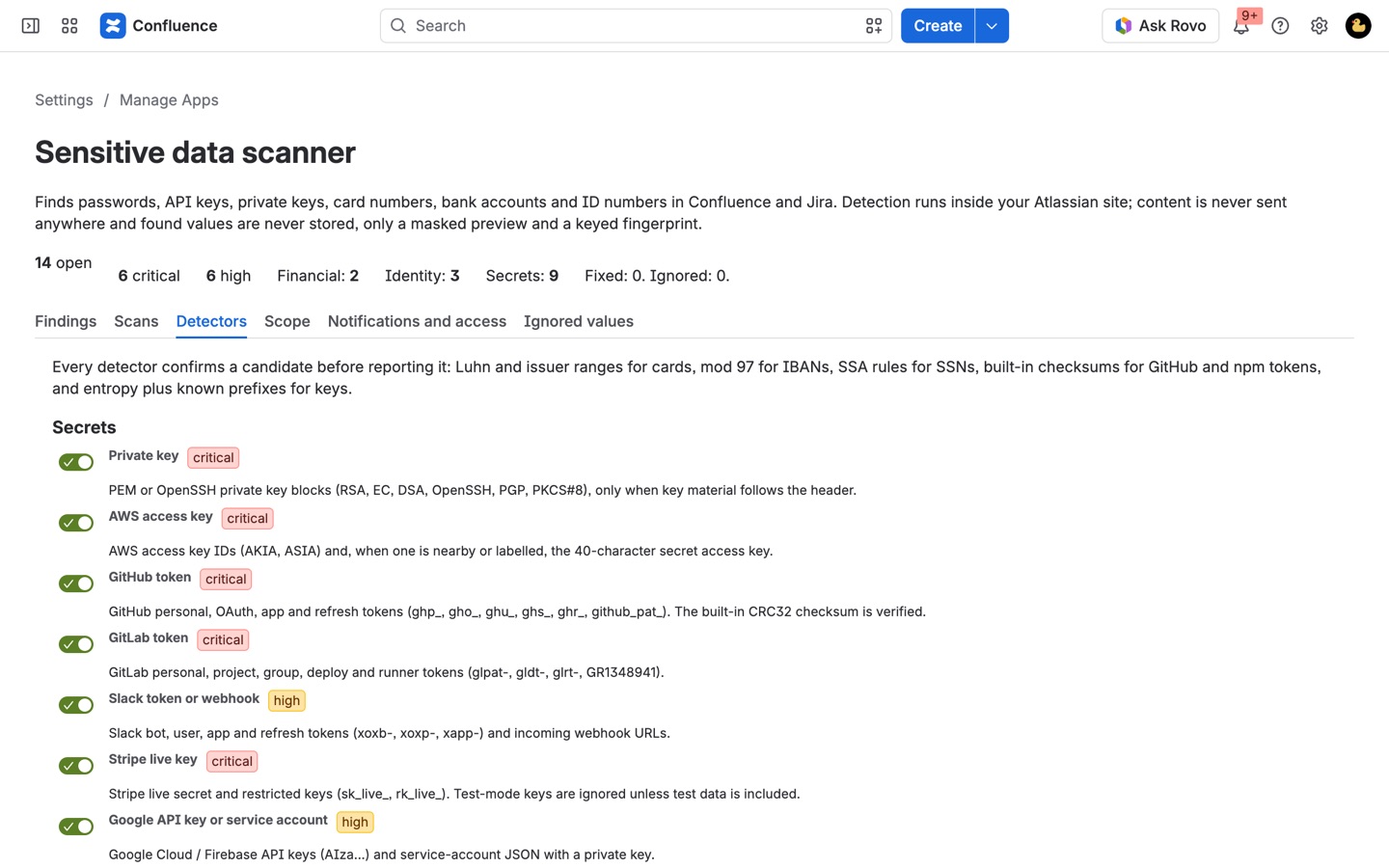
Cards must pass Luhn and a real issuer range, IBANs pass mod 97, GitHub tokens pass their CRC32 checksum. Phone numbers, order numbers, test cards and placeholders are skipped.
Redact or restrict in one click
Replace the value in place, or limit a page to you and its author. Mark findings rotated or not sensitive. The app stores only masked previews and keyed fingerprints.
How Spillproof works
- Install it in Confluence from the Atlassian Marketplace. To cover Jira as well, add Spillproof to Jira on the same site. One subscription covers both.
- Open Confluence settings > Spillproof (or Jira settings > Apps > Spillproof). Only Confluence and Jira admins see this page, and both products share the same settings and findings.
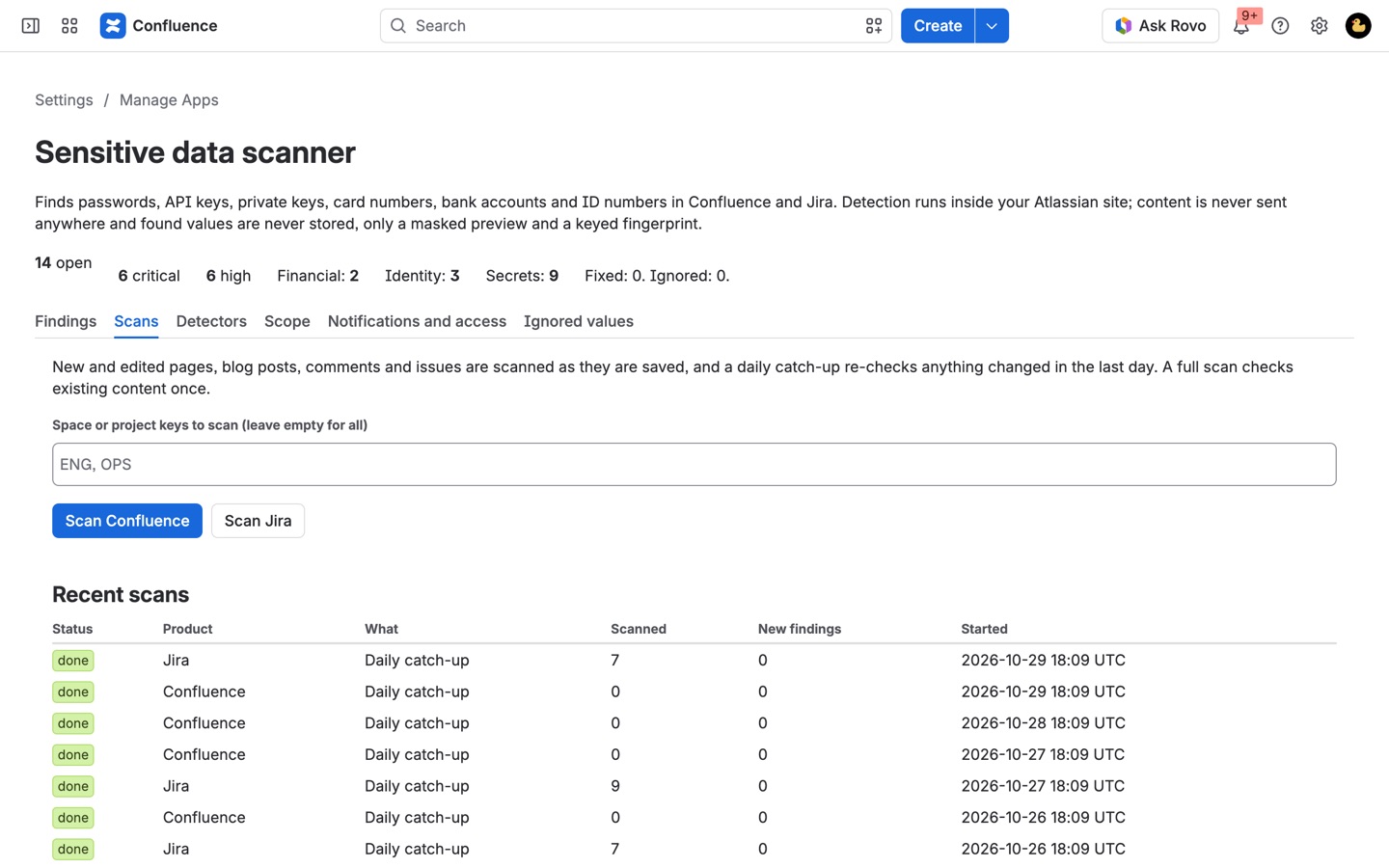
- Start the first full scan. On the Scans tab, click Scan Confluence and Scan Jira. Type space or project keys such as
ENG, OPSto scan only those, or leave the box empty for everything. Scans run in the background, so you can close the page; Recent scans shows how many items were checked and how many new findings each one turned up. - Leave it running. From then on every page, blog post, comment and issue is checked within seconds of being saved, and a daily catch-up re-checks anything changed in the last day.
- Work through the Findings tab. Open findings are listed by space and project, critical ones counted first. Filter by status, severity, type, product or space, and each row shows the masked value and where it sits, for example "Visa ending 4242" in a footer comment.
- Clean up each finding. Click Redact to swap the value for
[redacted <type>]in the current text, Restrict page to limit a Confluence page to you and its author, Rotated or Fixed once it's dealt with, or Not sensitive to stop reporting that exact value anywhere.
Who it's for
Security teams on sites without Atlassian Guard Premium
Atlassian's own sensitive-data detection, Guard Detect, comes with an Atlassian Guard Premium subscription for the organization. Spillproof gives a team that doesn't have it the same kind of watch over credentials, card numbers and ID numbers in Confluence and Jira, billed through the Marketplace on the one site.
Engineering teams that paste config into runbooks
Runbooks, incident timelines and "how to connect to staging" pages collect database URLs with passwords, AWS keys and service-account JSON. Spillproof reads code blocks and link targets too, and flags private keys, cloud keys and tokens as critical so they're the first thing on the list.
Support and finance teams handling customer data
Customers paste card numbers into Jira Service Management requests and agents copy them into comments. The card detector only reports numbers that pass the Luhn check and fit a real issuer's range and length, so order numbers and phone numbers don't fill the list.
HR and people teams
Onboarding pages and HR tickets pick up US Social Security numbers, UK National Insurance numbers, Canadian SINs and passport numbers. Each one is checked against its numbering rules or a nearby label before it's reported.
Spillproof or Atlassian Guard Detect
Guard Detect is the right choice if you already pay for Guard Premium and want one tool across every Atlassian product, or if you need new file uploads scanned: Spillproof doesn't read attachments. Spillproof fits when you want detection on one Confluence and Jira site without an organization-wide plan, and when you want cleanup buttons, a masked CSV export and a JQL search of affected issues in the same place.
Limits and requirements
- Confluence Cloud is required; Jira Cloud is optional and covered by the same subscription.
- Not scanned: attachments, whiteboards, databases, page history, Jira issue history, labels, space descriptions and templates.
- Redacting changes only the current text. Earlier Confluence page versions and Jira's History tab still hold the old value, so passwords and keys should be rotated.
- Email addresses and phone numbers are off by default; turn them on under Detectors if you need them.
- Background scanning pauses if the subscription lapses.
Spillproof guides
Questions about Spillproof
What does Spillproof do?
Find passwords, API keys, card numbers and ID numbers in Confluence and Jira. Checksum-verified, masked, nothing leaves Atlassian. Scans pages, blog posts, comments and issues as they are saved, plus a full backfill. Luhn, mod 97 and token checksums cut false alarms. Redact or restrict in one click. Runs on Atlassian: your content is never sent anywhere.
What does Spillproof work with?
Spillproof works in Confluence and Jira Cloud.
How much does Spillproof cost?
$5 a month for up to 10 users, or $50 a year. From 11 users: $1.75 per user a month, with lower rates for larger sites.
Is there a free trial?
Billed by Atlassian, with a 30-day free trial.
Where do I install Spillproof?
From the Atlassian Marketplace. Use the Install button on this page, or search for "Spillproof: PII and Secret Scanner for Confluence and Jira" there.
Who makes Spillproof?
Great Work LLC, an independent software company. Email hello@greatwork.company with any question about Spillproof and someone will answer.
Does Spillproof scan content that existed before I installed it?
Yes, once you run a full scan from the Scans tab. Until then it only checks what's created or edited after install.
Can people who aren't admins see the findings?
Admins pick reviewers under Notifications and access, and those people get the Apps > Spillproof dashboard. Anyone else who can see a page or issue can open Spillproof data check from its "..." menu to see masked findings for that one item and click Scan now.
Will it flag test card numbers and example keys from documentation?
No. Published test cards, documentation IBANs and Stripe test keys are skipped unless you tick Also report published test card numbers, documentation IBANs and Stripe test keys on the Detectors tab.
Can I add my own patterns, like employee IDs?
Yes. Under Custom patterns click Add a pattern and enter a regular expression such as EMP-(\d{6}). If the pattern has a group in brackets, only the group counts as the sensitive value.
Can I keep a space or project out of the scan?
Yes. On the Scope tab, list the Confluence space keys and Jira project keys to skip. Their open findings close when you click Save settings.
Does Spillproof store the values it finds?
No. It keeps a masked preview and a fingerprint made with a key generated for your site, so it can recognise the same value again without holding it. The CSV export has masked values only.
Can I get a weekly summary?
Yes. Turn on Weekly digest and choose either an email sent through Jira from an issue you pick, or a Confluence page that Spillproof rewrites each week so its watchers get Confluence's email.
How much does it cost?
$5 a month for up to 10 users or $50 a year, then $1.75 per user a month from 11 users, with lower rates on larger sites. Atlassian bills it and gives a 30-day free trial.
More Jira apps
 Stillframe
 Remindwell
 Tracestitch
 Mergewell