



Lessonwell Student courses for Thinkific and Teachable: progress and access on the ticket. From $99 a month.
From $99 a month per Zendesk account. 14-day free trial (Zendesk asks for a card at install). Billed monthly by Zendesk. No free plan.
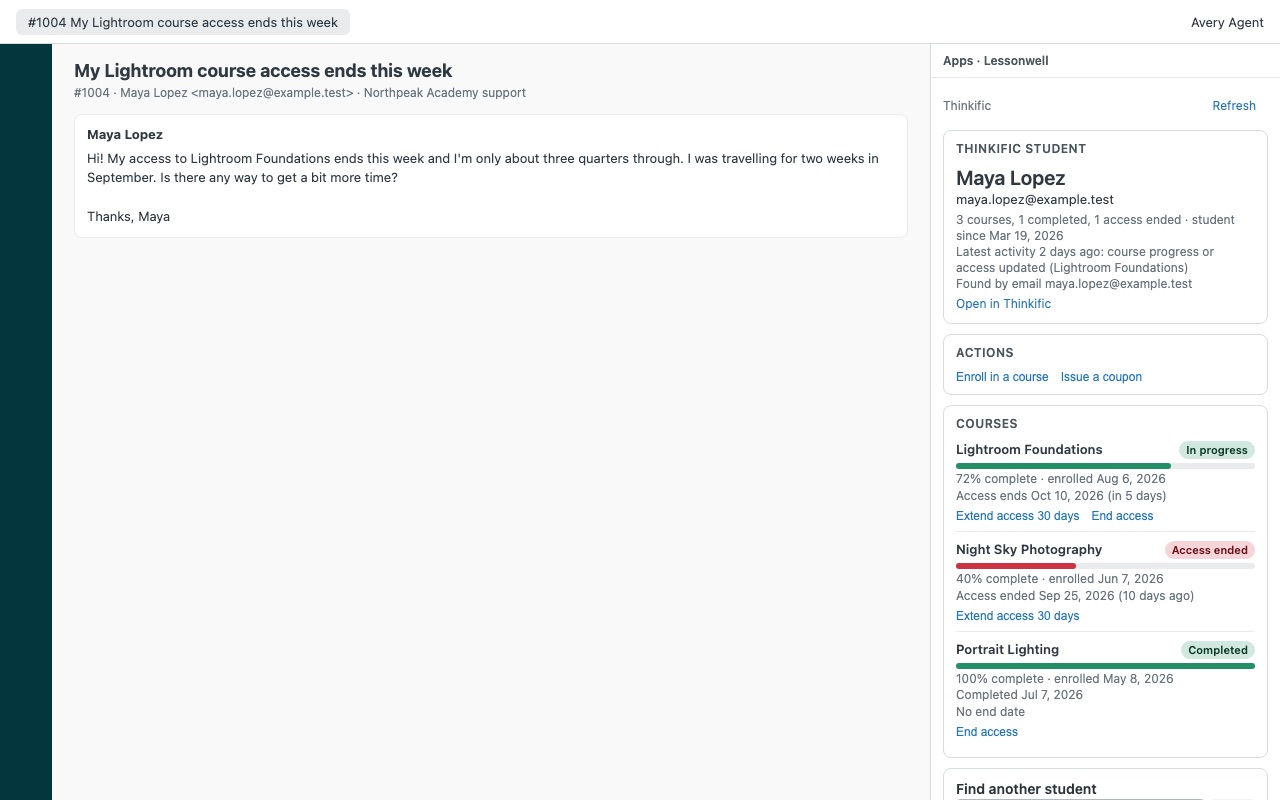
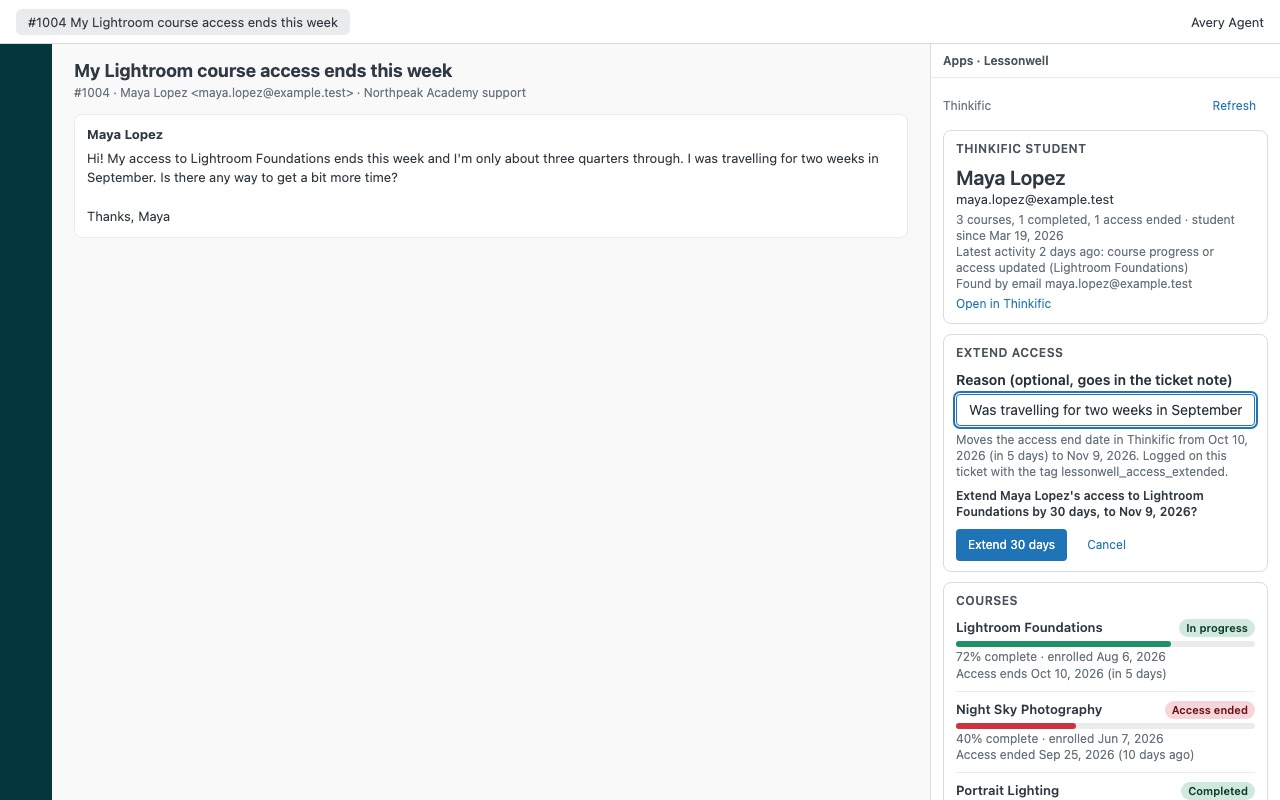
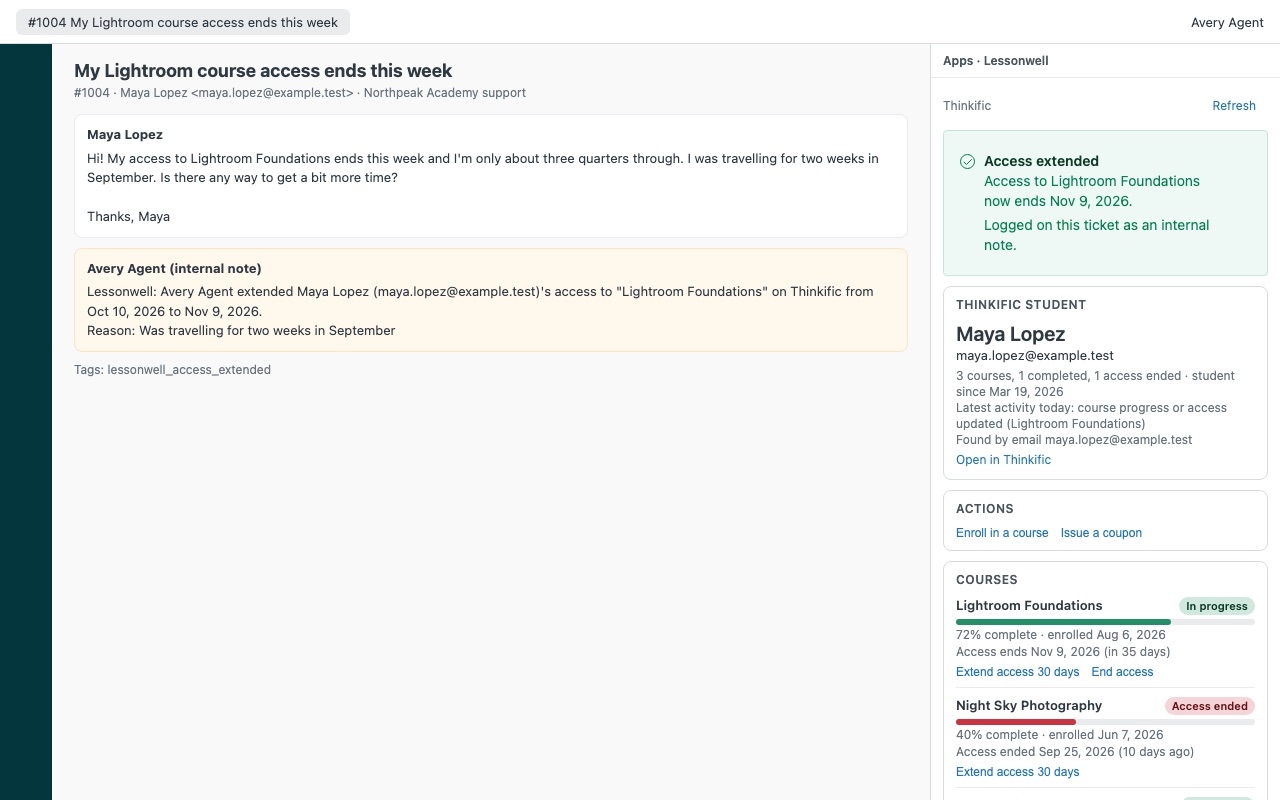
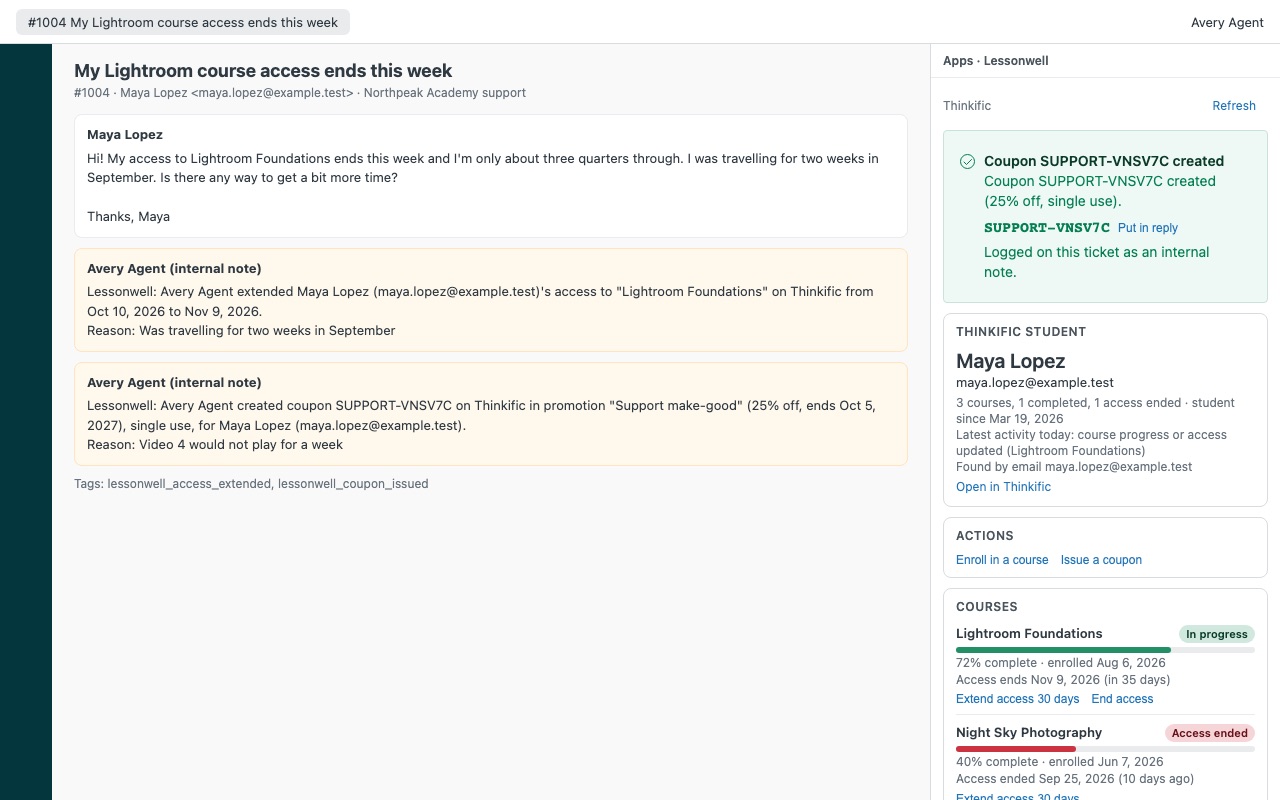
The student behind the ticket, without handing agents your course admin. Lessonwell shows the requester's Thinkific or Teachable student record next to every Zendesk ticket: every course with progress, when they enrolled and finished, when access ends, certificates, and what they bought, refunded or used a coupon on. Agents you allow can enroll the student in a course, extend or end access, unenroll, or create a single-use coupon, each one confirmed and logged on the ticket.
Lessonwell is built by Great Work LLC. It is not made or endorsed by Zendesk, Thinkific or Teachable. Thinkific and Teachable are trademarks of their owners.
What you get
The student in the sidebar
Found automatically by every verified email address on the requester's Zendesk profile, or looked up by email or student id. Lessonwell never searches by name and never lists other students. Every course: progress, enrolled and completed dates, and status.
Actions, confirmed and logged
Enroll in a course, with access for as many days as the agent chooses, or no end date. Extend access (Thinkific) by the number of days you set (30 by default).
Requirements
Thinkific on the Grow plan (or Pro + Growth) or above, or Teachable on the Growth plan or above. Those are the plans that include API access. Zendesk Support, any plan that allows Marketplace apps.
How Lessonwell works
- Create a key in your course platform. Thinkific: Settings > Code & analytics > API Access Tokens > Add API access token (older plans may only have the legacy API key). Teachable, as the school owner: Settings > API > Create API Key.
- Install Lessonwell from the Zendesk Marketplace, set Course platform to
thinkificorteachableand paste the token or key. Zendesk keeps it as a secure setting and only sends it toapi.thinkific.comordevelopers.teachable.com. - Choose who may act. Who may take actions is
agent(everyone) by default. Narrow it toadmin, custom role ids orgroup:<id>, and switch off any action support shouldn't take. - Open a ticket. Lessonwell looks the student up by exact email: the requester's primary address first, then the other verified addresses on their Zendesk profile.
- Read the student record. Every course with a progress bar, enrolled and completed dates and a status (in progress, not started, free trial, access ended, completed or unenrolled). On Thinkific, when access ends. On Teachable, certificates and the latest 20 purchases with refunds, chargebacks and the coupon used.
- Act from the ticket. Enroll in a course, extend or end access (Thinkific), unenroll (Teachable) or issue a single-use coupon (Thinkific). Each action asks for confirmation, then writes an internal note and a
lessonwell_*tag.
Who it's for
Course businesses with a support inbox
"I bought the course but can't get in" and "my access expired" are routine tickets. The agent sees the enrollments, the dates and the status next to the conversation instead of logging in to the school admin.
Teams that don't want to hand out admin seats
A course site admin login can change prices and delete courses. Lessonwell gives agents only the student tools you switch on, by role or group, and everyone else sees the record read-only.
Teachable schools that see refunds and chargebacks
Purchases show paid, refunded, partly refunded or chargeback next to the courses, so an agent knows the history before re-enrolling someone.
What you need
- Zendesk Support on any plan that allows Marketplace apps, and an admin to install it.
- Thinkific on Grow, Pro + Growth or above, or Teachable on Growth or above. Those plans include API access.
- A Thinkific API Access Token (or legacy API key plus your Thinkific subdomain), or a Teachable API key created by the school owner.
- For coupons, a Thinkific coupon promotion you set up once with the discount, courses and end date support may give.
Lessonwell guides
Questions about Lessonwell
What does Lessonwell do?
Student courses for Thinkific and Teachable: progress and access on the ticket. From $99 a month.
What does Lessonwell work with?
Lessonwell works in Zendesk Support.
How much does Lessonwell cost?
Team: $99 a month per Zendesk account, up to 12 agents. Scale: $8 a month per agent.
Is there a free trial?
14-day free trial (Zendesk asks for a card at install). Billed monthly by Zendesk. No free plan.
Where do I install Lessonwell?
From the Zendesk Marketplace. Use the Install button on this page, or search for "Lessonwell" there.
Who makes Lessonwell?
Great Work LLC, an independent software company. Email hello@greatwork.company with any question about Lessonwell and someone will answer.
Does Lessonwell copy my student list anywhere?
No. It reads only the student the agent is looking at, plus your course names for the enroll picker, while the sidebar is open. There is no Great Work server, nothing is exported and nothing is stored outside Zendesk and your course platform.
Can agents see other students or search by name?
No. Lessonwell matches by exact email or student id only, and never lists other students.
Does it work with Kajabi?
Not today. Kajabi's API would put a session token in the agent's browser, so Lessonwell doesn't call it.
Can it show a Thinkific student's orders?
No. Thinkific's API can't list one student's orders without paging through every customer's, so Lessonwell leaves orders out. Purchases are shown for Teachable.
What happens if the platform doesn't answer during an action?
Each change is sent once. Lessonwell reads the student back: if the change is there it's logged as done, and if not the agent is asked to check before trying again.
What happens when I uninstall it?
The settings, including the stored key, are deleted. Internal notes and tags already on tickets stay. Revoke the "Zendesk Lessonwell" token or key in your course platform as well.
More Zendesk apps
 Lettercrest
 Larkwell
 Leverwell
 Lanewell