



Leverwell Advanced ticket actions: change requester, CCs, reply-from and computed fields. Preview and undo.
From $50 a month per Zendesk account. 14-day free trial (Zendesk asks for a card at install). Billed monthly by Zendesk. No free plan.
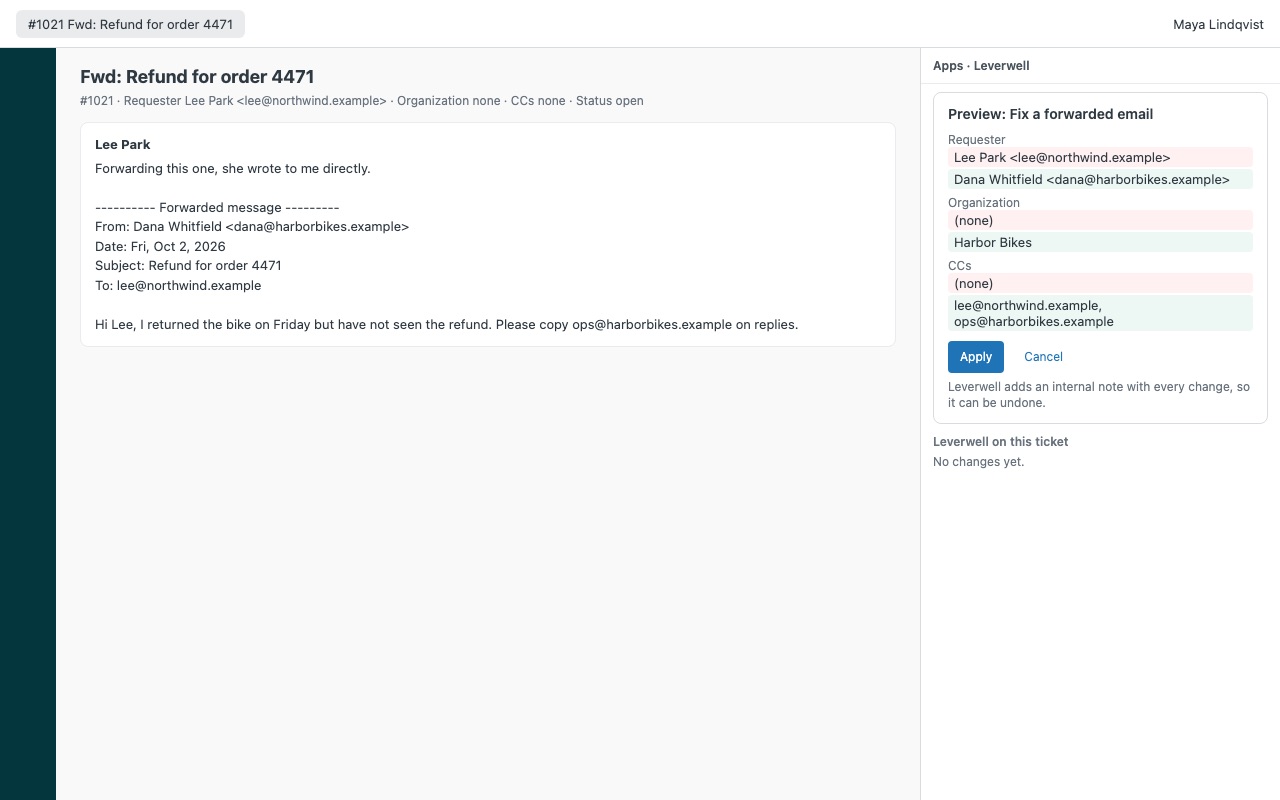
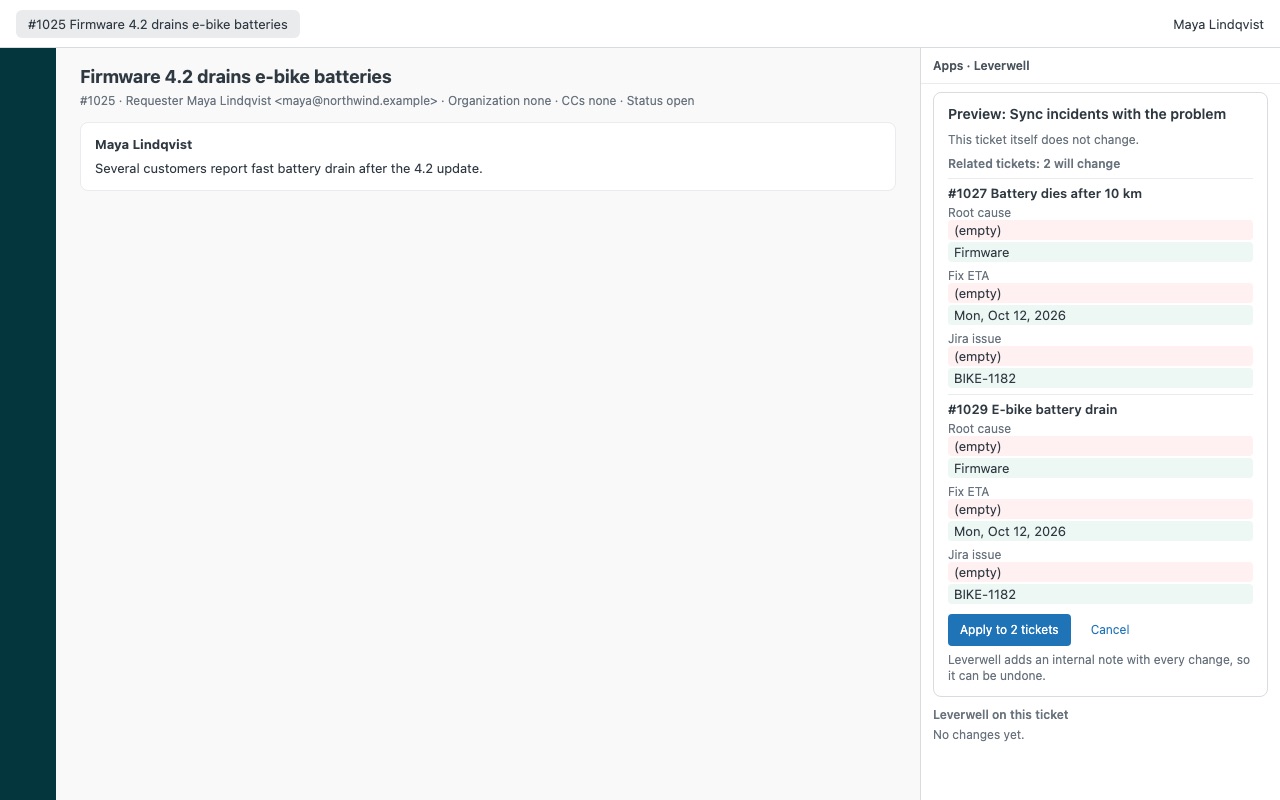
Macros for the changes macros can't make: requester, CCs, reply-from address and computed fields, with a preview and undo. A colleague forwards a customer email and the ticket belongs to the wrong person. A reply is about to go to an outside CC. A follow-up date should be three business days out, not three calendar days. Leverwell lets admins save these changes as action sets that agents run on a ticket in one click, after seeing exactly what will change, with an undo on every run.
Leverwell is built by Great Work LLC. It is not made or endorsed by Zendesk.
What you get
People on the ticket
Set the requester to the original sender of a forwarded email, the first CC or a fixed address. The old requester can stay on as a CC. Add CCs, end users included, from a list, the addresses in a message, or a requester or organization field. Your own domains and support addresses are never added.
Values macros can't calculate
Copy a value into a field from the requester, organization, another field or an incident's problem ticket. Set a date in business days, skipping weekends and your Zendesk schedule's holidays.
Preview first, undo anything
Nothing changes until you click Apply. The preview shows every field before and after, on this ticket and any related ticket. One safe write per ticket. Leverwell refuses to change a ticket edited after the preview, and adds an internal note saying what changed.
Runs on many tickets (Bulk plan)
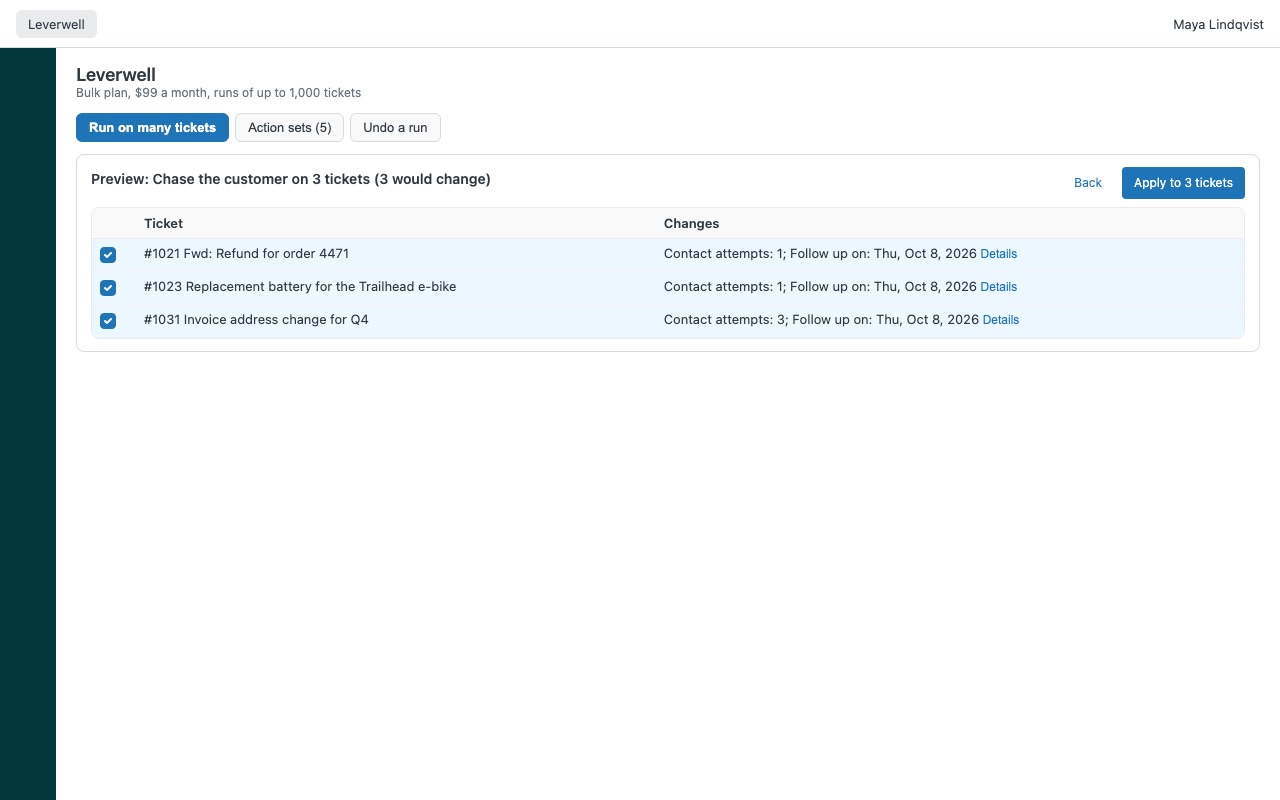
Run an action set on a view or a search, up to 1,000 tickets at a time, each previewed first. Undo the whole run right away, or later from its run id.
How Leverwell works
- Install Leverwell from the Zendesk Marketplace and choose a plan: Ticket for actions from the ticket sidebar, or Bulk to also run them on many tickets.
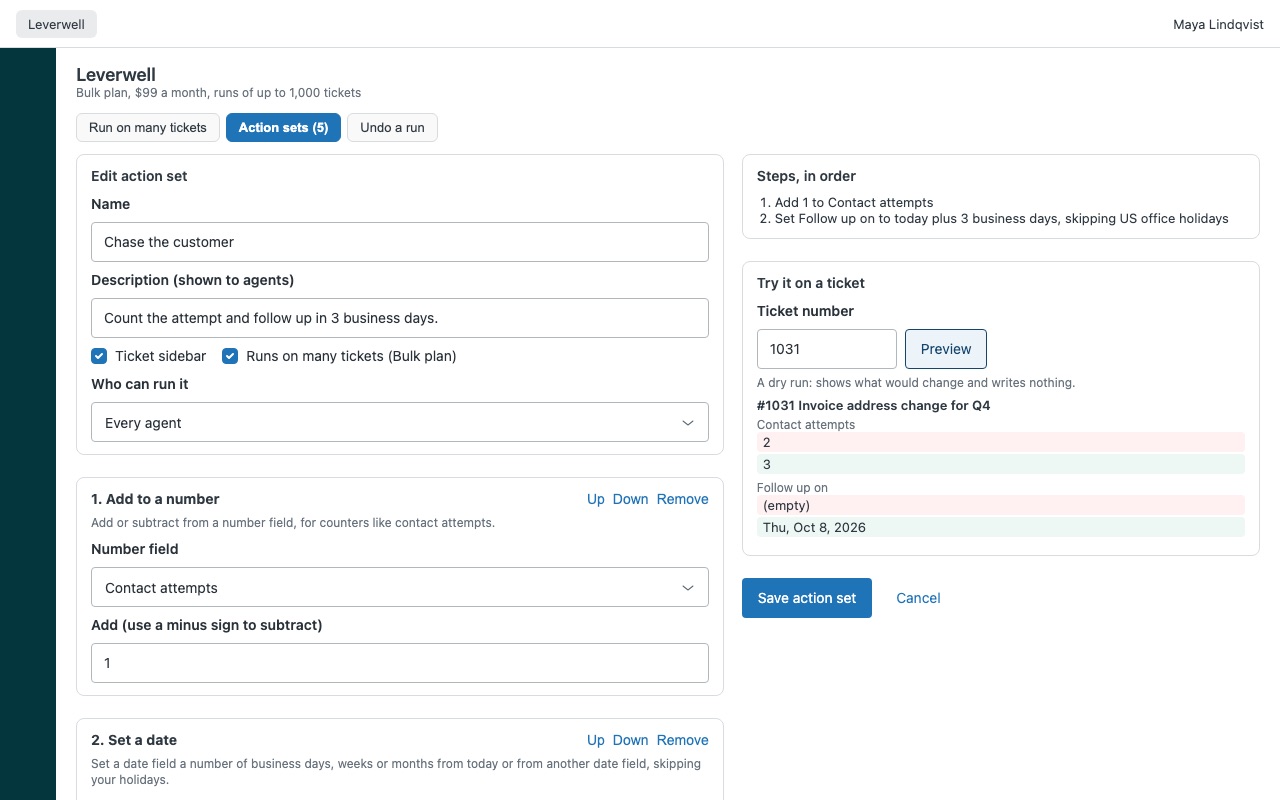
- Create an action set. An admin clicks the Leverwell icon in the left navigation bar, opens Action sets and clicks New action set, or Add the two examples ("Fix a forwarded email" and "Remove outside CCs").
- Add steps. Set requester, add or remove CCs, remove followers, set organization, set reply-from address, copy a value into a field, set a date in business days, add to a number, set text with placeholders, or copy fields to related tickets. Steps run in order, each seeing the result of the one before.
- Dry-run it. Under Try it on a ticket, enter a ticket number and click Preview. It shows what would change and writes nothing. Choose where the set is offered and Who can run it, then Save action set.
- Agents run it from the ticket. In the apps panel, an agent clicks Preview on a set, checks every value before and after, and clicks Apply. Leverwell writes the change and an internal note in one update.
- Undo when needed. Undo is on the result and in "Leverwell on this ticket". On the Bulk plan, Undo this run reverses a whole run, now or later from its run id.
Who it's for
Teams that get forwarded emails
A colleague forwards a customer's email and the ticket belongs to the colleague. "Set requester" picks the original sender from the From line of the first message and keeps the old requester as a CC.
Support teams that CC customers' contacts
Add CCs from a typed list, the addresses in a message, or an organization field such as the account's CSM, end users included. Remove everyone outside the requester's email domain before a reply goes out.
Admins whose macros stop at fixed values
Copy a value from the requester, organization or problem ticket, set a follow-up date three business days out using your schedule's holidays, count contact attempts, or prefix the subject with [{{organization.name}}] once.
What you need
- Zendesk Support, with an admin to install Leverwell and save action sets.
- Agents who can edit the tickets they run sets on. Leverwell acts as the signed-in agent, so an agent whose role can't add CCs can't add them with Leverwell either.
- The Bulk plan to apply action sets to a view or search, up to 1,000 tickets per run.
Leverwell guides
Questions about Leverwell
What does Leverwell do?
Advanced ticket actions: change requester, CCs, reply-from and computed fields. Preview and undo.
What does Leverwell work with?
Leverwell works in Zendesk Support.
How much does Leverwell cost?
Ticket: $50 a month per Zendesk account. Bulk: $99 a month per Zendesk account.
Is there a free trial?
14-day free trial (Zendesk asks for a card at install). Billed monthly by Zendesk. No free plan.
Where do I install Leverwell?
From the Zendesk Marketplace. Use the Install button on this page, or search for "Leverwell" there.
Who makes Leverwell?
Great Work LLC, an independent software company. Email hello@greatwork.company with any question about Leverwell and someone will answer.
Does Leverwell run automatically from triggers?
No. It runs when an agent or admin clicks Apply. It has no server, so nothing happens when nobody has it open.
Where are action sets and the undo record kept?
Action sets are saved in the app's settings. The record of each change is the internal note on the ticket, which ends with a compact copy of the before and after values that undo reads back.
What if someone edits the ticket between preview and apply?
Nothing is written. Leverwell asks the agent to preview again, so it never overwrites a change it didn't show.
Can I undo a change after someone else edited the same field?
Undo leaves that value alone and says so. Undo anyway overwrites it. If the Leverwell note was deleted or redacted, the change can no longer be undone from Leverwell.
Can it set any organization I choose?
Only organizations the requester belongs to, which is Zendesk's rule. Other tickets are left as they are, with a note in the preview.
What happens when I uninstall it?
The action sets are removed with the app. Tickets and the notes Leverwell wrote stay as they are.
More Zendesk apps
 Loyalwell
 Lettercrest
 Meterwell
 Lessonwell