


Foliowell Turn your own Word templates into finished PDFs or Word files from any workflow.
Listed on the HighLevel App Marketplace as “Foliowell: Word & PDF Documents”
Also for Jira, Webflow and Wix
$29 a month or $290 a year per business account. 14-day free trial, up to 50 documents.
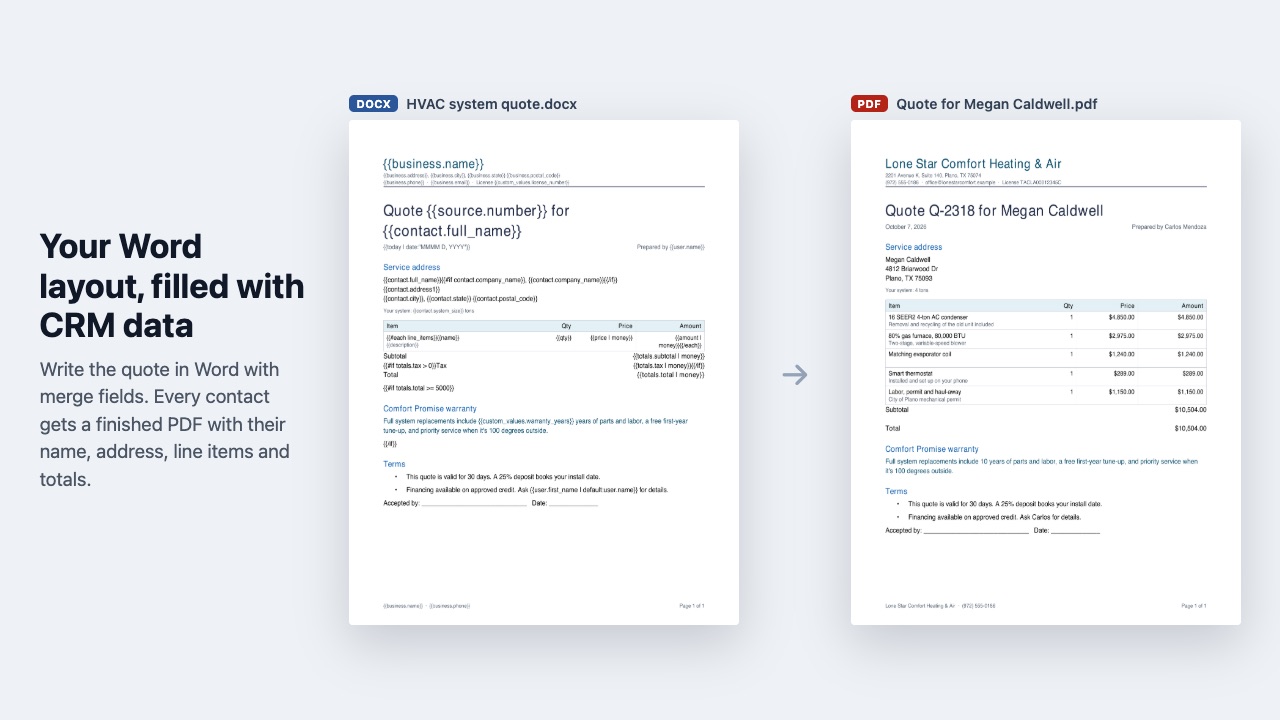
Foliowell makes the documents your business already sends, in the layout you already use. Design it in Word, put merge fields where the CRM data goes, upload it, and a workflow step fills it in for each contact and saves the result as a PDF or a Word file.
What you get
Your layout, not a template gallery
Use the letterhead, fonts, tables, logo, headers and footers you already have. There is no new editor to learn: if you can make it in Word or Google Docs, Foliowell can fill it. Upload a new version any time and every workflow uses it from then on.
All your CRM data
Contact fields, opportunity fields, your custom fields and custom values, the assigned team member, your business details, today's date and a running document number, written the way you already write merge fields: {{contact.first_name}}, {{opportunity.monetary_value | money}}, {{custom_values.license_number}}.
Line items and repeating rows
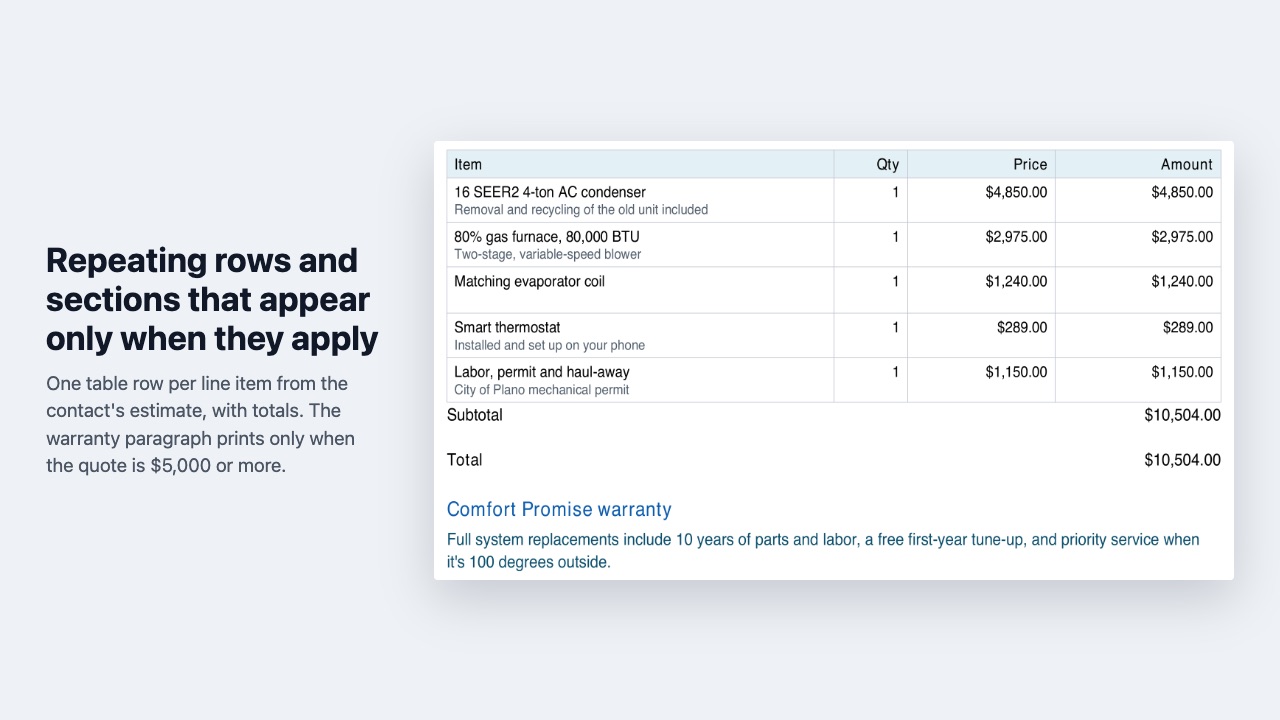
Pull the products and prices from the contact's latest estimate or invoice, or pass them in from the workflow, and one table row repeats per item, with subtotal, tax and total.
Sections that appear only when they apply
{{#if opportunity.monetary_value > 5000}} adds the warranty paragraph for big jobs, {{#if contact.tags contains "commercial"}} swaps in commercial terms. Combine conditions with and / or.
Saved where your team looks
Every document is saved to your CRM's media storage, and you choose what else happens: a note on the contact with the link, the file on a contact file field, an email to the contact with the document attached, or a text with the link. The link, file name and page count come back to the workflow for later steps, with Generated and Failed paths.
Try it before it goes live
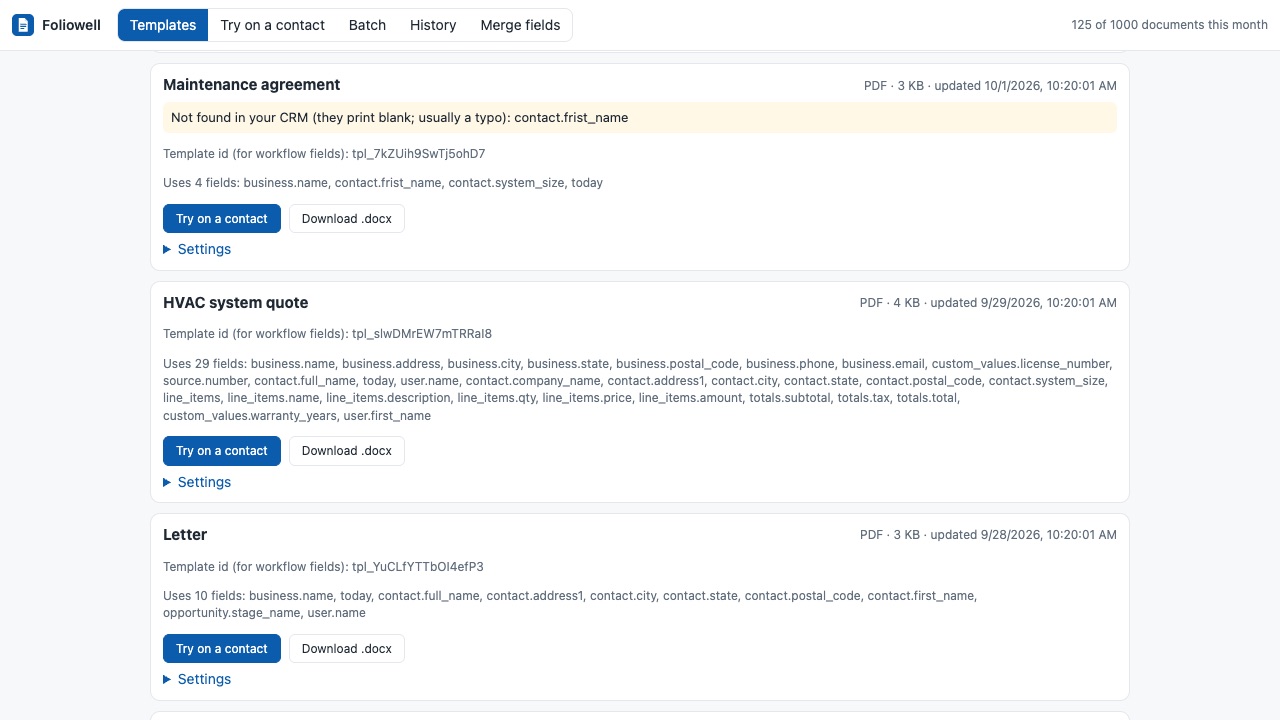
The template page checks every merge field against your CRM and flags typos, then fills the template with a real contact and downloads a test copy without saving anything.
Hundreds at once
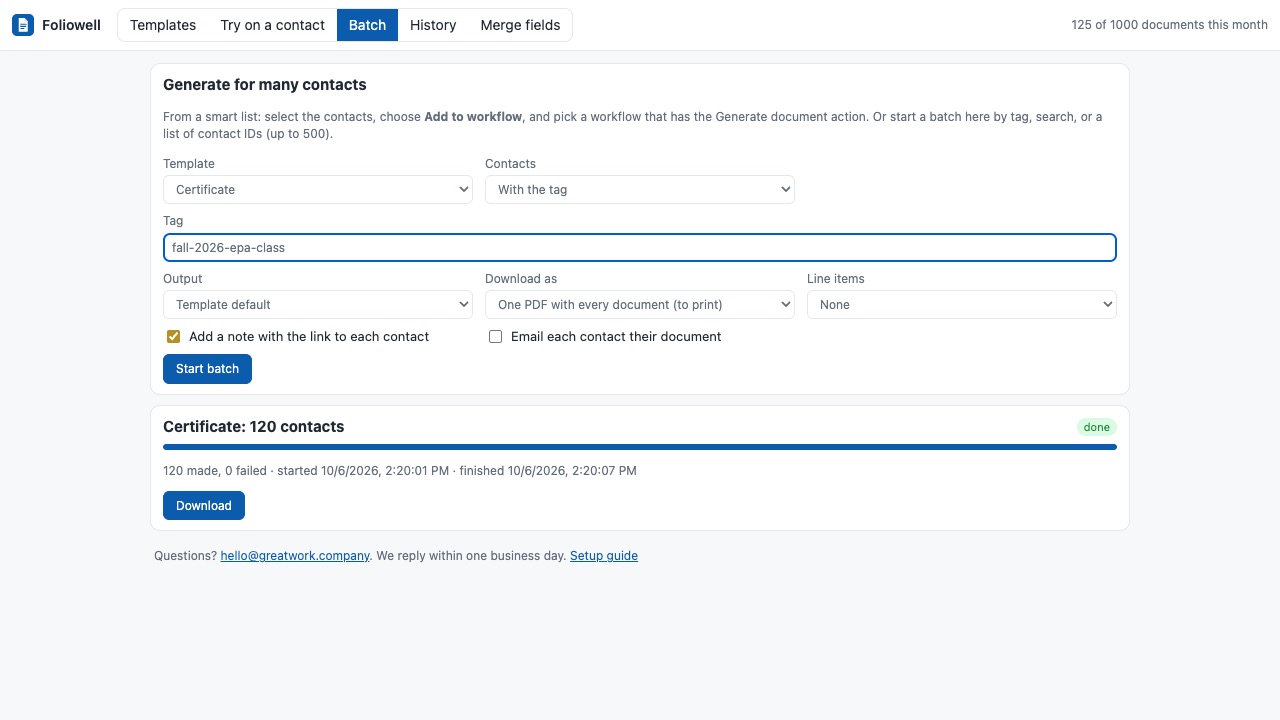
Start a batch for a tag, a search or a list of contacts, or add a smart list to a workflow, and get every document saved to its contact plus one combined PDF to print or a ZIP of files.
How Foliowell works
- Install Foliowell from the HighLevel App Marketplace into a sub-account and open it from the left menu.
- Make or pick a template. Lay the document out in Word, or in Google Docs and download it as .docx. Where data goes, type a merge field such as
{{contact.full_name}}. The Merge fields tab lists every field the sub-account has; click one to copy it. No template yet? Starter templates has a Quote with line items, a Certificate and a Letter to download and edit. - Upload it on the Templates tab (up to 5 MB). Foliowell reads every merge field and lists any the sub-account doesn't have, which is usually a typo. Set the default output (PDF or Word) and a file name pattern such as
Quote {{document.number}} {{contact.last_name}}. - Try it on a real contact. On Try on a contact, pick a contact, an opportunity and the line items, then Download a test copy. Nothing is saved and test copies don't count toward the plan.
- Add the Generate document action to a workflow. Choose the template, output, line items (none, the contact's latest estimate, latest invoice, or text you type) and what to do with the file: a note with the link, a contact file field, an email with the document attached, a text with the link.
- Branch on the result. The step has Generated and Failed paths and hands later steps
document_url,document_name,pagesandsaved_to. - Make many at once from the Batch tab or by adding a smart list's contacts to the workflow.
Who it's for
Contractors and home service companies
A quote, work order or warranty letter with the company's own letterhead, filled from the opportunity and the line items on the estimate already in the CRM, sent the moment the deal moves to a stage.
Coaches, trainers and schools
Certificates of completion and enrollment letters for everyone tagged as finished, printed from one combined PDF.
Agencies setting up client sub-accounts
A client brings the Word documents they already use. The agency adds merge fields, uploads them to the client's sub-account and wires them to the client's pipeline, with no new editor for the client to learn.
Anyone copying CRM data into Word by hand
Proposals, statements of work, welcome letters and renewal notices that today start with copy and paste from a contact record.
Foliowell or HighLevel's Documents & Contracts
HighLevel's own Documents & Contracts is built for documents the customer signs: you build the document in its editor and send it for e-signature. If the job is a contract that needs a signature, use that.
Foliowell is for documents that don't need signing and should look exactly like your existing Word file: quotes with your table layout, certificates, letters, job sheets. It fills conditional sections ({{#if contact.tags contains "commercial"}}), repeats a table row per line item from an estimate or invoice, saves the file to the contact without sending anything if you prefer, and makes hundreds in one batch with a single printable PDF.
On a Wix site, the same job for orders, form entries and bookings is Foliowell for Wix.
Limits and requirements
- Templates are Word .docx files up to 5 MB.
- PDF output follows the Word layout but leaves out floating text boxes, shapes, charts and multi-column sections; the template check lists them. Word output keeps everything.
- PDFs use Helvetica, Times or Courier in place of your fonts, matched by style and width. Letters outside Western European alphabets, such as Cyrillic, Greek or Chinese, print as "?" in a PDF; Word output keeps them.
- A batch takes up to 500 contacts, and its combined PDF or ZIP stays downloadable for 24 hours.
- The plan includes 1,000 documents a month. When they run out, the step takes the Failed path with a message saying so.
Foliowell guides
Questions about Foliowell
What does Foliowell do?
Turn your own Word templates into finished PDFs or Word files from any workflow. Foliowell makes the documents your business already sends, in the layout you already use. Design it in Word, put merge fields where the CRM data goes, upload it, and a workflow step fills it in for each contact and saves the result as a PDF or a Word file.
What does Foliowell work with?
Foliowell works in HighLevel, including white-label HighLevel accounts.
How much does Foliowell cost?
$29 a month or $290 a year per business account, including 1,000 documents a month. Test copies don't count. Workflow actions from marketplace apps may also carry a small per-run platform fee in your CRM, separate from Foliowell's price. Emails and texts are sent through your CRM, so its usual messaging rates apply. Billed through the HighLevel App Marketplace.
Is there a free trial?
14-day free trial, up to 50 documents.
Where do I install Foliowell?
From the HighLevel App Marketplace. Use the Install button on this page, or search for "Foliowell: Word & PDF Documents" there.
Who makes Foliowell?
Great Work LLC, an independent software company. Email hello@greatwork.company with any question about Foliowell and someone will answer.
Where are the documents stored?
In the sub-account's own media storage, not on our server. A note on the contact links to each one unless you turn that off.
Can I email the document to the contact?
Yes. Turn on the email option in the action; the document goes as an attachment through the sub-account's own email, with a subject and message that can use merge fields. A text with the link works the same way.
What merge fields can I use?
Contact and opportunity fields, your custom fields by key, custom values ({{custom_values.license_number}}), the assigned user, business details, {{today}} and a running {{document.number}}. Filters format them: | money, | date:"MMMM D, YYYY", | upper, | default:"-".
Which opportunity does it use?
The workflow's opportunity when there is one, otherwise the contact's latest open opportunity, or an opportunity id you pass in.
Can I change a template after workflows use it?
Yes. Upload the new version and every workflow uses it from then on.
What if a merge field is empty?
It prints nothing, or the fallback you set with | default:"...". Wrap a whole paragraph in {{#if contact.company_name}} ... {{/if}} to drop it when the field is empty.
What happens when I disconnect?
Settings > Disconnect, or uninstalling, deletes your templates and history from our server right away. Documents already saved to contacts stay in your CRM.
More HighLevel apps
 Kioskwell
 Exhibitwell
 Okaygate
 Plumbwell