


Exhibitwell When a payment is disputed, your CRM already holds the proof. Exhibitwell puts it in one pack before the deadline.
Listed on the HighLevel App Marketplace as “Exhibitwell: Chargeback Evidence Packs”
$99 a month or $990 a year per business account. 14-day free trial.
A disputed payment gives you about a week to answer, and the answer is scattered: the checkout, the signed agreement, the policy they ticked, the calls they showed up to, the messages where they said thanks. Exhibitwell gathers it from your CRM into one clean, dated PDF and tells you what is strong and what is missing for the reason the customer gave.
What you get
Disputes arrive by themselves
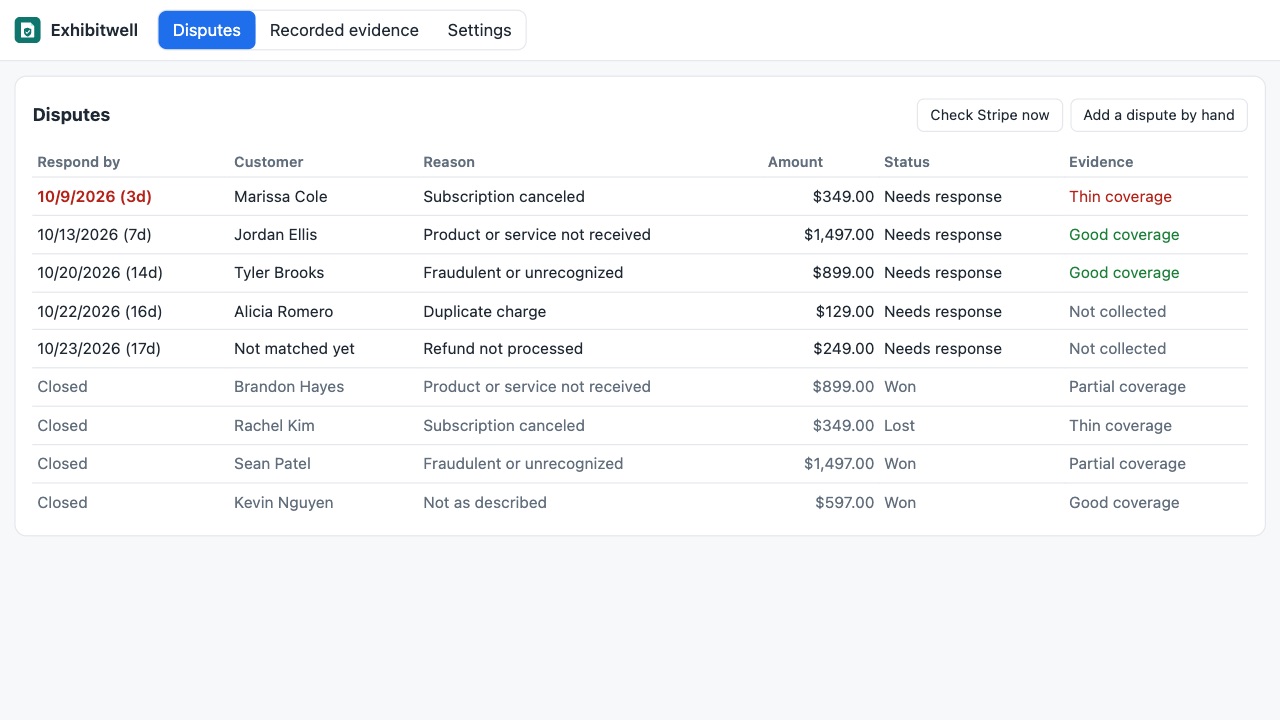
Connect your Stripe account with a restricted, read-only key and new disputes appear with their reason, amount and response deadline, matched to the customer and the payment in your CRM. Using a different processor? Add the dispute by hand in a few clicks; everything else works the same.
The evidence your CRM already has, in one pack
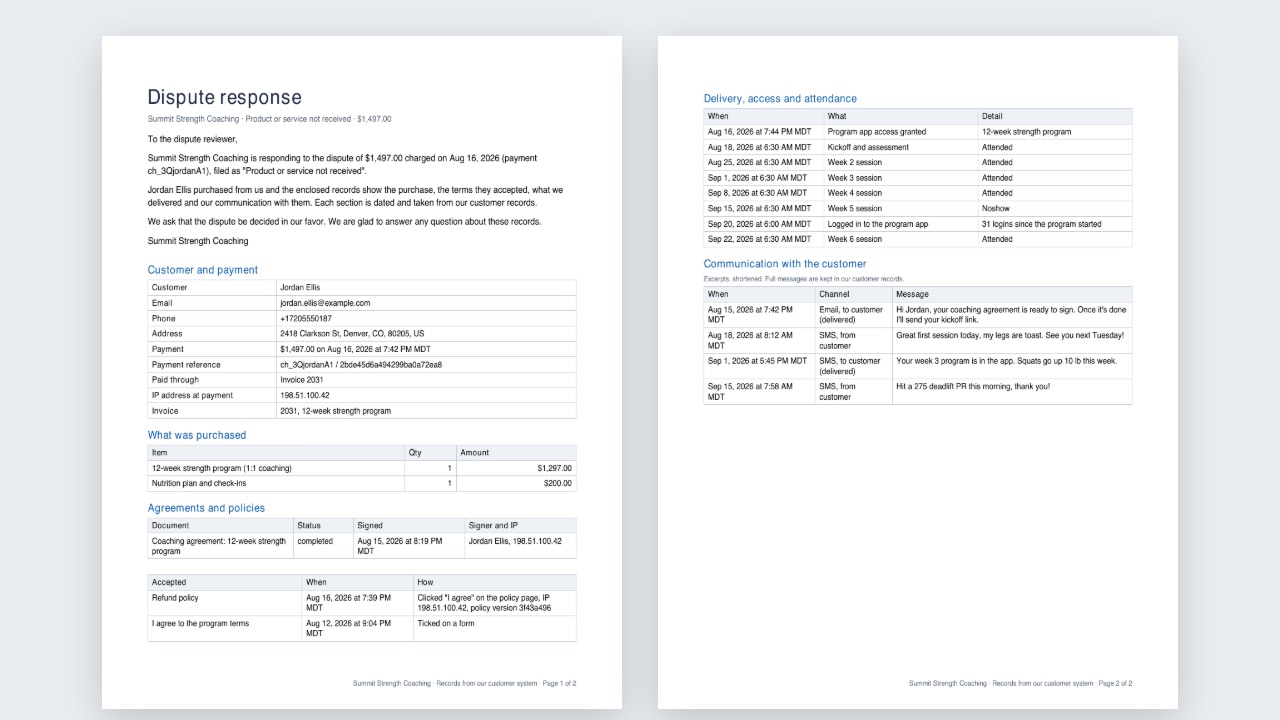
- The payment, what was bought (order or invoice lines) and the IP address it was paid from. Signed agreements with the signer's IP address and signing time, and documents your team sent. Policies the customer accepted: through a signed "I agree" link the app sends from your workflows (time, IP, exact policy version), or a terms checkbox on your forms. Appointments they attended, plus delivery and access milestones your workflows record: shipped, access granted, lessons completed, logins, service completed. Short, dated excerpts of your emails and texts with the customer around the purchase. Earlier payments by the same customer, for "I don't recognize this" disputes.
A checklist for each reason
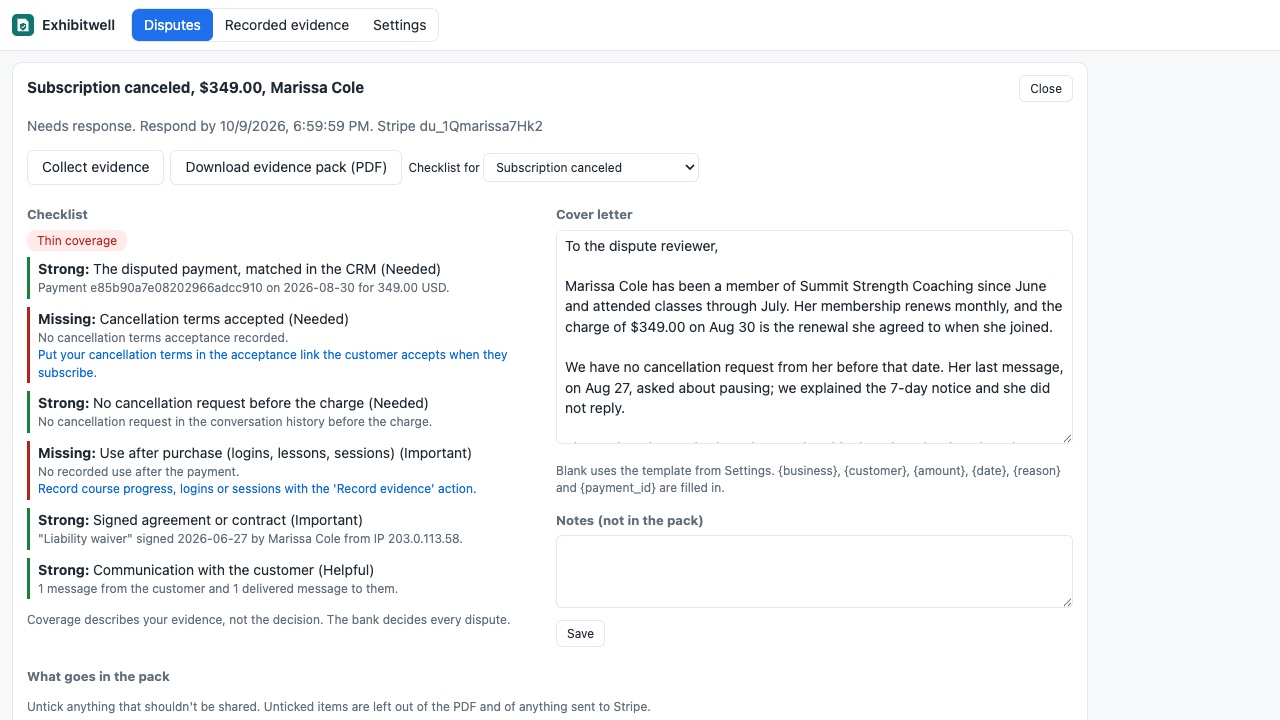
Fraudulent, product not received, not as described, subscription canceled, duplicate, refund not processed and general each get their own list: what the bank looks for, what you have, what is missing and how to fix it next time. If the customer asked to cancel before the charge, the checklist says so plainly.
You stay in control
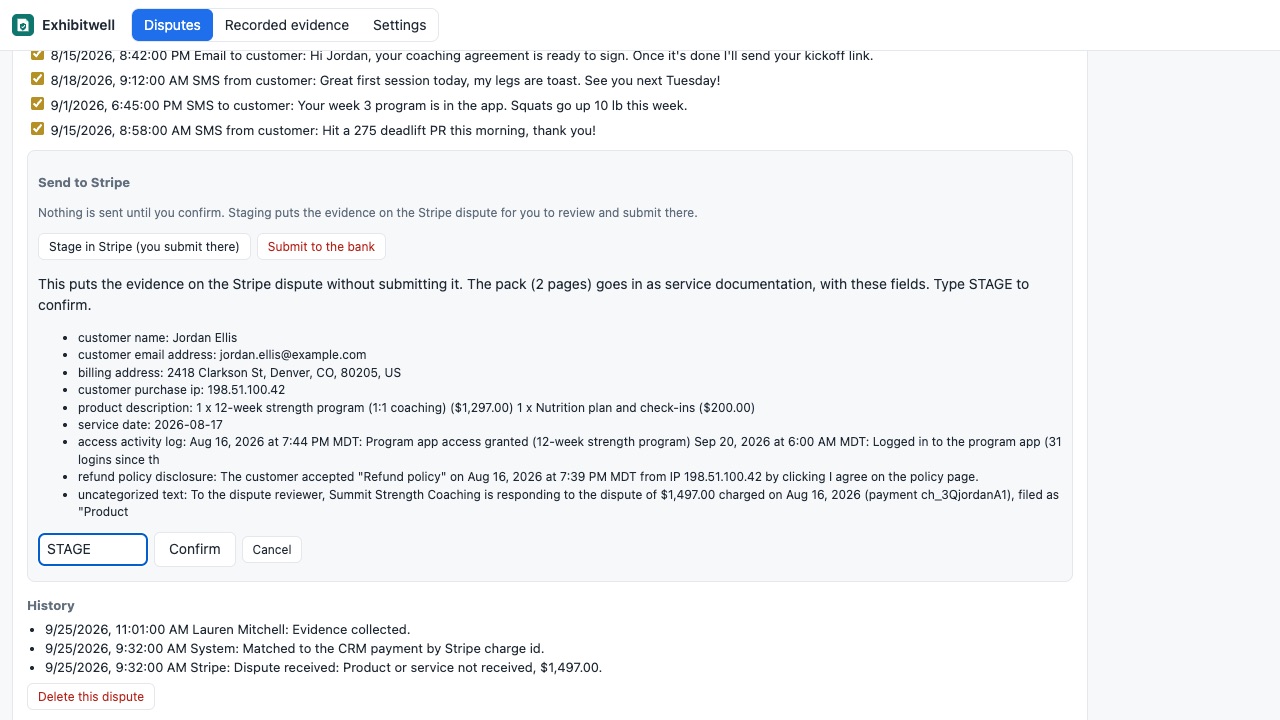
Untick anything you don't want shared. Edit the cover letter. Download the PDF and upload it anywhere. If you allow it, send the evidence to your Stripe dispute from the app: stage it for review, or submit it to the bank, always after you confirm. Nothing is ever sent automatically.
Never miss a deadline
Reminders 7, 3 and 1 days before the response is due (you choose), by email to the team members you pick, and three workflow triggers: Dispute opened, Evidence due soon, Dispute closed.
Built for evidence you collect before you need it
The "Record evidence" and "Get policy acceptance link" workflow steps turn your existing onboarding and delivery workflows into a dated record, so the next pack is stronger.
Private by design
Restricted keys only, sealed at rest and sent only to Stripe. Message excerpts are short and card-like numbers are removed. Data is encrypted, kept only as long as you choose, and deleted when you disconnect.
How Exhibitwell works
- Install Exhibitwell from the HighLevel App Marketplace into a sub-account and open it from the left menu. Only sub-account admins can open it, because disputes show customer details and messages.
- Connect Stripe with a restricted key. In Stripe, create a restricted key with Disputes: Read (and Charges: Read for better matching), then paste it under Settings > Stripe. Full secret keys starting
sk_are refused. For another processor, click Add a dispute by hand when one arrives. - Add your policies under Policies customers accept: refund policy, cancellation terms, terms of service.
- Add two workflow steps to collect evidence before you need it: Get policy acceptance link at checkout or onboarding, and Record evidence in delivery workflows (shipped, access granted, lesson completed, logged in, service completed and more).
- A dispute arrives with its reason, amount and Respond by date, matched to the customer and payment. If it can't be matched, Exhibitwell asks Which customer and payment is this?
- Click Collect evidence. Read the Checklist for the dispute's reason, untick anything that shouldn't be shared and edit the cover letter.
- Download evidence pack (PDF) and upload it to your processor, or with a write-enabled key choose Stage in Stripe (you submit there) or Submit to the bank, after typing STAGE or SUBMIT to confirm.
Who it's for
Coaches and course sellers
"I never got it" and "I canceled" disputes on programs sold through HighLevel funnels. The pack shows the signed agreement, the accepted refund policy with its time and IP address, the calls attended and the lessons recorded as completed.
Agencies billing retainers through a sub-account
A client disputes month four of a retainer. The pack lists the earlier payments they didn't dispute, the signed contract and the messages about the work.
Local service businesses
A customer disputes a completed job. Attended appointments, a "Service completed" record and the thank-you text after the visit are on one dated page.
Anyone answering disputes from the Stripe dashboard by hand
Instead of screenshotting the CRM into a document every time, the pack is built from the record in a few minutes, kept to the size limits, with a checklist of what's missing.
What Exhibitwell can and can't do
The decision is the bank's. Exhibitwell assembles and organizes evidence and says what is strong or missing for the reason given; it doesn't predict or promise an outcome, and it never sends anything to Stripe without your typed confirmation.
HighLevel doesn't give apps its own payment disputes, course or membership activity, page visit logs or call recordings. That's why disputes come from your Stripe account directly, and why the Record evidence step exists: it puts course progress and delivery into the record as it happens.
If documents for the customer were made with Foliowell in the same sub-account, they're included too.
Limits and requirements
- A Stripe account for automatic disputes; other processors work with disputes added by hand.
- The pack is kept under 19 pages and 4.5 MB, which fits Stripe's 4.5 MB evidence limit and Mastercard's 19-page limit. The longest sections are shortened first.
- Message excerpts are short, limited by window, count and length, and card-like numbers are removed.
- Evidence snapshots are deleted 180 days after a dispute closes; recorded evidence and policy acceptances are kept for the period you set (540 days by default).
Exhibitwell guides
Questions about Exhibitwell
What does Exhibitwell do?
When a payment is disputed, your CRM already holds the proof. Exhibitwell puts it in one pack before the deadline. A disputed payment gives you about a week to answer, and the answer is scattered: the checkout, the signed agreement, the policy they ticked, the calls they showed up to, the messages where they said thanks. Exhibitwell gathers it from your CRM into one clean, dated PDF and tells you what is strong and what is missing for the reason the customer gave.
What does Exhibitwell work with?
Exhibitwell works in HighLevel, including white-label HighLevel accounts.
How much does Exhibitwell cost?
$99 a month or $990 a year per business account. Includes unlimited disputes, packs, policies and recorded evidence; Stripe connection; reminders and triggers. Billed through the HighLevel App Marketplace.
Is there a free trial?
14-day free trial.
Where do I install Exhibitwell?
From the HighLevel App Marketplace. Use the Install button on this page, or search for "Exhibitwell: Chargeback Evidence Packs" there.
Who makes Exhibitwell?
Great Work LLC, an independent software company. Email hello@greatwork.company with any question about Exhibitwell and someone will answer.
Can Exhibitwell see my Stripe balance or make charges?
No. It accepts only restricted keys, and the key you create gives it only what you tick. For reading disputes, that's Disputes: Read and Charges: Read.
Does it work if I take payments through HighLevel's Stripe connection?
Yes, when the disputed charge is in a Stripe account you can create a restricted key for. The charge id is used to match the dispute to the payment in the CRM.
What reasons does the checklist cover?
Fraudulent, product not received, not as described, subscription canceled, duplicate, refund not processed and general.
When do reminders go out?
7, 3 and 1 days before the deadline by default, to the team members you pick. The Evidence due soon trigger fires on each reminder day for your own workflows.
Can I include evidence the CRM doesn't have?
Add notes under Notes (not in the pack) for your team, and attach anything else in your processor's dispute form alongside the pack.
What happens when I disconnect?
Disconnect deletes everything Exhibitwell keeps, including the sealed Stripe key.
More HighLevel apps
 Foliowell
 Plumbwell
 Kioskwell
 Kickwell