



Wharfwell for Mirakl marketplaces Mirakl marketplace orders on the ticket: refunds, cancels, tracking and replies, all logged.
$5 a month per agent. 14-day free trial (Zendesk asks for a card at install). Billed monthly by Zendesk. No free plan.
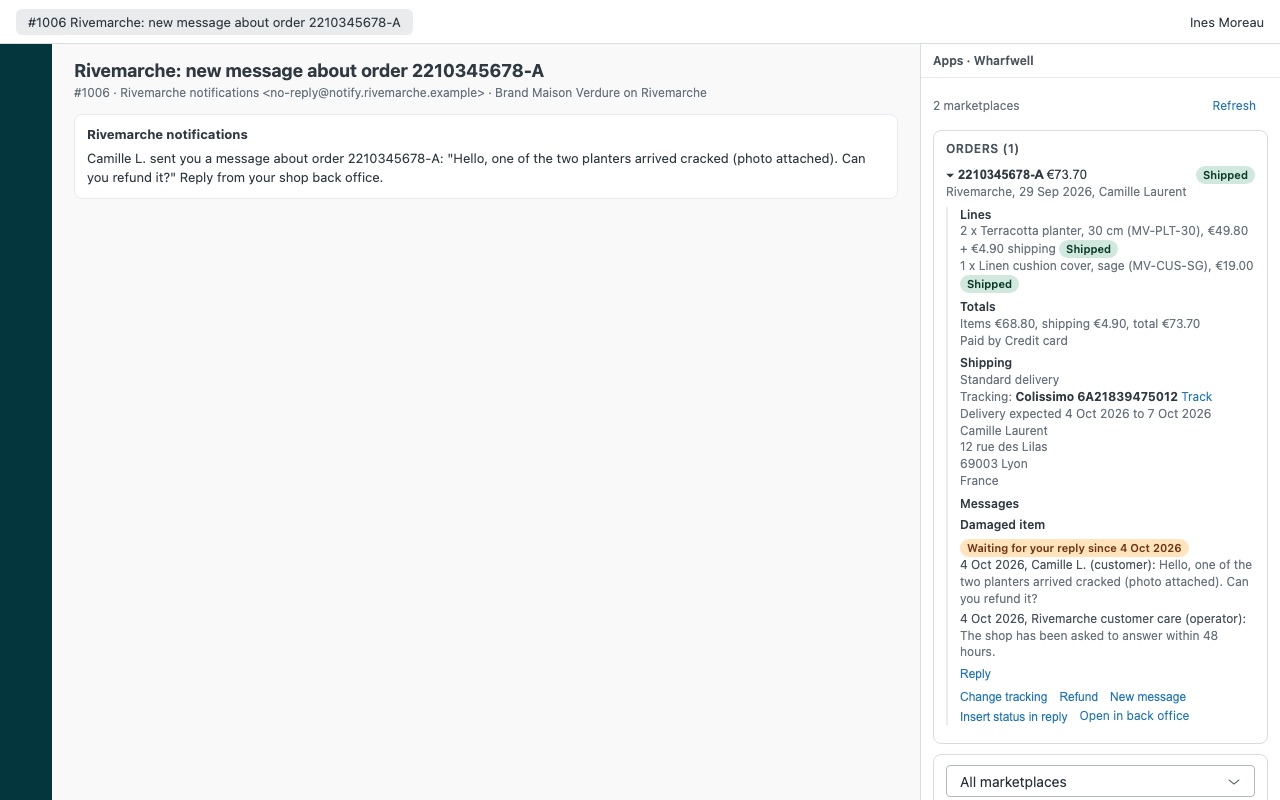
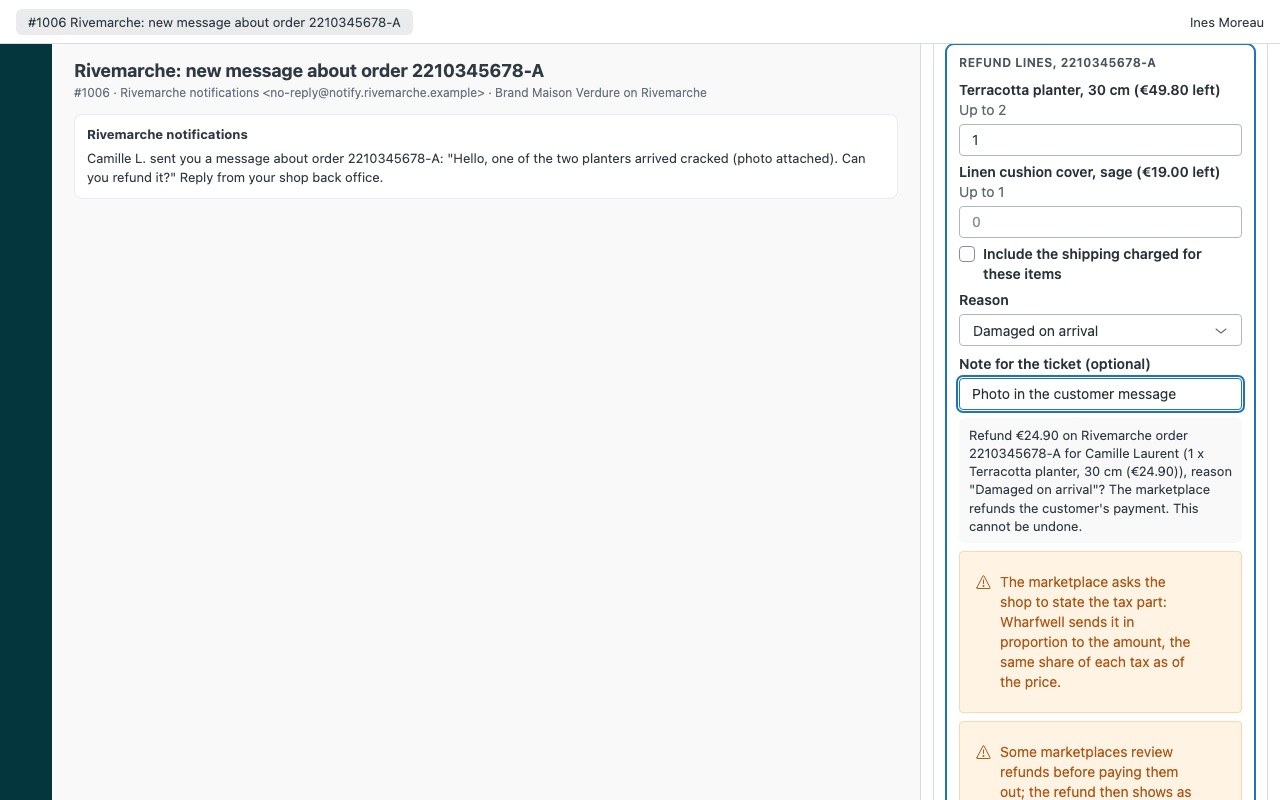
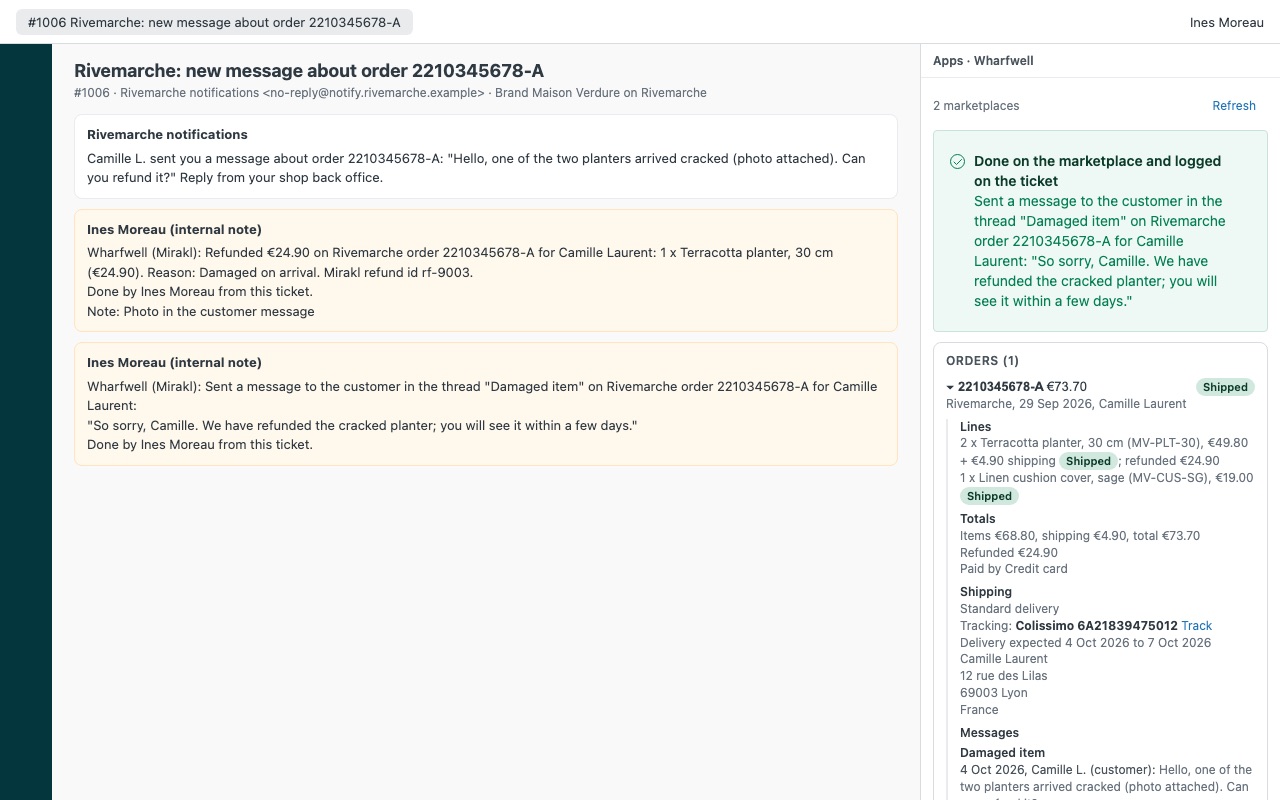
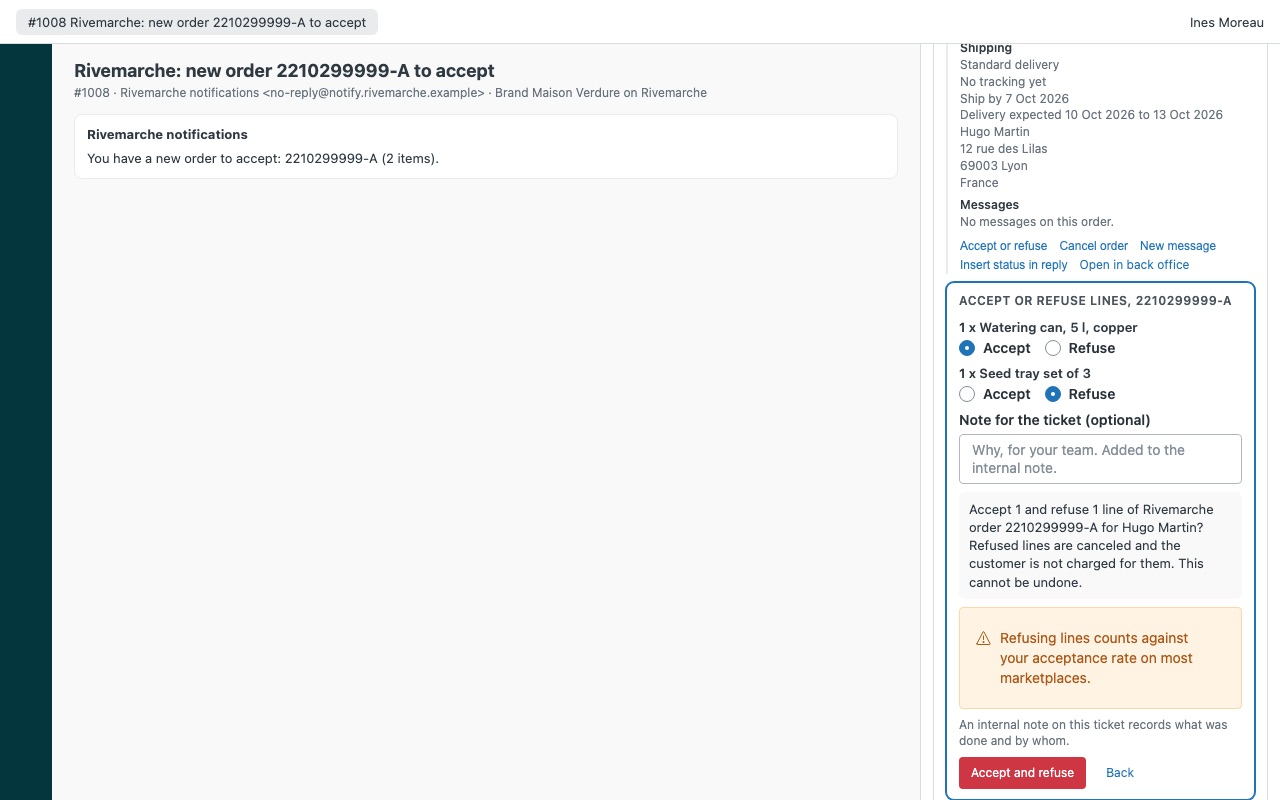
Every Mirakl marketplace order in the ticket, and the fix one click away. When a marketplace emails you about an order, Wharfwell finds the order id in the ticket and shows the order next to it, from whichever Mirakl-powered marketplace it came from. Agents you allow can accept orders, add tracking, refund or cancel lines, resolve incidents and reply in the order's thread. Every action is written to the ticket as an internal note.
Connect up to five Mirakl-powered marketplaces in one install, each with its own shop API key. Wharfwell is built by Great Work LLC. It is not made, endorsed or certified by Mirakl or Zendesk. Mirakl is a trademark of Mirakl SAS.
What you get
All your marketplaces, one sidebar
Found from the ticket: Wharfwell reads the order id in the notification email (or a ticket field you choose) and looks it up on every connected marketplace at once. Each order in full: lines with SKU, price and state, refunds, cancellations, open incidents, shipping, tracking and dates.
Actions with guard rails
Accept or refuse a new order, line by line. Add or change tracking, with the marketplace's own carrier list, then mark the order as shipped.
Logged on the ticket, every time
Each action adds an internal note with the order, lines, amounts, reason and agent, plus a tag for views and reports. If the marketplace's answer gets lost, Wharfwell reads the order again, so an action is never sent twice.
What Wharfwell does not do
It does not turn new marketplace messages into Zendesk tickets. Searching by email covers the last 30 days (up to 300 orders per marketplace).
How Wharfwell works
- Get a shop API key from each marketplace. In the marketplace's seller back office, open your user menu and choose API Key. Ask the marketplace's seller support for its API host if its seller API documentation doesn't list it.
- Install Wharfwell from the Zendesk Marketplace. Under Marketplace 1, enter a Name your agents know, the API host and the Shop API key. Add up to four more marketplaces the same way.
- Open a ticket about an order. Mirakl marketplaces put the order id in their notification emails, like
2210345678-A. Wharfwell finds it in the subject, the conversation or a ticket field you choose, and asks every connected marketplace for it at once. - Read the order. Lines with SKU, price and state, refunds and cancellations, open incidents, shipping and tracking, and the latest messages on the order, with "Waiting for your reply since" when the marketplace expects an answer.
- Act from the ticket. Agents you allow can accept or refuse a new order, add tracking, mark it as shipped, refund or cancel lines, cancel the order, resolve an incident, or reply to the customer or the operator.
- Keep the record. Each action opens a confirmation first, then adds an internal note and a
wharfwell_*tag to the ticket.
Who it's for
Sellers on several Mirakl-powered marketplaces
Each marketplace has its own back office. With up to five connected in one install, the agent doesn't need to know which one the order came from: Wharfwell asks all of them.
Teams answering marketplace messages on deadline
The order's message thread is in the sidebar with the date the marketplace started waiting for your reply, and the agent answers the customer, the operator or both from there.
Support teams that refund but shouldn't refund everything
Refunds can be limited to admins, roles or a group, and Largest refund without an admin caps what everyone else can refund. Refund and cancellation reasons come from the marketplace's own list.
What you need
- Zendesk Support with an admin to install the app.
- A seller account on each Mirakl-powered marketplace, with a back office user whose API key may manage orders and messages.
- The marketplace's API host name, such as
yourmarketplace-prod.mirakl.net. Host name only, nohttps://and no path. - A Shop id only if your key reaches several shops on one marketplace.
Wharfwell for Mirakl marketplaces guides
Questions about Wharfwell for Mirakl marketplaces
What does Wharfwell for Mirakl marketplaces do?
Mirakl marketplace orders on the ticket: refunds, cancels, tracking and replies, all logged.
What does Wharfwell for Mirakl marketplaces work with?
Wharfwell for Mirakl marketplaces works in Zendesk Support.
How much does Wharfwell for Mirakl marketplaces cost?
Standard: $5 a month per agent.
Is there a free trial?
14-day free trial (Zendesk asks for a card at install). Billed monthly by Zendesk. No free plan.
Where do I install Wharfwell for Mirakl marketplaces?
From the Zendesk Marketplace. Use the Install button on this page, or search for "Wharfwell for Mirakl marketplaces" there.
Who makes Wharfwell for Mirakl marketplaces?
Great Work LLC, an independent software company. Email hello@greatwork.company with any question about Wharfwell for Mirakl marketplaces and someone will answer.
Does Wharfwell turn marketplace messages into Zendesk tickets?
No. That needs a server watching every marketplace around the clock, and Wharfwell has none. It shows the order's thread on the ticket and lets agents reply in it.
Can it find an order when the ticket has no order id?
Agents can look one up by order id, by the reference the customer sees, or by email. Email search reads the last 30 days of orders by default (an admin can set up to 90, at most 300 orders per marketplace) and keeps only exact matches, because marketplaces usually give shops an anonymized notification address.
Why was an action refused?
Each marketplace decides what shops may do. Some review refunds before paying them out, some turn off partial acceptance or shop cancellations, and many filter messages with links, emails or phone numbers. Wharfwell shows the marketplace's own answer and writes nothing.
Where is my API key kept?
As a Zendesk secure setting. Agents' browsers never receive it, and Zendesk only sends it to the API host you entered for that marketplace.
What if the marketplace doesn't answer during an action?
Wharfwell reads the order again and only then reports what happened. It never sends an action twice on its own.
What stays after I uninstall?
The stored keys are deleted. Internal notes and wharfwell_* tags already on tickets stay.
More Zendesk apps
 Whowell
 Vouchwell
 Winnowell
 Twinmend