



Vouchwell Voucher and coupon codes from the ticket sidebar, one click each. Never the same code twice.
$199 a month per Zendesk account. 14-day free trial (Zendesk asks for a card at install). Billed monthly by Zendesk. No free plan.
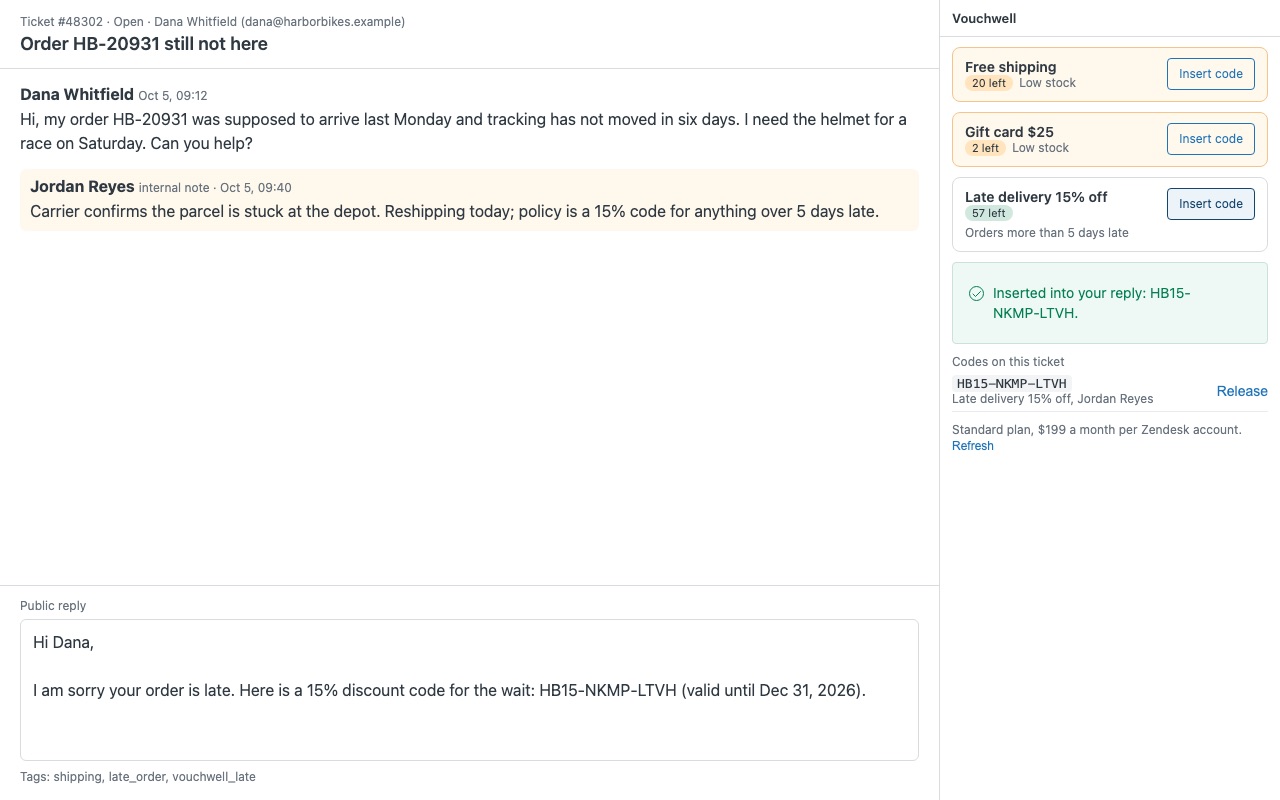
Hand out unique voucher and coupon codes straight from the ticket. Load your discount codes, gift card numbers or license keys into pools once. When an agent needs one, they click Insert code in the ticket sidebar (or apply a macro) and the next unused code goes into the reply. Two agents clicking at the same moment never get the same code, and every code records who gave it to which ticket.
Vouchwell is built by Great Work LLC. It is not made or endorsed by Zendesk.
What you get
Never the same code twice
A real lock on every code. Handing out a code takes a lock record inside Zendesk first and checks it before the code is marked used, so simultaneous clicks from several agents always end with different codes. Expiry dates. Codes close to their expiry date go out before later ones; codes past their date are never handed out.
For agents: one click, in the reply
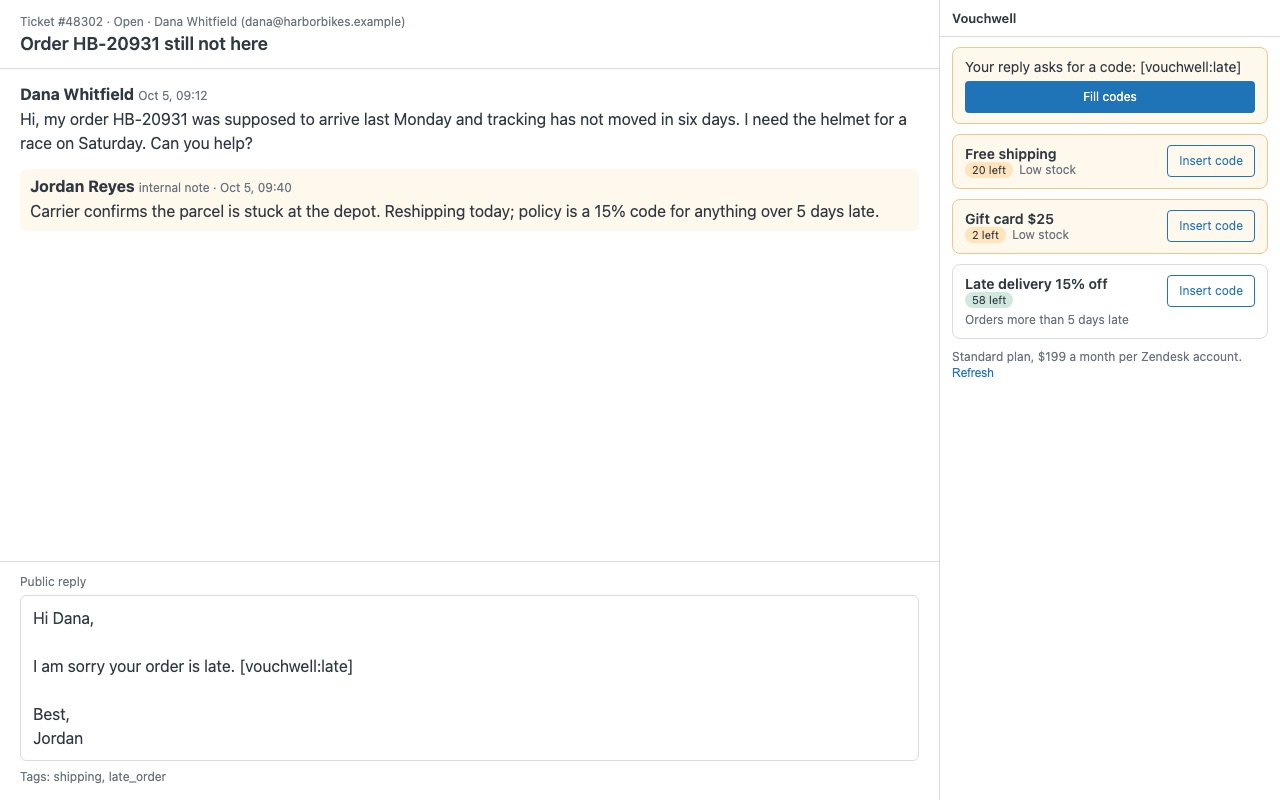
Insert code puts the code at the cursor using each pool's own text, for example "Here is 15% off for the wait: {{code}} (valid until {{expires}})". Macros: put [vouchwell:pool] in any macro. The sidebar fills it with a fresh code, and a reply with an unfilled placeholder cannot be submitted.
For admins: pools, stock and a record of who gave what
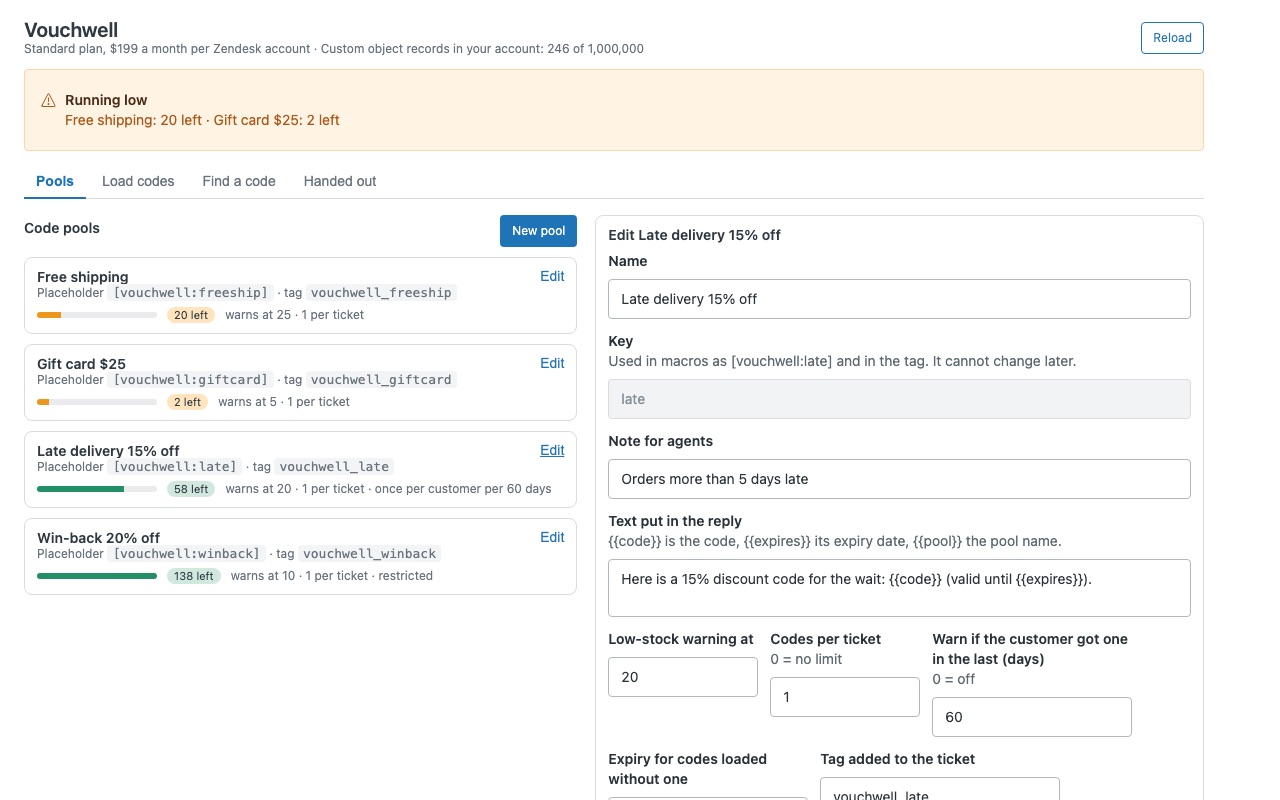
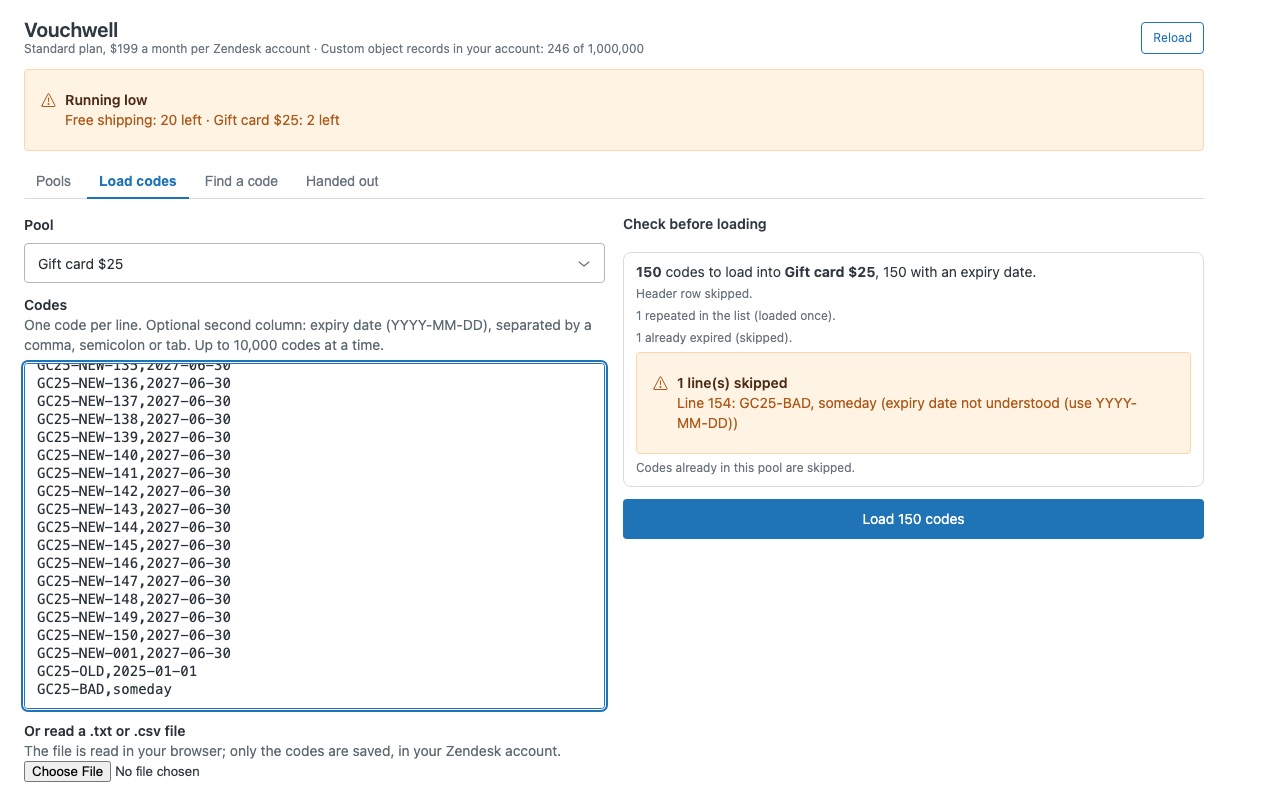
Load codes by pasting them or reading a .txt or .csv file in your browser, with optional expiry dates. You preview the load first, and codes already in the pool are skipped. Low-stock warnings per pool: agents see the count in the sidebar, admins see a banner, and the ticket that crosses the level gets the vouchwell_low_stock tag, so a trigger can tell you.
Requirements
Zendesk Suite (any plan: Team, Growth, Professional, Enterprise) or Support Enterprise. Vouchwell keeps pools, codes and hand-outs in one custom object, and custom objects are only on those plans. Suite Team allows 3 custom objects per account; Vouchwell uses 1. Each code is one small record. Records count toward your Zendesk custom object limits and data storage; Vouchwell shows your record count and limit before you load codes.
How Vouchwell works
- Install Vouchwell from the Zendesk Marketplace. Zendesk creates one custom object, "Vouchwell code", during the install. Everything Vouchwell stores lives there, in your own account.
- Create a pool. Open Vouchwell in the left navigation bar and click New pool. Give it a name, a key such as
late, the text that goes into the reply (with{{code}}where the code belongs), a low-stock level and who may use it. - Load codes. On the Load codes tab, paste codes or choose a .txt or .csv file, with an optional expiry date per code. You see a preview of what will load before anything is saved.
- Give a code from the ticket. The agent clicks Insert code in the sidebar. Vouchwell reserves the next unused code, puts the pool's text into the reply and tags the ticket.
- Or use a macro. Put
[vouchwell:late]in a macro's reply text. After the macro is applied, Fill codes (or the automatic setting) swaps each placeholder for its own code. - Watch stock and history. Agents see how many codes are left. Admins get a low-stock banner, Find a code to trace any code, and Handed out for every code given.
Who it's for
Shops that send a code when something goes wrong
A late parcel or a broken item gets a single-use discount. Agents add it in one click instead of copying from a shared list, and the per-ticket limit stops a second code going on the same ticket.
Teams handing out gift cards or license keys
Pools work for any code you were given in bulk: gift card numbers, activation keys, promo codes. Give codes an expiry date and Vouchwell never hands one out after that date.
Larger teams working the same queue
When several agents click at the same moment, each still gets a different code. Pools can be limited to groups, and on Enterprise to custom roles.
What you need
- Zendesk Suite (Team, Growth, Professional, Enterprise or Enterprise Plus) or Support Enterprise, because Vouchwell stores codes in a custom object. It uses one.
- Agent Workspace turned on, which custom objects require.
- On Enterprise plans: give each custom role that hands out codes view, add, edit and delete on the Vouchwell code object (Admin Center > Objects and rules > Custom objects > Vouchwell code > Permissions). Light agents need the same if they should hand out codes.
- Your own codes, from your store, gift card provider or licensing system.
Vouchwell guides
Questions about Vouchwell
What does Vouchwell do?
Voucher and coupon codes from the ticket sidebar, one click each. Never the same code twice.
What does Vouchwell work with?
Vouchwell works in Zendesk Support.
How much does Vouchwell cost?
Standard: $199 a month per Zendesk account.
Is there a free trial?
14-day free trial (Zendesk asks for a card at install). Billed monthly by Zendesk. No free plan.
Where do I install Vouchwell?
From the Zendesk Marketplace. Use the Install button on this page, or search for "Vouchwell" there.
Who makes Vouchwell?
Great Work LLC, an independent software company. Email hello@greatwork.company with any question about Vouchwell and someone will answer.
Where are my codes stored?
In your Zendesk account, as records of the Vouchwell code custom object. Vouchwell has no server and no export or download.
How many codes can I load?
Up to 10,000 per load; load larger files in parts. Each code is one small record that counts toward your account's custom object limits, and the Vouchwell page shows your current record count and limit.
What if an agent inserts a code by mistake?
They can Release it from Codes on this ticket for 60 minutes by default, if the customer never received it. Admins can always release or void a code.
Can I stop one customer getting two codes?
Each pool has Codes per ticket and Warn if the customer got one in the last N days, both checked when an agent clicks Insert code. The warning shows the agent where the earlier code went.
How do I know when a pool is running low?
Set Low-stock warning at. The ticket that crosses that level gets the vouchwell_low_stock tag, so a trigger can email whoever orders more codes.
What happens when I uninstall?
Billing stops. Zendesk keeps the Vouchwell code object and its records, so a reinstall picks up your pools, codes and history. Delete the object in Admin Center to remove them for good.
More Zendesk apps
 Wharfwell for Mirakl marketplaces
 Twinmend
 Whowell
 Twinewell for ShipStation