



Slotwell Fill-in macro prompts: macros that ask agents for details, check answers and add conditional text.
From $99 a month per Zendesk account. 14-day free trial (Zendesk asks for a card at install). Billed monthly by Zendesk. No free plan.
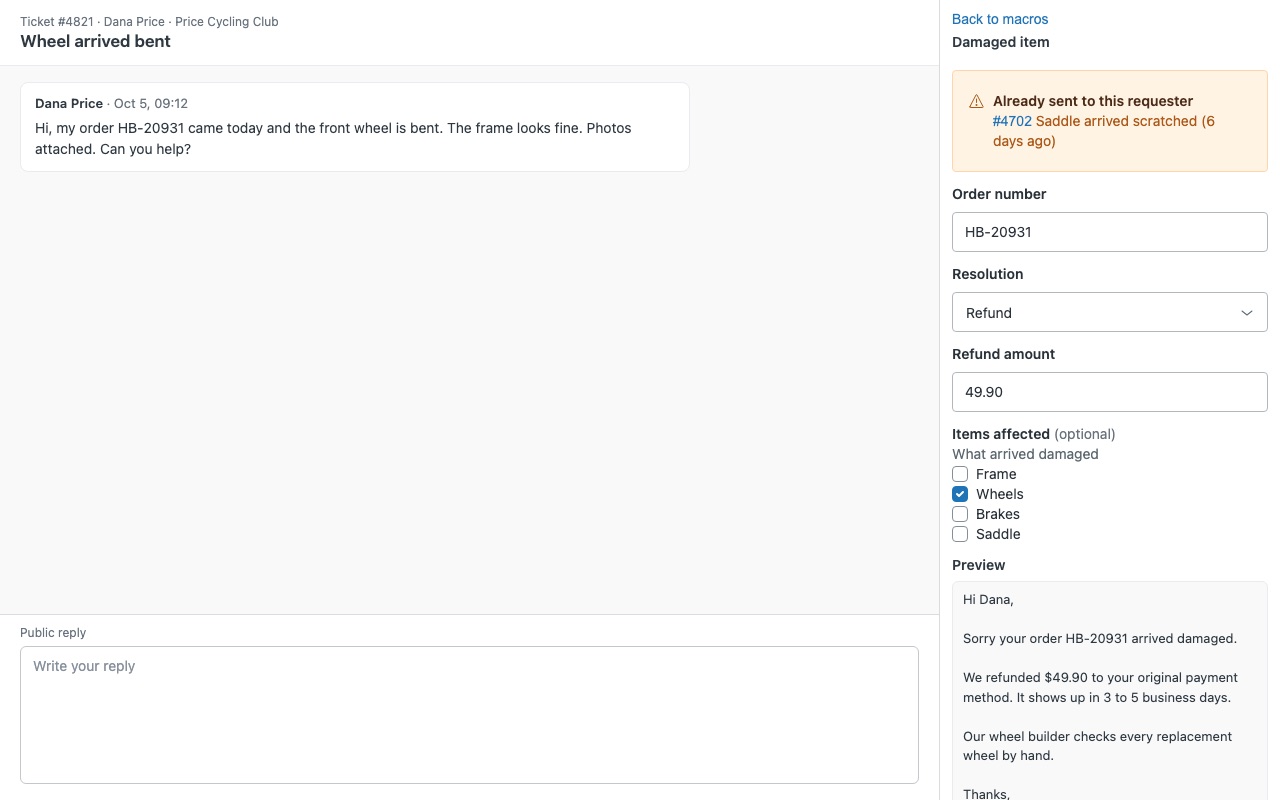
Macros that ask your agents for the details, check the answers and fill the reply, so every reply goes out complete. Your refund macro says "We refunded $XX.XX on XX/XX/XXXX" and you hope someone remembers to change it. With Slotwell the macro asks for the amount and the date in a small form in the ticket sidebar, refuses a refund of "ten-ish", and writes the reply for them.
Slotwell is built by Great Work LLC. It is not made or endorsed by Zendesk.
What you get
Blanks agents can't skip
Write blanks right in the macro reply: [[text:Order number]], [[number:Refund amount]], [[date:Ship date]], plus email, link and long-text blanks. Pick lists: [[choice:Resolution|Refund|Replacement|Store credit]], or several at once with multi.
One macro instead of five
Conditional text: [[#if Resolution = Refund]] ... [[else]] ... [[/if]]. Blanks in a branch that doesn't apply are hidden and never required. Answers that set the ticket: add a tag or set a ticket field per branch, or save an answer straight into a ticket field.
Works the way agents already work
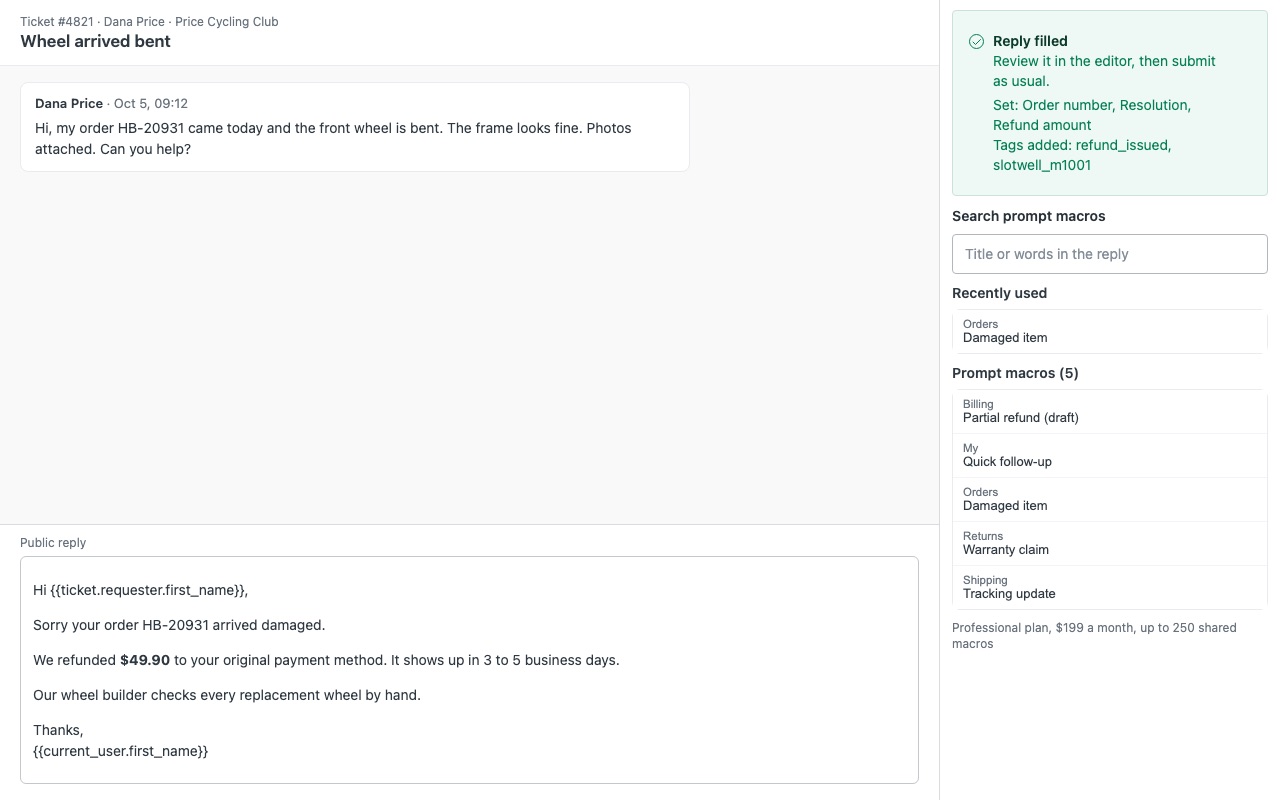
Pick a prompt macro in the Slotwell sidebar or from Zendesk's own macro menu. Fill reply applies the macro the normal way (status, group, tags, fields), then puts the answers in the reply. Nothing is sent until the agent submits.
Catch broken macros before an agent does
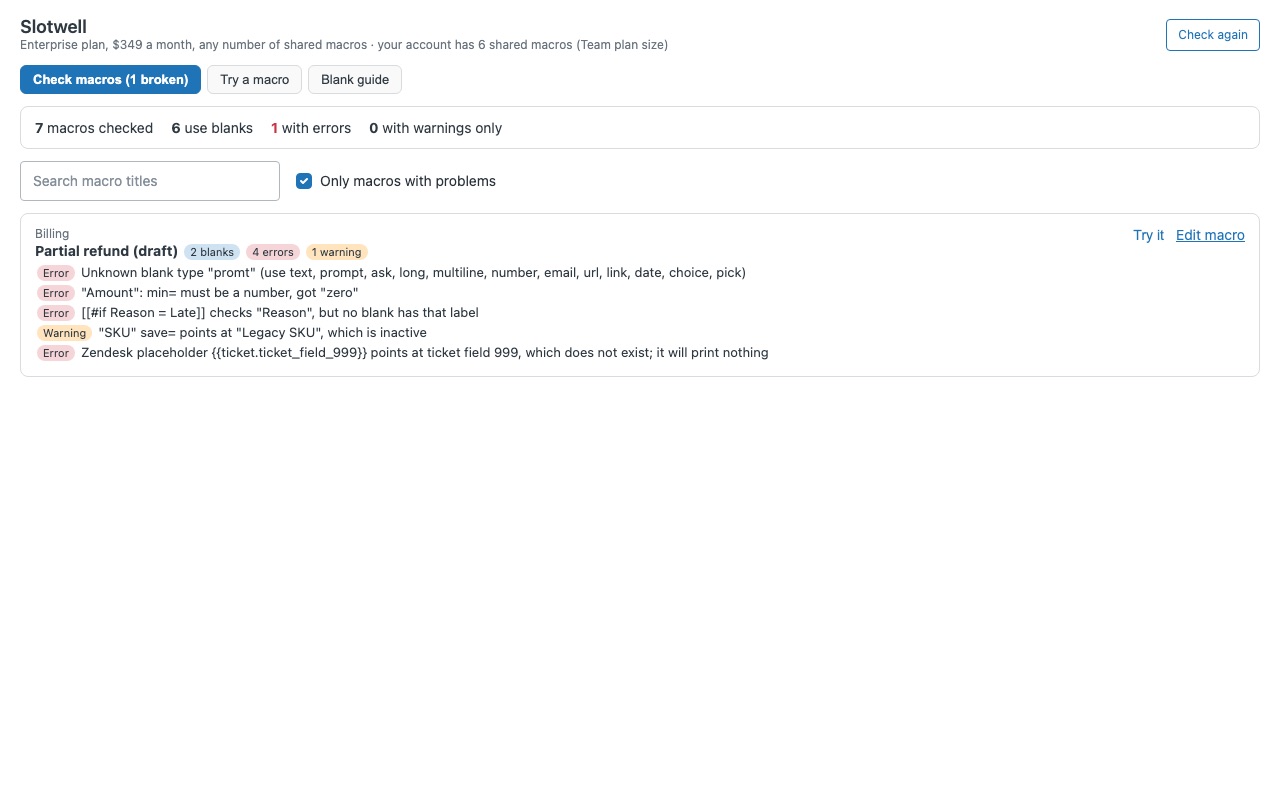
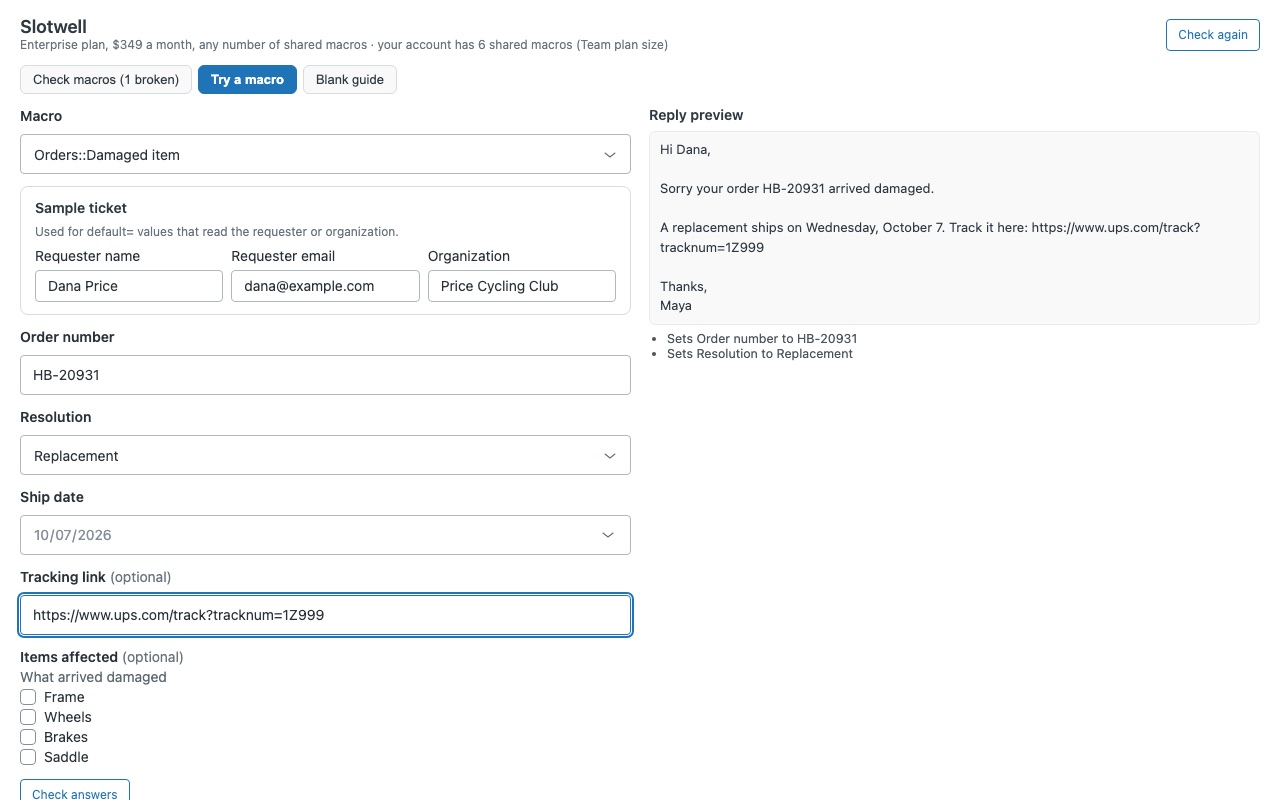
Check macros reads every macro and lists the problems: unknown blanks, unclosed blocks, deleted ticket fields and drop-down values that aren't options. Try a macro with sample answers and see the exact reply and ticket changes.
What it doesn't do
It fills the reply only. Blanks in a macro's subject stay as written (Check macros flags them). It doesn't edit your macros. You write blanks in Admin Center as usual.
How Slotwell works
- Install Slotwell from the Zendesk Marketplace and pick the plan for your number of shared macros. Slotwell creates one custom object, "Slotwell recents", at install.
- Write blanks in a macro's reply. In Admin Center > Workspaces > Agent tools > Macros, type tokens such as
[[text:Order number]],[[number:Refund amount; min=1; max=500]]or[[choice:Resolution|Refund|Replacement]]. The Blank guide in Slotwell's left-bar page has a builder that writes them for you. - Add conditional text where one macro covers several cases.
[[#if Resolution = Refund]] ... [[else]] ... [[/if]]prints only the branch that matches the agent's answers. - Run Check macros. It reads every macro and lists what's written wrong, from unclosed blocks to ticket fields that no longer exist. Try it opens a macro in Try a macro with a sample requester.
- Agents open a ticket. The Slotwell sidebar lists every macro with blanks, Recently used at the top. Answers that come from the ticket are already filled in.
- Agents answer and click Fill reply. Slotwell checks every answer, applies the macro as usual (status, group, tags, fields) and puts the answers in the reply. The agent reviews it and submits.
Who it's for
Teams whose macros say "XX/XX/XXXX"
If your refund or shipping macros rely on agents spotting and replacing placeholder text, a blank turns that into a required field. The reply can't be filled until every required blank is answered and passes its check.
Admins maintaining a long macro list
Five near-identical macros for refund, replacement and store credit can become one macro with a pick list and conditional text. Check macros then lists problems across the whole library in one place.
Teams that need answers on the ticket, not only in the reply
save=<ticket field id> puts an answer into a ticket field, and [[tag:...]] or [[field:...]] inside a branch sets a tag or field only when that branch applies, so reports can see what agents chose.
What you need
- Zendesk Support and an admin to install the app and edit macros in Admin Center.
- Shared macros (all agents and group macros) within your plan: Team up to 25, Professional up to 250, Enterprise any number.
- For Recently used to be saved, agents need permission to add and edit "Slotwell recents" records. Without it, everything else works.
Slotwell guides
Questions about Slotwell
What does Slotwell do?
Fill-in macro prompts: macros that ask agents for details, check answers and add conditional text.
What does Slotwell work with?
Slotwell works in Zendesk Support.
How much does Slotwell cost?
Team: $99 a month per Zendesk account. Professional: $199 a month per Zendesk account. Enterprise: $349 a month per Zendesk account.
Is there a free trial?
14-day free trial (Zendesk asks for a card at install). Billed monthly by Zendesk. No free plan.
Where do I install Slotwell?
From the Zendesk Marketplace. Use the Install button on this page, or search for "Slotwell" there.
Who makes Slotwell?
Great Work LLC, an independent software company. Email hello@greatwork.company with any question about Slotwell and someone will answer.
Do Zendesk's own placeholders still work?
Yes. Placeholders such as {{ticket.id}} and dynamic content such as {{dc.refund_policy}} are left alone and render as usual when the ticket is submitted.
Can agents still apply the macro from Zendesk's macro menu?
Yes. The sidebar then shows Your reply has N blanks to fill, and Fill the blanks opens the same form. Square-bracket tokens are the safest choice for macros applied that way.
Does Slotwell send anything to the customer by itself?
No. Fill reply only fills the reply. Nothing is sent until the agent submits the ticket.
Does it fill the subject line too?
No, Slotwell fills the reply only. Check macros flags blanks written in a subject.
What if we add macros past our plan?
The form and preview still show, and Check macros and Try a macro keep working. Fill reply resumes once the plan covers your shared macros.
Where are agents' answers stored?
In the reply and any ticket fields you chose, nowhere else. Recents keep only macro ids and chosen pick-list options, never typed answers, in your own Zendesk account.
More Zendesk apps
 Sprucewell
 Skipwell
 Staffwell
 Satchelwell for Magento and Adobe Commerce