



Skipwell Recharge subscriptions sidebar: skip, swap or reschedule from the ticket, with every change logged.
$10 a month per agent. 14-day free trial (Zendesk asks for a card at install). Billed monthly by Zendesk. No free plan.
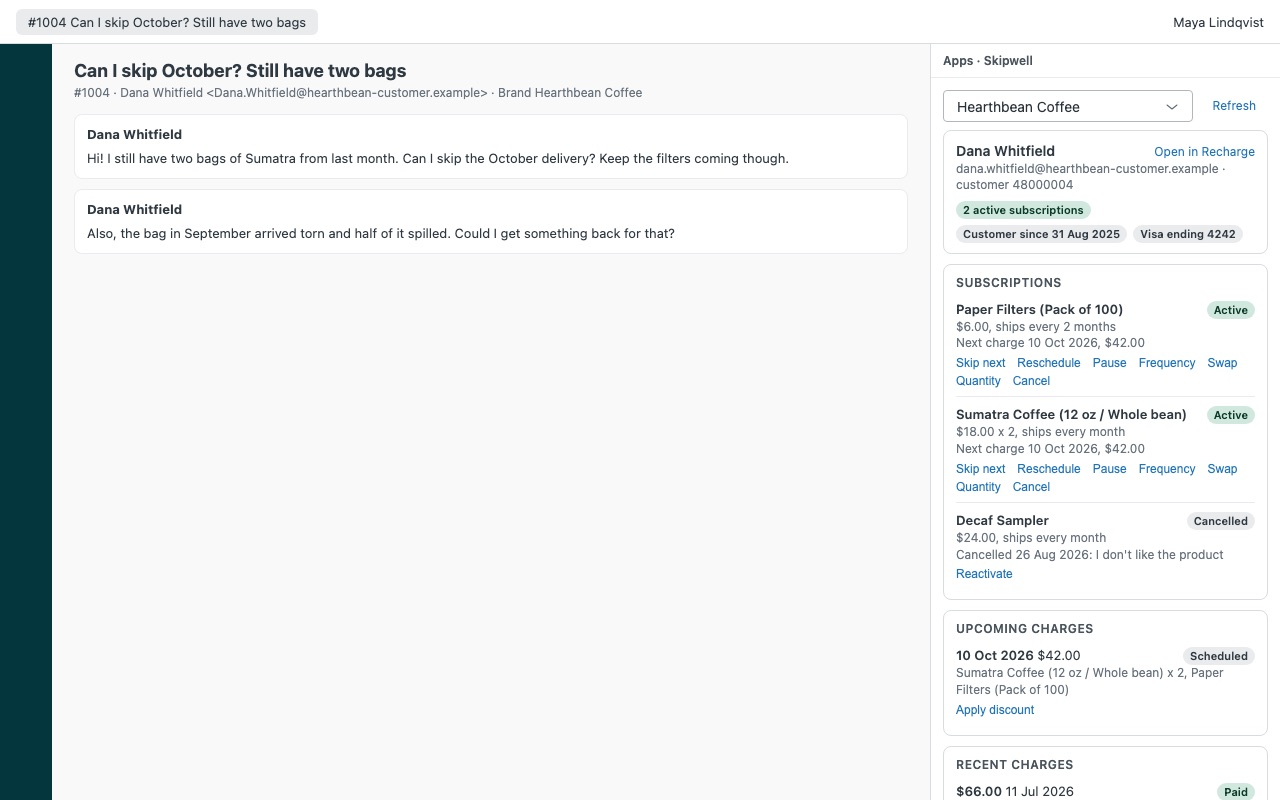
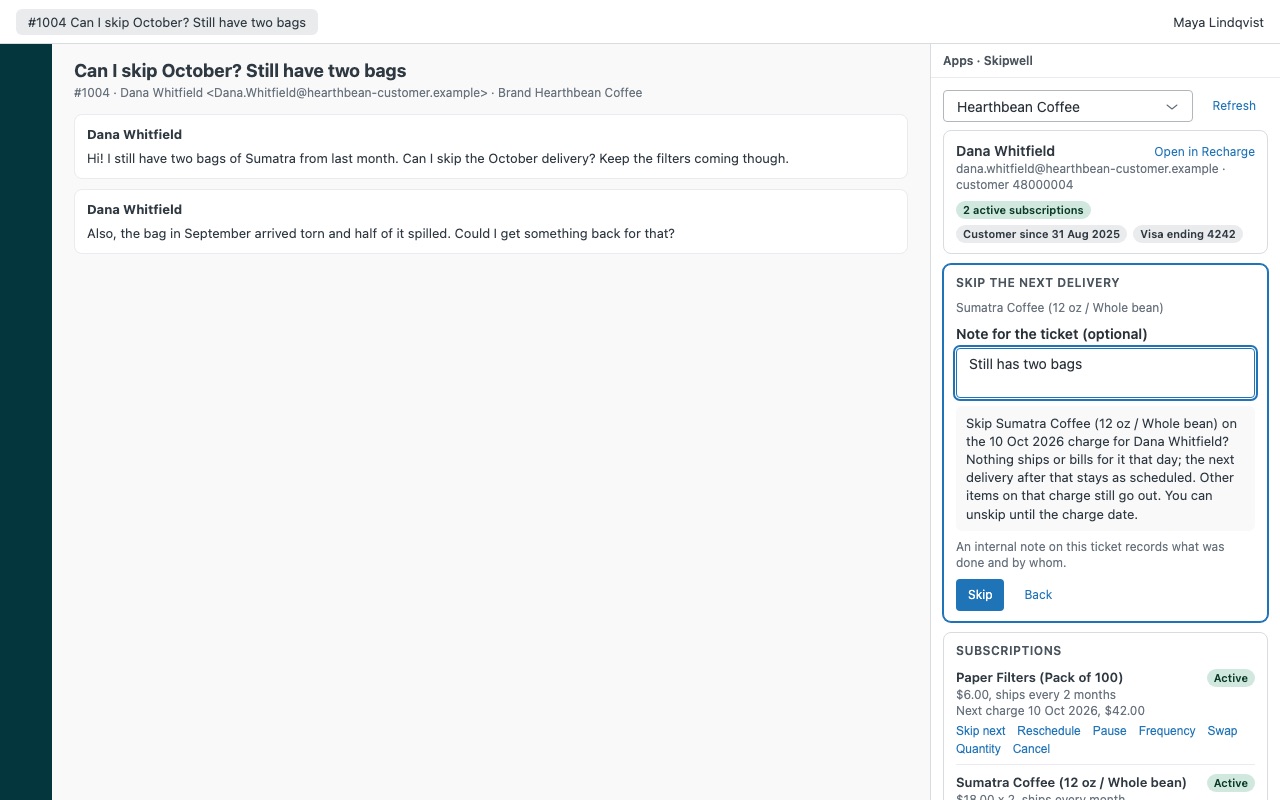
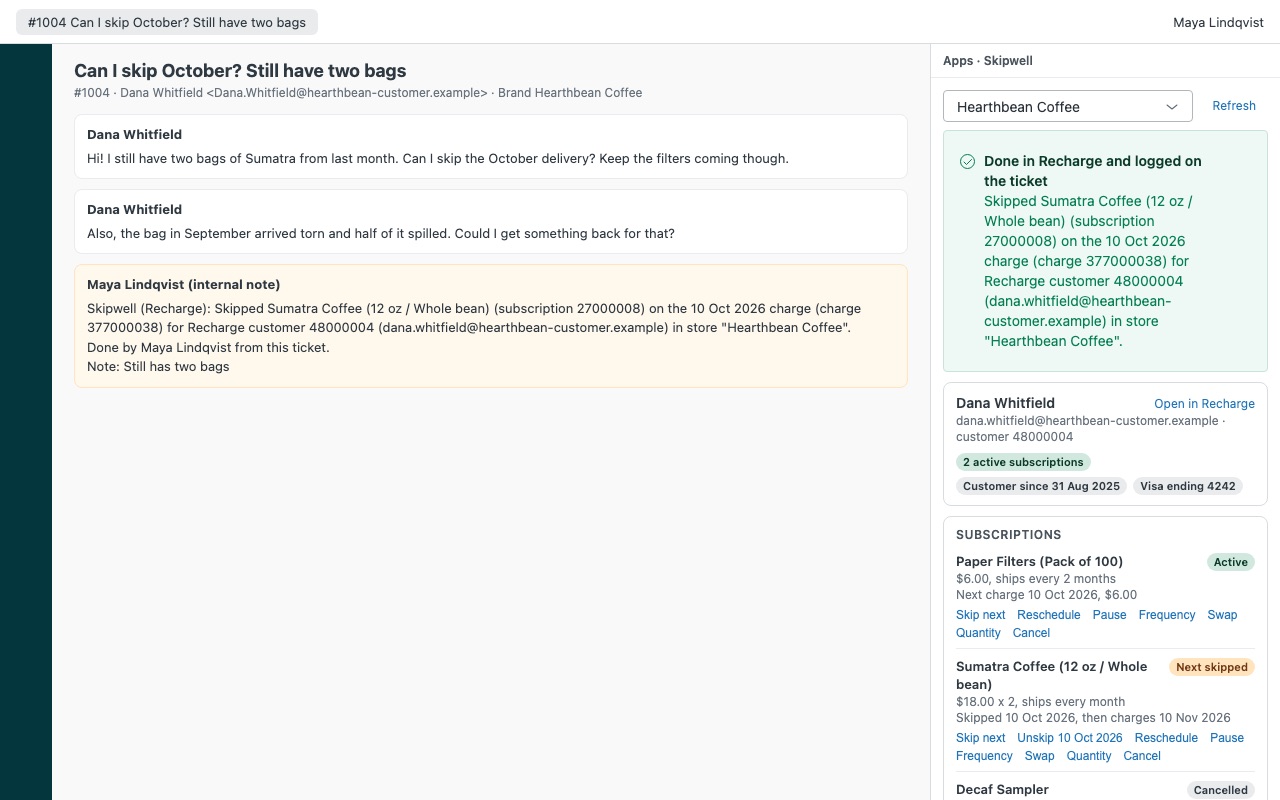
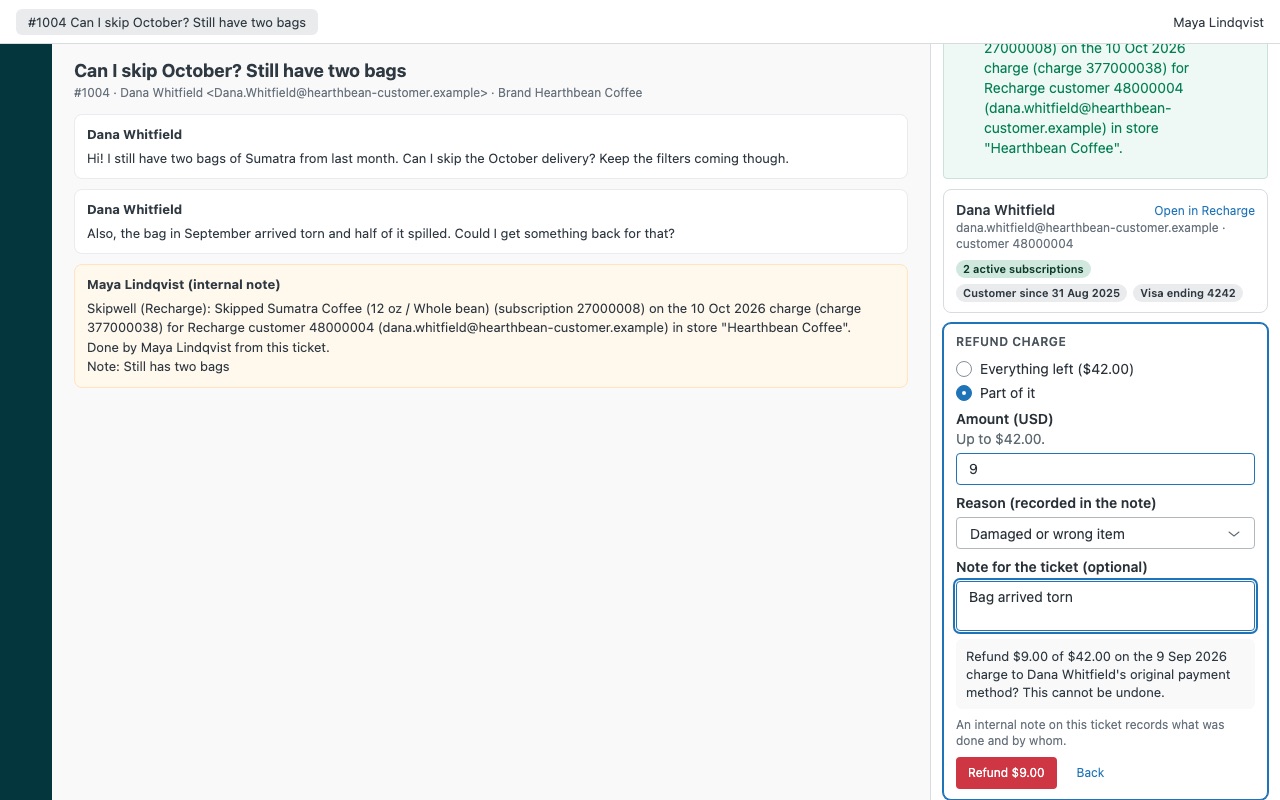
Answer "can I skip my next box?" from the ticket. When a subscriber writes in, Skipwell shows their Recharge customer next to the ticket: every subscription with its product, frequency, price and next charge, upcoming and skipped charges, failing payments and recent charges with refunds. Agents you allow can skip, reschedule, pause, swap, change quantity or frequency, cancel, reactivate, apply a discount or refund, and every change is written to the ticket as an internal note. Your customer gets one reply instead of a link to the customer portal and a "let us know if that doesn't work."
Skipwell is built by Great Work LLC. It is not made or endorsed by Zendesk or Recharge. Recharge is a trademark of Recharge Inc.
What you get
The whole subscription in the sidebar
Matched automatically by every email on the requester's profile, or by a user field holding the Recharge customer id. Subscriptions with product, variant, quantity, price, frequency, status and next charge.
Actions with guard rails
Skip or unskip the next delivery of one subscription. Reschedule the next charge, or pause for 1 to 12 deliveries, with the new date shown before you confirm.
What it doesn't do
Charges older than 90 days aren't shown. Stores on Shopify Checkout refund in Shopify, so Skipwell links to the order instead.
How Skipwell works
- Create a Recharge Admin API token. A store owner opens Tools & apps > API tokens in the Recharge merchant portal, creates an Admin token named "Skipwell for Zendesk" and gives it Read access, plus Read and Write for the actions you want agents to take.
- Install Skipwell from the Zendesk Marketplace and paste the token into Recharge API token. Optionally add a Store label and the Zendesk brand ids that should open this store.
- Choose who may act. Set Who may take actions (admins by default), switch groups of actions on or off, and set a Largest refund without an admin.
- Open a ticket. Skipwell matches the requester by every email on their Zendesk profile and lists their subscriptions, upcoming charges (including skipped and failing ones) and paid charges from the last 90 days.
- Act from the sidebar. Skip next, Reschedule, Pause, Frequency, Swap, Quantity, Cancel, Reactivate, Apply discount or Refund. Each action shows a sentence saying exactly what will happen, and nothing is sent until the agent confirms.
- Keep the record. After Recharge accepts a change, the ticket gets an internal note and a tag such as
skipwell_skiporskipwell_cancel, so views and reports can count them.
Who it's for
Subscription box teams buried in "skip my next box" tickets
Many subscriber requests are about timing: skip one, move the date, pause for a while. The agent makes the change and answers in the same reply instead of sending the customer to the portal.
Retention-minded support leads
When a subscriber asks to cancel, the agent can see what they pay, how often it ships and what's coming next, and can offer a pause, a later date, a different product or a discount before cancelling. If they still want out, the cancellation records a reason in Recharge with the ticket number.
Brands running more than one Recharge store
Connect up to three stores, each with its own token and brands. Tickets from a listed brand open that store first, and agents can switch.
What you need
- Zendesk Support and an admin to install Marketplace apps.
- A Recharge store and a store owner who can create an Admin API token and accept Recharge's API terms. Check that Tools & apps > API tokens appears in your merchant portal before the trial ends; Skipwell's docs say plainly that API access on every Recharge plan hasn't been confirmed.
- Token access: Read for customers, subscriptions, orders, payment methods, discounts, plans and store. Read and Write on subscriptions, orders, customers and payment methods for the matching actions.
- Shopify variant ids for any products agents may swap to.
Skipwell guides
Questions about Skipwell
What does Skipwell do?
Recharge subscriptions sidebar: skip, swap or reschedule from the ticket, with every change logged.
What does Skipwell work with?
Skipwell works in Zendesk Support.
How much does Skipwell cost?
Standard: $10 a month per agent.
Is there a free trial?
14-day free trial (Zendesk asks for a card at install). Billed monthly by Zendesk. No free plan.
Where do I install Skipwell?
From the Zendesk Marketplace. Use the Install button on this page, or search for "Skipwell" there.
Who makes Skipwell?
Great Work LLC, an independent software company. Email hello@greatwork.company with any question about Skipwell and someone will answer.
Can agents see the token?
No. It's a Zendesk secure setting. Zendesk adds it to requests on the way to api.rechargeapps.com and nowhere else, so it never reaches an agent's browser.
Does Skipwell store my subscribers' data?
No. It has no server of its own, keeps no copies and has no export. It reads Recharge only while the sidebar is open.
Will a double click skip or refund twice?
No. Skipwell reads Recharge again right before sending and sends each change once. If the connection drops while Recharge answers, it checks Recharge instead of sending again and tells the agent what it found.
Can it refund on a store that uses Shopify Checkout?
Recharge doesn't refund those charges through its API, so Skipwell links to the Shopify order and the refund happens there.
What doesn't it change?
Addresses, payment methods, one-time add-ons and bundle contents. It also can't charge a card, and prepaid subscriptions can't be skipped, swapped or changed in frequency from Skipwell.
What happens when I uninstall it?
The stored tokens are deleted. Internal notes and skipwell_* tags already on tickets stay. Delete the token in Recharge too.
More Zendesk apps
 Slotwell
 Satchelwell for Magento and Adobe Commerce
 Sprucewell
 Rousewell