



Satchelwell for Magento and Adobe Commerce Magento orders on the ticket: refund, cancel, hold, comment and resend emails, all logged.
$5 a month per agent. 14-day free trial (Zendesk asks for a card at install). Billed monthly by Zendesk. No free plan.
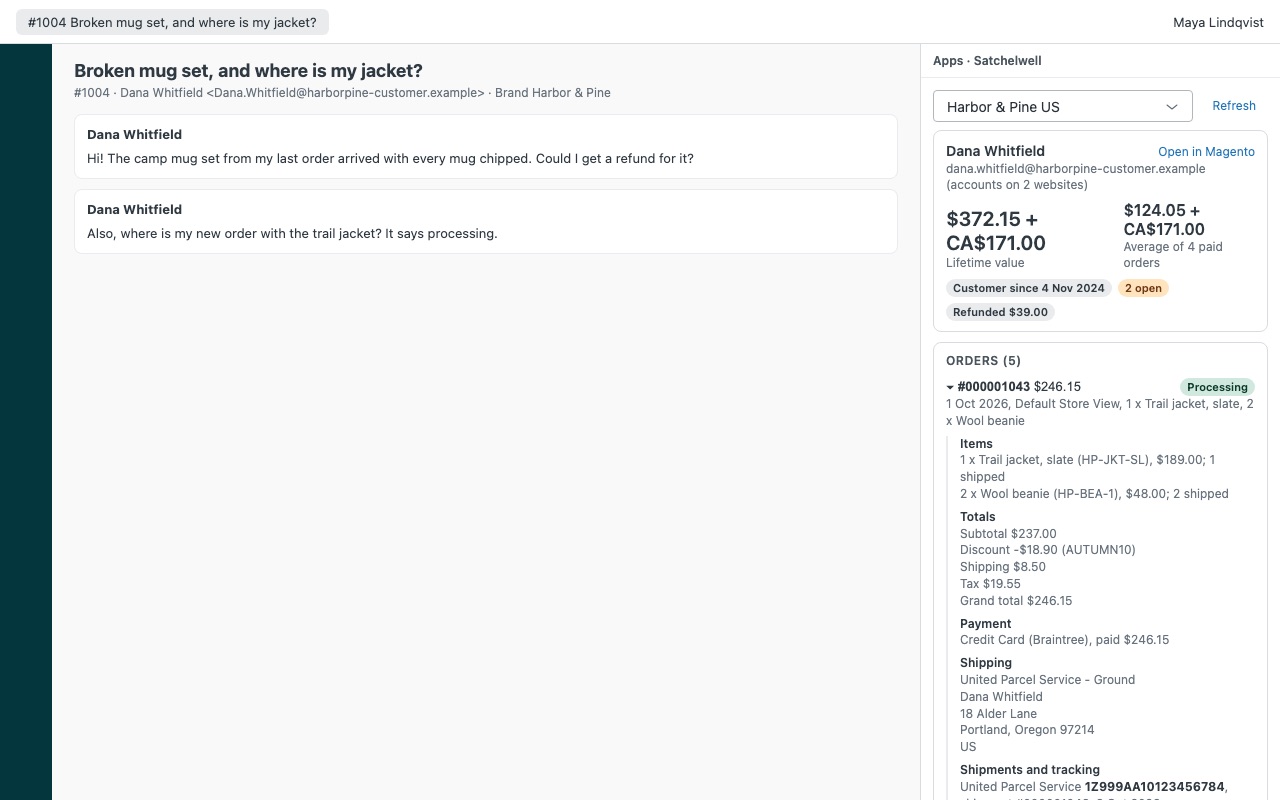
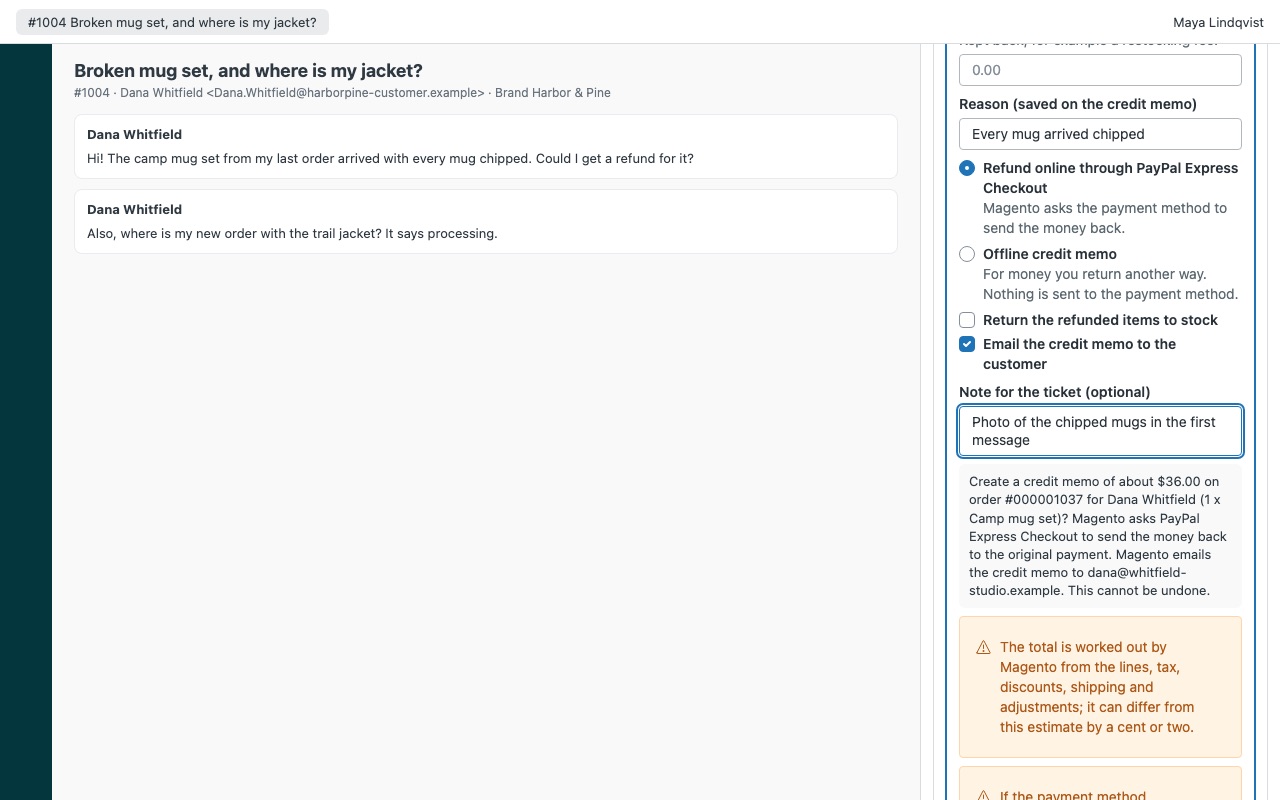
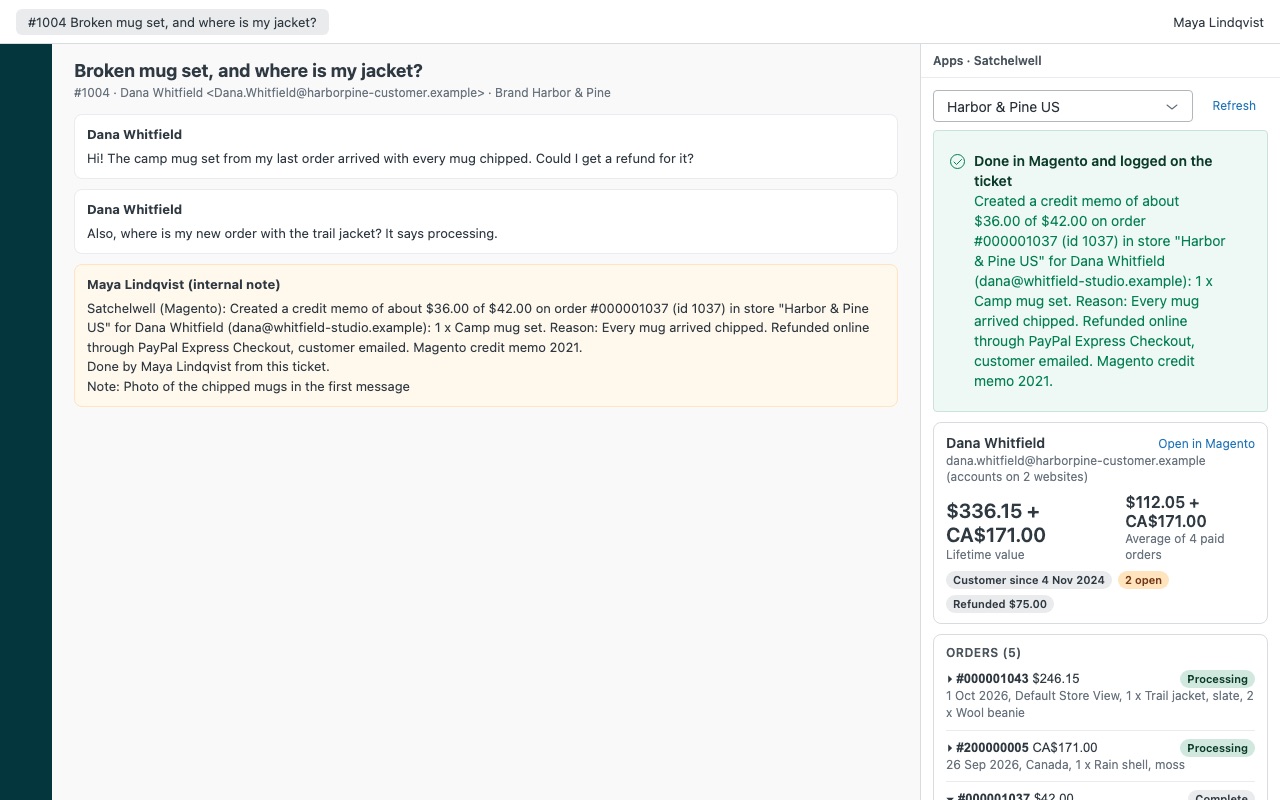
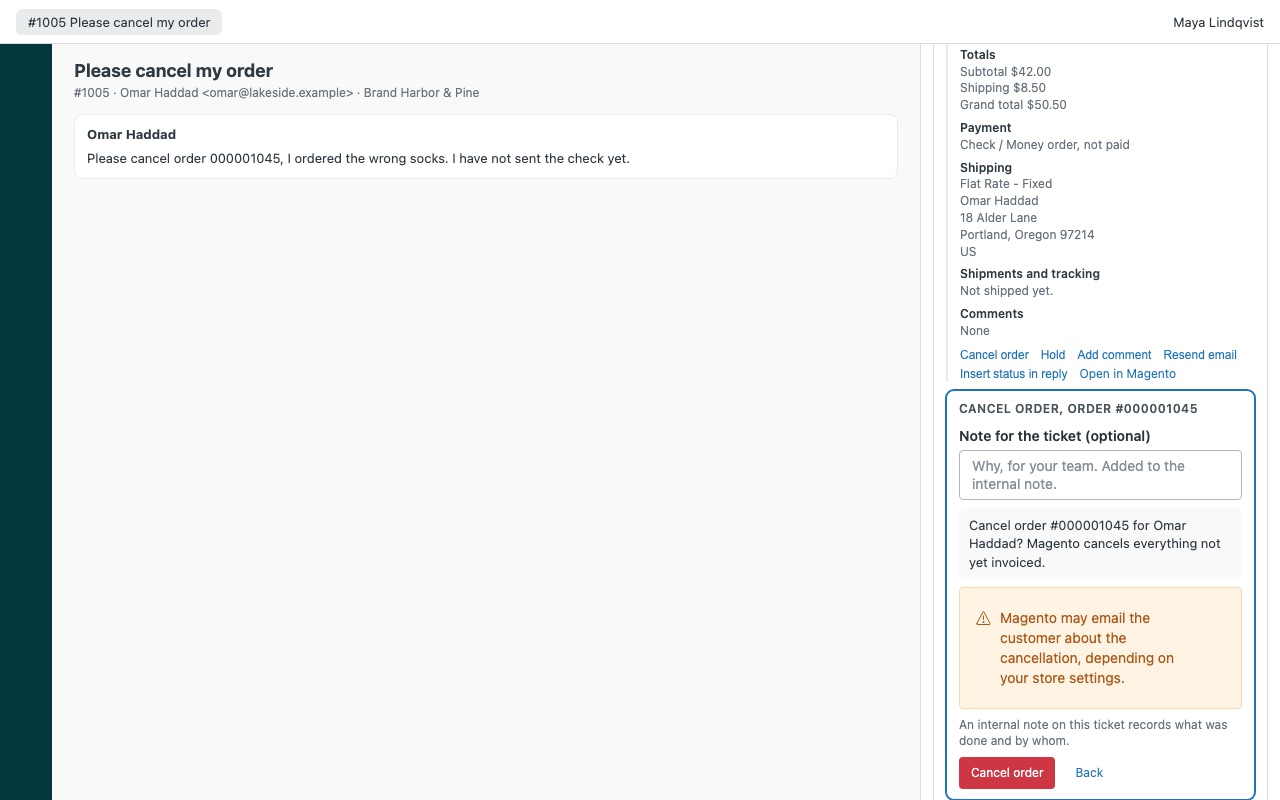
See the customer's Magento orders on the ticket, and sort them out without leaving Zendesk. When someone writes in about an order, Satchelwell shows every order they placed next to the ticket: items, totals, payment, shipments with tracking numbers, invoices, credit memos, returns and the order's comment history, with their lifetime value. Agents you allow can refund with a credit memo, cancel, hold, comment and resend order emails. Every action is written to the ticket as an internal note.
Works with Magento Open Source and Adobe Commerce 2.4, self-hosted or on Adobe Commerce cloud infrastructure. Satchelwell is built by Great Work LLC. It is not made or endorsed by Zendesk or Adobe. Adobe, Adobe Commerce and Magento are either registered trademarks or trademarks of Adobe in the United States and/or other countries.
What you get
Every order, matched automatically
Found by every email address on the requester's Zendesk profile: customer accounts on every website and guest checkouts alike, in one request. Each order in full: items, discounts, shipping, tax, payment, invoices, credit memos and comments.
Actions with guard rails
Refund with a credit memo, online or offline, with items returned to stock if you choose. The total never goes past what is left on the order. Cancel, hold and release hold, offered only when Magento allows it for the order's state, with a warning when canceling would leave invoiced money unrefunded.
Logged on the ticket, every time
Each action adds an internal note to the ticket with the order, amounts, reason and agent, plus a tag you can use in views and reports. If the store's answer gets lost, Satchelwell reads the order again, so an action is never sent twice.
Several websites, store views and stores
One Magento installation with several websites and store views works out of the box: every order shows its store view. Map a Zendesk brand to its store views so agents see that brand's orders first. Connect up to three separate Magento installations, for example one per region, each opened by its own brands.
How Satchelwell works
- Create an integration in Magento. In the Magento admin, open System > Extensions > Integrations > Add New Integration, give it Custom resource access for the features you want, then Activate and Allow. Copy the Access Token.
- Allow the token as a bearer token. In Stores > Configuration > Services > OAuth > Consumer Settings, set Allow OAuth Access Tokens to be used as standalone Bearer tokens to Yes. Magento 2.4.4 and later need this.
- Install Satchelwell from the Zendesk Marketplace and enter the store domain, the access token and, optionally, your admin URL for "Open in Magento" links. Nothing is installed in Magento.
- Open a ticket. Satchelwell looks up every email on the requester's Zendesk profile and lists their customer account orders and guest checkouts, with lifetime value and average order at the top.
- Read the order. Items with SKUs and what has shipped, totals with discount and coupon, payment, shipments with carrier and tracking number, invoices, credit memos, Adobe Commerce returns and comments. Insert status in reply adds the order number, status and tracking to your reply.
- Act from the ticket. Agents you allow can refund with a credit memo, cancel, hold or release an order, add a comment and resend an order, invoice, shipment or credit memo email. Each action is confirmed first, then logged as an internal note and a
satchelwell_*tag.
Who it's for
Magento stores handling order questions in Zendesk
"Where is my package?" is answered from the shipment's tracking number next to the conversation, without opening the Magento admin in another tab.
Teams that split refund authority
Actions can be limited to admins, chosen custom roles or groups. Largest refund without an admin caps what everyone else can refund, and each action type can be turned off for everyone.
Multi-store and multi-brand setups
Map each Zendesk brand to its store views so a ticket shows its own store's orders first, or connect up to three separate Magento installations, each mapped to brands.
What you need
- Magento Open Source or Adobe Commerce 2.4, self-hosted or on Adobe Commerce cloud infrastructure. Adobe Commerce as a Cloud Service (the SaaS edition) isn't supported.
- A Magento admin login to create the integration, and the bearer token setting turned on.
- The store on HTTPS with a complete certificate chain, reachable from Zendesk's servers. If a CDN, WAF or firewall blocks unknown servers, allow Zendesk's IP ranges for the
/rest/path. - A Zendesk admin to install Marketplace apps.
Satchelwell for Magento and Adobe Commerce guides
Questions about Satchelwell for Magento and Adobe Commerce
What does Satchelwell for Magento and Adobe Commerce do?
Magento orders on the ticket: refund, cancel, hold, comment and resend emails, all logged.
What does Satchelwell for Magento and Adobe Commerce work with?
Satchelwell for Magento and Adobe Commerce works in Zendesk Support.
How much does Satchelwell for Magento and Adobe Commerce cost?
Standard: $5 a month per agent.
Is there a free trial?
14-day free trial (Zendesk asks for a card at install). Billed monthly by Zendesk. No free plan.
Where do I install Satchelwell for Magento and Adobe Commerce?
From the Zendesk Marketplace. Use the Install button on this page, or search for "Satchelwell for Magento and Adobe Commerce" there.
Who makes Satchelwell for Magento and Adobe Commerce?
Great Work LLC, an independent software company. Email hello@greatwork.company with any question about Satchelwell for Magento and Adobe Commerce and someone will answer.
Does Satchelwell keep a copy of my orders?
No. It reads orders only while an agent has the sidebar open and keeps nothing after it closes. It has no server and sends nothing to Great Work.
Can it find orders from a different email address?
It checks every email on the requester's Zendesk profile. You can also map a Zendesk user field that holds the Magento customer id, and agents can look up any order number or email at the bottom of the sidebar.
How many orders does the sidebar read?
The 50 most recent. When a customer has more, "(last N orders)" appears under the lifetime value, which is then a minimum.
What if Magento doesn't answer during an action?
Satchelwell never sends the action again on its own. It reads the order again and reports whether the change is there. A lost email resend is reported as unknown and isn't resent.
Can I limit what the integration token can do?
Yes. Give the integration only the Magento resources for the features you want, and leave out the actions agents shouldn't take.
What happens when I uninstall it?
The stored tokens are deleted. Internal notes and satchelwell_* tags on tickets stay. Delete the integration in Magento as well.
More Zendesk apps
 Skipwell
 Rousewell
 Slotwell
 Replywell