


Repstub Commission plans that pay themselves: won deals and payments in, approved rep statements out.
Listed on the HighLevel App Marketplace as “Repstub: Sales Commissions & Rep Statements”
Also for Wix
$79 a month or $790 a year per business account. 14-day free trial, with leaderboards.
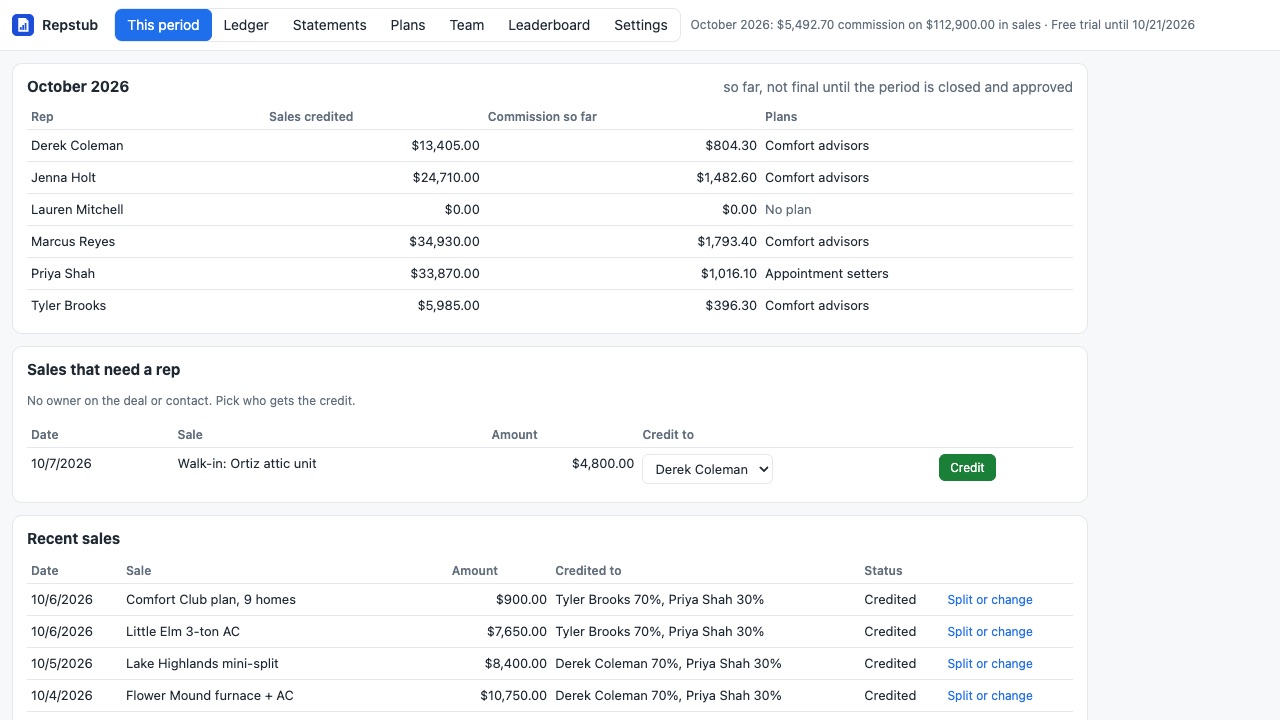
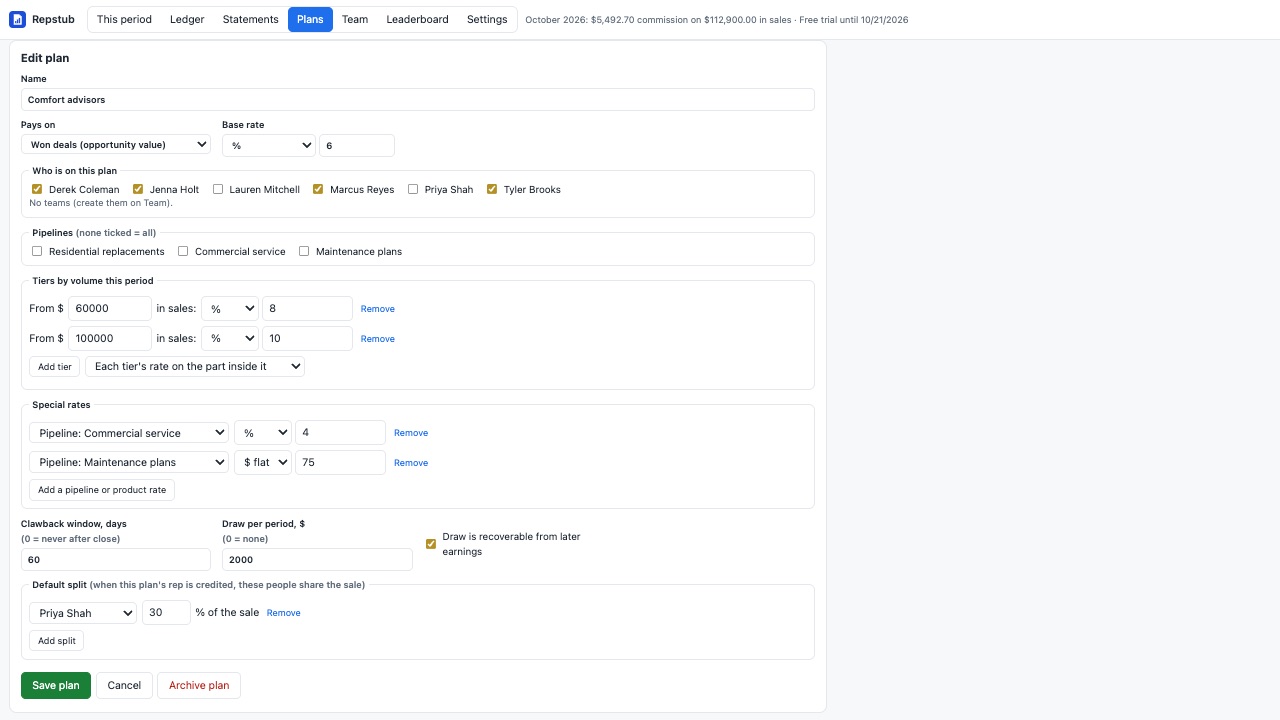
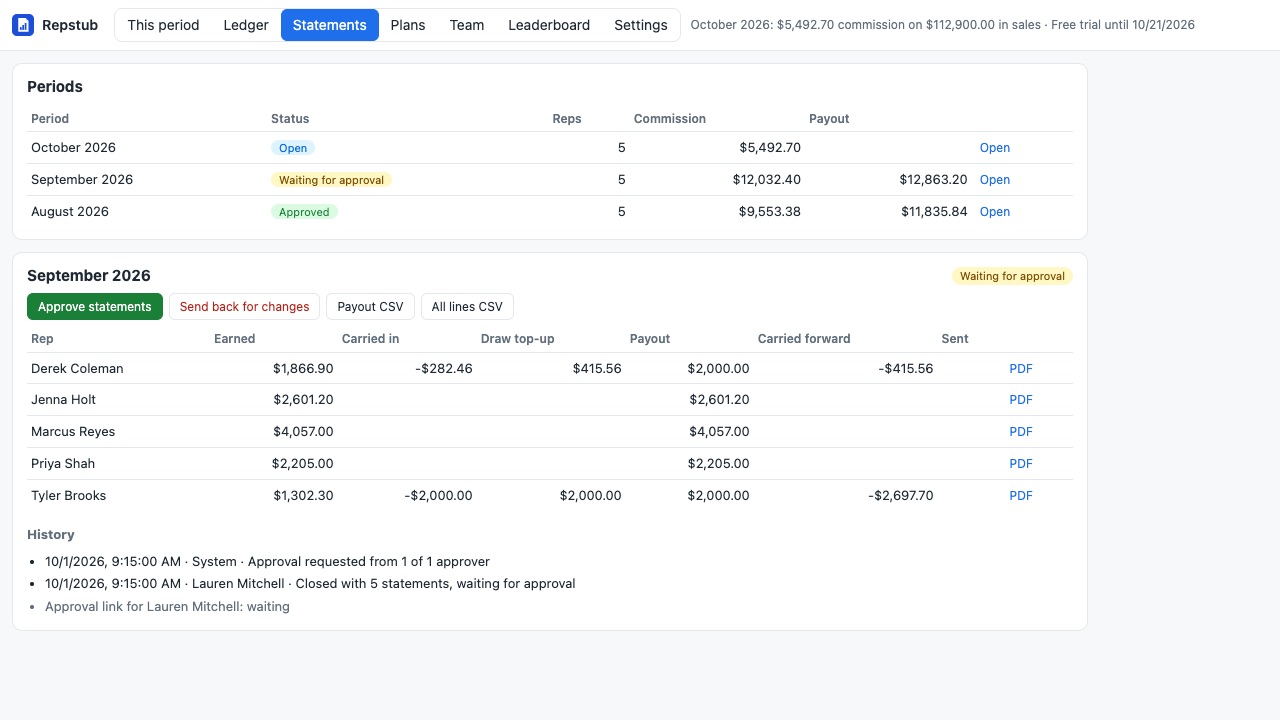
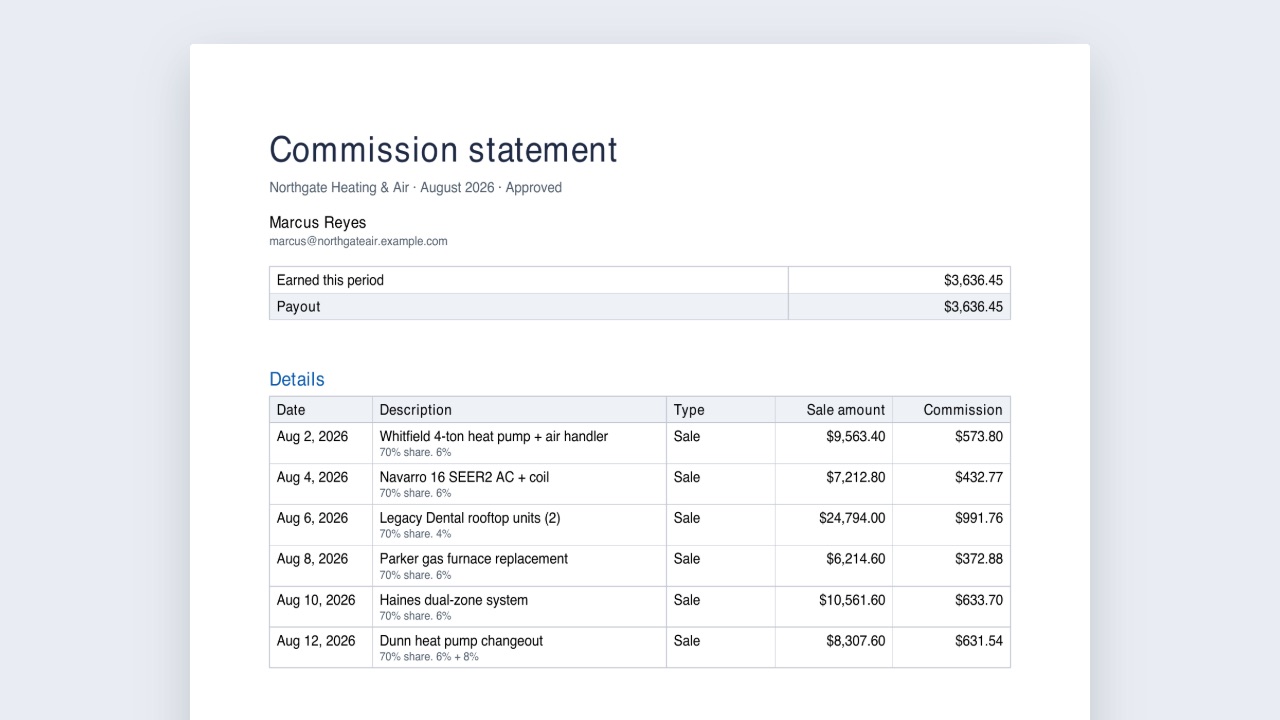
Repstub works out what every rep earned from the deals they win and the money your business collects, and turns it into a statement your manager approves and your rep can open any time. No spreadsheet at the end of the month, no arguments about who closed what.
What you get
Plans that match how you pay
Percent or flat per sale. Tiers by monthly volume (each tier on its own band, or the tier reached pays on the whole period). Different rates per pipeline or per product. Subscription renewals at the same rate, their own rate, for a set number of months, or not at all. A guaranteed draw per period, recoverable from later earnings or not. Put people on plans one by one or by team.
Credited as it happens
A deal marked won credits its owner. A paid invoice or order credits the rep on the client's won deal (or the contact owner). Subscription renewals and refunds are picked up every 30 minutes. Reopened or lost deals reverse, refunds take back their share of the commission inside your clawback window, and nothing is ever counted twice, even when the same event arrives again.
Splits between people
Setter and closer, two closers, a manager share: set a default split on a plan or split any single sale. Each person earns on their share under their own plan.
Close, approve, pay
When a period ends (monthly or every two weeks) it closes on its own or when you say so: tier true-ups and draws are worked out and each rep gets a statement. Your approvers get an email link to approve or send it back. Once approved, each rep gets a link to their statement with a PDF, and you download the payout CSV for payroll.
Reps see their own numbers
Every rep has a private page with what they have earned so far this period and every approved statement. Inside your CRM, team members who are not admins see only their own earnings.
Leaderboards (plan with leaderboards)
A live leaderboard for today, this week or the period, with goals, and a TV screen link for the office wall.
Workflows
The "Credit a sale" action credits a sale your CRM doesn't record as a won deal or a payment, once per sale.
How Repstub works
- Install Repstub from the HighLevel App Marketplace into a sub-account and open it from the left menu. Your CRM users appear on the Team tab; Refresh from CRM users picks up new ones.
- Create a plan on Plans with New plan. Choose what it Pays on: Won deals (opportunity value) or Money collected (invoices, orders, renewals). Pick who is on it, then a base rate as a percent or $ flat per sale.
- Add the rules you pay by: tiers by volume this period, special rates for a pipeline or product, how subscription renewals pay, a clawback window, a draw, and a default split such as a setter's share.
- Set the pay period in Settings: monthly or every two weeks, your time zone and currency, approvers, and how many days after a period ends it closes on its own.
- Work the period. Each won deal or payment is credited as it happens. The first tab shows each rep's commission so far and Sales that need a rep. The Ledger tab lists every line; add a sale by hand there, or a bonus or correction.
- Close, approve, pay. When the period closes, each rep gets a statement with tier true-ups and draws worked out. Approvers approve from an email link or on Statements. Once approved, each rep gets a link to their statement page with a PDF, and Download CSV gives you the payout file for payroll.
Who it's for
Agencies selling retainers
Account executives earn on the first payment and, if you choose, on renewals for a set number of months. A refund inside the clawback window takes the commission back on its own.
Setter and closer teams
A default split gives the setter 30% of every sale the closer is credited with, each paid under their own plan. Any single sale can be split differently or reassigned.
Home service and solar sales teams
Reps are paid on the opportunity value when a deal is marked won, with a higher rate past a monthly volume tier, and a lost or reopened deal reverses the line.
Owners tired of the month-end spreadsheet
Instead of exporting opportunities and building a commission sheet, the statements are already worked out and approved, and reps see their own numbers without asking.
Repstub or HighLevel's own reporting
HighLevel's opportunity reports show who won what. They don't apply your commission rates, tiers, splits, draws or clawbacks, close a pay period or produce a statement a rep can check. HighLevel's Affiliate Manager is for outside affiliates who sell through referral links; Repstub is for your own sales team's commission on CRM deals and payments.
If you sell through a Wix store and pay affiliates or reps on orders there, use Repstub for Wix instead.
Limits and requirements
- One sub-account per install; reps are the sub-account's users.
- Use either won deals or money collected for a given person, not both, so a sale isn't paid twice.
- Test-mode payments count only if you turn that on in Settings.
- Leaderboards and the TV screen need the plan with leaderboards.
- Workflow actions from marketplace apps can carry a small per-run fee from HighLevel, separate from Repstub's price.
Repstub guides
Questions about Repstub
What does Repstub do?
Commission plans that pay themselves: won deals and payments in, approved rep statements out. Repstub works out what every rep earned from the deals they win and the money your business collects, and turns it into a statement your manager approves and your rep can open any time. No spreadsheet at the end of the month, no arguments about who closed what.
What does Repstub work with?
Repstub works in HighLevel, including white-label HighLevel accounts.
How much does Repstub cost?
$79 a month or $790 a year per business account, unlimited reps. With leaderboards and the TV screen: $109 per month or $1,090 per year. Workflow actions from marketplace apps may carry a small per-run platform fee in your CRM, separate from Repstub's price. Billed through the HighLevel App Marketplace.
Is there a free trial?
14-day free trial, with leaderboards.
Where do I install Repstub?
From the HighLevel App Marketplace. Use the Install button on this page, or search for "Repstub: Sales Commissions & Rep Statements" there.
Who makes Repstub?
Great Work LLC, an independent software company. Email hello@greatwork.company with any question about Repstub and someone will answer.
Can reps see each other's commission?
No. Only admins see the whole team; everyone else sees only their own earnings.
What happens when a deal is reopened or a payment refunded?
While its period is open, the line reverses. After the period has closed, it reverses only within the clawback window you set, and the change shows up in the next period.
Can I pay commission on sales that aren't in the CRM?
Yes. Add a sale by hand on the Ledger tab, dated into an earlier open period if needed, or use the Credit a sale workflow action.
How do tiers work?
Choose "Each tier's rate on the part inside it" to pay every band its own rate as sales come in, or "Tier reached pays on the whole period" to pay the reached rate on everything, with a true-up line when the period closes.
What's a recoverable draw?
A minimum the rep is paid each period. When it's recoverable, what you topped up is paid back from the rep's later earnings and shows as carried forward on the statement.
Who approves the statements?
The approvers you set in Settings, by an email link that shows totals per rep, or an admin on the Statements tab. Sending a statement back reopens the period.
What happens if I disconnect?
Settings > Disconnect deletes everything Repstub stores for the sub-account right away, as does uninstalling.
More HighLevel apps
 Sluicewell
 Punchkeep
 Wrenchwell
 Okaygate