


Sluicewell Route every lead to the right client account by territory, schedule, caps and credits, once.
Listed on the HighLevel App Marketplace as “Sluicewell: Lead Distribution”
Related: Zonewell, our map app for HighLevel. When a client account has Zonewell, Sluicewell can use that account's service areas as its territory.
$197 a month or $1,970 a year for your whole team. 14-day free trial, up to 100 delivered leads.
Sluicewell is for teams that generate leads and sell or share them with the client accounts they run: pay per lead programs, rank and rent sites, franchise and dealer networks, home service lead gen.
What you get
Leads in from anywhere
Every campaign gets its own inbound URL for website forms, ad platforms and automation tools (JSON or a plain form post). In your own account, the Distribute lead workflow action sends a form or funnel contact through a campaign. There is also an API with keys you control, and you can add a lead by hand.
The right client, every time
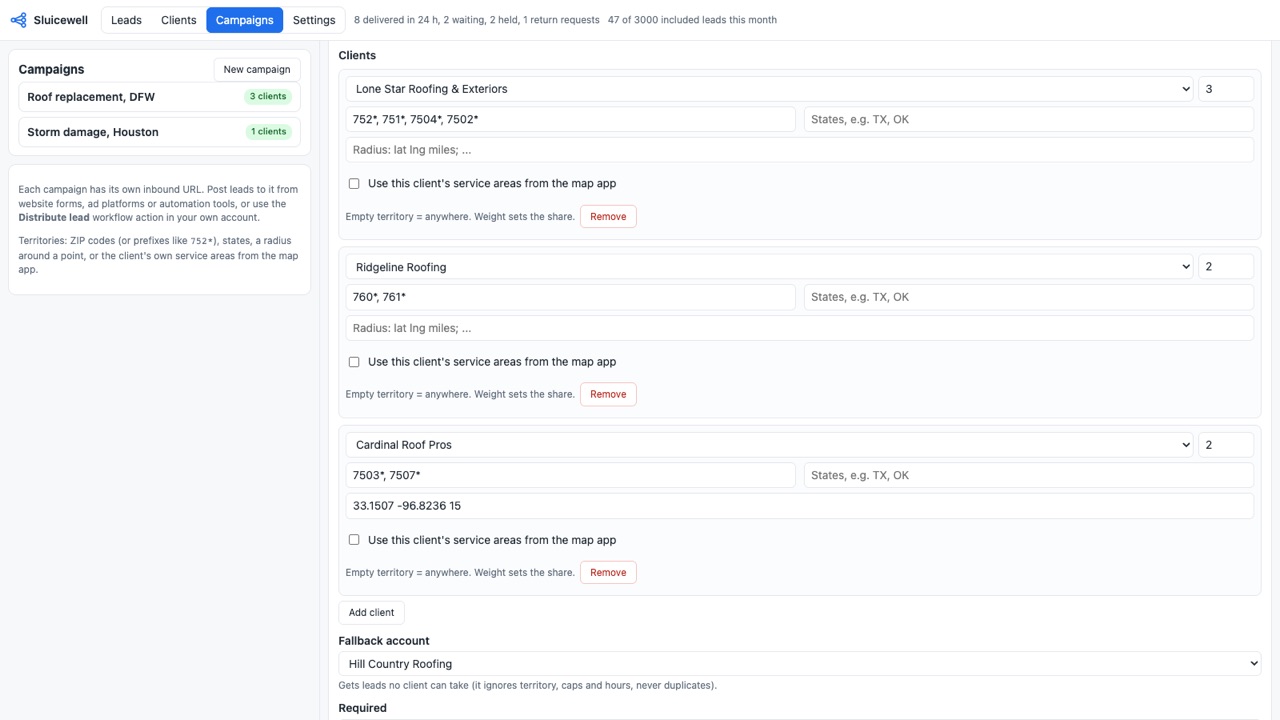
Route by ZIP code or ZIP prefix, state, a radius around a point, or the client's own service areas from our map app. Share leads by weight (60/40), equal turns, or priority order. Set each client's delivery days and hours in their time zone, daily, weekly and monthly caps, and a fallback account for anything no one can take. Leads that arrive at night can wait for the first client in the territory to open.
Prepaid lead credits
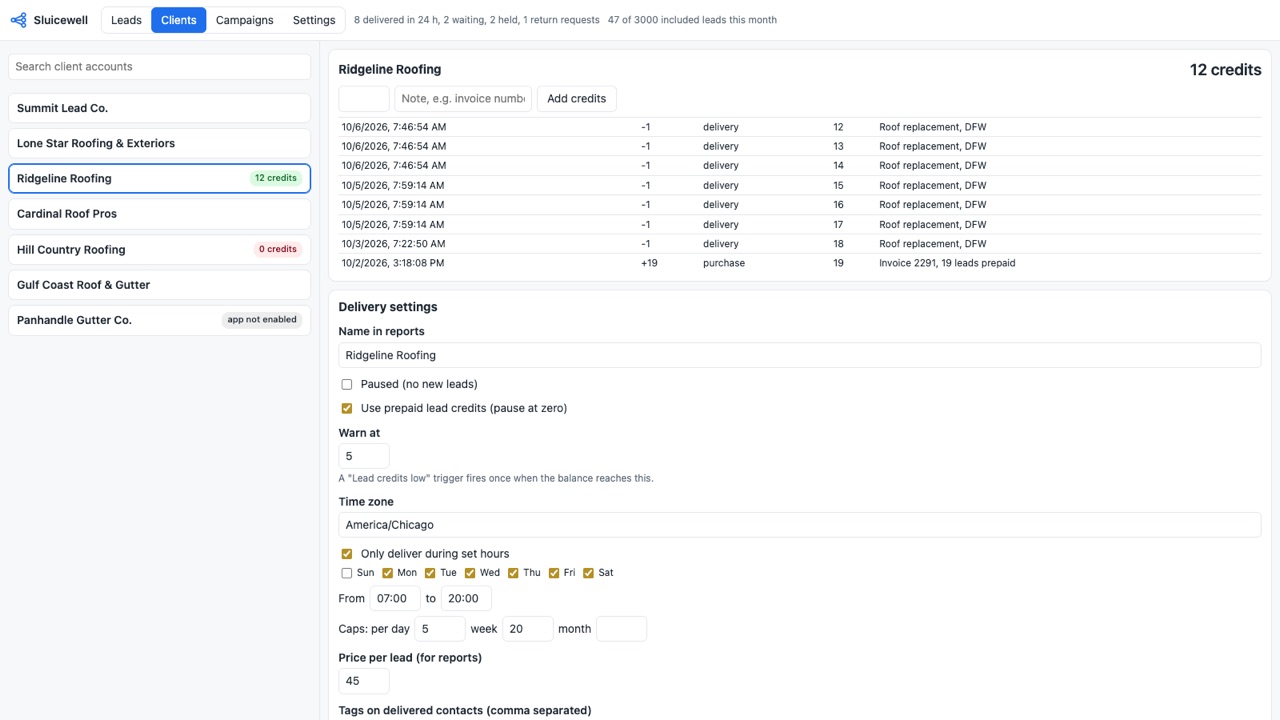
Give a client a balance of leads; each delivery uses one, a "Lead credits low" workflow trigger fires at the level you choose (so you can send the top-up invoice), and the client is paused at zero until you add more. Every credit change is in a ledger.
Never twice
The same phone number or email never goes to the same client twice within your window, a form submitted twice or a webhook retried by the sender makes one lead, and a delivery that fails halfway picks up where it stopped. One lead, one contact, one credit.
Delivered properly
Each lead becomes a contact in the client account, with your tags, an optional opportunity in the pipeline and stage you pick, a note with every answer, and a "Lead delivered" workflow trigger in the client account and in your own.
Returns without the email thread
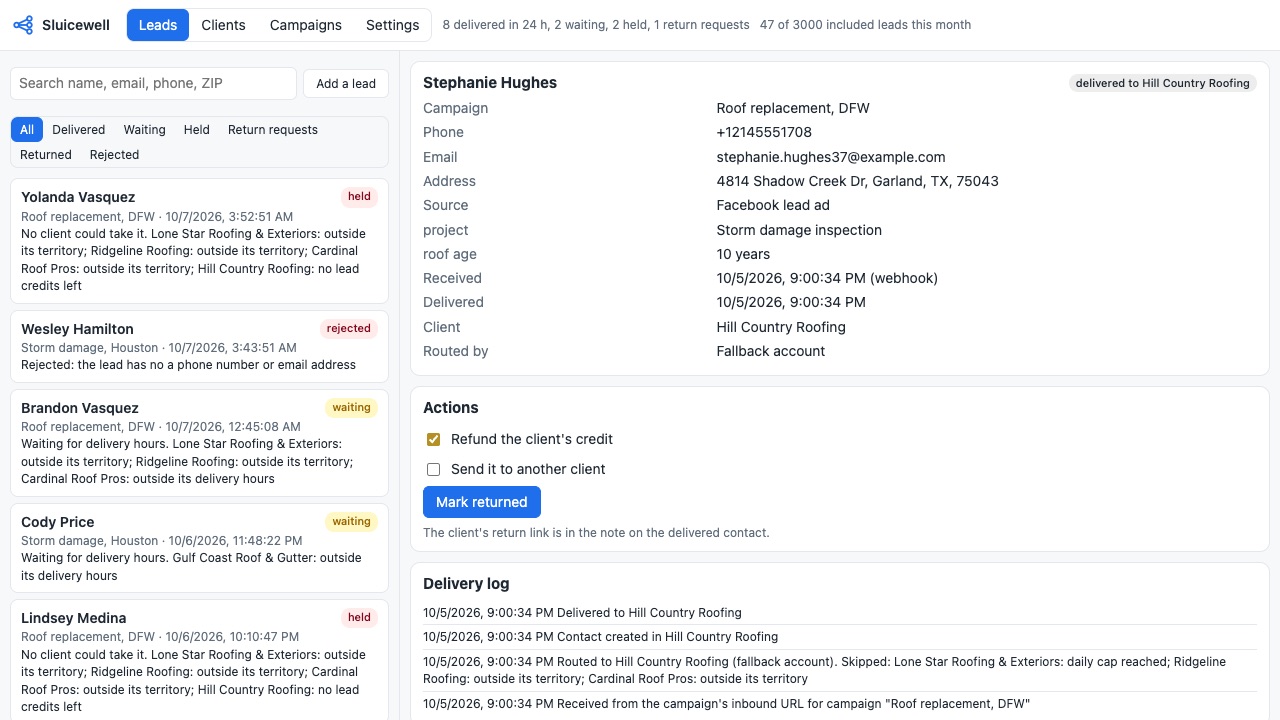
The note on each delivered contact carries a private link the client can use to return a lead within your window, with a reason. Approve it to refund the credit and, if you like, send the lead to the next client automatically.
Full delivery log and reports
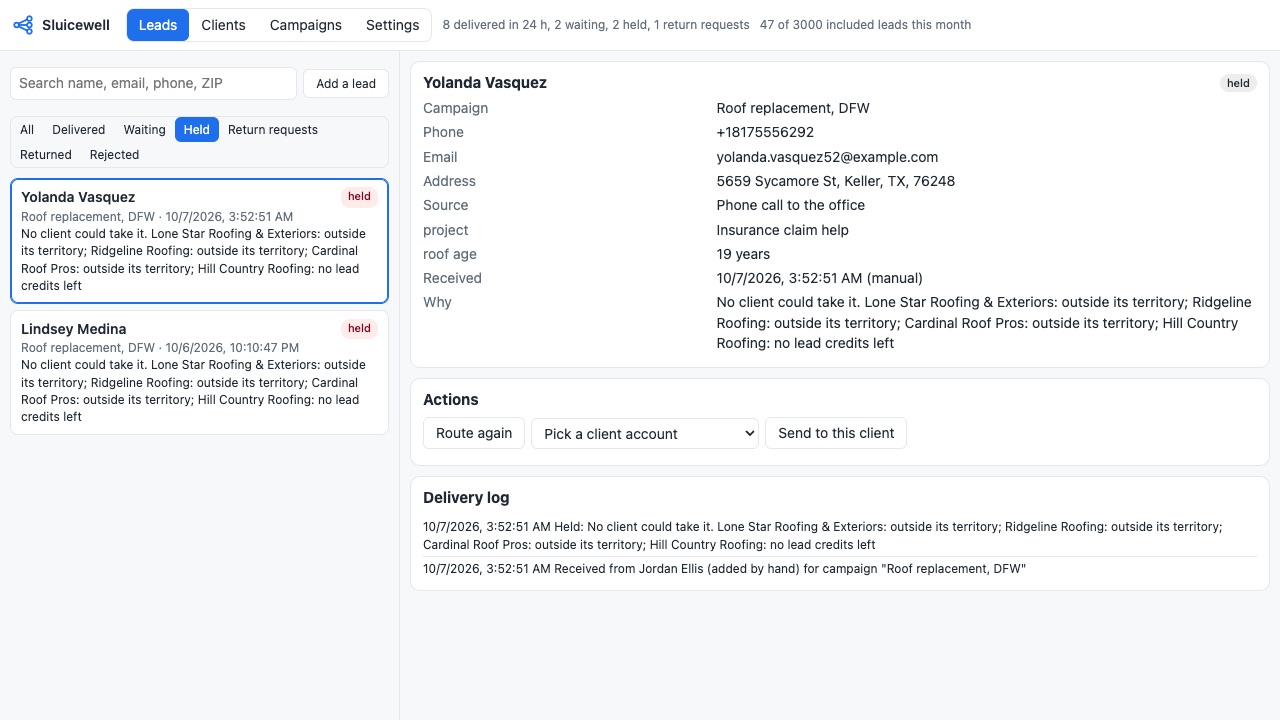
See every lead, where it went and why: which clients were skipped and the reason (outside territory, cap reached, closed, out of credits, duplicate). Per-client reports by day with return rate, value and a CSV export.
How Sluicewell works
- Install Sluicewell at the agency level for all client sub-accounts, including future ones, and for your own sub-account too. It can only deliver to sub-accounts it's installed on.
- Open it from the agency view's left menu. In Settings, pick Your own account (where the "Lead held" and "Lead credits low" triggers fire) and the default time zone.
- Set up each client under Clients: delivery days and hours in the client's time zone, caps per day, week and month, prepaid credits, and the tags, pipeline stage and note each delivered contact gets.
- Create a campaign for each stream of leads, such as one site or one ad set. Add the clients in it, each with a weight and a territory: ZIP codes or prefixes like
752*, states, radius areas, or the client's Zonewell service areas. - Pick how clients share leads: weighted rotation, equal turns, or priority. Set a fallback sub-account, a duplicate window, a return window and which contact details are required.
- Send leads in through the campaign's inbound URL (JSON or a plain form), the Distribute lead workflow action in your own sub-account, or the API with an agency key.
- Each lead lands in one client sub-account as a contact, with the opportunity, tags and a note holding the lead's answers and a private return link. The Leads tab shows where every lead went and why, or why it was held or rejected.
Who it's for
Pay-per-lead and lead gen agencies
You run the ads and sell the leads to local businesses, each with its own sub-account. Clients prepay for credits, each delivered lead uses one, and a client at zero is paused until they top up.
Rank and rent sites
One site ranks for "roofing Dallas" and two roofers rent it. Their territories split the ZIP codes, or both cover the city and take turns.
Franchise and dealer networks
A brand's website sends every inquiry to the location that covers the customer's ZIP code, during that location's open hours, with a fallback to head office.
Agencies sharing overflow leads
When a client has hit their monthly cap or closed for the day, the lead waits for them or goes to the next client in the territory instead of being lost.
Sluicewell or HighLevel's round robin
HighLevel's built-in round robin assigns leads to users or calendars inside one sub-account. Sluicewell works across sub-accounts: it decides which client account gets the lead, then creates the contact there. If all your leads stay in one business and only need a salesperson, the built-in option is enough.
Sluicewell is not a ping-post exchange and doesn't bill your clients. You collect payment from clients your own way; Sluicewell keeps their credit balance, and "Price per lead" is only for the value column in reports.
Limits and requirements
- An agency (company-level) install, with your own sub-account included.
- Leads without the required phone or email are rejected and logged.
- The same phone or email never goes to the same client twice within the duplicate window (30 days unless you change it).
- Leads waiting for a client's hours wait up to the campaign's limit (72 hours by default, up to 7 days), then go to the fallback or are held.
- Return links work for the campaign's return window, 7 days by default and up to 90.
- The plan includes 3,000 delivered leads a month; past that, each delivered lead is $0.05 through your CRM wallet.
Sluicewell guides
Questions about Sluicewell
What does Sluicewell do?
Route every lead to the right client account by territory, schedule, caps and credits, once. Sluicewell is for teams that generate leads and sell or share them with the client accounts they run: pay per lead programs, rank and rent sites, franchise and dealer networks, home service lead gen.
What does Sluicewell work with?
Sluicewell works in HighLevel, including white-label HighLevel accounts.
How much does Sluicewell cost?
$197 a month or $1,970 a year for your whole team, with unlimited client accounts and campaigns and 3,000 delivered leads a month included. Beyond that, $0.05 per delivered lead through your CRM wallet. Billed through the HighLevel App Marketplace.
Is there a free trial?
14-day free trial, up to 100 delivered leads.
Where do I install Sluicewell?
From the HighLevel App Marketplace. Use the Install button on this page, or search for "Sluicewell: Lead Distribution" there.
Who makes Sluicewell?
Great Work LLC, an independent software company. Email hello@greatwork.company with any question about Sluicewell and someone will answer.
Does each client sub-account pay for Sluicewell?
No. It's one agency price for your whole team, with $0 per client sub-account and unlimited campaigns.
Can I send leads from Facebook lead ads, a website form or another CRM?
Yes, anything that can POST JSON or a form to the campaign's inbound URL, or call the API. Leads already in your own sub-account go out with the Distribute lead action.
What stops a retry from creating two leads?
Send an Idempotency-Key header or an external_id field, and a repeated request returns the first lead instead of making a second one.
What happens when no client can take a lead?
It goes to the fallback sub-account if you set one, which ignores territory, caps and hours but never gets a duplicate. Without one, the lead is held and the Lead held trigger fires in your own sub-account.
Can clients see where else a lead went?
No. A client sees only the contacts delivered to their own sub-account. Each client has a report of its delivered and returned leads with a CSV you can share.
What happens when I disconnect?
Disconnect in Settings removes Sluicewell and deletes the data it keeps. Contacts already delivered stay in the client sub-accounts.
More HighLevel apps
 Wrenchwell
 Repstub
 Zonewell
 Punchkeep