



Optwell Marketing consent for Klaviyo and ActiveCampaign on the ticket. One-step unsubscribe. From $110/mo.
From $110 a month per Zendesk account. 14-day free trial (Zendesk asks for a card at install). Billed monthly by Zendesk. No free plan.
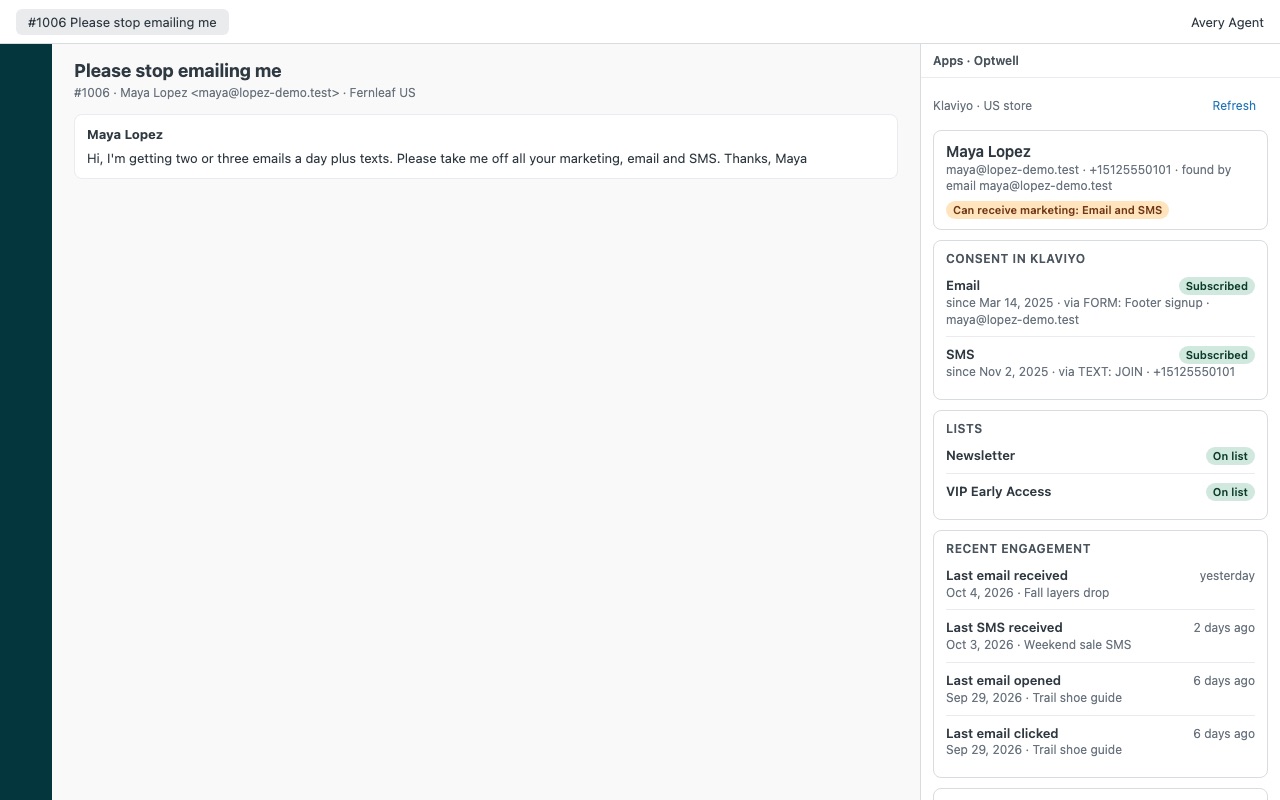
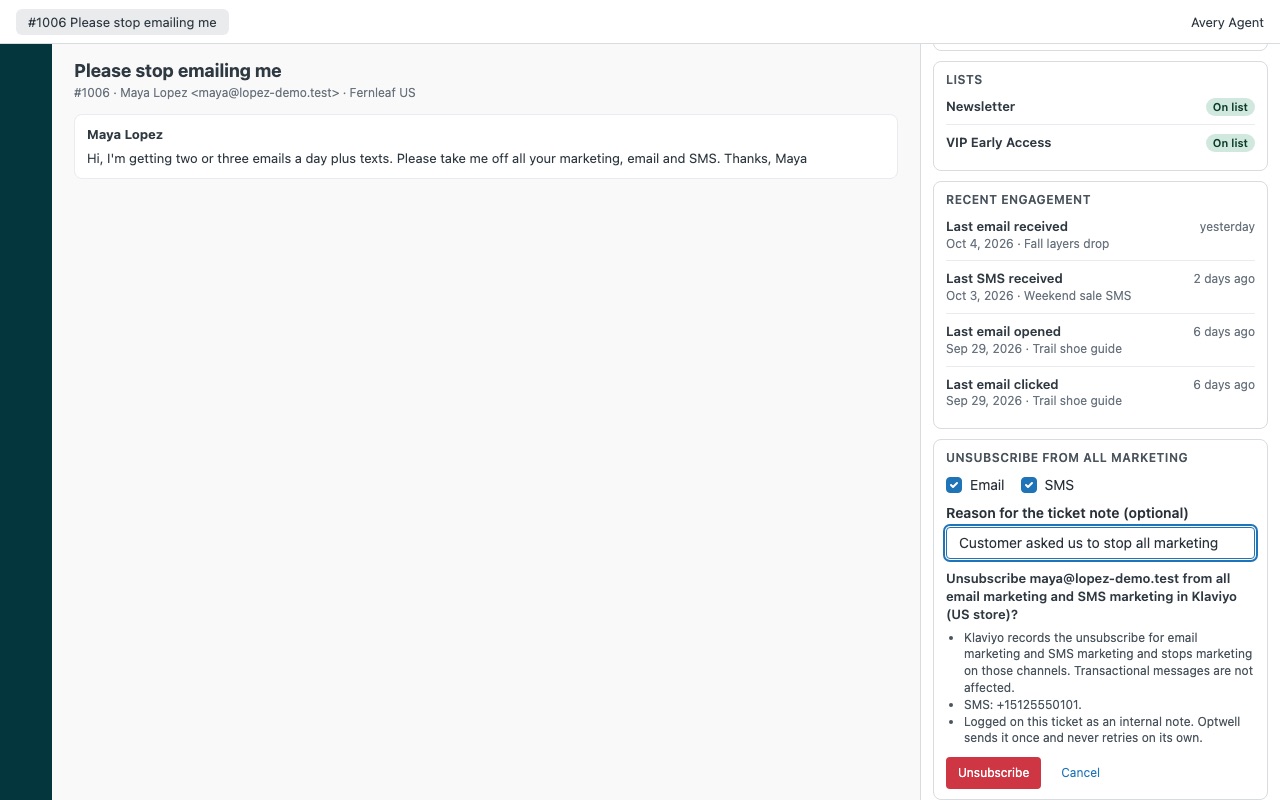
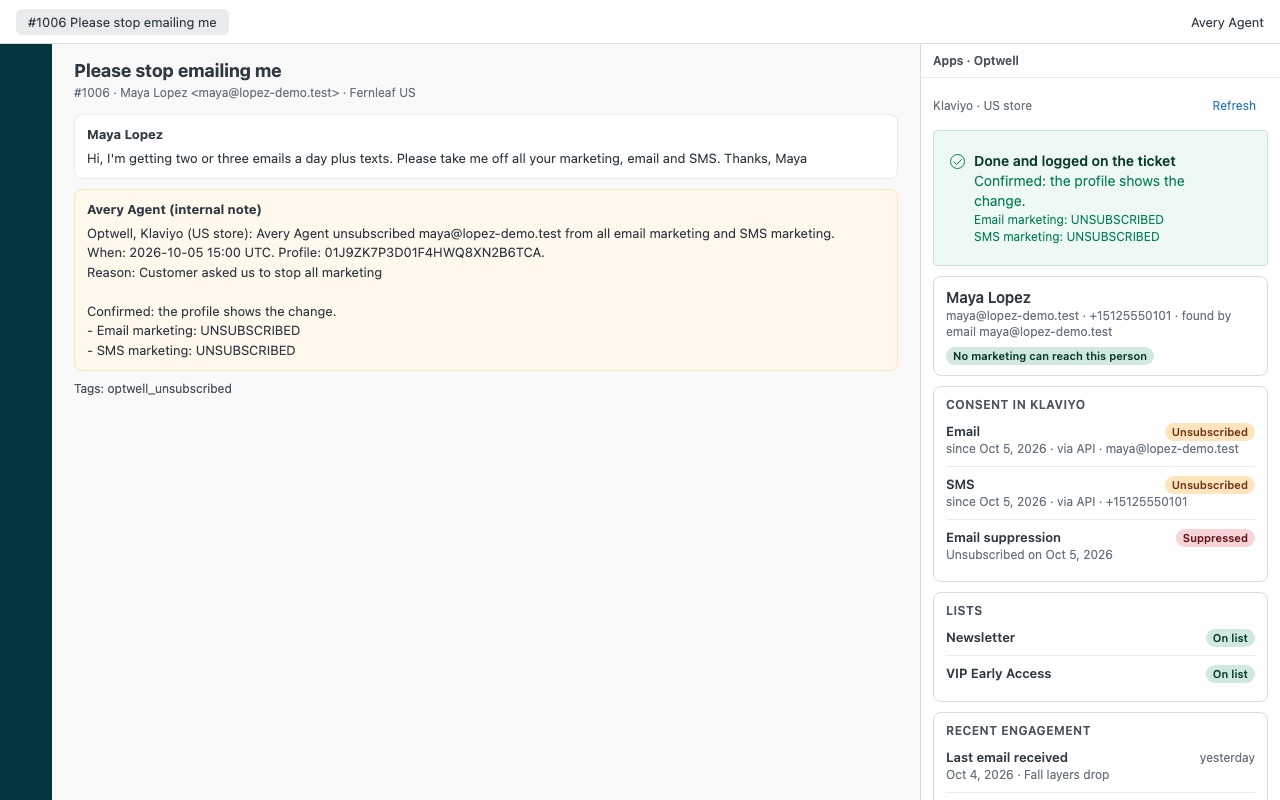
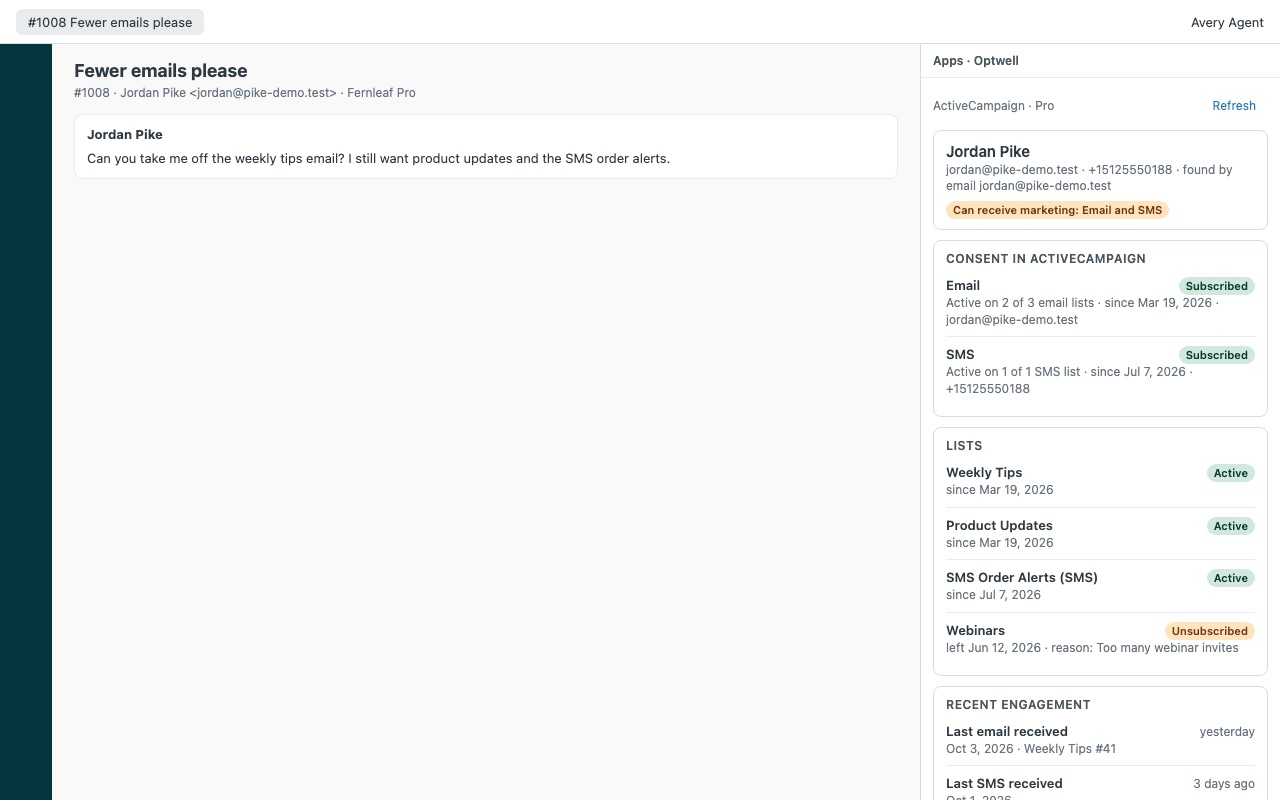
Optwell shows whether the person on a ticket can still get your marketing emails and texts, and lets your agents stop them in one confirmed step, logged on the ticket. It works with Klaviyo and ActiveCampaign, and it's built for the "please stop emailing me" ticket that turns up right after a big send.
What you get
See consent before you reply
Email and SMS marketing consent for the requester, with the date it was given or withdrawn and how (sign-up form, text keyword, API, preference page). Suppressions in plain words: unsubscribed, hard bounce, marked as spam, suppressed by hand, with dates.
Stop the messages in one confirmed step
Unsubscribe from all marketing: email, SMS or both. Unsubscribe from one list and leave the rest alone, for "fewer emails" rather than "no emails".
A record on every ticket
Each change adds an internal note: who did it, when, which account, the reason the agent typed, and the status the platform showed afterwards. Tags for your views and reports, such as optwell_unsubscribed.
Several stores, one account at a time
Connect up to 3 Klaviyo accounts and one ActiveCampaign account, and map each Zendesk brand to one of them. A ticket only ever reads from and writes to the account its brand maps to.
What it doesn't do
It doesn't delete profiles or handle data erasure or access requests. It changes marketing consent only. It doesn't lift suppressions; that stays a deliberate step inside Klaviyo.
How Optwell works
- Create a key. Klaviyo: Settings > Account > API keys > Create Private API Key > Custom Key, with Read access to Profiles, Lists, Events and Metrics and Full access to Profiles, Lists and Subscriptions. ActiveCampaign: Settings > Developer shows the API URL and key.
- Install Optwell from the Zendesk Marketplace, set Platforms and paste the keys. Up to 3 Klaviyo accounts and one ActiveCampaign account.
- Route brands. With more than one account, map each Zendesk brand in Brand routing, such as
<brand id>: klaviyo 2. A ticket never reads from or writes to two accounts at once. - Open a ticket. Optwell finds the profile by every email address on the requester's Zendesk profile, and in Klaviyo by phone number too if Look up Klaviyo profiles by phone is on.
- Read the consent. Email and SMS consent with when and how it was given, suppressions with reason and date, every list and the ones they left, and recent engagement.
- Act in one confirmed step. Unsubscribe from all marketing, Unsubscribe from one list, Suppress email (Klaviyo) or, if an admin allows it, Resubscribe with recorded consent. Optwell reads the profile back and logs an internal note with an
optwell_*tag.
Who it's for
Stores that get "stop emailing me" tickets after a send
The agent sees whether the person is still subscribed and stops email, SMS or both from the ticket, without a Klaviyo login.
Teams that need a record of each opt-out
Each change adds an internal note: who, when, which account, the reason the agent typed and what the platform shows afterwards. Tags such as optwell_unsubscribed make the changes reportable.
Brands running several Klaviyo accounts
Each Zendesk brand talks to its own account only, so a US store's ticket never touches the EU store's profiles.
What you need
- Zendesk Support, with an admin to install Optwell.
- A Klaviyo private API key with the scopes above, one per account (a read-only key shows consent and refuses every change).
- For ActiveCampaign, the account's API key from a user who may edit contacts, on an
api-us1.comAPI address.
Optwell guides
Questions about Optwell
What does Optwell do?
Marketing consent for Klaviyo and ActiveCampaign on the ticket. One-step unsubscribe. From $110/mo. Optwell shows whether the person on a ticket can still get your marketing emails and texts, and lets your agents stop them in one confirmed step, logged on the ticket. It works with Klaviyo and ActiveCampaign, and it's built for the "please stop emailing me" ticket that turns up right after a big send.
What does Optwell work with?
Optwell works in Zendesk Support.
How much does Optwell cost?
Team: $110 a month per Zendesk account, up to 12 agents. Scale: $9.50 a month per agent.
Is there a free trial?
14-day free trial (Zendesk asks for a card at install). Billed monthly by Zendesk. No free plan.
Where do I install Optwell?
From the Zendesk Marketplace. Use the Install button on this page, or search for "Optwell" there.
Who makes Optwell?
Great Work LLC, an independent software company. Email hello@greatwork.company with any question about Optwell and someone will answer.
Does Optwell help with GDPR erasure or access requests?
No. It changes marketing consent only. It doesn't delete or edit profiles, handle erasure or access requests, or give legal advice.
Can agents resubscribe someone?
Only if an admin turns on Allow resubscribe with recorded consent. The agent then records how and when the customer gave consent and ticks that they asked explicitly. Klaviyo uses the list's or account's opt-in setting, so with double opt-in the customer confirms first.
Does it work for SMS-only subscribers?
In Klaviyo, yes, with Look up Klaviyo profiles by phone on. Numbers are matched in E.164, such as +15125550101.
What doesn't the ActiveCampaign side do?
There's no suppress action, because ActiveCampaign publishes no API to add an address to its exclusion list, and no opens, because its API has none. Unsubscribes work list by list.
Does Optwell store our subscribers?
No. It reads one profile while the agent has the ticket open and keeps nothing: no copies, no exports and no server of ours in the middle.
What happens when I uninstall it?
The stored keys are deleted. Notes and tags already on tickets stay. Delete the keys in Klaviyo and ActiveCampaign too.
More Zendesk apps
 Pagowell
 Meterwell
 Panewell
 Loyalwell