



Meterwell Time to Harvest, Toggl or Clockify: send what agents track in Zendesk, mapped to client and project.
From $100 a month per Zendesk account. 14-day free trial (Zendesk asks for a card at install). Billed monthly by Zendesk. No free plan.
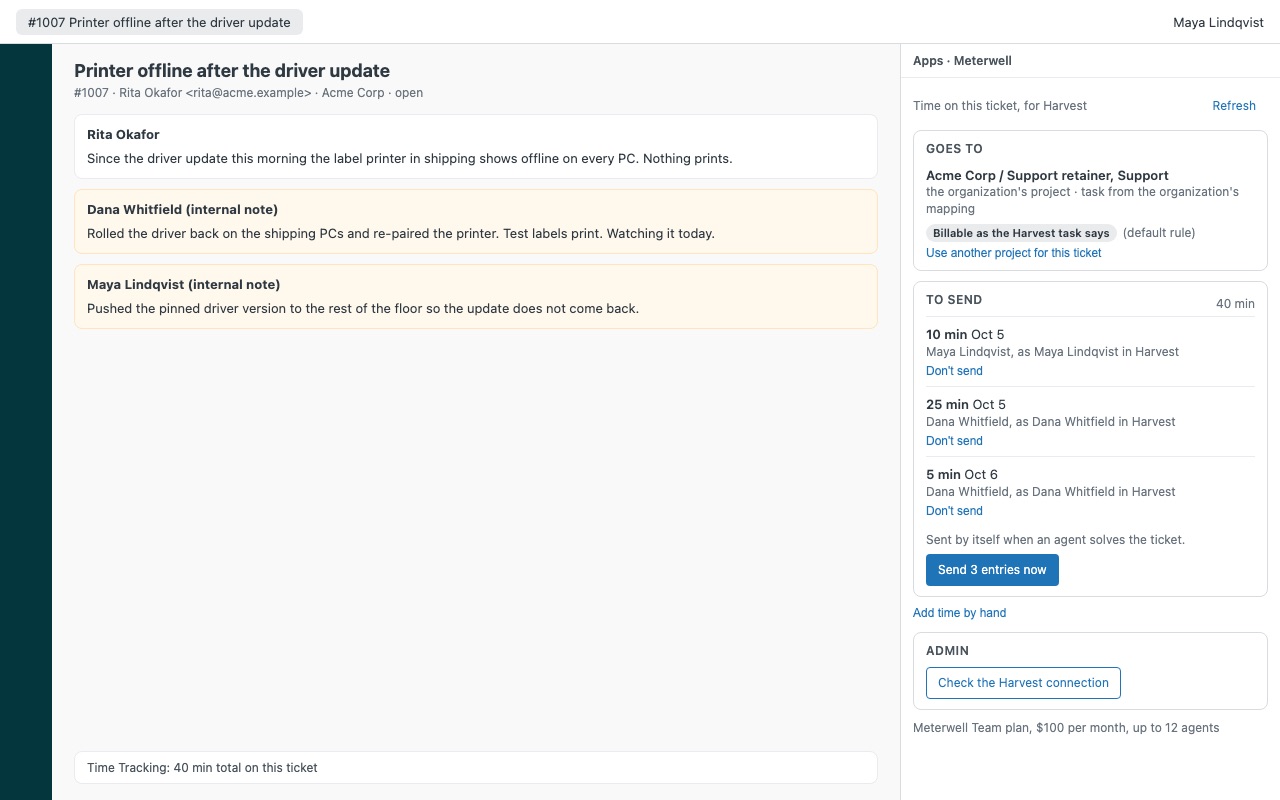
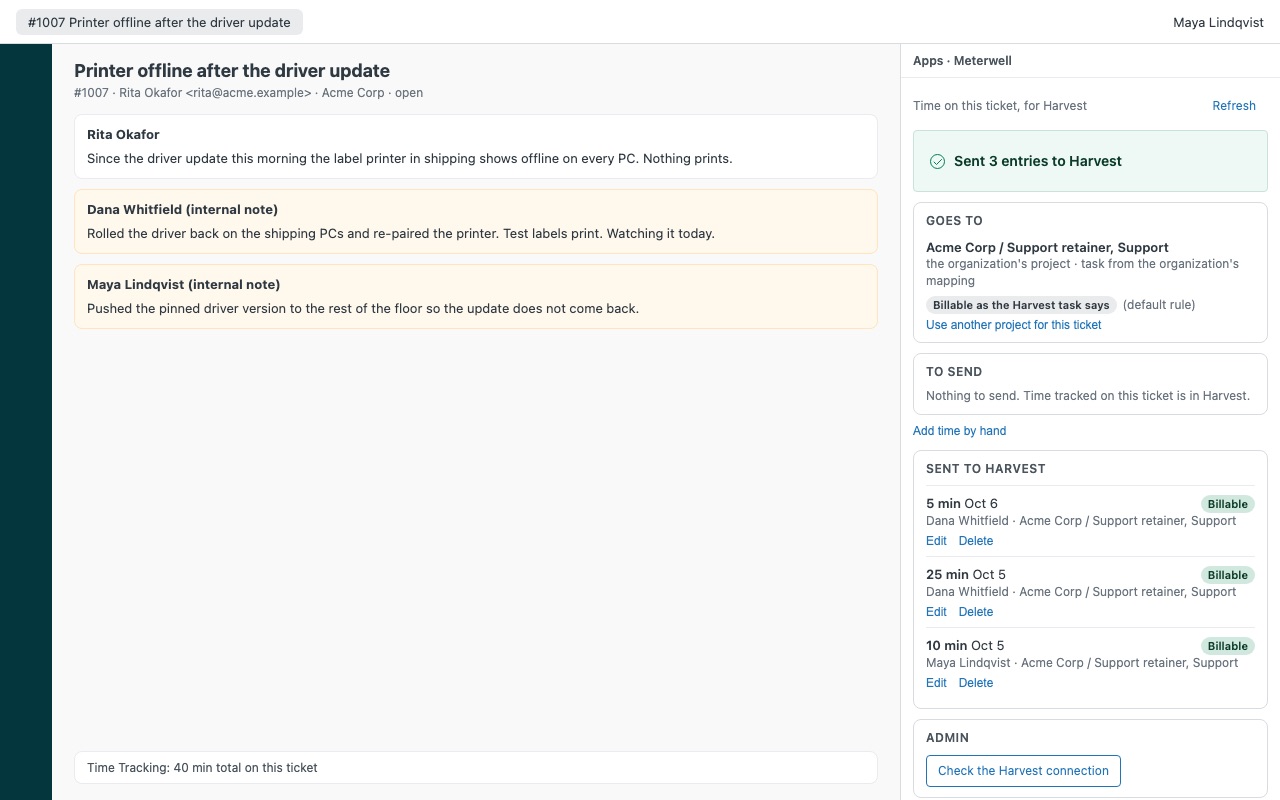
Send the time your agents already track in Zendesk to Harvest, Toggl Track or Clockify, against the right client, project and task, ready to invoice. Meterwell works with Zendesk's own Time Tracking app: it reads the time agents submit on each ticket and turns it into timesheet entries, one per agent and day, and never sends the same minutes twice.
Meterwell is built by Great Work LLC. It is not made or endorsed by Zendesk, Harvest, Toggl or Clockify. Harvest, Toggl Track and Clockify are trademarks of their owners.
What you get
Time goes out by itself
On solve, on every save, or only when someone clicks Send. Your admin picks. One entry per agent and day, with the ticket number, the subject (your admin can turn it off) and a link back to the ticket.
The right client, project and task
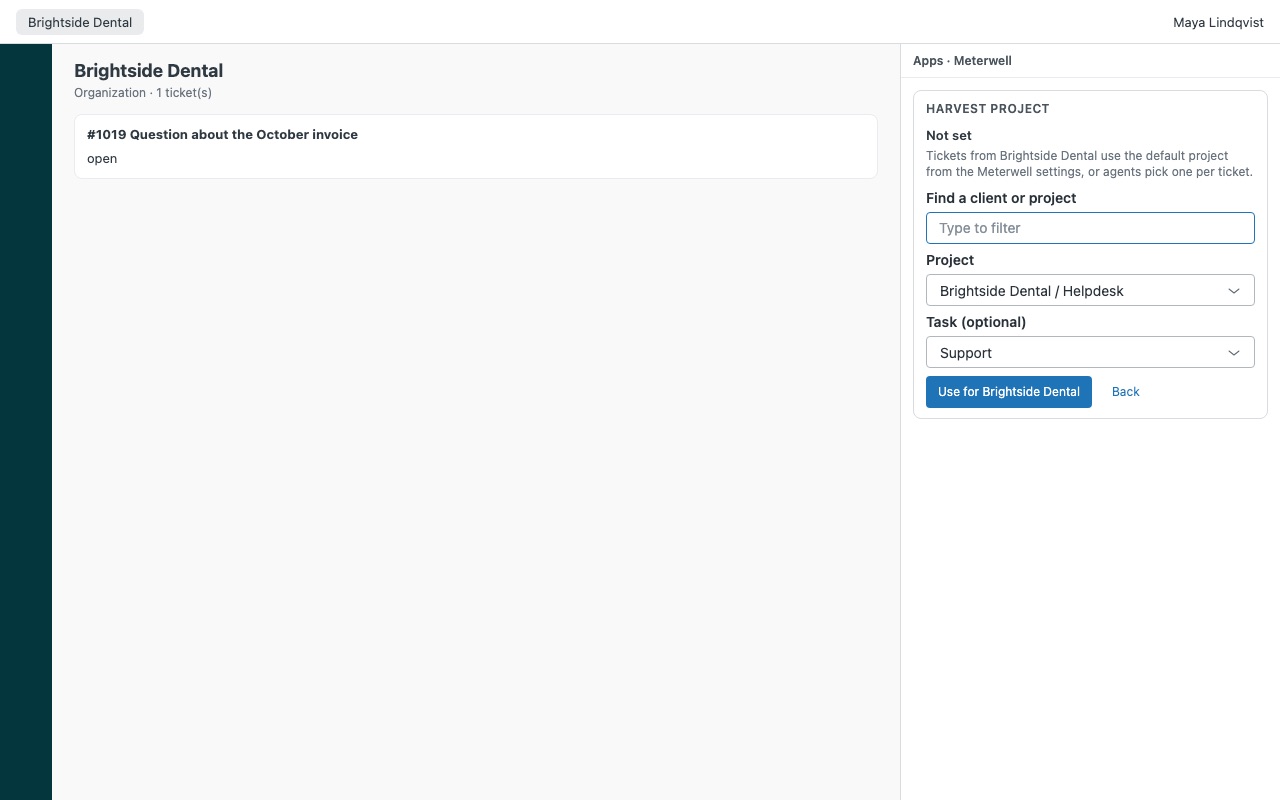
Map each Zendesk organization to a client project. Every ticket from that organization follows it. Task rules by ticket type, group, form or tag.
See and fix what was sent
The sidebar lists every entry Meterwell made for the ticket. Edit or delete one from the ticket. Entries your tool has locked (approved or invoiced) stay read-only. Corrections follow. If an agent takes time off in Time Tracking after it was sent, Meterwell offers to apply it to their entry.
Built not to double bill
Each entry carries a marker. Before sending, Meterwell checks your tool for it; if a reply gets lost, it checks again instead of sending again.
What it doesn't do
No background sync. Time goes out when an agent saves, solves or clicks Send in that ticket. No bulk export or backfill of past tickets.
How Meterwell works
- Get a token from your time tool. A Harvest personal access token and Account ID, a Toggl Track API token, or a Clockify API key and workspace id.
- Install Meterwell from the Zendesk Marketplace, set Time tool to
harvest,togglorclockifyand fill in that tool's fields. Tokens are Zendesk secure settings. - Pick when time goes out. Send time is
solveby default (when an agent solves the ticket),update(every save) ormanual(only with the Send button). - Map organizations to projects. Open an organization, click Choose a project in the Meterwell sidebar and pick the client's project, and optionally a task, from your tool's live list.
- Agents track time as they do today. Meterwell reads what each agent submits in Zendesk's Time Tracking app and groups it into one entry per agent and day, with the ticket number, a link back and the subject if allowed.
- See and fix it on the ticket. The sidebar shows Goes to (project, task, billable and why), To send and Sent to your tool, where entries can be edited or deleted until your tool locks them.
Who it's for
Agencies and MSPs that invoice support hours
Every ticket from a client lands on that client's project with the right task and billable flag, ready for the invoice your time tool already makes.
IT teams that report time by client or department
Organization mapping, task rules by ticket type, group, form or tag, and billable rules by tag, type, organization, group or priority keep the timesheet sorted without anyone retyping it.
Teams on Zendesk plans without Time Tracking
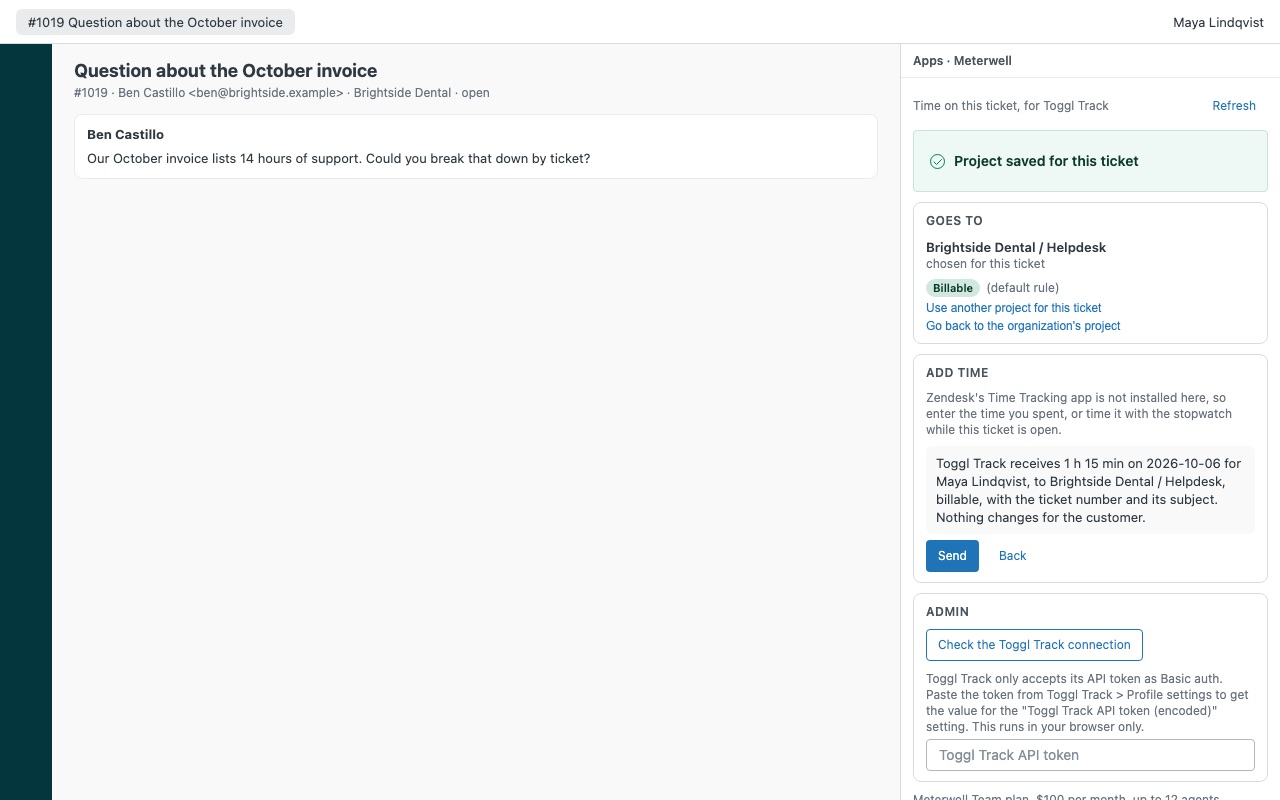
On Support Team and Suite Team, agents add time in the Meterwell sidebar instead: type 25, 1h 30m or 1:30, or run the stopwatch while the ticket is open.
What you need
- Zendesk Support with an admin to install. Zendesk's Time Tracking app for automatic time; it's on Suite Growth and above and Support Professional and Enterprise.
- A Harvest, Toggl Track or Clockify account. To post on each agent's own timesheet, a Harvest Administrator (or a Manager allowed to edit teammates' time) or a Clockify workspace admin.
- In Harvest, a task on every entry, so a task in the organization mapping or a
defaulttask rule.
Meterwell guides
Questions about Meterwell
What does Meterwell do?
Time to Harvest, Toggl or Clockify: send what agents track in Zendesk, mapped to client and project. Send the time your agents already track in Zendesk to Harvest, Toggl Track or Clockify, against the right client, project and task, ready to invoice. Meterwell works with Zendesk's own Time Tracking app: it reads the time agents submit on each ticket and turns it into timesheet entries, one per agent and day, and never sends the same minutes twice.
What does Meterwell work with?
Meterwell works in Zendesk Support.
How much does Meterwell cost?
Team: $100 a month per Zendesk account, up to 12 agents. Scale: $9 a month per agent.
Is there a free trial?
14-day free trial (Zendesk asks for a card at install). Billed monthly by Zendesk. No free plan.
Where do I install Meterwell?
From the Zendesk Marketplace. Use the Install button on this page, or search for "Meterwell" there.
Who makes Meterwell?
Great Work LLC, an independent software company. Email hello@greatwork.company with any question about Meterwell and someone will answer.
Can Meterwell send the same minutes twice?
It's built not to. Each entry carries a marker like [mw:mw1x2y3z] in its notes. Meterwell checks your tool for it before sending, and after a lost answer checks again instead of resending. Keep the marker when you edit notes in your tool.
Does it sync in the background?
No. Meterwell has no server, so time goes out from an open ticket only: when an agent solves, saves or clicks Send. It doesn't backfill past tickets.
What does it create in Zendesk?
Two fields: a ticket field, "Meterwell: time sent (managed by the app)", which records what was sent and hides itself, and an organization field, "Meterwell: billing project". Uninstalling removes both; entries already in your time tool stay there.
Does it change our Zendesk Time Tracking data?
No. It only reads the time agents submit. When an agent takes time off in Time Tracking after it was sent, Apply to the entry offers to correct the entry in your tool.
What happens if our team grows past 12 agents on Team?
Time stays visible and sending pauses until an admin switches to the Scale plan.
More Zendesk apps
 Optwell
 Loyalwell
 Pagowell
 Leverwell