



Panewell Customer BI dashboards in the ticket, filtered to the customer on screen. Looker, Power BI, Tableau.
$5 a month per agent. 14-day free trial (Zendesk asks for a card at install). Billed monthly by Zendesk. No free plan.
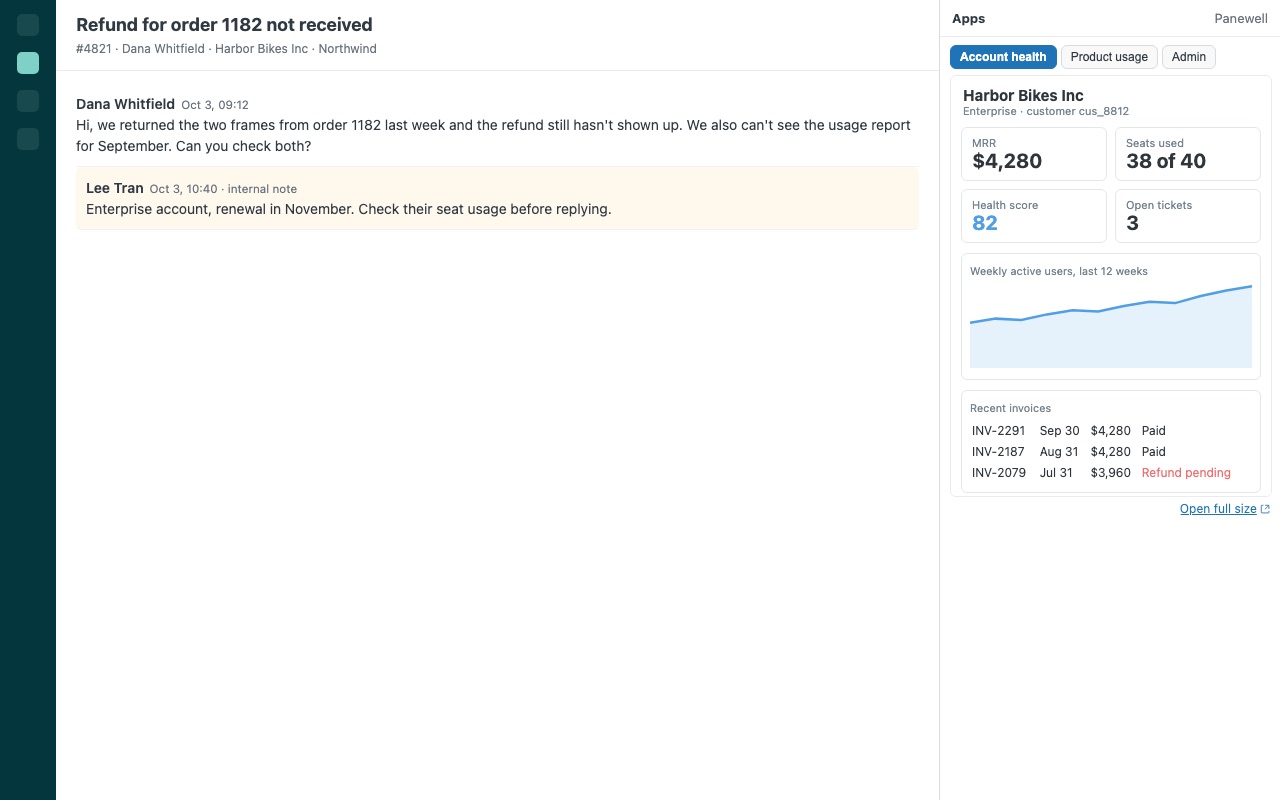
The dashboard for this exact customer, filtered and in the ticket, from the BI tool you already use. Panewell shows your Looker Studio, Looker, Metabase, Tableau, Power BI or Grafana dashboards in the Zendesk sidebar and fills in the filter for the customer on screen: their external ID, email, account number, organization, or any ticket, user or organization field. Agents see plan, usage, invoices and health for the person they are answering, without leaving the ticket or asking someone for a report.
Panewell is built by Great Work LLC. It is not made or endorsed by Zendesk.
What you get
Paste a link, Panewell does the rest
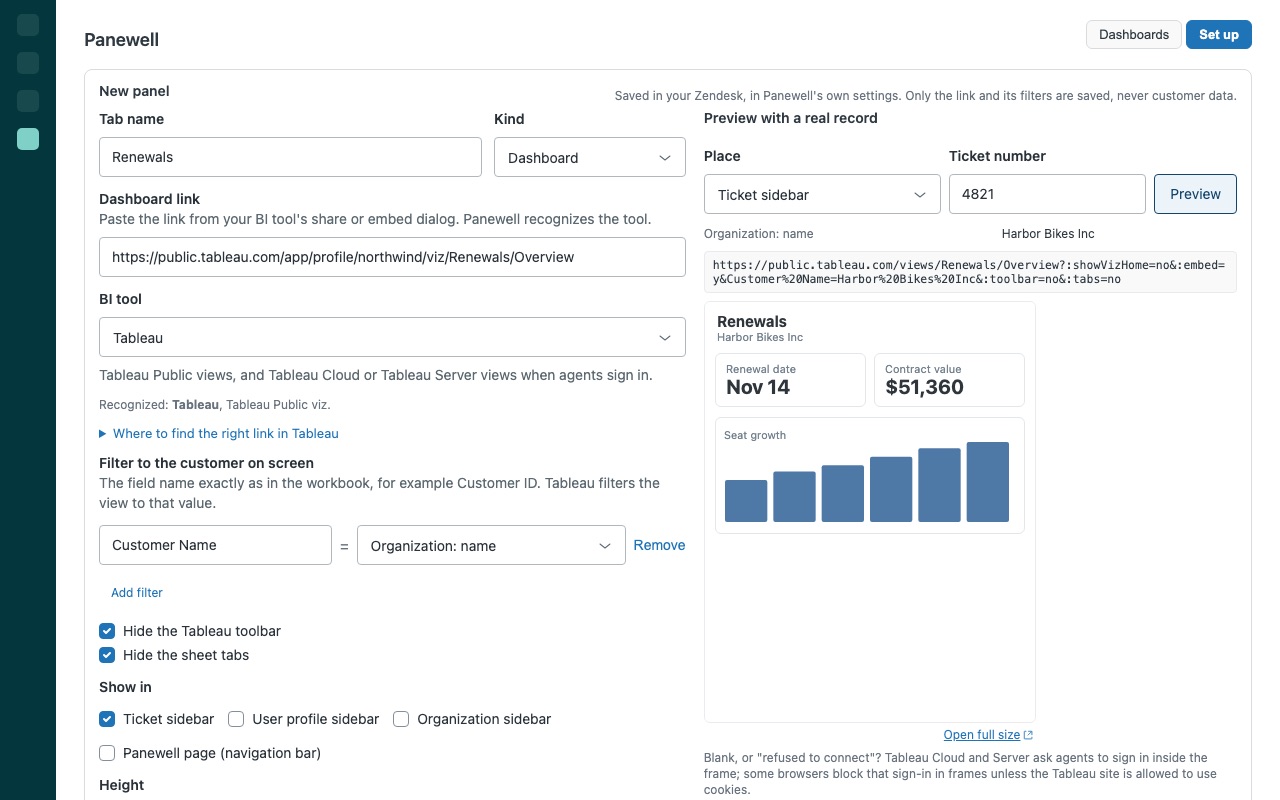
Paste the link from your BI tool's share or embed dialog. Panewell recognizes the tool and turns it into the link that can be shown in Zendesk. Pick the filter: the BI tool's parameter on the left, a Zendesk value on the right, such as customer_id = Customer: external ID or Customers/Email = Customer: email. Panewell writes it the way each tool reads it: report parameters for Looker Studio, query filters for Metabase, Looker and Tableau, filter= for Power BI, var- variables for Grafana.
Where it shows, and for whom
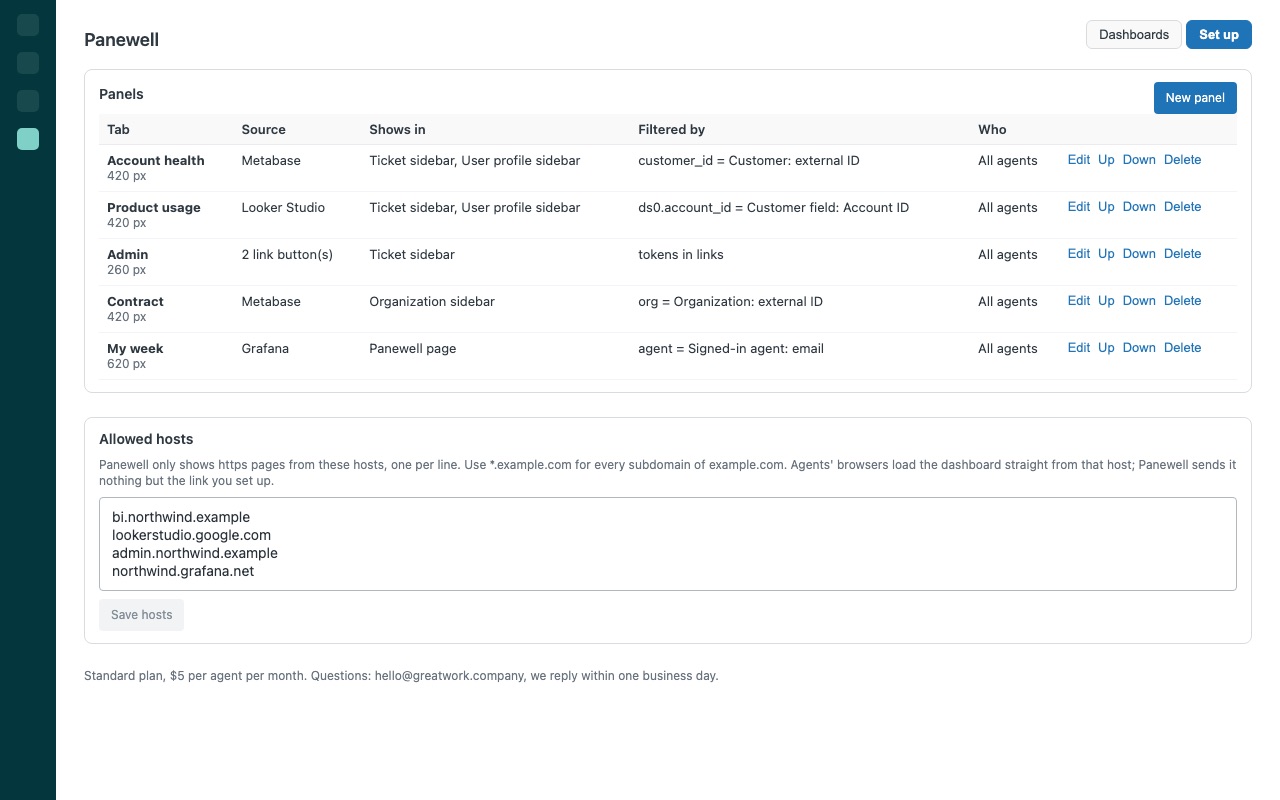
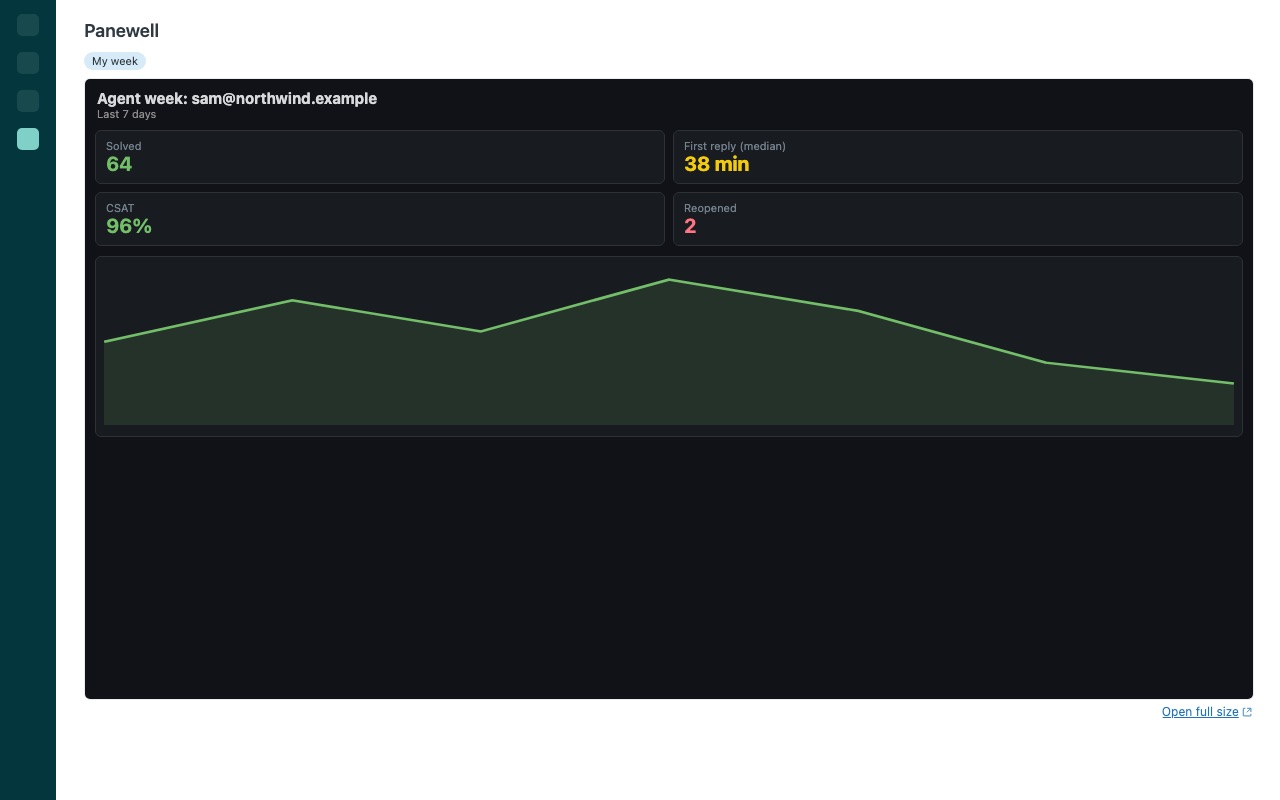
Ticket sidebar, user profile, organization profile, and a full-page Panewell view in the navigation bar for team dashboards (filtered by the signed-in agent if you like). Several dashboards become tabs; only the open one loads.
Safe by design
Never the wrong customer's numbers. If a value a filter needs is empty (a requester with no external ID), Panewell says so and does not load the dashboard unfiltered. Panewell only shows https pages from hosts your admin allows. Values are encoded so they can never change the host or add parameters, and the sidebar itself refuses to load frames from any other host.
How Panewell works
- Install Panewell from the Zendesk Marketplace. There are no settings to fill in at install. Optionally limit the app to certain roles or groups.
- Open Panewell from the left navigation bar and choose Set up (admins only), then New panel.
- Paste a dashboard link from your BI tool's share or embed dialog. Panewell recognizes Looker Studio, Looker, Metabase, Tableau, Power BI, Grafana and Google Sheets links and asks you to allow the dashboard's host.
- Add a filter. Each filter is "BI parameter = Zendesk value", such as
customer_id= the requester's external ID, the organization name or any custom field. Panewell writes it the way that tool expects. - Choose where it shows: the ticket sidebar, user profiles, organization profiles or the full Panewell page, plus a height and optional brand, group and value conditions.
- Preview on a real ticket, then Save panel. Agents see the dashboard filtered to the customer the next time they open a ticket.
Who it's for
Account teams who already keep customer health in a BI tool
Usage, plan, renewals and open invoices often live in Power BI or Looker Studio. Panewell puts that customer's view next to the ticket, so agents stop asking analysts for a screenshot.
Teams with several dashboards for different customers
Several panels in one place become tabs. A panel can show only on tickets of certain brands, only to certain groups, or only when a field matches, for example when the organization's Plan is enterprise or premium.
Managers who want each agent to see their own numbers
A panel on the Panewell page can filter by the signed-in agent's email or id, so one dashboard shows every agent their own figures.
Admins moving off the built-in iFrame app
Zendesk's built-in iFrame app stopped working on October 21, 2026. Panewell shows a dashboard or internal page per customer with tokens filled from the ticket, the requester or the organization, and only from hosts you allow.
What you need
- Zendesk Support with an admin to install and set up panels.
- A dashboard link from a supported tool, or any https page.
- For sign-in links, agents need their own access in the BI tool (for Power BI secure embeds, a license that lets them view the report).
- The BI tool must allow being framed by your Zendesk address and
https://*.apps.zdusercontent.com.
Panewell guides
Questions about Panewell
What does Panewell do?
Customer BI dashboards in the ticket, filtered to the customer on screen. Looker, Power BI, Tableau.
What does Panewell work with?
Panewell works in Zendesk Support.
How much does Panewell cost?
Standard: $5 a month per agent.
Is there a free trial?
14-day free trial (Zendesk asks for a card at install). Billed monthly by Zendesk. No free plan.
Where do I install Panewell?
From the Zendesk Marketplace. Use the Install button on this page, or search for "Panewell" there.
Who makes Panewell?
Great Work LLC, an independent software company. Email hello@greatwork.company with any question about Panewell and someone will answer.
What if a customer has no value for the filter?
The panel isn't loaded and says which value is missing. Panewell never shows a dashboard unfiltered in place of a filtered one.
Are URL filters a way to stop agents seeing other customers' data?
No. A URL filter chooses what is shown first. For customer data, prefer links agents sign in to and restrict rows in the BI tool itself, for example with Power BI row-level security.
Does Panewell support signed embeds?
Not embeds that need a server-side secret to sign each link, such as Metabase static embedding, Looker signed embed URLs, Power BI Embedded tokens or Tableau connected apps. Panewell tells you when you paste one, so use the public or sign-in link of the same dashboard instead.
What leaves Zendesk?
Only each panel's link with its filter values, loaded by the agent's browser from an allowed host, with no referrer. Panewell has no server of its own.
How many dashboards can I add?
Up to 40 panels, each with up to 6 filters. Link buttons, a panel kind that opens pages in a new tab, take up to 8 buttons each.
What happens when I uninstall it?
Panels and allowed hosts are stored in the app's own settings, so uninstalling removes them. Panewell creates nothing else in your account.
More Zendesk apps
 Patronwell
 Pagowell
 Pinwell
 Optwell