


Pagowell Mercado Pago payments sidebar: refunds, claim deadlines and subscriptions on the ticket. $10/agent.
$10 a month per agent. 14-day free trial (Zendesk asks for a card at install). Billed monthly by Zendesk. No free plan.
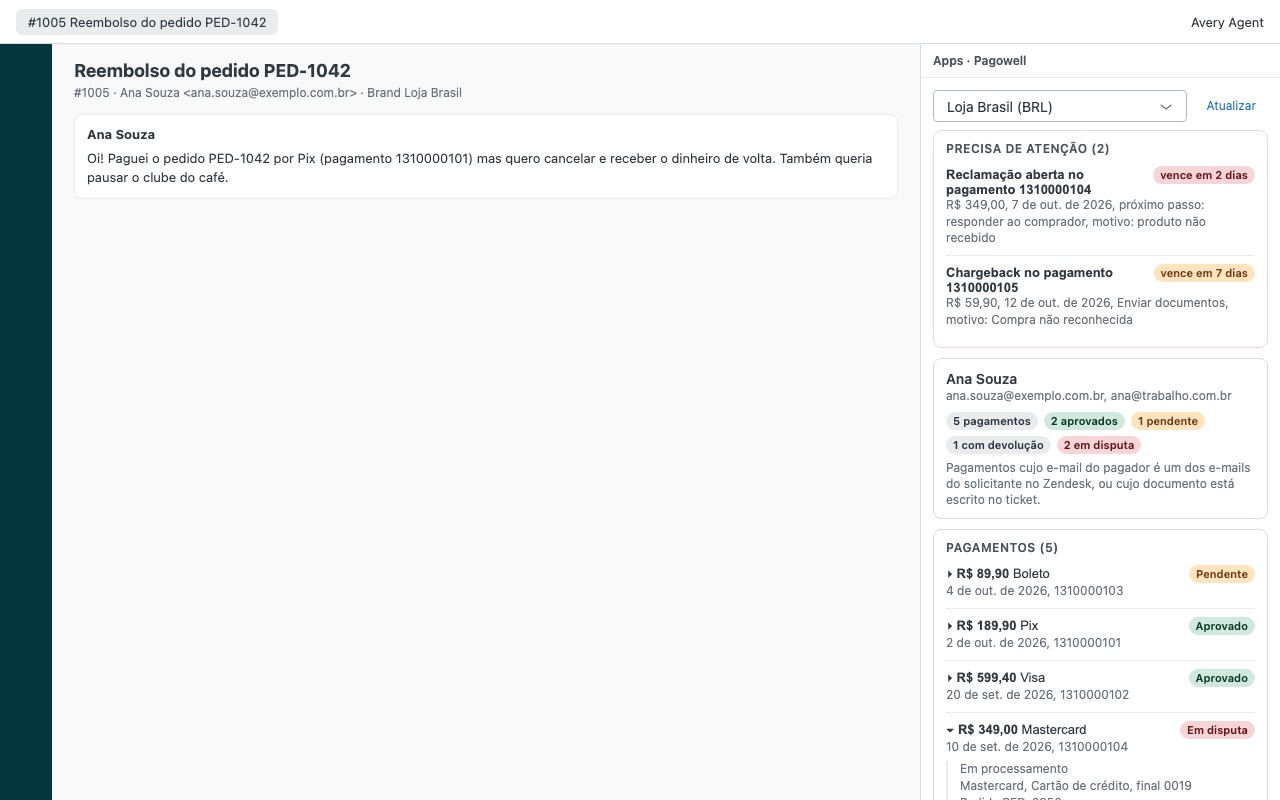
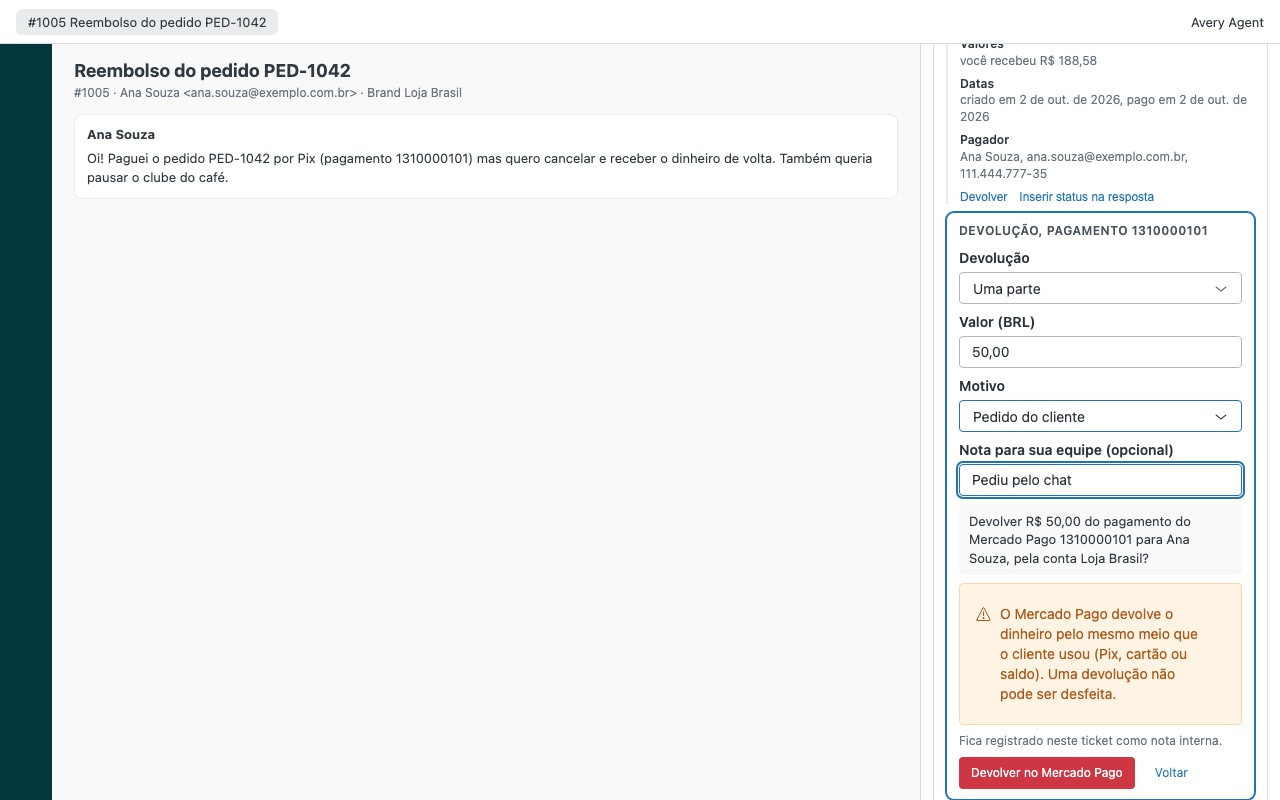
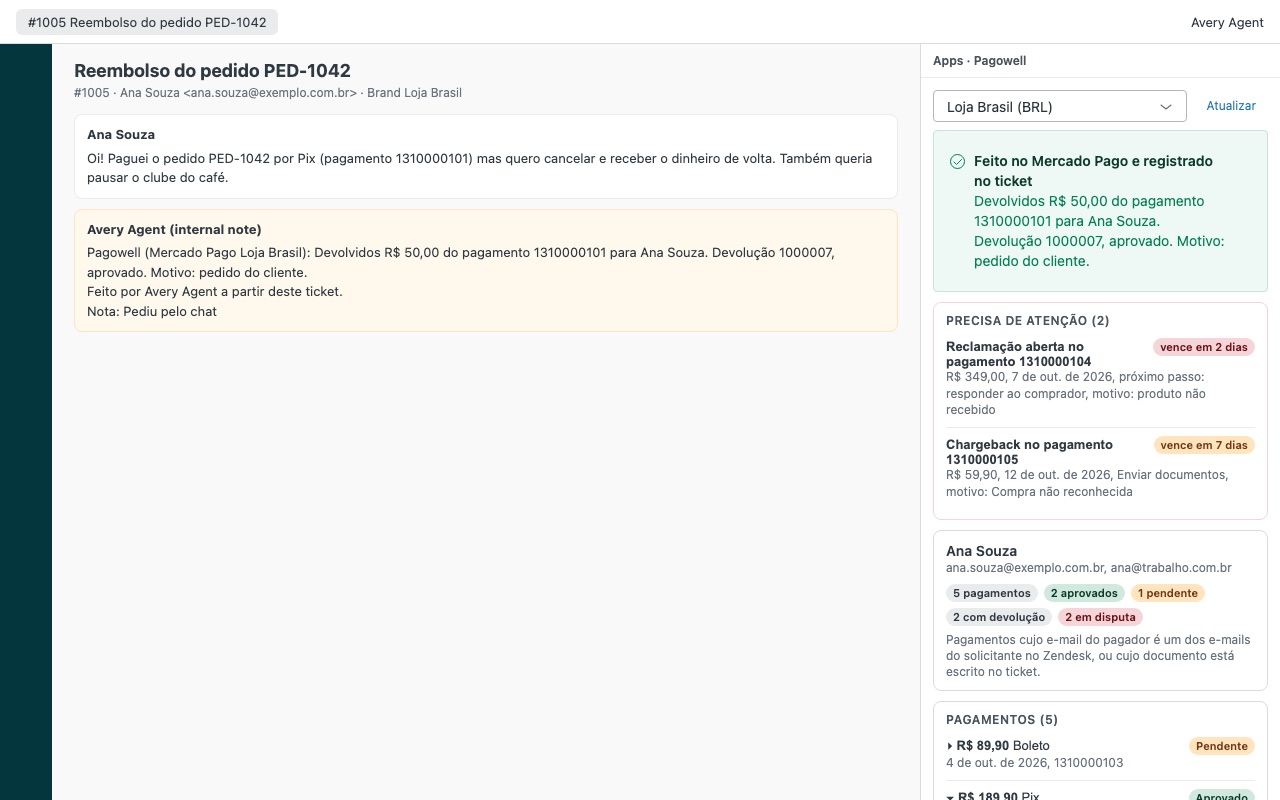
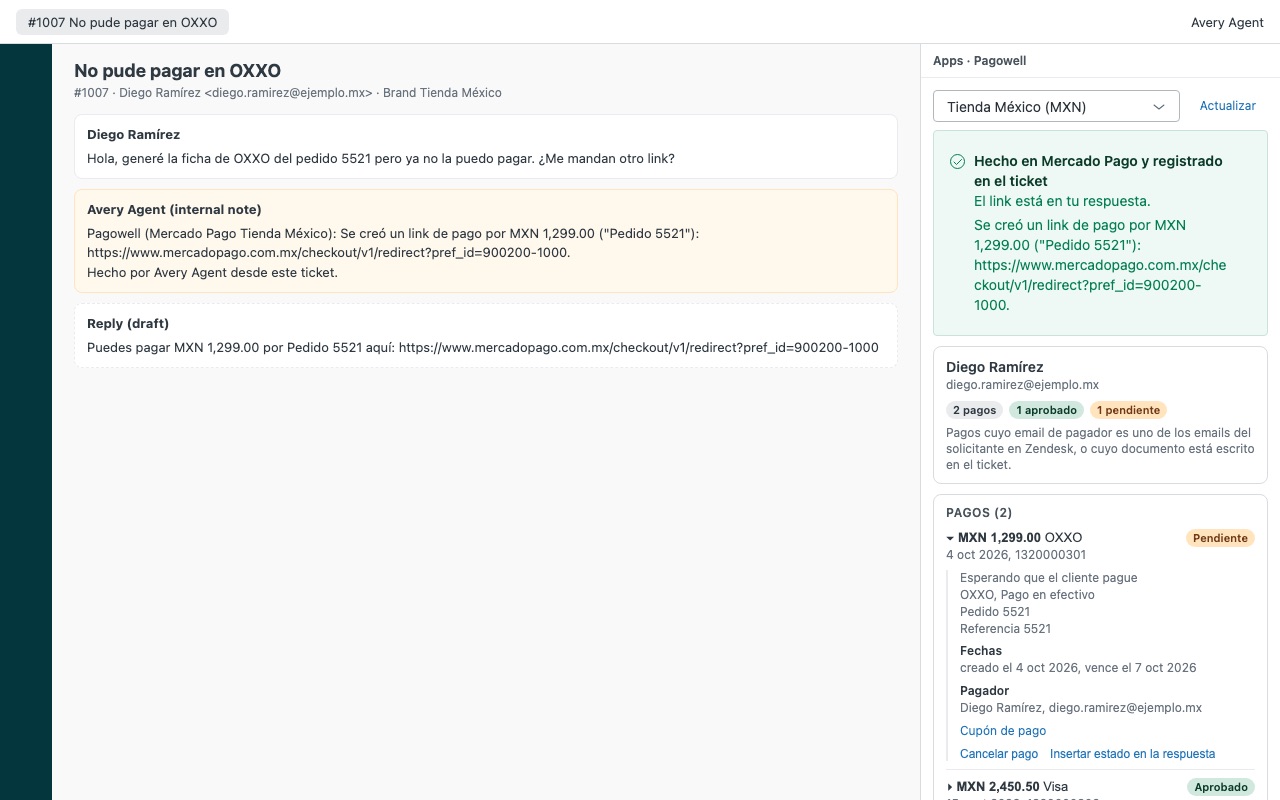
Pagowell shows the requester's Mercado Pago payments next to every ticket, in English, Spanish or Portuguese, so agents answer "did my Pix go through?" and refund an order without opening Mercado Pago in another tab.
What agents see - Every payment from the requester: by each email on their Zendesk profile, by a CPF/CNPJ, CUIT or RUT written in the ticket, by payment ids in the ticket and by your order reference. A payment shows only when its payer email or document is exactly theirs. - Open claims and chargebacks first, with the deadline and the next step. - Status in plain words, the method (Pix, boleto, OXXO and other cash slips, cards with installments and last digits, Mercado Pago balance), refunds so far, and the Pix or boleto link of an unpaid payment. - Subscriptions with the amount, next charge and status.
How Pagowell works
- Create an access token in Mercado Pago. In Mercado Pago Developers, open Your integrations, create an application for Zendesk and copy its production Access Token (it starts with
APP_USR-). Do this in each country's account you use. - Install Pagowell from the Zendesk Marketplace. In Accounts, write one line per country (AR, BR, MX, CL, CO, PE or UY), optionally with a name and Zendesk brand ids, and paste each country's token in its own setting. Pagowell checks that every token belongs to that country's account.
- Open a ticket. Pagowell searches the account's payments by every email on the requester's Zendesk profile, by a CPF, CNPJ, CUIT or RUT written in the ticket, by payment ids in the ticket and by your order reference.
- Read what needs attention first. Open claims and chargebacks sit at the top in a Needs attention card, nearest deadline first, with the next step Mercado Pago expects from you.
- Act from the ticket. Agents you allow can refund all or part of a payment, cancel an unpaid Pix, boleto or cash slip, pause, resume or cancel a subscription, or create a payment link and put it in the reply.
- Keep the record. Each action asks for confirmation with the exact sentence of what will happen, then adds an internal note and a
pagowell_*tag to the ticket.
Who it's for
Stores in Latin America that sell through Mercado Pago
"Did my Pix go through?" and "when does my boleto clear?" are daily tickets. With the payment status in plain words next to the conversation, agents answer without asking for a receipt or opening Mercado Pago in another tab.
Teams that answer in Spanish, Portuguese and English
Each agent sees Pagowell in their own Zendesk language, and ticket notes are written in that language. You can also fix one language for everyone.
Brands that sell in more than one country
One Mercado Pago account per country, each mapped to Zendesk brands. A Brazilian brand's ticket opens the Brazilian account, and agents can switch accounts at the top of the sidebar.
Teams that limit who moves money
Refunds and other actions can be limited to admins, roles or groups, and capped per currency (for example BRL 500, MXN 2000) for everyone who is not an admin. Everyone else sees payments read-only.
What you need
- Zendesk Support on a plan that allows Marketplace apps, and an admin to install.
- A Mercado Pago account in Argentina, Brazil, Mexico, Chile, Colombia, Peru or Uruguay.
- Access to Mercado Pago Developers for that account: the account owner, or a collaborator allowed to manage integrations.
- One production access token per country account.
Pagowell guides
Questions about Pagowell
What does Pagowell do?
Mercado Pago payments sidebar: refunds, claim deadlines and subscriptions on the ticket. $10/agent. Pagowell shows the requester's Mercado Pago payments next to every ticket, in English, Spanish or Portuguese, so agents answer "did my Pix go through?" and refund an order without opening Mercado Pago in another tab.
What does Pagowell work with?
Pagowell works in Zendesk Support.
How much does Pagowell cost?
Standard: $10 a month per agent.
Is there a free trial?
14-day free trial (Zendesk asks for a card at install). Billed monthly by Zendesk. No free plan.
Where do I install Pagowell?
From the Zendesk Marketplace. Use the Install button on this page, or search for "Pagowell" there.
Who makes Pagowell?
Great Work LLC, an independent software company. Email hello@greatwork.company with any question about Pagowell and someone will answer.
Can an agent see another customer's payment by mistake?
A payment shows only when its payer email or document is exactly the requester's. If Mercado Pago returns anyone else's payment for a search, Pagowell drops that whole search and says so. A payment id in the ticket that belongs to someone else is named with a masked email, and the agent has to look it up on purpose.
Why can't the access token be limited to read only?
Mercado Pago offers no way to narrow an access token's permissions. Pagowell keeps it in a Zendesk secure setting that agents never see, and Zendesk only sends it to api.mercadopago.com. Who can act with it through Pagowell is set in the app's settings.
How far back does it look for payments?
180 days by default, and up to 365. Older payments can still be opened by their payment id in the lookup box.
Does Pagowell answer claims or upload chargeback documents?
No. It shows each open claim and chargeback with its deadline and next step, and blocks refunds on a payment with an open claim. Answer the claim or send documents in Mercado Pago.
What happens when I uninstall it?
Pagowell and its stored tokens are removed. The internal notes and pagowell_* tags already on tickets stay, and Pagowell creates nothing else in your Zendesk account.
More Zendesk apps
 Panewell
 Optwell
 Patronwell
 Meterwell