


Loyalwell Loyalty points from LoyaltyLion, Yotpo or Smile on the ticket. Add, deduct or give rewards, logged.
$9 a month per agent. 14-day free trial (Zendesk asks for a card at install). Billed monthly by Zendesk. No free plan.
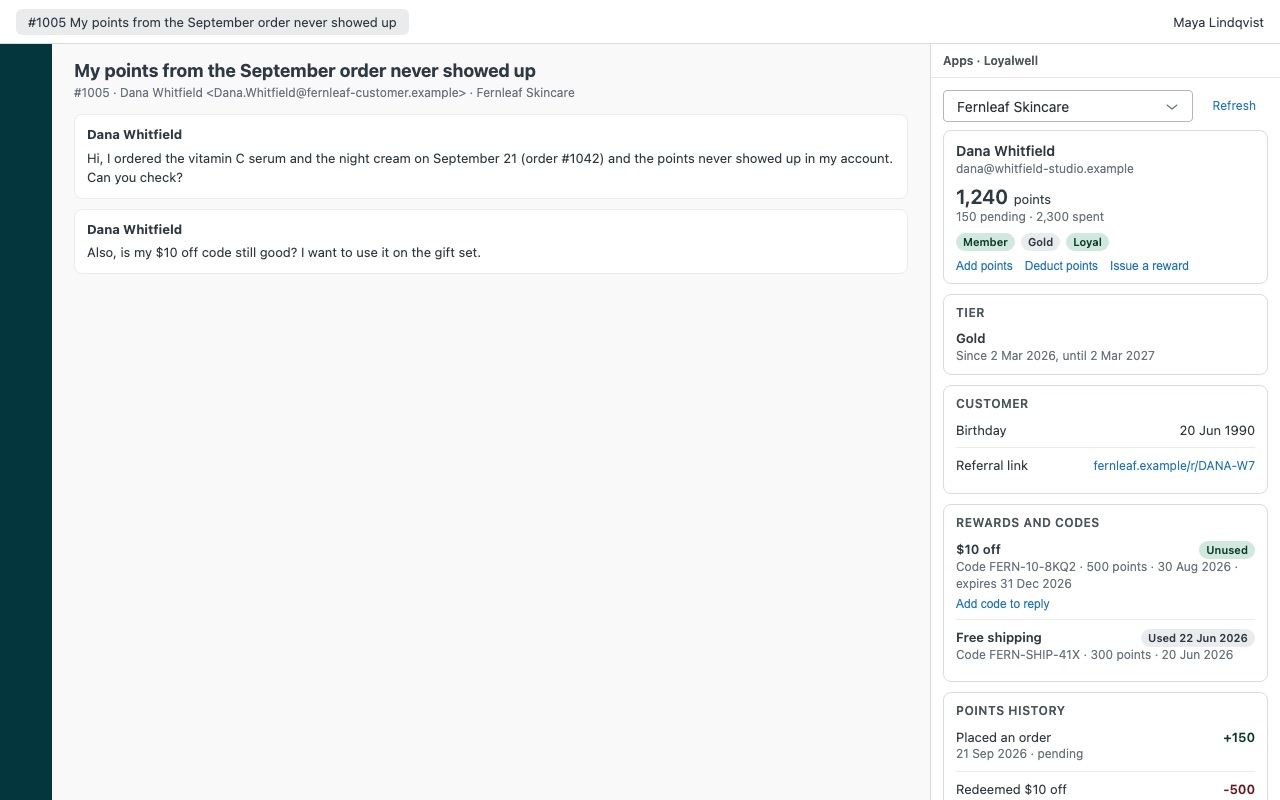
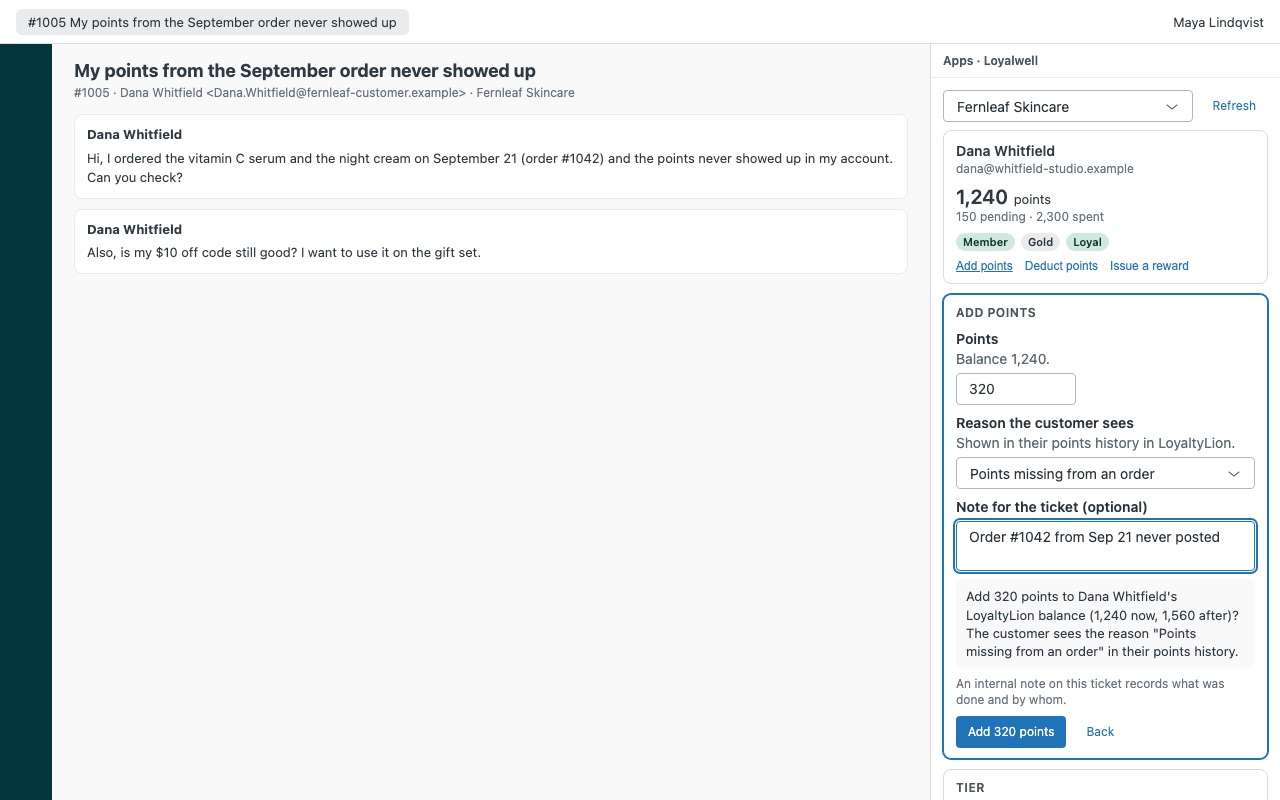
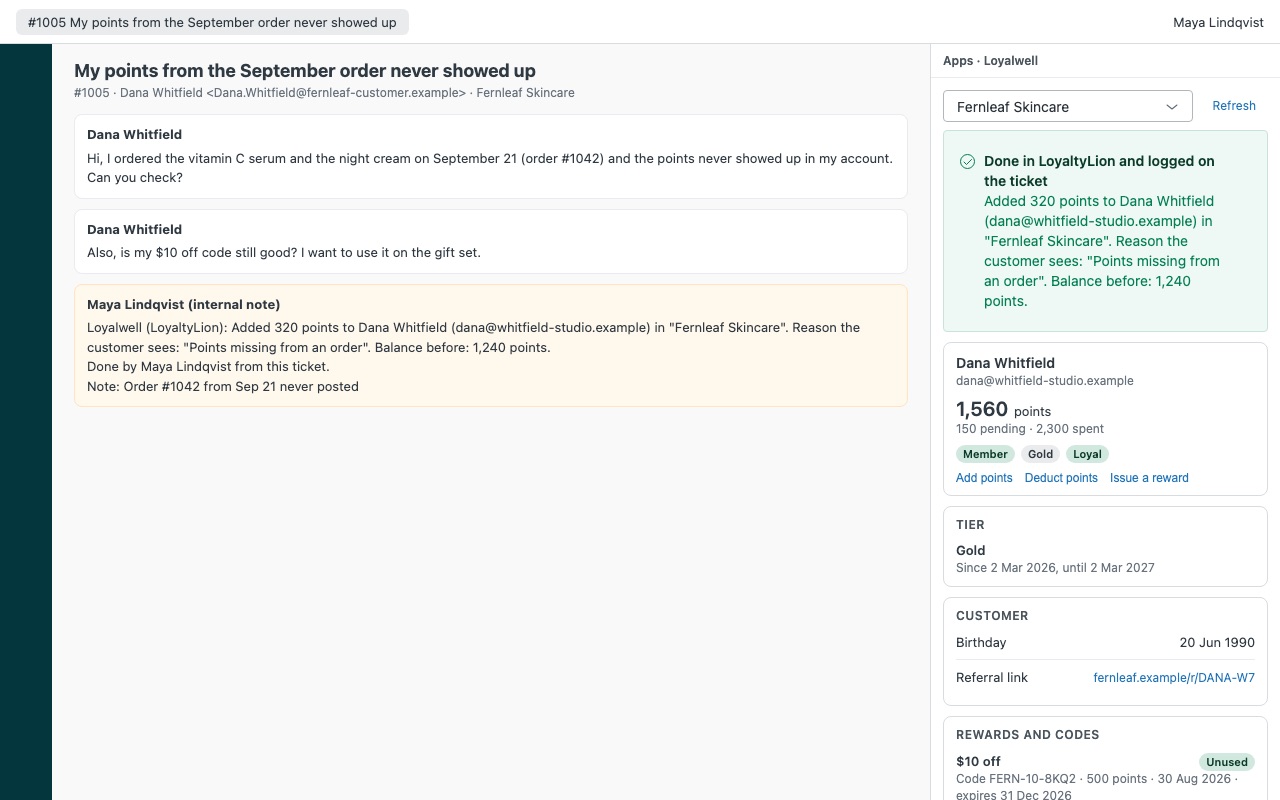
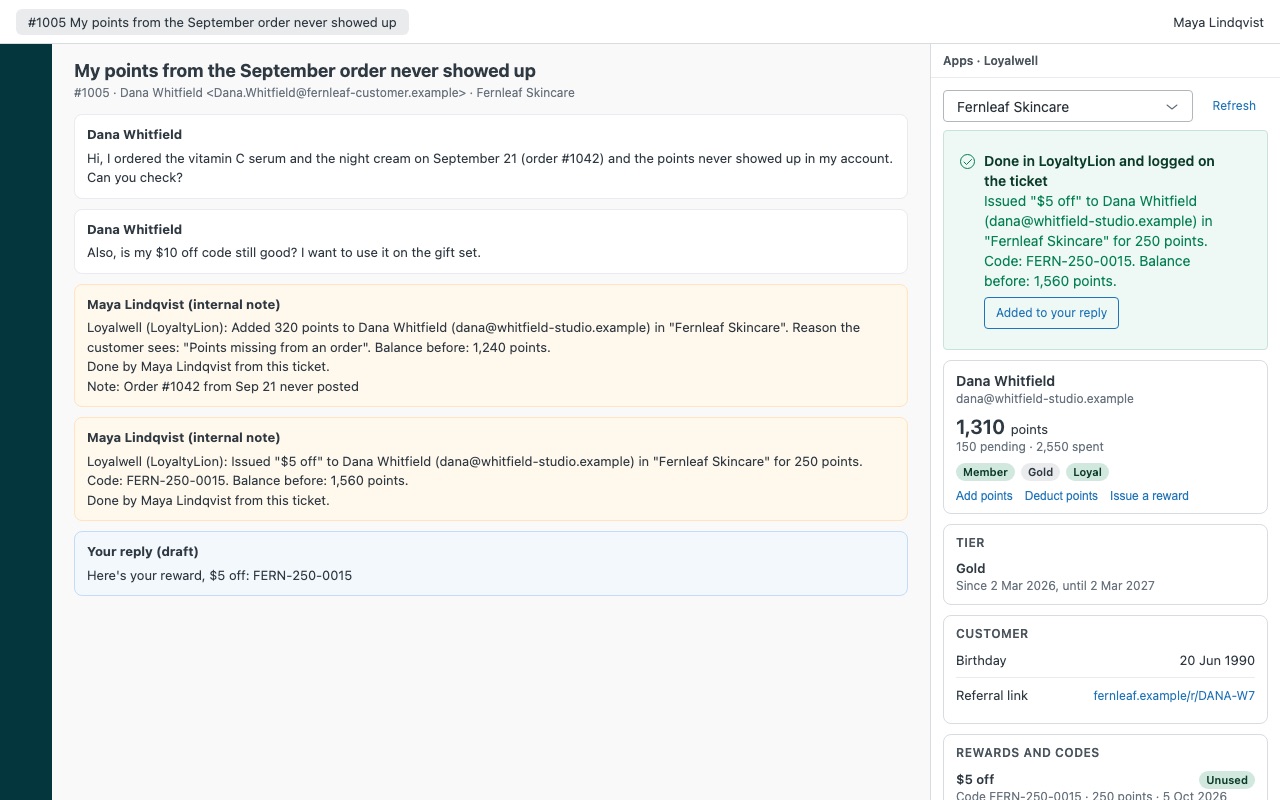
"Where are my points?" answered from the ticket. When a customer writes in, Loyalwell shows their loyalty record next to the ticket: points balance, pending and expiring points, tier and how close they are to the next one, birthday, referral link, the rewards they've redeemed with their codes, and their points history. Agents you allow can add or deduct points with a reason the customer sees, or issue a reward and drop its code into the reply, and every change is written to the ticket as an internal note. Works with LoyaltyLion, Yotpo Loyalty & Referrals and Smile.io.
Loyalwell is built by Great Work LLC. It is not made or endorsed by Zendesk, LoyaltyLion, Yotpo or Smile. LoyaltyLion, Yotpo and Smile.io are trademarks of their owners.
What you get
The loyalty record in the sidebar
Matched automatically by every email address on the requester's Zendesk profile, or by an email you type. Connect up to three programs, for example one per brand. Points: balance, pending and lifetime points, and when the next points expire.
Actions with guard rails
Add points for a missing order, a late delivery or goodwill, and deduct points for a return or a mistake. The customer sees the reason you pick in their points history. Issue a reward the program already offers (a discount code, free shipping, a gift card). It spends the customer's points and the code comes back to the sidebar.
What it doesn't do
It doesn't change a customer's tier. Tiers move the way your program rules move them. It only issues rewards with a fixed point cost that come back as a code. Free-product rewards that need a cart, and variable "spend any amount" rewards, stay in your loyalty platform.
How Loyalwell works
- Create an API key in your loyalty platform named "Loyalwell for Zendesk": LoyaltyLion under Manage > API keys, Yotpo's GUID and API key from the Loyalty admin settings, or Smile.io under Settings > Developer tools > Manage API keys.
- Install Loyalwell from the Zendesk Marketplace, type
loyaltylion,yotpoorsmilein Loyalty platform and paste the key (and the Yotpo GUID for Yotpo). Zendesk stores them as secure settings. - Set the guard rails. Who may take actions, a switch for each action, Most points per action (500 by default), Point limits by role and the Reasons the customer sees.
- Open a ticket. Loyalwell matches the requester by every email address on their Zendesk profile and shows points, status, tier, birthday, referral link, rewards and codes, and the points history.
- Fix the problem from the sidebar. Add points, Deduct points or Issue a reward. Each shows the balance now and after and the reason the customer will see, before anything is sent.
- Keep the record. Every action writes an internal note and a tag:
loyalwell_points_added,loyalwell_points_deductedorloyalwell_reward_issued.
Who it's for
Stores that get "where are my points?" tickets
The balance, pending points (LoyaltyLion) and the points history show what each order earned, so the agent answers from the record instead of logging in to the loyalty admin.
Teams that make things right with points
A late delivery or a missing order gets goodwill points with a reason the customer sees in their history, within the limit you set for the agent's role.
Brands with more than one program
Connect up to three programs, on the same platform or different ones, each mapped to Zendesk brand ids. A ticket opens the program for its brand, and agents can switch programs at the top of the sidebar.
What you need
- Zendesk Support, with an admin to install Loyalwell.
- LoyaltyLion on any plan with Manage > API keys, using API keys rather than the older token and secret.
- Yotpo Loyalty & Referrals, with the GUID and API key from the Loyalty admin settings.
- Smile.io on the Plus or Enterprise plan, where Smile offers its API, for Shopify and BigCommerce stores.
- A key with write permissions (
write_customerson LoyaltyLion,points_transaction:writeandpoints_purchase:writeon Smile) if agents will take actions. A read-only key still shows everything.
Loyalwell guides
Questions about Loyalwell
What does Loyalwell do?
Loyalty points from LoyaltyLion, Yotpo or Smile on the ticket. Add, deduct or give rewards, logged.
What does Loyalwell work with?
Loyalwell works in Zendesk Support.
How much does Loyalwell cost?
Standard: $9 a month per agent.
Is there a free trial?
14-day free trial (Zendesk asks for a card at install). Billed monthly by Zendesk. No free plan.
Where do I install Loyalwell?
From the Zendesk Marketplace. Use the Install button on this page, or search for "Loyalwell" there.
Who makes Loyalwell?
Great Work LLC, an independent software company. Email hello@greatwork.company with any question about Loyalwell and someone will answer.
Can agents change a customer's VIP tier?
No. None of the three platforms lets an app set a tier, so tiers move with your program rules. On Yotpo, adding points that count toward lifetime earned moves VIP progress.
Can a double click add points twice?
No. Each change is sent once. If the connection drops, Loyalwell re-reads the history to see whether it went through instead of sending it again.
How far back does the points history go?
The latest 50 entries on LoyaltyLion and Smile, or what Yotpo returns. Older entries stay in your loyalty platform.
Does Loyalwell keep a copy of our loyalty data?
No. It reads the customer while the sidebar is open and keeps no copies. There is no Great Work server, no export, and nothing is sent to Great Work.
What happens when I uninstall it?
The stored keys are deleted. Notes and tags already on tickets stay. Delete the key in your loyalty platform too.
More Zendesk apps
 Meterwell
 Leverwell
 Optwell
 Lettercrest