



Twinewell for ShipStation Your customer's ShipStation orders matched by email: tracking links, holds, tags, notes, all logged.
$9 a month per agent. 14-day free trial (Zendesk asks for a card at install). Billed monthly by Zendesk. No free plan.
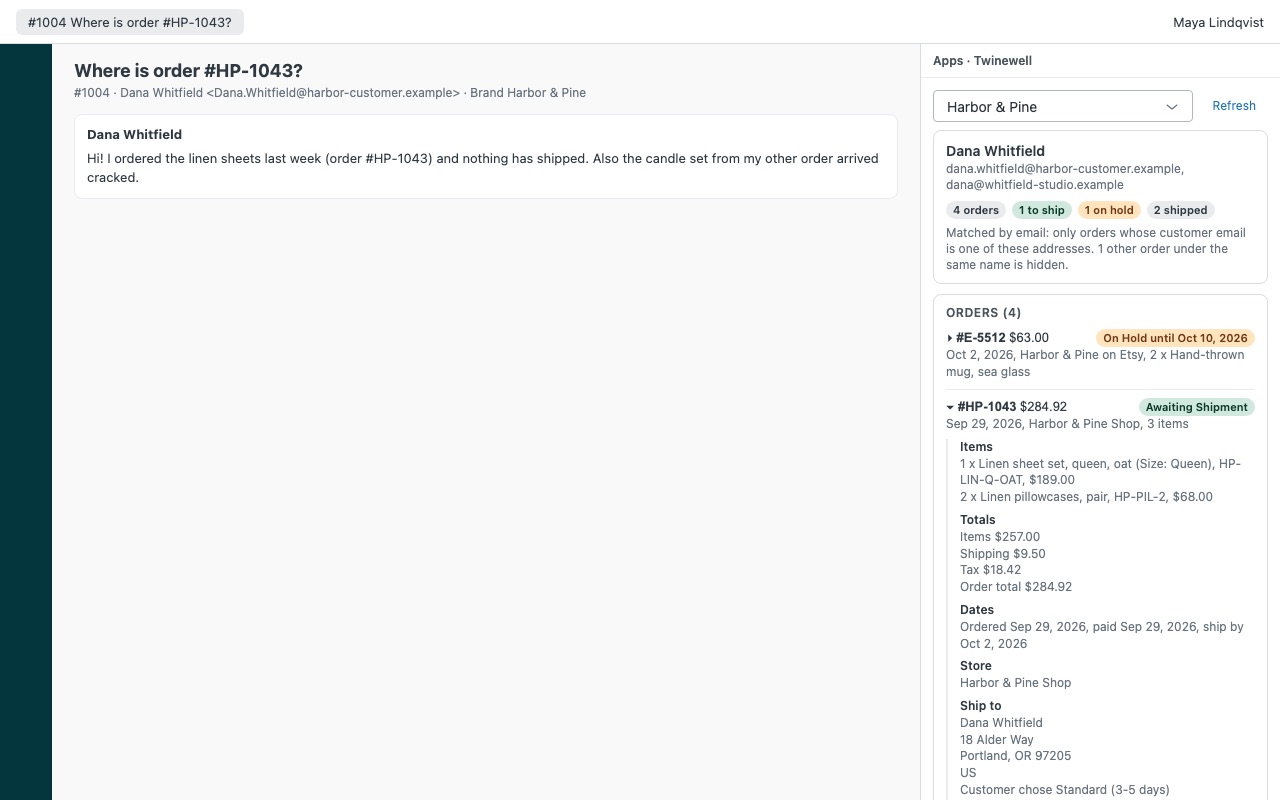
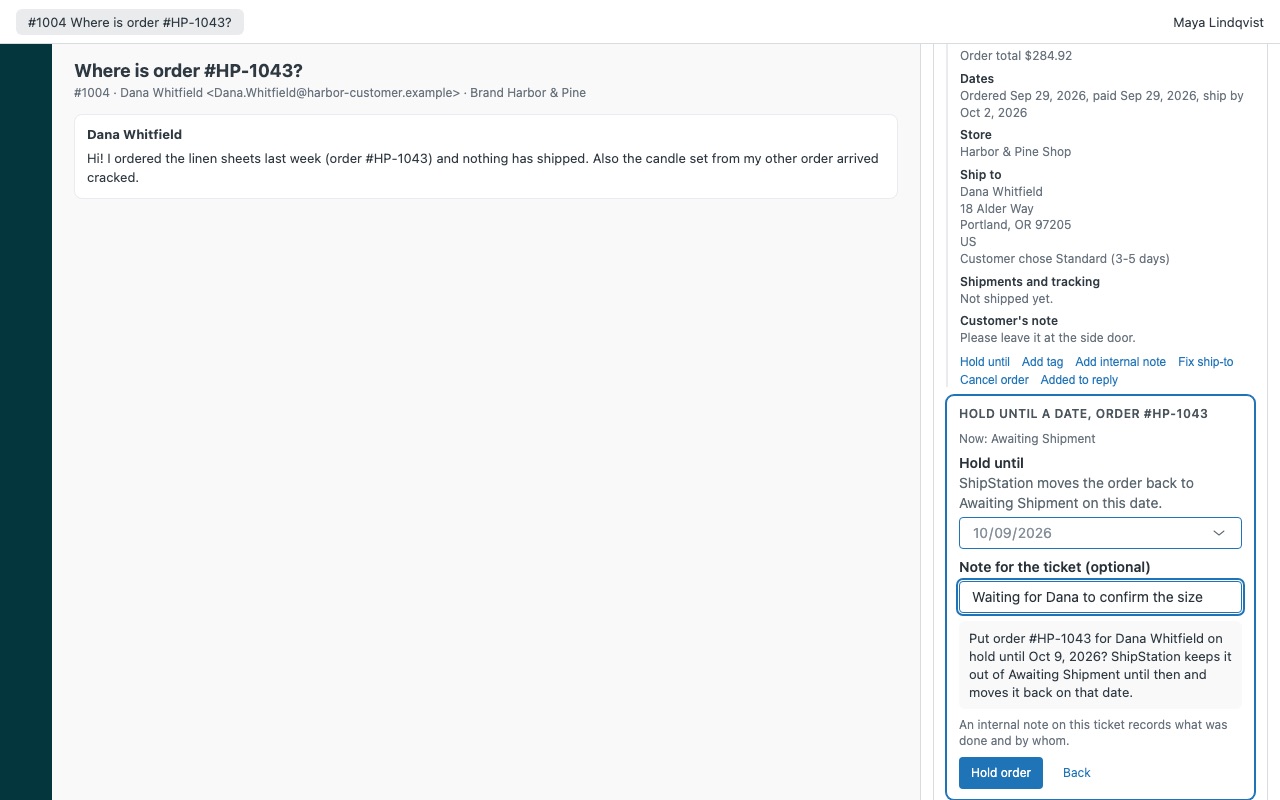
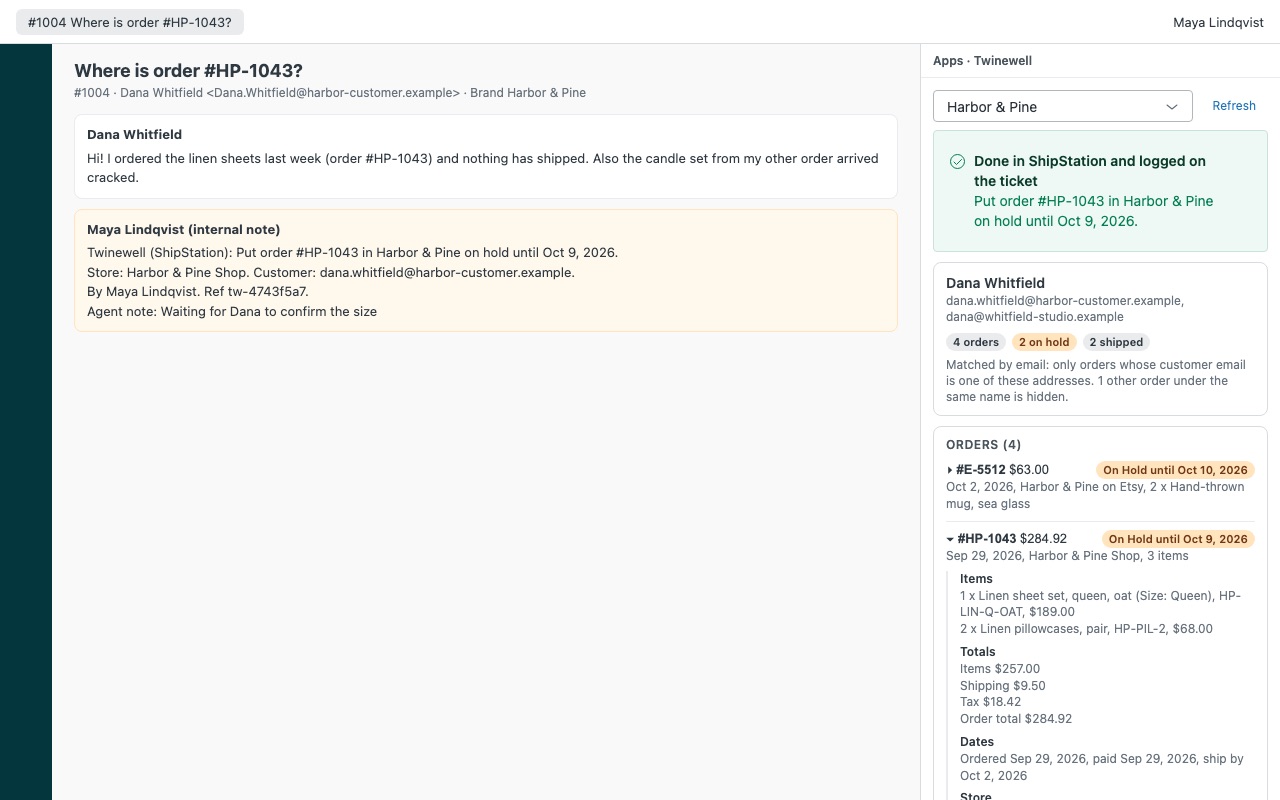
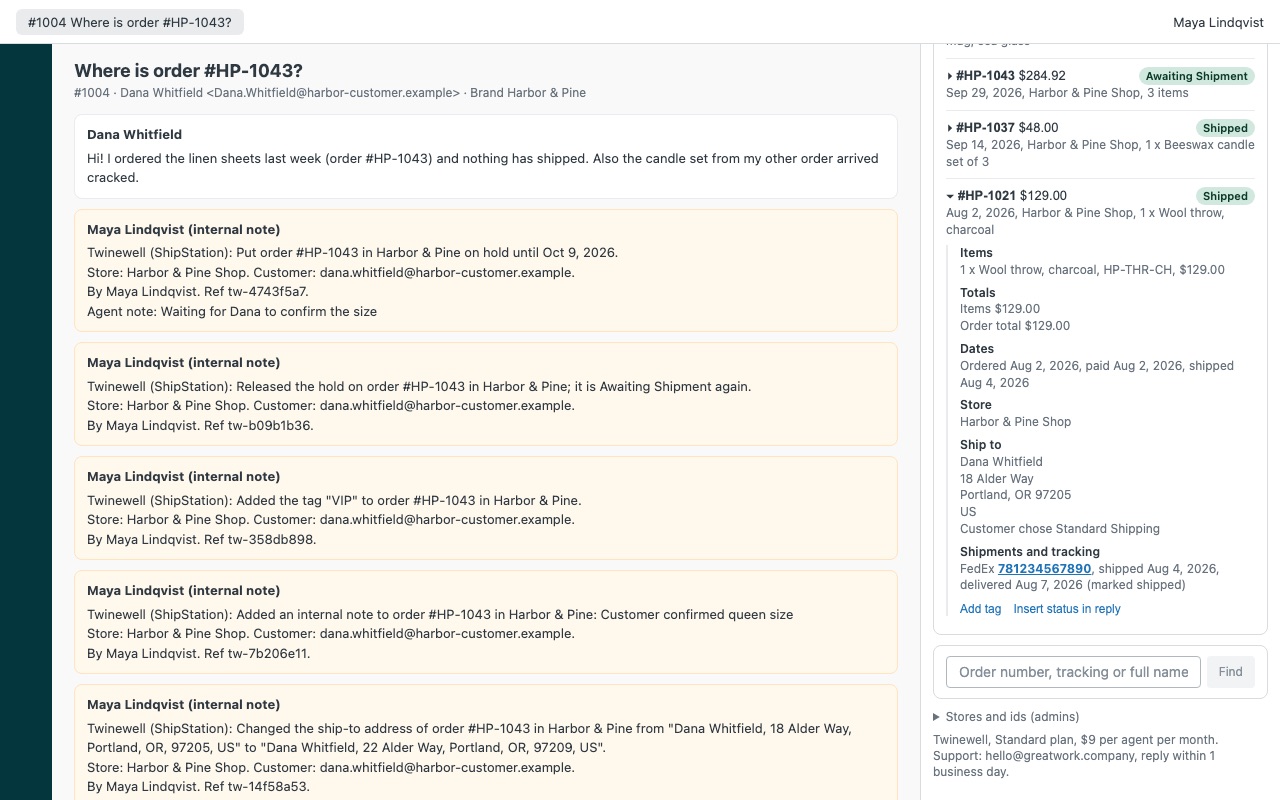
Your customer's ShipStation orders on the ticket, matched by their email address, with tracking links, holds, tags, notes and address fixes. Twinewell shows the orders a customer placed next to their ticket: items, totals, store, status, ship-by date, ship-to address and every shipment with a link to the carrier's tracking page. Agents you allow can hold an order, release a hold, tag it, add an internal note or fix the ship-to address before it ships, and every action is written to the ticket as an internal note. It won't show you every order placed by a Michael.
Twinewell is built by Great Work LLC. It is not made or endorsed by Zendesk or ShipStation. ShipStation is a trademark of its owner.
What you get
The right customer's orders, every time
Matched by email, exactly. Twinewell searches by the customer's name and any order numbers in the ticket, then keeps only orders whose email is on their Zendesk profile. Other customers with the same name stay hidden. Each order in full: items with SKUs, totals, dates, ship-by date, store, chosen service, ship-to address, the customer's note, gift message and internal notes.
Hand actions, confirmed and logged
Hold until a date and release a hold. Add an order tag or an internal note (dated, below the existing notes, never written over them).
What it doesn't do
It doesn't create, buy or void labels, mark orders as shipped, or refund payments. Those stay in ShipStation and your store. ShipStation's API can't search orders by email, so customers whose Zendesk name differs from the name on their orders are found by order number or the lookup box.
How Twinewell works
- Copy a V1 API key and secret from ShipStation. In ShipStation, open Settings > Account > API Settings. API access needs a ShipStation Standard or Accelerate plan or higher.
- Install Twinewell from the Zendesk Marketplace and paste the key and secret into API key and API secret. Set Currency if your orders are not in US dollars. Nothing gets installed in ShipStation.
- Open a ticket. Twinewell searches ShipStation by the requester's full name and by up to three order numbers written in the subject or first message, then keeps only orders whose customer email is one of the addresses on their Zendesk profile.
- Read the order next to the conversation. Items with SKUs, totals, ship-by date, store, ship-to address, the customer's note, gift message, internal notes and every shipment with a link to the carrier's tracking page.
- Answer with the facts. Insert status in reply adds the order's status and tracking links to the reply you are writing.
- Act when you need to. Agents you allow can hold an order until a date, release a hold, add an order tag, add an internal note, fix the ship-to address or cancel the order in ShipStation. Each action asks for confirmation first.
- Keep the record. Every action adds an internal note and a
twinewell_*tag to the ticket, and a dated line in the order's internal notes in ShipStation.
Who it's for
Stores where "where is my order?" fills the queue
The agent sees the shipments and carrier links for the right customer's orders without opening ShipStation, and can paste the status into the reply in one click.
Teams that catch problems before the label prints
A customer writes in with a new address or asks to wait for a missing item. While the order is still Awaiting Shipment, an allowed agent fixes the ship-to or holds it until a date, and the ticket shows who did it.
Businesses with several stores or two ShipStation accounts
Map Zendesk brands to ShipStation store ids so each brand's tickets show its own stores first, or connect a second ShipStation account with its own key, currency and brands.
What you need
- Zendesk Support on a plan that allows Marketplace apps, and an admin to install it.
- A ShipStation account on the Standard or Accelerate plan or higher. On lower plans ShipStation answers API requests with HTTP 402.
- A ShipStation V1 API key and secret from Settings > Account > API Settings.
- For actions: a list of who may act in Who may take actions (admins by default) and the action switches you want on. Allow cancelling starts off.
Twinewell for ShipStation guides
Questions about Twinewell for ShipStation
What does Twinewell for ShipStation do?
Your customer's ShipStation orders matched by email: tracking links, holds, tags, notes, all logged.
What does Twinewell for ShipStation work with?
Twinewell for ShipStation works in Zendesk Support.
How much does Twinewell for ShipStation cost?
Standard: $9 a month per agent.
Is there a free trial?
14-day free trial (Zendesk asks for a card at install). Billed monthly by Zendesk. No free plan.
Where do I install Twinewell for ShipStation?
From the Zendesk Marketplace. Use the Install button on this page, or search for "Twinewell for ShipStation" there.
Who makes Twinewell for ShipStation?
Great Work LLC, an independent software company. Email hello@greatwork.company with any question about Twinewell for ShipStation and someone will answer.
Why does it not show orders a customer placed under a different name?
ShipStation's API can't search orders by email, so Twinewell searches by the requester's full Zendesk name and the order numbers in the ticket. If their name differs from the one on the order, look the order up by number, tracking number or full name in the sidebar's lookup box.
Can agents create labels or mark an order as shipped from Zendesk?
No. Twinewell does not create, buy or void labels or mark orders shipped. Those stay in ShipStation.
Does cancelling in Twinewell refund the customer?
No. It cancels the order in ShipStation only. The order in your store and its payment stay as they are.
What happens when the ShipStation key expires?
The sidebar says ShipStation did not accept the API key and secret. Generate a new pair in ShipStation and paste both into the app settings.
Does Twinewell keep a copy of my orders?
No. It reads orders only while the sidebar is open, through Zendesk's proxy to ssapi.shipstation.com, and has no server of its own. The key and secret are Zendesk secure settings that never reach agents' browsers.
What stays if I uninstall?
The stored key and secret are deleted. Internal notes and twinewell_* tags on tickets stay, and so do the dated lines in ShipStation order notes.
More Zendesk apps
 Twinmend
 Twigwell
 Vouchwell
 Trolleywell for BigCommerce