



Trafficledger Google Analytics 4 reports in Google Sheets: saved reports, comparisons and scheduled refresh
Listed on the Google Workspace Marketplace as “Trafficledger: GA4 Reports in Sheets”
$55 a month or $528 a year per Google account. Free trial: 30 uses or 14 days, whichever comes first. No card needed.
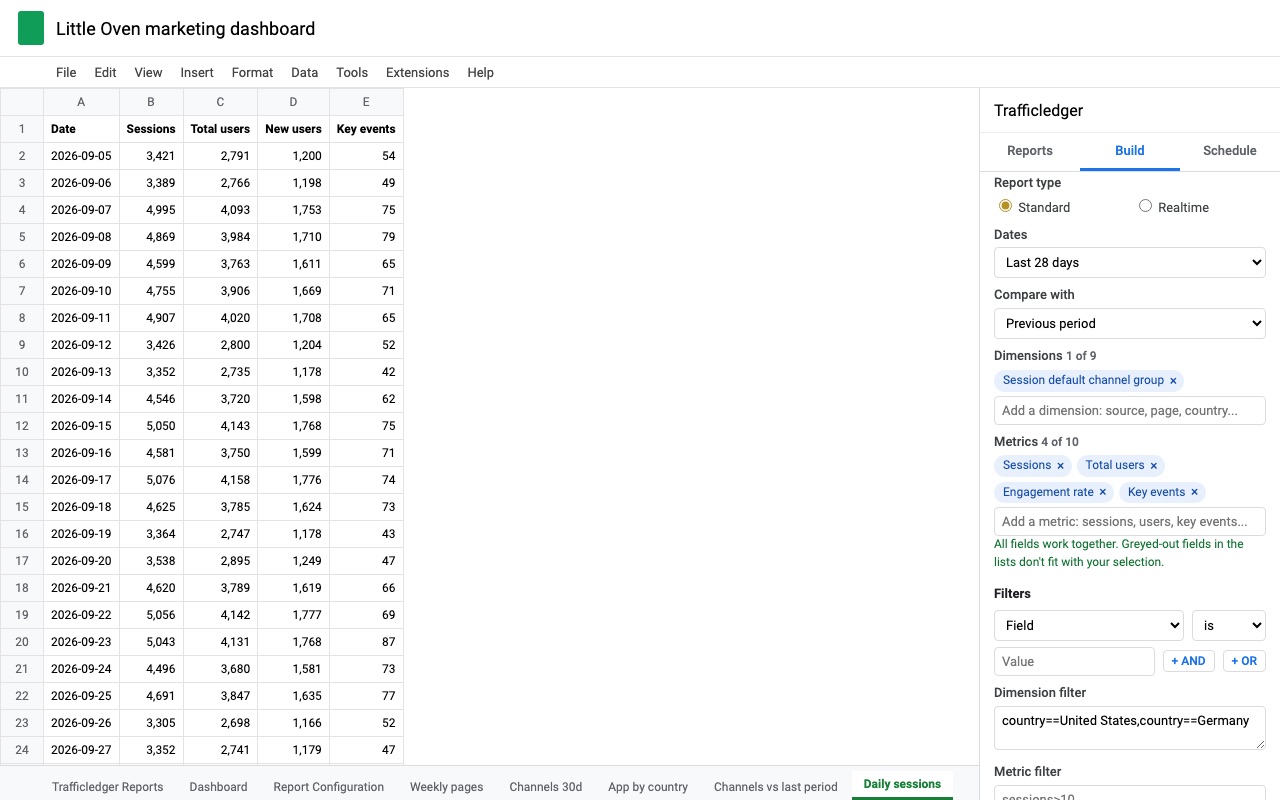
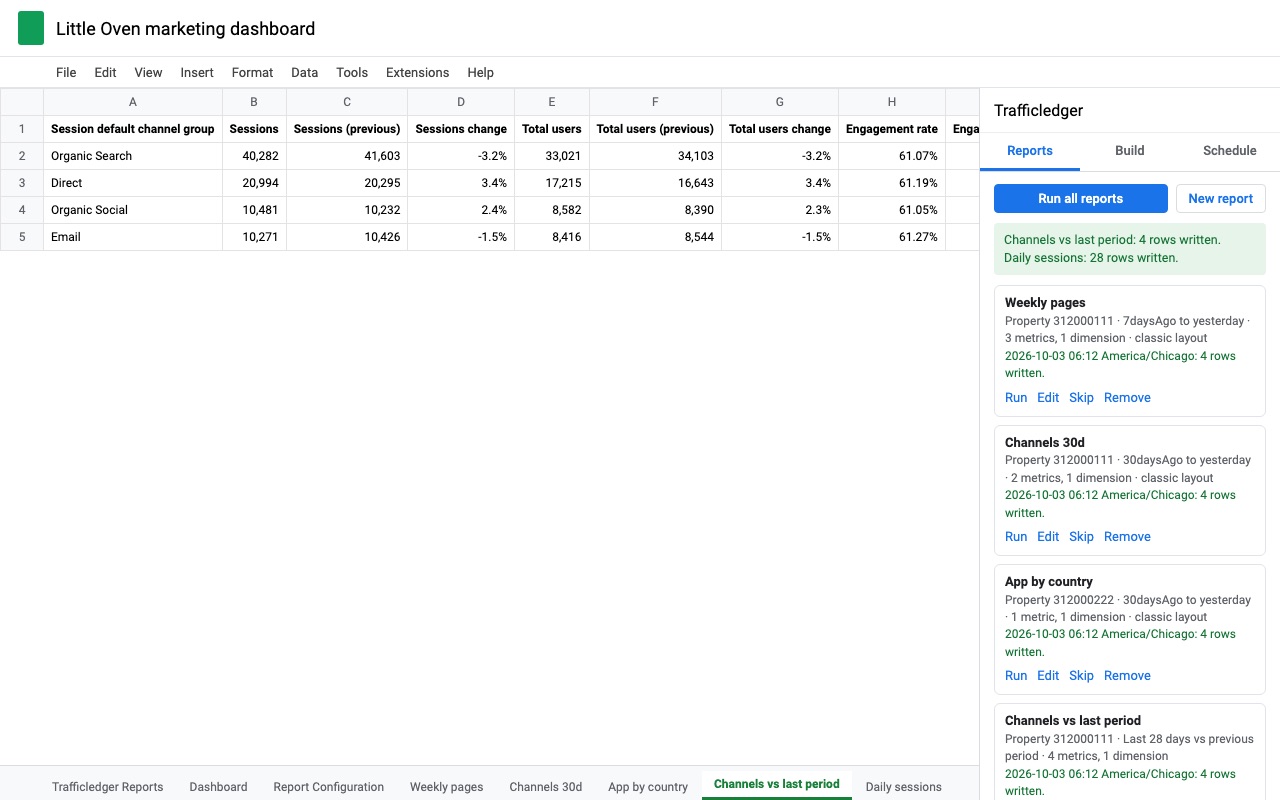
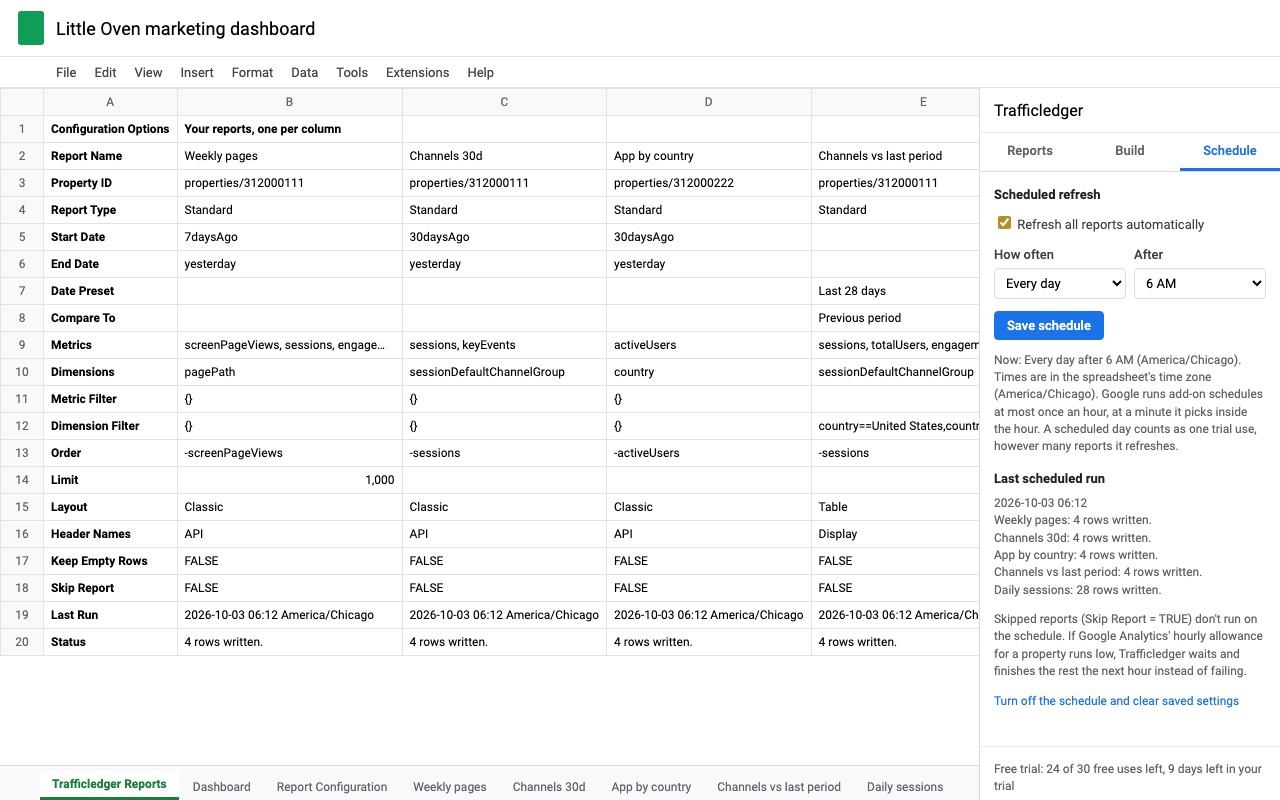
Trafficledger puts Google Analytics 4 data into Google Sheets and keeps it up to date. Build a report in the sidebar, save it, and refresh it by hand or on a schedule. Every report lives in one configuration sheet, one report per column, like the Google Analytics add-ons you may already use.
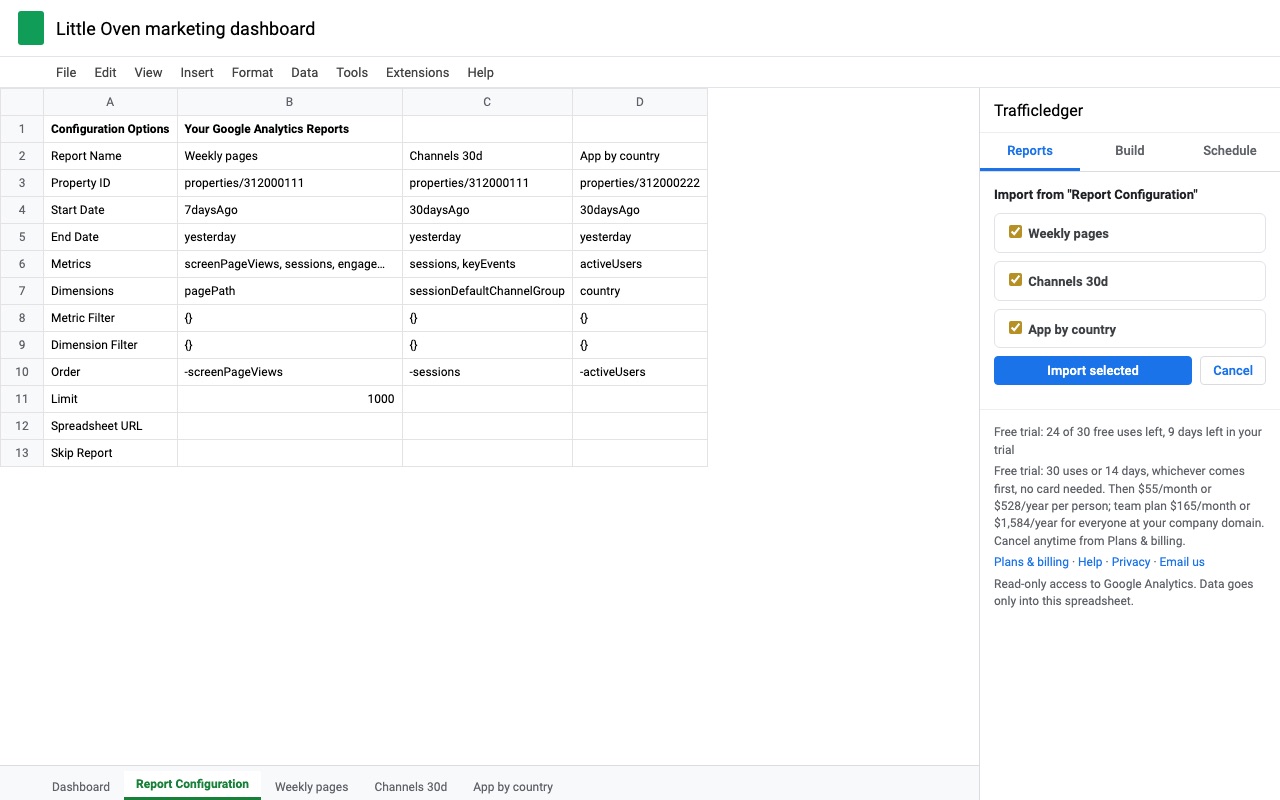
Moving from Google's add-on? One click. If your spreadsheet has the "Report Configuration" sheet from Google's GA4 Reports Builder (or from the old Universal Analytics add-on), Trafficledger finds it and imports every report. Imported reports keep their tab names and write to the same cells as before (totals in row 12, results from row 16), so the formulas and charts that point at them keep working. Universal Analytics reports are converted to GA4 names where a real equivalent exists, and Trafficledger tells you which fields had none.
What you get
- Any GA4 dimensions and metrics, with a live compatibility check
- Saved reports in one configuration sheet, imported from Google's add-on in one click
- Comparisons (previous period or last year), AND/OR filters, every row past 100,000
- Scheduled refresh every hour, day, week or month, plus realtime reports
- Read-only access; data goes only into your spreadsheet
How Trafficledger works
- Install Trafficledger from the Google Workspace Marketplace, open a spreadsheet and choose Extensions, Trafficledger, Open Trafficledger.
- Allow read-only access to Google Analytics when Google asks. Trafficledger can read your GA4 data and write only into the spreadsheet you have open.
- Click New report and pick a Google Analytics 4 property from the list of every account you can see, or type its property ID.
- Name the report. The name is also the tab it writes to.
- Choose the dates from presets such as Last 28 days, Last month or This quarter to date, or type a start and end. Optionally pick Compare with: Previous period, Same dates last year or Last year, same weekdays.
- Add dimensions and metrics from your property's own list, custom ones included. Fields that can't be combined with what you've already picked are greyed out before you run anything.
- Add filters and output options if you need them: AND and OR filters, a sort order, a row limit, and the Table or Classic layout.
- Click Save report, then Run now. The tab fills with the data and a status line, and the report is saved as a column in the Trafficledger Reports sheet.
- Turn on the schedule under Schedule to refresh every report every hour, day, week or month, even with the spreadsheet closed.
Who it's for
Agencies sending monthly numbers to clients
One spreadsheet per client, a "Last month" report compared with the same dates last year, refreshed on the 1st. The client's chart tab reads from the report tab, so the deck is up to date before anyone opens it.
Teams whose formulas point at Google's add-on output
If your sheets were built around the GA4 Reports Builder add-on, Trafficledger reads its "Report Configuration" sheet and keeps the same output cells, so the formulas and charts that read them keep working.
Anyone who has hit the row cap
Large sites with many pages, campaigns or products get every row, because Trafficledger pages through results 100,000 rows at a time instead of stopping at the first page.
A marketer who wants a live view during a launch
Realtime reports show the last 5, 10 or 30 minutes, and can refresh every minute while the sidebar is open.
Trafficledger or Google's own options
GA4 itself can export a report from the Share menu, which gives you a one-off copy that never updates. Looker Studio connects to GA4 for dashboards, but it doesn't put a refreshable table into a spreadsheet tab. Connected Sheets in Google Sheets works with BigQuery, so using it for analytics means setting up the GA4 BigQuery export, a billed Cloud project and SQL to rebuild sessions and users. If a single snapshot is all you need, GA4's export is enough. Trafficledger is for the report you rebuild every week: saved once, refreshed on a schedule, in the spreadsheet you already work in.
Limits and requirements
- Trafficledger reads standard GA4 reports and realtime reports through Google's Analytics Data API. It doesn't export raw events and connects to no data source other than Google Analytics 4.
- Up to 10 metrics and 9 dimensions per report, the same limits as the API.
- Google gives each property an hourly and daily allowance of API requests. The sidebar shows how much of it is used, and a scheduled run waits for the next hour when it's nearly gone.
- A report that would go past Google Sheets' 10 million cell limit is refused before the tab is touched.
- One person owns a spreadsheet's schedule. Someone else can turn it on only after the owner turns it off.
Want search data next to it? Queryledger puts Google Search Console data in Google Sheets and keeps a daily backup of it.
Trafficledger guides
Questions about Trafficledger
What does Trafficledger do?
Google Analytics 4 reports in Google Sheets: saved reports, comparisons and scheduled refresh. Trafficledger puts Google Analytics 4 data into Google Sheets and keeps it up to date. Build a report in the sidebar, save it, and refresh it by hand or on a schedule. Every report lives in one configuration sheet, one report per column, like the Google Analytics add-ons you may already use.
What does Trafficledger work with?
Trafficledger works in Google Sheets, in any browser.
How much does Trafficledger cost?
$55 a month or $528 a year per Google account. Team plan: $165 a month or $1584 a year covers everyone at your company or school who signs in to Google with an email address on your domain (not Gmail or other personal addresses). Billed through Stripe. Cancel any time from Plans and billing in the add-on.
Is there a free trial?
Free trial: 30 uses or 14 days, whichever comes first. No card needed.
Where do I install Trafficledger?
From the Google Workspace Marketplace. Use the Install button on this page, or search for "Trafficledger: GA4 Reports in Sheets" there.
Who makes Trafficledger?
Great Work LLC, an independent software company. Email hello@greatwork.company with any question about Trafficledger and someone will answer.
Does Trafficledger work with Universal Analytics?
Universal Analytics stopped processing data in 2023, so there's nothing to pull from it. If your spreadsheet has the old Universal Analytics add-on's report sheet, Trafficledger converts those reports to GA4 names where a real equivalent exists and tells you which fields had none.
Can a scheduled refresh run when nobody has the spreadsheet open?
Yes. The schedule runs on Google's servers under the account that turned it on. If a run has more reports than fit in one go, the next hourly check carries on with the rest.
Can I use a formula for the date range?
Yes. In the Trafficledger Reports sheet, a Start Date or End Date cell can hold a date or a formula such as =EOMONTH(TODAY(),-2)+1, which is the first day of last month.
Will GA4 data be sampled or thresholded?
Google sometimes samples or thresholds GA4 data, for example when Google signals is on. When it does, Trafficledger writes a note on the tab, along with any "(other)" row Google grouped data into.
Can values like 00123 or =Sale break my sheet?
No. Dimension columns are written as text, so a page path, campaign name or ID stays exactly as GA4 reports it.
Can I skip one report without deleting it?
Yes. Set its Skip Report row to TRUE, or to a formula, and it's left out of Run all reports and the schedule.
Does Trafficledger send my analytics data anywhere?
No. Data goes from Google Analytics into your spreadsheet. Trafficledger has read-only access to Analytics and access only to the spreadsheet it's open in.
More Google Sheets apps
 Cellendar
 Tabmeld
 Cellfetch
 Tabherd