



Queryledger Search Console data in Google Sheets, with daily backups that keep your history past 16 months
Listed on the Google Workspace Marketplace as “Queryledger: Search Console Backups & Reports”
$49 a month or $492 a year per Google account. Free trial: 30 uses or 14 days, whichever comes first. No card needed.
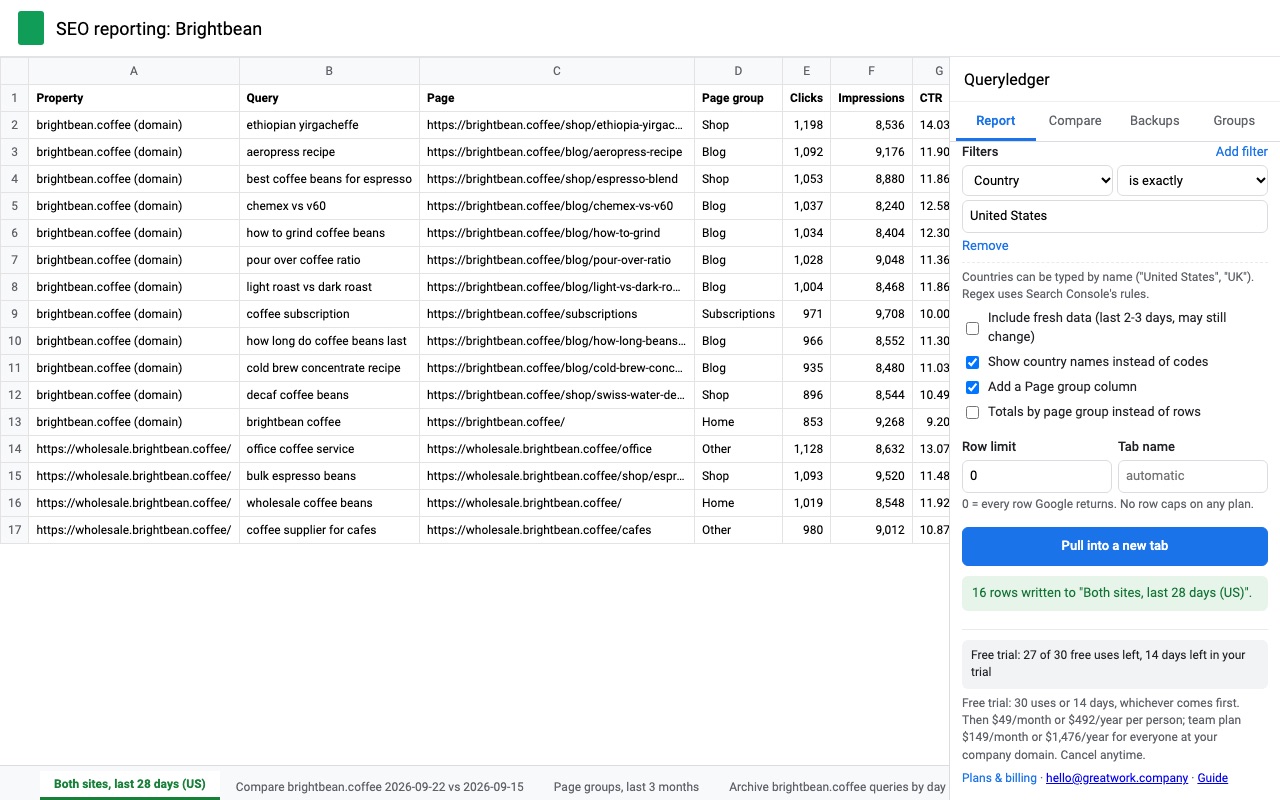
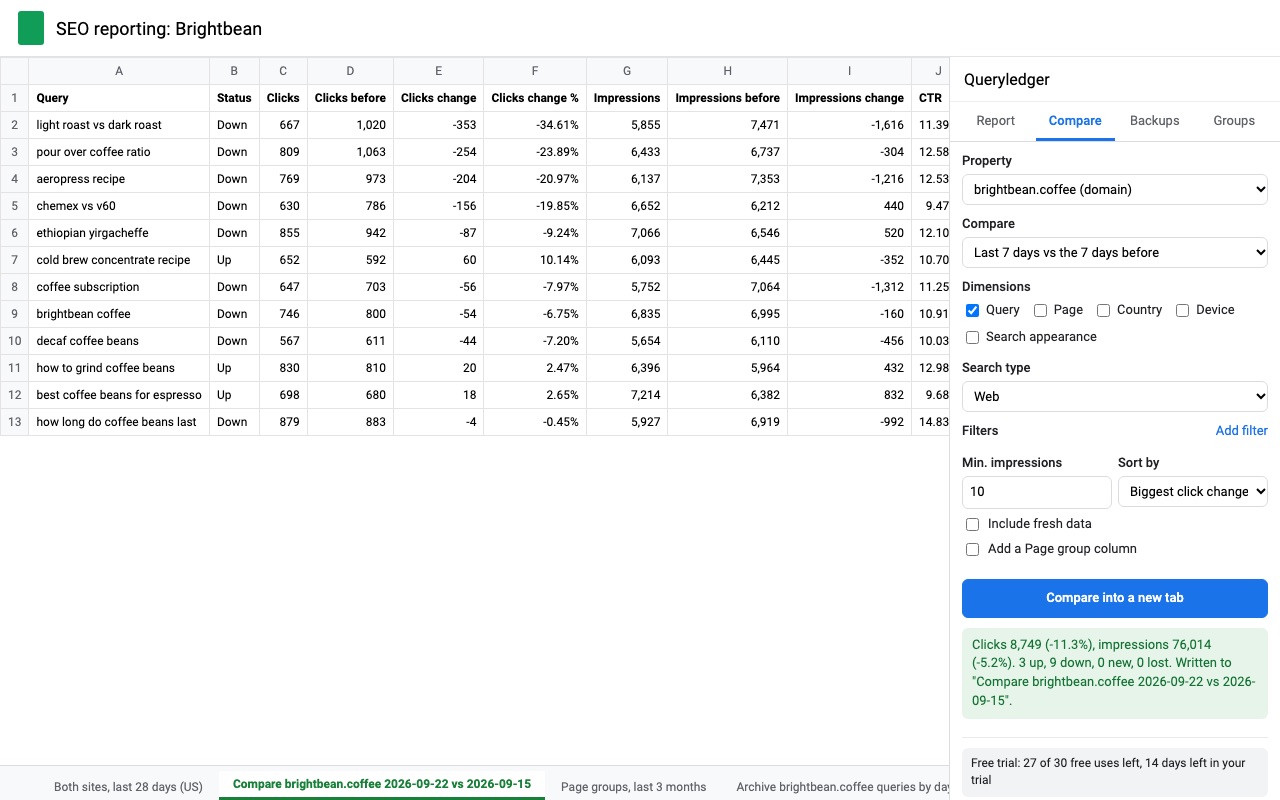
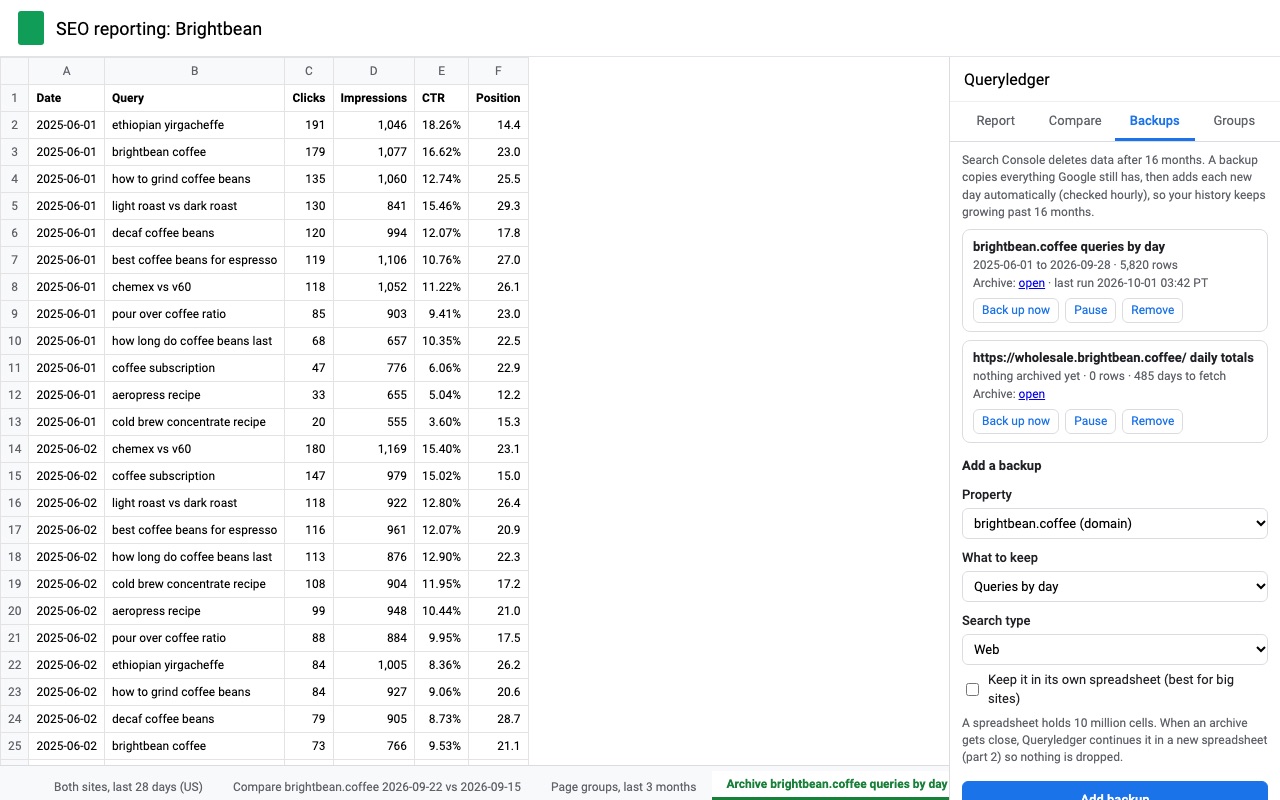
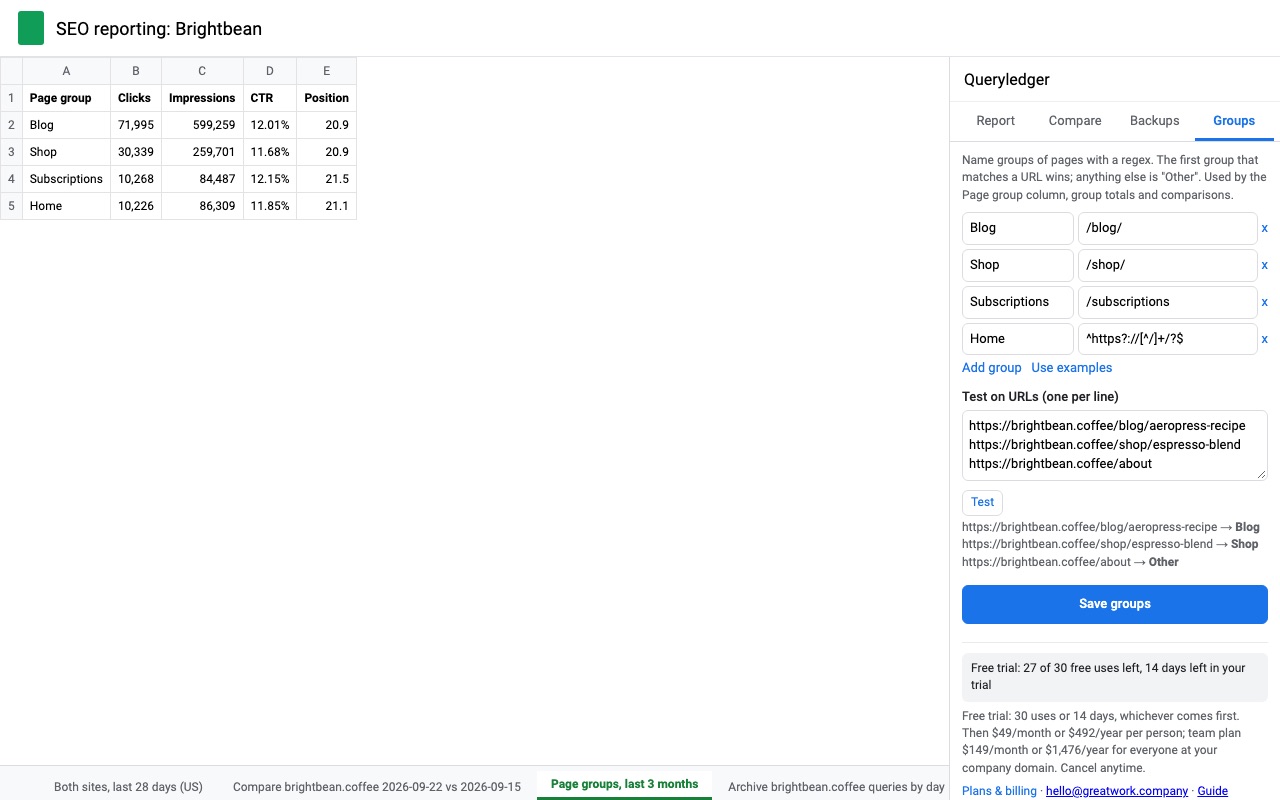
Queryledger pulls your Google Search Console performance data into Google Sheets and keeps a daily backup of it, so your search history doesn't disappear after 16 months.
Keep your history past 16 months Search Console deletes performance data after 16 months. Add a backup for a property and Queryledger copies everything Google still has, then adds each new day automatically once Google finalizes it. A year from now you can still compare against this year. Archives can live in a tab or in their own spreadsheet, and when a spreadsheet gets close to Google's 10 million cell limit the archive continues in a new one (part 2, part 3) so nothing is dropped. If a backup is interrupted, the next run cleans up the partial day, so you never get duplicate rows.
What you get
- Every row Google returns, no row caps on any plan
- Daily backups that keep your Search Console history past 16 months
- Several properties in one pull, regex page groups, week-over-week comparisons
- Country filters by name ("United States", "UK")
How Queryledger works
- Install it and open Extensions > Queryledger > Open Queryledger in any spreadsheet. The sidebar has four tabs: Report, Compare, Backups and Groups.
- Pick one or more properties on the Report tab. It lists every domain and URL-prefix property your Google account can see in Search Console. Picking several puts them in one table with a Property column.
- Choose dates and dimensions. Date presets run from Last 7 days to Everything Google still has (16 months), plus calendar months and custom dates, in Pacific Time like Search Console. Dimensions are date, query, page, country, device and search appearance; Search type covers Web, Image, Video, News tab, Discover and Google News.
- Add filters if you need them. Query, page, country, device or search appearance, with contains, is exactly, matches regex and their opposites. Countries can be typed as "United States" or "UK".
- Click Pull into a new tab. Leave Row limit at 0 and Queryledger pages through the Search Console API until Google has no more rows to send.
- Add a backup on the Backups tab for each property you want to keep. Queryledger copies everything Google still has, then checks hourly and adds each new day once Google finalizes it.
Who it's for
SEO consultants and agencies
Pull 10 client properties into one tab with a Property column, then sort or pivot in Sheets. A team plan covers everyone at your company's email domain.
Site owners who want last year's numbers next year
Search Console shows 16 months. A backup started today keeps growing, so a year-over-year comparison two years from now still has the earlier year to compare against.
Content teams with big sites
Name sections with a regex on the Groups tab (Blog = /blog/, Docs = /docs/) and every report can add a Page group column, or totals per group with impression-weighted average position.
Anyone tired of 1,000-row exports
The Export button in Search Console stops at 1,000 rows. Queryledger reads the same data through Google's API, which returns up to 50,000 rows per day per property per search type.
Queryledger or the Search Console export
The Search Console report is the right place to look at a chart or check one query. Its Export button gives you up to 1,000 rows of the table, one property at a time, for the dates you can still see. Google's free Bulk data export to BigQuery has no row cap, but it needs a Google Cloud project with BigQuery set up, SQL to read the tables, and it exports daily from the time you set it up. Queryledger sits between the two: the data arrives in Google Sheets, backups start with the 16 months Google still holds, and there is nothing to set up outside the sidebar. If you need more than the 50,000 rows a day the API returns, BigQuery is the better fit. For Google Analytics 4 reports in Sheets, see Trafficledger.
Limits and requirements
- Access to the property in Search Console from the Google account you use in Sheets. Queryledger's access is read-only.
- The API's own limits apply: up to 50,000 rows per day per property per search type, and Google leaves anonymized queries out of query-level rows, in the API and the report alike.
- A Google spreadsheet holds 10 million cells. Big archives continue in a new spreadsheet (part 2, part 3), which you can choose from the start with Keep it in its own spreadsheet.
- Backups run from an hourly trigger in your Google account; a backup only adds days Google has finalized, usually two to three days behind.
Queryledger guides
Questions about Queryledger
What does Queryledger do?
Search Console data in Google Sheets, with daily backups that keep your history past 16 months. Queryledger pulls your Google Search Console performance data into Google Sheets and keeps a daily backup of it, so your search history doesn't disappear after 16 months.
What does Queryledger work with?
Queryledger works in Google Sheets, in any browser.
How much does Queryledger cost?
$49 a month or $492 a year per Google account. Team plan: $149 a month or $1476 a year covers everyone at your company or school who signs in to Google with an email address on your domain (not Gmail or other personal addresses). Billed through Stripe. Cancel any time from Plans and billing in the add-on.
Is there a free trial?
Free trial: 30 uses or 14 days, whichever comes first. No card needed.
Where do I install Queryledger?
From the Google Workspace Marketplace. Use the Install button on this page, or search for "Queryledger: Search Console Backups & Reports" there.
Who makes Queryledger?
Great Work LLC, an independent software company. Email hello@greatwork.company with any question about Queryledger and someone will answer.
How do I get Google Search Console data into Google Sheets?
Open Extensions > Queryledger > Open Queryledger, tick the properties on the Report tab, pick dates and dimensions, and click Pull into a new tab.
Can I export more than 1,000 rows from Search Console?
Yes. Queryledger uses the Search Console API, which pages past the 1,000-row export limit, up to the 50,000 rows a day Google returns per property and search type.
How do I keep Search Console data longer than 16 months?
Add a backup on the Backups tab. It copies the 16 months Google still has, then appends each new day, so the history keeps growing in your spreadsheet.
Can I pull data for several websites at once?
Yes. Tick several properties and they come back in one table with a Property column. Each property in a pull counts as one trial use.
Does Queryledger send my Search Console data to your servers?
No. The data goes from Google's API straight into your spreadsheet. Our licensing server only sees your Google account email and a count of trial uses.
Why does my country filter return no rows in other tools?
Search Console expects three-letter country codes such as "usa". Queryledger converts names and two-letter codes, so "United States", "US" and "USA" all work, and suggests a match for typos.
Can I include data from the last two days?
Yes. Tick Include fresh data. Those numbers may still change for a day or two; backups only store final data.
What does the free trial include?
30 uses or 14 days, whichever comes first. A use is one property in a pull, one comparison, or one backup's daily run that adds data; the whole 16-month backfill counts as one.
More Google Sheets apps
 Rowcode
 PickMerge
 Rowsplit
 Labelyard