



Tillwell Stripe customer sidebar: refund, cancel or pause from the ticket, with every action logged.
$5 a month per agent. 14-day free trial (Zendesk asks for a card at install). Billed monthly by Zendesk. No free plan.
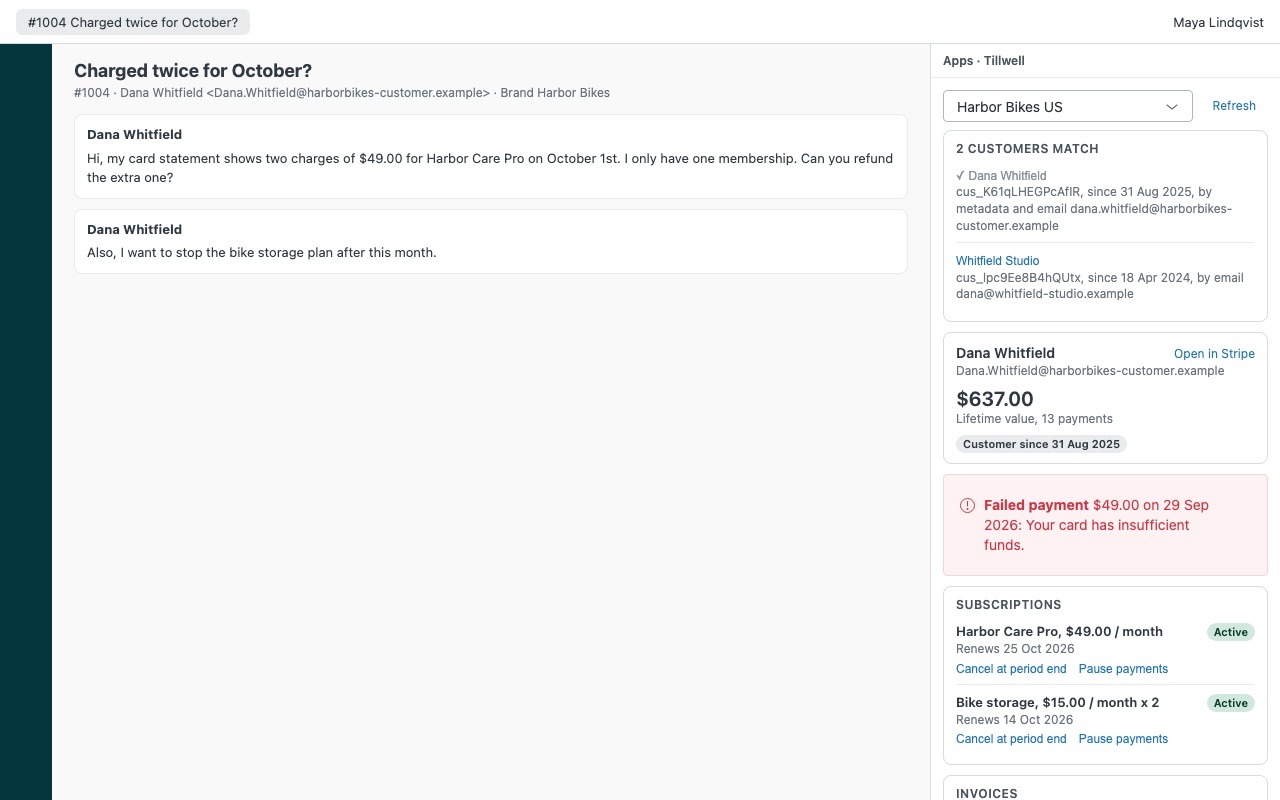
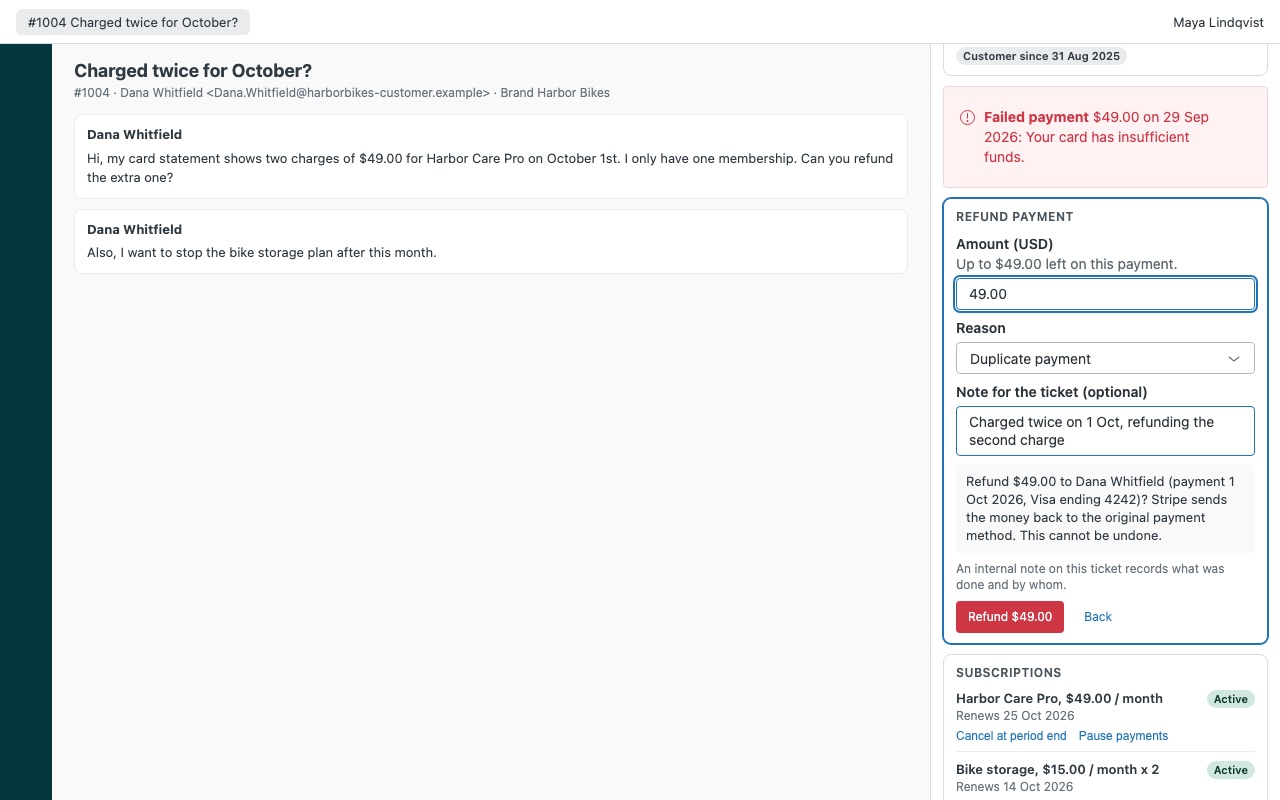
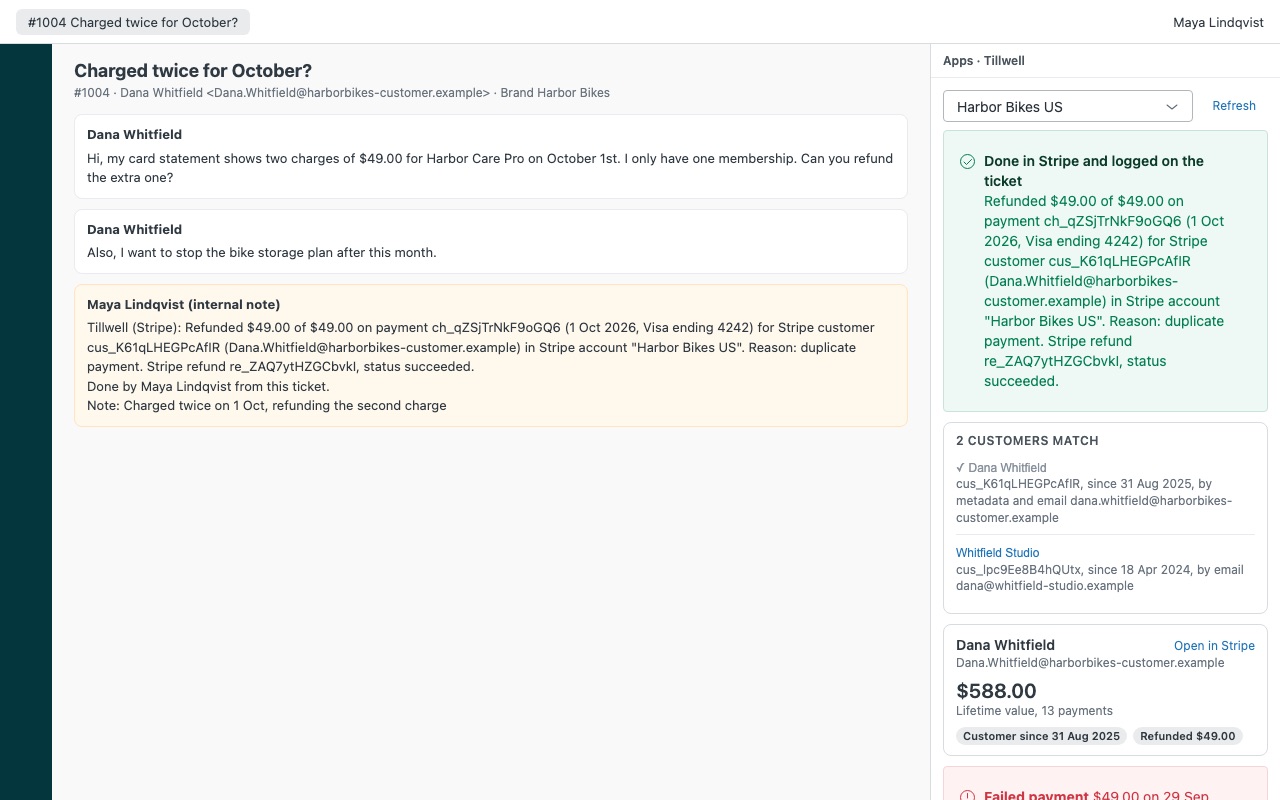
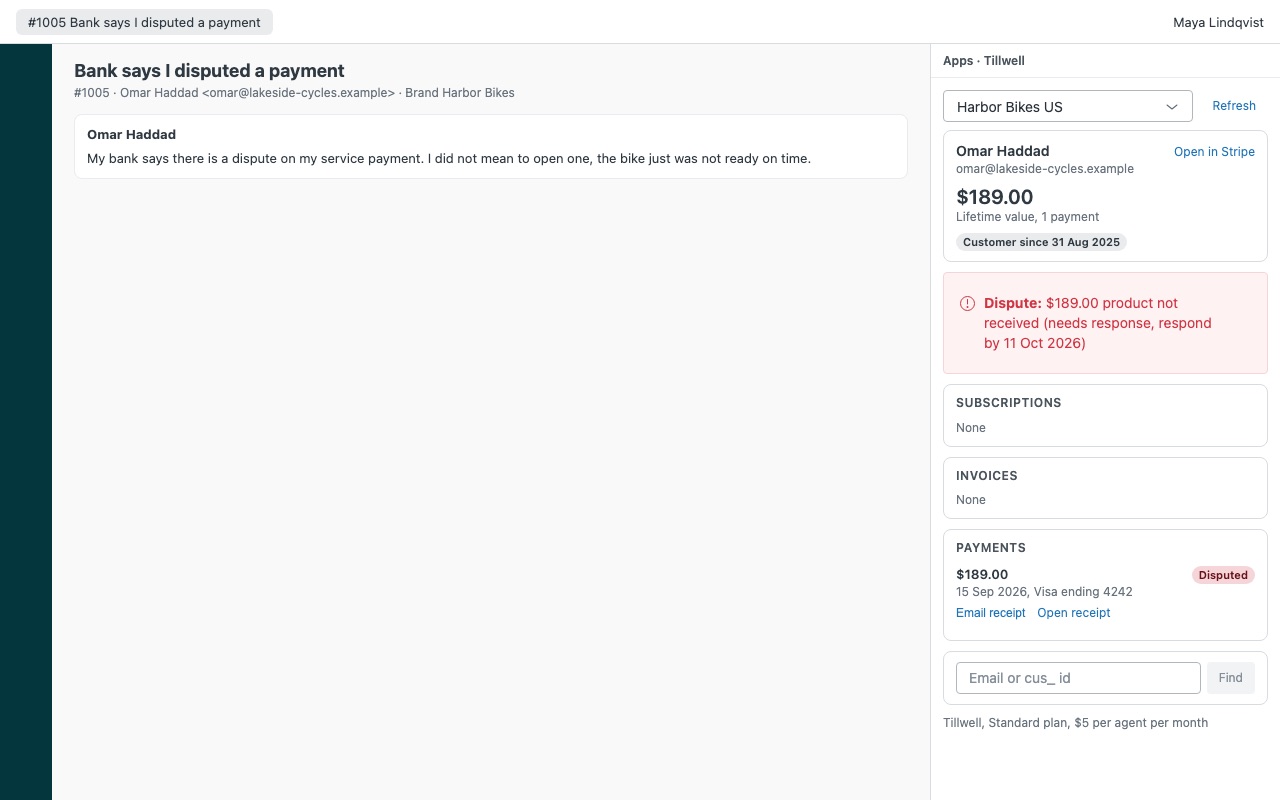
See the customer's Stripe billing on the ticket, and fix it without leaving Zendesk. When someone writes in about a charge, a renewal or a cancellation, Tillwell shows their Stripe customer next to the ticket: subscriptions, invoices, payments, failed payments, disputes and lifetime value. Agents you allow can refund, cancel or pause a subscription, and email an invoice or receipt, and every action is written to the ticket as an internal note.
Tillwell is built by Great Work LLC. It is not made or endorsed by Zendesk or Stripe. Stripe is a trademark of Stripe, Inc.
What you get
The whole billing picture in the sidebar
Matched automatically by the requester's email addresses (every address on their Zendesk profile), and optionally by a Zendesk user field that holds the Stripe customer id or a Stripe metadata key that holds the Zendesk user id. Subscriptions with plan, price, quantity, status and the next renewal, trial end or cancellation date.
Actions with guard rails
Refund in full or in part, with a reason. The amount can never exceed what is left on the payment, and disputed payments cannot be refunded. Cancel at period end (and undo it), pause payments with an optional resume date, and resume.
Logged on the ticket, every time
After Stripe accepts an action, Tillwell adds an internal note to the ticket with the amount, the Stripe ids, the reason, the agent and their note, plus a tag (tillwell_refund, tillwell_cancel and so on) you can use in views and reports. Refunds also carry the ticket number in Stripe's metadata, so your finance team can trace them from Stripe.
Several Stripe accounts
Connect up to three Stripe accounts, for example one per brand or region. Tillwell opens the account mapped to the ticket's brand, and agents can switch.
How Tillwell works
- Create a restricted key in Stripe. Under Developers > API keys > Create restricted key, name it "Tillwell for Zendesk" and give it Read on the resources the sidebar uses. Add Write only for the actions you want agents to take.
- Install Tillwell from the Zendesk Marketplace, paste the key into Stripe restricted key and give the account a name. Zendesk keeps the key as a secure setting and only adds it to requests going to api.stripe.com.
- Open a ticket. Tillwell tries every email address on the requester's Zendesk profile and shows their Stripe customer: lifetime value, customer since, credit or balance owed, subscriptions, invoices and payments.
- See problems first. Open disputes with their response deadline and failed payments from the last 90 days appear above everything else.
- Act from the ticket. Agents you allow can refund a payment, cancel a subscription at the end of the period or undo that, pause or resume payments, and email an invoice or a receipt. Each action shows a confirmation first.
- Keep the record. Every action adds an internal note and a
tillwell_*tag to the ticket. Refunds carry the Zendesk ticket id and agent id in Stripe metadata, so finance can trace them from Stripe.
Who it's for
SaaS and subscription businesses on Stripe
"I was charged twice", "cancel my plan" and "why did my payment fail?" are daily tickets. With the payment, the subscription and Stripe's failure reason beside the conversation, agents answer without asking for screenshots or opening the Stripe Dashboard.
Teams that keep refunds in a few hands
Actions can be limited to admins, custom roles or a group. Refunds above an amount you set need an admin. Everyone else sees the sidebar read-only, so frontline agents can still read the billing history.
Companies with more than one Stripe account
Connect up to three Stripe accounts, for example one per brand or region. A ticket opens the account mapped to its Zendesk brand, and agents can switch in the sidebar.
What you need
- Zendesk Support, and a Zendesk admin to install the app and fill in its settings.
- A Stripe account and a restricted key you create. A key with Read on all six resources gives a working sidebar with no actions.
- Write permissions only for the actions you turn on (the docs list each one).
- A live-mode key (
rk_live_...) in production. A test-mode key (rk_test_...) works for a trial run, and customers then show "(test mode)".
Tillwell guides
Questions about Tillwell
What does Tillwell do?
Stripe customer sidebar: refund, cancel or pause from the ticket, with every action logged.
What does Tillwell work with?
Tillwell works in Zendesk Support.
How much does Tillwell cost?
Standard: $5 a month per agent.
Is there a free trial?
14-day free trial (Zendesk asks for a card at install). Billed monthly by Zendesk. No free plan.
Where do I install Tillwell?
From the Zendesk Marketplace. Use the Install button on this page, or search for "Tillwell" there.
Who makes Tillwell?
Great Work LLC, an independent software company. Email hello@greatwork.company with any question about Tillwell and someone will answer.
Can agents see the Stripe key?
No. The key is a Zendesk secure setting. It travels only in the Authorization header of requests Zendesk's proxy sends to api.stripe.com, never to an agent's browser.
Does Tillwell store our Stripe data?
No. It reads the customer while the sidebar is open and keeps nothing after it closes. It has no server, no export, and sends nothing to Great Work.
How is lifetime value worked out?
Captured payments minus refunds, per currency. A customer with more than 100 payments shows "last 100 payments".
What if the customer's email in Stripe differs from Zendesk?
Map a Zendesk user field that holds the cus_... id, or a Stripe metadata key that holds the Zendesk user id. Agents can also look a customer up by exact email or customer id.
Can we refund a disputed payment from the sidebar?
No. Disputed payments can't be refunded; respond to the dispute in Stripe. The sidebar shows the dispute and its response deadline.
What happens when we uninstall?
The stored keys are deleted from Zendesk. Internal notes and tags already on tickets stay. Delete the restricted key in Stripe as well.
More Zendesk apps
 Tomewell
 Termwell
 Trailwell
 Tenurewell