



Quillmend Bulk macro editor: find and replace, fix and clean up shared macros, with a preview and undo.
From $99 a month per Zendesk account. 14-day free trial (Zendesk asks for a card at install). Billed monthly by Zendesk. No free plan.
Change hundreds of shared macros at once, see every change before it happens, and undo any of it later. Quillmend finds every macro the change touches, shows you each one before and after, writes only what you approve, and keeps a copy of every macro it changes so you can put it back.
Quillmend is built by Great Work LLC. It is not made or endorsed by Zendesk.
What you get
Find and replace across every macro
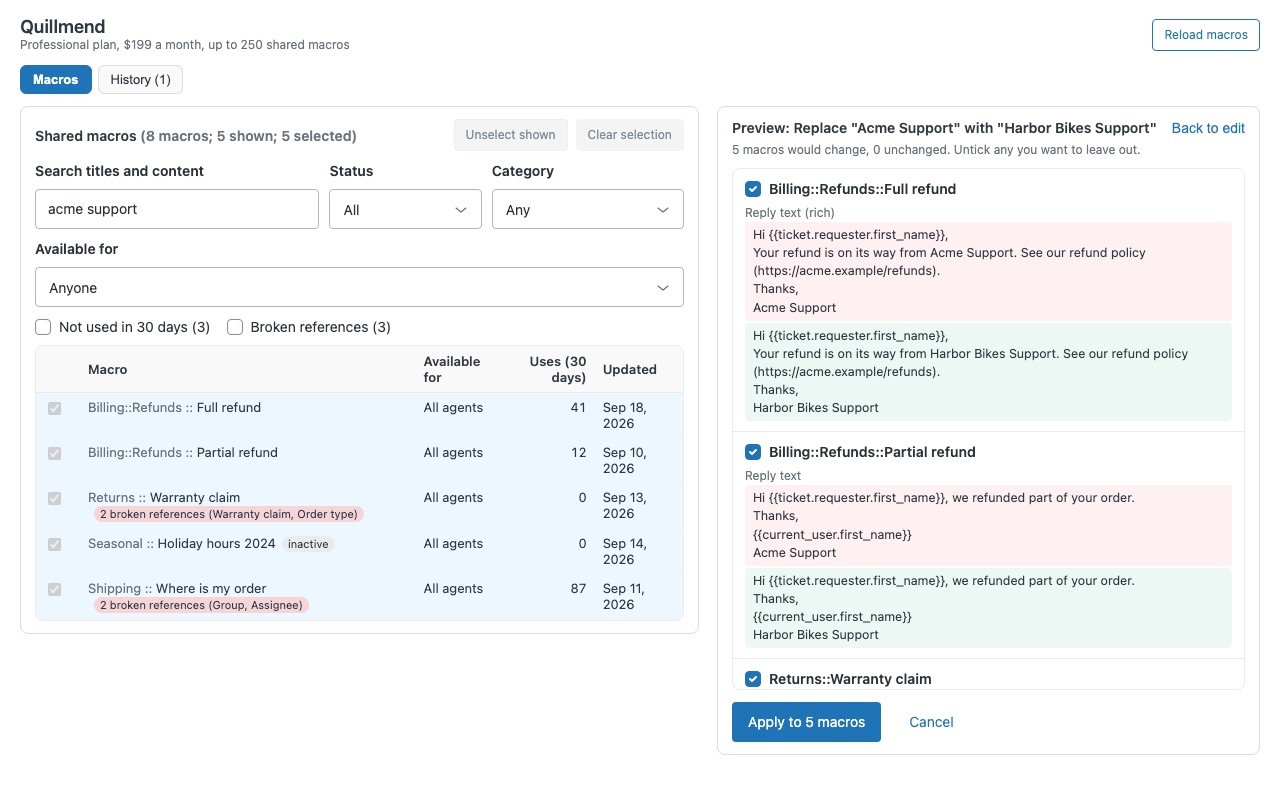
Search titles, reply text, subjects and tags for a word, a phrase, a link or a placeholder, and replace it in every macro that has it. Match case, whole words only, or a pattern with $1 groups. Rich reply text stays intact. Quillmend edits the words only. Bold, links, images and layout are never touched, and you never see or edit HTML.
Fix macros that point at something gone
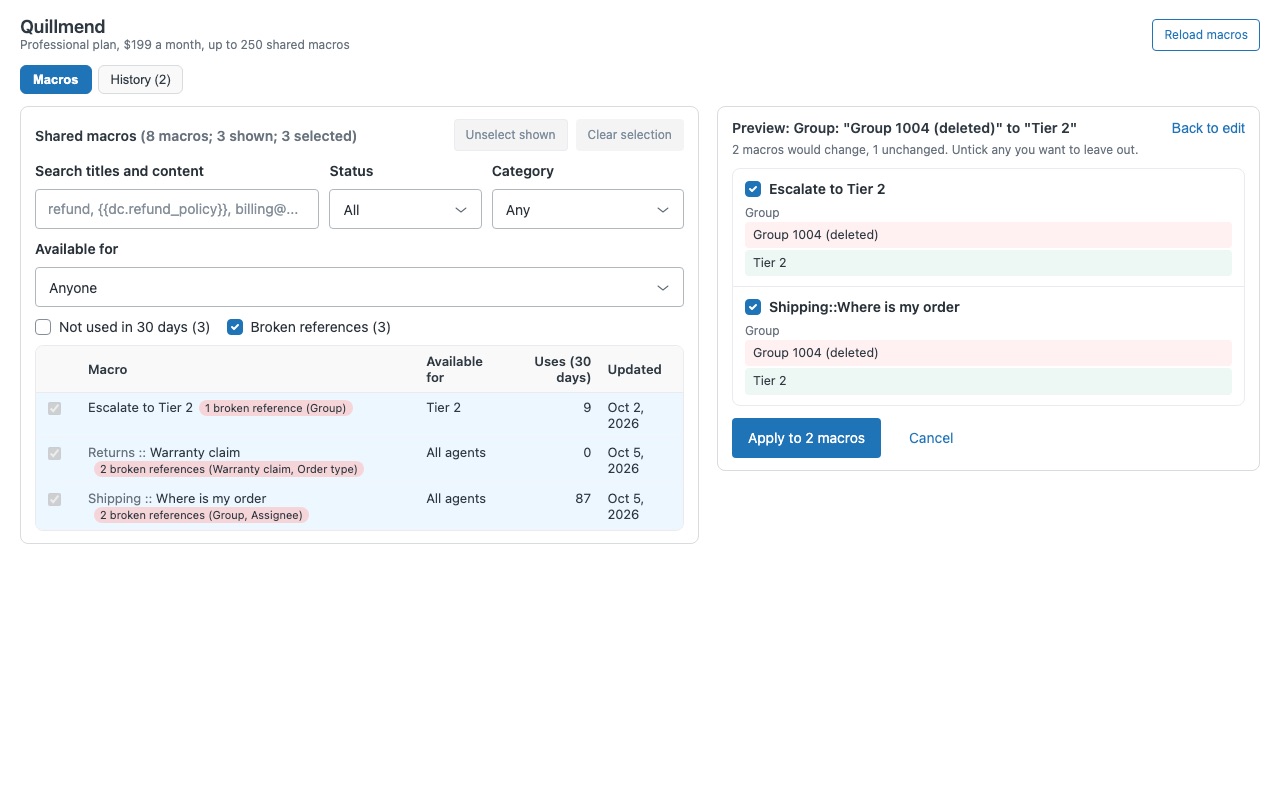
Broken references, listed. Macros that set a deleted group, a suspended agent, an inactive field or form, or a dropdown option that no longer exists. Fix them in bulk with Change a value: every macro that sets the retired group now sets the new one, keeping all their other actions.
Tidy the whole library
Move to a category (the Billing::Refunds:: part of the title) without retyping names. Change availability to all agents or to chosen groups.
Preview first, undo anything
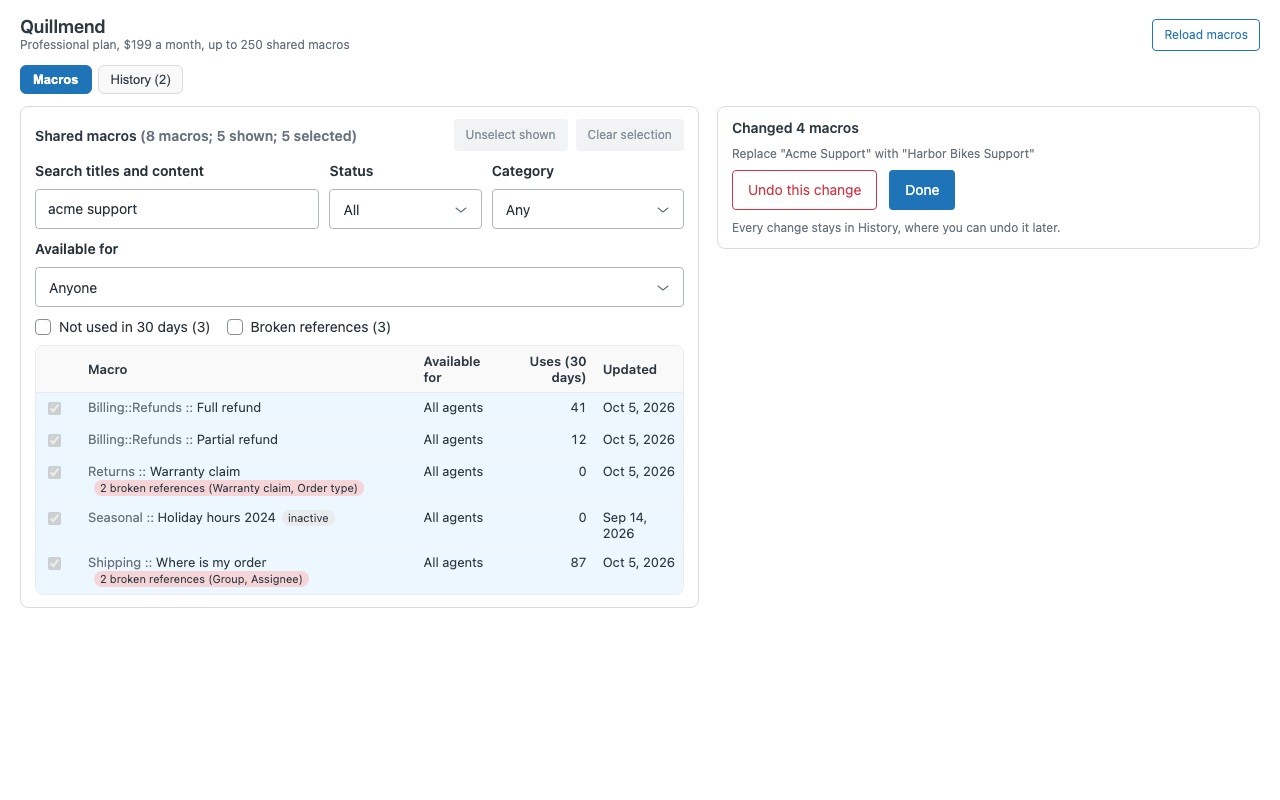
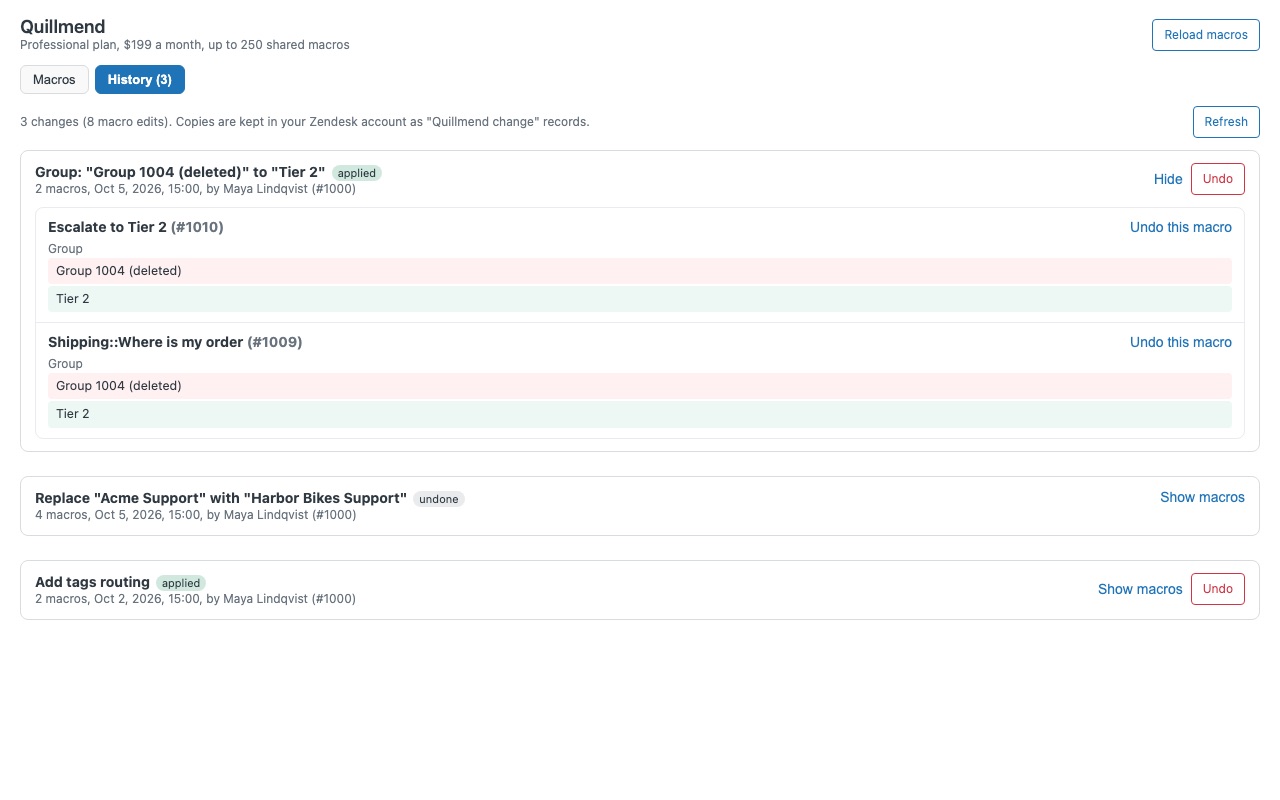
Nothing is written until you approve the preview. Every changed macro is listed with its old and new value side by side; untick any you want to leave out. Every change is saved in your Zendesk account before the macro is written: History lists each change with who made it and when, and Undo puts every macro back, or just one.
How Quillmend works
- Install Quillmend from the Zendesk Marketplace and pick the plan for your number of shared macros. At install it creates one custom object, "Quillmend change", which holds the undo copies.
- Restrict it to admins in Admin Center > Apps and integrations > Zendesk Support apps > Quillmend > Role restrictions, since only admins and custom roles allowed to manage shared macros can change them.
- Open it from the left navigation bar. The Macros tab lists every shared macro with its category, availability, uses in the last 30 days and last update.
- Filter and select. Search titles and content, filter by status, category or availability, or tick Not used in 30 days or Broken references. Click rows, or Select all N shown.
- Choose a change and preview it. Find and replace, change a value, add or remove tags, move to a category, change availability, activate, deactivate or delete. Preview changes shows each macro's old value in red and new value in green.
- Apply, then undo if needed. Quillmend writes one macro at a time, skips any macro someone edited since your preview, and keeps a copy of each one. History lists every change with Undo.
Who it's for
Teams after a rebrand or a help center move
The company name, a product name or a set of article links changed, and the old wording sits in dozens of macros. Search finds it in reply text, subjects and links, and one find and replace fixes all of them.
Admins cleaning up after a reorg
Groups were merged, agents left, a ticket field was retired. Broken references lists every macro that still points at something gone, and Change a value repoints them in one change.
Libraries that grew for years
Hundreds of macros, many unused, categories nobody agreed on. Filter by 30-day usage, deactivate in bulk, move macros under new categories with ::, and undo any step that went too far.
What you need
- A Zendesk plan with custom objects: every Zendesk Suite plan, or Support Enterprise.
- A Zendesk admin, or a custom role allowed to manage shared macros, to use it.
- On Enterprise accounts with custom roles, access for those roles to the "Quillmend change" object (Admin Center > Objects and rules > Custom objects > Quillmend change > Permissions).
- The plan that fits your shared macros, active and inactive: Team up to 25, Professional up to 250, Enterprise any number.
Quillmend guides
Questions about Quillmend
What does Quillmend do?
Bulk macro editor: find and replace, fix and clean up shared macros, with a preview and undo. Change hundreds of shared macros at once, see every change before it happens, and undo any of it later. Quillmend finds every macro the change touches, shows you each one before and after, writes only what you approve, and keeps a copy of every macro it changes so you can put it back.
What does Quillmend work with?
Quillmend works in Zendesk Support.
How much does Quillmend cost?
Team: $99 a month per Zendesk account. Professional: $199 a month per Zendesk account. Enterprise: $349 a month per Zendesk account.
Is there a free trial?
14-day free trial (Zendesk asks for a card at install). Billed monthly by Zendesk. No free plan.
Where do I install Quillmend?
From the Zendesk Marketplace. Use the Install button on this page, or search for "Quillmend" there.
Who makes Quillmend?
Great Work LLC, an independent software company. Email hello@greatwork.company with any question about Quillmend and someone will answer.
Does Quillmend change personal macros?
No. It lists and changes shared macros only, the ones available to all agents or to groups.
Where are the undo copies stored?
In your own Zendesk account, as records of the "Quillmend change" custom object. Nothing is kept outside Zendesk, and Quillmend never reads tickets or customers.
How many macros can one change touch?
Up to 1,000. A very long macro, roughly 13,000 characters of reply text or more, can't be changed because both copies must fit in Zendesk's 32 KB record limit. The preview marks it.
Can it edit triggers, automations or dynamic content?
No. It edits macro text and actions only. Side conversation actions are left as they are.
What if a colleague edits a macro while I'm working?
Quillmend reads each macro again just before writing it and skips it if it changed since your preview. Undo does the same, and offers to undo that one anyway if you want to overwrite the later edit.
What happens when I uninstall it?
Your macros stay as they are. Zendesk keeps the "Quillmend change" object and its records, so a reinstall can still undo past changes. Delete the object in Admin Center to remove them.
More Zendesk apps
 Quirewell
 Questwell
 Replywell
 Pursewell