


Rowcode Bulk QR codes and barcodes from Google Sheets rows, made inside Google, never expiring
Listed on the Google Workspace Marketplace as “Rowcode: Bulk QR Codes & Barcodes”
$4.99 a month or $39 a year per Google account. Free trial: 100 codes or 14 days, whichever comes first. No card needed.
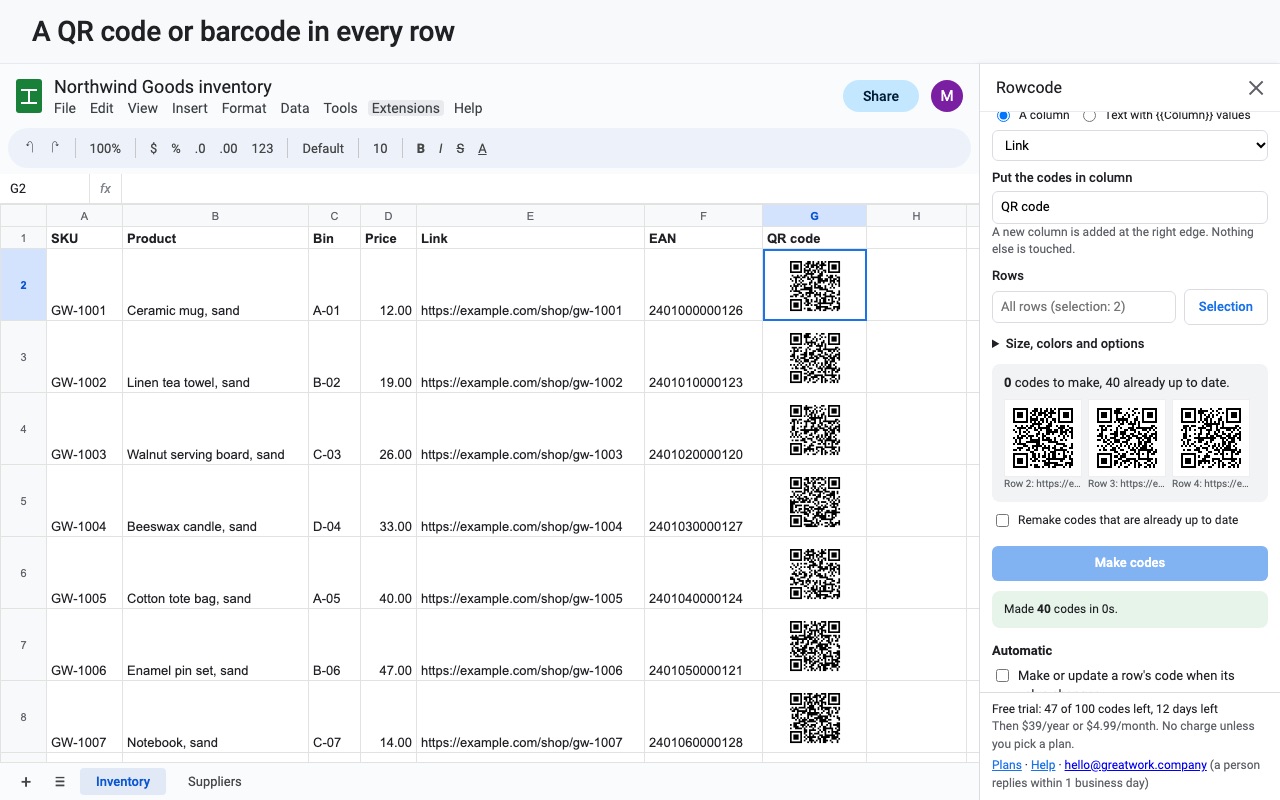
Rowcode turns spreadsheet rows into QR codes and barcodes: one per row, placed right in the row as an image, ready to print.
What you get
- Unlimited QR codes and barcodes
- QR, Code 128, EAN-13, UPC-A, EAN-8, Code 39 and ITF-14
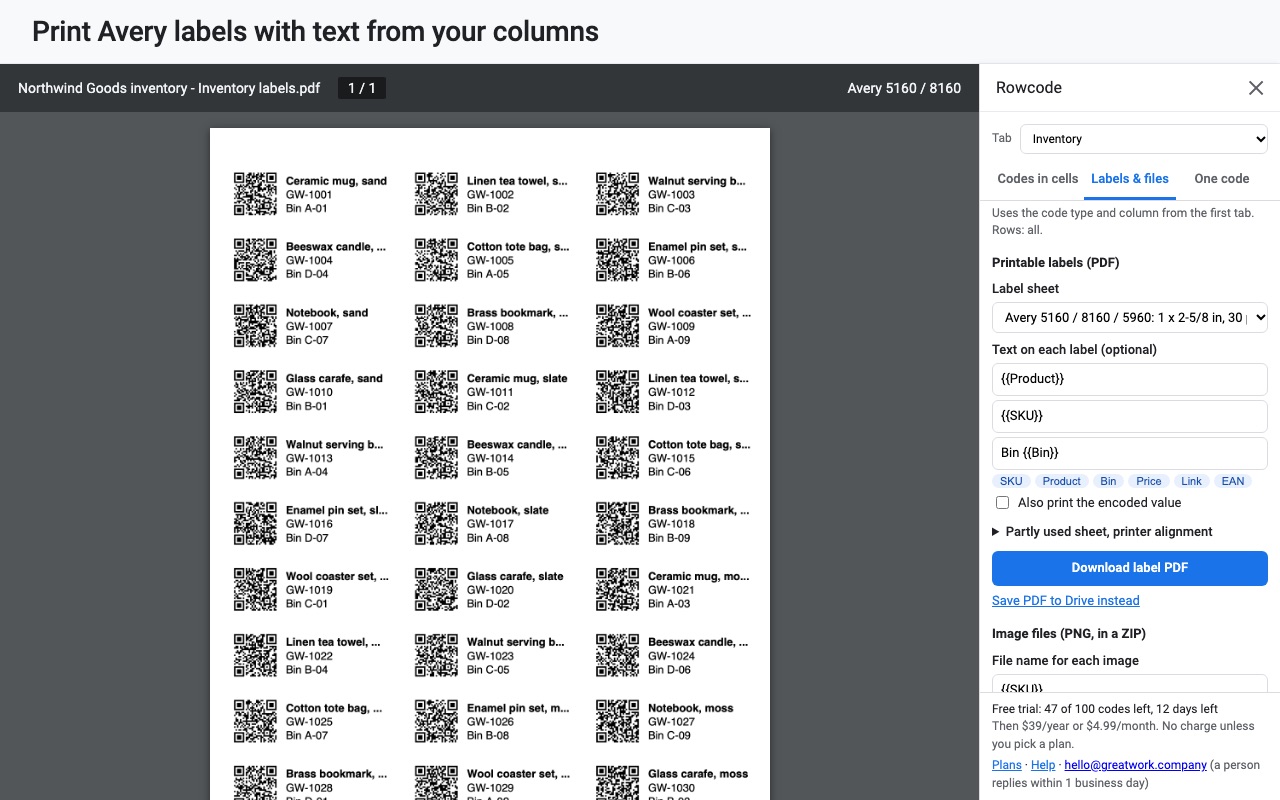
- Printable label PDFs for Avery sheets, plus PNG downloads
- Codes update automatically when rows change
- Codes never expire and never go through a redirect
How Rowcode works
- Set up the sheet with headers in row 1 (for example SKU, Product, Link) and one item per row.
- Open Extensions, Rowcode, Open Rowcode. The sidebar has three tabs: Codes in cells, Labels & files and One code. To see it first on made-up data, choose Try it with sample data from the same menu.
- Pick the Code type: QR, Code 128, EAN-13, UPC-A, EAN-8, Code 39 or ITF-14.
- Choose what goes in each code. Either A column, or Text with {{Column}} values, such as
https://shop.example.com/item/{{SKU}}, where each row fills in its own value. - Check the preview. Before anything is written, the sidebar checks your rows and says which ones can't become a code and why.
- Click Make codes. Each code lands as an image inside its row, in the column you picked. Run it again later and only changed rows are redone.
- Print or download from Labels & files: a label PDF for Avery sheets or plain paper, or a ZIP with one PNG per row, named from your columns.
Who it's for
Small shops and warehouses labeling stock
A product list with SKUs becomes Code 128 or EAN-13 barcodes that a USB or phone scanner reads back into any search box. Print them on Avery 5160 sheets and stick them on shelves or bins.
IT and facilities teams tagging equipment
An asset register with a tag number in each row becomes asset labels. A QR code that holds a link built from the row, such as a form prefilled with the asset tag, lets whoever finds a broken laptop report it from their phone.
Teachers and event organizers
A class roster or guest list becomes one QR code per person for check-in, name badges or handouts. With the automatic setting on, a new Google Form response gets its own code within seconds.
Anyone printing codes for products they sell
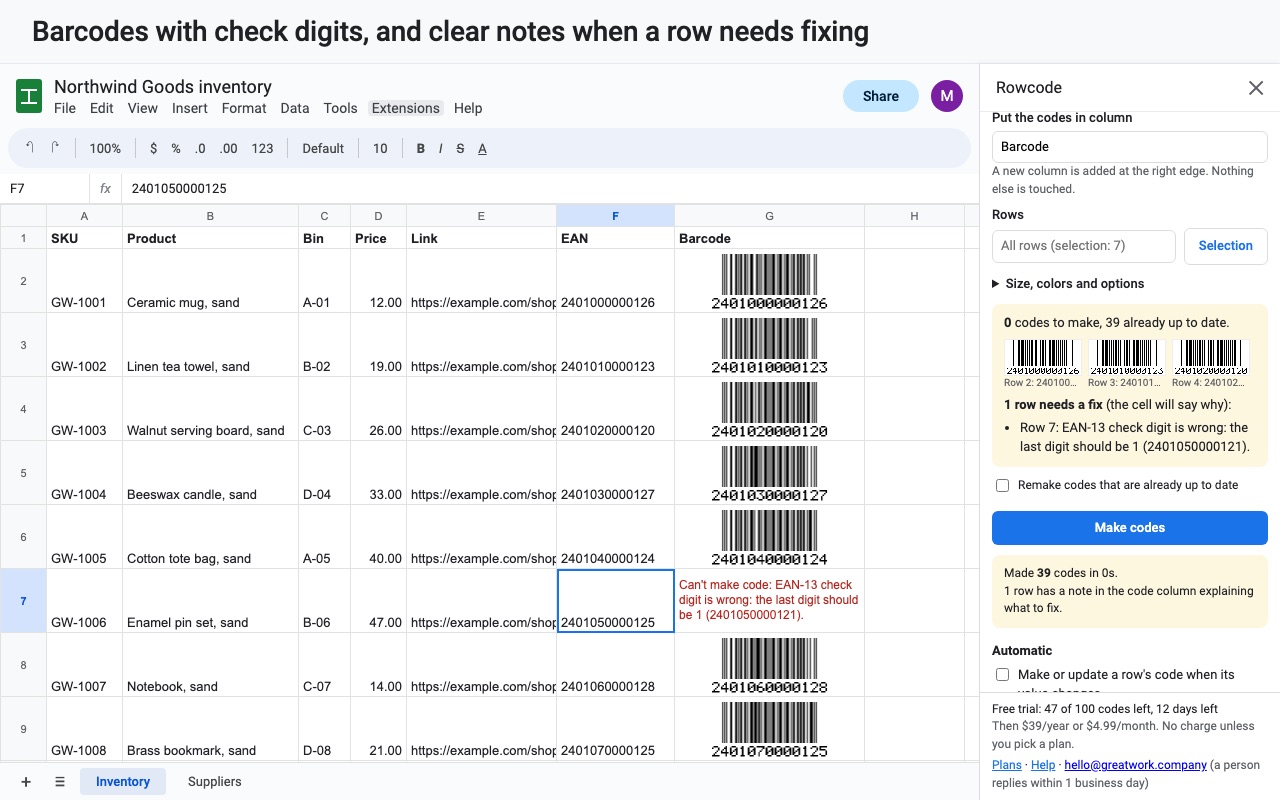
Retail barcodes need the right check digit. Type an EAN-13 or UPC-A number without the last digit and Rowcode adds it; type the full number and Rowcode checks it, saying which digit it should be if it's wrong.
Rowcode or a formula and font in Google Sheets
Google Sheets has no QR or barcode function. The IMAGE() formula can show a QR code only by calling an outside QR website with your data in the link, and the old Google Charts QR address that many tutorials use no longer works. Barcode fonts from the Sheets font list draw bars, but Code 128 and EAN need start, stop and check characters worked out first, and no font draws a QR code. If you need one code for one link, a free generator does the job. Rowcode is for many codes that stay in their rows, scan on the first try, and print on real label sheets, with your data never leaving Google.
Limits and requirements
- Works in Google Sheets in a browser. Codes are cell images, so they move with sorting and filtering.
- Barcode types accept what their standard allows: EAN and UPC take digits only, and Code 39 takes uppercase letters, digits, spaces and
- . $ / + %. A row that doesn't fit says so in its code cell. - Very long text makes a dense QR code. Use Q or H error correction only when codes will get scuffed, since it makes them bigger.
- Codes hold your data itself, not a short link, so a code's content can't be changed after it's printed. Reprint it with the new value.
For a single barcode without a spreadsheet, the free barcode generator makes one UPC, EAN or Code 128 image in your browser.
Rowcode guides
Questions about Rowcode
What does Rowcode do?
Bulk QR codes and barcodes from Google Sheets rows, made inside Google, never expiring. Rowcode turns spreadsheet rows into QR codes and barcodes: one per row, placed right in the row as an image, ready to print.
What does Rowcode work with?
Rowcode works in Google Sheets, in any browser.
How much does Rowcode cost?
$4.99 a month or $39 a year per Google account. $79 once for lifetime access on one Google account. Team plan: $149 a year covers everyone at your company or school who signs in to Google with an email address on your domain (not Gmail or other personal addresses). Billed through Stripe. Cancel any time from Plans and billing in the add-on.
Is there a free trial?
Free trial: 100 codes or 14 days, whichever comes first. No card needed.
Where do I install Rowcode?
From the Google Workspace Marketplace. Use the Install button on this page, or search for "Rowcode: Bulk QR Codes & Barcodes" there.
Who makes Rowcode?
Great Work LLC, an independent software company. Email hello@greatwork.company with any question about Rowcode and someone will answer.
Why did the leading zeros disappear from my barcode numbers?
Google Sheets stores a value like 012345 as a number and drops the zero. Select the column, choose Format, Number, Plain text, and type the values again. Rowcode also reads long numbers that Sheets shows in scientific notation, such as 4.00638E+12, as the full number.
Can one QR code combine several columns?
Yes. Choose Text with {{Column}} values and write the text with column names in double braces. {{_row}} adds the row number.
Can I make a Wi-Fi QR code?
Yes. On the One code tab, choose Joining a Wi-Fi network, type the network name and password, and put the code in a cell, download a PNG or print a poster PDF.
Can I make a QR code that opens my Google Form?
Yes. If the spreadsheet is linked to a Google Form, One code can make a code for This spreadsheet's Google Form.
Do I need a scanner app to read the codes?
QR codes open in the camera app on most phones. Barcodes need a barcode scanner or a scanning app; a USB scanner types the value wherever your cursor is.
Does making codes send my data anywhere?
No. Rowcode's own code makes every image inside Google. Cell values aren't sent to Great Work or to any QR service.
Do codes still work if I cancel?
Yes. The codes already made stay in your sheet and in your printed labels, and they keep scanning.
More Google Sheets apps
 Rowsplit
 Queryledger
 Rowtree
 PickMerge