



PickMerge Docs and PDFs from Sheets rows and Form responses, without full Drive access
Listed on the Google Workspace Marketplace as “PickMerge: Docs & PDFs from Sheets and Forms”
$8.99 a month or $99 a year per Google account. Free trial: 50 documents or 14 days, whichever comes first. No card needed.
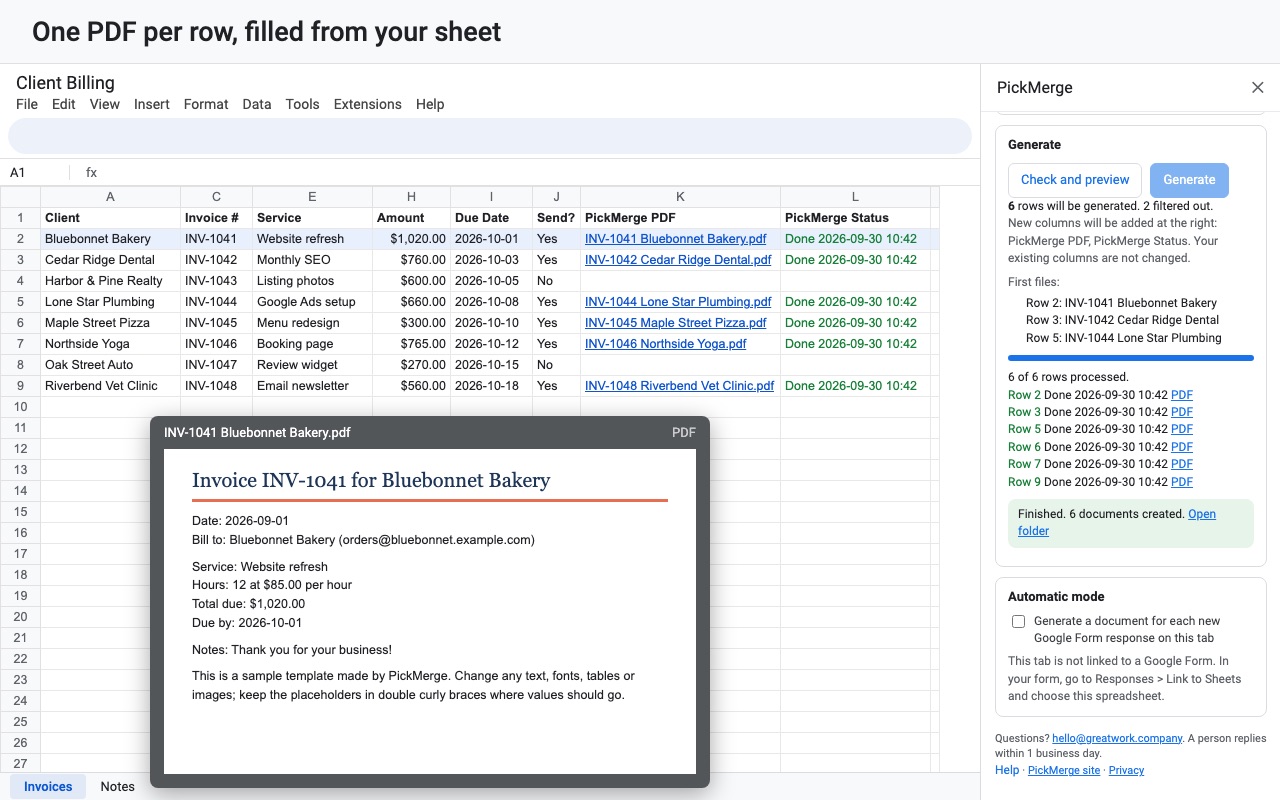
PickMerge turns each row of a sheet, or each new Google Forms response, into its own Google Doc or PDF built from a template you design in Google Docs. Invoices, certificates, offer letters, receipts, reports, permission slips: if you can lay it out in a Doc, PickMerge can fill it in.
What you get
- Unlimited documents and PDFs
- Automatic mode for Google Form responses
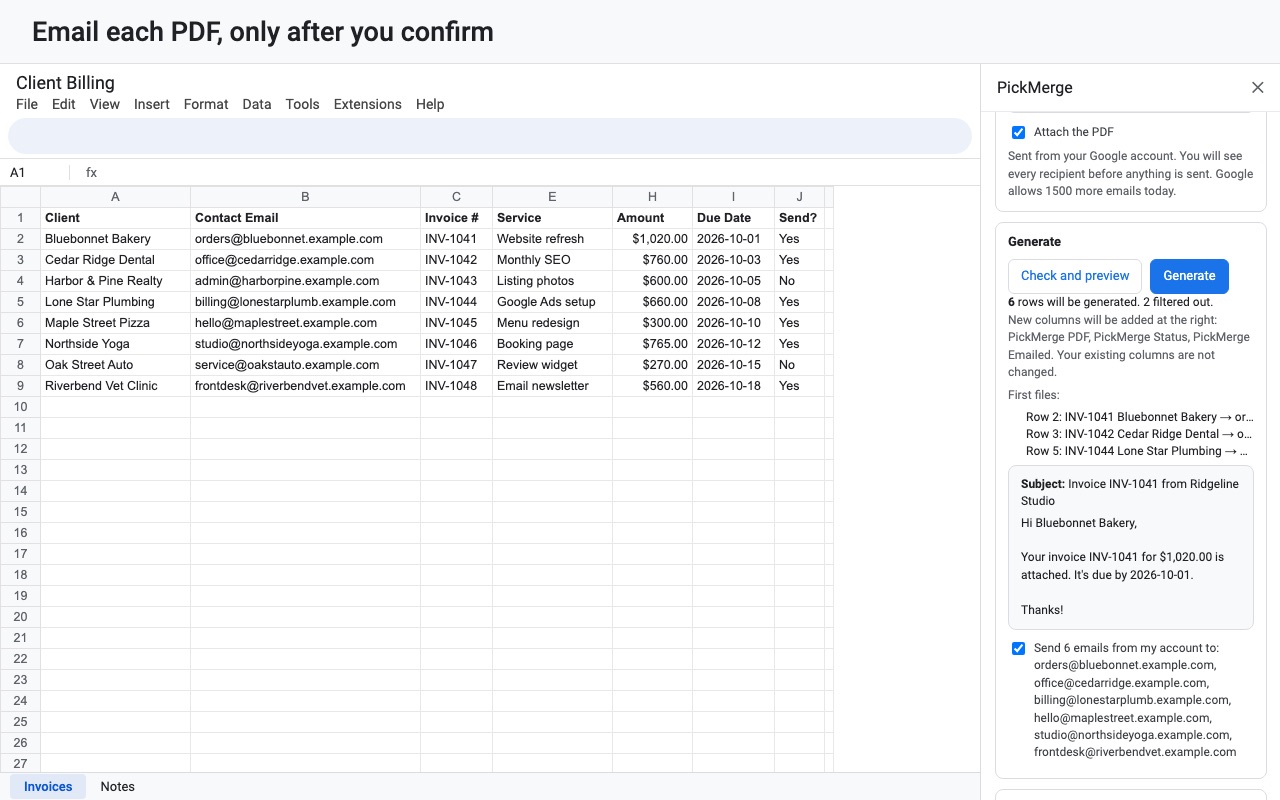
- Email each PDF to an address in the row
- Only touches files you pick (no full Drive access)
How PickMerge works
- Write a template in Google Docs. Type placeholders that match your column headers, like
{{Client}}and{{Amount}}. No template yet? Open the sidebar and click Make one from my columns for a starter Doc with every column in it. - Open Extensions > PickMerge > Open PickMerge in the spreadsheet, on the tab your rows come from.
- Click Pick a template Doc. Google's file picker opens, and PickMerge gets access to that one file. A Word (.docx) template works too: PickMerge makes a Google Docs copy and leaves your Word file alone.
- Choose what to make: PDF files, Google Docs, or Google Docs and PDFs. Set a File name from your columns, such as
Invoice {{Invoice #}} {{Client}}, and Choose folder or let PickMerge create one. - Narrow the rows if you need to. Only rows where a column equals, doesn't equal or contains a value (Send? equals Yes), is empty or isn't empty, or Row numbers like 2-50.
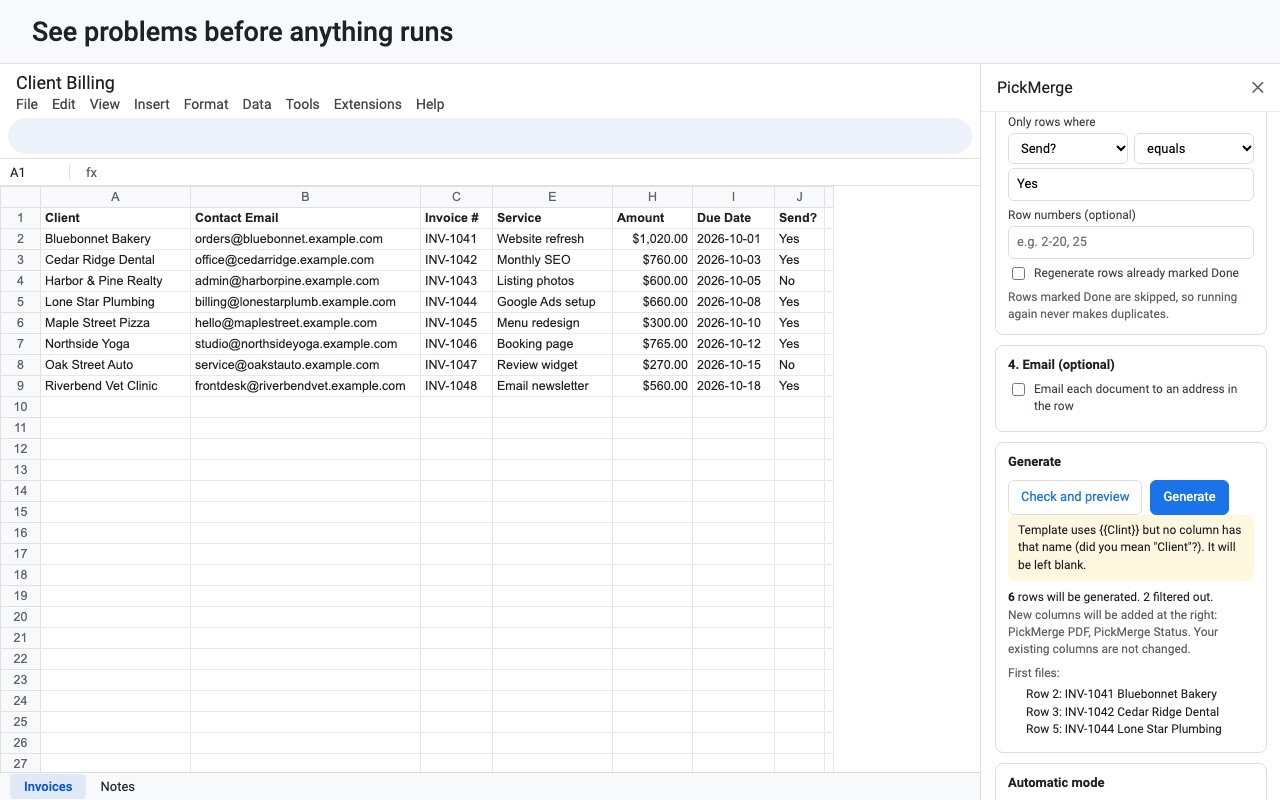
- Click Check and preview. It lists placeholders that don't match a column, with a suggestion for the likely typo, rows missing an email address, and the first files it will create. Previews never use trial documents.
- Click Generate. Each row gets its file, and new columns on the right of the tab show PickMerge Doc, PickMerge PDF and PickMerge Status links and results.
Who it's for
Invoices and receipts from a billing sheet
One row per invoice, one PDF per row, named by invoice number and client, saved to the folder you chose. Run it again next month and the rows already marked Done are skipped.
Schools and training teams
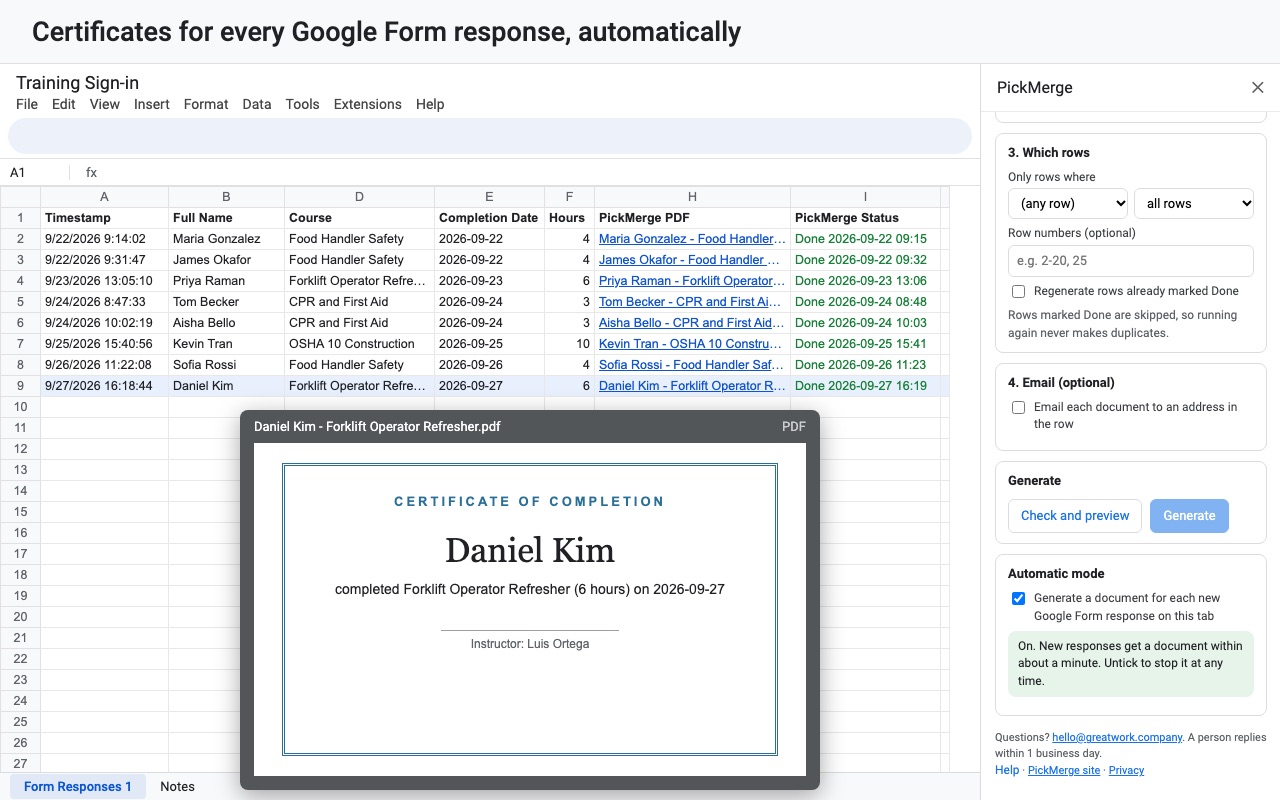
A response sheet of course completions turns into one certificate or report card per person from a Doc you designed with your school's logo. Tick Email each document to an address in the row to send each one to the student.
HR and office letters
Offer letters, contracts and permission slips where most of the text is the same and the name, date, salary or class changes. {{Nickname|there}} prints "there" when a cell is empty, so a missing value doesn't leave a gap.
Google Forms that need a document
With Automatic mode on, each new form response on the tab gets its document within about a minute, without anyone opening the sheet.
When PickMerge fits
Google Docs has no built-in way to fill a template from a spreadsheet, so a merge needs either an add-on or a script. Many merge add-ons ask to see, edit, create and delete all of your Google Drive files. PickMerge opens only the template and folder you pick through Google's file picker and the files it makes. Because it copies your template and replaces the placeholders in place, tables, headers, footers, images and document tabs stay as you laid them out, and dates and amounts print the way the sheet shows them.
It isn't a tool for building one long document with a table of every row; it makes one file per row. If you need a PDF of the whole sheet, Google Sheets' own File > Download > PDF does that. And if your records live in a HighLevel CRM rather than a spreadsheet, Foliowell for HighLevel fills Word templates from contacts and deals in a workflow.
Limits and requirements
- Google Sheets in a browser, a template in Google Docs or Word, and a Google account.
- Large sheets run in batches with a progress bar. If a run stops, press Generate again and it picks up where it left off.
- Email goes out from your own Google account, so Google's daily sending limit for that account applies. If more emails are queued than Google allows today, the preview warns you, and rows past the limit are marked so you can send them the next day.
- Email needs a confirmation: after the preview you tick "Send N emails from my account to: ...", and changing the subject, message or recipients asks again.
PickMerge guides
Questions about PickMerge
What does PickMerge do?
Docs and PDFs from Sheets rows and Form responses, without full Drive access. PickMerge turns each row of a sheet, or each new Google Forms response, into its own Google Doc or PDF built from a template you design in Google Docs. Invoices, certificates, offer letters, receipts, reports, permission slips: if you can lay it out in a Doc, PickMerge can fill it in.
What does PickMerge work with?
PickMerge works in Google Sheets, in any browser.
How much does PickMerge cost?
$8.99 a month or $99 a year per Google account. Billed through Stripe. Cancel any time from Plans and billing in the add-on.
Is there a free trial?
Free trial: 50 documents or 14 days, whichever comes first. No card needed.
Where do I install PickMerge?
From the Google Workspace Marketplace. Use the Install button on this page, or search for "PickMerge: Docs & PDFs from Sheets and Forms" there.
Who makes PickMerge?
Great Work LLC, an independent software company. Email hello@greatwork.company with any question about PickMerge and someone will answer.
How do I mail merge from Google Sheets to Google Docs?
Put {{Column name}} placeholders in a Google Doc, open Extensions > PickMerge > Open PickMerge in the sheet, click Pick a template Doc, choose Google Docs as the output, then Check and preview and Generate. You get one filled-in Doc per row.
Can PickMerge make PDFs instead of Docs?
Yes. Choose PDF files, or Google Docs and PDFs to get both. The PDF link goes in the PickMerge PDF column next to each row.
Why doesn't PickMerge ask for access to my whole Drive?
It uses Google's file picker, which gives an add-on access to the files you pick and the files it creates, and nothing else. That's the drive.file permission.
Will running it twice make duplicate documents?
No. Rows marked Done in the PickMerge Status column are skipped. Tick Regenerate rows already marked Done when you want fresh copies.
What happens when a cell in my sheet is empty?
The placeholder prints nothing, or the fallback you wrote after a bar: {{Title|Customer}} prints "Customer" for an empty Title.
Can I use the date or row number in the document?
Yes. {{_today}} prints today's date, {{_row}} the row number, {{_sheet}} the tab name and {{_spreadsheet}} the spreadsheet name.
Does PickMerge work with Google Forms?
Yes, through the form's response tab in Google Sheets. Open PickMerge on that tab, set up the template, then tick Automatic mode so each new response gets its document.
Do previews count against the free trial?
No. The trial counts merged rows only: 50 documents or 14 days, whichever comes first.
More Google Sheets apps
 Queryledger
 Labelyard
 Rowcode
 Includewell