


Helmwell Remote support for TeamViewer: start sessions from tickets, send the join link, log who connected.
From $110 a month per Zendesk account. 14-day free trial (Zendesk asks for a card at install). Billed monthly by Zendesk. No free plan.
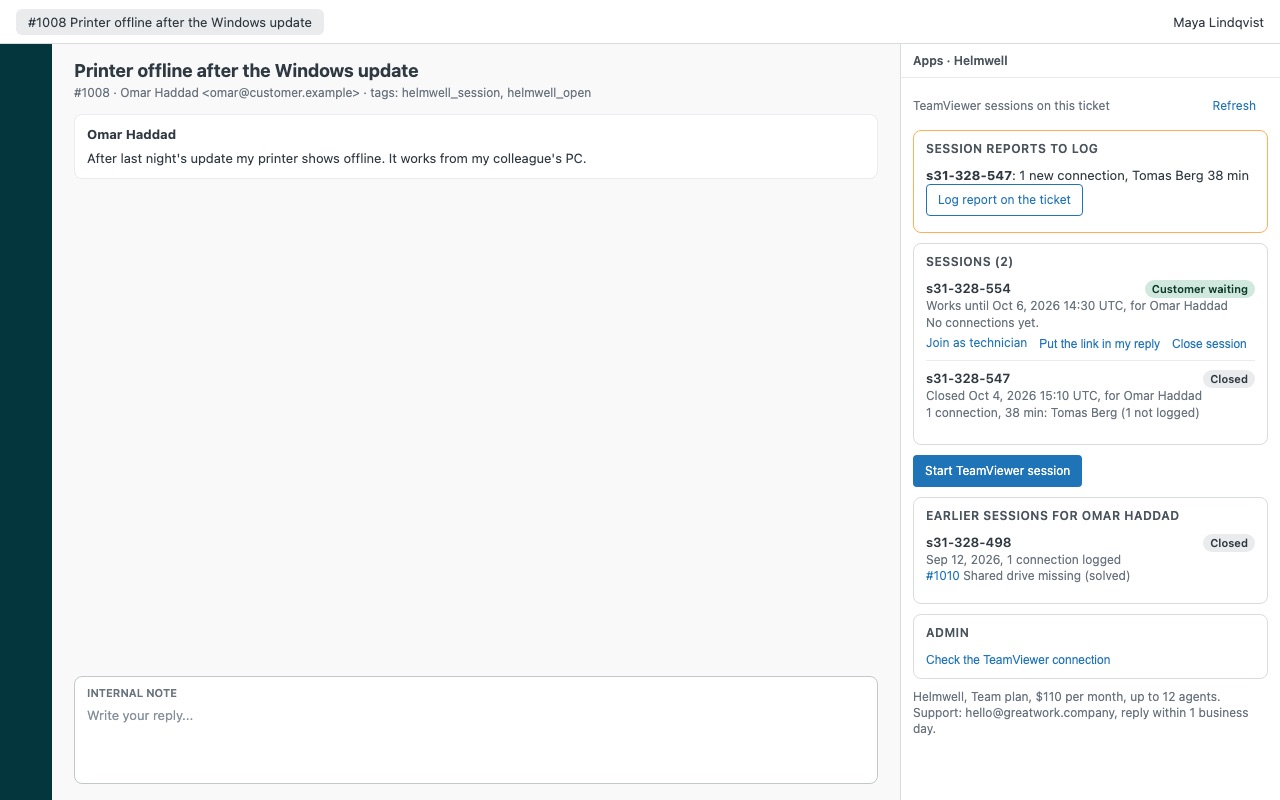
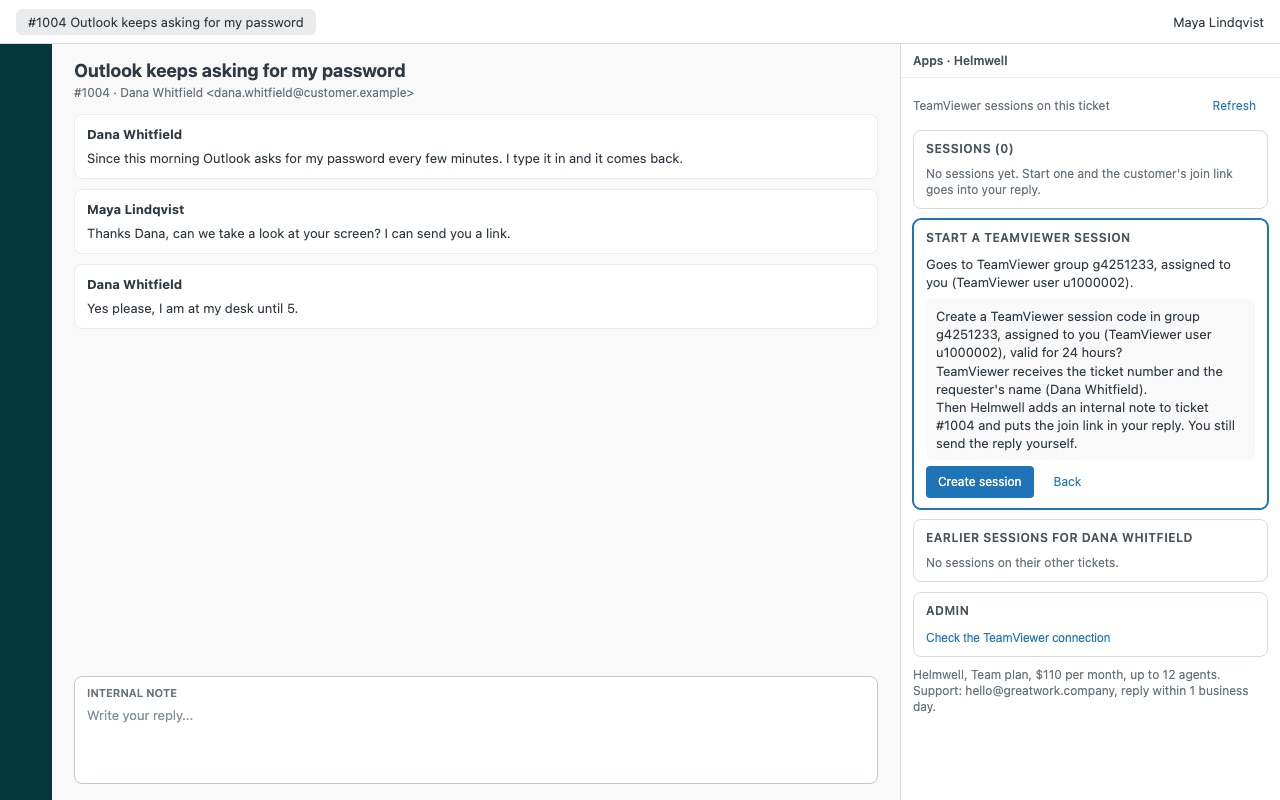
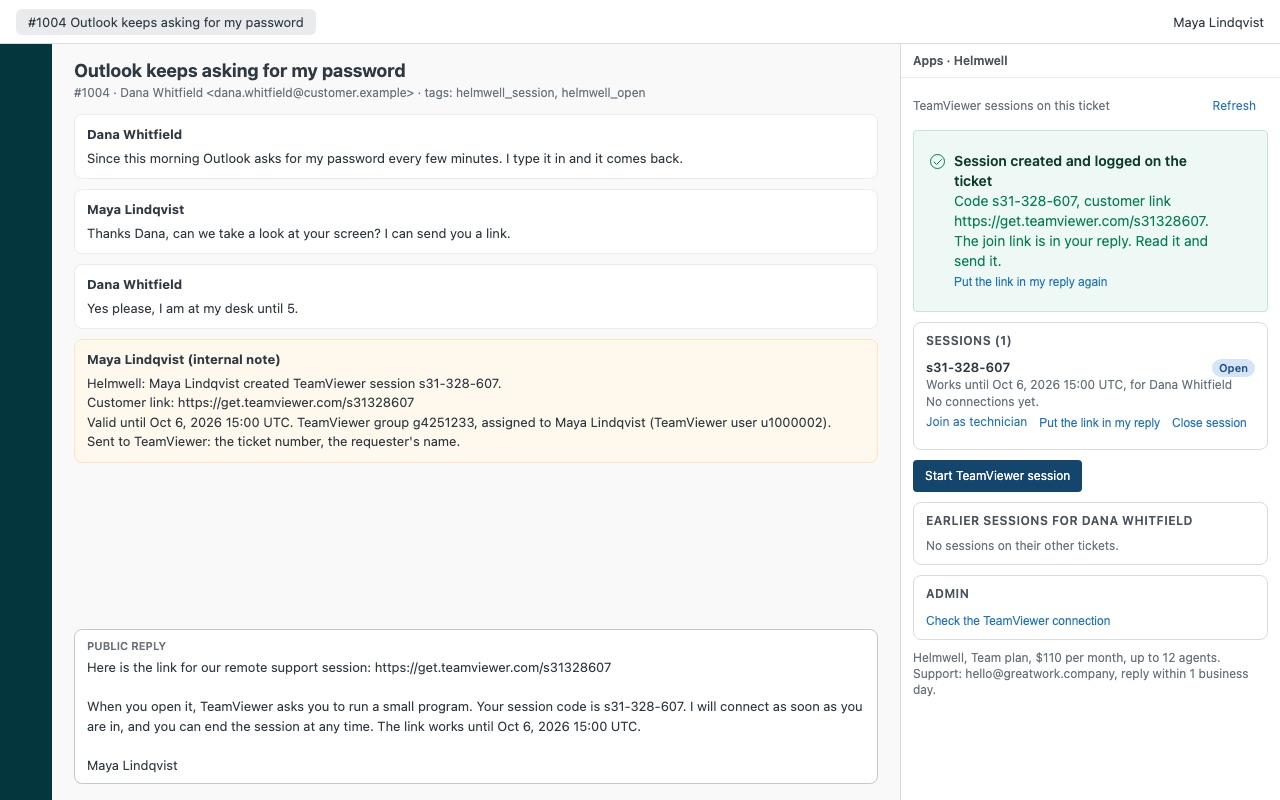
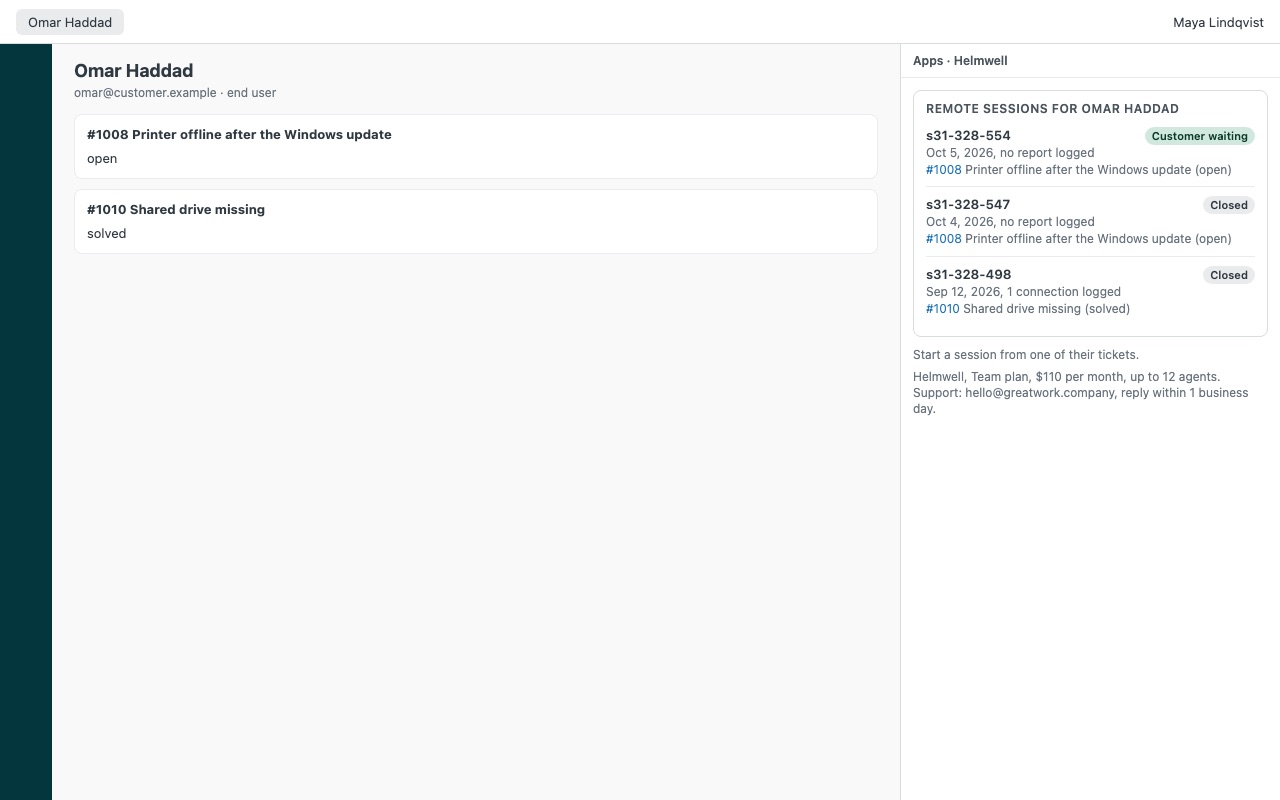
Start a TeamViewer remote support session from the ticket, put the join link in your reply, and get the session report back on the ticket: who connected, when, for how long and what they noted. Your customer still has to click the link. Helmwell takes care of everything around that click.
Helmwell is built by Great Work LLC. It is not made or endorsed by Zendesk or TeamViewer. TeamViewer is a trademark of TeamViewer Germany GmbH.
What you get
Start a session from the ticket
One click, then confirm. Helmwell creates the TeamViewer session code and puts the join link, the code and its expiry into your reply. Nothing reaches the customer until you send it. The right queue and technician. Map Zendesk groups to TeamViewer groups and agents to their TeamViewer users, so each session lands in the right queue, assigned to whoever started it.
See every session on the ticket
Each session shows its live state (Customer waiting, Open, Expired or Closed) and every connection made with it. Join as technician, put the link in your reply again, or close the code so the link stops working.
Built to be trusted
Setup that tells you what's wrong. An admin check tests the token and lists the group and technician ids in use. Nothing happens twice. Every change asks first, and a lost TeamViewer answer never creates a second session.
What it doesn't do
Helmwell has no server, so it reads TeamViewer when the sidebar opens or you click Refresh. It works with session codes; it doesn't connect to unattended devices.
How Helmwell works
- Create a TeamViewer script token. In the TeamViewer Management Console, Edit profile > Apps > Create script token, with only Session management and Connection reporting turned on.
- Install Helmwell from the Zendesk Marketplace, paste the token into TeamViewer script token and set the Default TeamViewer group. Zendesk keeps the token as a secure setting and sends it only to webapi.teamviewer.com.
- Start a session from a ticket. Click Start TeamViewer session, check the group, the technician and how long the code works, then Create session. The join link and code go into your public reply, and an internal note records what was sent.
- Watch it live. The session list shows Customer waiting when the customer has the session open, or Open, Expired or Closed. Join as technician opens TeamViewer's technician link.
- Log the report. When a connection ends, Log report on the ticket adds one internal note with the technician, device, start and end time, length, technician notes, service case and the customer's rating.
- See the history. The ticket sidebar lists the requester's sessions on their other tickets, and the user sidebar lists all of a person's sessions.
Who it's for
IT help desks and MSPs that support people remotely
The ticket holds the conversation, TeamViewer holds the session. Helmwell joins them so the session record lives on the ticket the customer opened.
Teams with several technicians and queues
Group mapping sends tickets from a Zendesk group into a chosen TeamViewer group, and Technician mapping assigns each session to the agent who starts it. Unmapped agents leave the session unassigned in the group's queue.
Teams that report on remote work
Every ticket with a session gets helmwell_session, and helmwell_open while a code is open. Build a view of tickets with open codes, or report on how many tickets needed a session.
What you need
- Zendesk Support and an admin to install the app.
- A TeamViewer account. A company token needs a TeamViewer Premium or Corporate license for company access; a technician's own token works on any license but sees only that person's sessions.
- Connection reports need a TeamViewer license with reporting (Premium or Corporate in TeamViewer's API documentation). Without it, sessions still work.
- Saved tickets: sessions start from tickets that already exist.
Helmwell guides
Questions about Helmwell
What does Helmwell do?
Remote support for TeamViewer: start sessions from tickets, send the join link, log who connected. Start a TeamViewer remote support session from the ticket, put the join link in your reply, and get the session report back on the ticket: who connected, when, for how long and what they noted. Your customer still has to click the link. Helmwell takes care of everything around that click.
What does Helmwell work with?
Helmwell works in Zendesk Support.
How much does Helmwell cost?
Team: $110 a month per Zendesk account, up to 12 agents. Scale: $9 a month per agent.
Is there a free trial?
14-day free trial (Zendesk asks for a card at install). Billed monthly by Zendesk. No free plan.
Where do I install Helmwell?
From the Zendesk Marketplace. Use the Install button on this page, or search for "Helmwell" there.
Who makes Helmwell?
Great Work LLC, an independent software company. Email hello@greatwork.company with any question about Helmwell and someone will answer.
What can someone do with the token if it leaks?
With only Session management and Connection reporting, the most anyone could do is create, read and close session codes and read connection reports. It can't reach your devices, users, groups, policies or a customer's computer. Check the TeamViewer connection warns if the token can read users or groups.
Does Helmwell open unattended devices?
No. It works with session codes only; the customer joins with a link.
How do session updates reach Zendesk?
Helmwell has no server, so TeamViewer can't notify it. Sessions are read from TeamViewer when the sidebar opens or someone clicks Refresh, and a report is written when an agent confirms it.
Will opening tickets use up our TeamViewer API limit?
Opening a ticket uses 1 to 2 calls per session on it. TeamViewer limits calls per token by license: 300 an hour on a free license, 7,200 a day on Business, 14,400 on Premium and 36,000 on Corporate.
What does Helmwell add to our Zendesk?
One hidden ticket field, "Helmwell: remote sessions (managed by the app)", which holds each ticket's session codes. Uninstalling removes it; internal notes, helmwell_* tags and everything in TeamViewer stay.
Is there a limit per ticket?
Up to 20 sessions per ticket, with the newest 10 read live.
More Zendesk apps
 Heralder
 Heedwell
 Hitchwell
 Heartwell