



Feirawell for VTEX Your customer's VTEX orders by email or CPF: items, Pix and boleto, invoices, tracking. $9/agent.
$9 a month per agent. 14-day free trial (Zendesk asks for a card at install). Billed monthly by Zendesk. No free plan.
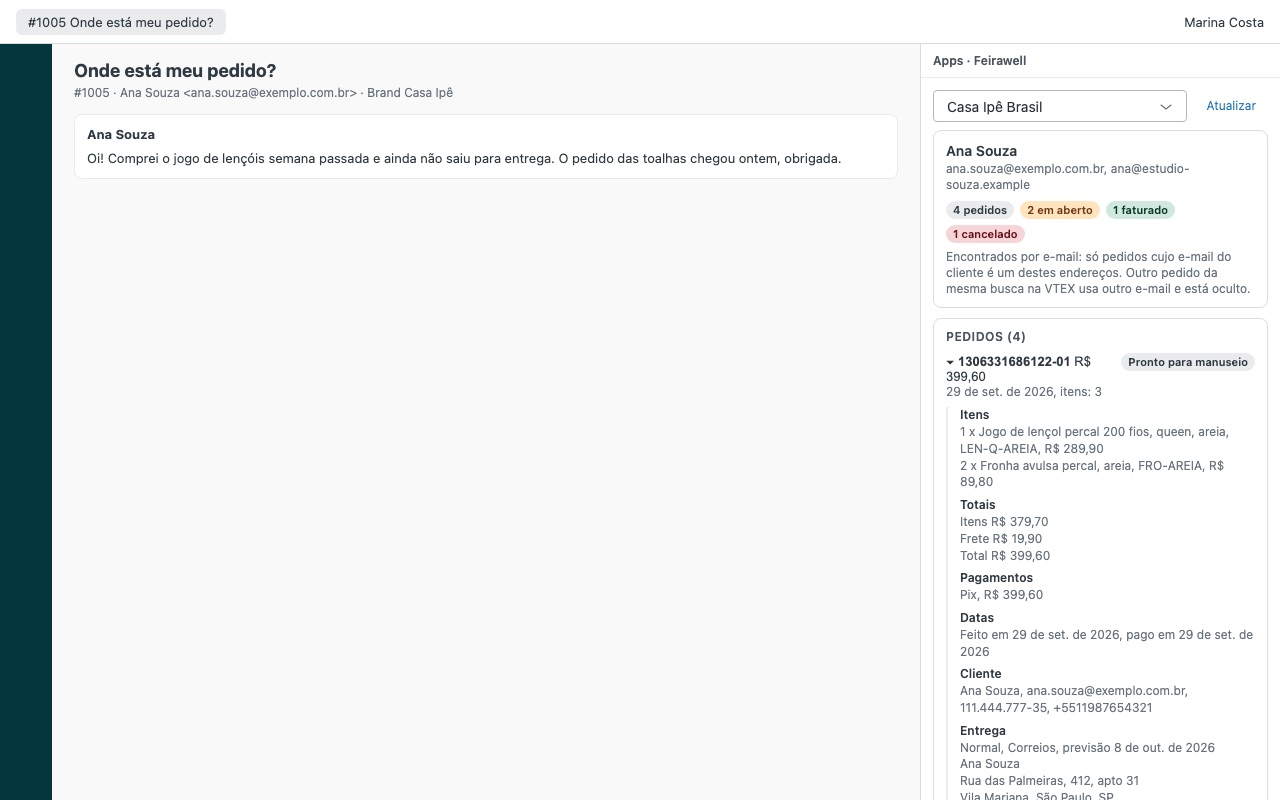
Feirawell shows the requester's VTEX orders next to every ticket, in English, Portuguese or Spanish, so your agents answer "where's my order?" without opening the VTEX admin in another tab.
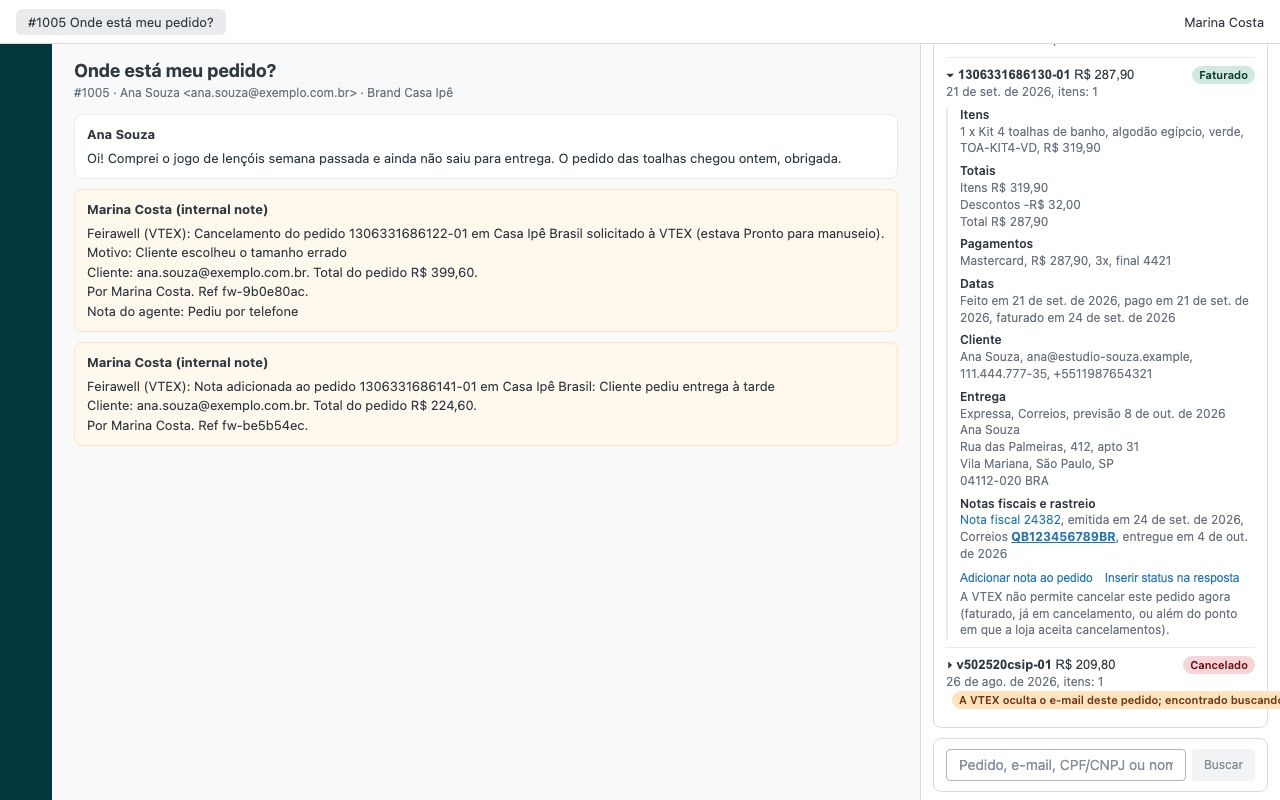
What agents see - Every order matched to the requester: by each email on their Zendesk profile, by a CPF or CNPJ written in the ticket, and by VTEX order ids in the ticket. Feirawell reads each order and keeps it only when the customer email or document is exactly theirs, so a near match never shows a stranger's order. - Items, totals, discounts and shipping, payments (Pix, boleto with its link, card brand, last digits and installments), dates, delivery or pickup, and invoices with tracking numbers and carrier links. - One click puts the order status and tracking into the reply.
How Feirawell works
- Create a VTEX app key. In the VTEX admin, make a role with the OMS resources View order and List Orders, then generate an application key with that role and copy the app key and app token.
- Install Feirawell from the Zendesk Marketplace and enter the VTEX account name (
mystorefor mystore.myvtex.com), the app key and the app token. No custom ticket fields or display settings to set up. - Open a ticket. Feirawell searches VTEX by up to five emails on the requester's Zendesk profile, by up to three CPF or CNPJ numbers written in the ticket (check digits validated) and by up to three VTEX order ids in the ticket.
- See only the right customer's orders. Each candidate order is read in full and kept only when its customer email or document is exactly the requester's. Near matches from VTEX's search are counted and hidden.
- Answer from the order. Items, totals, discounts, Pix, boleto with its link, card brand and installments, delivery or pickup, and invoices with tracking links. Insert status in reply puts the order status and tracking into your reply.
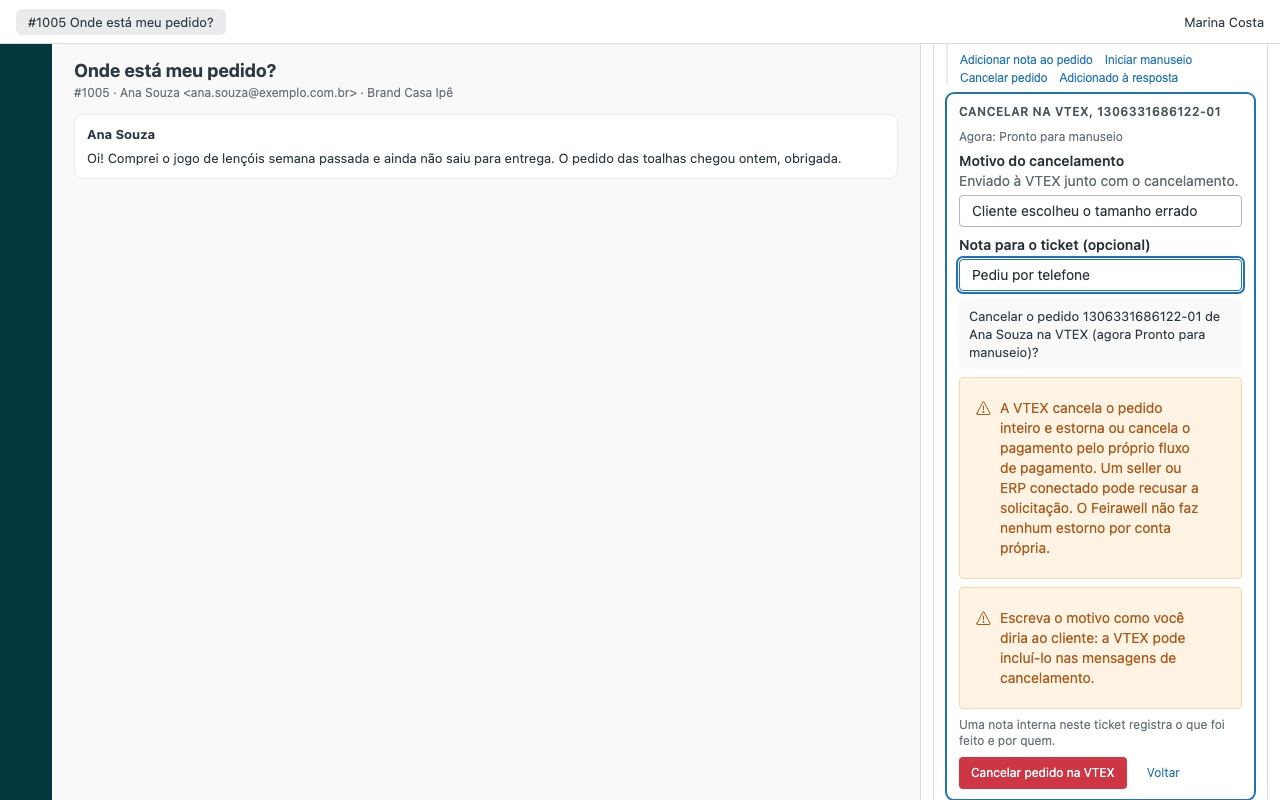
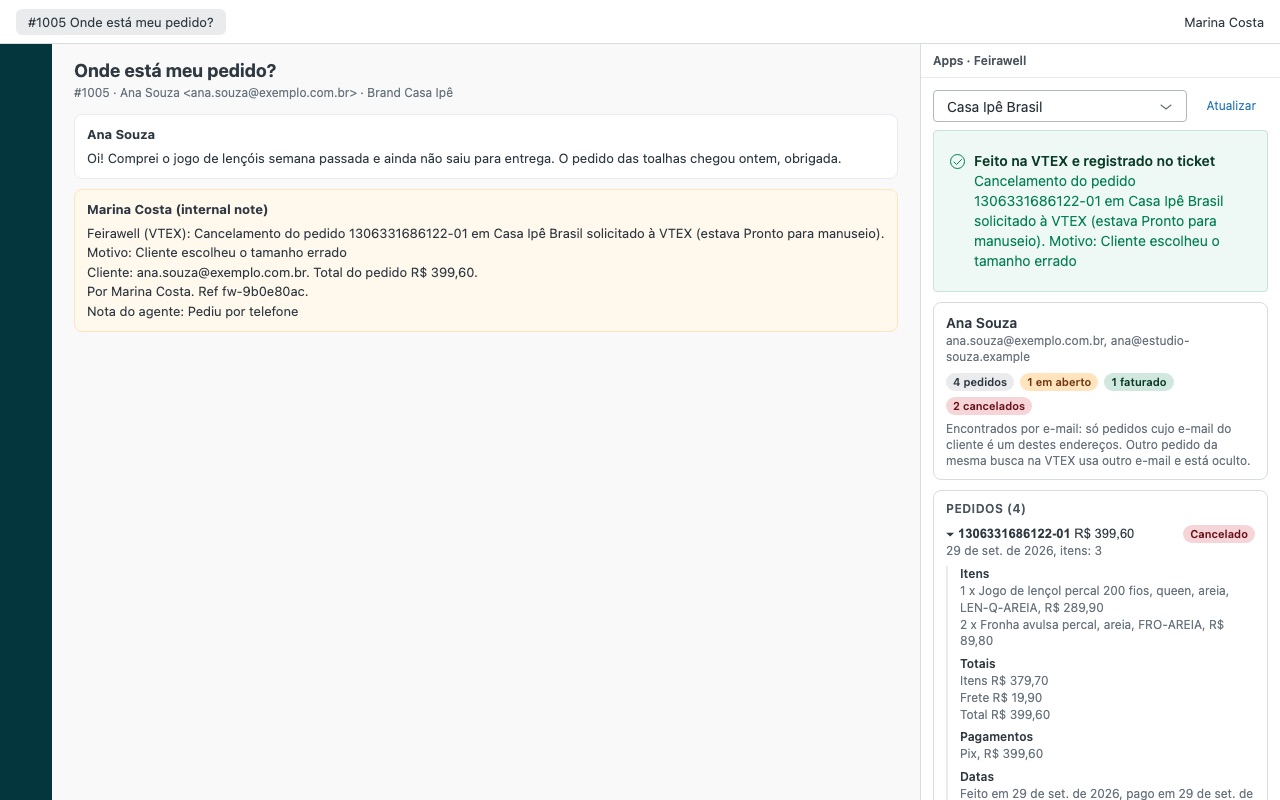
- Act when you're allowed to. Agents you choose can add an order note, start handling or cancel. Each action asks for confirmation, then writes an internal note and a
feirawell_note,feirawell_handlingorfeirawell_canceltag on the ticket.
Who it's for
Brazilian and Latin American stores on VTEX
Customers write in Portuguese or Spanish and often give a CPF instead of an order number. Feirawell reads the CPF or CNPJ from the ticket and shows the sidebar in each agent's Zendesk language: Portuguese, Spanish or English.
Teams where only some agents may touch orders
Who may take actions takes admin, agent, custom role ids or group:<id>. Start handling and cancel are off until an admin turns them on. Everyone else sees orders read-only.
Marketplaces, franchises and country stores
Up to three VTEX accounts, each with its own key, label and Zendesk brands. A ticket opens the account that matches its brand, and agents can switch accounts at the top of the sidebar.
What you need
- Zendesk Support on a plan that allows Marketplace apps, and an admin to install it.
- A VTEX account and permission to create roles and application keys in it.
- A role with OMS View order and List Orders for the sidebar. Add Change order workflow status for start handling and cancel, and Checkout Orders Full Access for order notes.
- The app token, which VTEX shows only once when you create the key.
Feirawell for VTEX guides
Questions about Feirawell for VTEX
What does Feirawell for VTEX do?
Your customer's VTEX orders by email or CPF: items, Pix and boleto, invoices, tracking. $9/agent. Feirawell shows the requester's VTEX orders next to every ticket, in English, Portuguese or Spanish, so your agents answer "where's my order?" without opening the VTEX admin in another tab.
What does Feirawell for VTEX work with?
Feirawell for VTEX works in Zendesk Support.
How much does Feirawell for VTEX cost?
Standard: $9 a month per agent.
Is there a free trial?
14-day free trial (Zendesk asks for a card at install). Billed monthly by Zendesk. No free plan.
Where do I install Feirawell for VTEX?
From the Zendesk Marketplace. Use the Install button on this page, or search for "Feirawell for VTEX" there.
Who makes Feirawell for VTEX?
Great Work LLC, an independent software company. Email hello@greatwork.company with any question about Feirawell for VTEX and someone will answer.
Where are the VTEX app key and token kept?
As Zendesk secure settings. Agents never see them, and Zendesk's proxy inserts them only into requests to your account at vtexcommercestable.com.br.
Why doesn't a brand new order show up?
VTEX's order search indexes new orders after about four minutes and covers the last two years. Search by the order id in the lookup box, or refresh after a few minutes.
What about customers who use a plus address like ana+loja@...?
VTEX's search refuses a "+" sign, so those addresses are skipped and the sidebar says so. Order ids and CPF or CNPJ from the ticket still work.
Our VTEX account masks customer emails. Does it still work?
Yes, with a limit. An order whose email VTEX hides is shown only when VTEX found it by the requester's own email, and it carries a badge saying so.
Can an agent cancel the same order twice by accident?
No. Feirawell never sends a write twice. If VTEX's answer is lost, it reads the order again to see what happened before telling the agent.
What happens when we uninstall?
Feirawell created nothing in your account at install, so uninstalling removes it completely. The feirawell_* tags it added stay on past tickets.
More Zendesk apps
 Ferrywell
 Everytide
 Heartwell
 Creelwell for Shopware