



Creelwell for Shopware Shopware 6 orders on the ticket: refunds, state changes, comments and tracking, all logged.
$9 a month per agent. 14-day free trial (Zendesk asks for a card at install). Billed monthly by Zendesk. No free plan.
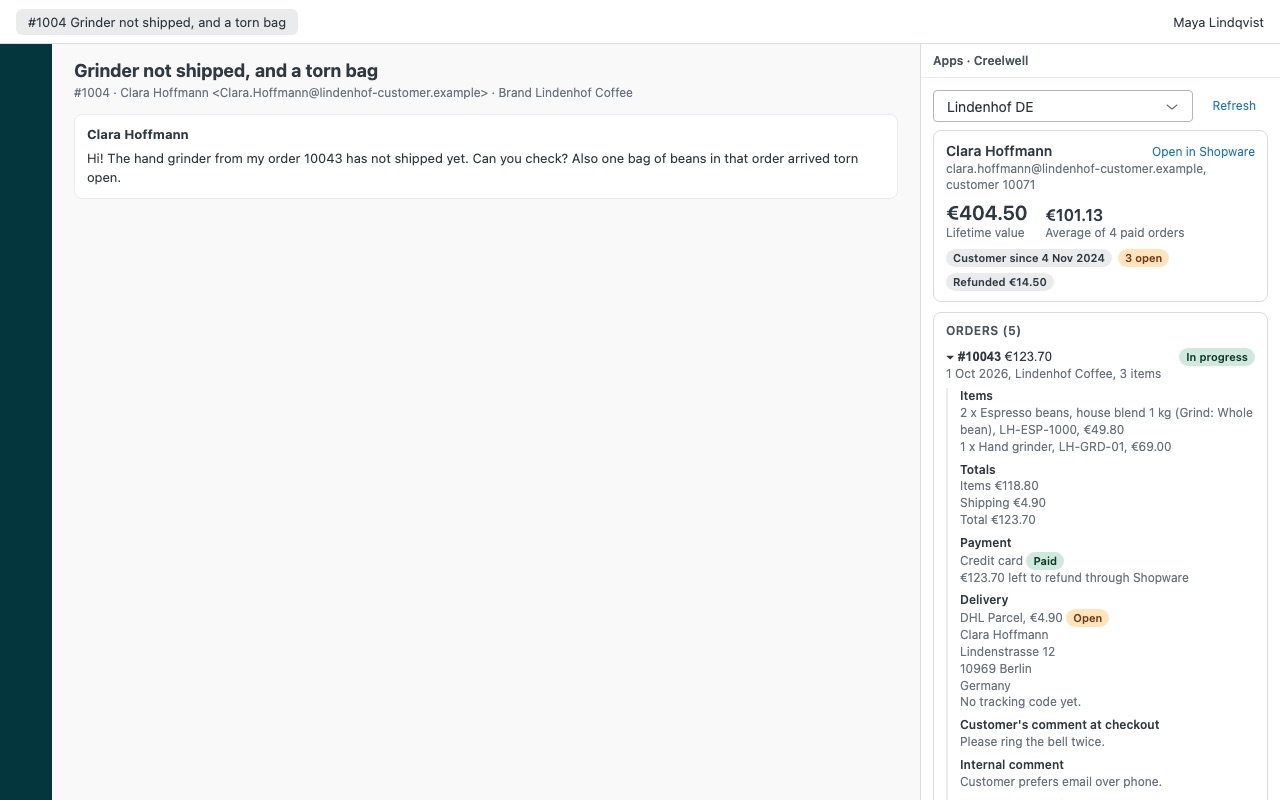
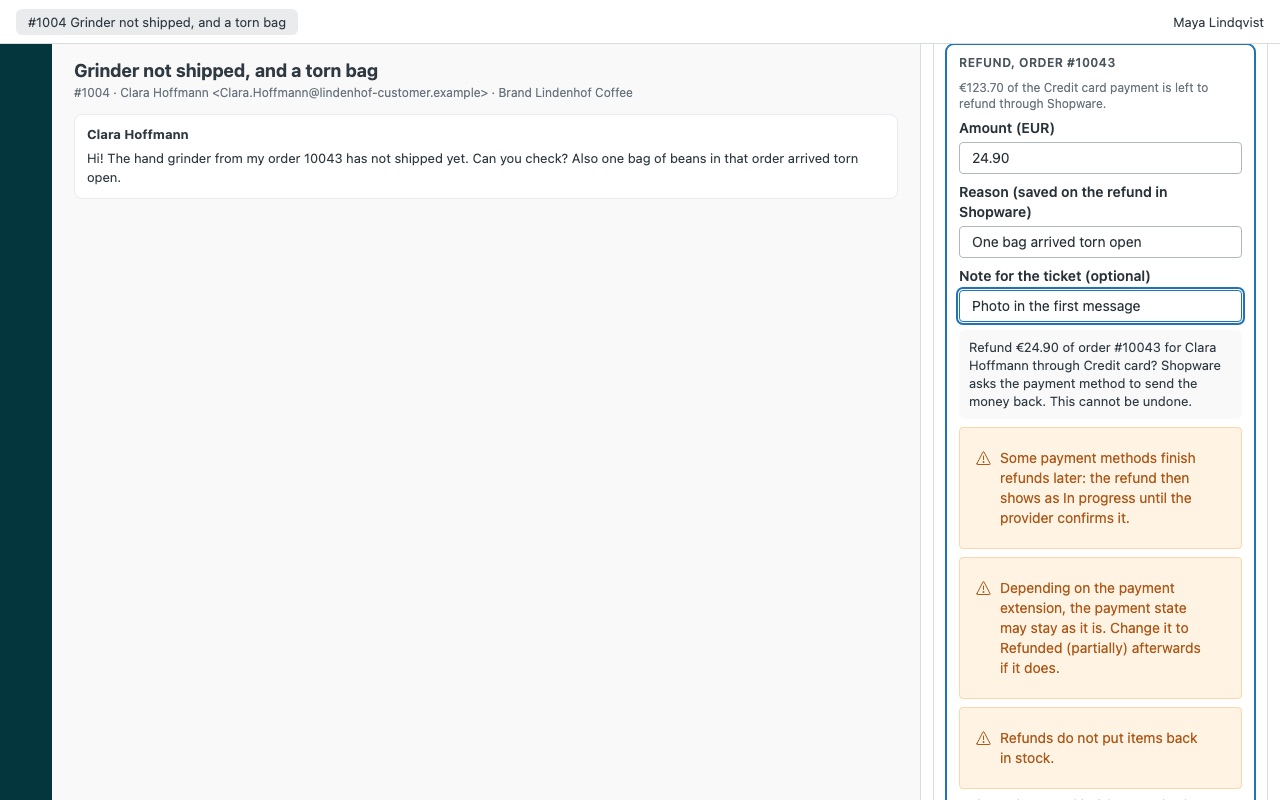
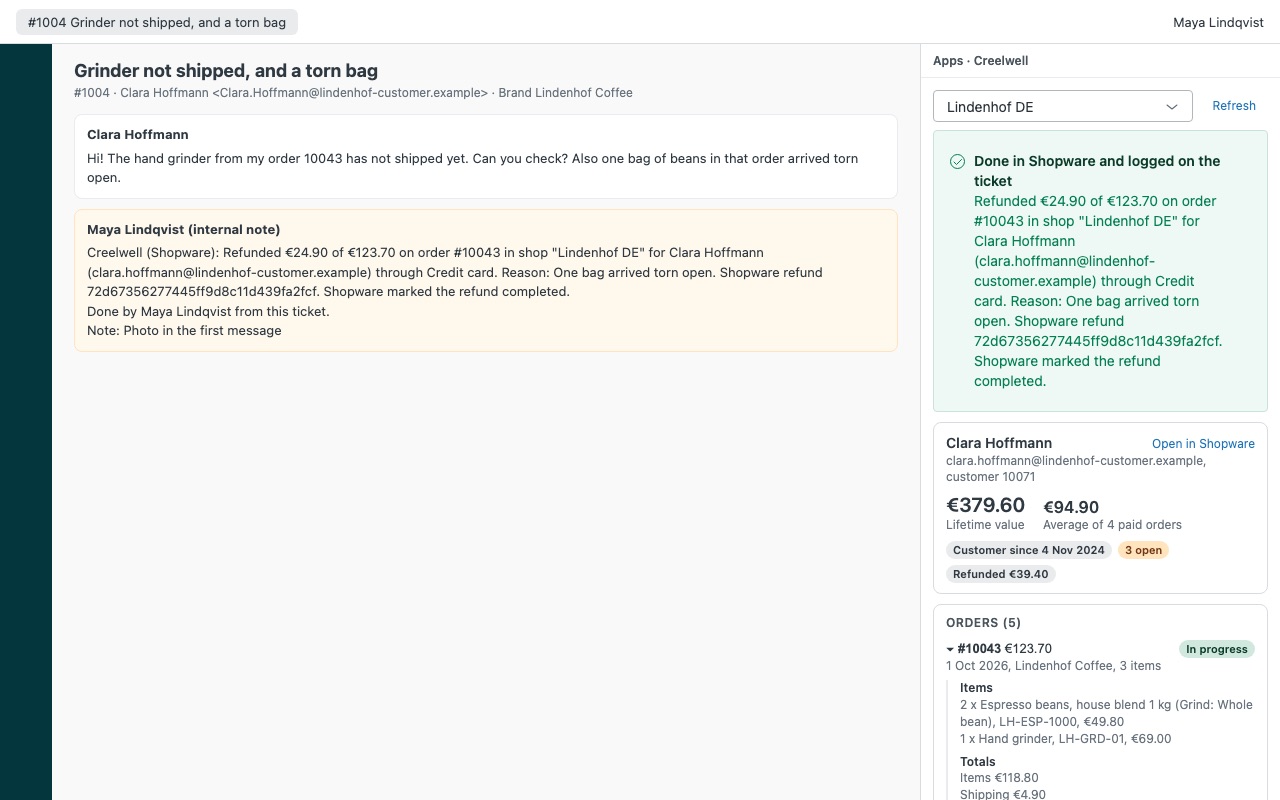
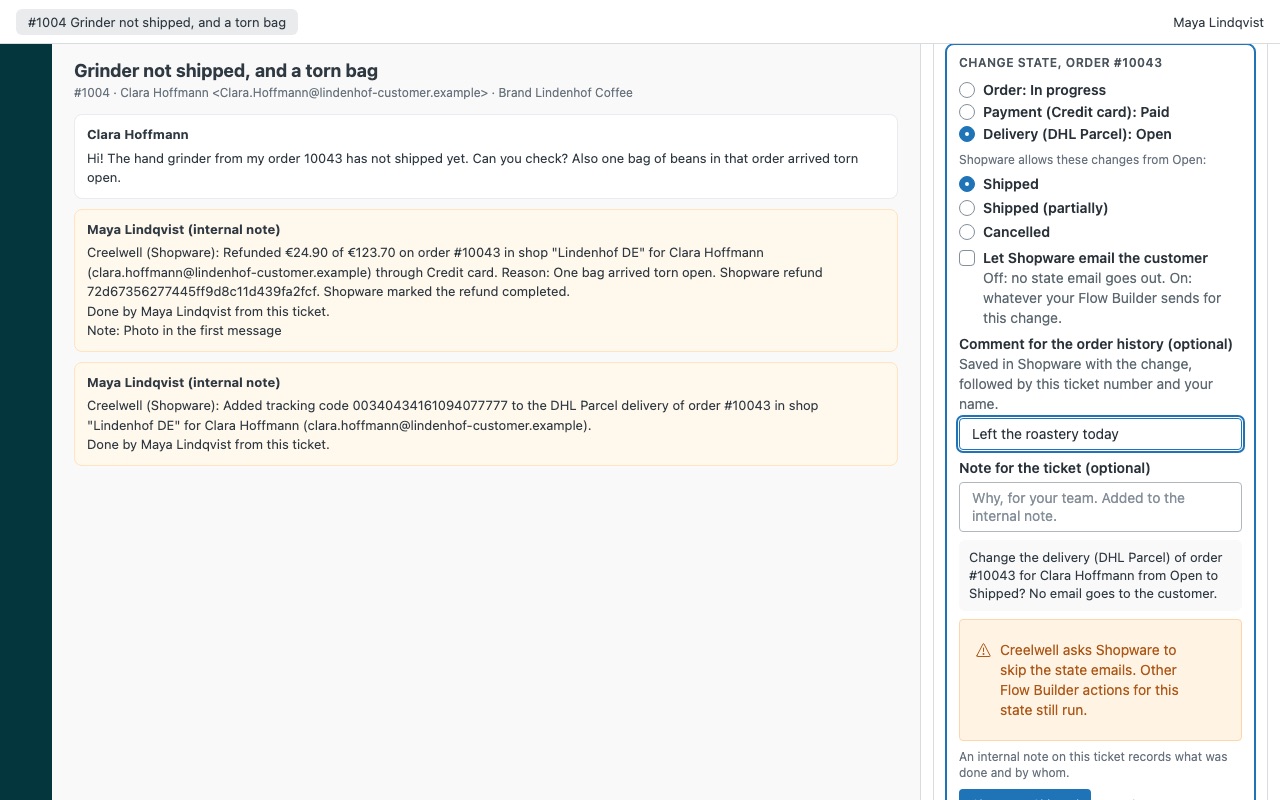
See the customer's Shopware 6 orders on the ticket, and sort them out without leaving Zendesk. When someone writes in about an order, Creelwell shows every order they placed in your shop next to the ticket: items, totals, payment and refunds, deliveries with tracking, their checkout comment, your internal comment and the state history, with their lifetime value. Agents you allow can change the order, payment or delivery state, refund through Shopware, add an internal comment or a tracking code, and every action is written to the ticket as an internal note.
Creelwell is built by Great Work LLC. It is not made or endorsed by shopware AG. Shopware is a trademark of shopware AG.
What you get
Every order, matched automatically
Found by every email address on the requester's Zendesk profile: orders from their customer account and guest checkouts alike. Orders whose buyer email is not theirs are left out. Each order in full: items, totals, payment and refunds, every delivery with its tracking link, the checkout comment, the internal comment and the state history.
Actions with guard rails
Change the order, payment or delivery state using only the transitions your shop allows. Choose whether Shopware emails the customer (off by default). Refund through Shopware's refund API. Where a payment method has no refund support in Shopware, Creelwell says so instead of pretending.
How Creelwell works
- Create a role and an integration in Shopware. In the Administration, add a "Creelwell" role with Orders and Customers viewer rights (plus Orders editor and the refund privileges for actions), then an integration with Administrator off that uses it.
- Install Creelwell from the Zendesk Marketplace and paste the shop domain, the integration's access key ID (SWIA...) and secret access key. Nothing gets installed in Shopware.
- Open a ticket. Creelwell finds orders whose buyer email is any of the requester's Zendesk addresses, guest checkouts included, plus orders of their customer records placed under an older email.
- Read the order. Items, payment and delivery states, tracking codes, captures and refunds, and the state history with its comments sit next to the conversation. Insert status in reply puts the order status in your reply.
- Act from the ticket. Agents you allow can change the order, payment or delivery state, refund through Shopware, add an internal comment or add a tracking code. Each action shows what will happen and waits for confirmation.
- Keep the record. Every action adds an internal note and a
creelwell_state,creelwell_refund,creelwell_commentorcreelwell_trackingtag to the ticket.
Who it's for
Shopware merchants whose support runs in Zendesk
Zendesk has no Shopware integration of its own. Creelwell puts the order, its delivery and its tracking codes on the ticket, so agents answer "where is my parcel?" without opening the Administration.
Teams that refund from support
Refunds go through Shopware's refund API to the payment method's extension. You choose who may refund and the largest amount without an admin, and payments that can't be refunded this way say so instead of showing a Refund button.
Stores with several sales channels or shops
Map Zendesk brands to sales channels, so each brand sees its own channel's orders first with Show all sales channels one click away. Connect up to three Shopware shops, each with its own integration.
Teams that want the Shopware record to match the ticket
State changes can carry a comment in the order history with the ticket number and the agent's name, and internal comments land below the order's internal comment for your team.
What you need
- Zendesk Support, and a Zendesk admin to install Marketplace apps.
- Shopware 6, with 6.5 or later recommended. Refunds through the API need 6.4.12 or later; the order internal comment needs 6.6 or later.
- The Shopware Administration reachable over HTTPS from Zendesk's servers. If the shop only lets in known addresses, allow Zendesk's public IP ranges.
- A Shopware integration with its own role. Creelwell refuses administrator integrations, sales channel keys (SWSC) and user keys (SWUA).
Creelwell for Shopware guides
Questions about Creelwell for Shopware
What does Creelwell for Shopware do?
Shopware 6 orders on the ticket: refunds, state changes, comments and tracking, all logged.
What does Creelwell for Shopware work with?
Creelwell for Shopware works in Zendesk Support.
How much does Creelwell for Shopware cost?
Standard: $9 a month per agent.
Is there a free trial?
14-day free trial (Zendesk asks for a card at install). Billed monthly by Zendesk. No free plan.
Where do I install Creelwell for Shopware?
From the Zendesk Marketplace. Use the Install button on this page, or search for "Creelwell for Shopware" there.
Who makes Creelwell for Shopware?
Great Work LLC, an independent software company. Email hello@greatwork.company with any question about Creelwell for Shopware and someone will answer.
Why won't Creelwell use an administrator integration?
The short-lived access token Shopware issues reaches the agent's browser and can do whatever the integration's role allows. A dedicated role keeps that to orders and customers, so Creelwell checks for it and refuses anything with administrator rights.
Does changing a state email the customer?
Only if the agent ticks Let Shopware email the customer. It is off by default, and Creelwell asks Shopware to skip the state emails; other Flow Builder actions for that state still run.
Do refunds put items back in stock?
No. Refunds return money through the payment method. Cancelling an order follows your Shopware stock settings.
Can an action be sent twice?
No. If Shopware's answer is lost, Creelwell reads the order again and only then tells you whether it happened.
How many orders does it read?
The 25 newest for the requester, so lifetime value then says "last 25 orders". The lookup box finds any order number or email in the shop.
What happens when I uninstall it?
Zendesk deletes the stored secret. Delete the integration and the Creelwell role in Shopware too. Internal notes and creelwell_* tags on tickets stay.
More Zendesk apps
 Everytide
 Cofferwell
 Feirawell for VTEX
 Clientwell