



Berth Book shared test environments in Jira without clashes, and see which build and which work items are on each one, from any CI.
Listed on the Atlassian Marketplace as “Berth: Environment Booking and Deployment Tracking”
From $19 a month for up to 10 users. Billed by Atlassian, with a 30-day free trial.
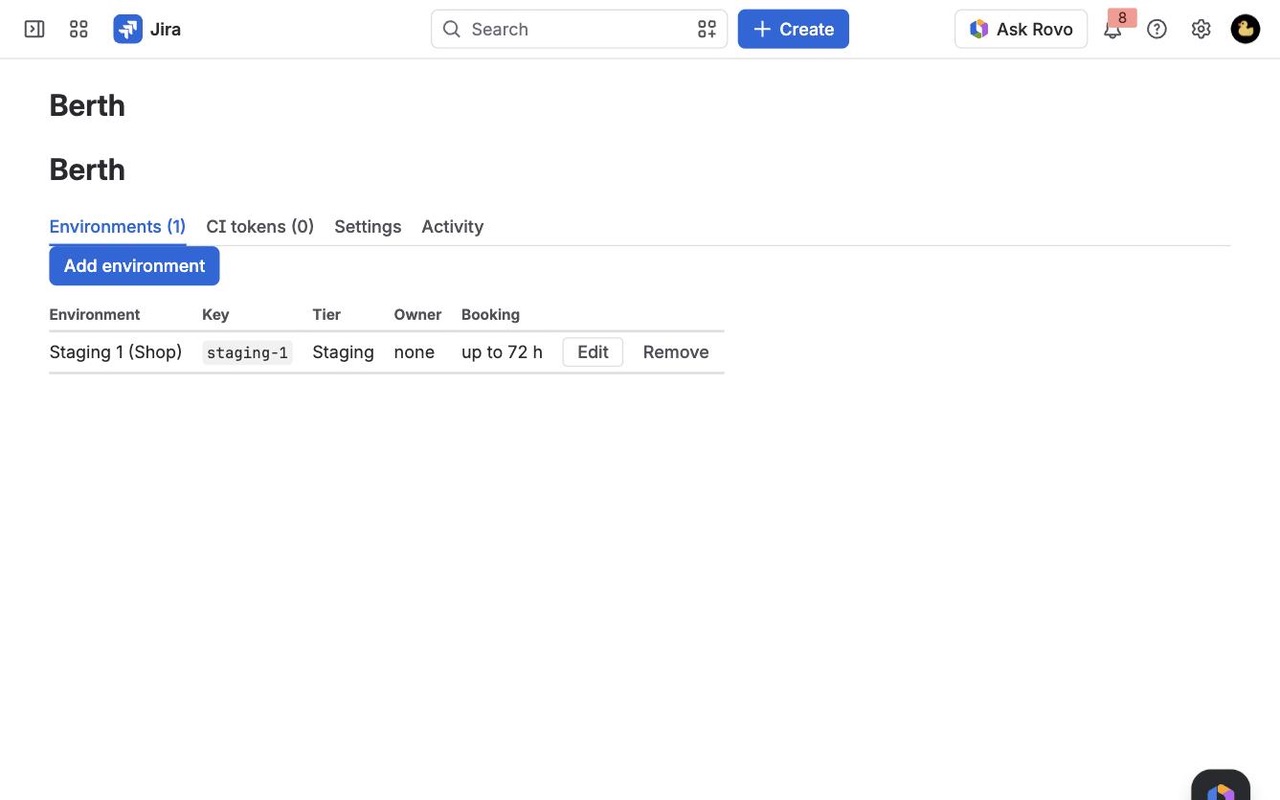
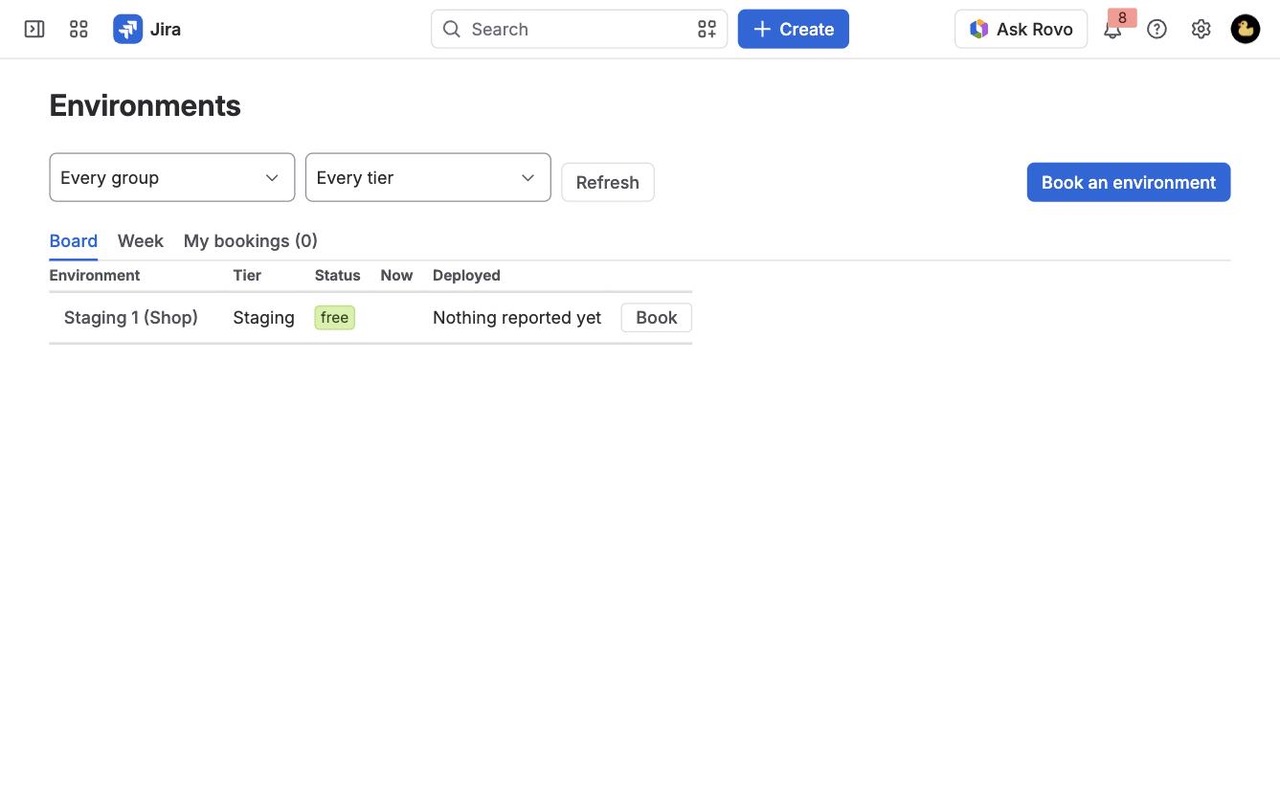
An environment board for Jira Cloud: who has each test environment and until when, bookings that can't clash, and what every pipeline deployed where, with the work items it carried.
What you get
Who has which environment, right now
One board for every test environment: status, who booked it and until when, and the build on it. A week view shows every booking, and a clash tells you which environment is free instead.
Deployments from any CI, with work items
One HTTP call from any pipeline records the version and the work items it carried. See what is on each environment and what is on staging but not yet on production.
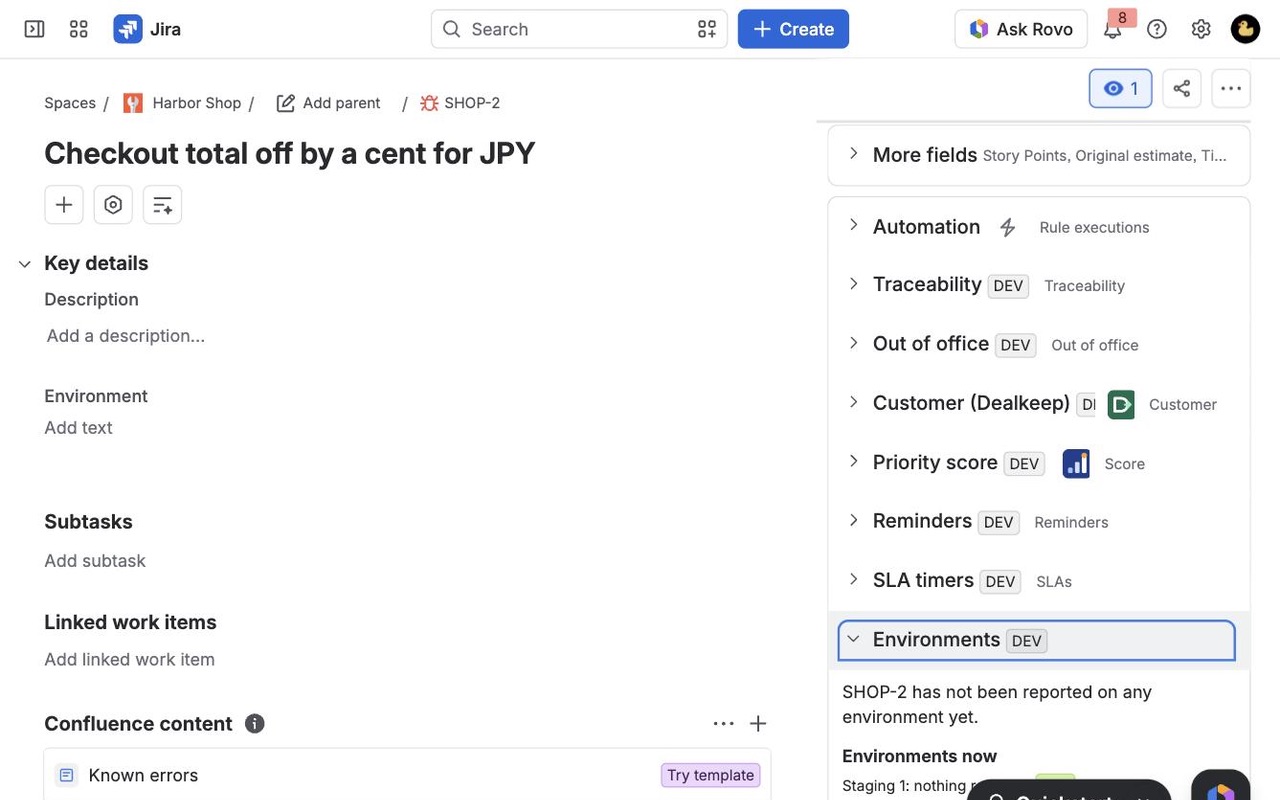
On every work item
The Environments panel shows where a work item is deployed, since which version, where it isn't yet, and who booked an environment to test it.
How Berth works
- Add your environments. A Jira admin opens Jira settings > Apps > Berth > Environments > Add environment and gives each one a name, the short key your CI will send (such as
staging-2), a tier (development, testing, staging, production or other), a group, its URL, an owner, whether it can be booked and the longest booking in hours. Production isn't bookable by default. - Create a CI token under CI tokens > New token, named after the pipeline and limited to some environments if you like. Copy it straight away; Berth keeps only a hash.
- Add one HTTP call to each pipeline's deploy step with the environment key, the version and the state. Work item keys in commit messages, the branch or the description are picked up.
- Book from the board. Apps > Environments > Book an environment: pick the environment, the start and end, what it's for and, if you want, a work item. If someone already has it, Berth names them, says until when, lists free environments of the same tier for the whole time and says when this one is next free.
- See what's where. Click an environment for Work items on it, with the version each arrived in, and Not yet on, which compares it with another environment, such as everything on staging that isn't on production.
- Check from the work item. The Environments (Berth) panel shows where a work item is deployed, since which version, the production environments that don't have it yet and bookings made for it.
Who it's for
QA teams sharing a few test environments
Five testers and two QA environments means someone asking in chat "is anyone on QA-2?" every morning. The board shows status (free, booked, deploying, maintenance, down), who has each one and until when, and the Week view shows every booking ahead.
Teams whose CI isn't connected to Jira
Jira fills its Deployments panel from connected CI tools. A Jenkins job, a shell script or an in-house deploy tool can report to Berth with curl, and Berth can pass those deployments on to Jira's own Deployments panel too.
Release managers asking "is it on staging yet?"
Not yet on lists every work item on one environment that isn't on another, so the question before a production deploy has a list for an answer instead of a hunt through pipelines.
Developers testing a branch
Book an environment for a work item, deploy, and the work item's panel shows the booking and the version on it, so reviewers know where to look.
Berth or Jira's own deployment tracking
Jira Cloud's Deployments panel, board icons and Releases hub show deployments from connected CI tools, and the Development page lists production deployments. If your pipelines are connected and nobody books environments, that may be all you need.
Berth adds booking with clash checks, a board of every environment's status and current version, deployments to non-production environments side by side, the Not yet on comparison, and reporting from any pipeline with a single HTTP call.
Requirements
- Jira Cloud. Booking can be open to everyone or one Jira group; Jira admins can always book.
- Each pipeline that reports deployments needs a Berth CI token stored as a secret, and the endpoint URL from Berth's settings.
- Berth never calls out to your systems; pipelines call in. Because the endpoint's replies to your CI count as data leaving Atlassian, Berth isn't marked Runs on Atlassian.
Berth guides
Questions about Berth
What does Berth do?
Book shared test environments in Jira without clashes, and see which build and which work items are on each one, from any CI. An environment board for Jira Cloud: who has each test environment and until when, bookings that can't clash, and what every pipeline deployed where, with the work items it carried.
What does Berth work with?
Berth works in Jira Cloud.
How much does Berth cost?
$19 a month for up to 10 users, or $190 a year. From 11 users: $1.90 per user a month, with lower rates for larger sites.
Is there a free trial?
Billed by Atlassian, with a 30-day free trial.
Where do I install Berth?
From the Atlassian Marketplace. Use the Install button on this page, or search for "Berth: Environment Booking and Deployment Tracking" there.
Who makes Berth?
Great Work LLC, an independent software company. Email hello@greatwork.company with any question about Berth and someone will answer.
How do I book a test environment in Jira?
Open Apps > Environments and click Book on the environment's row, or Book an environment. Choose when it starts and ends, say what it's for, and link a work item if you want. Bookings can't overlap.
What happens when the environment I want is taken?
Berth tells you who has it and until when, lists other environments of the same tier that are free for the whole time, and gives the next free slot on this one.
Which CI tools can report deployments?
Any that can make an HTTP request: GitHub Actions, GitLab CI, Jenkins, Azure Pipelines, Bitbucket Pipelines or a script. The request is a POST with a bearer token and a small JSON body.
What does a failed deployment do?
The board flags "last deploy failed" and the environment keeps its current version. A rolled_back deployment takes the work item keys you send off the environment.
Can owners end someone else's booking?
Yes. Environment owners and Jira admins can end any booking on their environment from its Bookings tab, and the activity log says who did it.
Is there a dashboard view?
Add the Environment status (Berth) widget to a Jira dashboard and pick a group and tiers.
Why didn't a key in my commit message become a work item?
Keys whose space doesn't exist on your site are ignored, so text like "UTF-8" isn't taken for a work item. The reply to your pipeline lists the keys recorded and the keys ignored.
More Jira apps
 Changeleaf
 Attachwell
 Cutline
 Tracestitch