



Clientwell HubSpot CRM panel: the requester's contact, company, deals and activity on the ticket. Log notes.
From $100 a month per Zendesk account. 14-day free trial (Zendesk asks for a card at install). Billed monthly by Zendesk. No free plan.
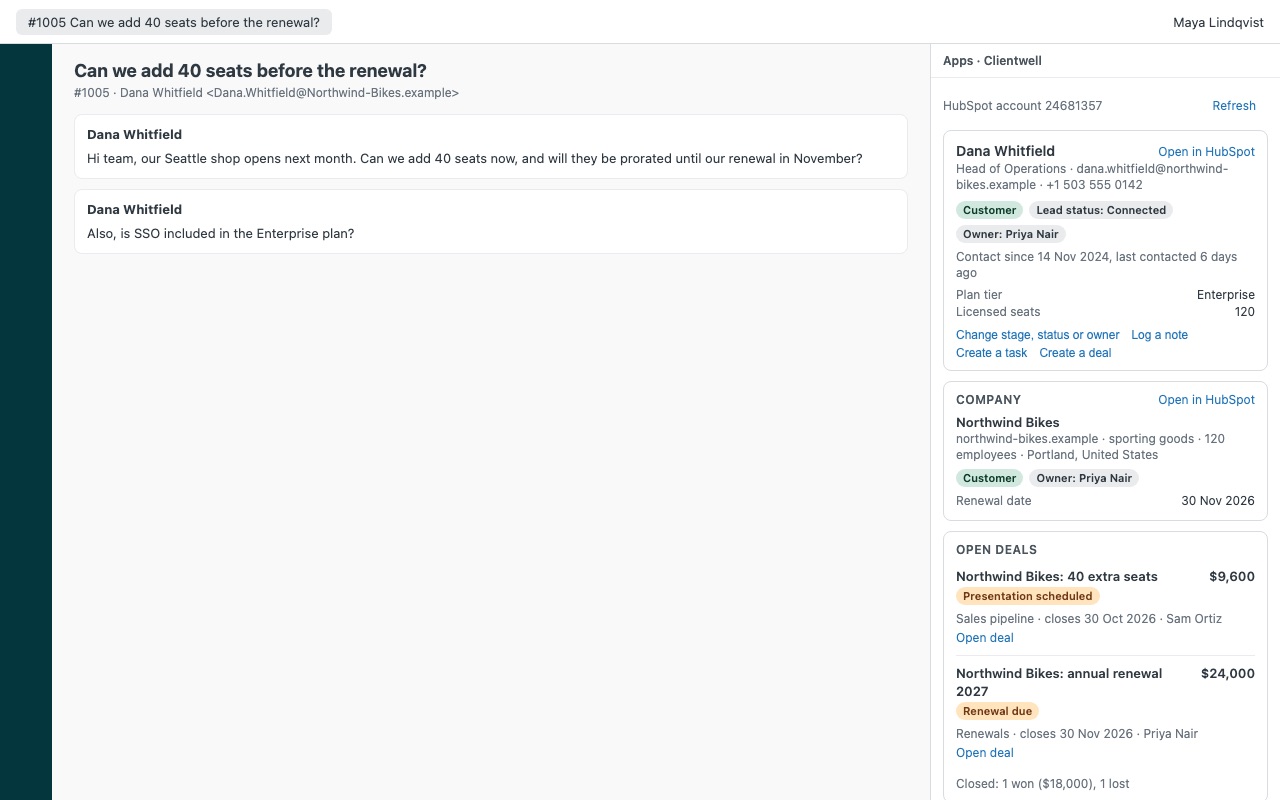
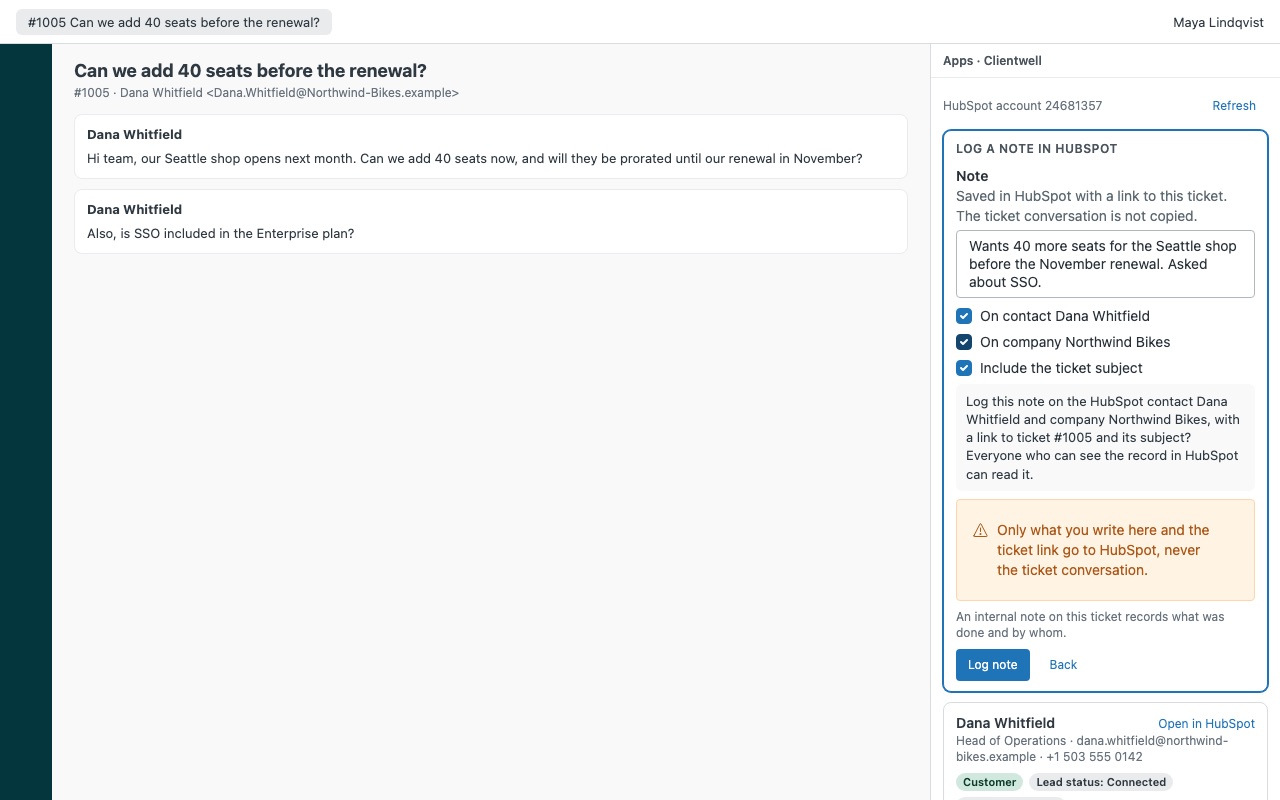
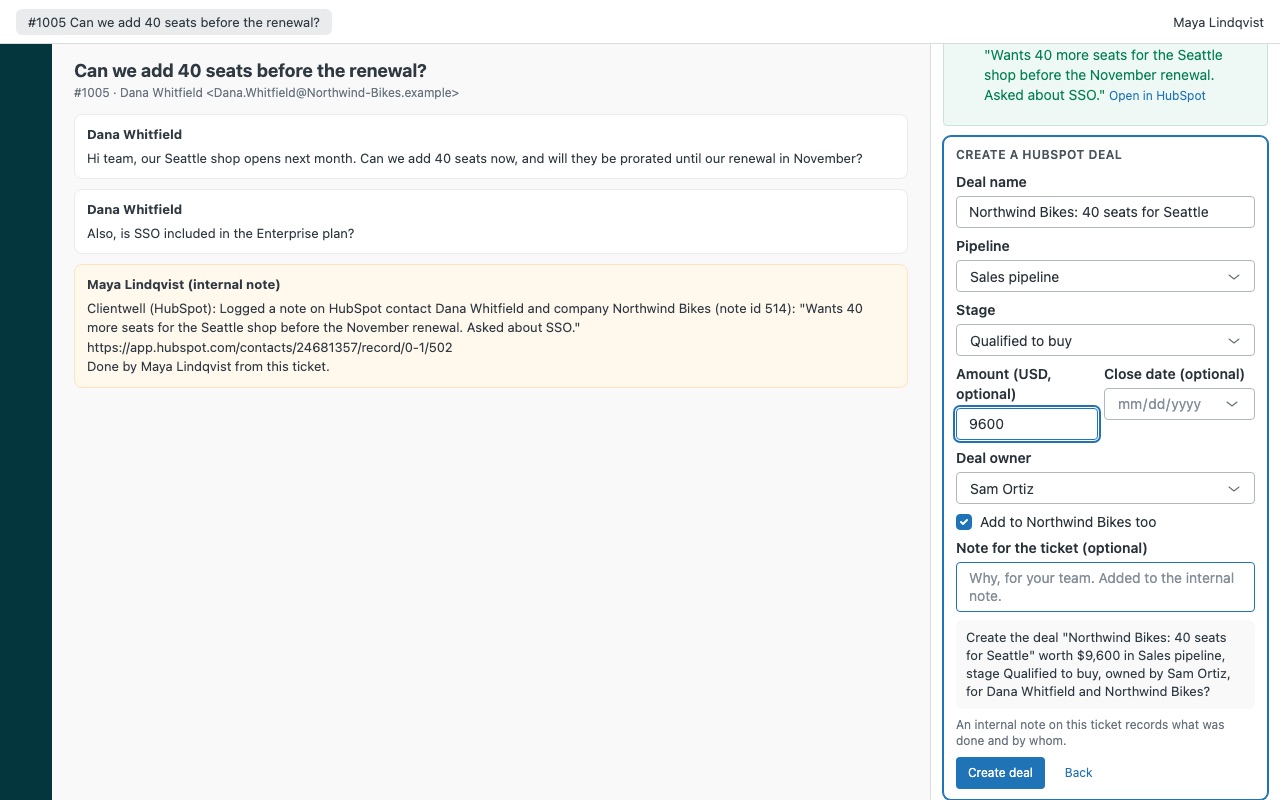
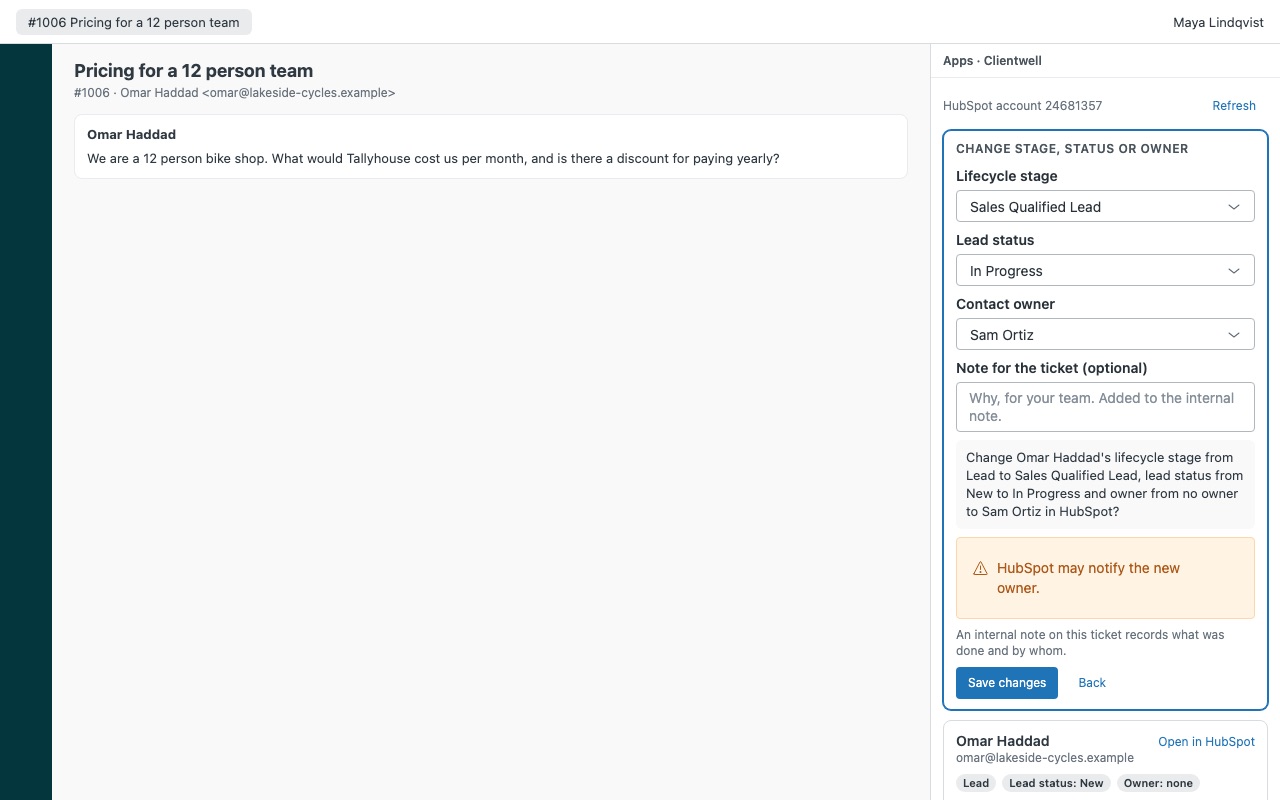
See the requester's HubSpot owner, deals and lifecycle stage before you reply, and log the conversation back in one click. Clientwell puts the HubSpot contact next to every ticket: their company, open deals with stage, amount and owner, recent notes, calls, emails and meetings, and the lists they belong to. Agents you allow can create the contact, change the lifecycle stage, lead status or owner, log a note on the contact or company, and create a task or a deal, each confirmed first and recorded on the ticket as an internal note.
Clientwell is built by Great Work LLC. It is not made, endorsed or sponsored by Zendesk or HubSpot, Inc. HubSpot is a trademark of HubSpot, Inc.
What you get
The CRM record in the ticket
Matched automatically by every email address on the requester's Zendesk profile, including the additional emails stored on the HubSpot contact. Contact: lifecycle stage, lead status, contact owner, job title, phone, when they were last contacted, plus up to 10 HubSpot fields you choose for contacts and 10 for companies.
Actions with a confirmation and a trail
Create a contact for a new requester, with name, lifecycle stage, lead status, owner and company filled in for you. Clientwell checks HubSpot again first, so it never creates a duplicate. Change the lifecycle stage, lead status or owner. Moving a stage back (Customer to Opportunity) needs an admin unless you allow it, and Clientwell handles HubSpot's forward-only rule for you.
How Clientwell works
- Give Clientwell a HubSpot access token. A HubSpot super admin creates a private app with read scopes for contacts, companies, deals and owners, plus write scopes for the actions you want, and copies its access token.
- Install Clientwell from the Zendesk Marketplace and paste the token into HubSpot private app access token. Zendesk keeps it as a secure setting and only sends it to api.hubapi.com.
- Open a ticket. Clientwell searches HubSpot for every email on the requester's Zendesk profile, against each contact's primary and additional emails.
- Read the CRM next to the conversation. Lifecycle stage, lead status and owner, job title and phone, your own extra fields, the company, open deals with pipeline, stage, amount, close date and owner, and the newest notes, calls, logged emails and meetings.
- Handle new requesters. With Match a company by email domain on, a requester with no contact shows the company whose domain matches their email, so the agent can create the contact there.
- Act from the ticket. Agents you allow can create the contact, change the stage, status or owner, log a note on the contact or company, and create a task or a deal. Each action shows what will change and waits for the click.
- Keep the record. Every action adds an internal note to the ticket and a
clientwell_*tag.
Who it's for
Support teams that need to know who they're talking to
Is this a customer, an open opportunity or a lead? The lifecycle stage, the owner and any open deal sit next to the ticket, so the agent knows before replying whether to loop in the account owner.
Account managers who want support activity in HubSpot
Agents log a note on the contact, the company or both, with a link back to the ticket. Only what the agent writes and the ticket link go to HubSpot, never the ticket conversation.
Teams where support finds sales opportunities
An upgrade question becomes a deal in the right pipeline and stage, or a task for the owner due the next business day, without anyone retyping the details in HubSpot.
Teams leaving Zendesk Sell for HubSpot
Sell retires on 2027-08-31. If HubSpot is where your deals are moving, Clientwell keeps them visible on tickets.
What you need
- Zendesk Support, and a Zendesk admin to install Marketplace apps.
- A HubSpot super admin to create the private app and copy its token. HubSpot stopped letting accounts create new legacy private apps on October 26, 2026; an existing one keeps working. If your account can't create one, email hello@greatwork.company before you install.
- Scopes
crm.objects.contacts.read,crm.objects.companies.read,crm.objects.deals.readandcrm.objects.owners.read. Recommended:crm.schemas.contacts.read,crm.schemas.companies.read,sales-email-read; optionalcrm.lists.read. - For actions:
crm.objects.contacts.write,crm.objects.companies.writeandcrm.objects.deals.write.
Clientwell guides
Questions about Clientwell
What does Clientwell do?
HubSpot CRM panel: the requester's contact, company, deals and activity on the ticket. Log notes.
What does Clientwell work with?
Clientwell works in Zendesk Support.
How much does Clientwell cost?
Team: $100 a month per Zendesk account, up to 14 agents. Scale: $7.50 a month per agent.
Is there a free trial?
14-day free trial (Zendesk asks for a card at install). Billed monthly by Zendesk. No free plan.
Where do I install Clientwell?
From the Zendesk Marketplace. Use the Install button on this page, or search for "Clientwell" there.
Who makes Clientwell?
Great Work LLC, an independent software company. Email hello@greatwork.company with any question about Clientwell and someone will answer.
Does Clientwell sync tickets into HubSpot automatically?
No. It runs no triggers, no automation and no background sync. Something reaches HubSpot only when an agent confirms an action on a ticket.
Can I give some agents a read-only panel?
Yes. Who may take actions takes agent, admin, custom role ids or group:<id>. Everyone else sees the panel read-only, and each action type can be switched off for everyone.
What if two agents create the same contact?
Clientwell searches HubSpot again just before creating a contact, so a contact someone else just added is never duplicated.
What happens if our Zendesk account outgrows the Team plan?
The panel stays visible and actions turn off, with a message naming the plan that fits. An admin changes the plan in the Zendesk Marketplace.
What happens when I uninstall it?
Zendesk deletes the stored token. Internal notes and clientwell_* tags on tickets stay. Delete the private app in HubSpot as well.
More Zendesk apps
 Cofferwell
 Canoewell
 Creelwell for Shopware
 Caddywell for PrestaShop