



Canoewell Paddle Billing sidebar: subscriptions on the ticket. Refund, pause or cancel, every action logged.
$10 a month per agent. 14-day free trial (Zendesk asks for a card at install). Billed monthly by Zendesk. No free plan.
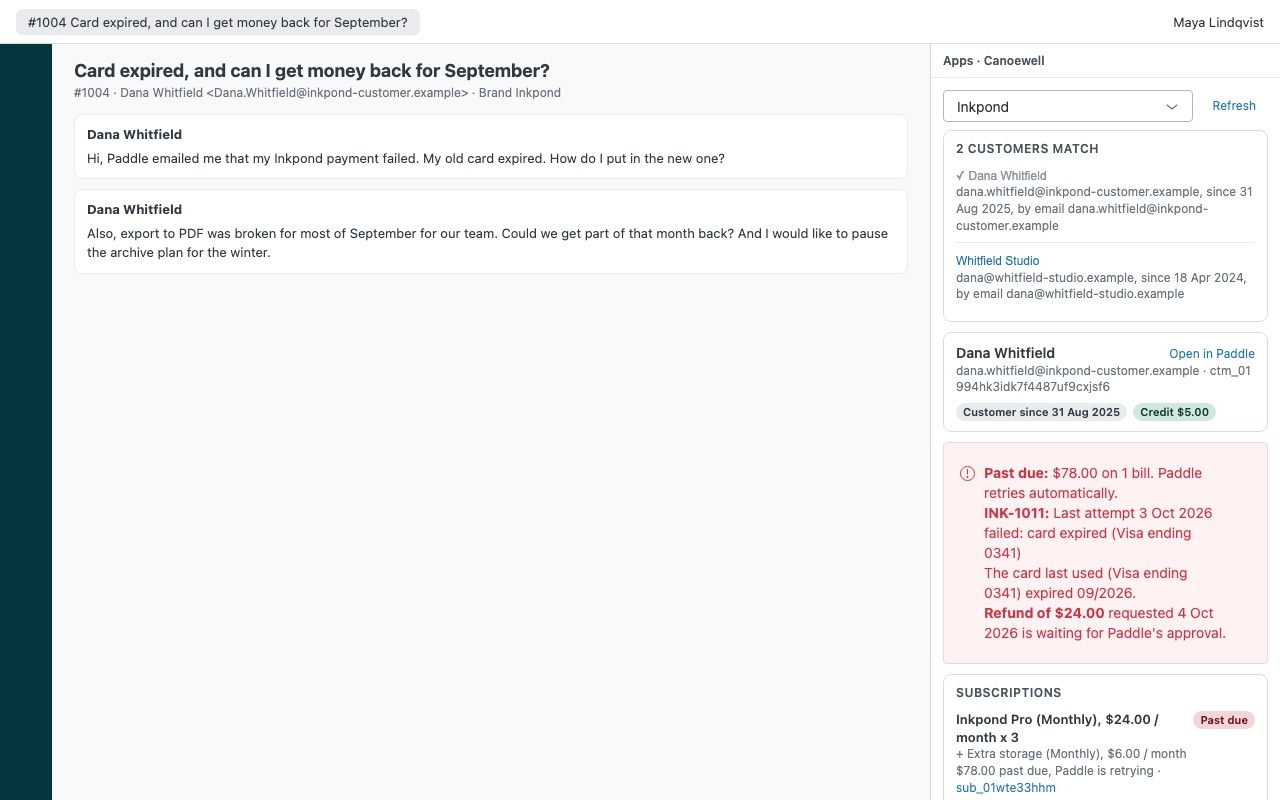
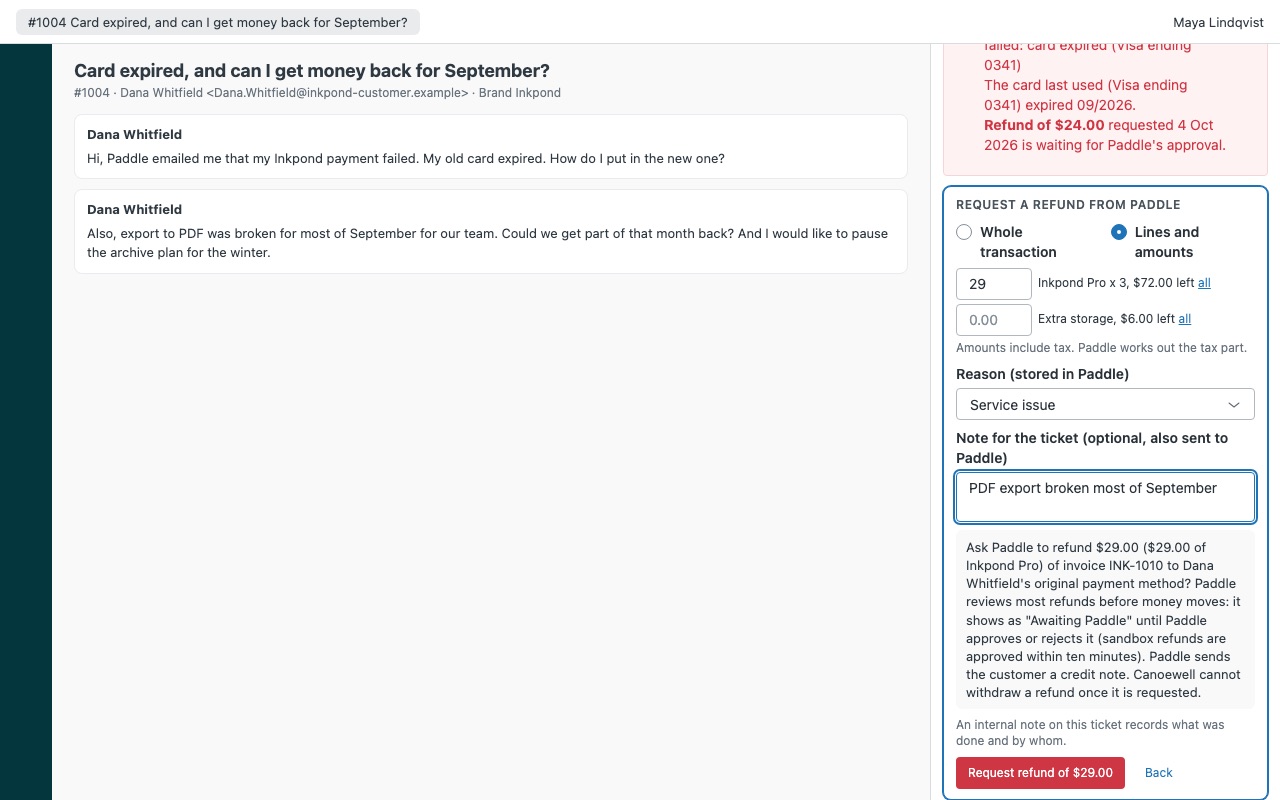
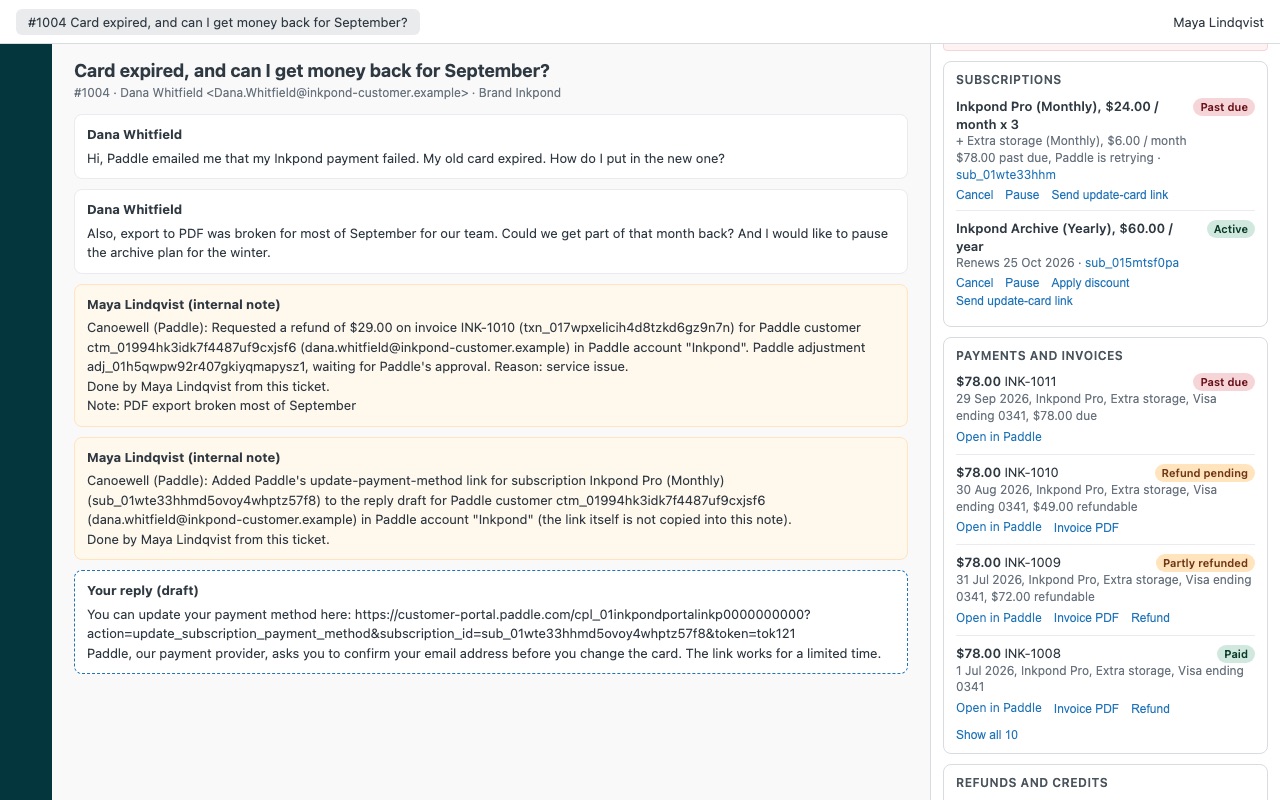
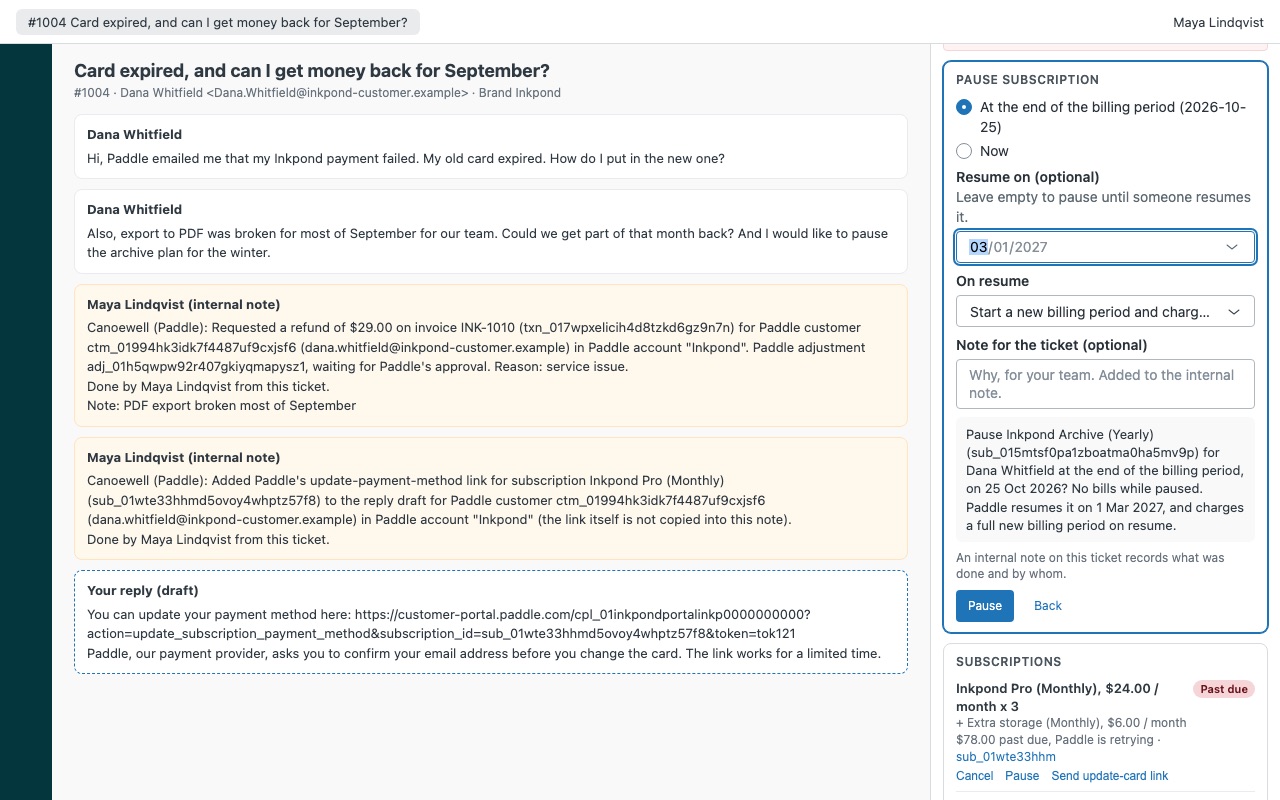
See the customer's Paddle subscriptions on the ticket, and sort out billing without leaving Zendesk. When someone writes in about a failed payment, a refund or a cancellation, Canoewell shows their Paddle Billing customer next to the ticket: subscriptions with every item, scheduled cancellations and pauses, past-due bills and why the last payment failed, invoices and refunds. Agents you allow can request a refund, credit an invoice, cancel or undo a scheduled cancellation, pause or resume, apply a discount and send the customer the link to update their card, and every action is written to the ticket as an internal note.
Canoewell is built by Great Work LLC. It is not made or endorsed by Zendesk or Paddle. Paddle is a trademark of Paddle.com Market Limited. Canoewell works with Paddle Billing, not Paddle Classic.
What you get
The whole subscription in the sidebar
Matched automatically by every email on the requester's profile, or by a user field holding the Paddle customer id. Subscriptions with items, seats, price, interval, discount, status, next bill, trial end and any scheduled cancellation or pause.
Actions with guard rails
Request a refund of a whole transaction or chosen lines, with a reason stored in Paddle next to the ticket number. Credit an invoice to lower what the customer owes.
How Canoewell works
- Create an API key in Paddle. In Paddle, open My account > Settings > Authentication > API keys and make a key with the read permissions, plus
subscription.writeandadjustment.writeif agents will take actions. - Install Canoewell from the Zendesk Marketplace and paste the key into Paddle API key. Turn on Sandbox for a key that starts with
pdl_sdbx_. - Open a ticket. Canoewell looks up the requester by every email on their Zendesk profile, plus a Zendesk user field holding the Paddle customer id if you keep one.
- See problems first. Past-due bills with the amount owed and why the last payment failed, a card that has expired or is about to, and refunds still waiting for Paddle sit at the top.
- Read the account. Subscriptions with every item, seats, price, discount and the next date that matters; payments and invoices with an Invoice PDF link; refunds and credits with their Paddle status; credit balance.
- Act from the ticket. Agents you allow can request a refund, credit an invoice, cancel or undo a scheduled cancellation, pause or resume, apply a discount, or add Paddle's update-card link to a reply.
- Keep the record. Every action adds an internal note with amounts, Paddle ids, reason and agent, plus a
canoewell_*tag for views and reports.
Who it's for
SaaS teams selling through Paddle
"Why was I charged?" and "please cancel my plan" are daily tickets. With the subscription, the last payment and the invoice PDF next to the conversation, agents answer without asking for an invoice number or logging into Paddle.
Teams chasing failed payments
A past-due subscription shows why the last attempt failed. Send update-card link adds Paddle's portal link to your reply; once the customer changes the card, Paddle collects what is owed.
Companies that need control over refunds
Refunds can be limited to admins, chosen roles or one group, with a largest amount non-admins may request alone. Agents pick from your own list of refund reasons, and the reason is stored in Paddle with the Zendesk ticket number.
Several products on separate Paddle accounts
Connect up to three Paddle accounts, live or sandbox, each mapped to Zendesk brands. A brand's tickets open its account first, and agents can switch in the sidebar.
What you need
- Zendesk Support, and a Zendesk admin to install Marketplace apps.
- A Paddle Billing account. Paddle Classic accounts aren't supported.
- A Paddle API key with
customer.read,subscription.read,transaction.readanddiscount.read(adjustment.readoptional), plussubscription.writeandadjustment.writefor actions. - A reminder to replace the key before it expires. Paddle keys last 90 days by default and one year at most.
Canoewell guides
Questions about Canoewell
What does Canoewell do?
Paddle Billing sidebar: subscriptions on the ticket. Refund, pause or cancel, every action logged.
What does Canoewell work with?
Canoewell works in Zendesk Support.
How much does Canoewell cost?
Standard: $10 a month per agent.
Is there a free trial?
14-day free trial (Zendesk asks for a card at install). Billed monthly by Zendesk. No free plan.
Where do I install Canoewell?
From the Zendesk Marketplace. Use the Install button on this page, or search for "Canoewell" there.
Who makes Canoewell?
Great Work LLC, an independent software company. Email hello@greatwork.company with any question about Canoewell and someone will answer.
Does a refund from Zendesk move money right away?
Not always. Paddle is the merchant of record and reviews most refunds on live accounts before money moves. The refund shows as Awaiting Paddle until Paddle approves or rejects it, and Canoewell can't withdraw a request once it is sent.
What can't Canoewell change?
Plans, quantities, billing dates, tax and invoices stay with Paddle. Canoewell doesn't retry failed payments, give promotional credit or reinstate a canceled subscription.
Could an action be sent twice?
No. Paddle Billing has no idempotency keys, so Canoewell re-reads Paddle before sending, sends each action once and never retries after a lost answer. If it can't tell what happened, it asks you to check and Refresh.
Can it work with a Paddle sandbox?
Yes. Turn on Sandbox for that account's key. Sandbox refunds are approved within ten minutes, which makes it a good place to try the actions.
What happens when I uninstall it?
Zendesk deletes the settings and the key. Notes and tags already on tickets stay. Revoke the key in Paddle as well.
More Zendesk apps
 Clientwell
 Caddywell for PrestaShop
 Cofferwell
 Basketwell for WooCommerce