



Caddywell for PrestaShop PrestaShop orders from every shop on the ticket: status, tracking, messages. No module needed.
From $32 a month per Zendesk account. 14-day free trial (Zendesk asks for a card at install). Billed monthly by Zendesk. No free plan.
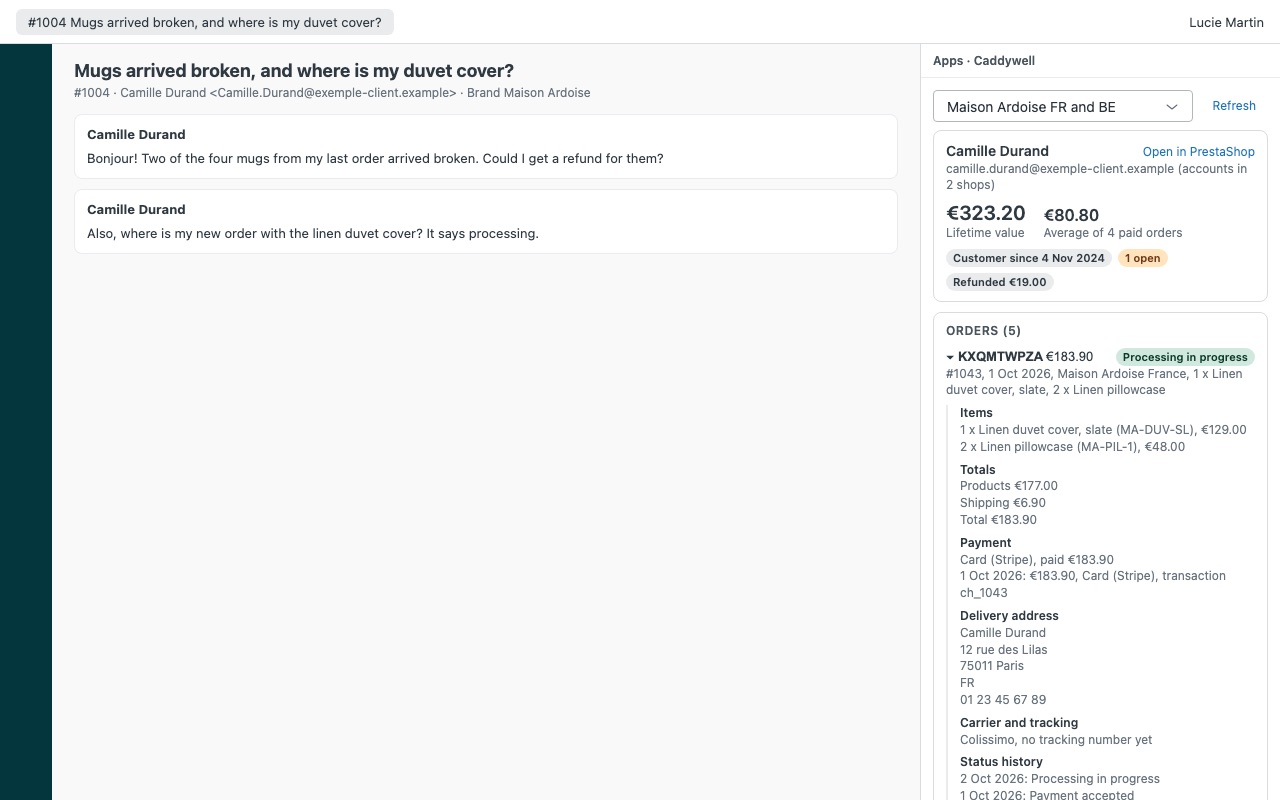
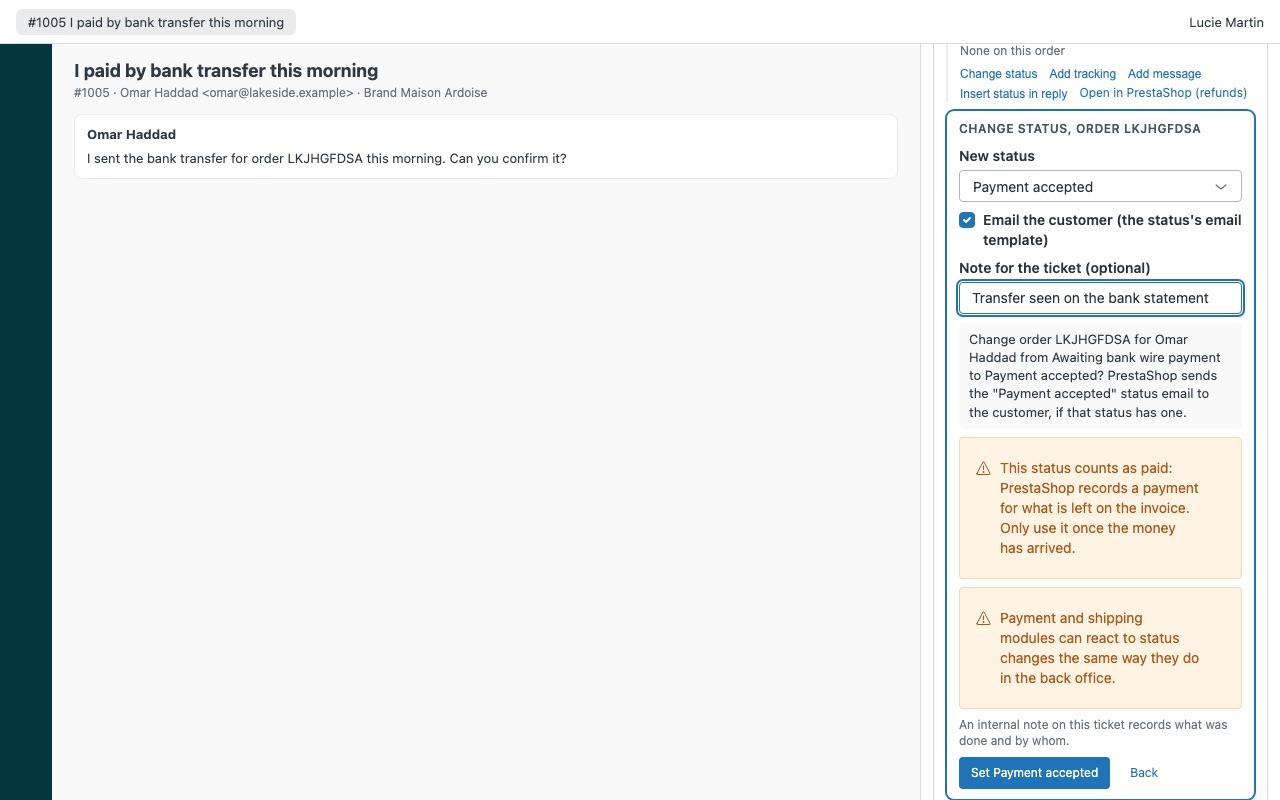
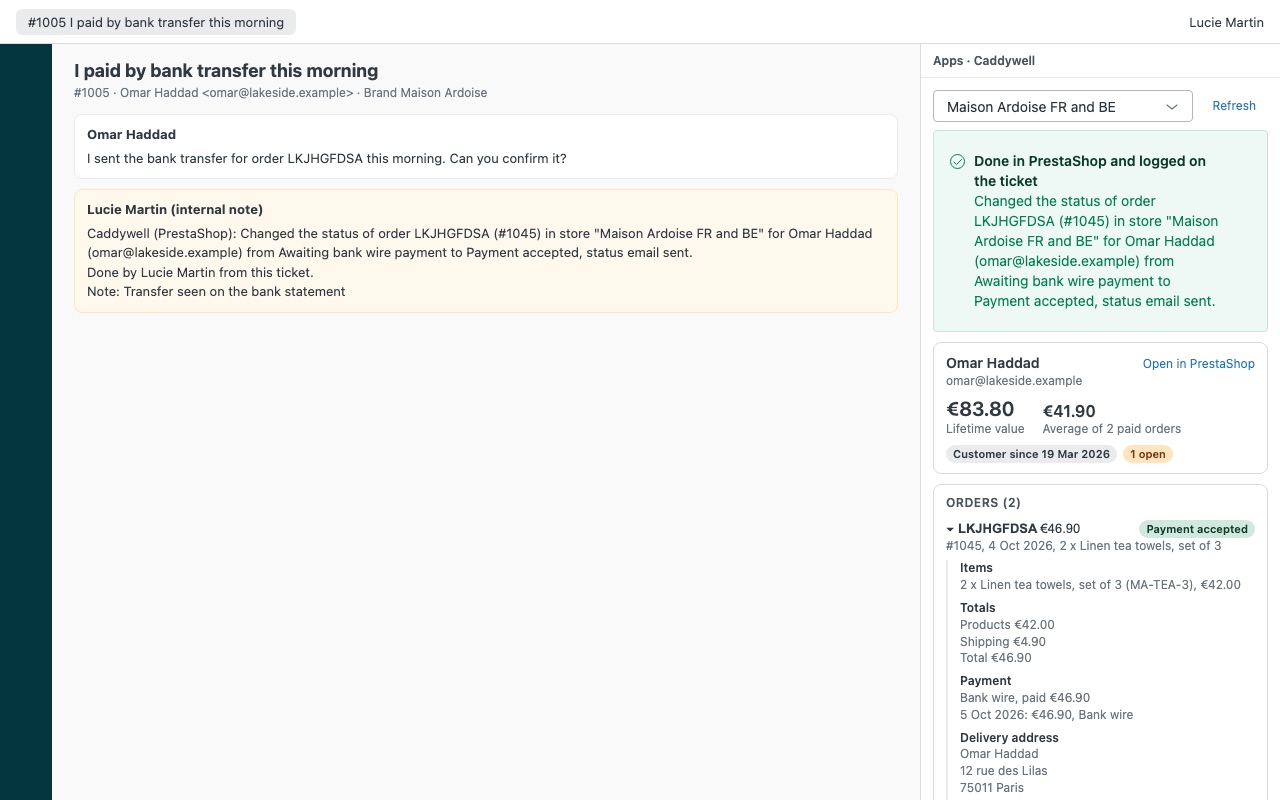
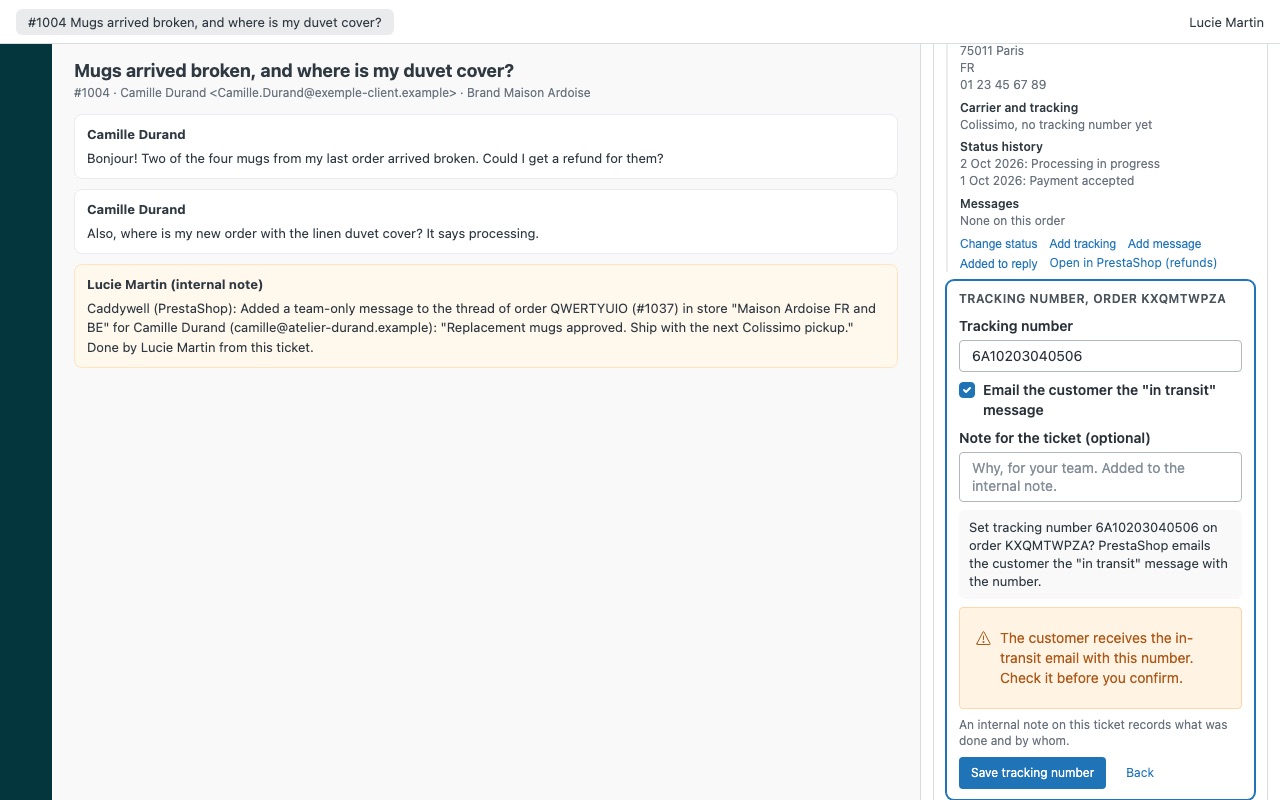
See the customer's PrestaShop orders on the ticket, from every shop of your multistore, with no module to install. When someone writes in about an order, Caddywell shows every order they placed next to the ticket: items, totals, payment, delivery address, carrier with a tracking link, status history, credit slips and the order's messages, with their lifetime value. Agents you allow can change the order status, add or fix the tracking number and add a message to the order, with or without PrestaShop's customer emails. Every action is written to the ticket as an internal note.
Works with PrestaShop 1.7.6 to 9 through PrestaShop's own Webservice: you create a key in your back office and paste it into the app settings. Nothing to install in PrestaShop, no outside account, billed by Zendesk. Caddywell is built by Great Work LLC. It is not made or endorsed by Zendesk or PrestaShop SA. PrestaShop is a registered trademark of PrestaShop SA.
What you get
Every order, from every shop
Found by every email on the requester's profile, registered and guest, in every shop of a multistore. Each order in full: items, refunds and returns, discounts, shipping, payments, delivery address and status history.
Actions with guard rails
Change the order status, with or without the status email, from the statuses you allow. Add or fix a tracking number, and send the "in transit" email if you want.
How Caddywell works
- Create a Webservice key in PrestaShop. In the back office, open Advanced Parameters > Webservice, turn the Webservice on and add a key with View (GET) on the order resources. Add POST or PUT only for the actions you want agents to take.
- Install Caddywell from the Zendesk Marketplace and pick the plan for your number of agents and admins. Paste the store domain and the key into its settings. Nothing gets installed in PrestaShop.
- Open a ticket. Caddywell searches every email address on the requester's Zendesk profile across every shop of a multistore, guest checkouts included, and lists their orders newest first.
- Read the order next to the conversation. Items with refunded and returned quantities, totals, payments with transaction ids, the delivery address, the carrier with a tracking link, the status history, credit slips and the order's messages, with lifetime value at the top.
- Answer with the facts. Insert status in reply adds the order reference, status, carrier and tracking link to your reply.
- Act from the ticket. Agents you allow can change the status, add or fix the tracking number and add a message to the order. Each action shows what will happen and waits for confirmation.
- Keep the record. Every action adds an internal note and a
caddywell_status,caddywell_trackingorcaddywell_messagetag to the ticket.
Who it's for
PrestaShop stores answering "where is my order?" in Zendesk
Zendesk retired its own PrestaShop integration in April 2024. Caddywell puts the order, carrier and tracking link back on the ticket, so agents stop asking for order numbers.
Multistore merchants with a brand per shop or country
One key reads every shop. Map each Zendesk brand to its shops, and a ticket on that brand shows those shops' orders first, with Show all shops one click away.
Teams that want limits on who changes orders
Actions are admin-only by default. You can open them to roles or groups, switch off each action type, and list the only statuses agents may set. Canceled and refunded orders move again only for admins.
Companies running separate PrestaShop installations
Connect up to three installations, each with its own domain, key and brands. Ticket notes name the store, so the next agent knows which one changed.
What you need
- Zendesk Support, and a Zendesk admin to install Marketplace apps.
- PrestaShop 1.7.6 or later, including PrestaShop 8 and 9, with the Webservice turned on.
- HTTPS with a certificate browsers accept, and the
/api/address working through PrestaShop's URL rewriting. - A firewall, CDN or security module that lets Zendesk's servers reach
/api/, because requests come from Zendesk, not the agent's browser. - For order messages, the id of the PrestaShop employee they are written as (Advanced Parameters > Team).
Caddywell for PrestaShop guides
Questions about Caddywell for PrestaShop
What does Caddywell for PrestaShop do?
PrestaShop orders from every shop on the ticket: status, tracking, messages. No module needed.
What does Caddywell for PrestaShop work with?
Caddywell for PrestaShop works in Zendesk Support.
How much does Caddywell for PrestaShop cost?
Starter: $32 a month per Zendesk account, up to 3 agents. Team: $75 a month per Zendesk account, up to 10 agents. Business: $175 a month per Zendesk account, up to 25 agents. Scale: $7.50 a month per agent.
Is there a free trial?
14-day free trial (Zendesk asks for a card at install). Billed monthly by Zendesk. No free plan.
Where do I install Caddywell for PrestaShop?
From the Zendesk Marketplace. Use the Install button on this page, or search for "Caddywell for PrestaShop" there.
Who makes Caddywell for PrestaShop?
Great Work LLC, an independent software company. Email hello@greatwork.company with any question about Caddywell for PrestaShop and someone will answer.
Can Caddywell refund a PrestaShop order?
No. PrestaShop's Webservice has no refund operation, so credit slips, restocking and payment refunds only run in the back office. Caddywell shows credit slips and refunded quantities, can set the Refunded status with a warning that no money moves, and Open in PrestaShop takes you to the order.
Does it create Zendesk tickets from the PrestaShop contact form?
No. Caddywell is a ticket sidebar. It reads and updates orders; it doesn't send anything from PrestaShop into Zendesk.
What happens if our Zendesk account grows past the plan?
The order list stays visible, and order details and actions pause with a message naming the plan that fits. An admin changes the plan in the Zendesk Marketplace.
Where is my Webservice key kept?
As a Zendesk secure setting. Agents' browsers never receive it; Zendesk adds it to requests on their way to the store domain you entered, and only to that domain.
What happens when I uninstall it?
Zendesk deletes the stored keys. Internal notes and caddywell_* tags already on tickets stay. Delete the Webservice key in PrestaShop as well.
More Zendesk apps
 Canoewell
 Basketwell for WooCommerce
 Clientwell
 Winnowell