



Tracestitch Requirement IDs, versions and readable diffs on Jira work items. Baselines, a traceability matrix and suspect links after changes.
Listed on the Atlassian Marketplace as “Tracestitch: Requirements and Traceability for Jira”
From $10 a month for up to 10 users. Billed by Atlassian, with a 30-day free trial.
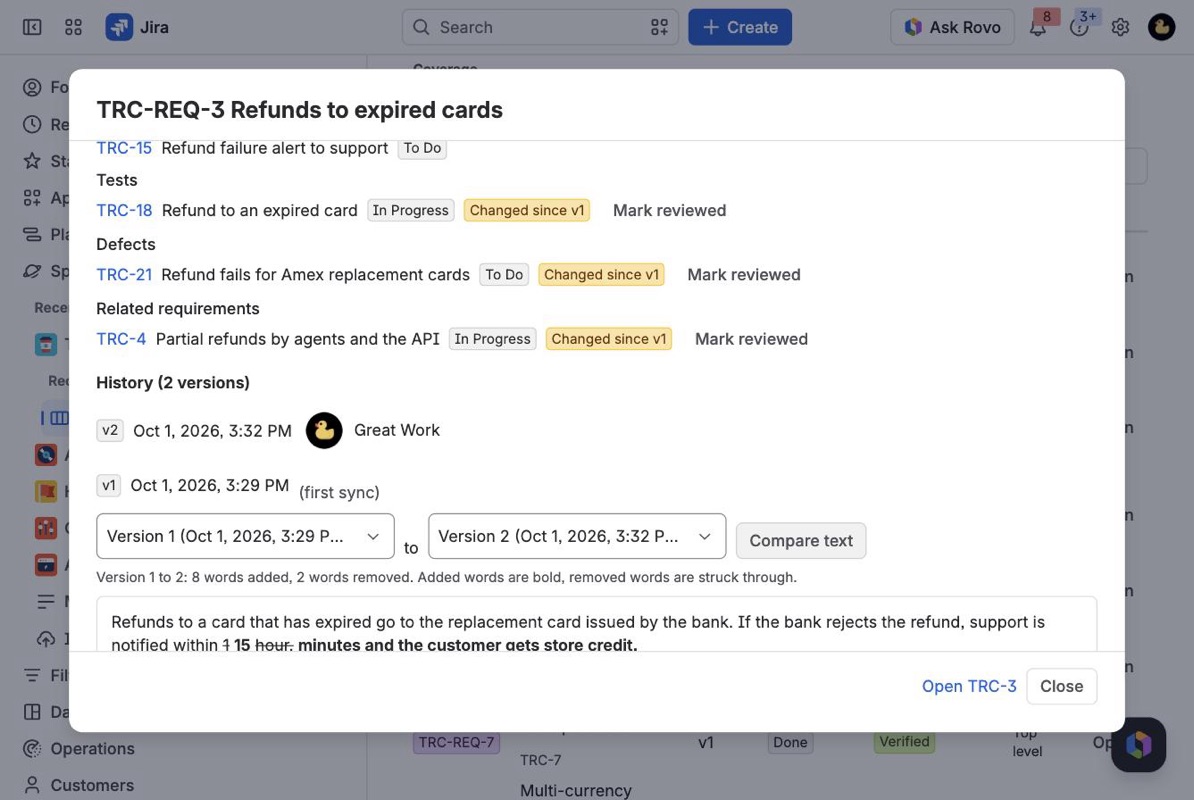
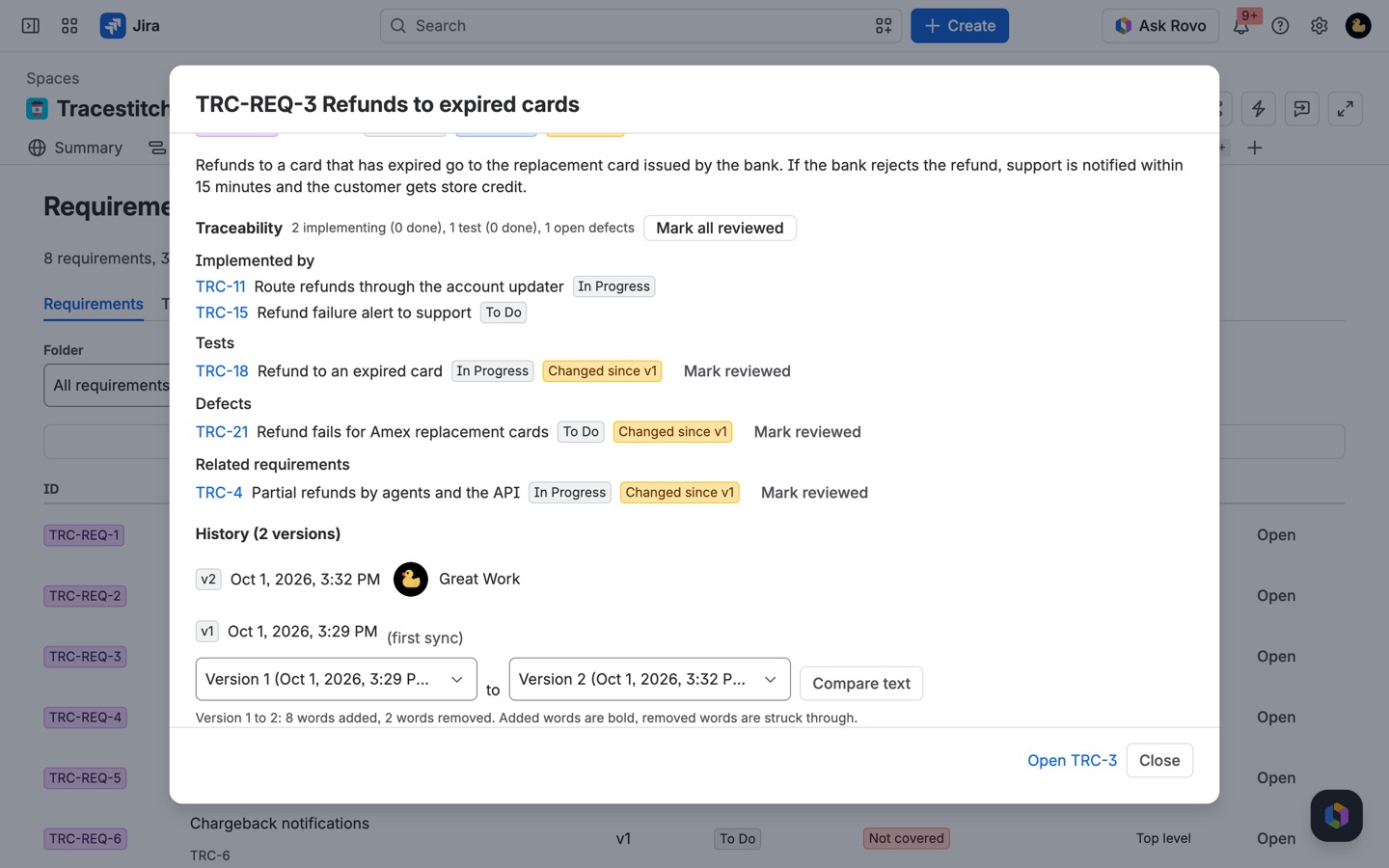
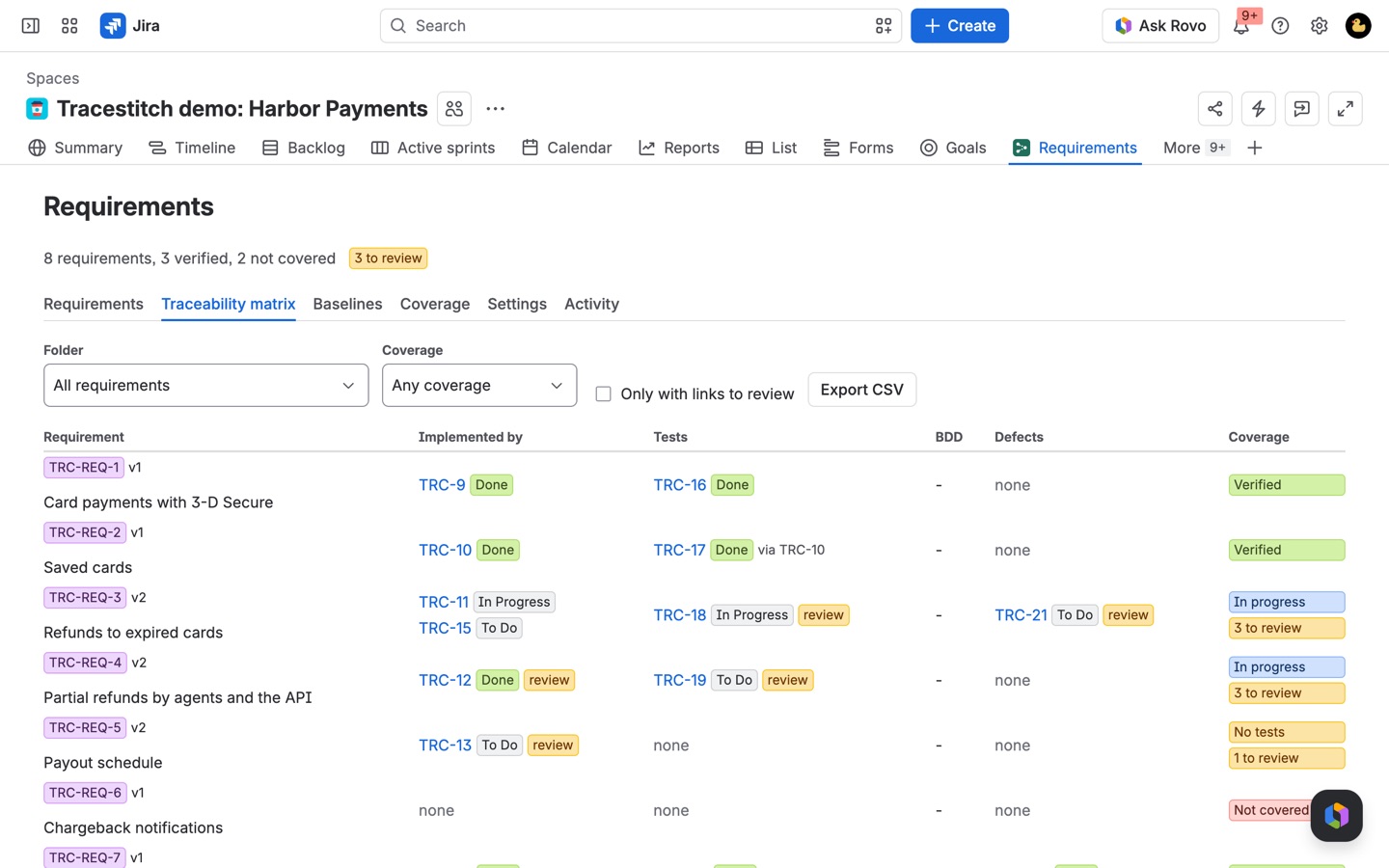
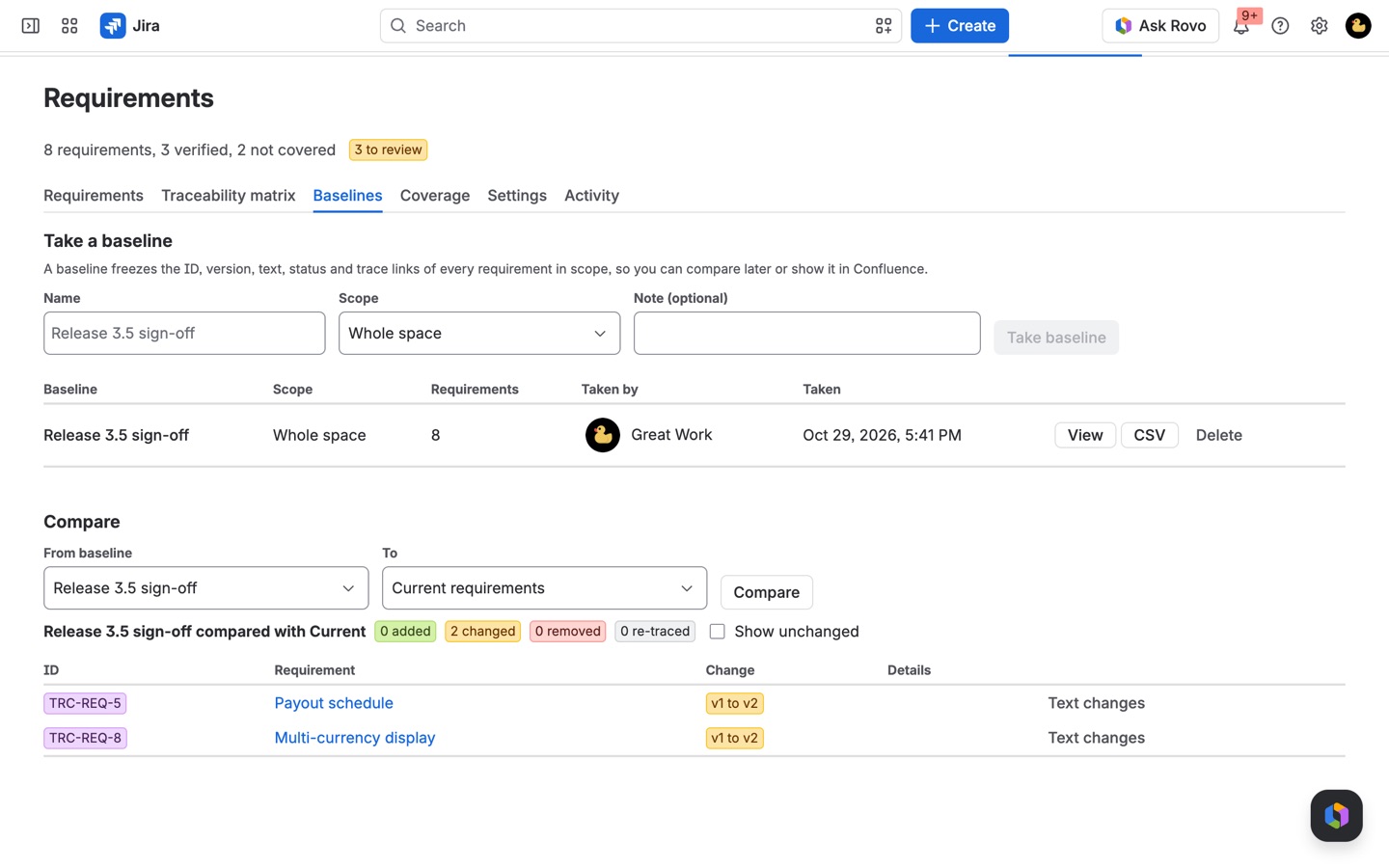
Turn any Jira work item type into requirements with stable IDs, a folder tree and versions. See what implements and tests each one, take baselines, compare them word by word, and get flagged when a requirement changes under linked work.
What you get
Requirements with IDs, versions and diffs
Every requirement gets a stable ID and a place in a folder tree. Each text change is a new version, and any two versions compare word by word, in plain, readable text.
A traceability matrix that flags changes
See what implements, tests and reports defects against each requirement, with a coverage verdict. When a requirement changes, linked work is flagged until someone reviews the change.
Baselines you can compare at any time
Freeze a folder or the whole space before a review or release. Compare two baselines, or a baseline with today, and open the text diff of anything that changed.
How Tracestitch works
- Install Tracestitch from the Atlassian Marketplace in Jira Cloud. To show requirements on Confluence pages as well, connect the app to Confluence on the same site.
- Open Requirements in a space's sidebar. A space admin opens the Settings tab, ticks Track requirements in this space, picks the Work item types that are requirements (a "Requirement" type, or Story if that's what you use) and sets an ID prefix such as
PAY-REQ. - Tracestitch reads the space. Existing requirements get IDs in the order they were created (
PAY-REQ-1,PAY-REQ-2) and version 1. A requirement created later gets the next ID within about a minute. - Keep linking work the way you already do. On each requirement, linked Test, Test Case, Test Plan and Test Execution items count as tests, Bug and Defect items count as defects, other requirements show as related, and everything else (stories, tasks, epics) counts as implementing work. All of those type lists can be changed in Settings, and you can limit which link types count.
- Edit requirements in Jira as usual. A change to the summary, the description or an extra text field you picked records a new version. Status changes, bold or colour changes and Jira re-saving the same text don't.
- Review what a change touched. Every work item linked before the change is flagged. On a story or test, the Traceability panel shows "Changed: v1 to v2" with See what changed and Mark reviewed.
- Check coverage and freeze it. The Traceability matrix and Coverage tabs give each requirement a verdict, and the Baselines tab freezes a folder or the whole space so you can compare it later.
Who it's for
Teams that keep a requirements spreadsheet next to Jira
A "Requirement" work item type in Jira plus a spreadsheet of IDs and test links is a common setup, and the two drift apart after a few sprints. Tracestitch builds the IDs, the trace links and the coverage from the Jira links people already make, so there's no second list to keep in step.
Regulated or audited work
Medical device, automotive, payments and public sector teams often have to show which tests cover which requirement and what the requirements said on the day a release was signed off. A baseline named "Release 3.5 sign-off" keeps the text, version, status, folder and links of every requirement in scope, and a later compare lists what was added, removed, changed, moved or re-traced since.
Product managers whose specs change mid-sprint
When a requirement's wording changes after a story is in progress, the developer and tester on that story see the change on their own work item, with the old and new text side by side, instead of finding out at demo time.
QA leads who need to know what is untested
reqCoverage = "untested" in any Jira search lists requirements with implementing work but no tests, and reqSuspect > 0 lists everything waiting for someone to review a change. Both work in filters, boards and dashboards.
Tracestitch or plain Jira links
Jira on its own can link a requirement to a story and a test, and a JQL search can list those links. That's enough for a small backlog where nobody asks for history. What Jira doesn't have is a requirement ID that survives a move or a renamed key, a version history of the requirement text with a readable diff, a flag on linked work when the text changes, a frozen record of the whole set at a point in time, or a coverage verdict per requirement. Tracestitch adds those on top of the links and work item types you already have; it doesn't introduce a separate requirements editor, and your requirements stay ordinary Jira work items.
Tracestitch is not a test management tool. It doesn't run tests or record test steps. It reads test work items from Jira, including the ones a test management app creates, and uses their status for coverage.
Limits and requirements
- Jira Cloud. Confluence Cloud on the same site is optional, for the Requirements (Tracestitch) macro.
- Tracking is turned on per space by a space admin or Jira admin.
- Up to 1,000 requirements per baseline and 200 baselines per space. Export CSV on the matrix and on a baseline gives up to 1,000 rows per run, as text you copy into a spreadsheet or a .csv file.
- Folders go up to eight levels deep, with up to 500 per space.
- IDs and history from another requirements app aren't imported. Existing requirements start at version 1 when tracking is turned on.
- Tracestitch runs on Atlassian's own platform, with no outside servers.
To keep a dated snapshot of a JQL result on a Confluence page that people without Jira access can read, see Stillframe. A Stillframe snapshot of reqCoverage is a coverage record you can hand to an auditor.
Tracestitch guides
Questions about Tracestitch
What does Tracestitch do?
Requirement IDs, versions and readable diffs on Jira work items. Baselines, a traceability matrix and suspect links after changes. Turn any Jira work item type into requirements with stable IDs, a folder tree and versions. See what implements and tests each one, take baselines, compare them word by word, and get flagged when a requirement changes under linked work.
What does Tracestitch work with?
Tracestitch works in Jira Cloud.
How much does Tracestitch cost?
$10 a month for up to 10 users, or $100 a year. From 11 users: $2.05 per user a month, with lower rates for larger sites.
Is there a free trial?
Billed by Atlassian, with a 30-day free trial.
Where do I install Tracestitch?
From the Atlassian Marketplace. Use the Install button on this page, or search for "Tracestitch: Requirements and Traceability for Jira" there.
Who makes Tracestitch?
Great Work LLC, an independent software company. Email hello@greatwork.company with any question about Tracestitch and someone will answer.
Does Jira have built-in requirements management?
Not as such. Jira has work item types, links and JQL, which teams use to model requirements, but no requirement IDs, versions, baselines, suspect links or traceability matrix. Tracestitch adds those to the work items you already have.
Do I need a special Requirement work item type?
No. In Settings you tick whichever types hold requirements in that space. Many teams create a "Requirement" type, but Story, Epic or any custom type works.
Does it work with Xray, Zephyr or other test apps?
It works with any test app that stores tests as Jira work items. Add that app's test types under Linked work item types that are tests in Settings, and linked tests count toward coverage with their Jira status. Tracestitch doesn't read test runs stored outside Jira work items.
What happens to a requirement's ID if it's deleted or moved to another space?
It's retired: the ID is never reused, and its history and every baseline that includes it stay readable.
Can people mark a change reviewed from the story itself?
Yes. The Traceability panel on the story or test shows See what changed and Mark reviewed. Anyone who can edit work items in either space can mark it.
What can I search for with JQL?
reqId, reqVersion, reqCoverage, reqSuspect and reqTraces, for example reqId = "PAY-REQ-12" or reqCoverage = "uncovered". They work in any Jira search, filter or dashboard gadget.
What happens if the subscription ends?
Everything recorded stays readable in Jira. Nothing new is recorded, the Confluence macro shows a notice instead of requirements, and syncing picks up again when the subscription is active.
How much does it cost?
$10 a month for up to 10 users. From 11 users every user is billed at $2.05 a month, with lower rates on larger sites. Atlassian bills it, with a free trial.
More Jira apps
 Attachwell
 Stillframe
 Berth
 Spillproof