



Attachwell Rename attachments, file them by category, find what fills your storage and clean it up safely, across every Jira project.
Listed on the Atlassian Marketplace as “Attachwell: Attachment Manager for Jira”
From $10 a month for up to 10 users. Billed by Atlassian, with a 30-day free trial.
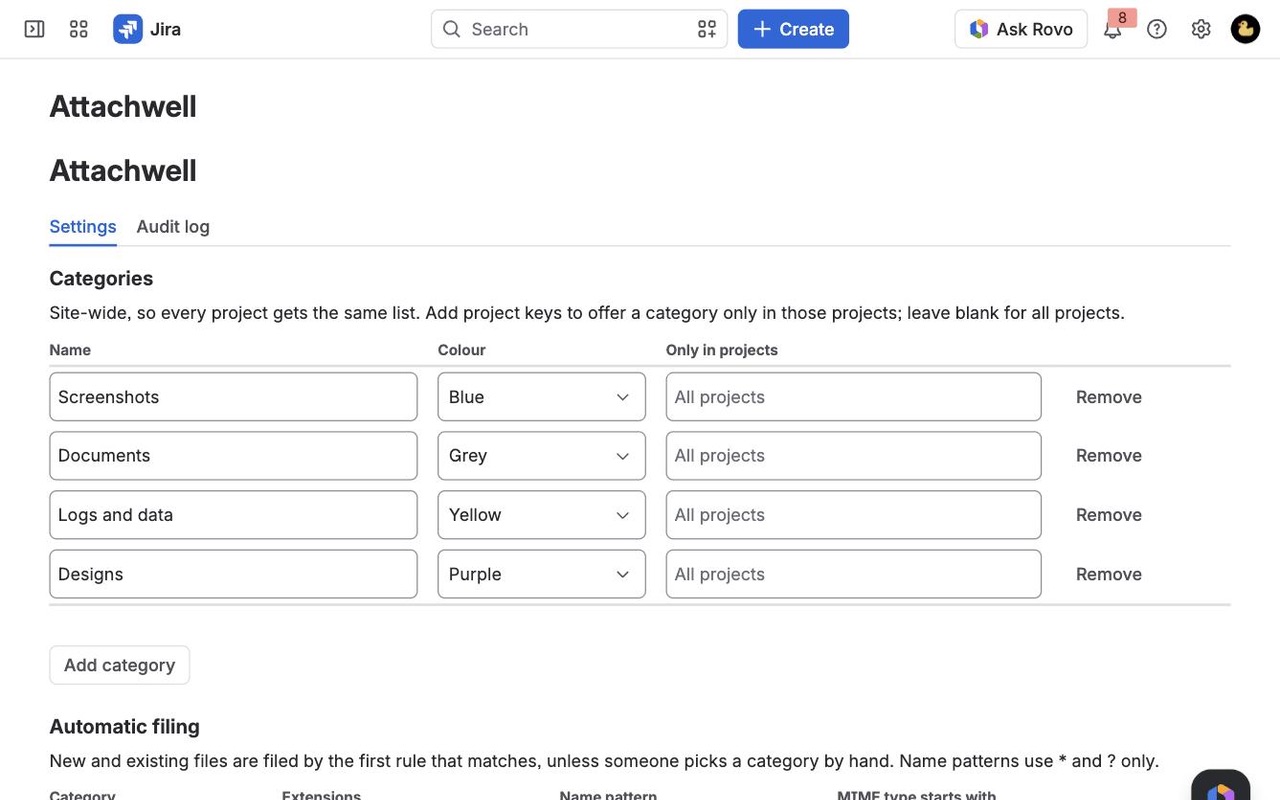
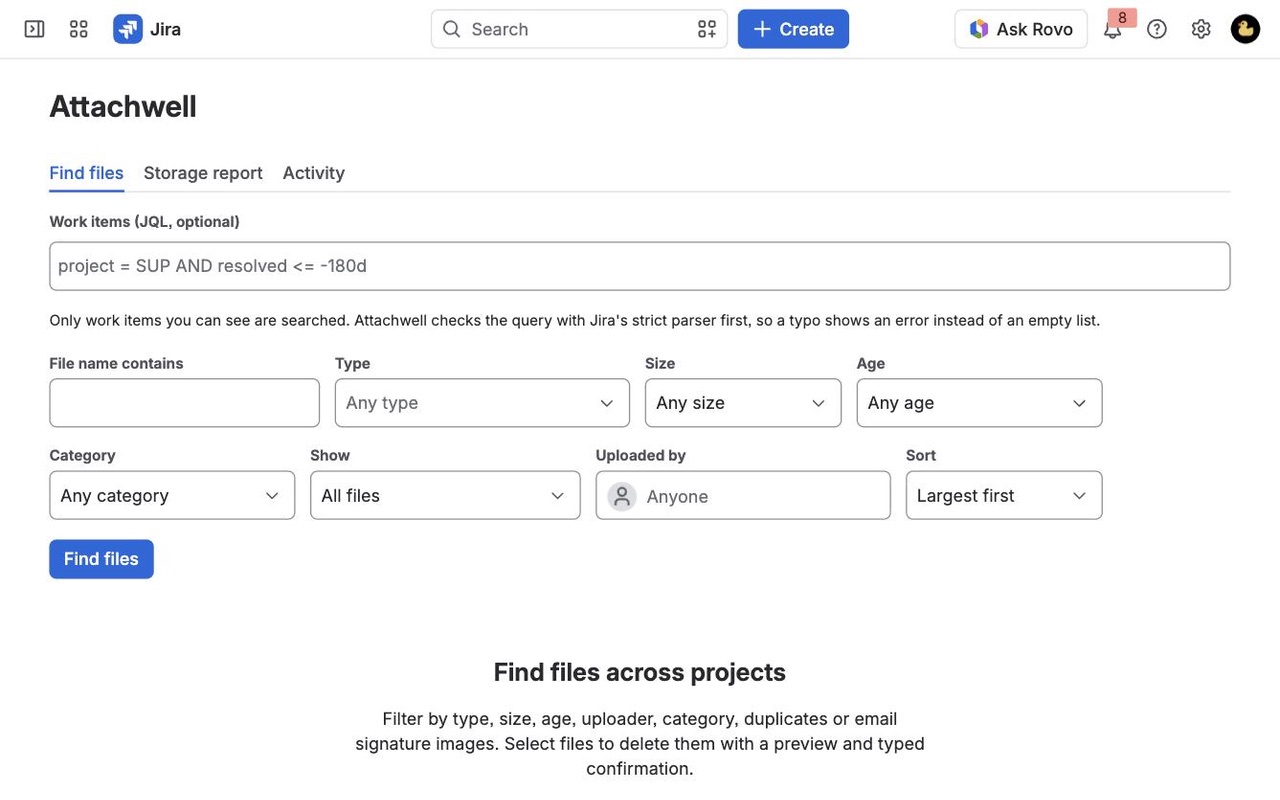
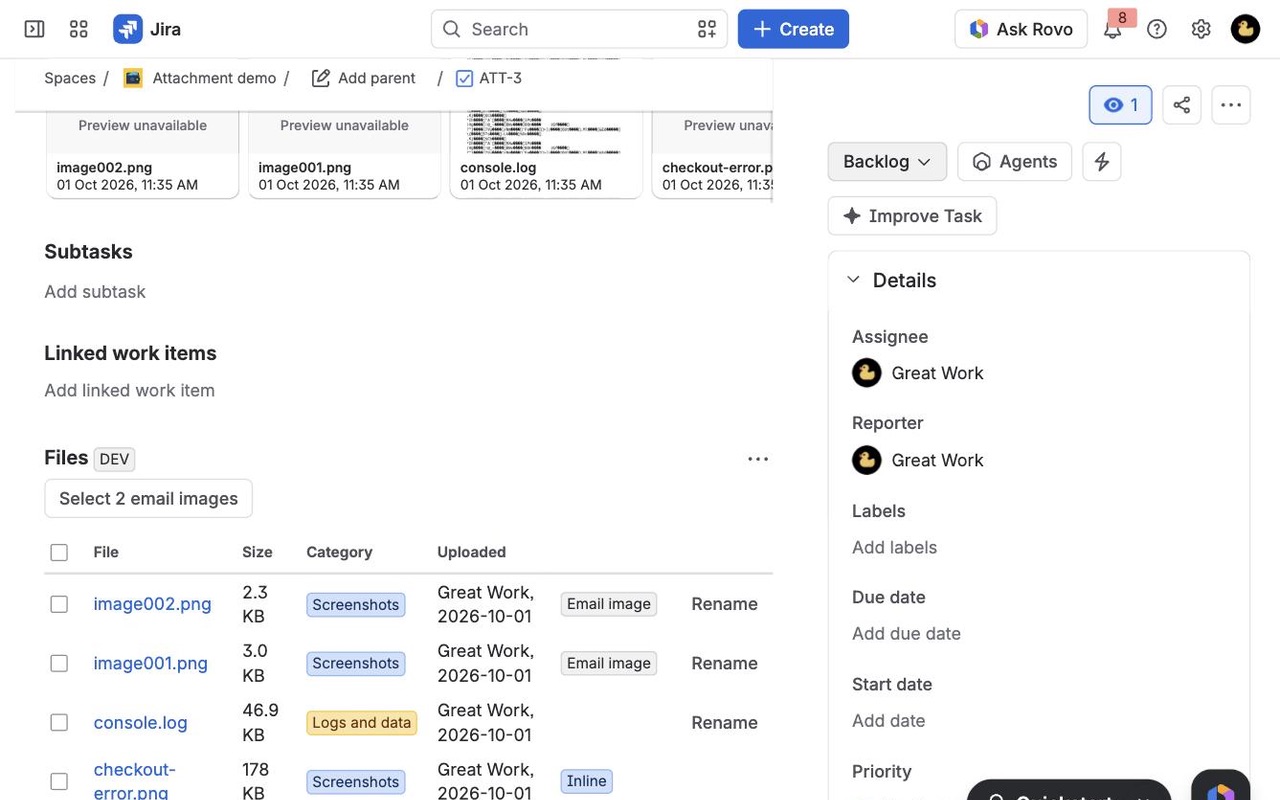
Rename attachments, file them under site-wide categories, and find files across projects by type, size, age and uploader. Delete in bulk with a preview, your own Jira permissions, a typed confirmation and an audit log.
What you get
Rename and file every attachment
Rename a file without downloading and re-uploading it. Site-wide categories file new and old files by extension, name or type, and anyone who can edit the work item can pick one by hand.
Find files across all your projects
JQL plus filters for name, type, size, age, uploader and category. Duplicate uploads and email signature images are flagged so you can select them in one click.
Clean up with a preview and an audit log
Bulk delete checks your own Jira permissions, skips inline images, and asks you to type the count. The storage report shows where the space goes, by project, type, uploader and age.
How Attachwell works
- Install Attachwell from the Atlassian Marketplace on your Jira Cloud site. There is nothing to configure first: four starter categories (Screenshots, Documents, Logs and data, Designs) and their rules sort the files you already have.
- Open a work item and click the Files panel under the summary. Each file shows its category, size, uploader and any flags. Pick a different category by hand, or click Rename to fix a name like
image (3).png. - Go to Apps > Attachwell > Find files to search across projects. Type JQL (or leave it blank for everything you can see), add filters for name, type, size, age, uploader or category, and click Find files. Each search reads 300 work items; Search more work items carries on from there.
- Select what you want gone and click Delete. Attachwell builds a preview from what is in Jira at that moment and lists every file it will leave alone, with the reason: you lack the permission, the file is shown inline, or it has already gone.
- Type the phrase shown, for example
DELETE 14 FILES. Files are then deleted ten at a time, as you, and each one is read again just before it goes. A file whose name or size changed since the preview is skipped. - Check Activity for your own deletes and renames, or the admin audit log for everyone's.
Who it's for
Jira admins near the storage limit
Atlassian's plan tables put Jira Free at 2 GB of file storage and Standard at 250 GB. When a site gets close, the Storage report shows where the space went: totals by project, file type, uploader, age and category, the 50 largest files, and how much is taken by duplicate uploads and email signature images.
Service desks buried in email images
Requests that arrive by email collect image001.png and Outlook-...png signature images on every reply. Attachwell flags Outlook-style image names at or under a size your admin sets (50 KB by default), and the Files panel has a button that selects all of them on a work item.
Teams that want files they can find again
A contract named scan0001.pdf on one work item among thousands might as well be lost. Categories are site-wide, so a "Contracts" category means the same thing in every project, and a rule such as *contract* or pdf, docx files new and old uploads without anyone remembering to.
Project leads cleaning up after a project
Close out a project by finding files older than a year or over 10 MB in it with one JQL query, then delete them in one confirmed batch instead of opening work items one by one.
Attachwell or Jira's own attachment tools
Jira Cloud lists, downloads and deletes the files on one work item at a time, including deleting every file on that work item, and its storage page names the work items that use the most space. If that covers your cleanup, you don't need an app.
Attachwell is for the jobs Jira leaves out: renaming a file (Atlassian's feature request for it, JRACLOUD-25060, is marked Future Consideration), choosing some files across many work items, categories, finding duplicates and signature images, and a breakdown of storage by more than work item.
Some things it doesn't do. Jira deletes attachments permanently, so Attachwell can't bring a file back, which is why every delete starts with a preview and a typed phrase. It doesn't download many files as one zip. It won't rename a file that is shown inline in a description or comment, since the inline image would still point at the old file.
What you need
- Jira Cloud. Attachwell runs on Atlassian's Forge platform and sends nothing to any outside server.
- To rename: Create attachments, plus Delete own attachments for your files or Delete all attachments for other people's. Renames go up to the size your admin sets, 25 MB by default and at most 50 MB.
- To delete: the same Delete attachments permission in each project. Files you can't delete are left out of the preview, not attempted.
- The storage report is open to Jira admins and one group they choose.
Attachwell guides
Questions about Attachwell
What does Attachwell do?
Rename attachments, file them by category, find what fills your storage and clean it up safely, across every Jira project. Rename attachments, file them under site-wide categories, and find files across projects by type, size, age and uploader. Delete in bulk with a preview, your own Jira permissions, a typed confirmation and an audit log.
What does Attachwell work with?
Attachwell works in Jira Cloud.
How much does Attachwell cost?
$10 a month for up to 10 users, or $100 a year. From 11 users: $1.05 per user a month, with lower rates for larger sites.
Is there a free trial?
Billed by Atlassian, with a 30-day free trial.
Where do I install Attachwell?
From the Atlassian Marketplace. Use the Install button on this page, or search for "Attachwell: Attachment Manager for Jira" there.
Who makes Attachwell?
Great Work LLC, an independent software company. Email hello@greatwork.company with any question about Attachwell and someone will answer.
How does Attachwell rename a file when Jira can't?
It uploads a copy under the new name, as you, and then removes the original. In Jira the file gets a new upload date; the Files panel shows "Renamed from" with the old name, and the audit log keeps the original uploader and date. Leave the extension off and the current one stays.
Can I find the largest attachments in Jira?
Yes. In Find files, sort by Largest first or filter by size (over 1 MB, 10 MB or 100 MB). The storage report also lists the 50 largest files on the site, or within a JQL you give it.
Will deleting attachments lower our Jira storage number straight away?
Not always. Atlassian calculates its storage meter separately and it can take days to drop after a cleanup, so it can differ from Attachwell's report for a while.
What counts as a duplicate?
A file with the same name and size as an earlier file on the same work item. The earliest copy is never flagged, so selecting all duplicates always leaves one.
Can someone delete files they couldn't delete in Jira?
No. The delete runs as the signed-in person and checks their own Delete attachments permission in each project. Inline images are also left alone unless you untick that option in the preview.
Who can see what was deleted?
Everyone sees their own actions under Activity. Jira admins see the full audit log of deletes, renames, category changes, settings changes and report runs, kept for 365 days by default and adjustable from 30 days to 10 years.
Can a category apply to only some projects?
Yes. A Jira admin types project keys next to a category in Jira settings > Apps > Attachwell, and it is offered only in those projects. Everywhere else it doesn't appear in the list.
More Jira apps
 Berth
 Tracestitch
 Changeleaf
 Stillframe