



Tidywell Sort lines, lists and tables, change case and clean up text in Google Docs, with a preview of every change and Undo
Listed on the Google Workspace Marketplace as “Tidywell: Sort, Change Case & Clean Up Text”
$4.99 a month or $44 a year per Google account. Free trial: 15 Apply runs or 14 days, whichever comes first. No card needed.
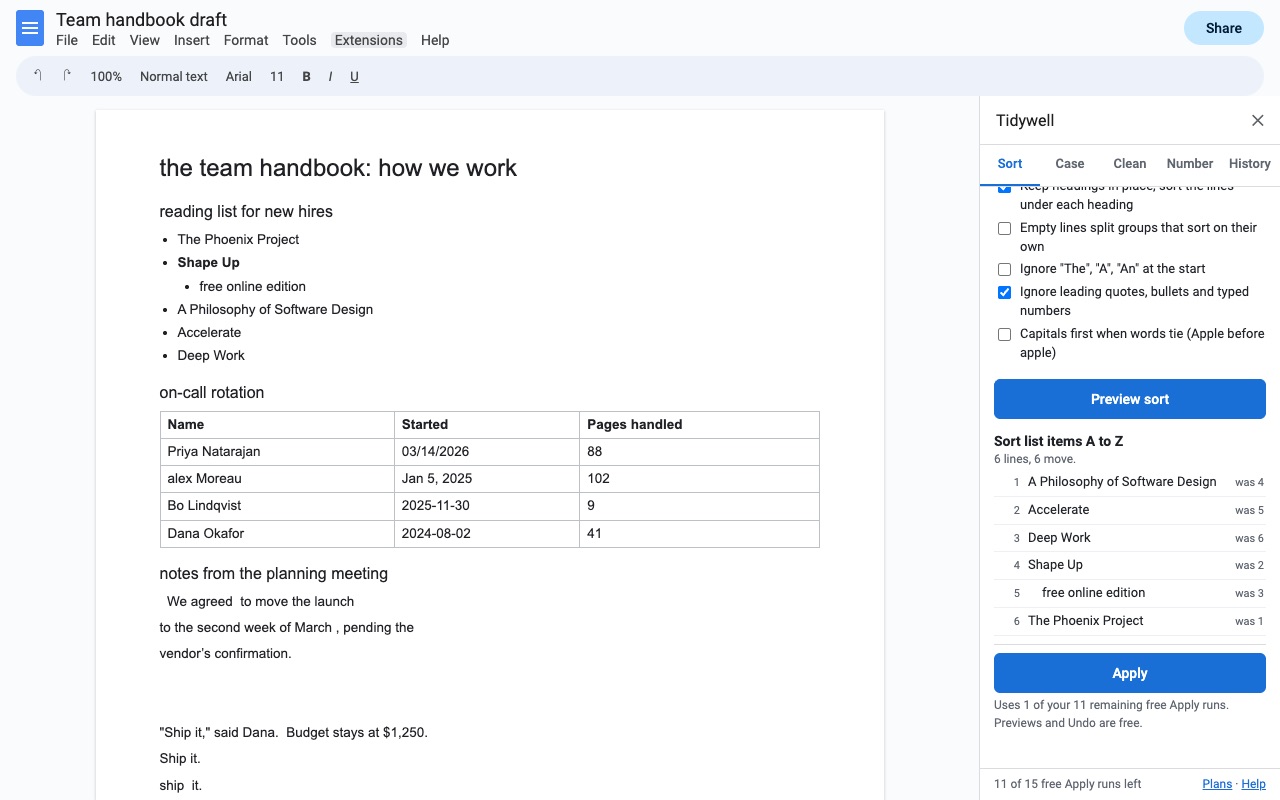
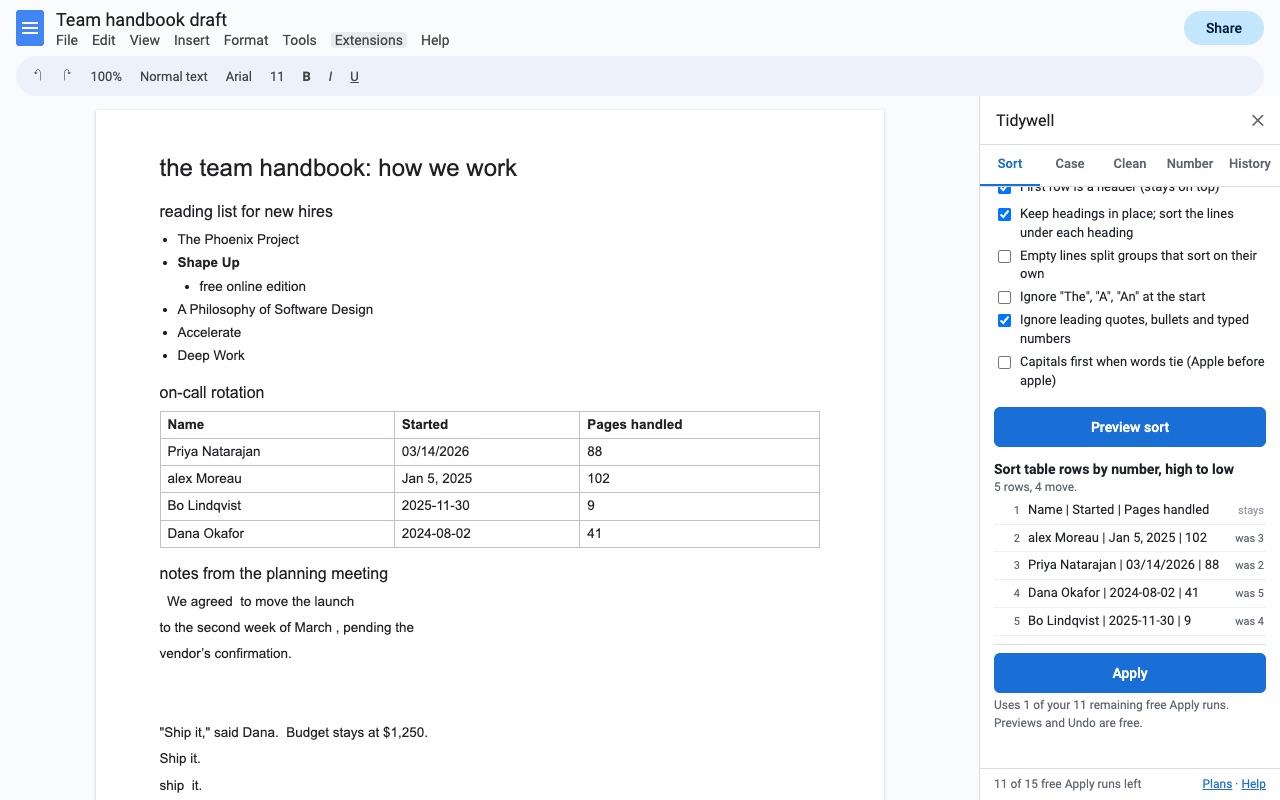
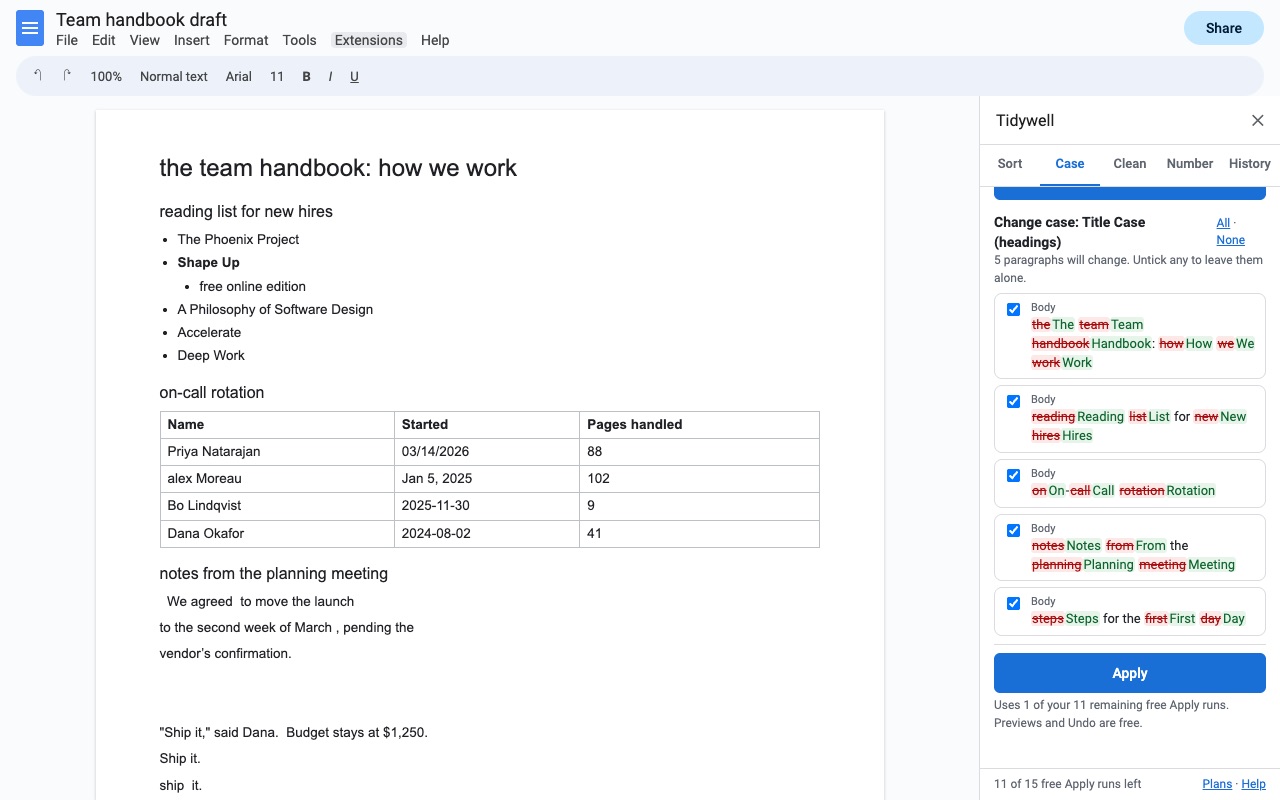
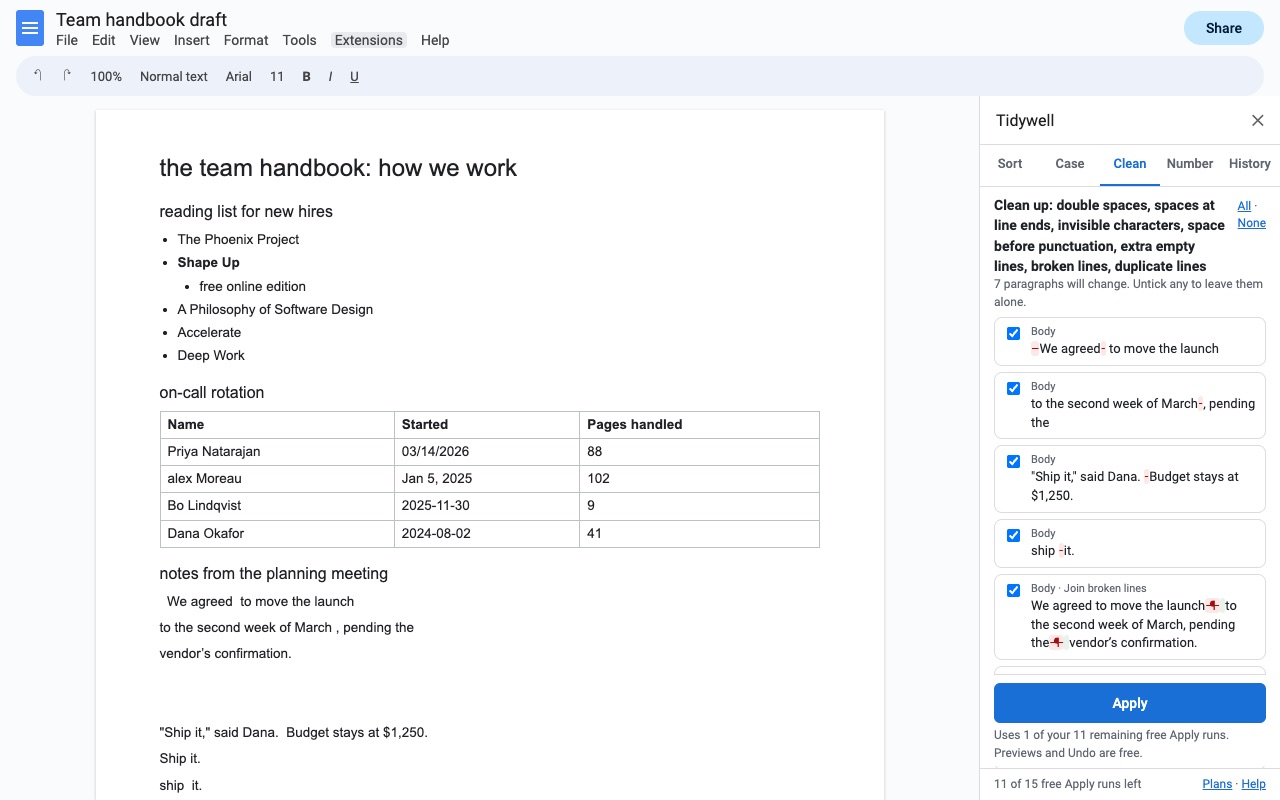
Tidywell sorts, recases and cleans up text in Google Docs, and shows you exactly what will change before anything does.
What you get
- Sort selected lines, bulleted and numbered lists (sub-items move with their parent) and table rows (by any column, header row stays on top)
- A to Z with natural numbers, Z to A, by number, by date, by length, reverse or shuffle; headings stay in place and the lines under each sort on their own
- Change case: Sentence case, Title Case with small-word rules, Capitalize Each Word, UPPERCASE, lowercase, tOGGLE; keeps NASA and iPhone as they are
- Clean up: double spaces, stray spaces, line breaks, invisible characters, straight or curly quotes, empty lines, lines broken mid-sentence, duplicate lines
- Number lines with typed numbers (1. a) iv.) or remove typed numbers and bullets
- Preview every change before it happens; untick lines to leave alone; Undo any run from History, even after closing the Doc
- Keeps bold, italics, links, colors and fonts
How Tidywell works
- Open Extensions, Tidywell and pick a tool: Sort lines, lists or tables, Change case, Clean up text or Number lines. They open in one sidebar with a tab for each, plus History.
- Select what to change, or for a sort, click inside the list or table. Case, clean-up and numbering can also work on one tab or the whole document.
- Choose the options, such as A to Z for a sort or Sentence case for case.
- Press Preview. Removed text shows in red and added text in green; a sort shows the new order. Untick any line you want left alone.
- Press Apply. Bold, italics, links, colors and fonts are kept.
- Undo right there, or later from History, even after you've closed and reopened the Doc. The last 10 changes are kept.
Who it's for
Anyone keeping lists in Google Docs
Glossaries, reading lists, vocabulary, guest lists and inventories sort A to Z with numbers in number order, so "Item 2" comes before "Item 10". Leading "The", "A" and "An" can be ignored, and in a bulleted list each sub-item moves with its parent.
Writers and editors cleaning up pasted text
Text copied from a PDF or an email often has a line break in the middle of every sentence, double spaces, non-breaking spaces and a mix of straight and curly quotes. Clean up text fixes each of those, and shows you every fix first.
Teachers and students formatting documents
Headings in Title Case with small words like "of" and "the" left lowercase, a bibliography sorted, or a list of answers numbered a), b), c) as typed characters that survive pasting into an email.
Teams with tables in their Docs
Sort a table's rows by any column, by text, number or date, while the header row stays on top.
Tidywell or Google Docs on its own
Google Docs has Format, Text, Capitalization for lowercase, UPPERCASE and Title Case, and find and replace. It has no way to sort lines, lists or tables, no sentence case, and no clean-up for broken lines, invisible characters or duplicate lines. If a case change on a few words is all you need, the built-in menu is enough. Tidywell is for sorting and for cleaning up long or pasted text, with a preview so a whole-document change never surprises you.
Limits and requirements
- Works in Google Docs in a browser on a computer.
- Tidywell can only see the Doc you open it in. Text is processed inside Google and never sent to Great Work.
- If someone edits the Doc between your preview and Apply, Tidywell stops and asks you to preview again.
- Undo leaves alone any line someone edited after the change, so it never erases newer work. File, Version history can still bring those back.
- Tidywell doesn't do find and replace.
For a quick one-off list outside of Docs, the free remove duplicate lines tool works on pasted text.
Tidywell guides
Questions about Tidywell
What does Tidywell do?
Sort lines, lists and tables, change case and clean up text in Google Docs, with a preview of every change and Undo. Tidywell sorts, recases and cleans up text in Google Docs, and shows you exactly what will change before anything does.
What does Tidywell work with?
Tidywell works in Google Docs, in any browser.
How much does Tidywell cost?
$4.99 a month or $44 a year per Google account. $100 once for lifetime access on one Google account. Billed through Stripe. Cancel any time from Plans and billing in the add-on.
Is there a free trial?
Free trial: 15 Apply runs or 14 days, whichever comes first. No card needed.
Where do I install Tidywell?
From the Google Workspace Marketplace. Use the Install button on this page, or search for "Tidywell: Sort, Change Case & Clean Up Text" there.
Who makes Tidywell?
Great Work LLC, an independent software company. Email hello@greatwork.company with any question about Tidywell and someone will answer.
Can I sort by date?
Yes. Choose Dates, oldest first or Dates, newest first. Tidywell reads dates like 03/14/2026, 2026-03-14, Mar 14 2026 and 14 March 2026, and asks whether a date like 03/04/2026 is month first or day first.
Will sorting mix up my headings?
No. By default, headings stay in place and the lines under each heading sort on their own. Turn that off to sort the headings too.
Can I sort each section separately?
Yes. With empty lines splitting groups, each block between empty lines sorts on its own.
Does Change case keep acronyms?
Yes. Keep acronyms and brand names leaves words like NASA, iPhone and McDonald as they are.
What does one Apply cost in the trial?
One trial use, however many lines it changes. Previews and Undo are always free, even after the trial ends.
Why does it keep asking me to authorize?
That happens when several Google accounts are signed in to the same browser. Open the Doc in a window where only one account is signed in, or a private window.
More Google Docs apps
 Aloudwell
 Texwell
 Crispwell
 Syntaxwell