


Crispwell Readability, writing style and SEO checks for Google Docs, with in-document highlights and one-click fixes
Listed on the Google Workspace Marketplace as “Crispwell: Readability & Writing Style Checker”
$30 a month or $120 a year per Google account. Free trial: 10 documents or 7 days, whichever comes first. No card needed.
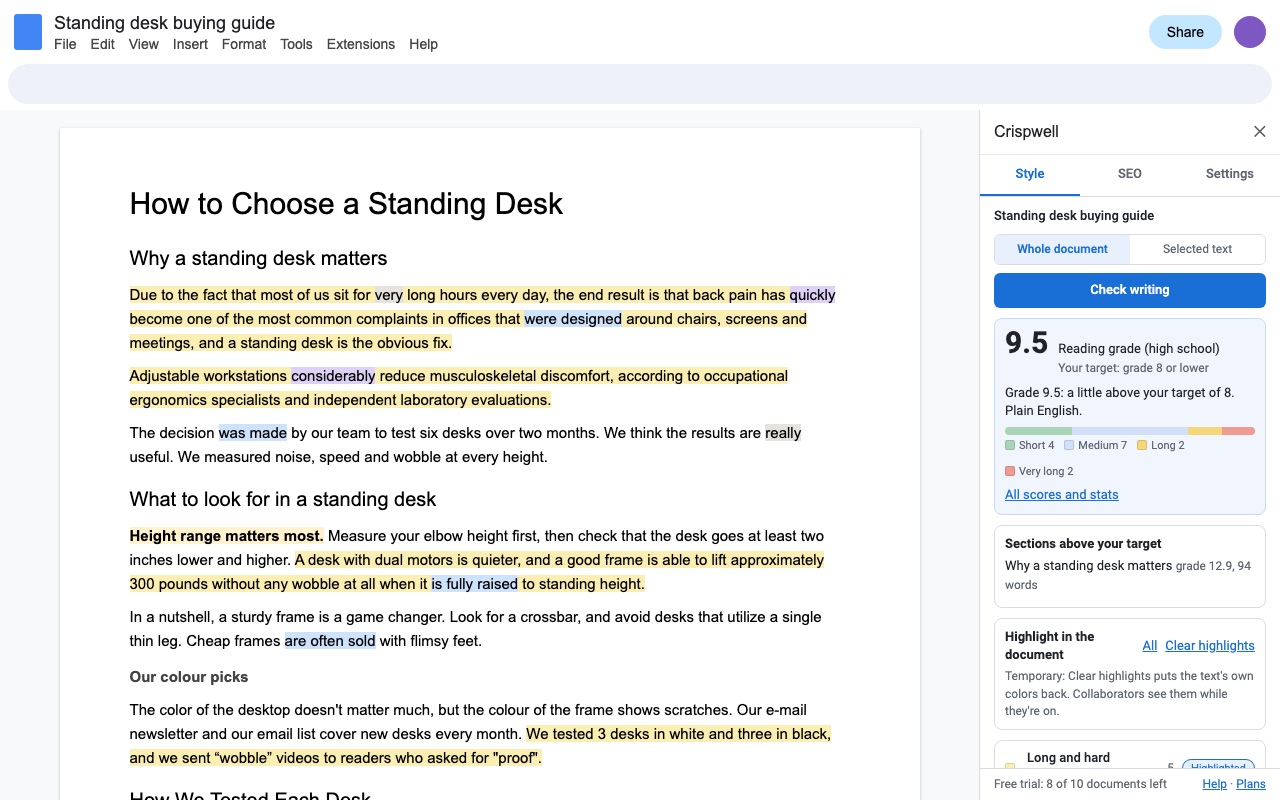
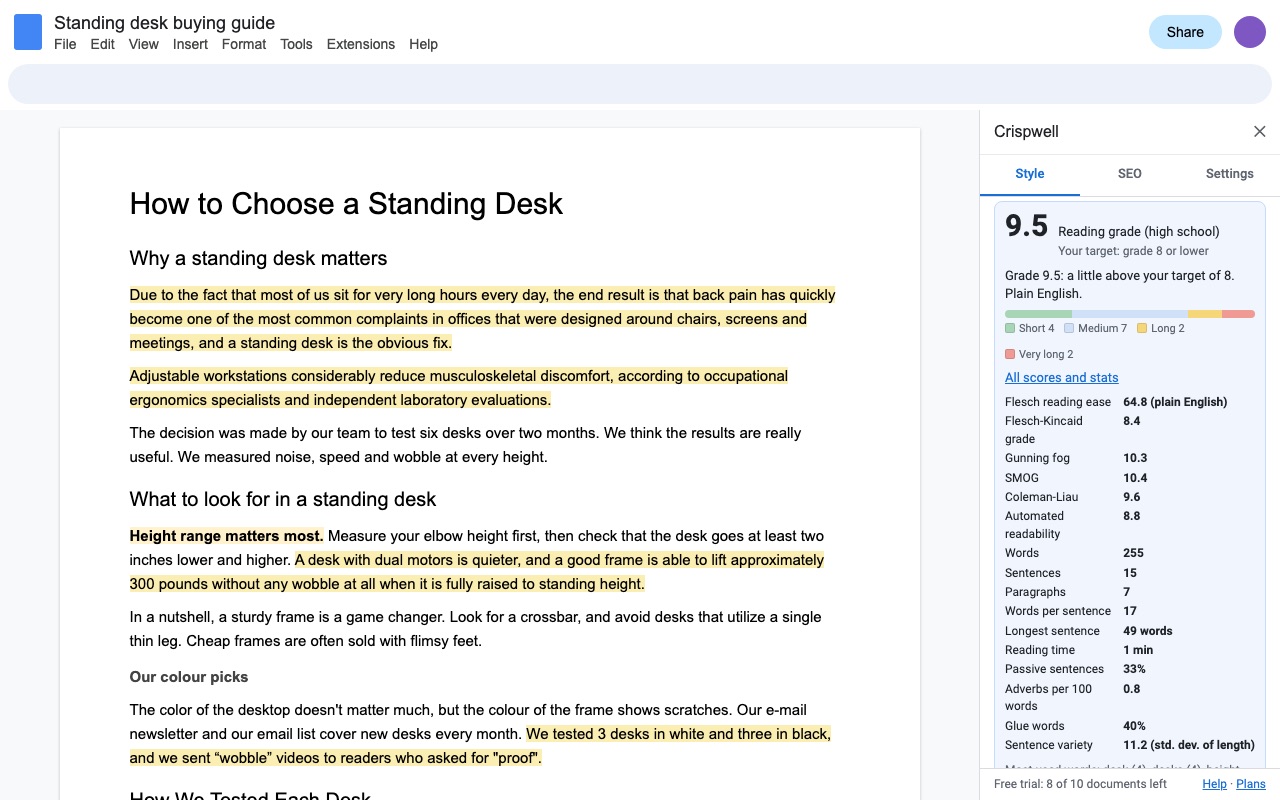
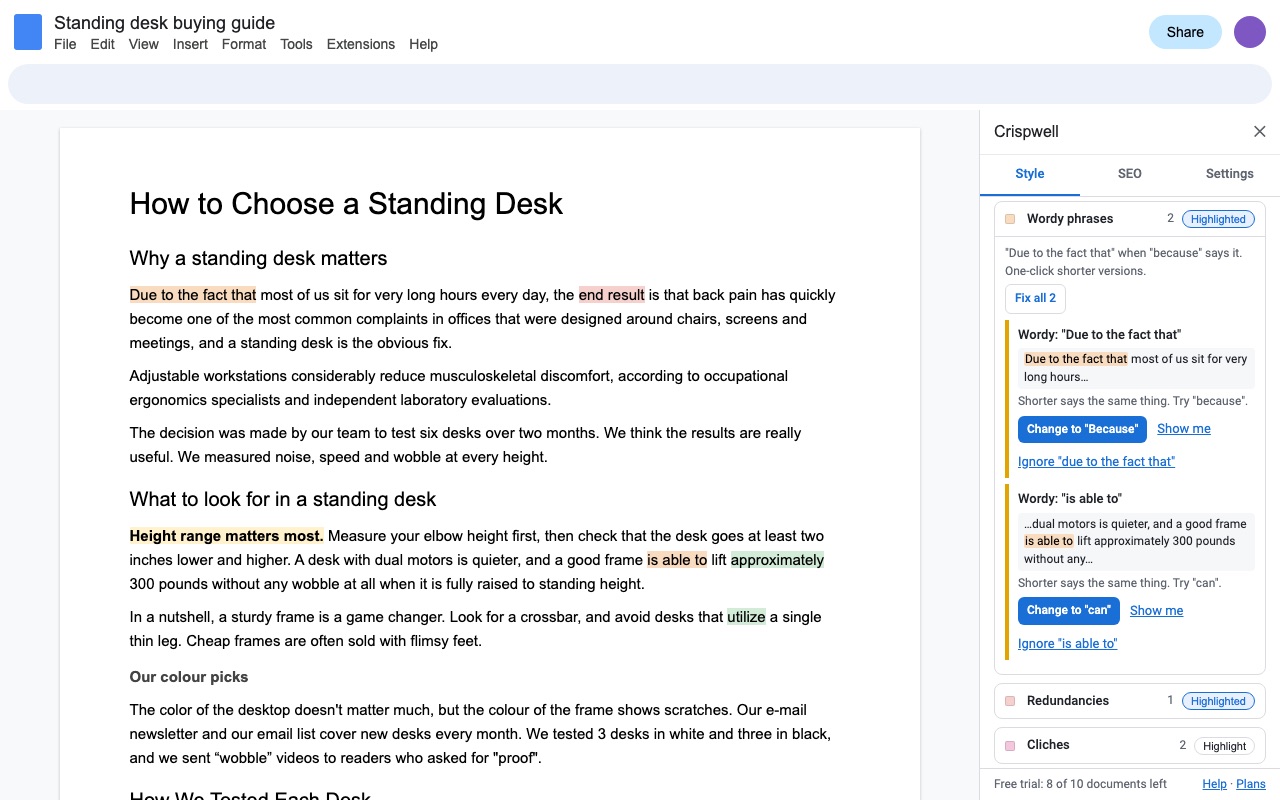
Crispwell tells you how hard your Google Doc is to read, shows you exactly which sentences and words make it hard, and fixes the safe ones in one click. Every check is a rule you can read. No AI, and nothing about your writing leaves Google.
What you get
- Reading grade (average of Flesch-Kincaid, Gunning fog, SMOG, Coleman-Liau and ARI) and Flesch reading ease against a target you set, for the document, each section or a selection
- Highlights in your Doc by color: long and hard sentences, passive voice, adverbs, filler words, wordy phrases, redundancies, cliches, complex words, repeats, sticky sentences
- One-click fixes for wordy phrases, redundancies, doubled words and plain-word swaps, keeping your formatting; Clear highlights restores your own colors
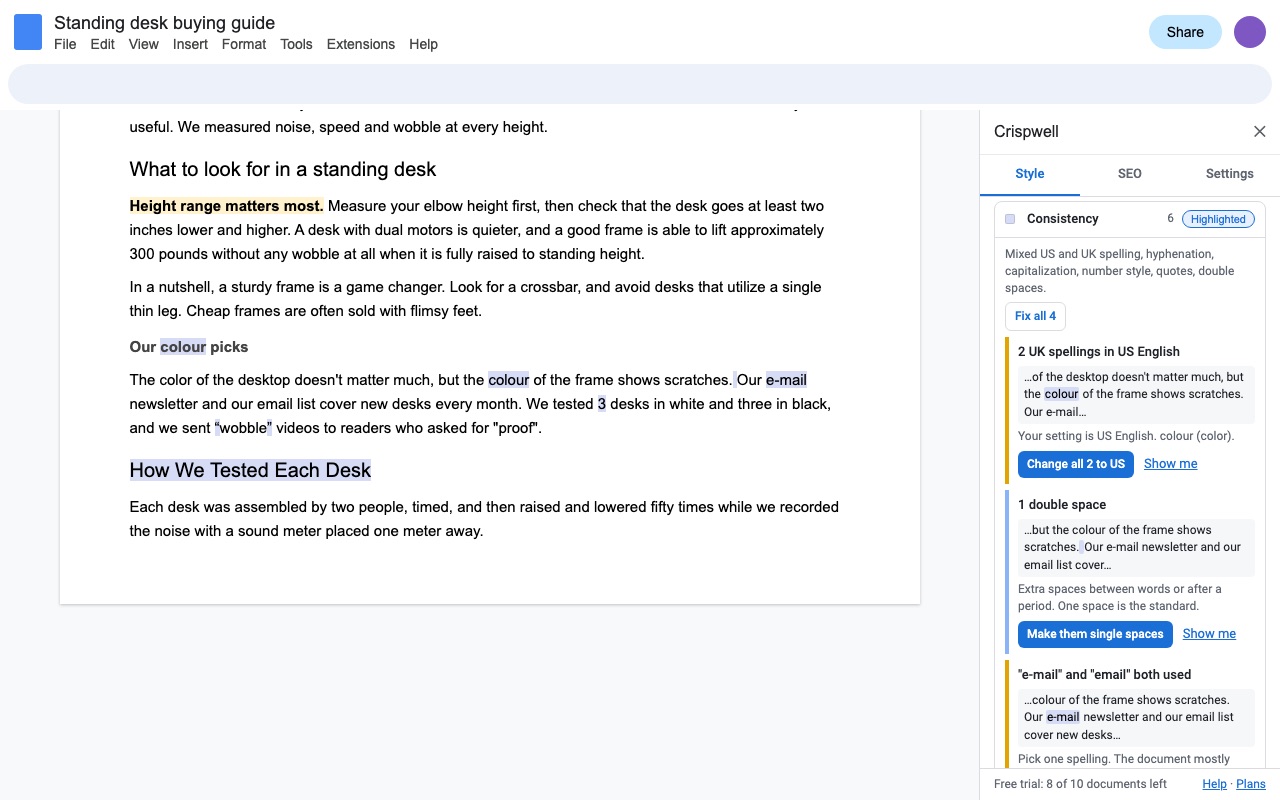
- Consistency checks: US and UK spelling, hyphenation, capitalization, number style, curly and straight quotes, double spaces, heading case
- SEO panel: focus keyphrase in title, intro and subheadings, density, meta description length with a search preview, heading outline, length target
- Your own ignore list and house-style words; audience presets for web, business, academic and young readers
- Only reads the Doc you open it in; no AI, nothing about your writing leaves Google
How Crispwell works
- Install Crispwell from the Google Workspace Marketplace and open a Google Doc.
- Choose Extensions > Crispwell > Check writing style. The sidebar opens on the Style tab.
- Pick Whole document or Selected text, then click Check writing. Crispwell reads the body text of every tab in the Doc, including lists and table cells, and shows one reading grade against your target, then a list of problems by category.
- Click Highlight in the document. Each category gets its own background color in the Doc: long sentences, passive voice, adverbs, filler words, wordy phrases, cliches and the rest. Show me on any item selects that exact text.
- Fix the safe ones. Wordy phrases, redundancies, doubled words, plain-word swaps and consistency problems have a fix button, or Fix all for a whole group. The new words keep the formatting of the ones they replace, and Edit > Undo reverses a fix.
- Click Clear highlights when you're done. Crispwell puts back the background colors your text had before, including highlighting you added yourself.
Who it's for
Content writers with a grade target
Set Audience to General public (grade 8), Business (10), Academic (13) or Young readers (5), or type your own target grade. Sections above your target lists the parts of a long piece that pull the score up, so you rewrite those first instead of the whole draft.
Teams with a house style
US or UK spelling, "e-mail" or "email", "Internet" or "internet", curly or straight quotes: Crispwell flags the minority form and changes every instance at once. Under Settings you can add your own banned words to the weak-word list and an ignore list for terms that are fine in your field.
Bloggers who draft in Docs and publish elsewhere
The SEO check tab checks a focus keyphrase in the title, first paragraph and subheadings, its density, the length of your title and meta description with a search result preview, and the heading outline with words per section.
Teachers and students checking a reading level
Paste in a passage or select one paragraph and Crispwell reports Flesch reading ease and the reading grade for just that selection.
Crispwell or the checks built into Google Docs
Google Docs checks spelling and grammar on every plan. On some paid Workspace editions it also suggests word choice, active voice and conciseness, one suggestion at a time as you type. Docs doesn't give a reading grade, a list of problems you can work through, color highlights by category, consistency checks or SEO checks; Tools > Word count shows words and pages only.
Crispwell doesn't check grammar or spelling, and it never rewrites a sentence for you. Long sentences, passive voice and cliches are flagged and left to you. Keep using Docs' spelling and grammar check alongside it.
Limits
- Headers, footers and footnotes aren't checked. The body of every tab is.
- Checks are rules in English. The grade formulas are built for English text.
- A trial use is one document checked. Checking the same document again within 24 hours, highlighting and fixing are free.
- Crispwell can only open the Doc you start it in.
Crispwell guides
Questions about Crispwell
What does Crispwell do?
Readability, writing style and SEO checks for Google Docs, with in-document highlights and one-click fixes. Crispwell tells you how hard your Google Doc is to read, shows you exactly which sentences and words make it hard, and fixes the safe ones in one click. Every check is a rule you can read. No AI, and nothing about your writing leaves Google.
What does Crispwell work with?
Crispwell works in Google Docs, in any browser.
How much does Crispwell cost?
$30 a month or $120 a year per Google account. $399 once for lifetime access on one Google account. Billed through Stripe. Cancel any time from Plans and billing in the add-on.
Is there a free trial?
Free trial: 10 documents or 7 days, whichever comes first. No card needed.
Where do I install Crispwell?
From the Google Workspace Marketplace. Use the Install button on this page, or search for "Crispwell: Readability & Writing Style Checker" there.
Who makes Crispwell?
Great Work LLC, an independent software company. Email hello@greatwork.company with any question about Crispwell and someone will answer.
Is there a Hemingway-style editor for Google Docs?
Crispwell works in the same spirit inside Docs: it colors hard sentences, passive voice, adverbs and complex words in your document, with a reading grade. It adds fixes for wordy phrases, consistency checks and SEO checks.
How is the reading grade worked out?
It is the average of five formulas: Flesch-Kincaid grade, Gunning fog, SMOG, Coleman-Liau and the Automated Readability Index. Crispwell also shows Flesch reading ease and every formula on its own under All scores and stats.
Can I check only part of a document?
Yes. Select the text, choose Selected text and click Check writing. Each section of a full check also gets its own grade.
Does it change my writing without asking?
No. Nothing changes until you click a fix, and only the safe kinds have one: wordy phrases ("due to the fact that" to "because"), redundancies ("end result" to "result"), doubled words, plain-word swaps such as "utilize" to "use", and consistency fixes.
Does it check grammar?
No. Use Tools > Spelling and grammar in Docs for that.
Will the highlights stay in my Doc?
Only until you click Clear highlights, in the sidebar or under Extensions > Crispwell. Your own highlighting comes back as it was.
Can I stop it flagging a word?
Yes. Click Ignore on any flagged word and it isn't flagged again. Settings also lets you turn whole checks off.
Is my writing sent anywhere?
No. The check runs in Google Apps Script under your own account, and no text is sent to Great Work.
More Google Docs apps
 Fadewell
 Aloudwell
 Highlightwell
 Tidywell