



Clean Copy Copy a Confluence page tree or a whole space with attachments, restrictions and working links. Previews first, resumes on failure.
Listed on the Atlassian Marketplace as “Clean Copy: Copy Spaces and Page Trees for Confluence”
From $9 a month for up to 10 users. Billed by Atlassian, with a 30-day free trial.
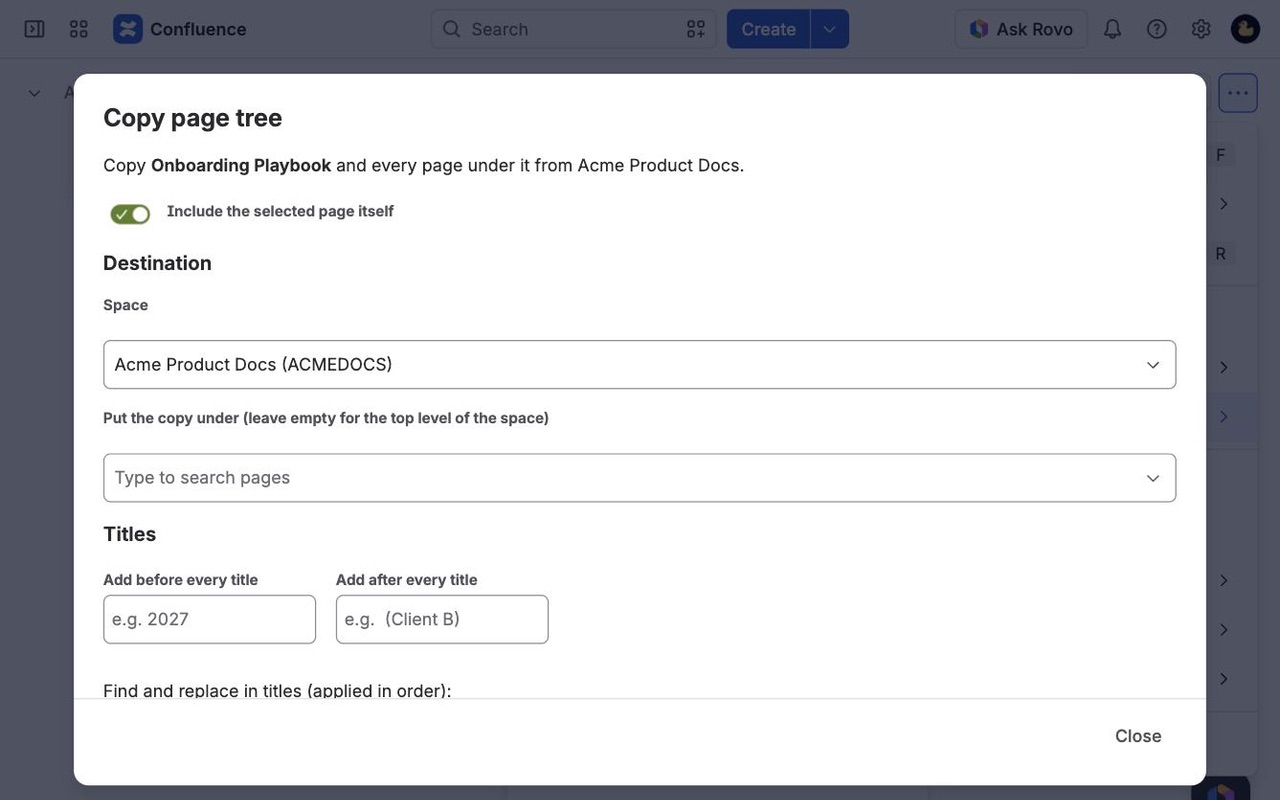
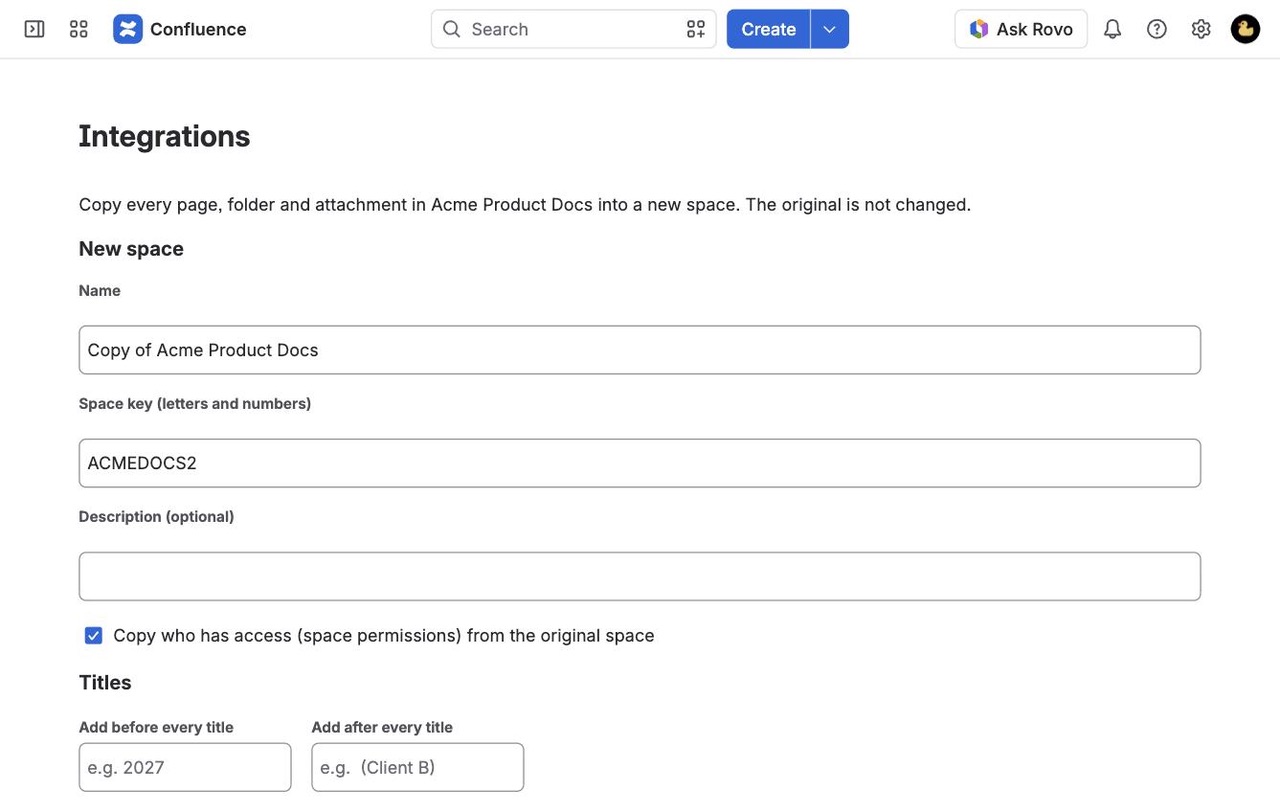
Copy any page tree to any space, or a whole space into a new one. Attachments, labels, properties and page restrictions come along, links are fixed to point at the copies, and big copies run in the background and resume where they stopped.
What you get
Preview every copy before it starts
See page and folder counts, titles that already exist in the destination, and anything Confluence can't copy. Nothing is created until you click Start.
Links point at the new pages
Links, includes, page tree macros and page URLs inside the copy are updated to the copies. Links to pages you didn't copy keep working instead of breaking.
Big copies finish, even after a failure
Copies run in the background and save progress after every page. Rate limits, errors or a cancel? Resume picks up where it stopped, with no duplicates.
How Clean Copy works
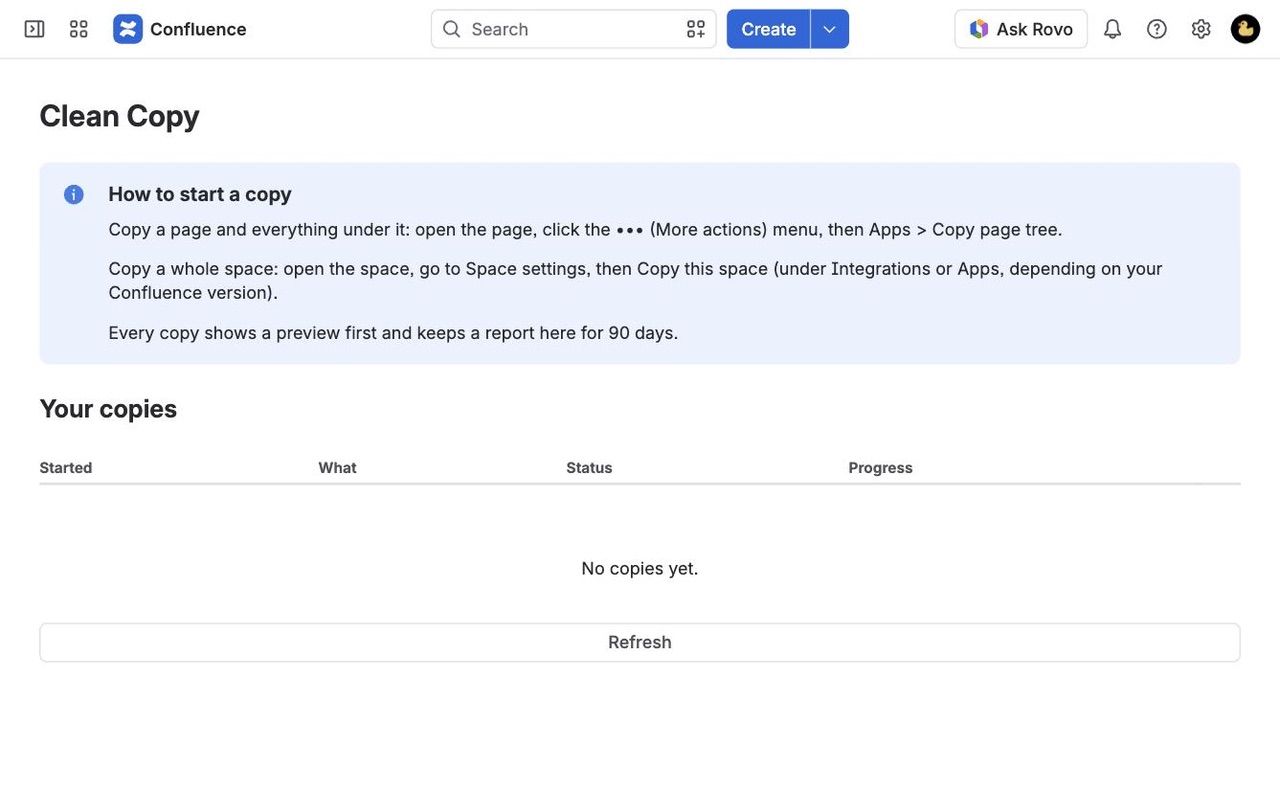
- Start from where you are. To copy part of a space, open its top page, click ••• (More actions) and choose Copy page tree (on some sites it sits under Apps). To copy a whole space, open Space settings and choose Copy this space.
- Pick the destination. For a page tree: any space you can add pages to, and a parent page, or the top level. For a space: a name (it starts as "Copy of" plus the original), a new space key and an optional description.
- Set the titles. Add text before or after every title, such as "2027 " or " (Client B)", and up to six find and replace pairs, applied in order. Tick Also replace in page text to change the body too; code blocks are left alone.
- Choose what comes along. Attachments, labels, page properties, page restrictions and link fixing are all on by default.
- Click Preview copy. You see items by type and what happens to each, the deepest level, titles that already exist in the destination (the first 15, then a count) and anything Confluence can't copy.
- Click Start copy and close the window if you like. Apps > Clean Copy lists every copy you've run, with status, counts and a full report.
Who it's for
Agencies and consultancies with a space per client
Build one space the way you want every client's to look, then copy it for each new client with " (Client B)" added to every title and the client's name replaced in the page text.
Teams starting the next year, release or project
Copy last year's planning tree to a new parent with "2026" replaced by "2027" in titles and text, so the new tree is ready to edit and the old one stays as a record.
Admins reorganizing spaces
Copy a team's section into another space under a new parent. Links between the copied pages point at the copies, and links to pages you didn't copy keep pointing at the originals instead of breaking.
Anyone copying hundreds or thousands of pages
Big copies run in the background and save progress after every page, so a rate limit or an error means a pause, not starting over.
Clean Copy or Confluence's own copy
Confluence Cloud copies a page, and can include its child pages, which suits a small tree in the same space. It has no built-in way to copy a whole space. And copied pages keep their links as page titles, so after a copy into another space those links look for pages that aren't there (a known Confluence issue, CONFCLOUD-37772).
Clean Copy adds whole-space copies with the space's access settings, link fixing across the copied pages, title rules, a preview of clashes, and copies that resume. Some content still can't be copied by any app: whiteboards, databases and smart link embeds are listed in the report, and the pages under them are copied under the nearest copied parent.
Limits and requirements
- Confluence Cloud. You need permission to add pages in the destination; a whole-space copy also needs permission to create spaces.
- Not copied: comments, page history, and space settings other than access (theme, templates, space shortcuts). Blog posts, when you turn them on, copy their text and labels but not attachments.
- Folders at the root of a space that aren't under any page aren't reached by a whole-space copy.
- Copies run as the app in the background, so Confluence shows Clean Copy as the creator of copied pages. The report records who started each copy.
- Clean Copy runs on Atlassian's Forge platform and sends nothing outside Atlassian. Job data (page ids, titles and who started the copy) is deleted after 90 days.
Clean Copy guides
Questions about Clean Copy
What does Clean Copy do?
Copy a Confluence page tree or a whole space with attachments, restrictions and working links. Previews first, resumes on failure. Copy any page tree to any space, or a whole space into a new one. Attachments, labels, properties and page restrictions come along, links are fixed to point at the copies, and big copies run in the background and resume where they stopped.
What does Clean Copy work with?
Clean Copy works in Confluence Cloud.
How much does Clean Copy cost?
$9 a month for up to 10 users, or $90 a year. From 11 users: $0.90 per user a month, with lower rates for larger sites.
Is there a free trial?
Billed by Atlassian, with a 30-day free trial.
Where do I install Clean Copy?
From the Atlassian Marketplace. Use the Install button on this page, or search for "Clean Copy: Copy Spaces and Page Trees for Confluence" there.
My last copy app failed halfway. What happens here?
Progress is saved after every page. Rate limits, errors and restarts are retried automatically, and a stuck copy can be resumed. Items that were half-created during an interruption are detected and reused, so you never get duplicates.
Will internal links and macros break?
No. Links, includes, excerpt includes, children and page tree macros and page URLs are pointed at the copies. Links to pages outside the copy keep pointing at the originals.
Are permissions copied?
Page restrictions are copied with each page. A whole-space copy can also copy who has access to the space.
Can I check before copying?
Yes. The preview shows counts, title clashes and anything that can't be copied before anything is created.
Do pages keep their order? Is there a size limit?
Pages are created in the same order as the source at every level, and there is no page limit.
Can I skip or overwrite pages that already exist?
You can rename, skip, or stop. Clean Copy never overwrites an existing page.
Who makes Clean Copy?
Great Work LLC, an independent software company. Email hello@greatwork.company with any question about Clean Copy and someone will answer.
Can I copy a page tree into the same space?
Yes, but titles must be unique within a space, so every page would clash with its original. Add text before or after every title, or use find and replace, and the preview shows whether anything still clashes.
Are comments and page history copied?
No. Each copy holds the current version of each page with its attachments, labels, properties and restrictions.
Why was a page skipped with "The app cannot see this item"?
The source page has view restrictions that don't include the app. Add Clean Copy to the page's restrictions, then click Retry skipped and failed. The copy keeps the same restrictions.
Can I get a list of everything that was copied?
Yes. Show full report (CSV) in the copy's Details gives one row per item with where it went.
Does a copied space keep its homepage?
Yes. The original homepage content goes onto the new space's homepage, and the whole tree follows in the same order.
What happens if our license lapses?
Previews and new copies are turned off until you renew, and your existing copies and their reports stay readable. Copied pages are normal Confluence content and stay after you uninstall.
More Confluence apps
 Dibs
 Chartmere
 Lanemark
 Sprigwell