



Refwell Citations, bibliography and APA/MLA paper formatting for Google Docs: cite by DOI, ISBN or URL in six styles
Listed on the Google Workspace Marketplace as “Refwell: Citations, Bibliography & APA/MLA Paper Formatter”
$12.95 a month or $79.95 a year per Google account. Free trial: 20 uses or 14 days, whichever comes first. No card needed.
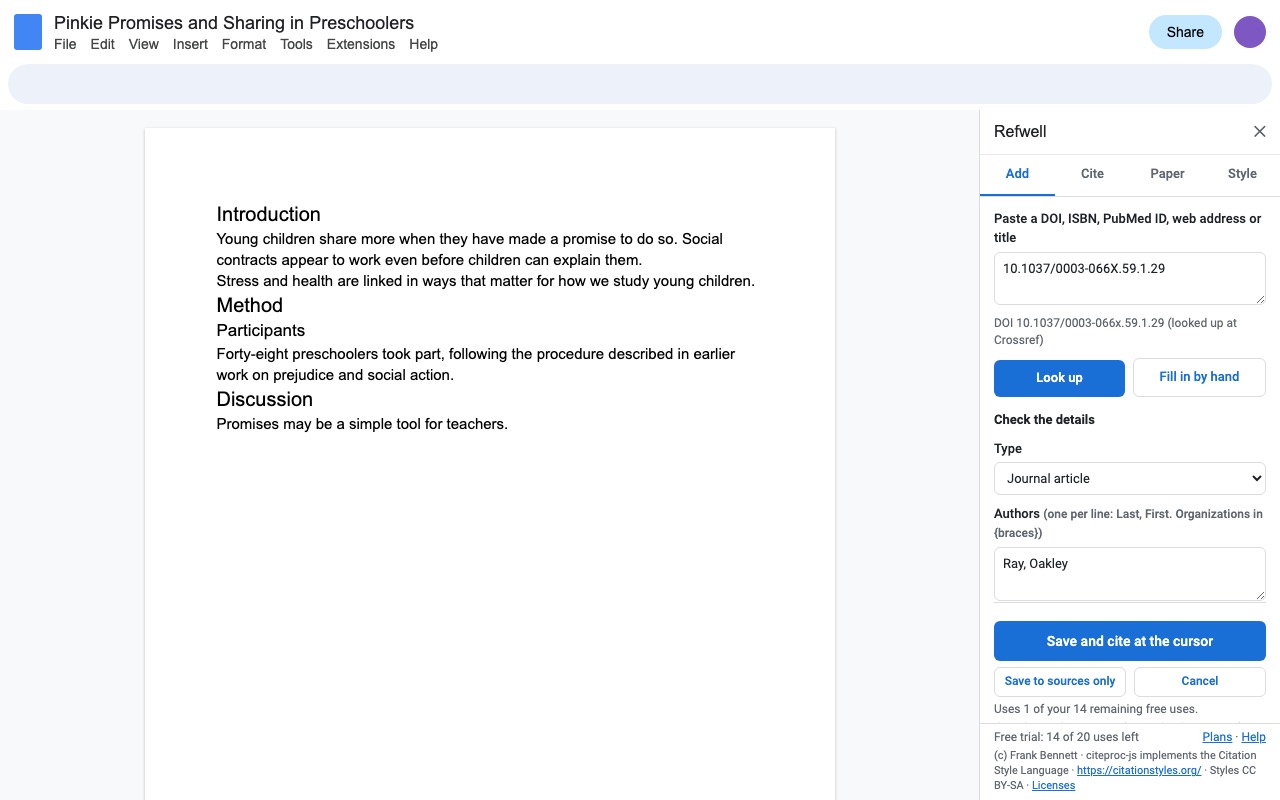
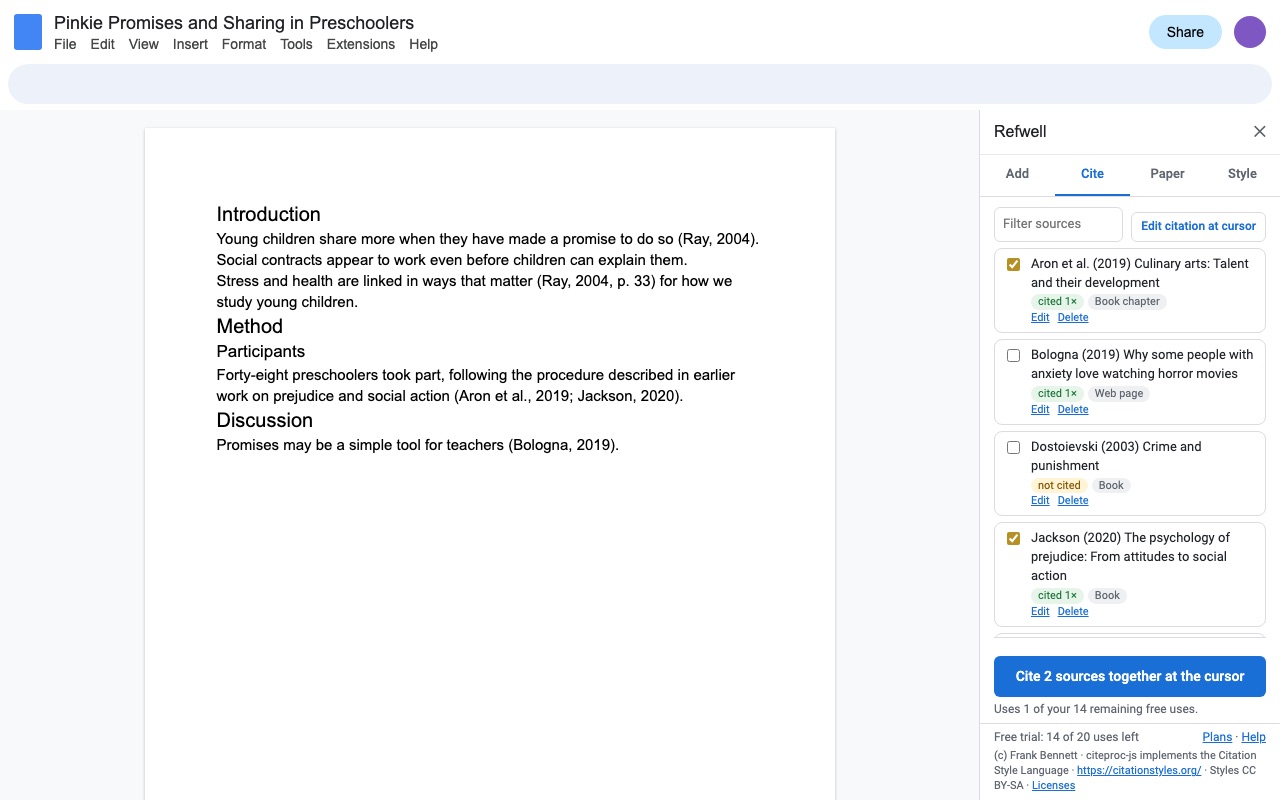
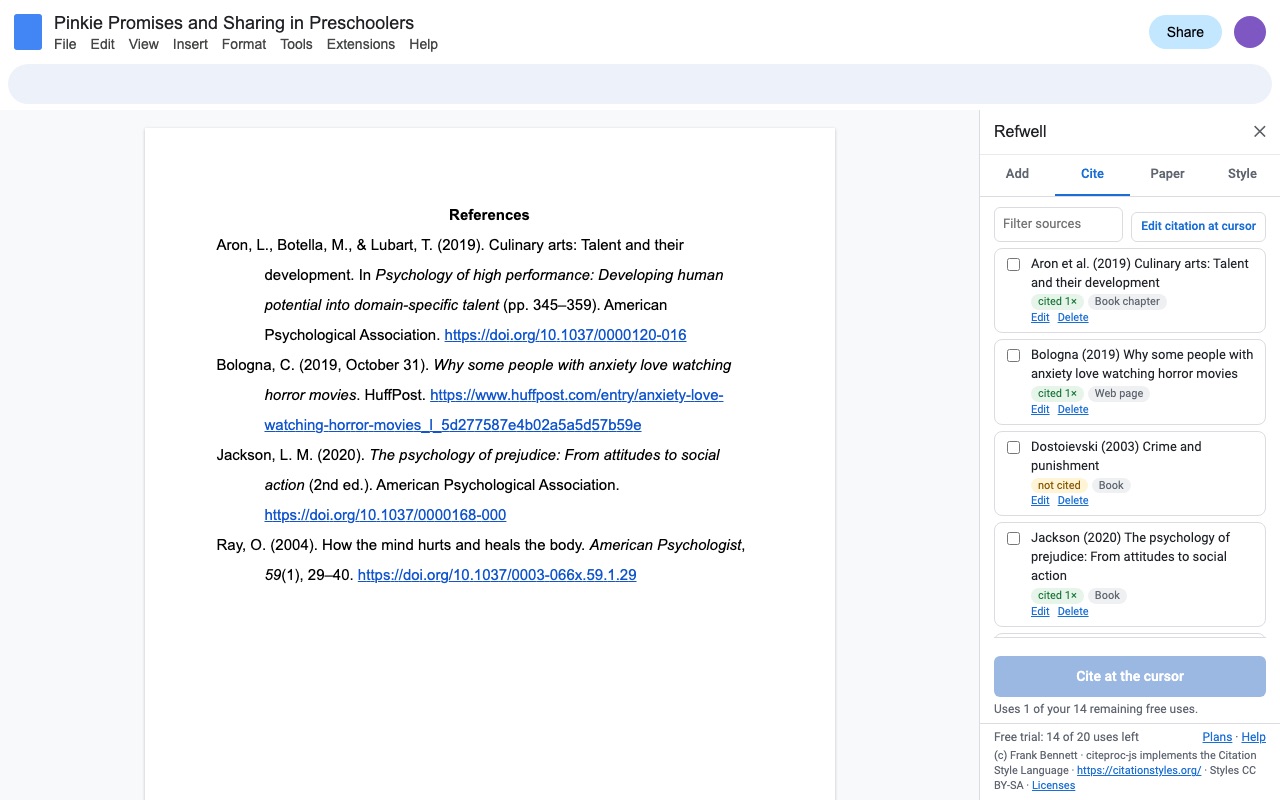
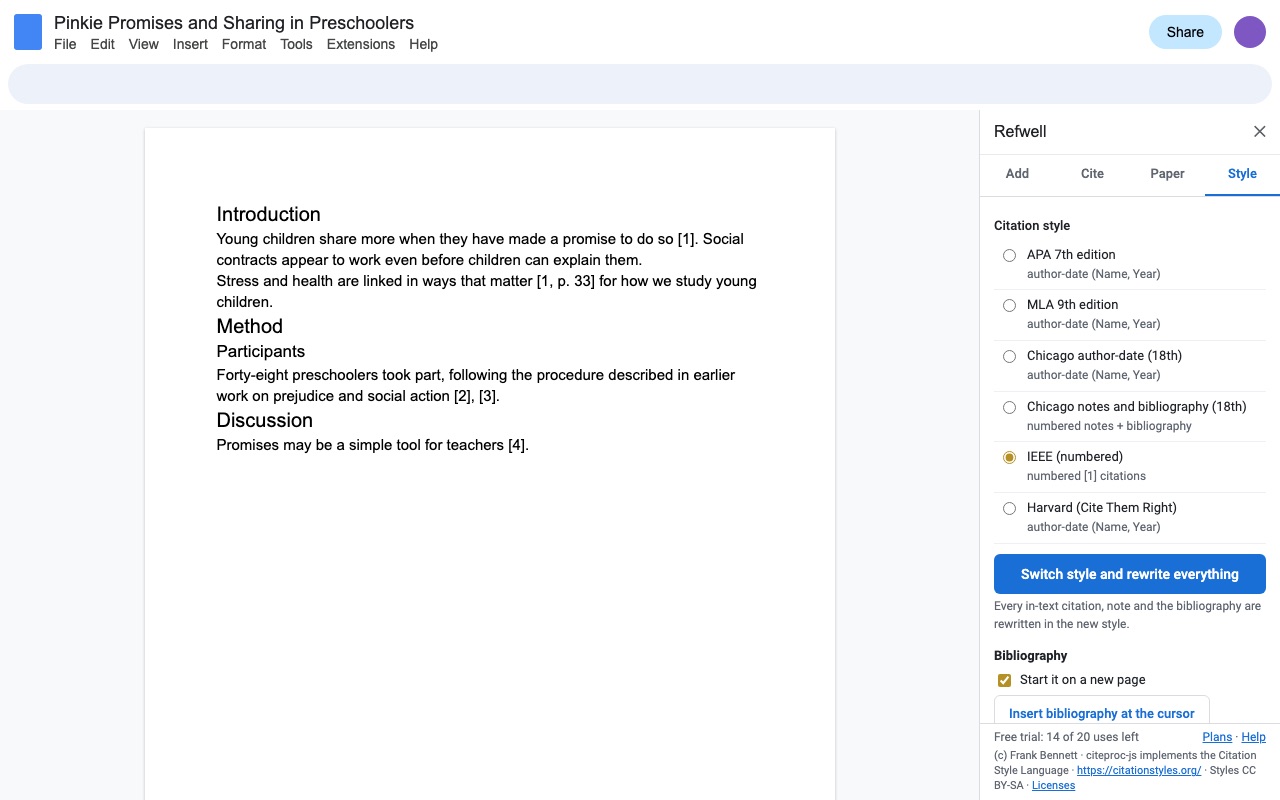
Refwell adds citations to Google Docs the fast way: paste a DOI, an ISBN, a PubMed ID, a web address or an article's title, check the details, and the citation goes in at your cursor. The bibliography fills itself in and stays right as you write.
What you get
- Cite by DOI, ISBN, PubMed ID, web address or title: details come from Crossref, DataCite, Open Library and NCBI, with a form to check or finish them
- APA 7, MLA 9, Chicago author-date and notes-bibliography (18th ed.), IEEE and Harvard, from the official CSL styles
- In-text citations with page numbers, narrative citations (Grady et al. (2019)), numbered [1] citations and Chicago notes
- The bibliography rewrites itself in place: renumbering, 2019a/2019b, hanging indents, double spacing
- Switch style and every citation, note and the bibliography are rewritten
- Paper setup: APA student and professional title pages with running head, MLA heading, Turabian title page, 1 inch margins, double spacing, APA heading levels
- Sources live in the Doc, so a shared Doc keeps its list; import and export BibTeX and RIS
How Refwell works
- Open Extensions > Refwell > Add a source or cite. The sidebar has four tabs: Add, Cite, Paper and Style.
- Paste what you have into the Add tab (a DOI, an ISBN, a PubMed ID, an arXiv ID, a publisher link with a DOI in it, or an article's title) and click Look up. Several at once works too, one per line, up to 25 lines.
- Check the details. Refwell fills in a form with the authors, title, journal, volume, pages and the rest. Fix anything that's off, then click Save and cite at the cursor or Save to sources only.
- Cite from the Cite tab. Tick one source or several, add a page or another locator, tick Name in the sentence for a narrative citation like Grady et al. (2019), and click Cite at the cursor.
- Insert the bibliography. On the Style tab, click Insert bibliography at the cursor. It's titled for the style (References, Works Cited, Bibliography or Reference list), sorted or numbered, with hanging indents.
- Keep writing. Each new citation updates the bibliography. If you delete a citation or edit around one, click Refresh citations and bibliography.
Who it's for
Students writing a paper due this week
Cite as you write in APA 7 or MLA 9, get the References or Works Cited page without typing a single entry, and set up the title page and header from the Paper tab.
Graduate students and researchers
Bring your list over from Zotero, Mendeley, EndNote or Google Scholar by pasting a BibTeX or RIS export into Import into this Doc's sources. Cite with page numbers, and export the Doc's sources back out as BibTeX or RIS when the draft moves to LaTeX or another tool.
Engineering and computer science students
IEEE numbers citations [1], [2], [3] in the order you first cite them. Cite a new source early in the paper and every number after it shifts, in the text and in the reference list.
Group projects in a shared Doc
The source list lives in the Doc itself, so anyone on the team who opens Refwell sees the same sources and cites from them.
Refwell or Tools > Citations in Google Docs
Google Docs has a citation tool of its own under Tools > Citations. You type each source's details by hand, and it covers APA, MLA and Chicago author-date. There's no lookup by DOI, ISBN or PubMed ID, no numbered IEEE style, no Chicago notes, no Harvard, no BibTeX or RIS import, and nothing for the title page or header.
Refwell fills those gaps. If your paper has three web sources in MLA and you don't mind typing them, the built-in tool will do. If you have twenty journal articles with DOIs, need IEEE or Chicago notes, or your instructor asks you to switch from APA to MLA the night before, that's where Refwell saves the evening: Switch style and rewrite everything rewrites every citation, note and the bibliography at once.
Limits and requirements
- Google Docs in a browser. Refwell only asks for access to the Doc you open it in.
- Lookups come from Crossref and DataCite (DOIs), Open Library (ISBNs) and NCBI (PubMed IDs). A web address without a DOI isn't fetched: Refwell opens the form with the address and today's access date for you to fill in the author and title.
- Citations go in the body of the Doc, not in headers, footers or footnotes.
- Chicago notes-bibliography puts the notes in a Notes section as endnotes, because add-ons can't create Google Docs footnotes. Chicago allows endnotes.
- Add-ons can't insert page-number fields. After Format paper, Refwell tells you the one step to do yourself with Insert > Page numbers.
- Small capitals print as regular capitals.
Refwell guides
Questions about Refwell
What does Refwell do?
Citations, bibliography and APA/MLA paper formatting for Google Docs: cite by DOI, ISBN or URL in six styles. Refwell adds citations to Google Docs the fast way: paste a DOI, an ISBN, a PubMed ID, a web address or an article's title, check the details, and the citation goes in at your cursor. The bibliography fills itself in and stays right as you write.
What does Refwell work with?
Refwell works in Google Docs, in any browser.
How much does Refwell cost?
$12.95 a month or $79.95 a year per Google account. Billed through Stripe. Cancel any time from Plans and billing in the add-on.
Is there a free trial?
Free trial: 20 uses or 14 days, whichever comes first. No card needed.
Where do I install Refwell?
From the Google Workspace Marketplace. Use the Install button on this page, or search for "Refwell: Citations, Bibliography & APA/MLA Paper Formatter" there.
Who makes Refwell?
Great Work LLC, an independent software company. Email hello@greatwork.company with any question about Refwell and someone will answer.
Is there a reference manager for Google Docs?
Refwell keeps a source list inside each Google Doc, cites from it and builds the bibliography. It doesn't need a desktop app or a separate account, and it imports and exports BibTeX and RIS for the reference manager you already use.
Can I cite a DOI in Google Docs?
Yes. Paste the DOI (or a publisher link that contains it) on the Add tab and click Look up. The details come from Crossref, or DataCite for DOIs Crossref doesn't have, such as Zenodo and arXiv.
Which citation styles does Refwell support?
APA 7th edition, MLA 9th edition, Chicago author-date and Chicago notes and bibliography (18th edition), IEEE (numbered), and Harvard (Cite Them Right). They come from the official Citation Style Language styles.
Can I switch my paper from APA to MLA?
Yes. Pick the new style on the Style tab and click Switch style and rewrite everything. Every in-text citation, note and the bibliography is rewritten, and the bibliography title changes with it.
Can I import my sources from Zotero or Mendeley?
Yes. Export BibTeX or RIS from Zotero, Mendeley, EndNote or Google Scholar, paste it on the Style tab, and click Import into this Doc's sources.
What counts as a use in the free trial?
Inserting a citation, inserting the bibliography, formatting a paper, or switching the style. Lookups, the source list, Refresh, editing or removing a citation, import and export never count and stay free after the trial ends.
What happens to my citations if I stop using Refwell?
They're ordinary text in your Doc, and so is the bibliography. Nothing disappears, and a Word or PDF download keeps them as text.
Does Refwell format footnotes for Chicago style?
It writes Chicago notes as numbered endnotes in a Notes section, with short notes after the first citation of a source. It can't create Google Docs footnotes.
More Google Docs apps
 Remarkwell
 Iconwell
 Syntaxwell
 Highlightwell