



Highlightwell Labeled highlighters for Google Docs, and every highlight collected into a Doc or Sheet with links back
Listed on the Google Workspace Marketplace as “Highlightwell: Highlighter Labels & Export for Docs”
$2.99 a month or $24 a year per Google account. Free trial: 10 exports or 14 days, whichever comes first. No card needed.
Highlightwell gives your Google Docs highlight colors a meaning, and pulls every highlighted passage out for you.
What you get
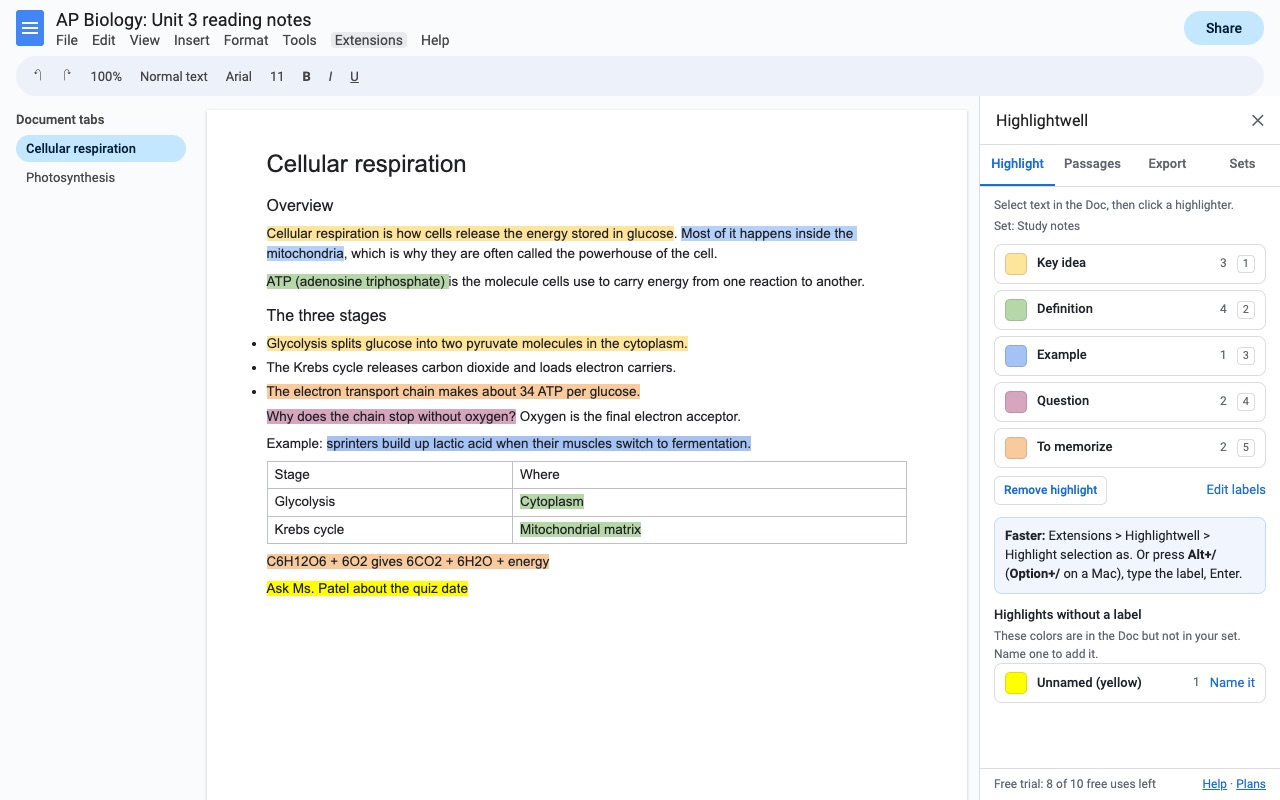
- Highlighters with labels (Key idea, Evidence, Question...): one click in the sidebar, or Alt+/ and the label name
- Ready-made sets for study notes, research, interview coding and essay feedback; edit them or make your own (up to 9 labels)
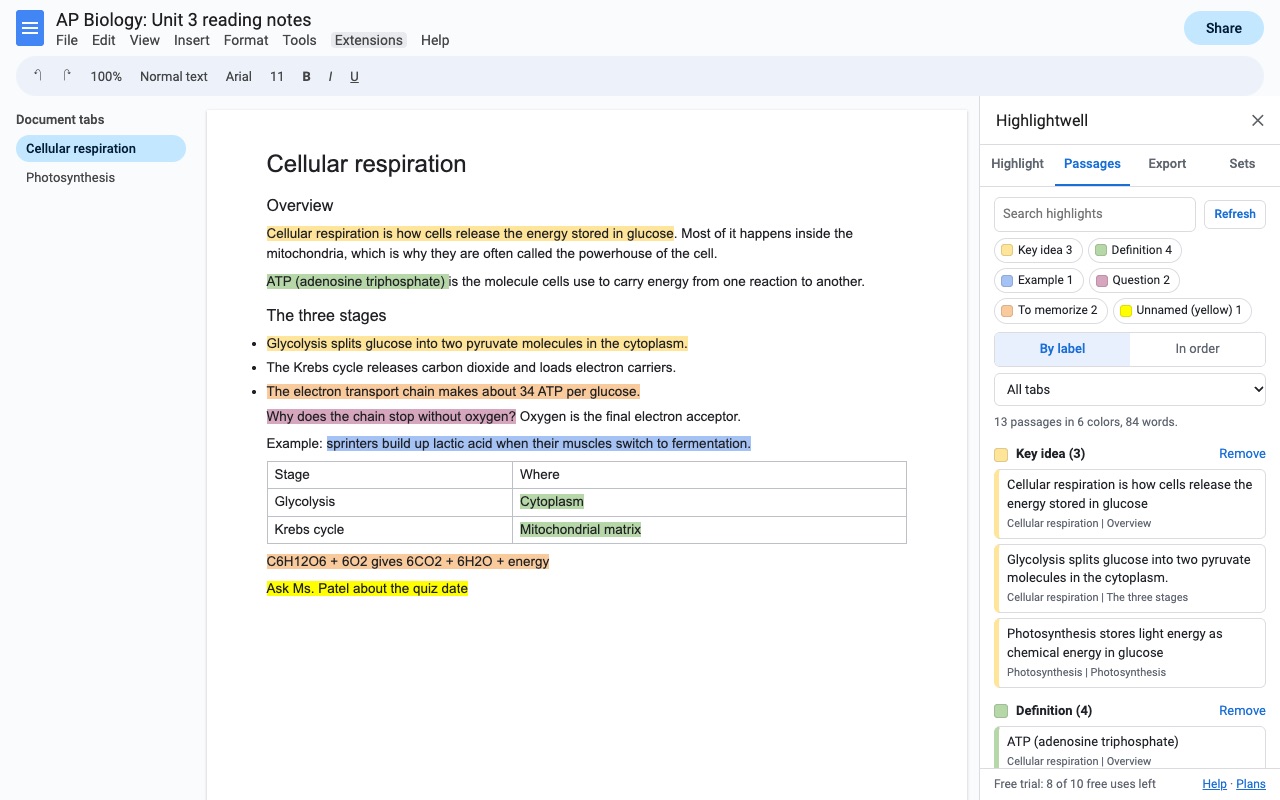
- Every highlight listed by label, across document tabs, lists and tables; click one to jump to it
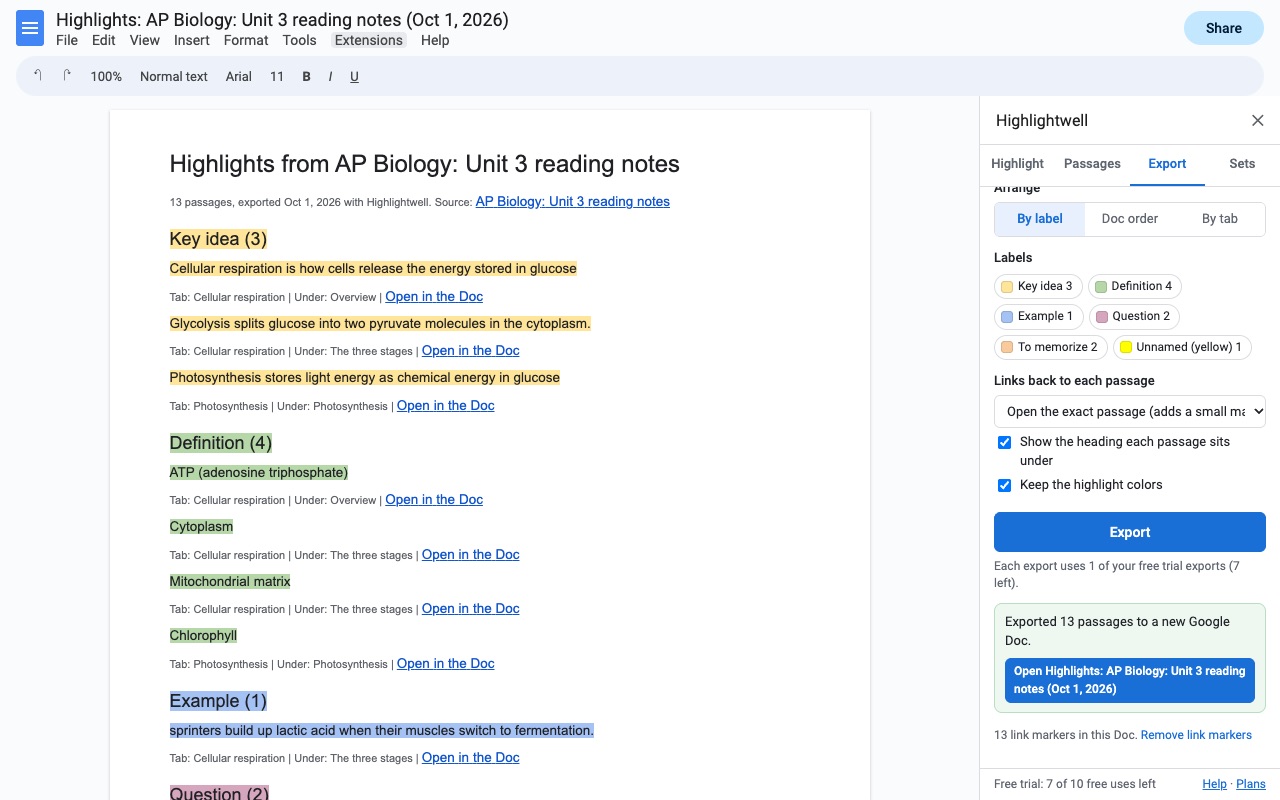
- Export to a new Google Doc grouped by label, or to a Google Sheet with a Summary tab that counts passages by label
- Keep adding highlights from many Docs to one Sheet; or copy them as Markdown or plain text
- Links back to the exact passage in the Doc
- Share a set as a code, or attach it to a Doc so a whole class or team uses the same colors
How Highlightwell works
- Open Extensions > Highlightwell > Open highlighters. The sidebar has four tabs: Highlight, Passages, Export and Sets.
- Pick a highlighter set on the Sets tab. Study notes gives you Key idea, Definition, Example, Question and To memorize. Research and evidence, Interview coding and Essay feedback each come with their own labels, and you can edit any of them into your own set.
- Select text and click a highlighter. The selection can be part of a line, several paragraphs, list items or table cells. From the keyboard, press Alt+/ (Option+/ on a Mac), type the label name, and press Enter.
- Open the Passages tab to see everything you've highlighted, grouped by label or in reading order, with the heading each passage sits under. Search, filter by label or tab, and click a passage to jump to it.
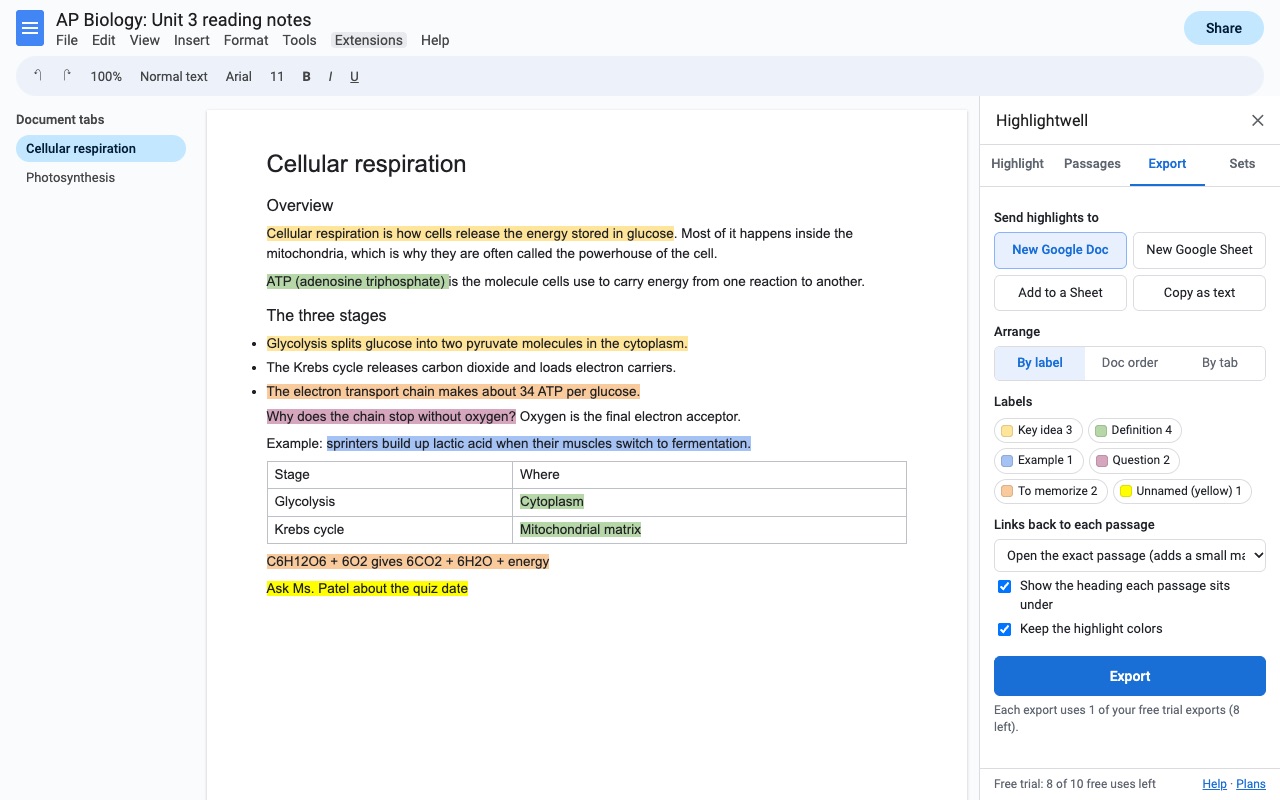
- Open the Export tab and pick where the highlights go: New Google Doc, New Google Sheet, Add to a Sheet, or Copy as text (Markdown or plain text).
- Choose how links work. "Open the exact passage" adds a small bookmark at each highlight, "Open the Doc (and tab)" links to the document, and "No links" leaves them out. Then click Export.
Who it's for
Students turning readings into study notes
Highlight a chapter with the Study notes set, then export a new Doc grouped by label. All the definitions sit together, all the questions sit together, and each one links back to the page it came from.
Graduate students and researchers coding interviews
Use the Interview coding set (Motivation, Barrier, Experience, Suggestion, Emotion, Memorable quote) on each transcript, and send every transcript to the same Sheet with Add to a Sheet. The Summary tab counts passages and words per label across all of them.
Teachers giving essay feedback
The Essay feedback set has Thesis, Strong evidence, Analysis, Needs a citation, Grammar or spelling, and Unclear. Share the set as a code, or attach it to a Doc with Use this set for everyone who opens Highlightwell in this Doc, so every student and grader reads the colors the same way.
Anyone gathering evidence for a report
The Research and evidence set separates Main claim, Evidence, Quote, Counterpoint, Statistic and To check. Export by label and the quotes and statistics you need are already sorted.
Highlightwell or the highlight button in Google Docs
The highlight color button in the Docs toolbar paints text, and that's where it stops. A color has no name, so yellow can mean one thing in September and another in November. There's no keyboard shortcut for it, and there's no way to gather the highlighted passages into a list.
Highlightwell uses those same highlight colors, so anything you mark stays an ordinary Docs highlight even if you stop using the add-on. It finds highlights you made before you installed it, too: colors that aren't in your set show up under "Highlights without a label", and you can name one in a click. If you change a label's color later, it offers to recolor the passages that still use the old one.
If you only highlight a few lines and never need them again, the toolbar button is enough. Highlightwell is for documents where you'll come back to the highlights: to study from, to count, or to hand to someone else.
Limits and requirements
- Google Docs in a browser. Highlightwell reads the Doc you open it in and the files it creates for you, and nothing else in your Drive.
- It collects highlights from the body of every document tab, including lists and tables. Highlights in headers, footers and footnotes aren't collected.
- A set holds up to 9 highlighters, with labels up to 40 characters, and you can keep up to 20 sets of your own.
- The "Highlight selection as" menu names come from the set that was active when the Doc opened. After you switch sets, reload the Doc to rename them.
- Highlighting and browsing passages don't use up the trial. Each export (a new Doc, a new Sheet, adding to a Sheet, or copying as text) counts as one, however many highlights it holds.
Highlightwell guides
Questions about Highlightwell
What does Highlightwell do?
Labeled highlighters for Google Docs, and every highlight collected into a Doc or Sheet with links back. Highlightwell gives your Google Docs highlight colors a meaning, and pulls every highlighted passage out for you.
What does Highlightwell work with?
Highlightwell works in Google Docs, in any browser.
How much does Highlightwell cost?
$2.99 a month or $24 a year per Google account. $49 once for lifetime access on one Google account. Billed through Stripe. Cancel any time from Plans and billing in the add-on.
Is there a free trial?
Free trial: 10 exports or 14 days, whichever comes first. No card needed.
Where do I install Highlightwell?
From the Google Workspace Marketplace. Use the Install button on this page, or search for "Highlightwell: Highlighter Labels & Export for Docs" there.
Who makes Highlightwell?
Great Work LLC, an independent software company. Email hello@greatwork.company with any question about Highlightwell and someone will answer.
Is there a keyboard shortcut to highlight in Google Docs?
Docs doesn't have one for highlighting. With Highlightwell installed, press Alt+/ (Option+/ on a Mac), type the highlighter's label, such as "Key idea", and press Enter. The same highlighters are listed under Extensions > Highlightwell > Highlight selection as.
Can I export all highlighted text from a Google Doc?
Yes. On the Export tab, choose New Google Doc for the passages grouped by label, by tab or in Doc order, or New Google Sheet for one row per passage. Copy as text gives you Markdown or plain text for anywhere else.
What columns does the Google Sheet export have?
Label, Color, Passage, Words, Tab, Under heading, Order in Doc, Link, Source Doc and Exported. A second tab called Summary counts the passages and words for each label.
Does it find highlights I made before installing it?
Yes. Every highlight color in the Doc is read. Colors that match your set get its labels, and the others are listed under "Highlights without a label" until you name them.
Can a whole class use the same highlighter colors?
Yes. Click Share this set to get a code that others paste into Add a set from a code, or tick Use this set for everyone who opens Highlightwell in this Doc on the Sets tab.
Will the links still work if I edit the Doc?
"Open the exact passage" places a small bookmark at each highlight, and the link opens the Doc at that bookmark, in the right tab. If you edit the text a lot, export again for fresh links. Remove link markers on the Export tab deletes every marker Highlightwell added.
What happens to my highlights if I stop paying?
They stay in the Doc as normal Google Docs highlights. The exported Docs and Sheets are ordinary files in your Drive and stay there too.
Does Highlightwell work in Google Slides or Sheets?
No. It highlights and collects passages in Google Docs. Exports can go into a Google Sheet, but it doesn't highlight inside Sheets or Slides.
More Google Docs apps
 Iconwell
 Fadewell
 Refwell
 Crispwell