



Quizferry Build a Google Forms quiz from a question bank sheet, a Doc or pasted text
$9.99 a month or $99 a year per Google account. Free trial: 5 builds or 14 days, whichever comes first. No card needed.
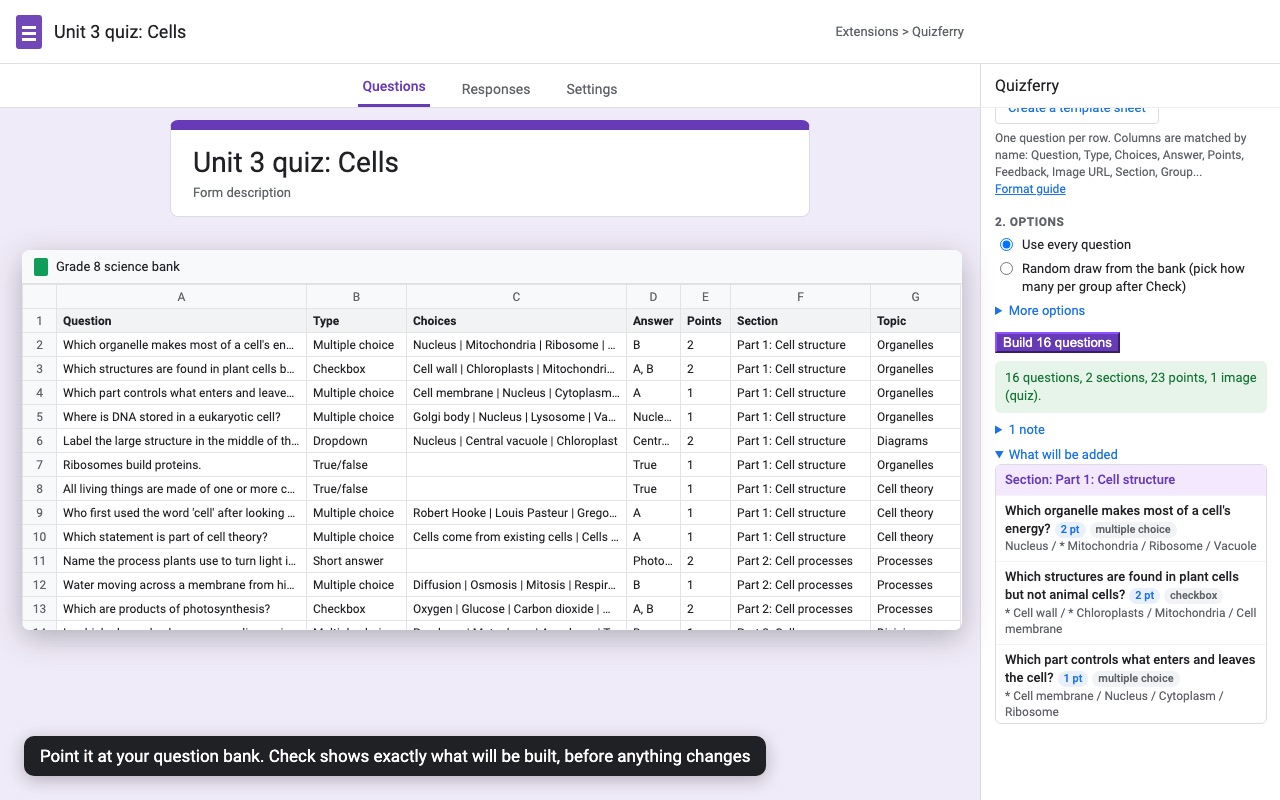
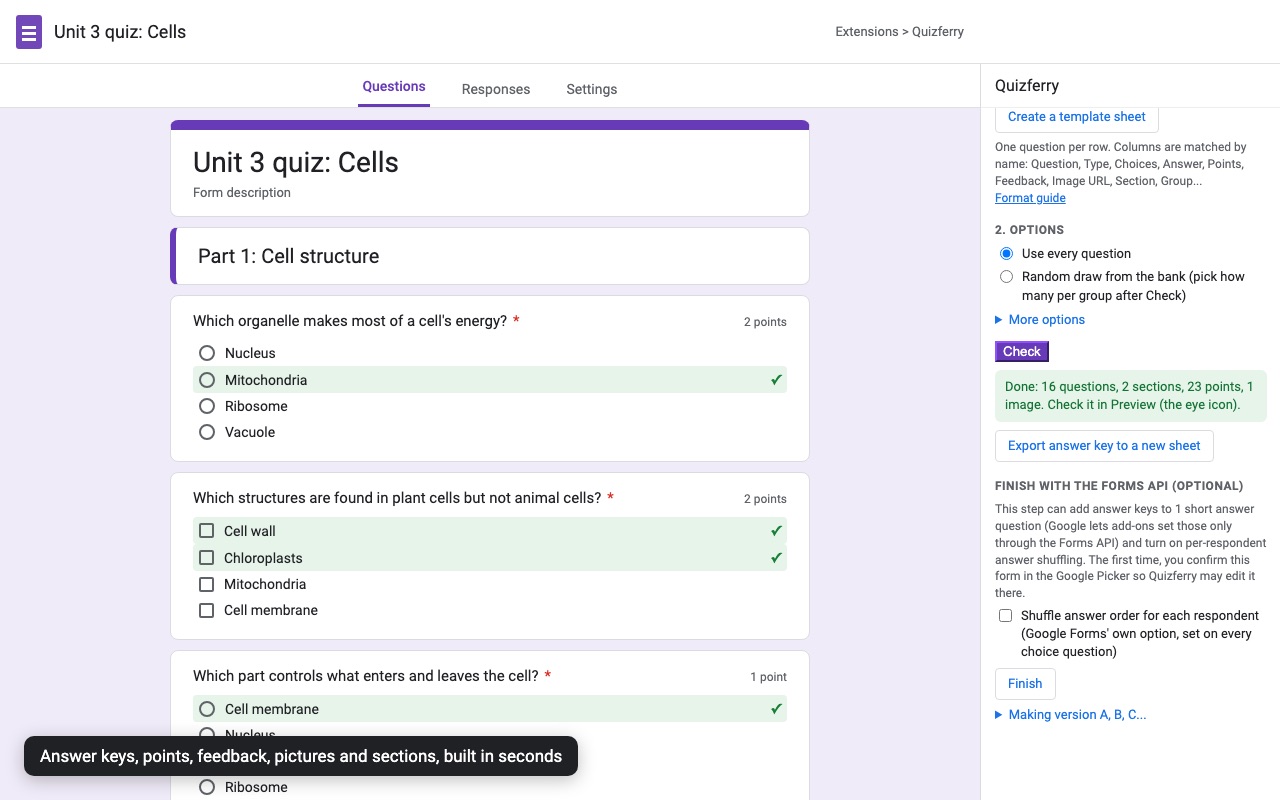
Quizferry builds your Google Form from the questions you already have: a question bank in Google Sheets, a test written in Google Docs, or text you paste in. Open a form (a blank one is fine), choose Extensions > Quizferry, pick your bank, click Check, then Build.
What you get
- Question bank sheets, Google Docs or pasted text (Aiken works too)
- Answer keys, points, correct and incorrect feedback, pictures and sections
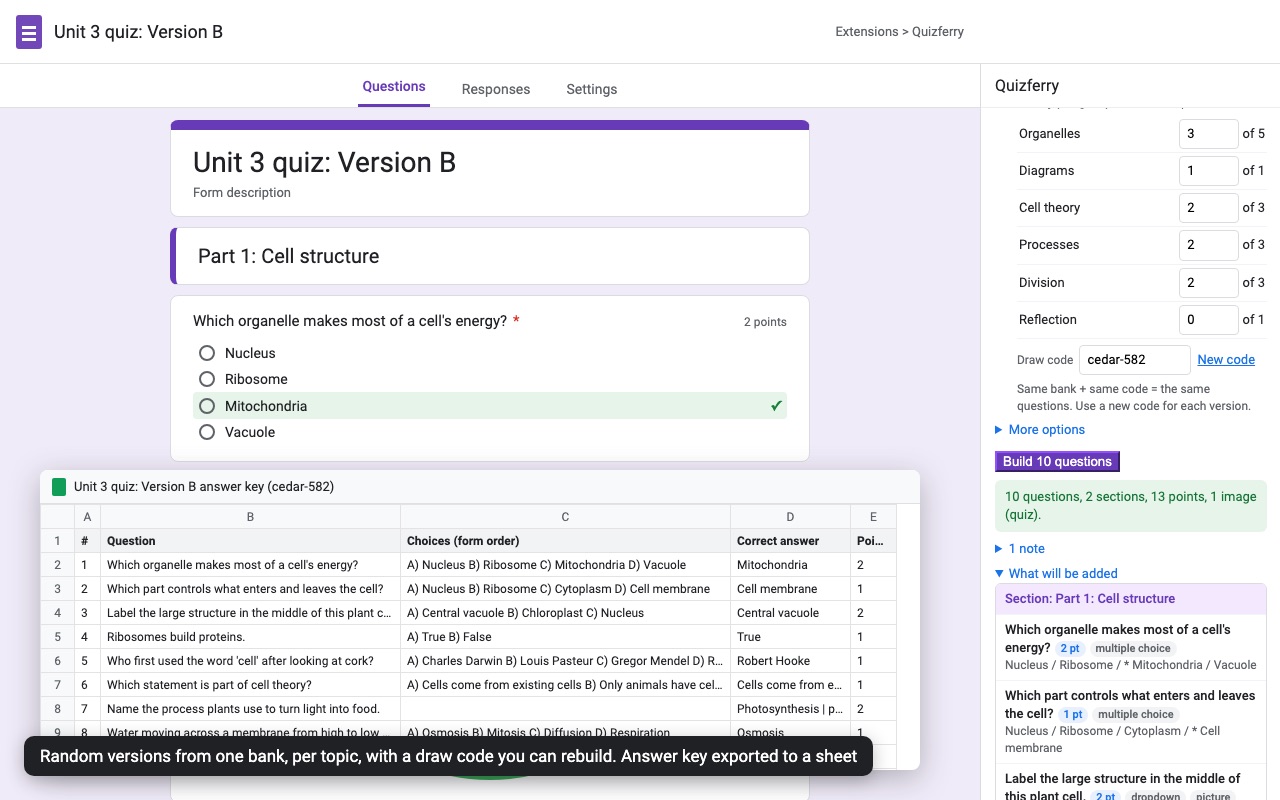
- Random draws per topic with a repeatable draw code, for versions A, B, C
- Check first: every problem listed by row before anything changes
- Rebuild replaces only what Quizferry added; your own questions stay
- Short answer keys and per-student answer shuffling
How Quizferry works
- Open the form you want to fill. A new blank one is fine (type forms.new in the address bar). Quizferry builds into the form it's opened in and never creates forms elsewhere in your Drive.
- Open Extensions > Quizferry > Build from a question bank. The sidebar has two parts: 1. Your questions and 2. Options.
- Choose where the questions are. Sheet with Pick a spreadsheet (then the Tab), Doc with Pick a Google Doc, or Paste. Recent... reopens the last banks you used, and Create a template sheet makes a new spreadsheet with every column filled in by example.
- Set the options. Turn grading on with Quiz (or leave it on when the bank has answers or points), set the default Points for graded questions without a Points value, and choose Use every question or Random draw from the bank.
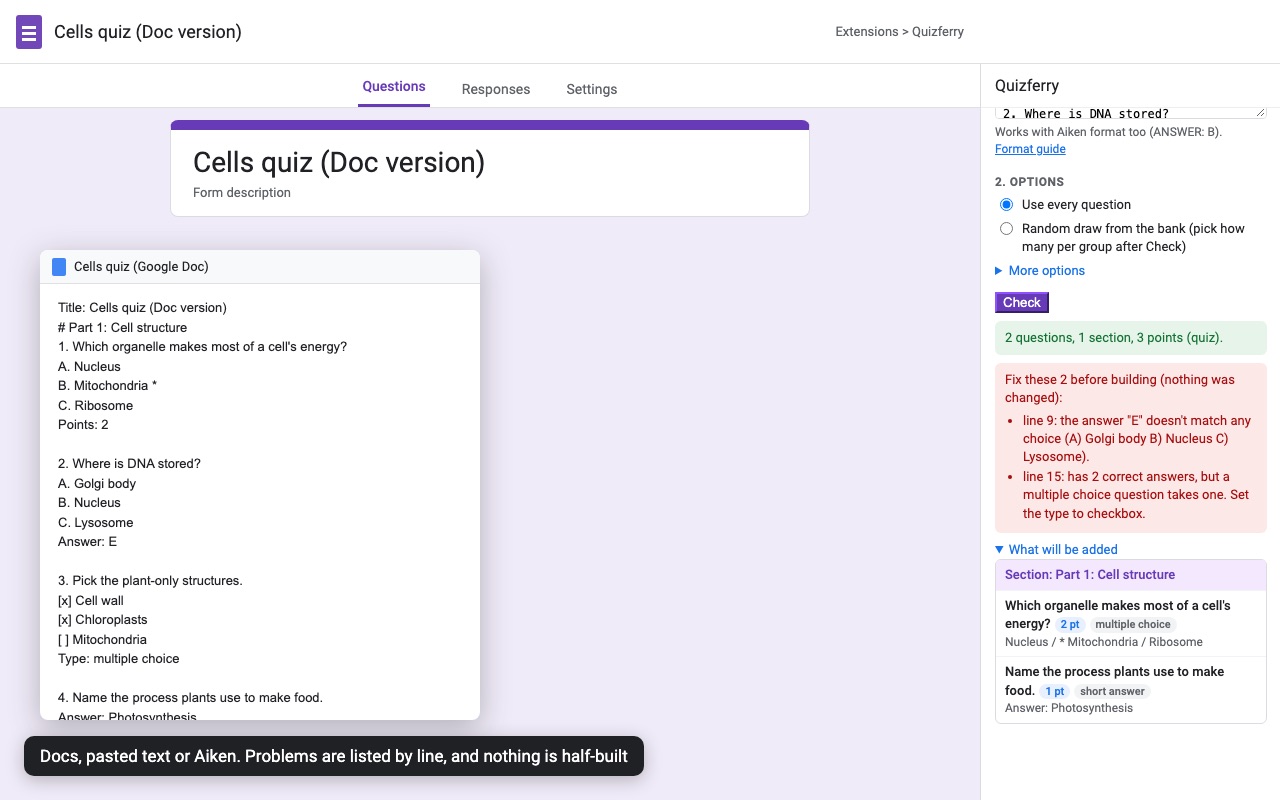
- Click Check. Quizferry reads the bank and lists every problem by row or line, such as an answer that isn't one of the choices or a picture link that won't load. Under What will be added you see the question count, sections and points. Nothing in the form changes yet, and Check is always free.
- Click Build. The questions, sections, text blocks and pictures go into the form with their answer keys, points and feedback.
- Finish (optional). Export answer key to a new sheet saves the questions and answers in form order. Finish with the Forms API sets the two things add-ons can't set any other way: answer keys on short answer questions and answer shuffling for each respondent.
Who it's for
Teachers with a test in a Word file or a Doc
A unit test typed as numbered questions with lettered choices goes in as it is. Mark the right answer with a *, bold it, or add an Answer: line, and Quizferry turns it into a graded multiple choice question. Headings in the Doc become sections.
Departments that keep a shared question bank
A spreadsheet with one question per row, a Topic column and a Points column becomes a quiz in one build. Next term, fix three rows in the sheet and rebuild: Replace the questions Quizferry built here before swaps out only what Quizferry added, so a name question or instructions you wrote yourself stay where they are.
Anyone making versions A, B and C
Random draw takes a set number of questions from each group (the Group, Topic, Unit, Tag or Difficulty column, or the section). The Draw code makes the draw repeatable, so the same bank and code always give the same questions, and New code gives a different version.
Trainers moving quizzes from another tool
Aiken format (ANSWER: B lines) pastes straight in, and the sheet's header names are matched loosely, so banks exported for other quiz tools usually work without renaming columns.
Quizferry or Google Forms' own import
Google Forms' Import questions copies questions from another Google Form. It can't read a spreadsheet, a Doc or text, so a bank that lives anywhere else has to be typed in one question at a time, with the answer key and points set by hand on each. Forms also has no question pools: Shuffle question order changes the order, but every student still gets every question.
Quizferry is for the part before the form exists: getting a bank you already have into a quiz with every key, point value and feedback line set, and doing it again when the bank changes. It doesn't time quizzes or run them live; for a countdown that auto-submits, see Tickwell.
Limits and requirements
- Banks must be a Google Sheet or a Google Doc, or text you paste. Open Excel and Word files in Google Sheets or Docs and save them as Google files first.
- Question types: multiple choice, checkbox, dropdown, short answer, paragraph, true/false and linear scale, plus section, title (text block) and image rows.
- Google doesn't let add-ons put pictures on individual choices, so a choice picture goes above the question instead.
- Linear scale questions can't be graded. Paragraph answers are graded by hand in Forms, so an answer for one becomes "Model answer" feedback.
- Short answer keys and per-respondent answer shuffling need the Finish step, which asks you to confirm the form in the Google Picker the first time.
- Picture links must be PNG, JPG or GIF, or a Drive file shared as Anyone with the link. A broken link is skipped and reported, never left as an empty picture.
Quizferry guides
Questions about Quizferry
What does Quizferry do?
Build a Google Forms quiz from a question bank sheet, a Doc or pasted text. Quizferry builds your Google Form from the questions you already have: a question bank in Google Sheets, a test written in Google Docs, or text you paste in. Open a form (a blank one is fine), choose Extensions > Quizferry, pick your bank, click Check, then Build.
What does Quizferry work with?
Quizferry works in Google Forms, in any browser.
How much does Quizferry cost?
$9.99 a month or $99 a year per Google account. Billed through Stripe. Cancel any time from Plans and billing in the add-on.
Is there a free trial?
Free trial: 5 builds or 14 days, whichever comes first. No card needed.
Where do I install Quizferry?
From the Google Workspace Marketplace. Use the Install button on this page, or search for "Quizferry" there.
Who makes Quizferry?
Great Work LLC, an independent software company. Email hello@greatwork.company with any question about Quizferry and someone will answer.
How do I import questions into Google Forms from a spreadsheet?
Open the form, choose Extensions > Quizferry > Build from a question bank, pick Sheet, then Pick a spreadsheet and the tab. Click Check, fix anything it lists, then Build. Only a Question column is required.
Can I import questions from Word into Google Forms?
Yes. Open the Word file in Google Docs and save it as a Google Doc, then pick it under Doc. Or copy the questions and use Paste.
How does Quizferry know which answer is correct?
In a sheet, the Answer column takes a letter (B), several letters (A, C), a number or the choice text. In a Doc or pasted text, mark the choice with a *, bold it, use [x], or add an Answer: line.
Will rebuilding delete questions I added by hand?
No. With Replace the questions Quizferry built here before ticked, it removes only the items it created last time and puts the new ones in the same position.
Can each student get different questions?
Each build makes one set of questions. For versions, build into a second form from the same bank with Random draw and a New code. Turning on Forms' own Shuffle question order also changes the order for each respondent.
Is there a limit on the number of questions?
Quizferry sets no question limit. Long builds run in steps and the sidebar keeps going until the whole bank is in.
What counts as one build in the trial?
Each click of Build into a form counts once, however many questions it adds. Check, the preview and exporting the answer key don't use builds. The trial is 5 builds or 14 days, whichever comes first.
Does Quizferry send my questions anywhere?
No. Your questions go from Google straight into your form and are never sent to Great Work. Our server only sees your Google account email, to check your plan.
More Google Forms apps
 Tickwell
 Formshelf for Notion
 Form Bugle
 Form Mailroom