



Form Mailroom Email notifications and respondent confirmations for Google Forms, routed by answer
Listed on the Google Workspace Marketplace as “Form Mailroom: Email Notifications for Forms”
$5.99 a month or $49 a year per Google account. Free trial: 100 form responses or 14 days, whichever comes first. No card needed.
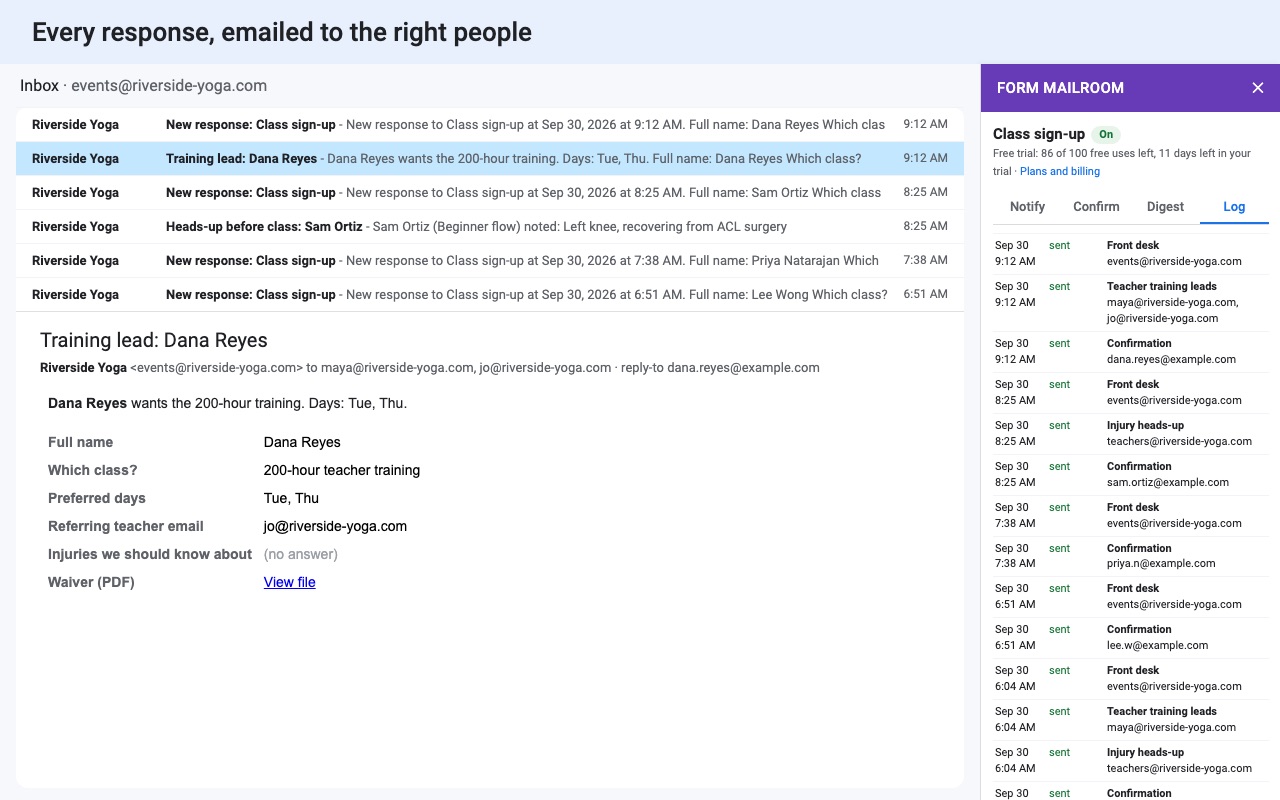
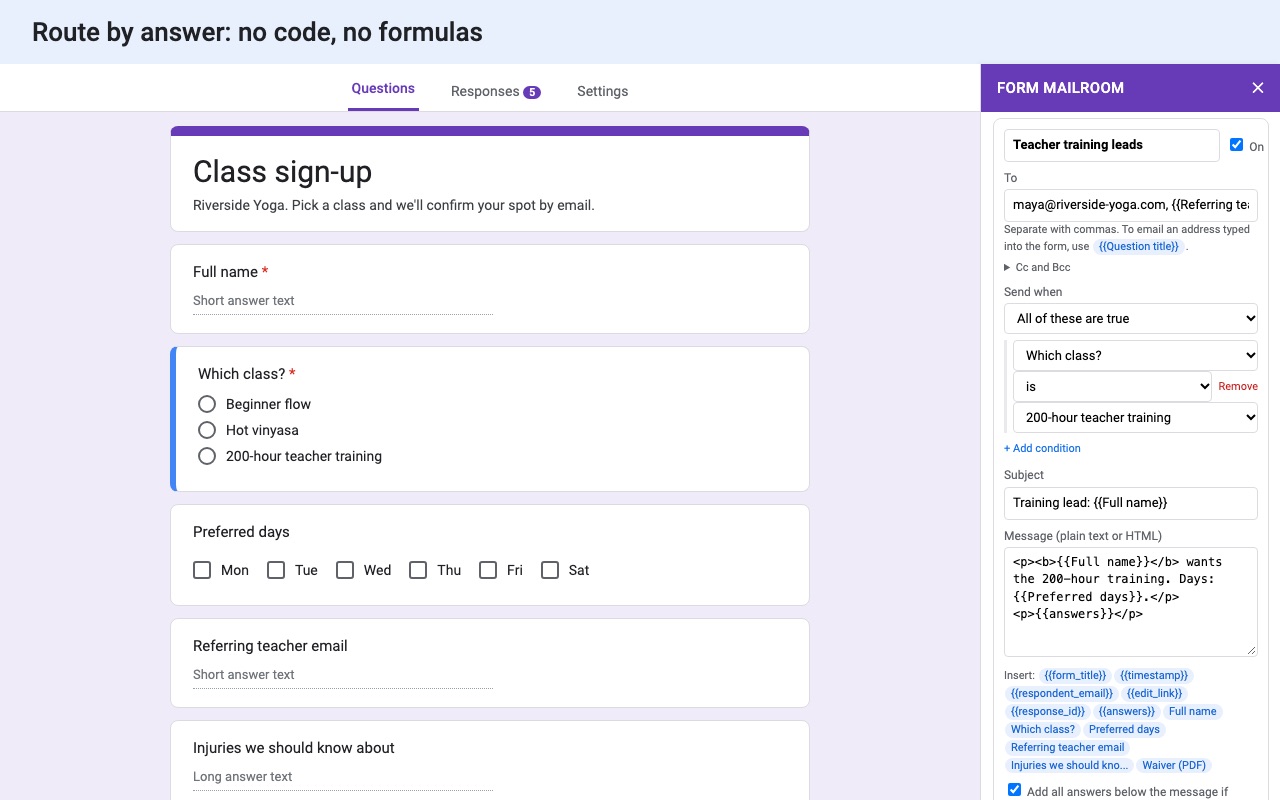
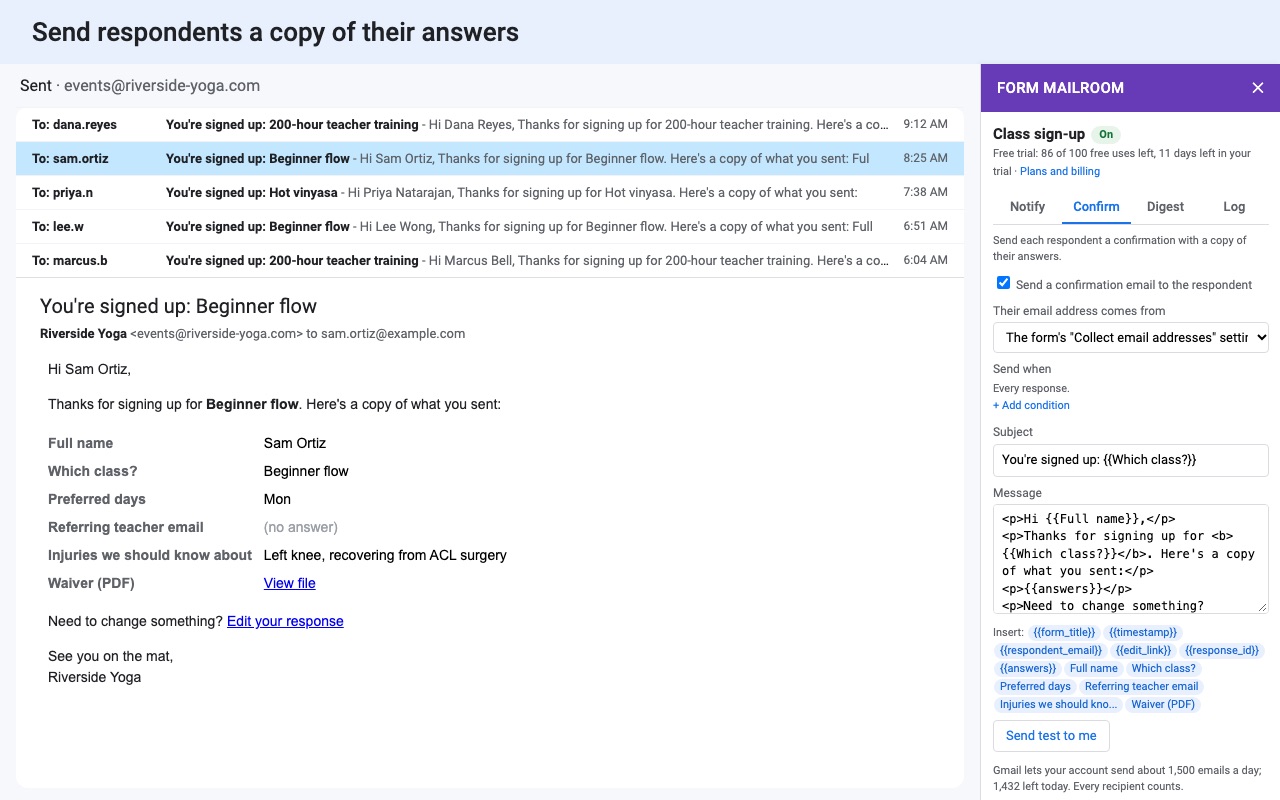
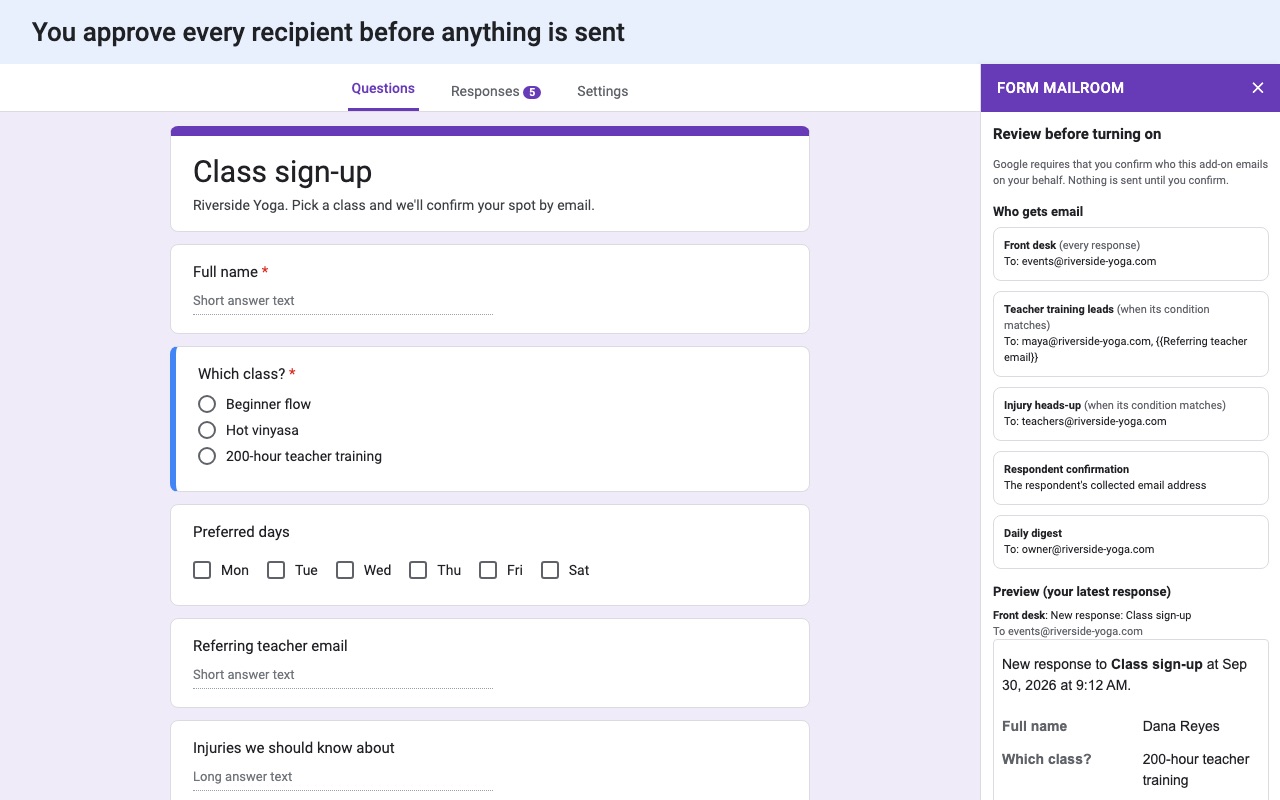
Form Mailroom emails the right people every time your form gets a response.
What you get
- Unlimited rules, recipients and forms
- Route each response by its answers
- Respondent confirmations with a copy of their answers
- HTML templates with answer placeholders and file links
- Daily digest and a full send log
- Held-back responses are never lost: send them later in one click
How Form Mailroom works
- Install Form Mailroom from the Google Workspace Marketplace, open your form and choose Add-ons (puzzle piece icon) > Form Mailroom > Set up notifications.
- On the Notify tab, set up a rule. Type who gets the email (separate addresses with commas), add Cc and Bcc if needed, and write the Subject and Message. Placeholders like
{{Name}}fill in answers, and{{answers}}adds every question and answer as a table. - Add conditions under Send when to send a rule only for some responses, such as Department is Sales. Click + Add rule for each team.
- On the Confirm tab, turn on the respondent confirmation and choose where their address comes from: the form's Collect email addresses setting or a question in the form.
- Set the Sender name and reply-to. When someone hits Reply can go to you, to the respondent (for notifications), or to another address.
- Click Send test to me on any rule to see the real email in your inbox.
- Click Review and turn on. You see every recipient and the emails rendered for your latest response. Nothing is sent to anyone until you confirm.
Who it's for
Teams where each request goes to a different person
A request form with a Department question sends Sales requests to sales@, Billing to the finance lead and everything marked Urgent to the manager too, each with their own subject line.
Forms that people expect a receipt from
Registrations, applications and orders send the respondent a confirmation with a copy of their answers and, if response editing is on, their {{edit_link}} to change them later.
Owners who want one email a day, not fifty
The Digest tab sends a daily summary of the day's responses at the hour you pick. Days with no responses send nothing.
Anyone handing a form to a client or colleague
The email goes to the address that needs it, written the way you want, instead of the owner forwarding Google's notices by hand.
Form Mailroom or Google Forms' own email notifications
Google Forms can email the form's owner and editors when a response comes in: Responses > More (three dots) > Get email notifications for new responses. That email says a response arrived and links to the summary; the answers aren't in it, you can't add other people, and it can't depend on an answer. Forms can also send respondents a copy of their own answers when it collects email addresses, but you can't change the wording, add your own message or reply-to.
Form Mailroom sends the answers themselves, to anyone, by rule, in your words. If your team works in chat instead of email, Form Bugle posts responses to Slack, Discord, Teams or Google Chat.
Limits and requirements
- Emails are sent from the Google account of the person who turned notifications on, so Google's daily email limit for that account applies. If it runs out, the responses are held and Send them now sends them the next day.
- If the trial ends, new notifications are held back, not lost, and can be sent once you pick a plan.
- One person runs notifications for a form. Other editors see a read-only sidebar, so nobody sends twice.
- Changing who gets emails needs a new Review and turn on; changing the wording doesn't.
Form Mailroom guides
Questions about Form Mailroom
What does Form Mailroom do?
Email notifications and respondent confirmations for Google Forms, routed by answer. Form Mailroom emails the right people every time your form gets a response.
What does Form Mailroom work with?
Form Mailroom works in Google Forms, in any browser.
How much does Form Mailroom cost?
$5.99 a month or $49 a year per Google account. Billed through Stripe. Cancel any time from Plans and billing in the add-on.
Is there a free trial?
Free trial: 100 form responses or 14 days, whichever comes first. No card needed.
Where do I install Form Mailroom?
From the Google Workspace Marketplace. Use the Install button on this page, or search for "Form Mailroom: Email Notifications for Forms" there.
Who makes Form Mailroom?
Great Work LLC, an independent software company. Email hello@greatwork.company with any question about Form Mailroom and someone will answer.
How do I get an email with the answers every time someone submits my Google Form?
Add Form Mailroom, set up a rule with your address and {{answers}} in the message, and click Review and turn on. Each response arrives as an email with every question and answer.
Can Google Forms notify more than one person?
With Form Mailroom, yes: list as many addresses as you like in a rule, or add rules for different people. Google's own notifications only go to the form's owner and editors.
Can the email go to an address typed into the form?
Yes. Use the question's title as a placeholder in the recipients, such as {{Manager email}}.
Are file uploads included?
File upload answers come through as links to the files in Drive.
What conditions can a rule use?
An answer is, is not, contains, does not contain, is any of, is empty, is answered, or is greater or less than a number, amount, date or time.
Where can I see what was sent?
The Log tab lists every email, skip and error.
More Google Forms apps
 Formshelf for Notion
 Form Bugle
 Quizferry
 Tickwell