



Form Bugle Google Forms responses posted to Slack, Discord, Teams, Google Chat, Telegram and webhooks
Listed on the Google Workspace Marketplace as “Form Bugle: Form Alerts to Chat™ and Webhooks”
$3.99 a month or $39 a year per Google account. Free trial: 100 form responses or 14 days, whichever comes first. No card needed.
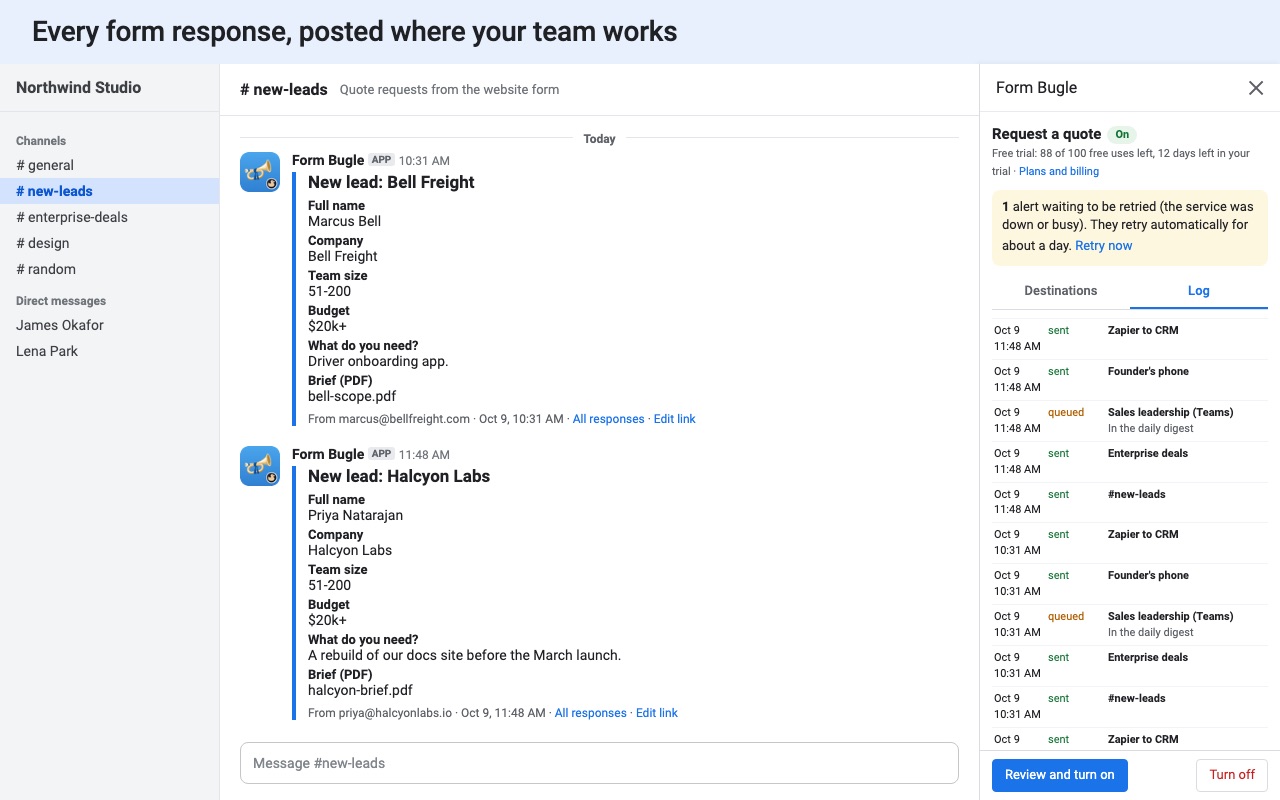
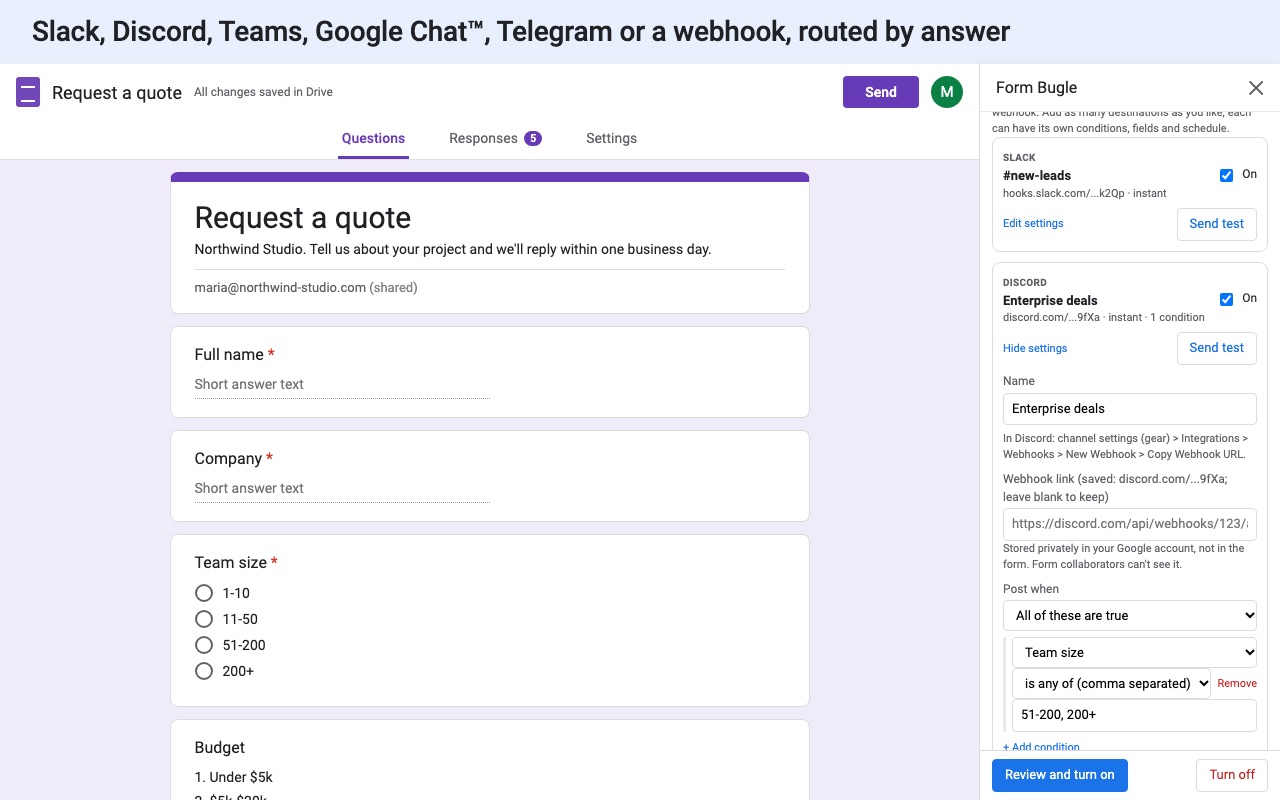
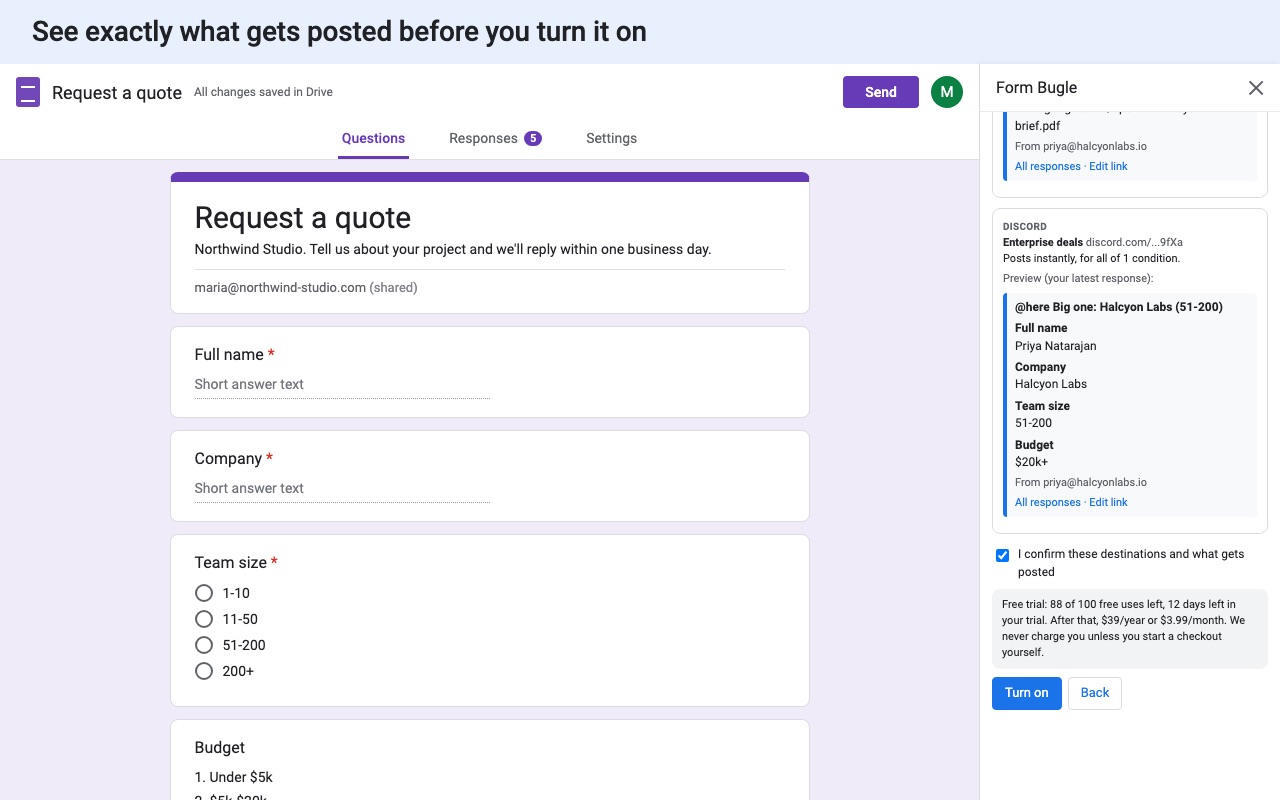
Form Bugle posts every new form response to the chat your team already watches.
What you get
- Slack, Discord, Microsoft Teams, Google Chat, Telegram and webhooks in one add-on
- Unlimited forms and destinations
- Route each response by its answers
- Pick which answers go to chat
- Hourly or daily digests
- Automatic retries when a service is down
How Form Bugle works
- Install Form Bugle from the Google Workspace Marketplace, open your form and choose Add-ons (puzzle piece icon) > Form Bugle > Set up chat alerts.
- Add a destination. Pick Slack, Discord, Microsoft Teams, Google Chat, Telegram or Webhook, and paste the incoming-webhook link the app gives you. For Telegram, paste a bot token and click Find my chats to pick the chat.
- Set the message. Edit the Message title with placeholders such as
{{Name}}, and under Answers to include choose All answers or Only the questions I pick. - Choose when to post: Right away, one message per response, an Hourly digest, or a Daily digest at the hour you pick.
- Add conditions under Post when to send only some responses there, such as Department is Sales. Add another destination for the rest.
- Click Send test. A message marked [Test] is posted with the latest response, or a sample if the form has none.
- Click Review and turn on. You see every place responses will go, and nothing posts until you confirm.
Who it's for
Teams that answer requests in chat
Support requests, IT tickets and booking requests reach the channel where people are already working, with a link to all responses and the respondent's edit link, so someone picks it up without checking the spreadsheet.
Communities on Discord
Server applications, event sign-ups and staff applications post to a private mod channel as an embed with each answer as a field, ready to discuss in a thread.
Teams with more than one place to notify
One form can post to several destinations: Sales leads to the sales channel, Support requests to the support channel, everything to a webhook for your CRM, each with its own fields and conditions.
Anyone who wants a summary instead of a ping
An hourly or daily digest gathers the responses into one message. Days with no responses post nothing.
Form Bugle or what Google Forms does on its own
Google Forms can email the form owner when a response arrives (Responses > the three dots > Get email notifications for new responses), and that email has no answers in it, only a link. It can't post to a chat app. Writing an Apps Script that calls a webhook works for one form and one channel, until the channel's webhook changes, a post fails or you need to filter by answer.
Form Bugle retries failed posts on its own (up to six tries over about a day, for outages and rate limits) and logs every post, retry, skip and error, so a response is never silently dropped. If you want responses emailed with the answers in them, or a confirmation sent to the respondent, use Form Mailroom instead.
Limits and requirements
- Webhook destinations must be on a supported service: Slack, Discord, Teams Workflows, Google Chat, Telegram, Zapier, Make, n8n Cloud, Pipedream, IFTTT or ntfy.sh. Self-hosted webhook URLs can't be used.
- Each post is shortened to fit the app's own message limits. Discord, for example, shows up to 25 answers per message.
- Alerts run through the account of the person who turned them on. Webhook links and bot tokens are stored in that person's Google account, not in the form, so collaborators can't see them.
- A changed webhook link doesn't post until you click Review and turn on again.
Form Bugle guides
Questions about Form Bugle
What does Form Bugle do?
Google Forms responses posted to Slack, Discord, Teams, Google Chat, Telegram and webhooks. Form Bugle posts every new form response to the chat your team already watches.
What does Form Bugle work with?
Form Bugle works in Google Forms, in any browser.
How much does Form Bugle cost?
$3.99 a month or $39 a year per Google account. $99 once for lifetime access on one Google account. Team plan: $149 a year covers everyone at your company or school who signs in to Google with an email address on your domain (not Gmail or other personal addresses). Billed through Stripe. Cancel any time from Plans and billing in the add-on.
Is there a free trial?
Free trial: 100 form responses or 14 days, whichever comes first. No card needed.
Where do I install Form Bugle?
From the Google Workspace Marketplace. Use the Install button on this page, or search for "Form Bugle: Form Alerts to Chat™ and Webhooks" there.
Who makes Form Bugle?
Great Work LLC, an independent software company. Email hello@greatwork.company with any question about Form Bugle and someone will answer.
How do I send Google Form responses to Slack?
In Slack, create an incoming webhook for the channel. In the form, open Form Bugle, add a Slack destination, paste the link, click Send test and then Review and turn on.
Can I post to Microsoft Teams?
Yes, through a Teams Workflows webhook. In Teams, create a workflow that posts to a channel when a webhook request is received, and paste its link into a Teams destination.
Can I keep private answers out of chat?
Yes. Choose Only the questions I pick and leave out answers like phone numbers or health notes.
Can it mention the channel?
Slack and Discord destinations can turn on Notify the channel (@here).
What happens when the trial ends?
New alerts are held back, not lost. Once you pick a plan, click Post them now to send them.
Do retries count toward the trial?
No. One trial use is counted per response that posts or queues anything, however many destinations it goes to. Retries are free.
Can I see what was posted?
Yes. The delivery log in the sidebar lists every post, retry, skip and error. Only the person who turned alerts on can see it.
More Google Forms apps
 Form Mailroom
 Tickwell
 Formshelf for Notion
 Quizferry