



Huecount Count and sum cells by color in Google Sheets, with formulas that update when colors change
Listed on the Google Workspace Marketplace as “Huecount: Count & Sum by Color”
$2.99 a month or $19 a year per Google account. Free trial: 14 days or 50 color breakdowns in the sidebar, whichever comes first. No card needed.
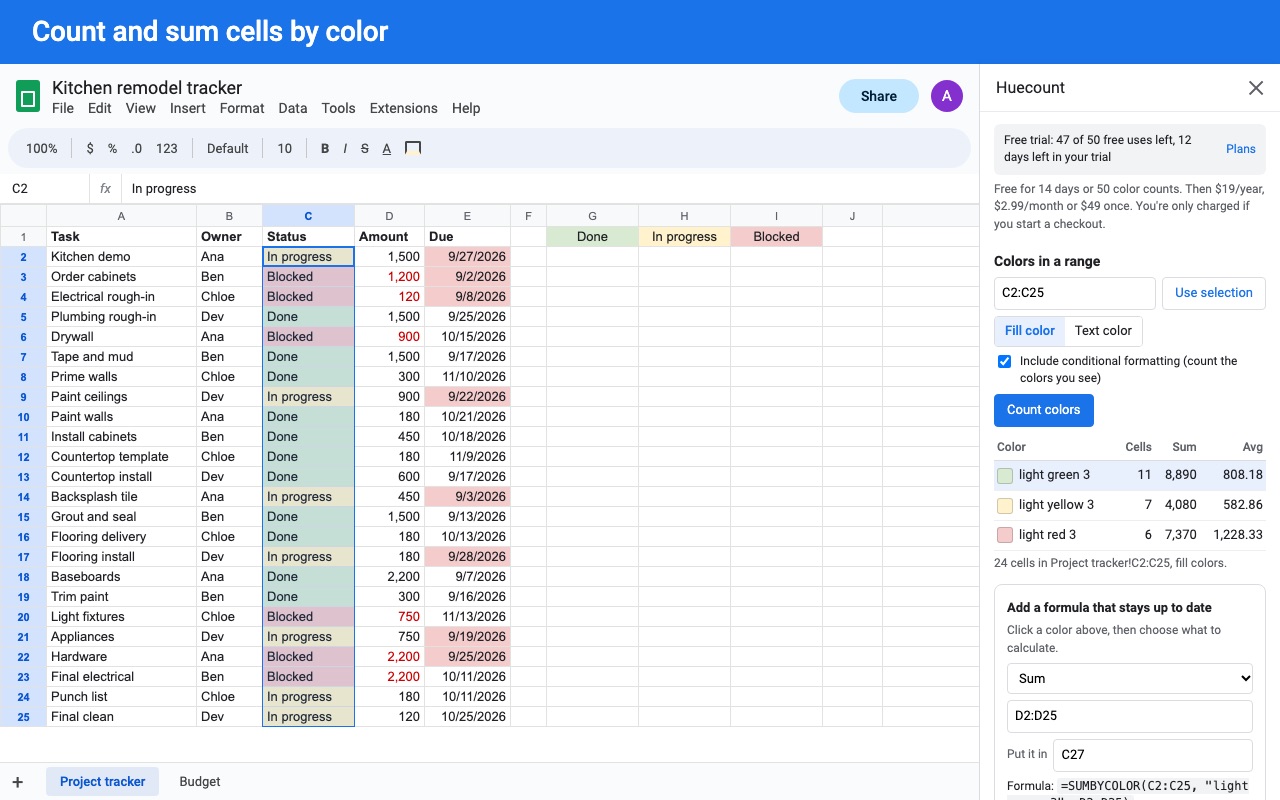
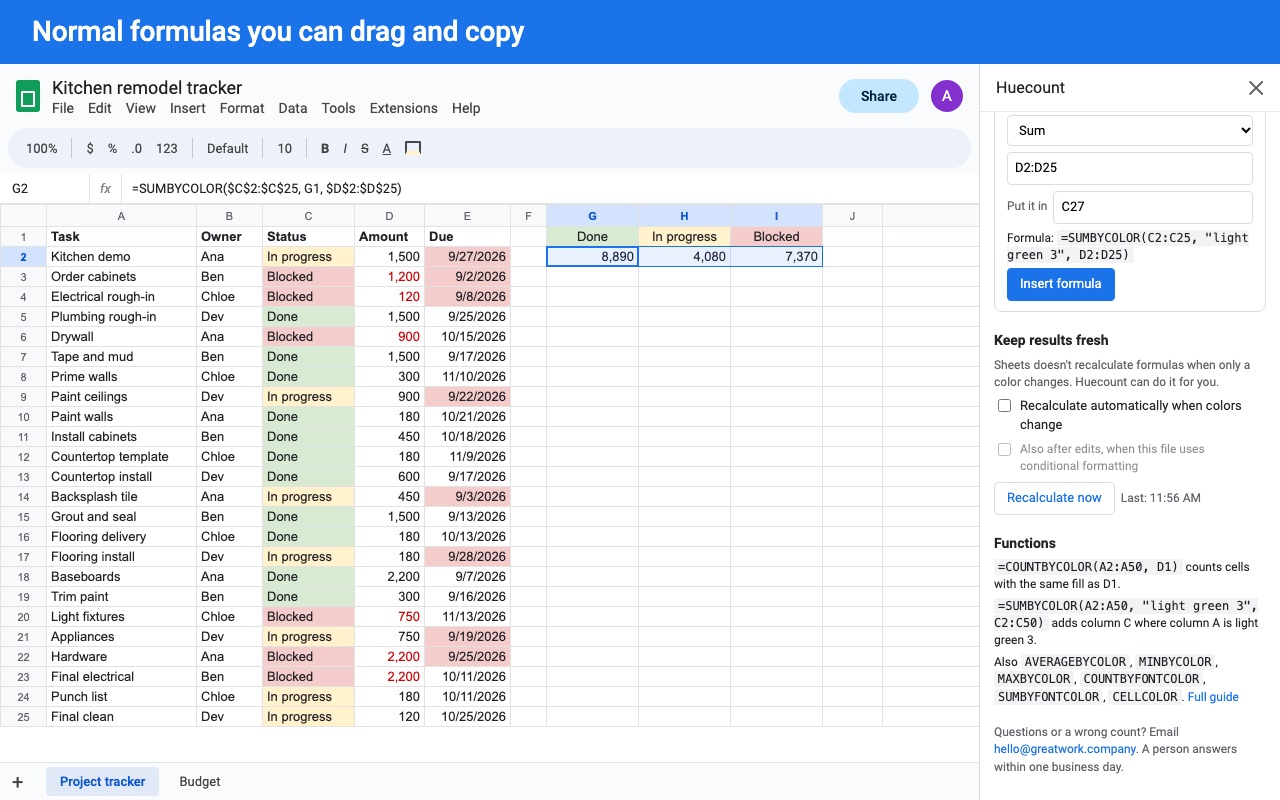
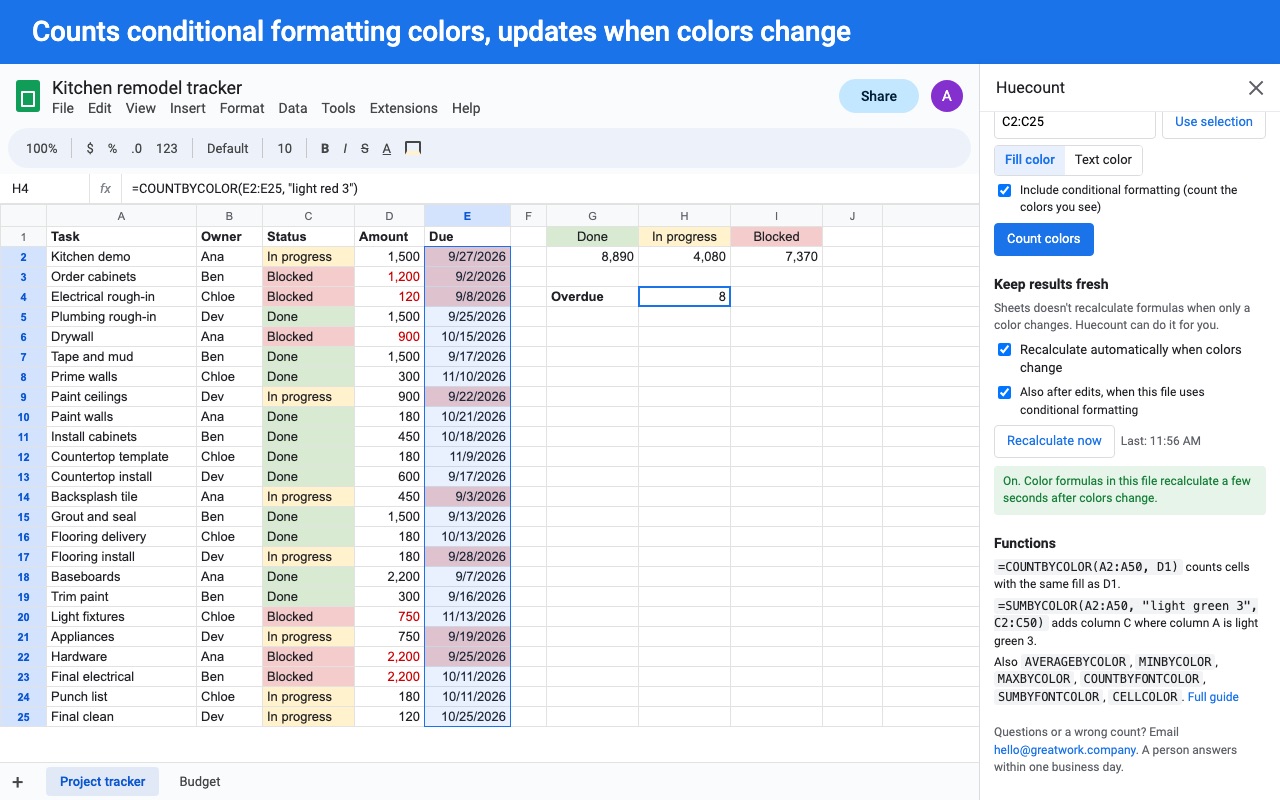
Huecount adds color functions to Google Sheets. Count the green cells, add up the amounts in yellow rows, average everything a rule colored red, and keep the totals right when colors change.
What you get
- COUNTBYCOLOR, SUMBYCOLOR, AVERAGEBYCOLOR, MIN/MAXBYCOLOR, font color versions, CELLCOLOR
- Normal references: drag and copy formulas like any other
- Counts conditional formatting colors, the colors you actually see
- Recalculates automatically when a color changes
- Sidebar breakdown of every color in a range, with one-click formulas
How Huecount works
- Install Huecount from the Google Workspace Marketplace and open any spreadsheet.
- Open Extensions > Huecount > Open Huecount. The sidebar opens on the right.
- Pick a range. Type it (
A2:D50) or select the cells and click Use selection. Choose Fill color or Text color, and leave Include conditional formatting ticked to count the colors you see on screen. - Click Count colors. You get one line per color with the number of cells, and the sum and average when the cells hold numbers.
- Turn a line into a formula. Click a color, choose Count cells, Sum, Average, Minimum or Maximum, add a numbers range if the values sit in another column, type the cell to put it in and click Insert formula. The sidebar shows the formula before it writes it, for example
=SUMBYCOLOR(A2:A50, "light green 3", C2:C50). - Keep totals fresh. Under Keep results fresh, tick Recalculate automatically when colors change. Huecount reruns its formulas a few seconds after you change a fill, a text color or a conditional formatting rule. Recalculate now in the sidebar and Refresh color formulas now in the menu do the same on demand.
You can also skip the sidebar and type the functions straight into a cell. Extensions > Huecount > Function guide lists every function and option.
Who it's for
Teams that track status with a color code
A project tracker where green means done, yellow means waiting and red means blocked. =COUNTBYCOLOR(B2:B200, D1) next to a sample cell in each color gives a live count of each status, and the counts move when someone recolors a row.
Anyone whose highlighting comes from rules
A sales sheet with a rule that paints overdue invoices red. Huecount reads the rule the way Sheets applies it, so =SUMBYCOLOR(A2:A90, "red", F2:F90) adds the amounts of the rows the rule colored, not just rows someone filled by hand.
Teachers and graders
Marks colored by hand while grading, or a color scale over scores. AVERAGEBYCOLOR and MAXBYCOLOR give the class average and top score for each color band.
Budgets and inventory sheets
Rows tinted by category or by text color for items to reorder. SUMBYFONTCOLOR and COUNTBYFONTCOLOR total the rows by the color of their text instead of their fill.
Huecount or what Sheets already has
Google Sheets can sort and filter a range by fill or text color, and that's enough when you want to look at one color at a time. It has no function that reads a color: COUNTIF, SUMIF and QUERY see only values. Sheets also never reruns a formula when only a color changes, which is why color counts from scripts copied off forums go stale. Huecount adds the functions, reads conditional formatting, and reruns them for you. =CELLCOLOR(A2:A50) writes each cell's color as a code like #d9ead3, so you can use colors inside COUNTIF, FILTER and QUERY too.
Limits and requirements
- Each formula can look at up to 250,000 cells and has 30 seconds to finish, a Google limit.
- Put the functions directly in a cell. Inside LAMBDA, MAP or BYROW they can't find their ranges and say so.
- Everyone who edits the file needs Huecount installed for the functions to calculate for them.
- Conditional formatting rules whose custom formula uses lookups such as VLOOKUP, XLOOKUP, MATCH, INDEX or FILTER aren't evaluated. The formula names the rule; add
"skipcf"to ignore that rule or"nocf"to count each cell's own color. - Colors from Format > Alternating colors aren't read. Those cells count as their own fill.
Huecount guides
Questions about Huecount
What does Huecount do?
Count and sum cells by color in Google Sheets, with formulas that update when colors change. Huecount adds color functions to Google Sheets. Count the green cells, add up the amounts in yellow rows, average everything a rule colored red, and keep the totals right when colors change.
What does Huecount work with?
Huecount works in Google Sheets, in any browser.
How much does Huecount cost?
$2.99 a month or $19 a year per Google account. $49 once for lifetime access on one Google account. Team plan: $99 a year covers everyone at your company or school who signs in to Google with an email address on your domain (not Gmail or other personal addresses). Billed through Stripe. Cancel any time from Plans and billing in the add-on.
Is there a free trial?
Free trial: 14 days or 50 color breakdowns in the sidebar, whichever comes first. No card needed.
Where do I install Huecount?
From the Google Workspace Marketplace. Use the Install button on this page, or search for "Huecount: Count & Sum by Color" there.
Who makes Huecount?
Great Work LLC, an independent software company. Email hello@greatwork.company with any question about Huecount and someone will answer.
Can Google Sheets count cells by color without an add-on?
Not with a formula. COUNTIF and SUMIF only see values, so Sheets can filter or sort by color but can't return a count or a total for a color. Huecount adds COUNTBYCOLOR, SUMBYCOLOR and the other color functions.
Does Huecount count colors from conditional formatting?
Yes, by default. It works out which rule colors each cell, in the same order Sheets applies them, including text and number conditions, dates, empty or not empty, color scales and custom formulas built from common functions. If a rule uses something it can't evaluate, the formula tells you which rule instead of returning a wrong number.
Why didn't my total change when I recolored a cell?
Sheets doesn't recalculate formulas when only a color changes. Tick Recalculate automatically when colors change in the sidebar, or use Extensions > Huecount > Refresh color formulas now. If the color comes from a rule that depends on values outside the counted range, also tick Also after edits, when this file uses conditional formatting.
Can I drag a Huecount formula down a column?
Yes. The ranges are normal references with no quotes, so Sheets adjusts them when you drag or copy the formula. Ranges typed in quotes also work, but they stay fixed when dragged.
How do I tell Huecount which color to count?
Point at a cell that has the color (D1), or type a hex code ("#ff0000"), the name Sheets shows when you hover a swatch ("light green 3"), several colors ("red|yellow") or everything except one ("not white").
Can it count by text color instead of fill?
Yes. COUNTBYFONTCOLOR, SUMBYFONTCOLOR and AVERAGEBYFONTCOLOR match the text color, and adding the "font" option to the other functions does the same.
Do colors pasted from another file match?
Pasted colors are sometimes a shade off. The "tolerance=10" option also matches colors within 10 (out of 255) on each of red, green and blue.
Does the trial limit my formulas?
No. The trial counts Count colors breakdowns in the sidebar. Formulas, inserting formulas and recalculating don't use any of the 50, so for most people the 14 days end the trial first.
More Google Sheets apps
 Includewell
 Geocode & Map Addresses
 Labelyard
 Fuzzwell