



Fuzzwell Fuzzy match and join two lists in Google Sheets: company names, people, addresses, emails and phones, with scores and a review tab
Listed on the Google Workspace Marketplace as “Fuzzwell: Fuzzy Match & Join Two Lists”
$15 a month or $100 a year per Google account. Free trial: 14 days or 10 match runs, whichever comes first. No card needed.
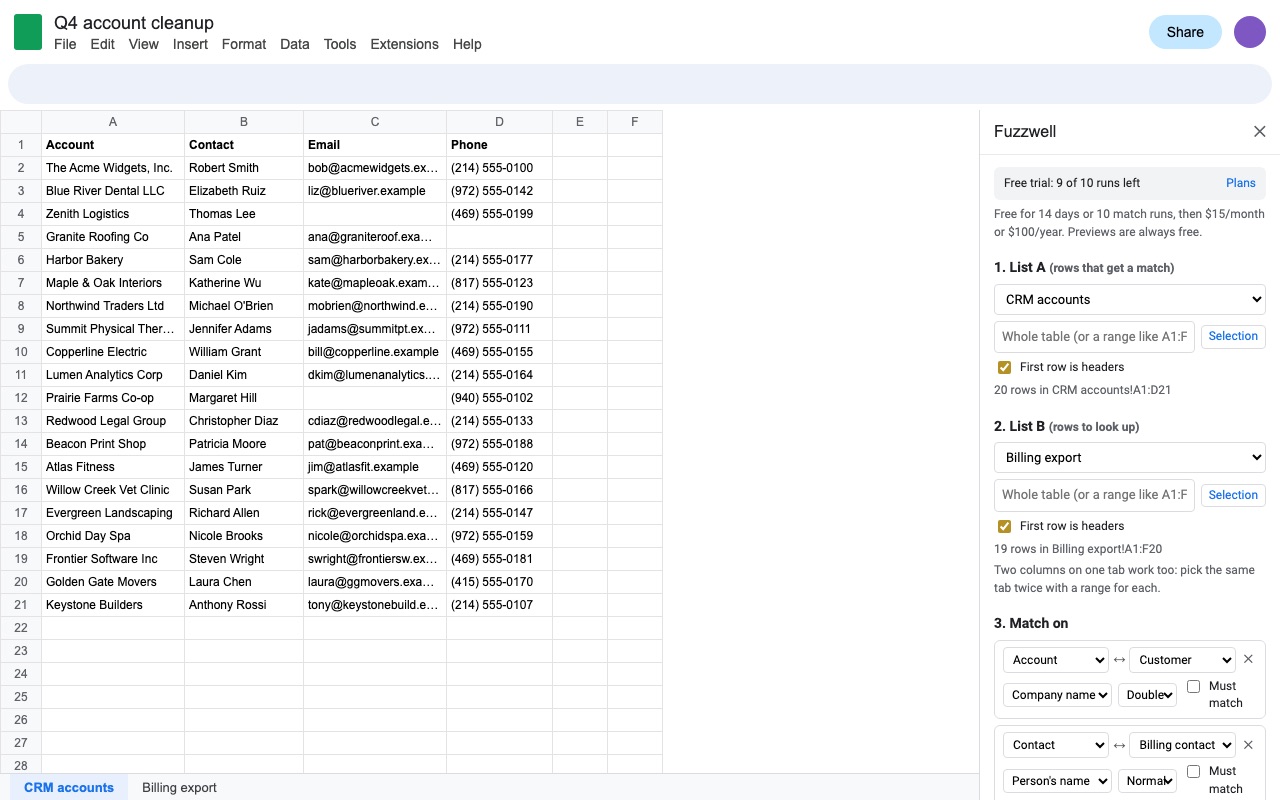
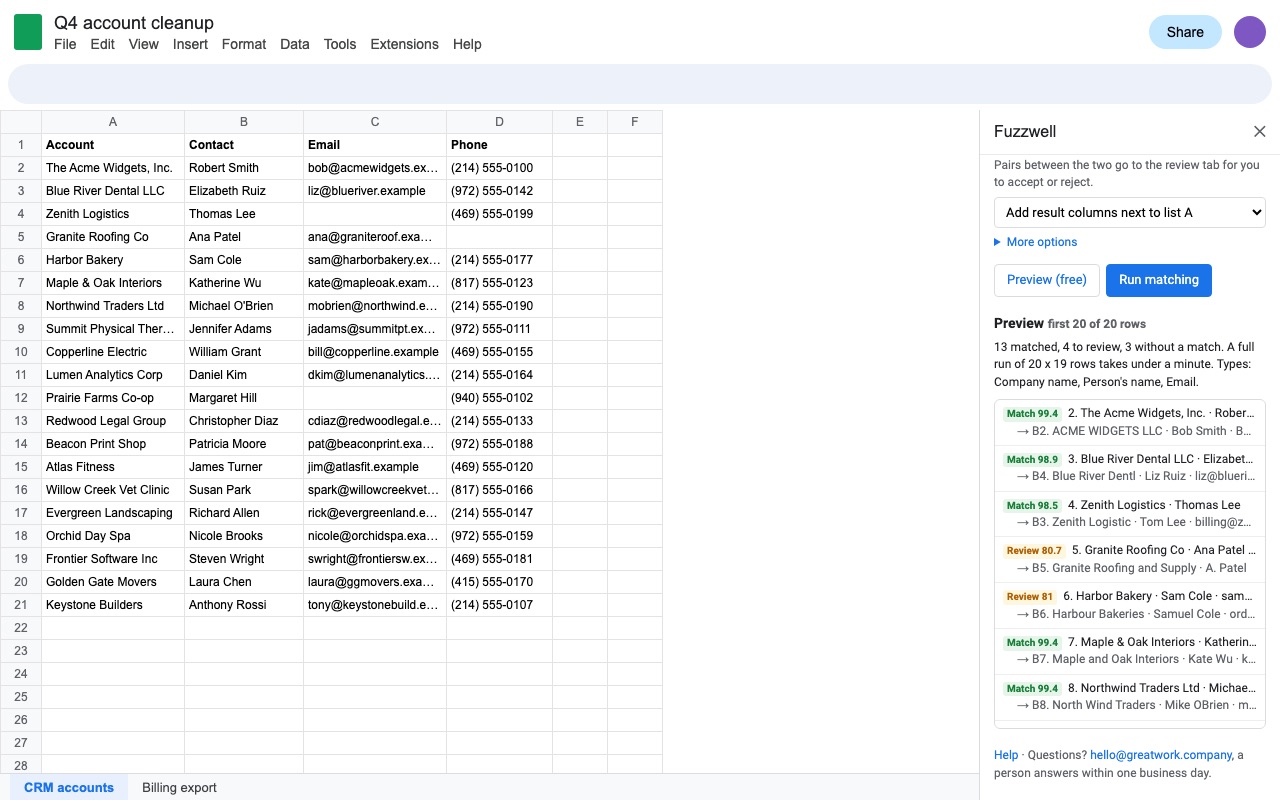
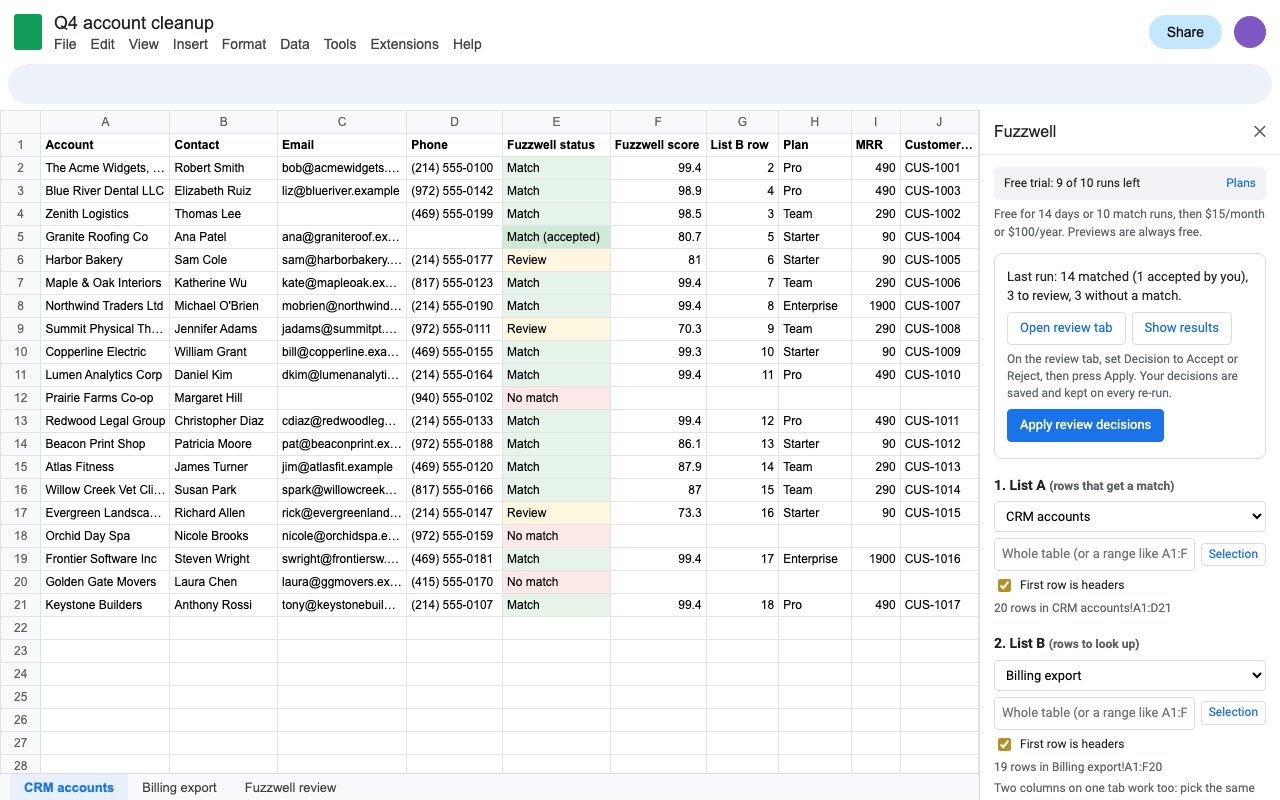
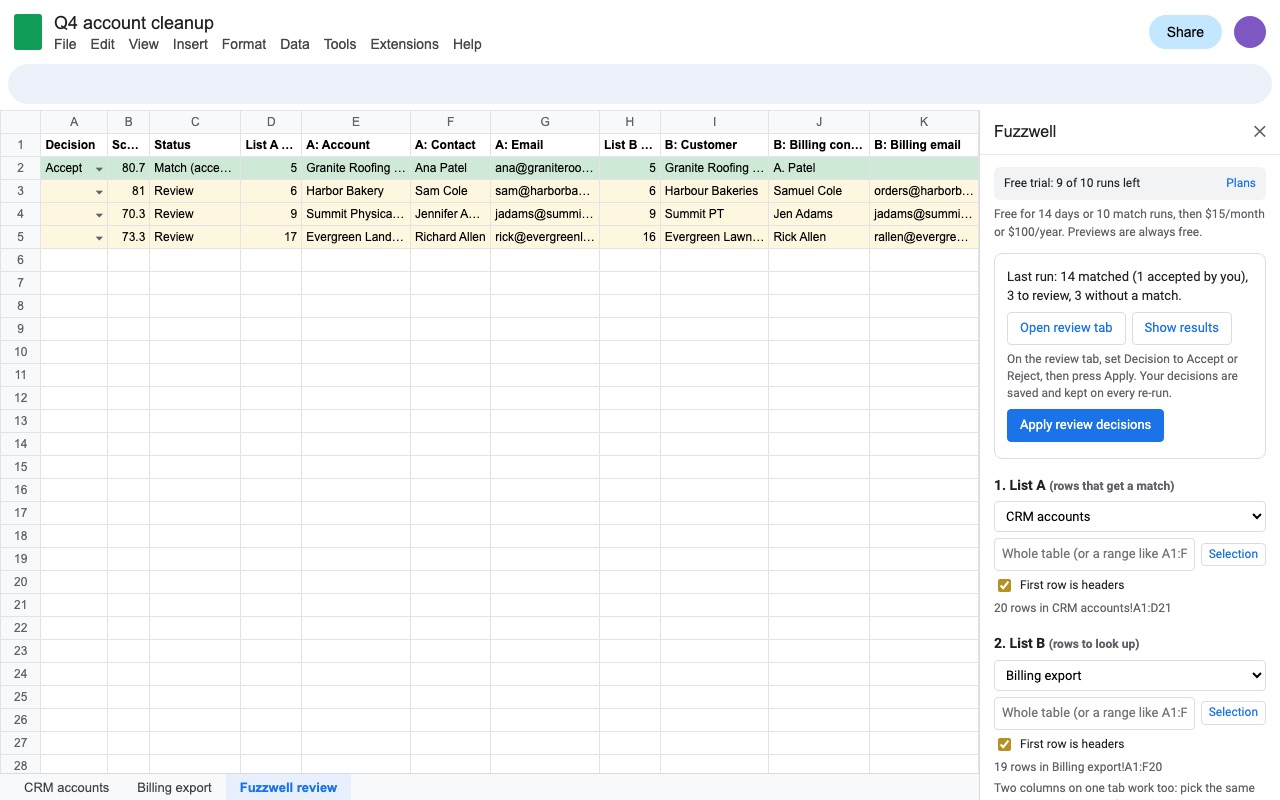
Fuzzwell matches the rows of two lists in Google Sheets when the keys aren't typed the same way, and brings over the columns you need, like a VLOOKUP that understands "The Acme Widgets, Inc." and "ACME WIDGETS LLC" are the same company.
What you get
- Match rows between two lists or two columns when the keys aren't typed the same
- Company, person, address, email, website and phone aware cleanup, plus Jaro-Winkler, token set and trigram scoring
- Weighted score across several columns, with must-match columns
- Best match per row, one-to-one pairing, or every candidate above a score
- Pulls in the columns you pick, like VLOOKUP, with a score and match status
- Review tab with side-by-side candidates; accept or reject, and re-runs keep your decisions
- Built for big lists: 50,000 x 50,000 rows in resumable steps
How Fuzzwell works
- Install Fuzzwell from the Google Workspace Marketplace and open the spreadsheet that holds both lists.
- Open Extensions > Fuzzwell > Match two lists. The sidebar opens.
- Pick list A and list B. List A is the rows that get a match, list B the rows to look up. Each can be a whole tab or a range like
A1:F500, and two columns on one tab work too: pick the same tab twice with a range for each. - Choose what to match on. Under Match on, Fuzzwell suggests column pairs from the headers. Each pair has a type (Detect type, Company name, Person's name, Street address, Email, Website or domain, Phone, Text or Exact), a weight from Normal to x5, and a Must match box for hard rules like the same state.
- Tick the list B columns to bring in, the way you'd pick the column for a VLOOKUP.
- Set the options. Choose Best match for each row (like VLOOKUP), One to one: each list B row used once, or Best match, plus every candidate on its own tab. Drag Match at (85 by default) and Review from (70), and choose whether results go next to list A or on a new tab.
- Click Preview (free). Fuzzwell matches the first 150 rows of list A and shows each pair with its score, without writing anything or using a run.
- Click Run matching. Fuzzwell adds Fuzzwell status, Fuzzwell score, List B row and the columns you picked. Pairs between the two scores go to the Fuzzwell review tab, where you set Accept or Reject and press Apply review decisions.
Who it's for
Joining a CRM export to a billing export
The CRM says "The Acme Widgets, Inc." and billing says "ACME WIDGETS LLC". Match on company name with the website column as a second pair, bring over the account ID, and check the handful of borderline rows on the review tab.
Event and donor lists
Registrations typed by attendees against a member list, with "Bob Smith" on one side and "Smith, Robert" on the other. The person's name type handles name order, initials and common nicknames, and an email pair raises the score when both agree.
Vendor and supplier cleanup
Two years of purchase records with vendor names spelled a dozen ways, matched one to one against a clean vendor master so each vendor row is used once.
Mailing lists and addresses
A returned-mail list matched to customer addresses, where "123 N Main St Apt 4" and "123 North Main Street #4" are the same place, while a different house number keeps two addresses apart.
When VLOOKUP is enough, and when it isn't
VLOOKUP, XLOOKUP and MATCH in Google Sheets find exact values, and XLOOKUP's wildcard mode finds a pattern you write yourself. Use them when both lists share an ID, an SKU or an email typed the same way. They have no idea that "Liz" and "Elizabeth" are one person, they return the first hit with no score to tell you how sure to be, and they can't pair rows one to one. Data cleanup suggestions in Sheets flag spelling differences inside one column, not across two lists. Fuzzwell is for the rows those formulas miss: a scored, repeatable join you can review, which gives the same result each time you run it. For a quick look at two short lists pasted in a browser, our free compare two lists tool shows what's in both and what's only in one.
Limits and requirements
- Up to 100,000 rows per list. 50,000 x 50,000 rows is the tested size and typically finishes in a few minutes.
- Runs go in steps of about two and a half minutes, because Google stops add-ons at six. Keep the sidebar open; if you close it, open Fuzzwell again and press Resume. A resumed run counts once.
- If a list changes during a run, Fuzzwell asks you to run again rather than mix old and new rows.
- Street address cleanup follows US conventions (USPS words like St and Ave, 5-digit ZIP codes).
- Fuzzwell can only open the spreadsheet you use it in. Matching runs inside Google, and your rows aren't sent to our servers.
Fuzzwell guides
Questions about Fuzzwell
What does Fuzzwell do?
Fuzzy match and join two lists in Google Sheets: company names, people, addresses, emails and phones, with scores and a review tab. Fuzzwell matches the rows of two lists in Google Sheets when the keys aren't typed the same way, and brings over the columns you need, like a VLOOKUP that understands "The Acme Widgets, Inc." and "ACME WIDGETS LLC" are the same company.
What does Fuzzwell work with?
Fuzzwell works in Google Sheets, in any browser.
How much does Fuzzwell cost?
$15 a month or $100 a year per Google account. Team plan: $399 a year covers everyone at your company or school who signs in to Google with an email address on your domain (not Gmail or other personal addresses). Billed through Stripe. Cancel any time from Plans and billing in the add-on.
Is there a free trial?
Free trial: 14 days or 10 match runs, whichever comes first. No card needed.
Where do I install Fuzzwell?
From the Google Workspace Marketplace. Use the Install button on this page, or search for "Fuzzwell: Fuzzy Match & Join Two Lists" there.
Who makes Fuzzwell?
Great Work LLC, an independent software company. Email hello@greatwork.company with any question about Fuzzwell and someone will answer.
How do I fuzzy match in Google Sheets?
Sheets has no fuzzy lookup function. Install Fuzzwell, open Extensions > Fuzzwell > Match two lists, pick the two lists and the columns to compare, preview, and run. Each row of list A gets a status, a 0 to 100 score and the matched row from list B.
Is there a fuzzy VLOOKUP for Google Sheets?
Fuzzwell works like one. Tick the list B columns under Bring in from list B and they're written next to list A for every match, along with the score so you can see how close each match was.
What do the scores mean?
Pairs at or above Match at (85 by default) are marked Match. Pairs between Review from (70) and Match at are marked Review and listed on the review tab. Lower pairs are No match. You can move both sliders before a run.
Can I match on more than one column?
Yes. Add a column pair for each, such as company name plus website, or name plus ZIP. The pairs combine into one weighted score, blank cells don't count against a pair, and a pair marked Must match has to agree for any match.
Will a re-run undo my review decisions?
No. Decisions are saved on a hidden Fuzzwell decisions tab by the content of the two rows, so they survive sorting, new rows and every later run. To undo one, clear its Decision cell on the review tab and press Apply.
Can two rows in list A match the same list B row?
In Best match for each row mode, yes, the same as VLOOKUP. Choose One to one to use each list B row once, with the highest scores paired first.
Does Fuzzwell change my data?
It adds its own result columns next to list A (or writes to a new tab) and its own tabs. A re-run finds its columns by their headers and writes over them, not over yours.
Do previews use up the trial?
No. Previews and applying review decisions are always free. The trial counts match runs, and a run that continues over several steps counts as one.
More Google Sheets apps
 Geocode & Map Addresses
 Fillferry
 Huecount
 Due Date Reminders